Cleaning Leads Free: How to Scrub Your B2B List in 2026
Dirty lead lists kill deliverability and waste budget. Here's how to clean leads free in 2026 — dedupe, validate, and verify — and where free hits its ceiling.
TL;DR
- Cleaning leads free is realistic for small lists — dedupe, syntax-fix, and basic validation can all be done at zero cost with the right free tools.
- The biggest wins come from removing duplicates, killing role addresses, and dropping hard bounces before you ever hit send.
- Free tiers cap out fast on volume and catch-all detection — that's where a paid verifier earns its keep.
- A clean list protects your sender reputation and deliverability, which is worth far more than the cost of cleaning.
- The smartest workflow: clean free first, then verify at scale only the leads you're about to email.
What does "cleaning leads" actually mean?#
Cleaning leads means removing everything in your list that will waste your time, burn your budget, or damage your sending reputation — before you contact anyone. Think of it like washing produce before you cook: the dirt is invisible until it ruins the dish.
A raw lead list almost always contains junk: duplicate rows, typos like john@gmial.com, role inboxes (info@, sales@), addresses that already bounced, and contacts at companies that no longer exist. Email cleaning is the process of catching all of that.
When people search for cleaning leads free, they usually want to do four things without paying:
- Deduplicate — collapse repeated contacts so you don't email the same person twice.
- Standardize — fix formatting, casing, and obvious syntax errors.
- Validate — confirm each address is structurally real and the domain can receive mail.
- Filter — strip role accounts, disposable domains, and known complainers.

Why does cleaning leads free even matter?#
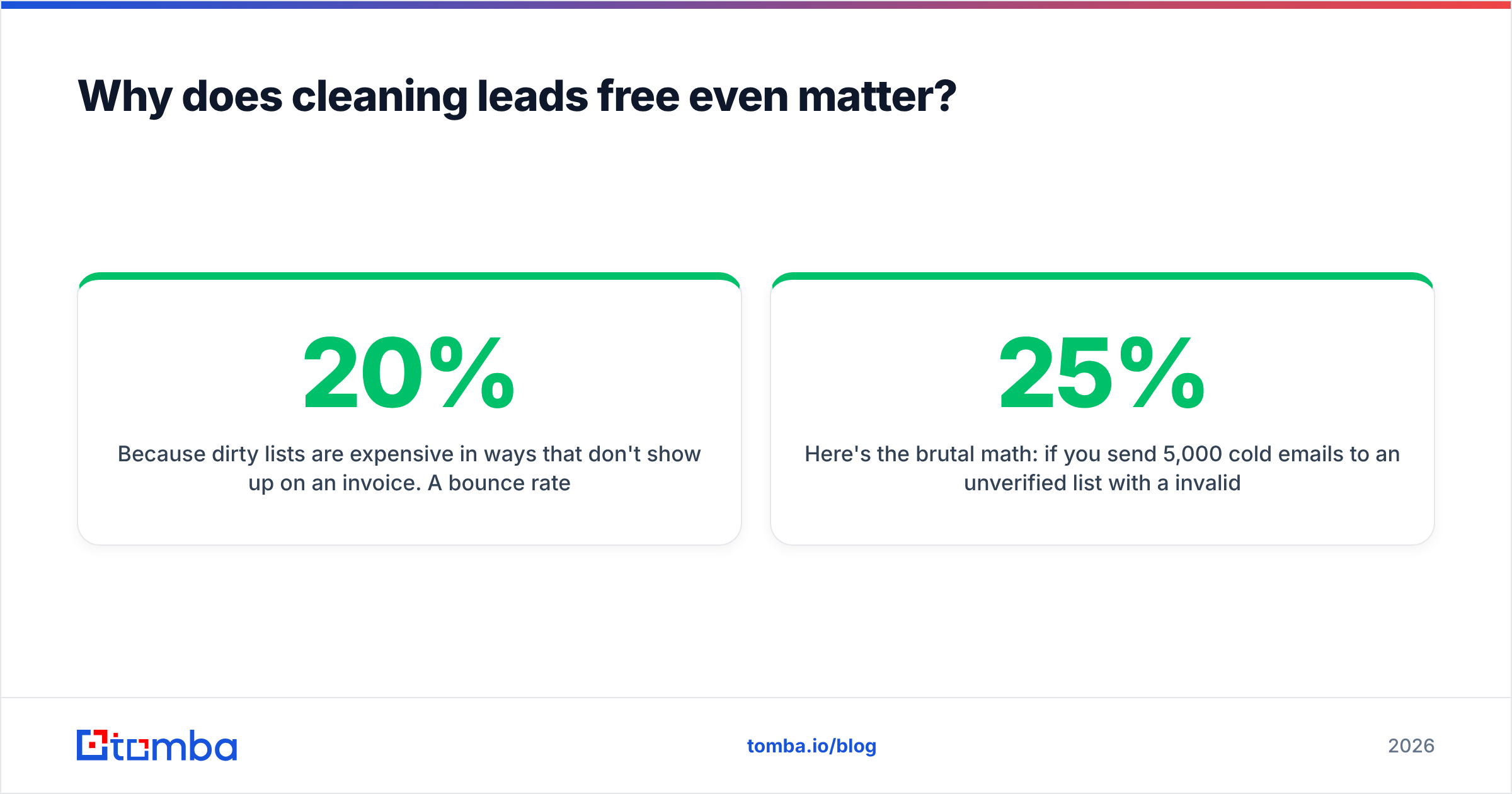
Because dirty lists are expensive in ways that don't show up on an invoice. A 20% bounce rate doesn't just waste 20% of your sends — it tells inbox providers your hygiene is poor, and they start routing all your mail to spam. One bad campaign can poison the deliverability of every campaign after it.
Email deliverability is fragile. Mailbox providers like Gmail and Outlook track your sender reputation using bounce rates, spam complaints, and engagement. According to HubSpot's research on email marketing benchmarks, list quality is one of the strongest predictors of inbox placement — and most teams discover this only after their domain is already throttled.
Here's the brutal math: if you send 5,000 cold emails to an unverified list with a 25% invalid rate, that's 1,250 bounces. Most ESPs will pause or flag your account above a 2–3% bounce rate. So you don't just lose those 1,250 contacts — you risk the other 3,750 never landing either.
Cleaning leads free fixes the cheapest, highest-impact problems first. You won't catch everything without a paid tool, but you'll catch enough to stay out of the danger zone.
How do you clean leads for free, step by step?#
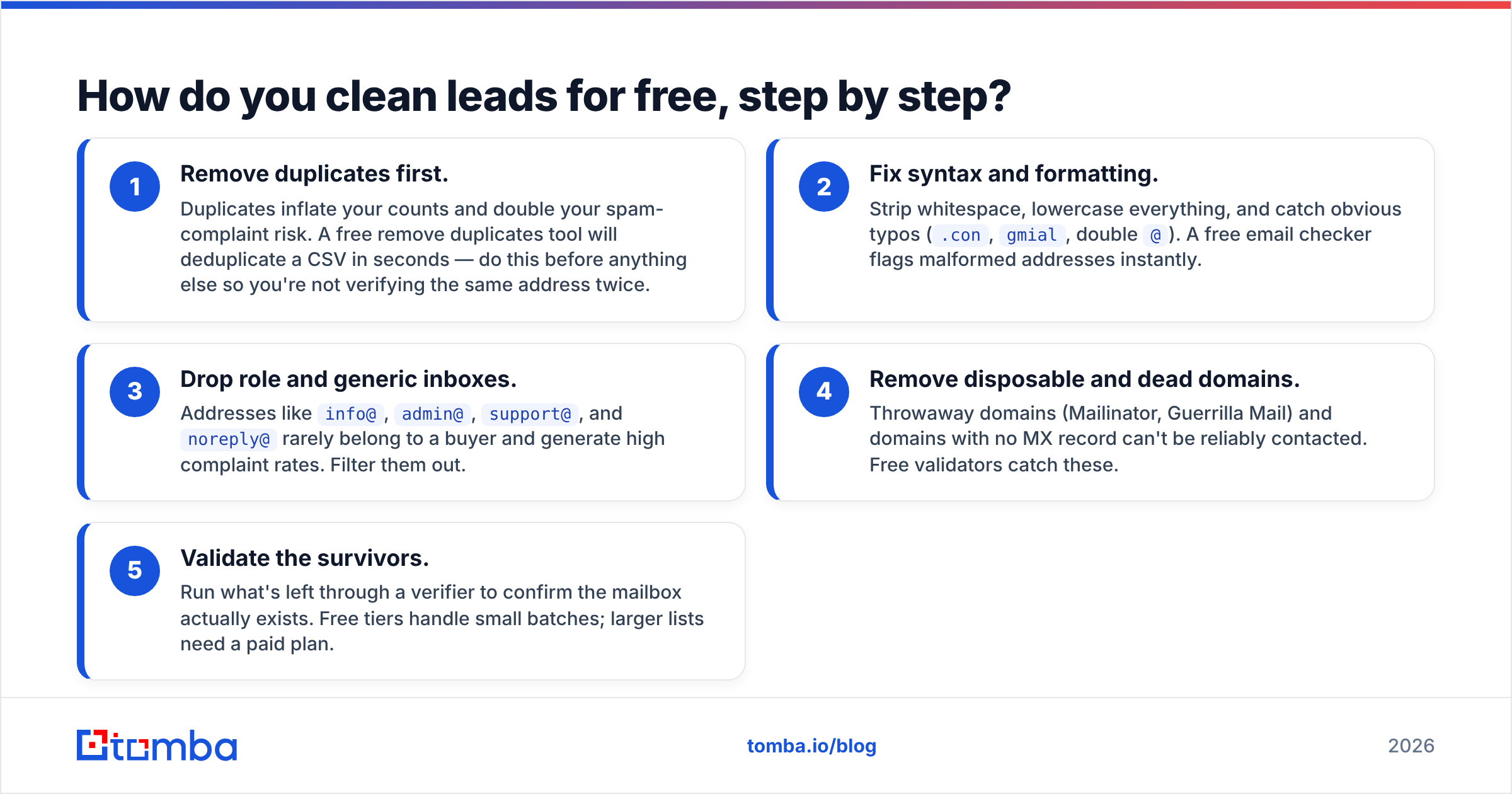
You can get a list 70–80% of the way to "safe to send" without spending a dollar. Here's the order that matters most.
- Remove duplicates first. Duplicates inflate your counts and double your spam-complaint risk. A free remove duplicates tool will deduplicate a CSV in seconds — do this before anything else so you're not verifying the same address twice.
- Fix syntax and formatting. Strip whitespace, lowercase everything, and catch obvious typos (
.con,gmial, double@). A free email checker flags malformed addresses instantly. - Drop role and generic inboxes. Addresses like
info@,admin@,support@, andnoreply@rarely belong to a buyer and generate high complaint rates. Filter them out. - Remove disposable and dead domains. Throwaway domains (Mailinator, Guerrilla Mail) and domains with no MX record can't be reliably contacted. Free validators catch these.
- Validate the survivors. Run what's left through a verifier to confirm the mailbox actually exists. Free tiers handle small batches; larger lists need a paid plan.
Do those five things and your bounce rate typically drops from the high teens into the low single digits — the difference between a healthy sender and a blacklisted one.
Which free lead-cleaning tools should you use?#
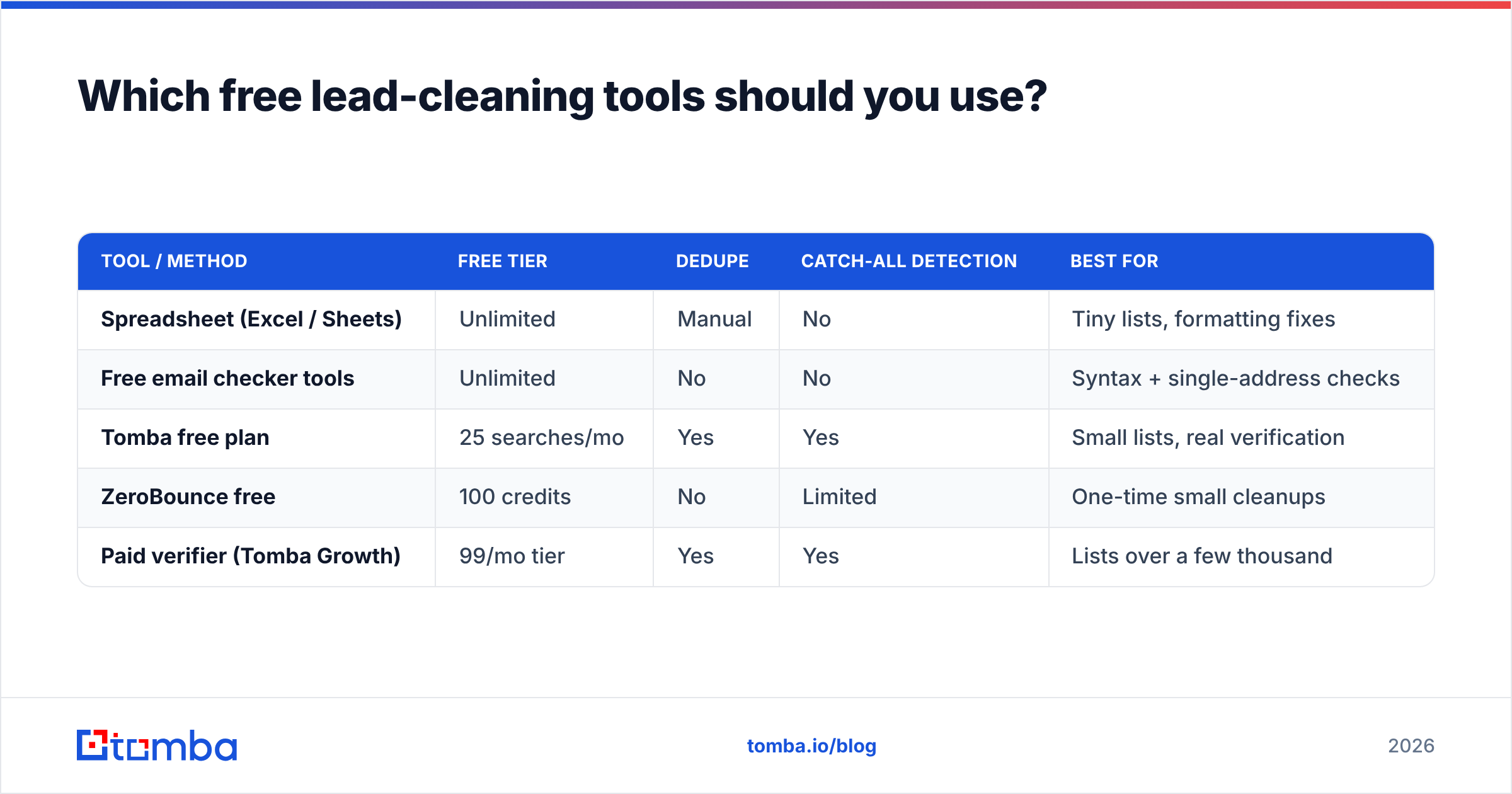
Most "free" cleaning is really a stack of single-purpose tools plus a free verifier tier. Here's how the common options compare on what actually matters.
| Tool / Method | Free tier | Dedupe | Catch-all detection | Best for |
|---|---|---|---|---|
| Spreadsheet (Excel / Sheets) | Unlimited | Manual | No | Tiny lists, formatting fixes |
| Free email checker tools | Unlimited | No | No | Syntax + single-address checks |
| Tomba free plan | 25 searches/mo | Yes | Yes | Small lists, real verification |
| ZeroBounce free | 100 credits | No | Limited | One-time small cleanups |
| Paid verifier (Tomba Growth) | 99/mo tier | Yes | Yes | Lists over a few thousand |
The pattern is clear: free spreadsheet work handles formatting and dedupe, free single-address checkers handle syntax, and a free verifier tier handles a small batch of real mailbox checks. The moment you exceed a few hundred contacts or need reliable catch-all handling, you graduate to a paid plan.
For deduping specifically, don't sleep on the basics — Data > Remove duplicates in Google Sheets is free and instant. Pair it with a dedicated email verifier for the validation step and you've covered the two highest-impact tasks at zero cost for small lists.
Is free lead cleaning good enough, or do you need a paid tool?#
Conclusion first: free cleaning is enough for small, low-stakes lists — but it hits a hard ceiling on volume and accuracy. Knowing where that ceiling sits saves you from a false sense of security.
Free tools are great at the deterministic checks: syntax, duplicates, role detection, disposable domains, MX records. These are rule-based and cheap to run. Where free falls apart is SMTP-level mailbox verification at scale and catch-all domains.

A catch-all domain accepts mail to any address, so a simple validator can't tell whether jane@company.com is real or a typo — the server says "yes" to everything. Resolving these requires deeper checks, which is exactly what a catch-all verifier is built for. Free tiers usually punt on catch-alls or guess, and guessing is how good-looking lists still bounce.
Here's a realistic decision guide:
- Stick with free if you're cleaning under ~500 contacts, sending low volume, and your list is mostly hand-collected (not purchased).
- Move to paid if you're emailing thousands per month, working with purchased or scraped data, or you've already had a deliverability scare.
- Always pay if your domain reputation is business-critical — the cost of one blacklisting dwarfs a verifier subscription.
You can review the full Tomba pricing tiers to see where free ends: the free plan covers 25 searches a month, Starter is 49/mo, and Growth at 99/mo is where most teams cleaning real volume land. Note that the starter tier is 49/mo, not the 39 figure you'll sometimes see quoted in older roundups.
How do you clean a large list without doing it one address at a time?#
Batch it. Cleaning leads free works fine for a 200-row CSV, but nobody hand-checks 50,000 contacts. For volume, you want bulk processing and an API.
A bulk email finder and bulk verifier let you upload a CSV, run the full clean (dedupe, validate, catch-all check, enrich), and download a scored list with each address marked deliverable, risky, or invalid. That turns a week of manual work into a coffee break.
If cleaning is part of a recurring pipeline — say you pull new signups nightly — wire it into your stack with the Tomba API so every lead is verified the moment it enters your CRM. That's the difference between cleaning leads as a chore and cleaning them as a system. You can also push verified records straight into your tools through the HubSpot integration so reps never touch a stale contact.
Beyond pure cleaning, data enrichment fills the gaps a clean leaves behind — job titles, company size, LinkedIn URLs — so a verified lead is also a useful one. A clean list of names with no context still doesn't sell anything.
What does a clean list look like vs a dirty one?#
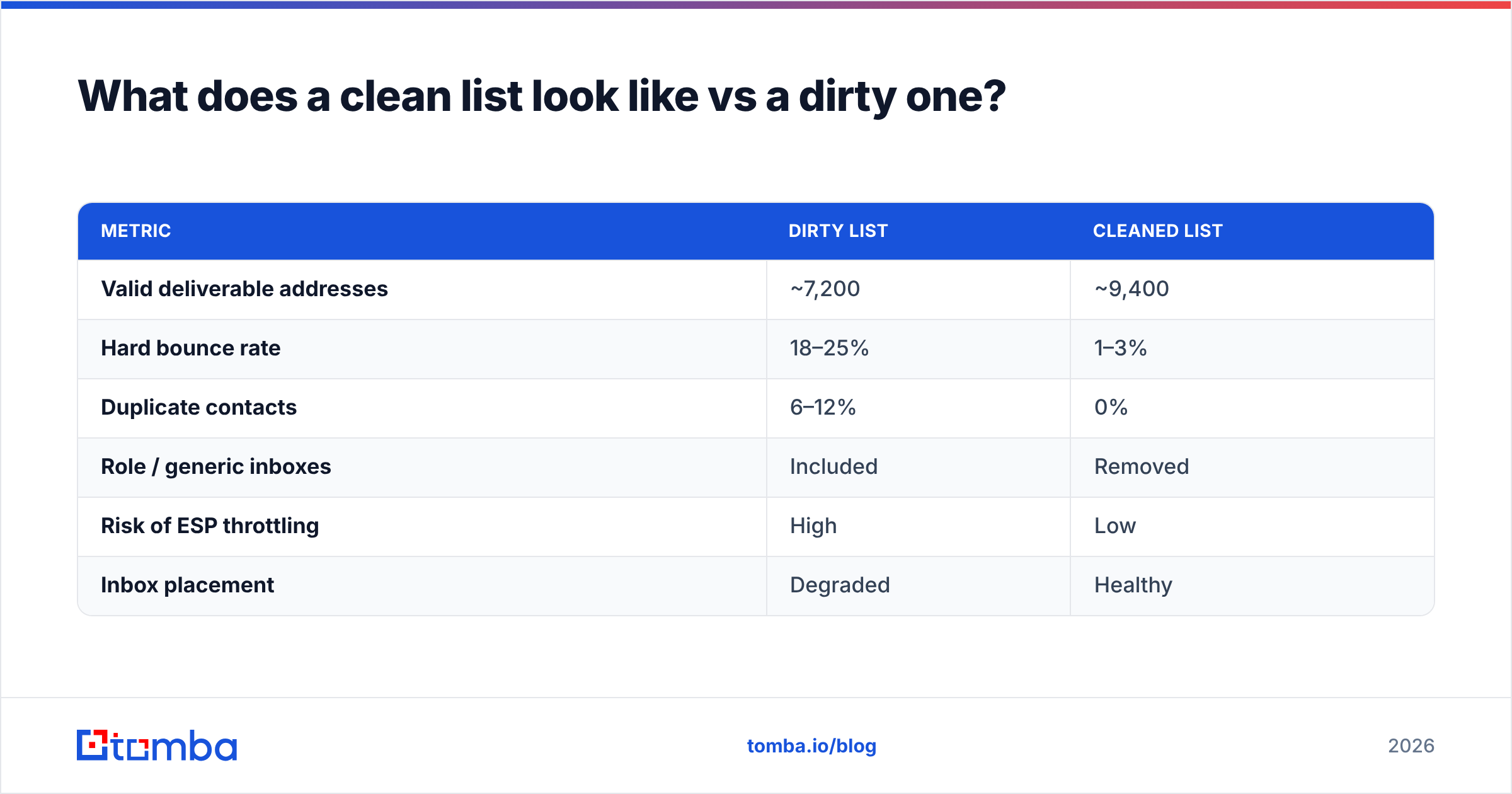
The contrast is stark once you measure it. Here's a side-by-side of the same 10,000-contact list before and after a proper clean.
| Metric | Dirty list | Cleaned list |
|---|---|---|
| Valid deliverable addresses | ~7,200 | ~9,400 |
| Hard bounce rate | 18–25% | 1–3% |
| Duplicate contacts | 6–12% | 0% |
| Role / generic inboxes | Included | Removed |
| Risk of ESP throttling | High | Low |
| Inbox placement | Degraded | Healthy |
Note that cleaning increases your usable address count in net terms — by fixing recoverable typos and standardizing data, you often rescue contacts you'd otherwise have written off, while removing the ones that would've hurt you. According to G2's reviews of email verification tools, teams consistently cite bounce-rate reduction and deliverability recovery as the top reasons they adopt a verifier — the exact outcomes the table above shows.
How often should you clean your leads?#
Lead data decays fast. People change jobs, companies fold, and inboxes get retired. Industry estimates put B2B data decay at roughly 20–30% per year — meaning up to a third of your list goes stale annually even if you never add a single new contact.
Practical cadence:
- Before every cold campaign — always verify the segment you're about to email, even if you cleaned it last month.
- Monthly — re-verify your active outreach lists.
- On import — verify every new lead at the point of entry via API or integration.
- Quarterly — full-list audit, including re-checking previously "risky" addresses that may have resolved.
Cleaning isn't a one-time event. It's hygiene, and like hygiene, skipping it doesn't show immediately — it shows when your deliverability quietly collapses three campaigns later.
What's the smartest free-first workflow?#
Combine free and paid so you only pay for what free can't do. The optimal sequence:
- Dedupe and format for free — spreadsheet + a free checker. Zero cost, removes 100% of duplicates and obvious junk.
- Filter role and disposable addresses for free — most free validators flag these.
- Verify the survivors with a verifier — use the free tier for small lists, a paid tier for volume. This is the step free tools genuinely can't fake at scale.
- Enrich what remains — turn clean addresses into actionable leads.
- Automate on import — so you never start from a dirty list again.
This way "cleaning leads free" isn't a compromise — it's the front half of a smart pipeline where you spend money only on the SMTP and catch-all checks that actually require it.
Final word: clean free, verify smart#
You can do most of your lead cleaning for free, and you should. Deduping, formatting, and filtering role and disposable addresses cost nothing and protect you from the worst self-inflicted deliverability wounds. But free tools can't reliably confirm a real mailbox at volume or resolve catch-all domains — and those are exactly the gaps that turn a "clean-looking" list into a bounce-heavy disaster.
The fix is a free-first workflow: scrub everything you can at zero cost, then point a real verifier at the leads you're actually about to email. If you're building or cleaning a B2B list, start with the Tomba Email Finder to source verified, deliverable addresses from the start — and pair it with the verifier so every contact that enters your pipeline is clean before a rep ever touches it. Clean leads in, fewer bounces out, and a sender reputation that keeps your mail landing in the inbox where it belongs.
// get started
Find, verify and enrich your first contacts today
Start on the free plan with 25 searches a month, then scale when your team is ready.
Free plan · No credit card required · GDPR & CCPA
// about the author