Clearalist vs GetProspect (2026): Which Email Tool Wins?
Clearalist vs GetProspect compared on accuracy, pricing, and features for 2026 — plus where each falls short and the email finder that beats both.
You are choosing between two tools that sound similar but solve different halves of the same problem. Clearalist vs GetProspect is really a question of "find new contacts" versus "clean the contacts I already have" — and most teams need both jobs done well, not one done halfway.
TL;DR#
- GetProspect is a prospecting-first platform: a B2B database, a LinkedIn email extractor, and bulk email finding. Clearalist is verification-first: it scrubs and validates lists you already own.
- If your bottleneck is sourcing leads, GetProspect is the closer fit. If your bottleneck is bounce rate, Clearalist's lane is verification.
- Neither tool dominates both jobs at once, and both get pricey as volume climbs.
- For accuracy-sensitive outbound, a finder with built-in verification and a generous free tier — like Tomba Email Finder — often replaces the pair.
- Read the comparison table below before you commit to an annual plan.
What is Clearalist?#
Clearalist is an email verification and list-cleaning service. You upload a list of addresses you already collected — from a webinar, a CSV export, an old CRM segment — and it checks each one for syntax errors, dead domains, role accounts (like info@ or sales@), and addresses that will hard-bounce. The output is a cleaner list and a deliverability score.
Think of Clearalist as a water filter. It does not find new water; it removes the sediment from what you already poured in. That is valuable, because sending to a dirty list damages your sender reputation and your email deliverability — but a filter alone never fills the glass.
The limitation is obvious once you name it: verification assumes you already have addresses. If your list is empty, Clearalist has nothing to clean.
What is GetProspect?#
GetProspect is a lead-generation platform built around an email finder and a B2B contact database. Its best-known feature is a LinkedIn email extractor: browse a profile or a search result, and GetProspect attempts to return a verified business email. It also offers domain-based search, bulk finding from uploaded lists, and lightweight CRM-style list management.
GetProspect is the well that fills the glass. It sources net-new contacts, then runs a verification pass on what it finds. The catch is that its verification is bundled and opaque — you do not get the granular control of a dedicated verifier, and catch-all domains (where the server accepts everything) are where its accuracy quietly drops.
So the honest framing of Clearalist vs GetProspect is not "which is better" but "which job are you trying to do." One finds, one cleans.
How do Clearalist and GetProspect compare head to head?#
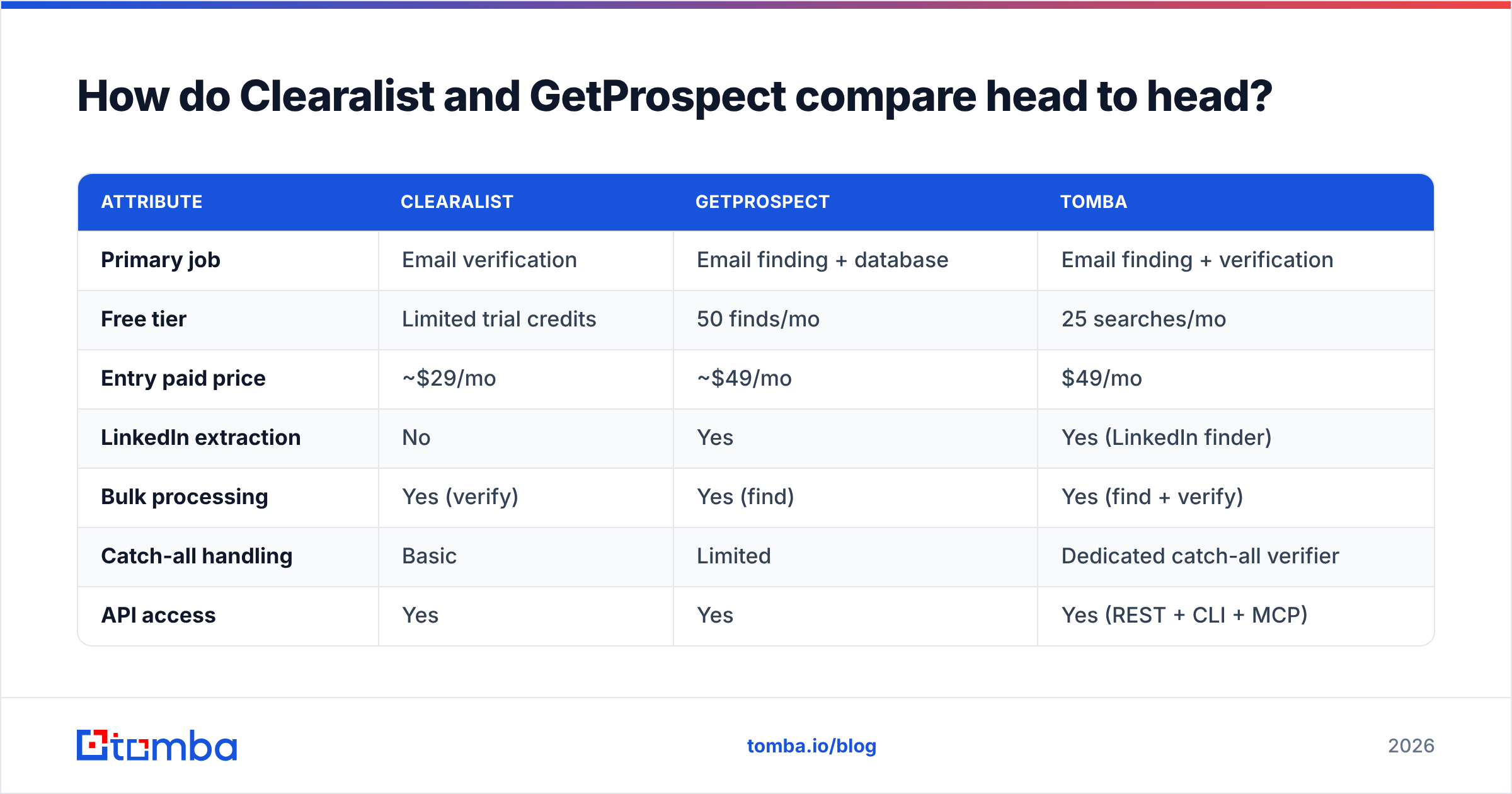
Here is the core breakdown. Treat the prices as the entry points each vendor advertises; both use credit systems that change effective cost with volume.
| Attribute | Clearalist | GetProspect | Tomba |
|---|---|---|---|
| Primary job | Email verification | Email finding + database | Email finding + verification |
| Free tier | Limited trial credits | 50 finds/mo | 25 searches/mo |
| Entry paid price | ~$29/mo | ~$49/mo | $49/mo |
| LinkedIn extraction | No | Yes | Yes (LinkedIn finder) |
| Bulk processing | Yes (verify) | Yes (find) | Yes (find + verify) |
| Catch-all handling | Basic | Limited | Dedicated catch-all verifier |
| API access | Yes | Yes | Yes (REST + CLI + MCP) |
| Best for | Cleaning owned lists | Sourcing new leads | End-to-end outbound |
A few things stand out. GetProspect wins on sourcing because Clearalist simply does not source. Clearalist wins on focused verification depth versus GetProspect's bundled checks. And the column most teams overlook — catch-all handling — is where both leave bounces on the table, because catch-all domains are increasingly common at mid-market and enterprise companies.

Where each tool earns its keep#
- Clearalist for hygiene. If you run newsletters or re-engage stale segments, a dedicated verifier pays for itself by protecting your domain reputation.
- GetProspect for top-of-funnel. If your reps live in LinkedIn Sales Navigator, the extractor shortens the path from profile to inbox.
- Neither for the full loop. Pair them and you are paying two subscriptions, syncing two exports, and still patching the catch-all gap manually.
- A combined tool for most SMB teams. When find-and-verify live in one credit pool, you stop reconciling CSVs between vendors.
)
Is GetProspect better than Clearalist for cold outreach?#
For cold outreach specifically, GetProspect is the more complete starting point — but only because it does the harder job. You cannot email a contact you have not found. Clearalist enters the workflow after GetProspect (or any finder) has produced a list.
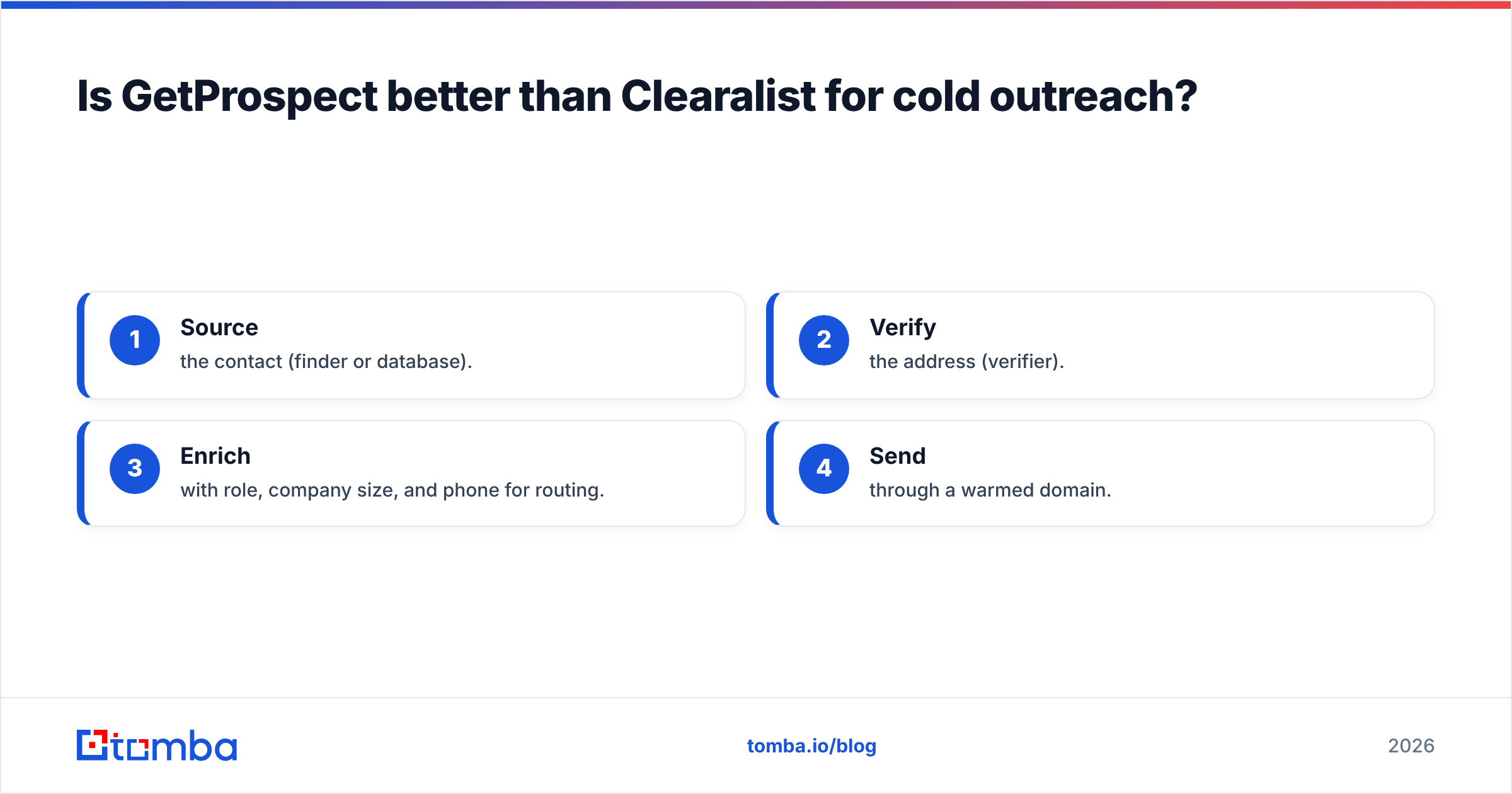
That sequencing is the real insight. In a healthy outbound motion the order is:
- Source the contact (finder or database).
- Verify the address (verifier).
- Enrich with role, company size, and phone for routing.
- Send through a warmed domain.
GetProspect covers steps 1 and a weak version of 2. Clearalist covers a strong version of 2. Neither owns step 3 well. So a team running GetProspect alone over-sends to risky addresses, and a team running Clearalist alone has nothing to send to. The two-tool stack works, but it is a stack you are gluing together by hand.
This is exactly why many teams audit their tooling and consolidate. If you are already comparing finders, it is worth weighing dedicated platforms — see how the category shakes out among Apollo alternatives and RocketReach alternative options before locking in.
What does pricing really look like at scale?#
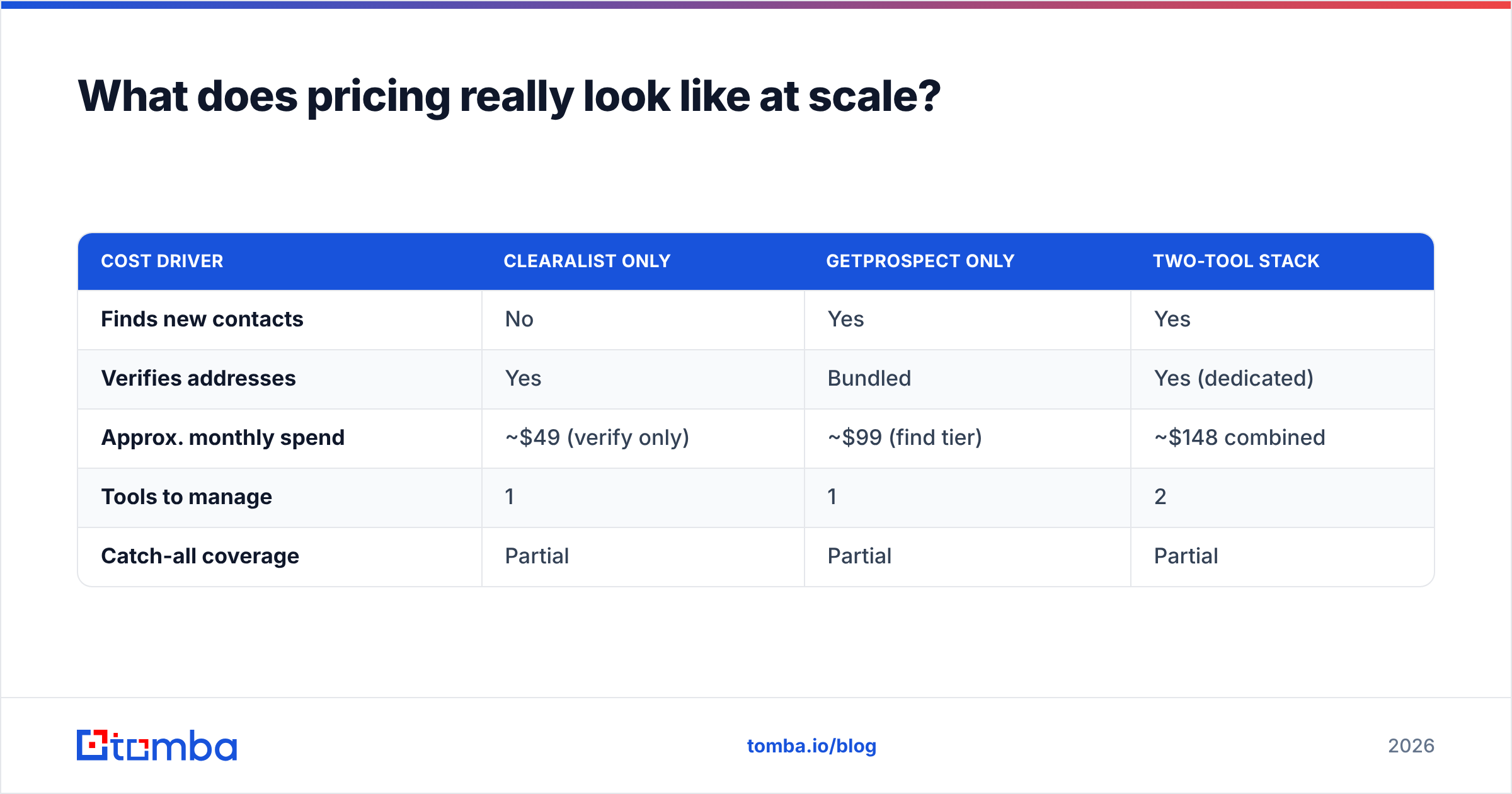
Sticker prices mislead because both vendors meter by credits, and a "find" and a "verify" are not the same unit. Here is a realistic monthly scenario for a team needing 5,000 verified, sourced contacts.
| Cost driver | Clearalist only | GetProspect only | Two-tool stack |
|---|---|---|---|
| Finds new contacts | No | Yes | Yes |
| Verifies addresses | Yes | Bundled | Yes (dedicated) |
| Approx. monthly spend | ~$49 (verify only) | ~$99 (find tier) | ~$148 combined |
| Tools to manage | 1 | 1 | 2 |
| Catch-all coverage | Partial | Partial | Partial |
The two-tool stack lands near $148/mo for this volume and still leaves the catch-all gap open. That is the hidden tax of splitting find and verify across vendors: you pay twice and inherit the weakest link of each. Before committing, compare the full Tomba pricing tiers — Growth at $99/mo bundles finding and verification into one credit pool, which removes the reconciliation overhead entirely.
)
Where do both tools fall short — and what fixes it?#
Both tools share three weak spots, and naming them tells you what to look for in any replacement.
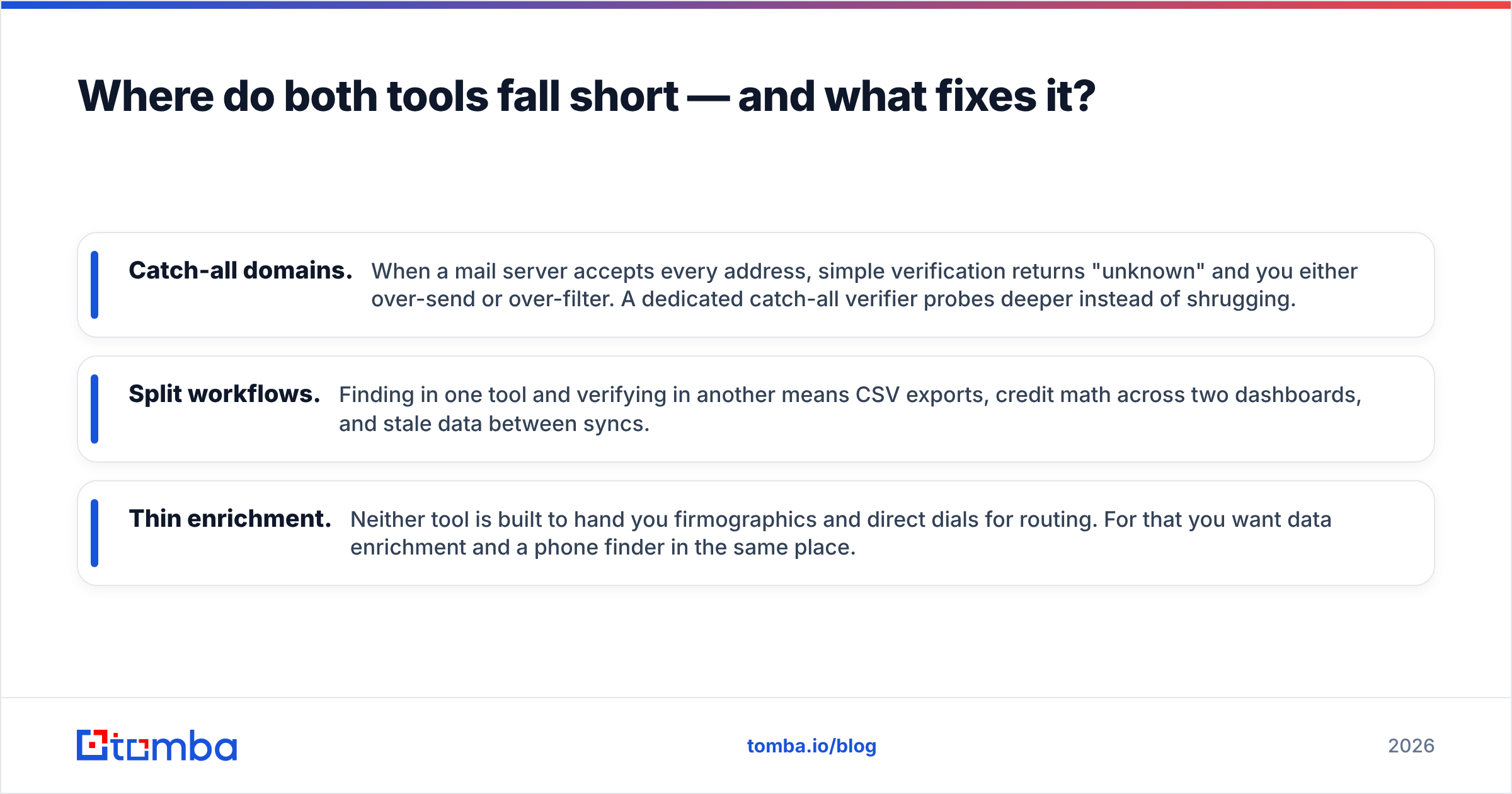
- Catch-all domains. When a mail server accepts every address, simple verification returns "unknown" and you either over-send or over-filter. A dedicated catch-all verifier probes deeper instead of shrugging.
- Split workflows. Finding in one tool and verifying in another means CSV exports, credit math across two dashboards, and stale data between syncs.
- Thin enrichment. Neither tool is built to hand you firmographics and direct dials for routing. For that you want data enrichment and a phone finder in the same place.
The fix in every case is consolidation: do find, verify, and enrich against one source of truth so a contact is sourced, validated, and routed without leaving the platform.
How Tomba fits this specific gap#
Tomba was built for the end-to-end loop these two tools split between them. The email finder sources by name, domain, or company; the email verifier validates in the same credit pool; the domain search returns every public address at a company at once; and the catch-all verifier handles the case where Clearalist and GetProspect both go quiet.
Crucially, accuracy is a published number, not a vague promise — Tomba documents its data sources so you can audit where an address came from. For teams that script their outreach, the Tomba API, CLI, and MCP server mean you can wire finding-plus-verification straight into your pipeline.

Which tool should you choose?#
Decide by your actual bottleneck, not the marketing.
- Choose Clearalist if you already have large lists and your only problem is bounce rate. It is a focused verifier and it does that one job.
- Choose GetProspect if your reps source primarily from LinkedIn and you need volume sourcing more than verification depth. Its extractor is its strongest feature.
- Choose a combined platform if you want one tool, one credit pool, and one accuracy standard across find, verify, and enrich — and you do not want to pay two vendors to still miss catch-all domains.
For independent perspective on how these platforms score on usability and support, cross-check reviews on G2 and Capterra before you sign anything annual. Vendor demos show the happy path; peer reviews show the bounce rate.
The bottom line#
Clearalist vs GetProspect is a comparison of two specialists: one cleans, one finds. If you only need one job, pick the matching specialist. But most outbound teams need finding, verification, and enrichment to work as a single motion — and stitching two tools together to get there costs more, syncs slower, and still leaves catch-all bounces on the table.
If you would rather source, verify, and enrich in one place — starting free with 25 searches a month and scaling to Growth at $99/mo when you are ready — start with the Tomba Email Finder. Find the address, confirm it is real, and route it to the right rep without ever exporting a CSV between vendors.
// get started
Find, verify and enrich your first contacts today
Start on the free plan with 25 searches a month, then scale when your team is ready.
Free plan · No credit card required · GDPR & CCPA
// about the author