Clearout vs FinalScout 2026: Which Email Tool Wins?
Clearout verifies email lists at scale; FinalScout finds emails from LinkedIn. We compare accuracy, pricing, and use cases to show which tool fits your 2026 outbound stack.
You have a list of prospects and a deadline. One tool promises clean, verified email lists. The other promises to pull emails straight off LinkedIn profiles. They sound similar, but Clearout and FinalScout solve different halves of the same problem — and picking the wrong one wastes both budget and sender reputation.
This breakdown compares Clearout vs FinalScout on what actually matters: where each gets its data, how accurate the results are, what you pay, and which workflows each one fits. We also show where a finder-plus-verifier platform like Tomba covers both jobs at once.
TL;DR#
- Clearout is a verification-first tool. Its strength is cleaning large email lists and reducing bounces. Its email finder is a secondary feature.
- FinalScout is a LinkedIn-first finder. It pulls contact emails from LinkedIn profiles and ships an AI email writer, but it's weaker at bulk list hygiene.
- They overlap less than the name match suggests. Clearout wins on verification scale; FinalScout wins on LinkedIn-sourced prospecting.
- Neither does both jobs cleanly. If you want finding and verification in one workflow, a combined platform like the Tomba Email Finder plus email verifier closes the gap.
- Pricing favors different buyers: Clearout is pay-as-you-go friendly; FinalScout sells monthly credit tiers tied to LinkedIn exports.
What is Clearout?#
Clearout is an email verification and lead-cleaning platform. Think of it as a quality-control line at the end of your data pipeline: you feed it a messy list of addresses, and it flags the ones that will bounce, the disposable accounts, the role-based inboxes (like info@ or sales@), and the risky catch-all domains.
Its real-time verification runs SMTP-level checks and returns a status — valid, invalid, catch-all, or unknown — for each address. Clearout also offers an email finder that guesses and verifies addresses from a name and domain, but in practice most teams adopt it for the verifier, not the finder. The product is built around list hygiene at volume, which is why agencies and email marketers reach for it before a big send.

If your main pain is a 12% bounce rate dragging down email deliverability, Clearout's verification engine is the part you're buying.
What is FinalScout?#
FinalScout is a LinkedIn-centric email finder with a built-in AI writer. Its core move is different from Clearout's: you browse LinkedIn (or Sales Navigator), and FinalScout surfaces the prospect's business email, then lets you draft and send outreach using ChatGPT-style templates.
The pitch is "find the person on LinkedIn, get their email, write the message" — a single flow aimed at SDRs who live inside LinkedIn all day. FinalScout claims high deliverability on the emails it returns because it leans on profile data and pattern matching rather than scraping stale databases.
Where it's thinner: bulk list verification. FinalScout is built to extract from profiles you're already viewing, not to scrub a 50,000-row CSV you inherited from a trade show. If you need to find emails by company domain at scale, you'll feel the limits of a profile-by-profile model — which is where a dedicated domain search tool earns its place.
Clearout vs FinalScout: how do they compare?#
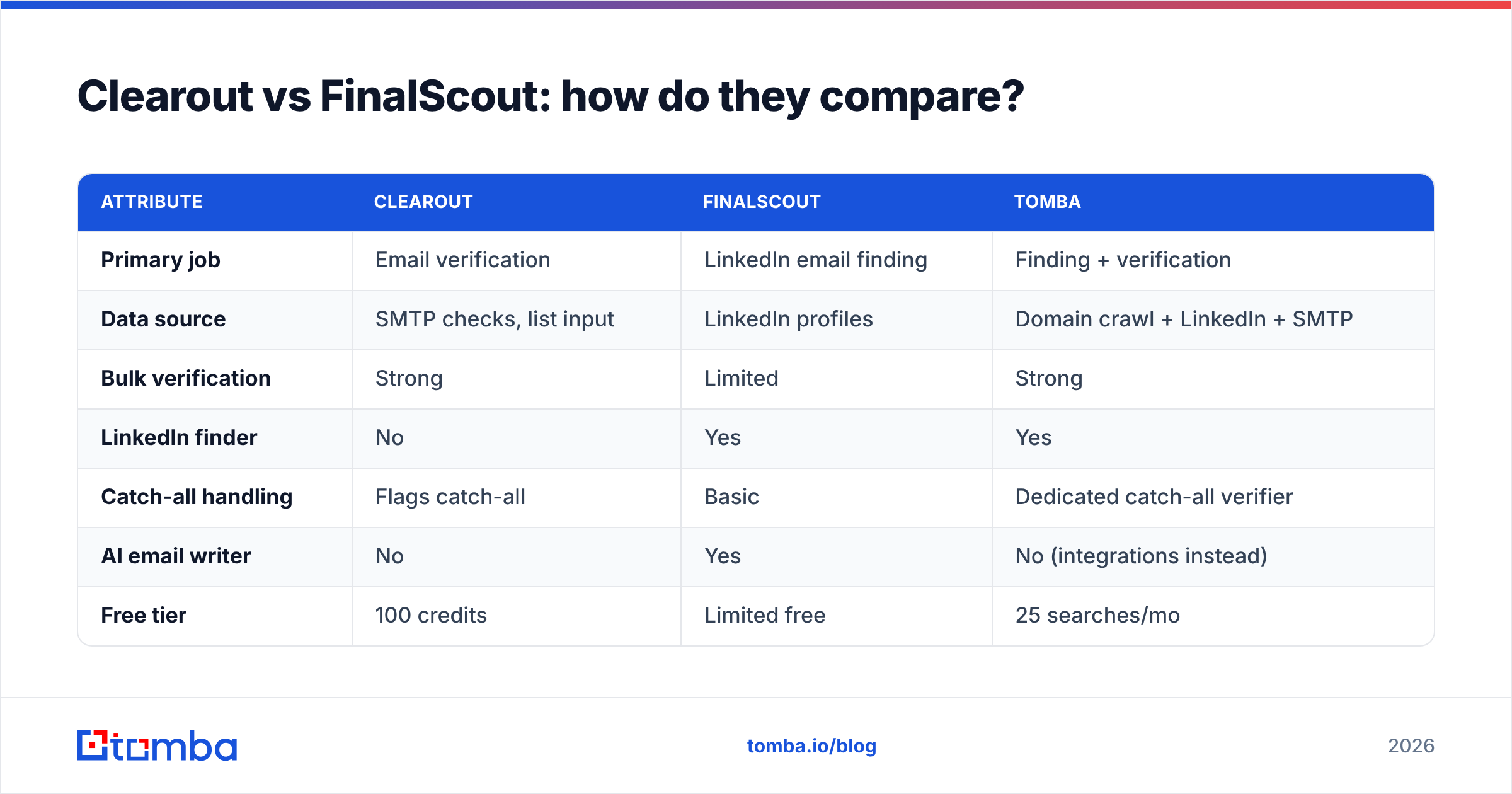
Here's the side-by-side. The honest summary: these tools sit at opposite ends of the prospecting pipeline.
| Attribute | Clearout | FinalScout | Tomba |
|---|---|---|---|
| Primary job | Email verification | LinkedIn email finding | Finding + verification |
| Data source | SMTP checks, list input | LinkedIn profiles | Domain crawl + LinkedIn + SMTP |
| Bulk verification | Strong | Limited | Strong |
| LinkedIn finder | No | Yes | Yes |
| Catch-all handling | Flags catch-all | Basic | Dedicated catch-all verifier |
| AI email writer | No | Yes | No (integrations instead) |
| Free tier | 100 credits | Limited free | 25 searches/mo |
| Entry paid price | Pay-as-you-go | ~$35/mo tier | $49/mo |
| Best for | List hygiene at scale | LinkedIn-only SDRs | Mixed finding + cleaning |
A few things stand out. FinalScout is the only one of the two with a native LinkedIn finder and AI writer. Clearout is the only one of the two built for serious bulk verification. Neither one does both at full strength — which is the practical reason buyers often end up running two subscriptions.
Which one is more accurate?#
Accuracy depends on the job you're measuring. For verification, Clearout is the stronger performer — its whole reason to exist is catching addresses that will bounce, and it does that well, including disposable and role-based detection. For finding, FinalScout's LinkedIn sourcing tends to return fresher addresses than database-only finders, because LinkedIn profiles change when people change jobs.
But "found an email" and "the email is deliverable" are two different claims. A finder that returns an address without verifying it just moves the bounce risk downstream. The safest workflow always pairs finding with a verification pass, and that's exactly where single-purpose tools force you to bolt on a second product.

Catch-all domains are the classic trap. Many companies accept every address at their domain, so a verifier returns "catch-all / unknown" instead of a clean valid. Clearout flags these; FinalScout largely punts. A dedicated catch-all verifier resolves more of those gray-zone addresses, which is the difference between guessing and knowing before you hit send.
How does pricing compare?#
Pricing is where buyer type matters most.
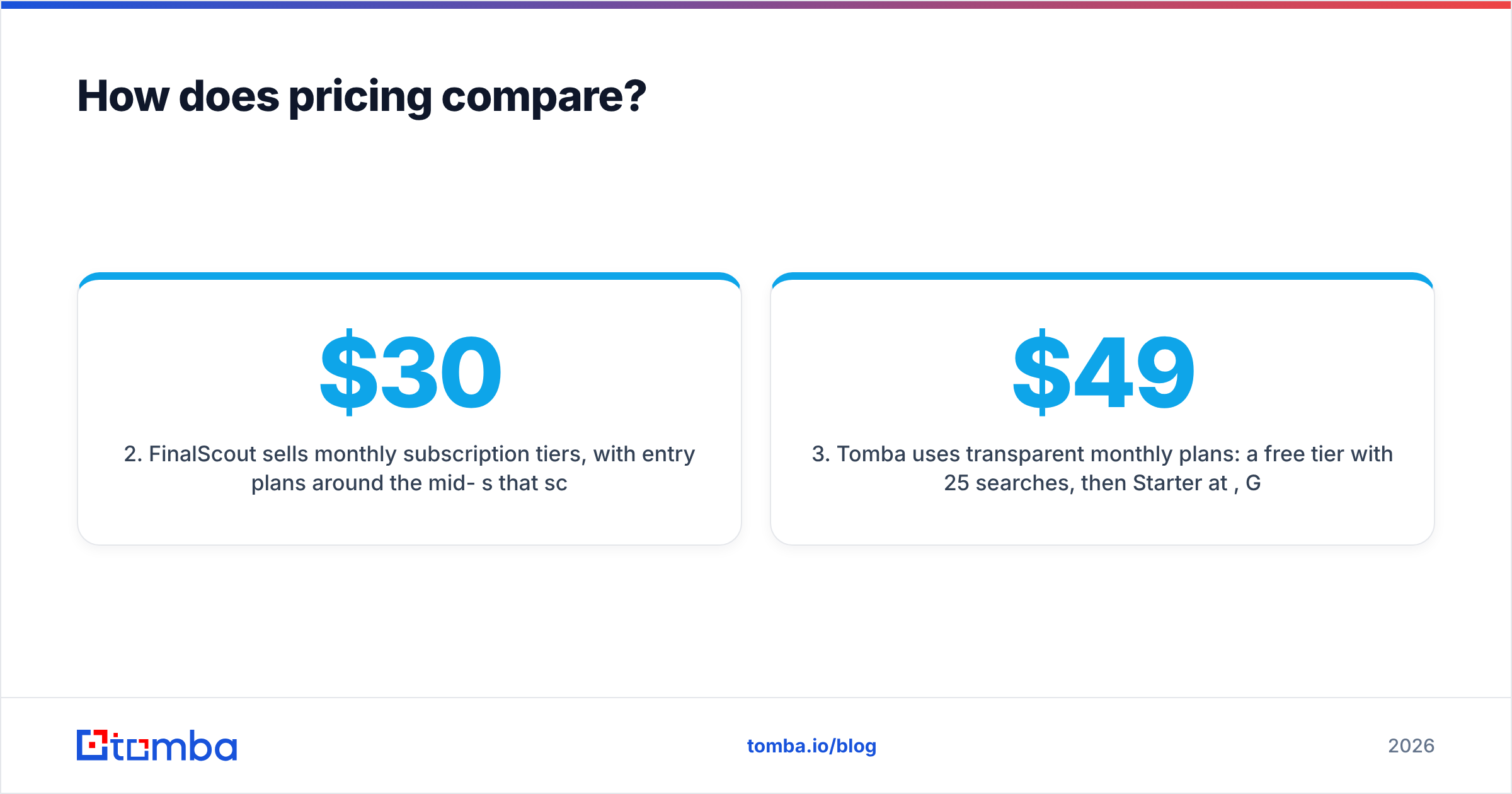
- Clearout leans on credit packs and pay-as-you-go verification. You buy credits and burn them as you verify, which suits teams with spiky, occasional cleaning needs rather than a fixed monthly cadence. There's a small free allotment to test it.
- FinalScout sells monthly subscription tiers, with entry plans around the mid-$30s that scale by how many emails you export and how much AI writing you do. It's priced like an SDR seat tool, not a data-cleaning utility.
- Tomba uses transparent monthly plans: a free tier with 25 searches, then Starter at $49/mo, Growth at $99/mo, Pro at $249/mo, and custom Enterprise. Full Tomba pricing covers finding and verification under one credit pool, so you're not paying two vendors for two halves of one task.
The hidden cost with single-purpose tools is the second subscription. If FinalScout finds the email and you still pay Clearout to verify it, your real cost-per-clean-lead is the sum of both. Consolidating that math is the main argument for a combined platform.
Which tool should you choose?#
Match the tool to your dominant workflow:
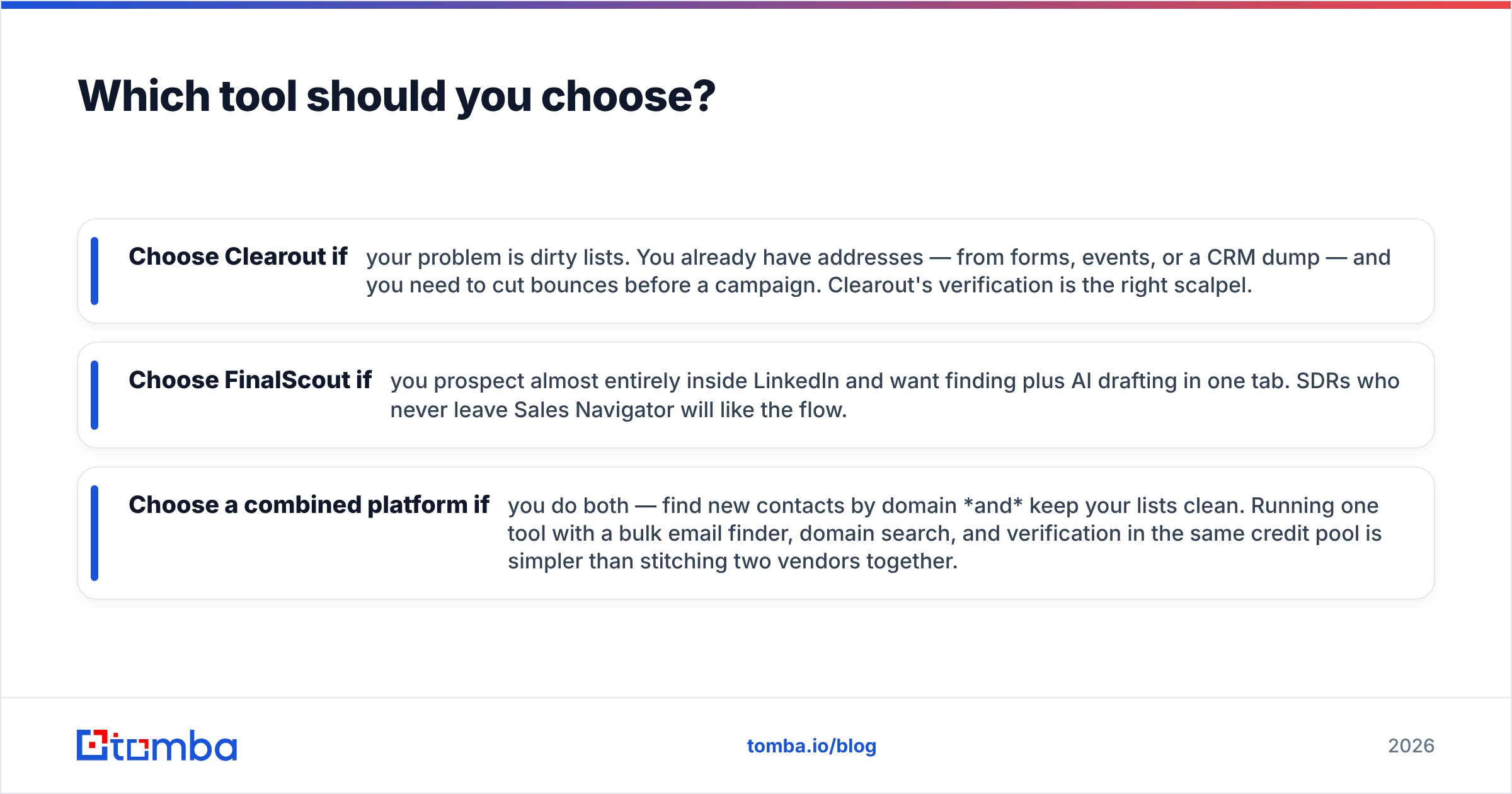
- Choose Clearout if your problem is dirty lists. You already have addresses — from forms, events, or a CRM dump — and you need to cut bounces before a campaign. Clearout's verification is the right scalpel.
- Choose FinalScout if you prospect almost entirely inside LinkedIn and want finding plus AI drafting in one tab. SDRs who never leave Sales Navigator will like the flow.
- Choose a combined platform if you do both — find new contacts by domain and keep your lists clean. Running one tool with a bulk email finder, domain search, and verification in the same credit pool is simpler than stitching two vendors together.
For teams that source contacts from LinkedIn but also work from company domains, Tomba's LinkedIn finder overlaps FinalScout's core feature while keeping verification native — so you're not choosing between finding and cleaning.
How do these tools fit a real outbound workflow?#
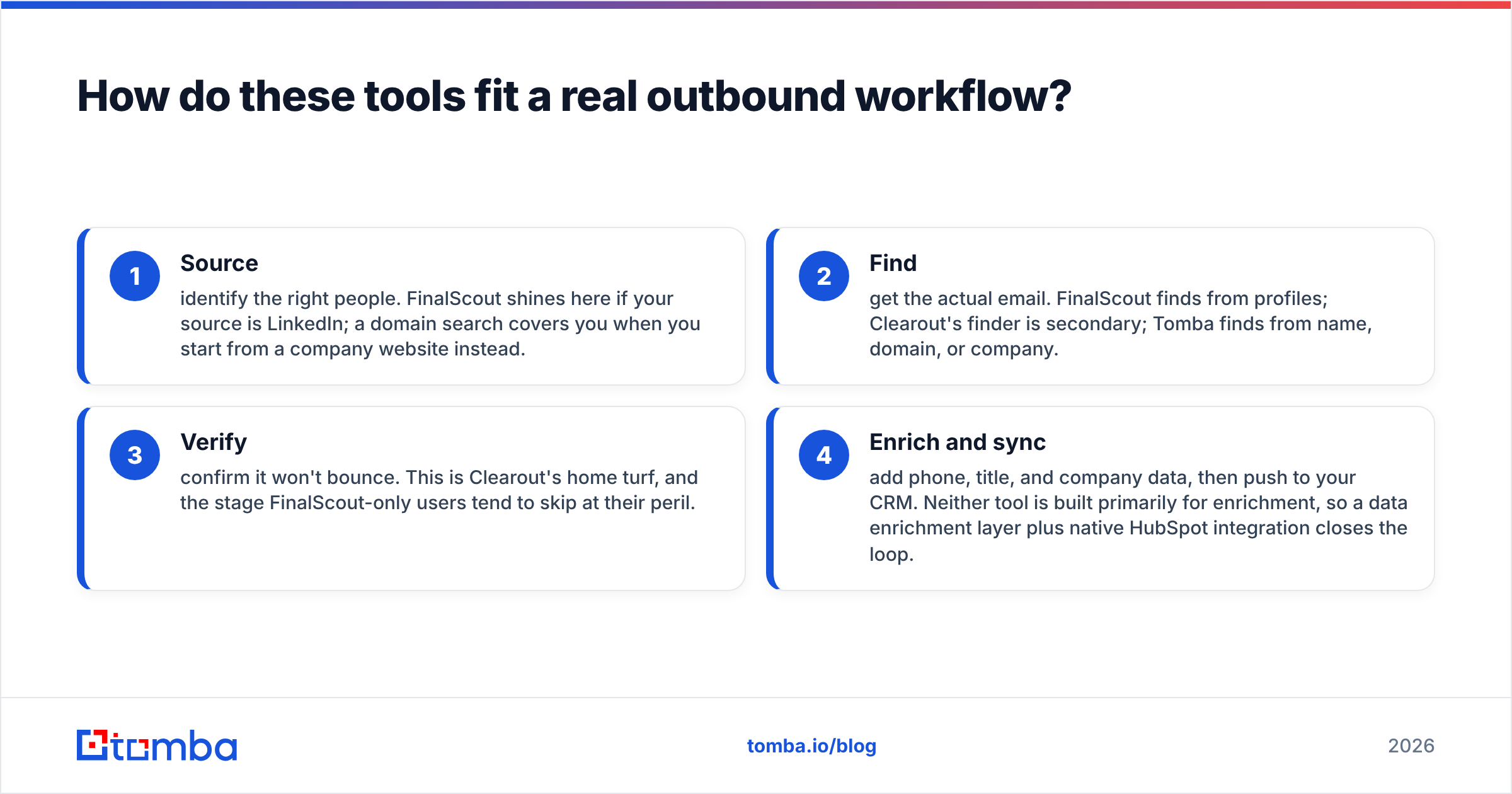
A working pipeline has four stages, and the Clearout-vs-FinalScout choice changes depending on where your gap is:
- Source — identify the right people. FinalScout shines here if your source is LinkedIn; a domain search covers you when you start from a company website instead.
- Find — get the actual email. FinalScout finds from profiles; Clearout's finder is secondary; Tomba finds from name, domain, or company.
- Verify — confirm it won't bounce. This is Clearout's home turf, and the stage FinalScout-only users tend to skip at their peril.
- Enrich and sync — add phone, title, and company data, then push to your CRM. Neither tool is built primarily for enrichment, so a data enrichment layer plus native HubSpot integration closes the loop.
The takeaway: Clearout owns stage 3, FinalScout owns stages 1–2 for LinkedIn, and neither covers all four. Map your weakest stage, and the decision gets obvious.
For more context on how these vendors stack up against the broader market, independent review sites like G2 and Capterra carry verified user ratings worth scanning before you commit. And if you want to understand the mechanics behind verification, the basics of SMTP-level checks are well documented in resources like Wikipedia's SMTP overview.
What are the limitations to watch for?#
No tool is perfect, and pretending otherwise just leads to surprises after you've paid.
Clearout's limits: it verifies, but it doesn't really prospect. The finder works, yet you wouldn't build a top-of-funnel motion on it. Catch-all and "unknown" results still require judgment — verification reduces risk, it doesn't eliminate it. And pay-as-you-go can get expensive at very high volumes versus a flat plan.
FinalScout's limits: it's tethered to LinkedIn. If your accounts aren't well-represented there, or you're working from raw domain lists, the model strains. Bulk verification is not its strength, so you'll likely add a second tool — which is the exact cost stack we flagged earlier. AI-written emails also need human editing; templated outreach at scale hurts sender reputation when it reads like a robot.
The shared limit: both make you choose a lane. That's fine if your need is narrow. It's a problem if you outgrow the lane in six months.
Frequently asked questions#
Is Clearout or FinalScout better for cold email? For the verification step that protects deliverability, Clearout. For sourcing LinkedIn contacts and drafting messages, FinalScout. A clean cold-email program needs both, so most teams either pair them or use a combined platform.
Can FinalScout verify email lists like Clearout? Not at the same depth. FinalScout focuses on finding and writing; its verification is light compared to Clearout's dedicated SMTP-level checks and catch-all flagging.
Does Clearout find emails from LinkedIn? Clearout's finder works from names and domains, not as a native LinkedIn extractor. FinalScout is the LinkedIn-first option of the two.
What's the cheapest way to get both finding and verification? Rather than two subscriptions, a single platform with shared credits is usually cheaper per clean lead. Tomba's free tier (25 searches/mo) lets you test both before paying.
The bottom line#
Clearout and FinalScout aren't really rivals — they're two parts of one job. Clearout cleans, FinalScout finds, and the buyer who only needs one lane will be happy with the matching tool. The trap is needing both and paying two vendors to cover what one platform handles in a single workflow.
If your outbound motion mixes LinkedIn sourcing, domain-based finding, and list hygiene, start with the Tomba Email Finder — find verified business emails by name, domain, or company, with verification and catch-all handling built into the same credit pool. Spin up the free tier, run your toughest list through it, and compare the bounce numbers against whatever you're using now. Clean data is the cheapest growth lever you have; stop paying twice for it.
Ready to find emails that actually work?
Join 150,000+ professionals who stopped guessing and started sending. Free credits on signup — no credit card required.
Get the Tomba newsletter
Practical outbound tactics and product updates — once every two weeks.
About the author