Clickback vs ContactOut (2026): Which B2B Tool Wins?
Clickback sends cold email to purchased lists; ContactOut finds verified contacts. We compare pricing, accuracy, compliance, and the smarter 2026 stack.
You typed "Clickback vs ContactOut" into a search bar because someone on your team pitched one of them, and you need to know if it actually solves your problem before a budget meeting. Here is the short version: these two tools barely compete. One sends bulk cold email to purchased lists. The other finds and verifies individual contacts. Picking between them is less "which is better" and more "which job am I hiring a tool to do" — and for most modern B2B teams, the honest answer is neither does the whole job alone.
TL;DR — Clickback vs ContactOut in 30 seconds#
- Clickback is a cold-email sending and lead-nurturing platform (Clickback MAIL + Clickback WEB). It exists to email cold, purchased B2B lists at scale and identify website visitors.
- ContactOut is a contact-data tool. It finds personal and work emails plus phone numbers, mostly sourced from LinkedIn profiles, and ships a Chrome extension and recruiter-friendly database.
- They solve different stages of outbound: ContactOut gets you the data, Clickback (or any sender) delivers the message.
- Pricing differs wildly — Clickback is quote-based and enterprise-priced; ContactOut runs on credit tiers with a limited free plan.
- For accuracy-first email discovery at a fair price, a dedicated email finder like Tomba usually beats both on cost-per-verified-contact.
What is Clickback, exactly?#
Clickback is a Canadian B2B email lead-generation company built around two products. Clickback MAIL is an email-sending platform engineered specifically to mail cold, purchased, or third-party lists — something most mainstream ESPs (Mailchimp, HubSpot, Constant Contact) explicitly forbid. It layers on list validation, spam-word scanning, and dedicated sending infrastructure so those campaigns don't immediately torch your domain reputation. Clickback WEB is a website-visitor identification tool that reveals the companies (and sometimes contacts) browsing your site.
The core promise is "accelerated lead generation": buy a list, clean it through Clickback, send high-volume campaigns, and route engaged opens/clicks into your CRM. It's an outbound delivery engine, not a data discovery engine.
That distinction matters because it shapes everything else — pricing, compliance exposure, and who the tool is actually for. If you're a marketing team sitting on a 50,000-row purchased list and you need to mail it without getting blacklisted, Clickback is purpose-built for that. If you need to find those 50,000 contacts in the first place, Clickback isn't the answer.

What is ContactOut, exactly?#
ContactOut is a contact-finding platform aimed heavily at recruiters and sales teams. Its flagship feature is a Chrome extension that surfaces personal emails, work emails, and phone numbers directly on LinkedIn profiles and across the web. It also offers a searchable database, an email verifier step, and integrations for pushing contacts into ATS and CRM systems.
ContactOut's pitch is coverage of personal emails — the Gmail/Yahoo addresses that work-only databases miss — which is valuable for recruiting passive candidates who change jobs. Its data leans on LinkedIn enrichment, so its sweet spot is "I'm looking at a person's profile and I want their contact info right now."
So ContactOut is the discovery half of the equation: it answers who and how do I reach them. It does not send campaigns, manage deliverability, or warm domains. You take ContactOut's exported list somewhere else to actually run outreach.
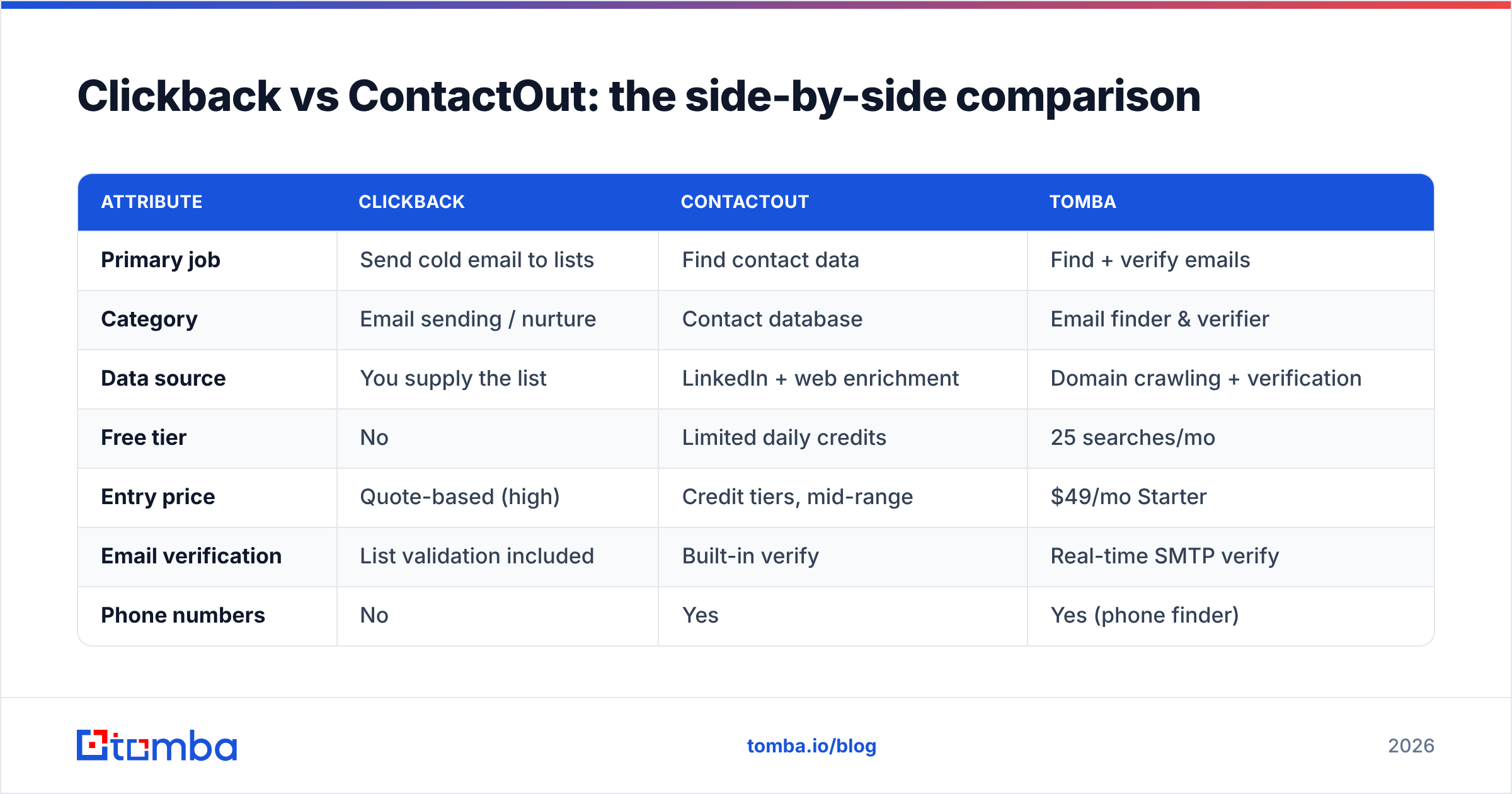
Clickback vs ContactOut: the side-by-side comparison#
Here's the part you came for. Because these tools occupy different stages, the comparison is as much about category as features.
| Attribute | Clickback | ContactOut | Tomba |
|---|---|---|---|
| Primary job | Send cold email to lists | Find contact data | Find + verify emails |
| Category | Email sending / nurture | Contact database | Email finder & verifier |
| Data source | You supply the list | LinkedIn + web enrichment | Domain crawling + verification |
| Free tier | No | Limited daily credits | 25 searches/mo |
| Entry price | Quote-based (high) | Credit tiers, mid-range | $49/mo Starter |
| Email verification | List validation included | Built-in verify | Real-time SMTP verify |
| Phone numbers | No | Yes | Yes (phone finder) |
| Bulk processing | Yes (sending) | Yes (export) | Yes (bulk finder) |
| Best for | Mailing purchased lists | Recruiters, personal emails | Cost-efficient B2B discovery |
| API access | Limited | Yes | Full REST API |
The table makes the real decision obvious: if your bottleneck is sending, look at Clickback. If your bottleneck is finding, look at ContactOut — or a more accuracy-focused finder. Comparing them head-to-head only makes sense if you haven't yet decided which problem you have.
Is Clickback better than ContactOut for cold outreach?#
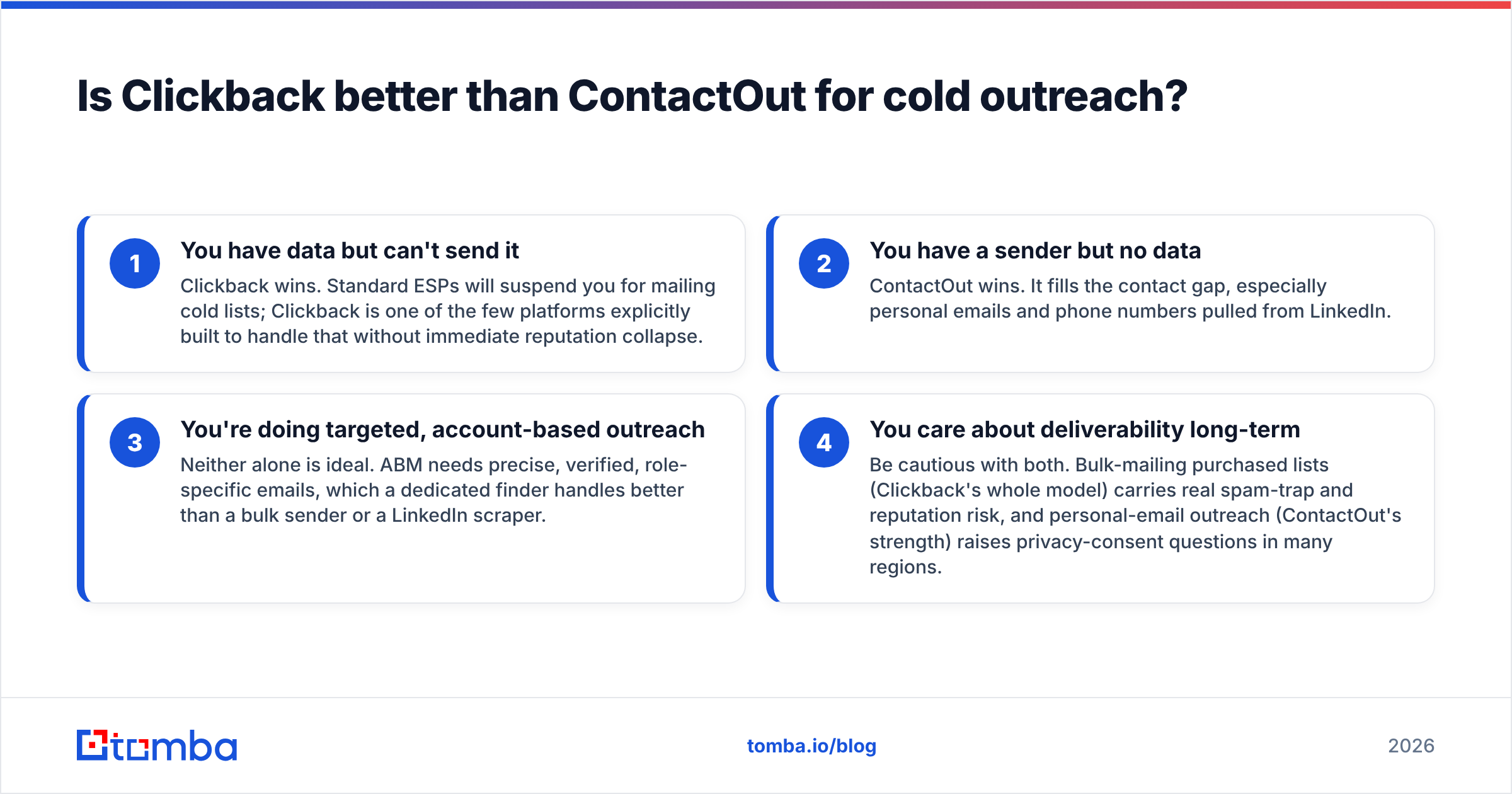
It depends entirely on which half of outreach is broken for you, broken down by job:
- You have data but can't send it — Clickback wins. Standard ESPs will suspend you for mailing cold lists; Clickback is one of the few platforms explicitly built to handle that without immediate reputation collapse.
- You have a sender but no data — ContactOut wins. It fills the contact gap, especially personal emails and phone numbers pulled from LinkedIn.
- You're doing targeted, account-based outreach — Neither alone is ideal. ABM needs precise, verified, role-specific emails, which a dedicated finder handles better than a bulk sender or a LinkedIn scraper.
- You care about deliverability long-term — Be cautious with both. Bulk-mailing purchased lists (Clickback's whole model) carries real spam-trap and reputation risk, and personal-email outreach (ContactOut's strength) raises privacy-consent questions in many regions.
The uncomfortable truth: cold-emailing purchased lists at volume is increasingly fragile in 2026. Google and Yahoo's bulk-sender requirements, tighter spam filtering, and one-click-unsubscribe mandates have made spray-and-pray riskier than ever. That doesn't make Clickback useless — it makes quality of list the deciding factor. And list quality comes from discovery tools, not sending tools.
What about data accuracy and compliance?#
Accuracy is where the money leaks. A sending platform can have flawless infrastructure and still tank your campaign if the underlying list is 30% invalid — every bounce chips at sender reputation. ContactOut and Tomba both invest in verification; Clickback validates the list you bring but can't manufacture accuracy that wasn't there.
On compliance, the two tools carry different risk profiles. Clickback operates in the cold-list mailing space, which sits in a gray zone under CAN-SPAM (legal in the US with proper unsubscribe and identification) but is far stricter under GDPR in the EU, where purchased B2B lists without consent are a liability. ContactOut surfaces personal emails, which is exactly the data category regulators scrutinize most. Whichever you choose, document your lawful basis and honor opt-outs religiously — read the vendors' own compliance docs rather than trusting a sales rep's summary.
For an apples-to-apples sense of how finders are judged, third-party review sites like G2 aggregate verified-buyer feedback on deliverability, accuracy, and support — a better signal than any vendor landing page.
How does Tomba fit into the Clickback vs ContactOut decision?#
Tomba sits where most teams actually struggle: getting accurate, verified business emails without paying enterprise prices or risking compliance on personal-email scraping. Where Clickback assumes you already have a list and ContactOut leans on LinkedIn personal data, Tomba builds verified work emails from domain and name inputs, then verifies them in real time before they ever reach a campaign.
A few practical advantages for the discovery stage:
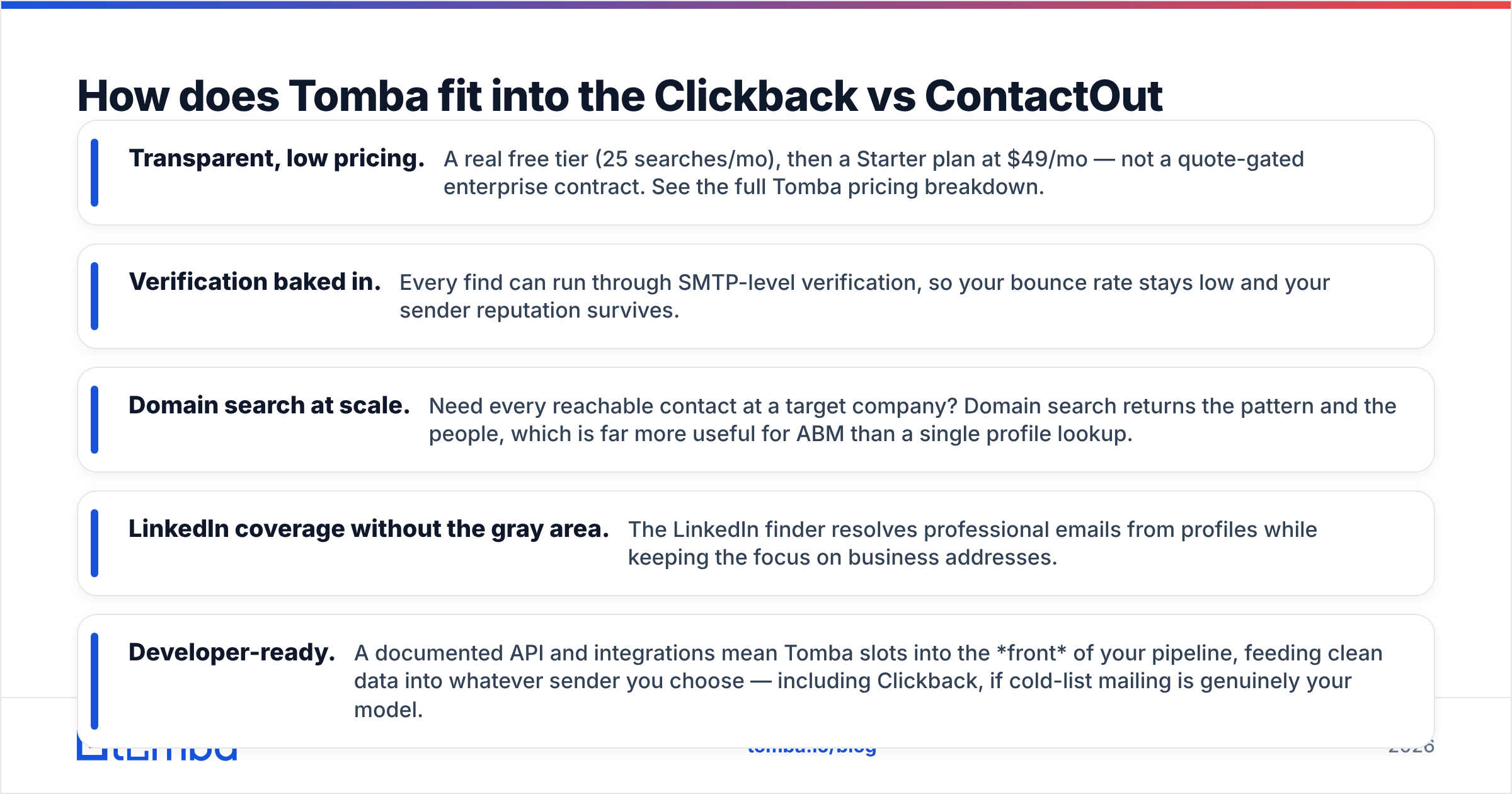
- Transparent, low pricing. A real free tier (25 searches/mo), then a Starter plan at $49/mo — not a quote-gated enterprise contract. See the full Tomba pricing breakdown.
- Verification baked in. Every find can run through SMTP-level verification, so your bounce rate stays low and your sender reputation survives.
- Domain search at scale. Need every reachable contact at a target company? Domain search returns the pattern and the people, which is far more useful for ABM than a single profile lookup.
- LinkedIn coverage without the gray area. The LinkedIn finder resolves professional emails from profiles while keeping the focus on business addresses.
- Developer-ready. A documented API and integrations mean Tomba slots into the front of your pipeline, feeding clean data into whatever sender you choose — including Clickback, if cold-list mailing is genuinely your model.
The strategic move isn't "Tomba instead of both." It's recognizing that discovery and delivery are separate problems. Use a precise finder to build a clean, verified, consent-aware list, then send it through whatever delivery platform fits your risk tolerance. If you were leaning ContactOut purely for email discovery, it's worth weighing a ContactOut alternative on cost-per-verified-email before committing.
Which tool should you actually pick?#
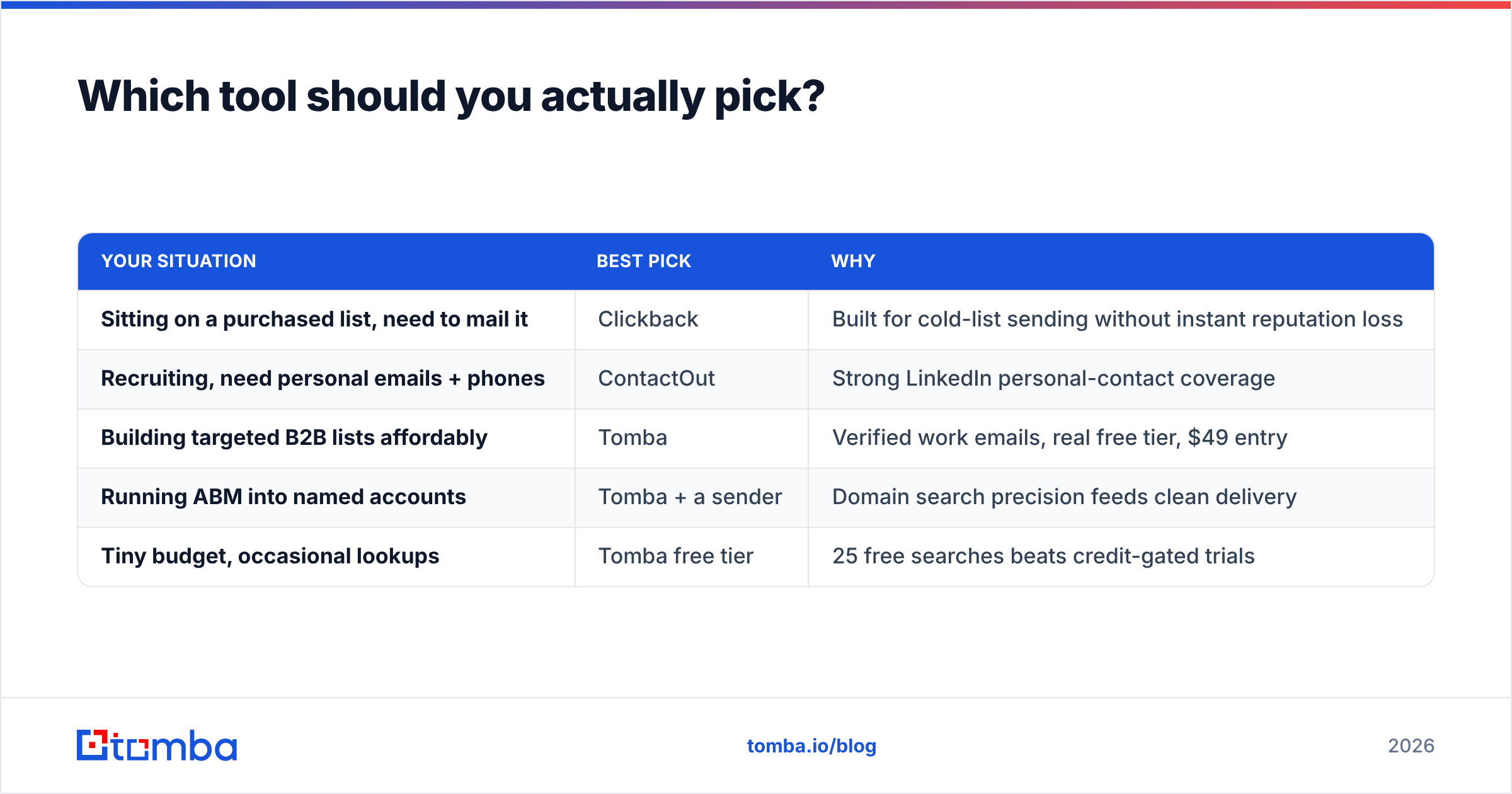
Match the tool to the gap, not the hype:
| Your situation | Best pick | Why |
|---|---|---|
| Sitting on a purchased list, need to mail it | Clickback | Built for cold-list sending without instant reputation loss |
| Recruiting, need personal emails + phones | ContactOut | Strong LinkedIn personal-contact coverage |
| Building targeted B2B lists affordably | Tomba | Verified work emails, real free tier, $49 entry |
| Running ABM into named accounts | Tomba + a sender | Domain search precision feeds clean delivery |
| Tiny budget, occasional lookups | Tomba free tier | 25 free searches beats credit-gated trials |
If you remember one thing: Clickback and ContactOut aren't really rivals. Clickback is a delivery engine for cold lists. ContactOut is a contact-discovery engine. The mistake is buying one expecting it to do the other's job, then blaming the tool when your pipeline stalls.
The bottom line#
Clickback wins when sending to cold, purchased lists is your specific, deliberate strategy and you accept the deliverability and compliance trade-offs that come with it. ContactOut wins when you need personal emails and phone numbers fast, especially in a recruiting context. But for the job most B2B sales and marketing teams actually have — building accurate, verified, affordable contact lists that won't wreck your domain — a dedicated email finder is the cleaner answer.
Start at the source. Clean, verified data makes every downstream tool (sender, CRM, sequencer) perform better, and bad data makes even the best sender useless. Spin up a free Tomba account, run a domain search on your top target accounts, and feed verified emails into your outreach instead of gambling on a list you can't trust. Try the Tomba Email Finder — find and verify professional emails before you spend a dollar on sending.
Ready to find emails that actually work?
Join 150,000+ professionals who stopped guessing and started sending. Free credits on signup — no credit card required.
Get the Tomba newsletter
Practical outbound tactics and product updates — once every two weeks.
About the author