Clickback vs Seamless.AI 2026: Which B2B Tool Wins?
Clickback sends compliant cold email at scale; Seamless.AI builds the contact list. See which fits your B2B pipeline in 2026 — and where a leaner stack beats both.
Clickback vs Seamless.AI: Which B2B Tool Actually Fits Your 2026 Stack?
People put Clickback and Seamless.AI in the same sentence all the time, then realize halfway through a trial that they do two different jobs. One sends email. The other finds the people you'd send email to. Picking between them as if they were interchangeable is how teams end up paying for software they barely touch.
This breakdown sorts out what each tool is, where they overlap, what they cost in 2026, and when you genuinely need neither.
TL;DR#
- Clickback is a B2B email marketing and cold-outreach platform built to email cold (non-opted-in) lists compliantly at volume. It is a sending engine, not a data source.
- Seamless.AI is a sales intelligence platform — a real-time contact and company database with an email finder, Chrome extension, and CRM exports. It is a data source, not a serious sending engine.
- They are complements more often than competitors: Seamless.AI builds the list, Clickback (or any sender) works it.
- Both carry real friction — Seamless.AI for credit limits and aggressive renewals, Clickback for a steep price floor aimed at mid-market.
- If your core problem is accurate contact data at a fair price, a focused email finder like Tomba often beats paying for either platform's broad bundle.
What Is Clickback?#
Clickback is a Canadian B2B email software company whose flagship product, Clickback MAIL, is designed for one thing most email platforms refuse to touch: emailing cold contacts you have not yet gotten permission from. Most ESPs (Mailchimp, Constant Contact) ban cold lists outright. Clickback leans into it with dedicated IP infrastructure, list hygiene, and reporting tuned for high-volume B2B sending.
The pitch is "accelerated lead generation" — upload a purchased or scraped list, run it through their cleaning, and send branded HTML campaigns at scale while staying inside CAN-SPAM and CASL guardrails. Think of it as a sending platform that assumes your list is cold from the start, the way a freight company assumes your boxes are heavy.
What Clickback does not do well is find contacts. You bring the list. If your data is thin or stale, Clickback will happily send to dead inboxes and tank your sender reputation.
What Is Seamless.AI?#
Seamless.AI is a sales intelligence platform centered on a "real-time search engine" for B2B contacts. Instead of serving a static database, it claims to verify emails and phone numbers at the moment you search, pulling from public web signals. You get a Chrome extension that scrapes LinkedIn and company sites, list-building tools, data enrichment, and one-click pushes to Salesforce, HubSpot, and Outreach.
Seamless.AI is a data engine. It answers "who do I contact and how do I reach them," not "how do I send 50,000 emails this week." You can export to a sequencer, but Seamless.AI is not a deliverability platform and does not pretend to manage cold-sending IP reputation.
The well-documented friction with Seamless.AI is commercial, not technical: users on G2 repeatedly cite credit caps that run out fast, auto-renewal terms that are hard to escape, and accuracy that varies by industry. Great when it hits, frustrating when it misses.
Clickback vs Seamless.AI: What's the Core Difference?#
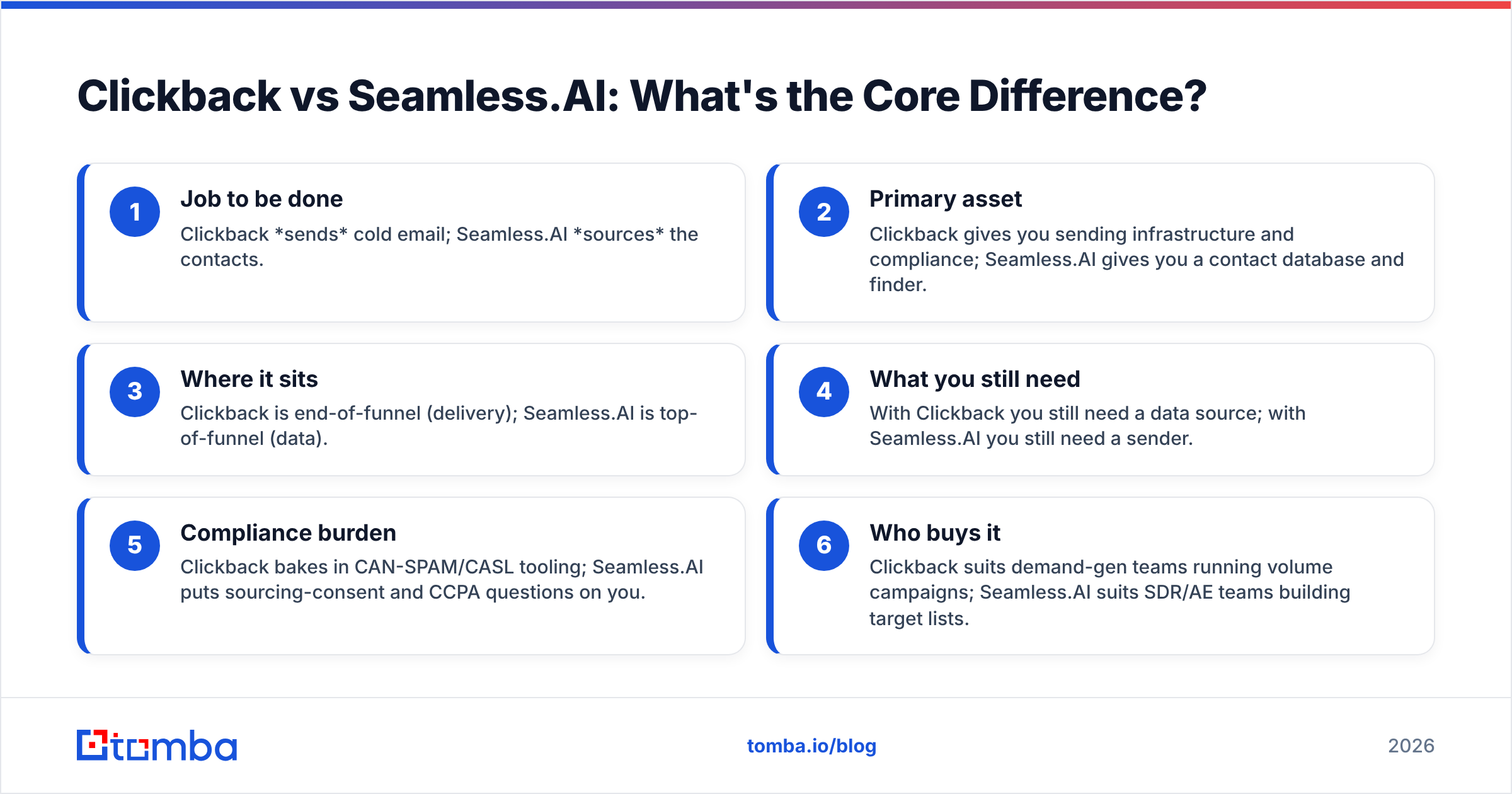
The cleanest way to see it: these tools sit on opposite ends of the same outbound workflow.
- Job to be done — Clickback sends cold email; Seamless.AI sources the contacts.
- Primary asset — Clickback gives you sending infrastructure and compliance; Seamless.AI gives you a contact database and finder.
- Where it sits — Clickback is end-of-funnel (delivery); Seamless.AI is top-of-funnel (data).
- What you still need — With Clickback you still need a data source; with Seamless.AI you still need a sender.
- Compliance burden — Clickback bakes in CAN-SPAM/CASL tooling; Seamless.AI puts sourcing-consent and CCPA questions on you.
- Who buys it — Clickback suits demand-gen teams running volume campaigns; Seamless.AI suits SDR/AE teams building target lists.
If you only remember one thing: asking "Clickback or Seamless.AI?" is like asking "truck or warehouse?" You may need both, but they are not substitutes.
How Do Clickback and Seamless.AI Compare on Features and Price?#
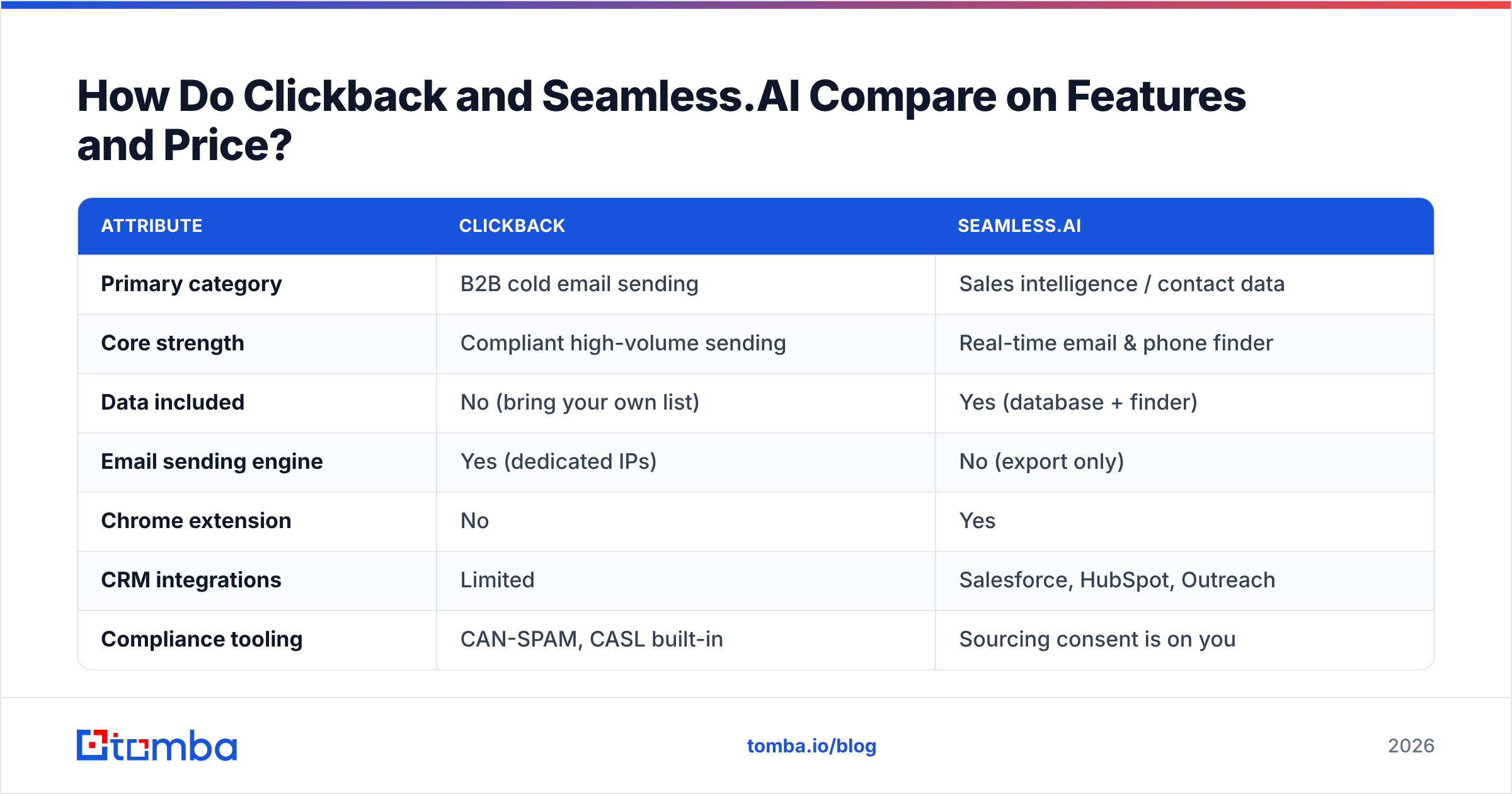
Pricing for both is quote-driven and shifts with contract size, so treat these as 2026 directional figures rather than published rate cards. The structural differences matter more than the exact dollar amount.
| Attribute | Clickback | Seamless.AI |
|---|---|---|
| Primary category | B2B cold email sending | Sales intelligence / contact data |
| Core strength | Compliant high-volume sending | Real-time email & phone finder |
| Data included | No (bring your own list) | Yes (database + finder) |
| Email sending engine | Yes (dedicated IPs) | No (export only) |
| Chrome extension | No | Yes |
| CRM integrations | Limited | Salesforce, HubSpot, Outreach |
| Compliance tooling | CAN-SPAM, CASL built-in | Sourcing consent is on you |
| Pricing model | Annual, volume-based (mid-market floor) | Per-seat + credits, annual |
| Entry cost (2026, approx.) | ~$500+/mo equivalent | ~$1,764+/yr per seat tiers |
| Free tier | No, demo only | Limited free credits |
| Best for | Demand-gen volume campaigns | SDR/AE list building |
The takeaway: Clickback charges for delivery, Seamless.AI charges for data. Neither is cheap, and buying both to cover one outbound motion can push a small team past $15k/year before a single reply lands.
When Should You Choose Clickback?#
Pick Clickback when sending is your bottleneck, not sourcing. Specifically:
- You already own a large, reasonably clean B2B list (purchased, event-sourced, or built in-house) and need to email it cold without getting your domain blacklisted.
- You run volume demand-gen — webinar invites, content blasts, re-engagement — where branded HTML and open/click reporting matter.
- Compliance is a board-level concern and you want CAN-SPAM/CASL handling that is not bolted on as an afterthought.
- You have the budget for a mid-market platform and the volume to justify it.
Clickback is the wrong call if you are a small team doing 1:1 personalized cold email, or if your real gap is "I don't have anyone to email yet." It solves delivery, and delivery only.
When Should You Choose Seamless.AI?#
Pick Seamless.AI when finding contacts is your bottleneck and you live inside a CRM:
- Your SDRs build target-account lists daily and want a LinkedIn-native Chrome extension to grab contacts on the fly.
- You need phone numbers plus emails and want enrichment that syncs straight into Salesforce or HubSpot.
- You value real-time lookups over a static database and accept that accuracy will swing by vertical.
- You can manage credit budgets carefully — and you read the renewal terms before signing.
Seamless.AI is the wrong call if you only need verified work emails in bulk, if you bristle at credit caps, or if you want predictable flat pricing. Plenty of teams shop for a Seamless.AI alternative for exactly those reasons.
Do You Actually Need Either One?#
Here's the question both vendors would rather you skip: what is the one job you're actually trying to do?
Most teams who compare Clickback and Seamless.AI are really after a simpler outcome — a list of verified, accurate work emails for the right people, which they can then drop into whatever sender or sequencer they already pay for (Gmail, Outlook, Instantly, a CRM cadence). They don't need a $15k bundle. They need clean data and a way to validate it.
That is where a focused tool changes the math. With Tomba you can:
- Find professional emails by name, company, or domain with the email finder, then confirm them with the email verifier before a single send.
- Pull every public address on a company domain via domain search instead of burning Seamless.AI credits one contact at a time.
- Process whole lists at once with the bulk email finder, then push results into your existing stack.
Then you take that clean list to a sender — including Clickback, if you genuinely need compliant cold volume. The point is to stop paying a data tax and a sending tax bundled into one rigid contract when your real need is narrower.
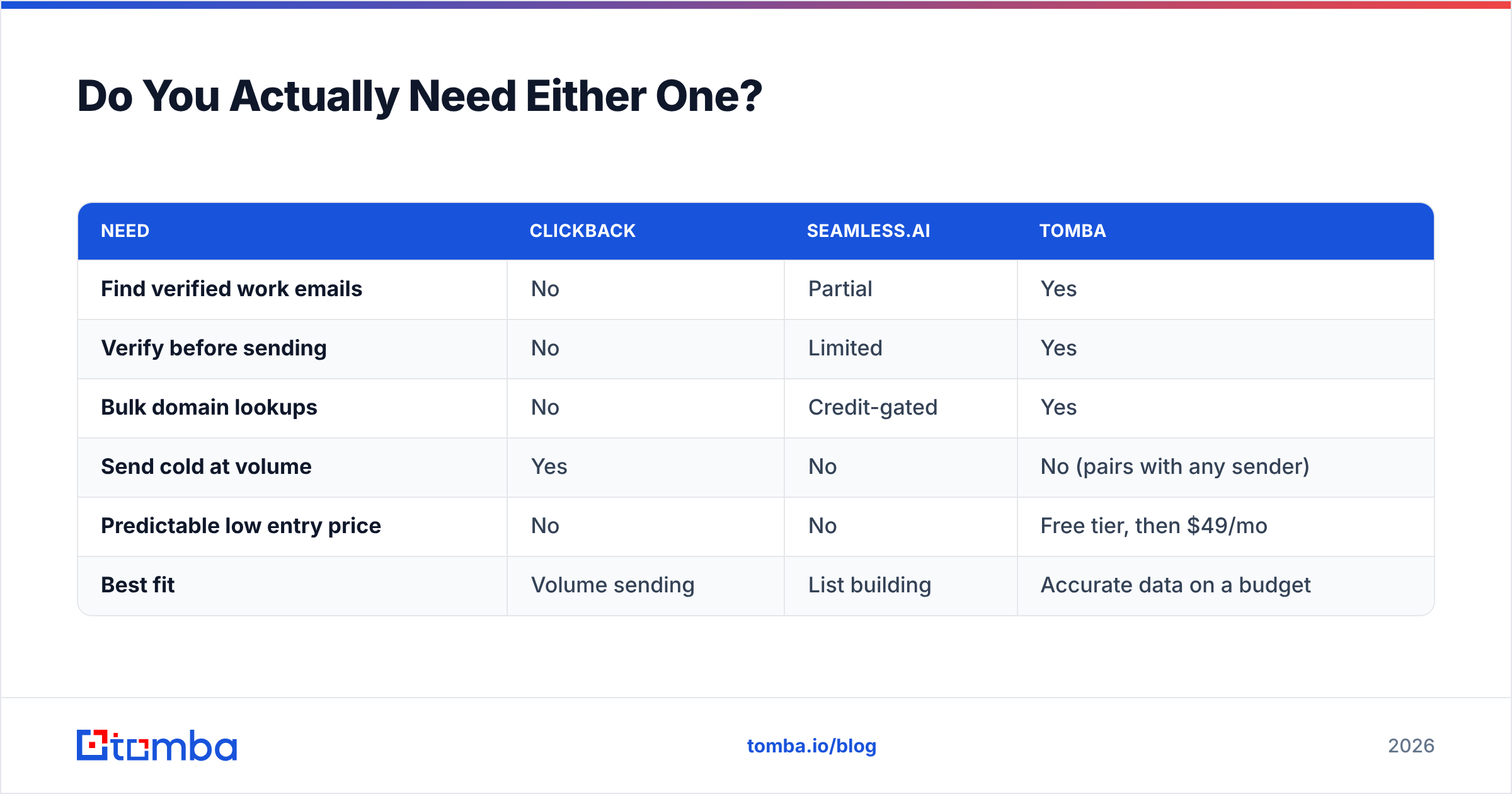
| Need | Clickback | Seamless.AI | Tomba |
|---|---|---|---|
| Find verified work emails | No | Partial | Yes |
| Verify before sending | No | Limited | Yes |
| Bulk domain lookups | No | Credit-gated | Yes |
| Send cold at volume | Yes | No | No (pairs with any sender) |
| Predictable low entry price | No | No | Free tier, then $49/mo |
| Best fit | Volume sending | List building | Accurate data on a budget |
How Do the Three Stack Up on Pricing?#
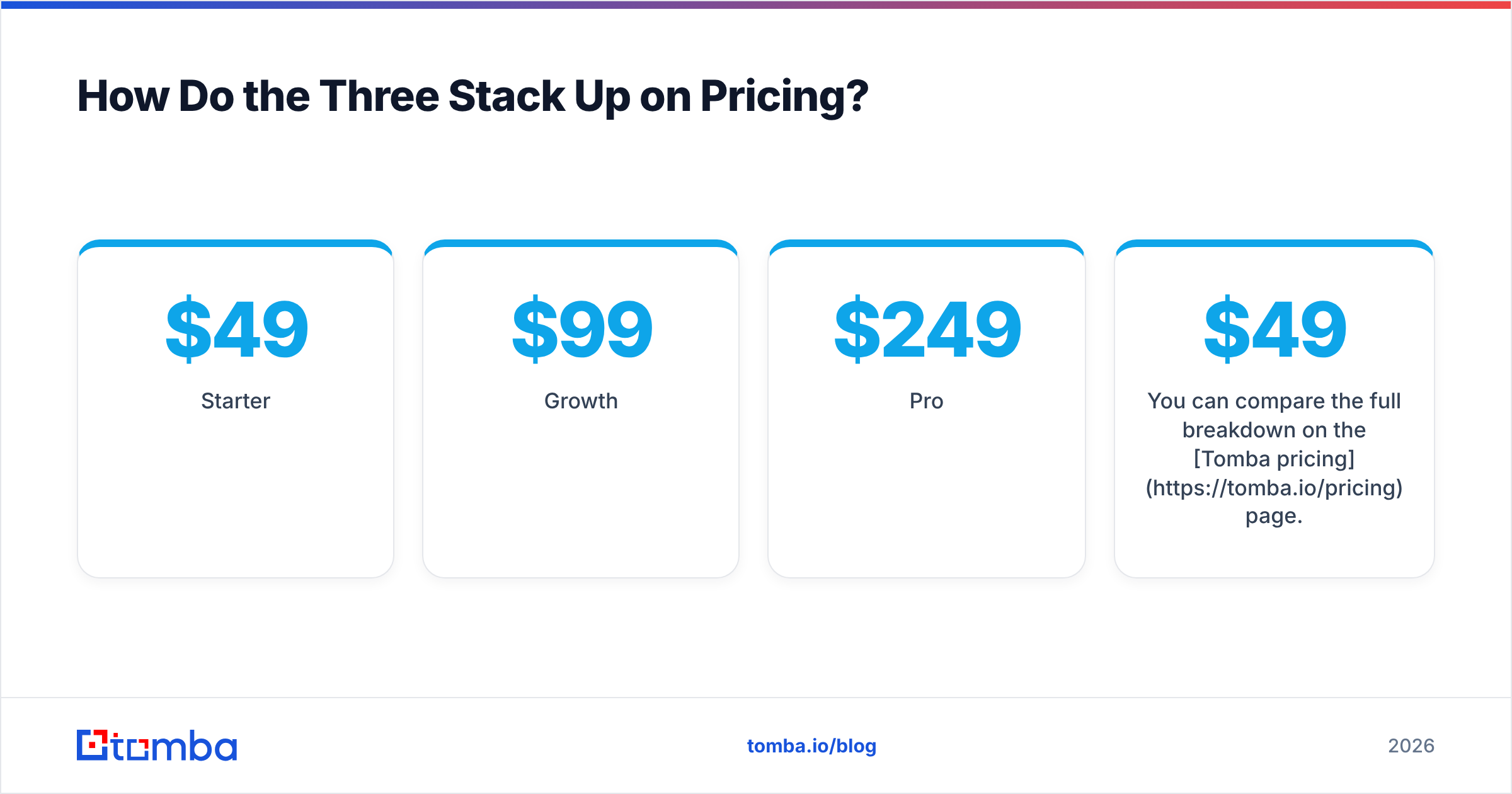
This is where the gap gets loud. Clickback and Seamless.AI both anchor at mid-market price points with annual commitments. Tomba publishes transparent tiers you can start free:
- Free — 25 searches/month, no card required.
- Starter — $49/mo.
- Growth — $99/mo.
- Pro — $249/mo.
- Enterprise — custom.
You can compare the full breakdown on the Tomba pricing page. For a team that mainly needs accurate contacts, starting at $49/mo against four-figure annual contracts is not a rounding error — it's the difference between testing outbound this quarter and waiting for budget approval.
What About Data Accuracy and Deliverability?#
Two different risks live in this comparison, and conflating them burns teams.
Accuracy is Seamless.AI's domain. Real-time search sounds great, but the output quality varies — strong in some industries, noisy in others. Whatever finder you use, you should verify before sending, because even good data decays as people change jobs. A verification step (catch-all handling, SMTP checks, syntax validation) is what protects your sender reputation, and it's why Tomba pairs finding and verifying in one workflow. You can read more about where the data comes from rather than taking any vendor's accuracy claim at face value.
Deliverability is Clickback's domain. Sending cold at volume without dedicated IPs, warmup, and compliance tooling is how domains get blacklisted. Clickback exists precisely because mainstream ESPs won't carry cold lists. But — and this matters — Clickback can only deliver as well as your list is clean. Garbage data plus a great sender equals great-looking bounces.
The honest sequence for cold outbound in 2026 is: find → verify → send. Seamless.AI covers the first leg unevenly, Clickback covers the third leg well, and neither covers verification as a first-class step. That gap is exactly what a dedicated finder-plus-verifier closes.
Clickback vs Seamless.AI: The Verdict#
Choose based on your actual bottleneck, not the louder sales pitch:
- Sourcing is your problem, you live in a CRM, you want phones + emails: Seamless.AI, with eyes open on credits and renewals. Check independent reviews on G2 first.
- Sending is your problem, you own a big list, compliance matters: Clickback. Visit clickback.com to scope volume pricing.
- You mostly need accurate, verified emails without a four-figure contract: skip the bundle. Build the list with a focused finder, verify it, then route it to whatever sender you already use.
The trap is buying a heavy platform to solve a light problem. Most outbound teams don't need an everything-suite — they need clean contacts they can trust and a clear path from data to inbox.
Get Verified B2B Emails Without the Bloat#
If your real goal is reaching the right people — not paying for two overlapping platforms — start with the data. The Tomba Email Finder lets you find professional email addresses by name, domain, or company, verify them before you send, and export straight into your existing outreach or CRM. Begin on the free tier with 25 searches, scale to Starter at $49/mo when you're ready, and keep your sending stack (Clickback or anything else) fed with contacts that actually land. Find the people first; the rest of the funnel gets easier.
Ready to find emails that actually work?
Join 150,000+ professionals who stopped guessing and started sending. Free credits on signup — no credit card required.
Get the Tomba newsletter
Practical outbound tactics and product updates — once every two weeks.
About the author