Cloduraai vs D7 Lead Finder: 2026 Lead Gen Comparison
Cloduraai and D7 Lead Finder solve different lead-gen problems. See pricing, data accuracy, and where each tool wins — plus a faster way to get verified B2B emails.
You are picking a lead-generation tool and two names keep coming up: Clodura.ai and D7 Lead Finder. They look similar on a pricing page, but they were built for opposite jobs. Choose wrong and you either overpay for a sales-intelligence platform you barely use, or you flood your CRM with scraped local listings that bounce on the first send.
This breakdown cuts through it. Here is what each tool actually does, where the data comes from, what you pay, and which one fits your motion in 2026.
TL;DR — Cloduraai vs D7 Lead Finder#
- Clodura.ai is a full B2B sales-intelligence platform: a 600M+ contact database, org charts, buyer intent signals, sequences, and a built-in dialer. Best for SDR teams running structured outbound.
- D7 Lead Finder is a bulk local-business lead scraper. You search a niche plus a city, and it returns business listings (name, site, phone, sometimes a generic email). Best for agencies selling services to local SMBs.
- They are not direct competitors. Clodura targets named B2B accounts; D7 targets local businesses by category. Picking depends on who you sell to, not which is "better."
- Both have a data-quality gap at the contact level — Clodura on email freshness, D7 on email presence entirely. Verify before you send.
- If your real need is accurate, verified email addresses for named prospects, a dedicated email finder beats both on cost-per-valid-contact.
What is Clodura.ai?#
Clodura.ai is an all-in-one B2B sales-intelligence and engagement platform. Think of it as a database, a sequencer, and a dialer stitched into one dashboard — the kind of stack a 10-person SDR team would otherwise buy from three vendors.
Its core pieces:
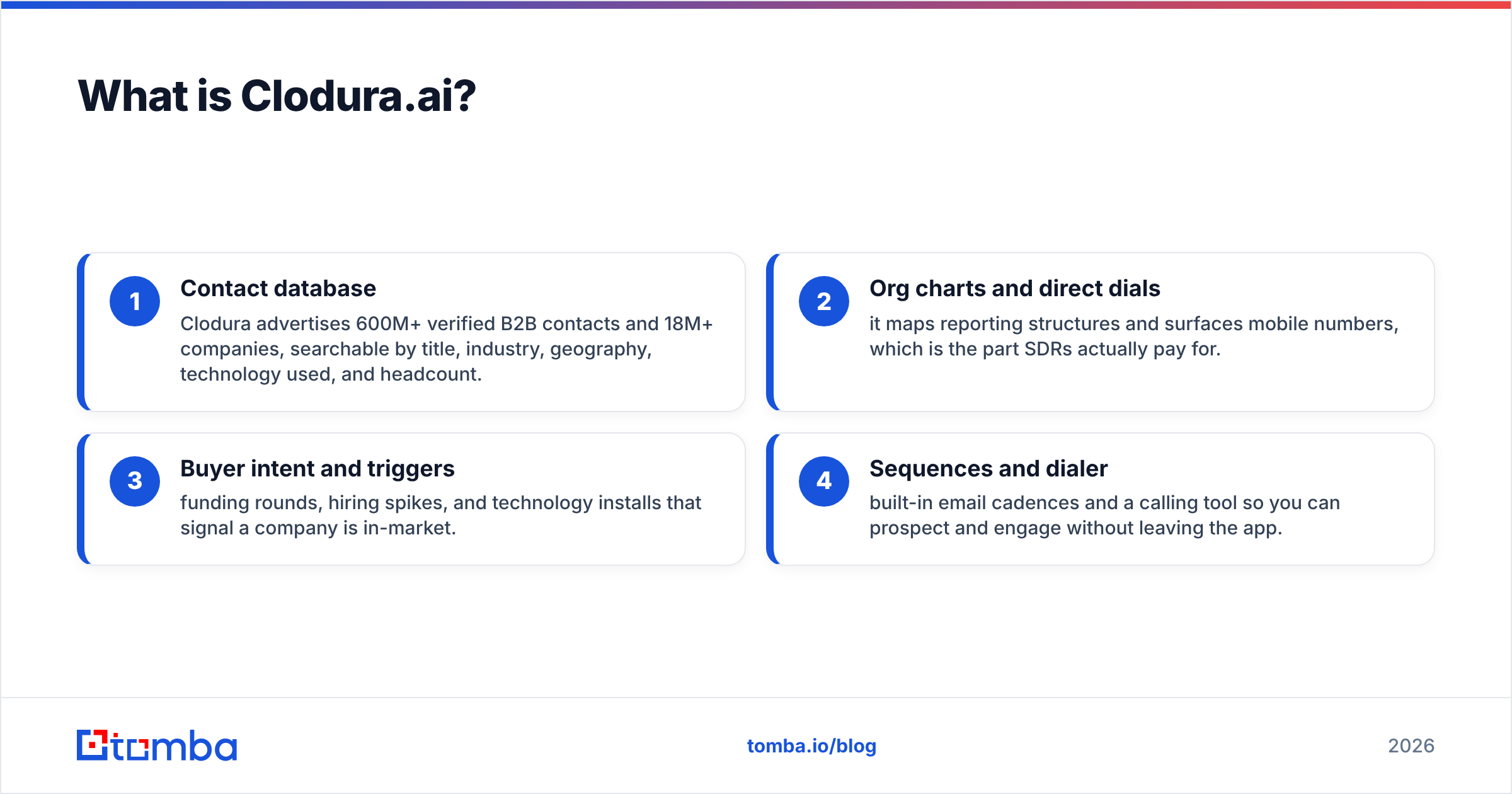
- Contact database — Clodura advertises 600M+ verified B2B contacts and 18M+ companies, searchable by title, industry, geography, technology used, and headcount.
- Org charts and direct dials — it maps reporting structures and surfaces mobile numbers, which is the part SDRs actually pay for.
- Buyer intent and triggers — funding rounds, hiring spikes, and technology installs that signal a company is in-market.
- Sequences and dialer — built-in email cadences and a calling tool so you can prospect and engage without leaving the app.
In short, Clodura wants to be the one screen an outbound rep lives in. That breadth is its selling point and, for a small team, its main cost risk — you pay for modules you may not touch.
What is D7 Lead Finder?#
D7 Lead Finder is a bulk local-lead scraper. You type a business category ("dentists," "roofers," "law firms") and a location, and it returns a spreadsheet of matching businesses pulled largely from public listings and map data.
What a typical D7 row contains:
- Business name
- Website URL
- Phone number
- Physical address and category
- Social profiles when available
- A generic email (often
info@orcontact@) — not always present
This is gold for a local marketing agency cold-calling SMBs, or a service business building a territory list. It is not built to find a named decision-maker's direct email at a 2,000-person enterprise. D7's strength is volume and breadth across local categories; its weakness is depth at the person level.
If you want to understand the building block both tools depend on, our explainer on what is domain search covers how company-level email discovery actually works.
Cloduraai vs D7 Lead Finder: side-by-side comparison#
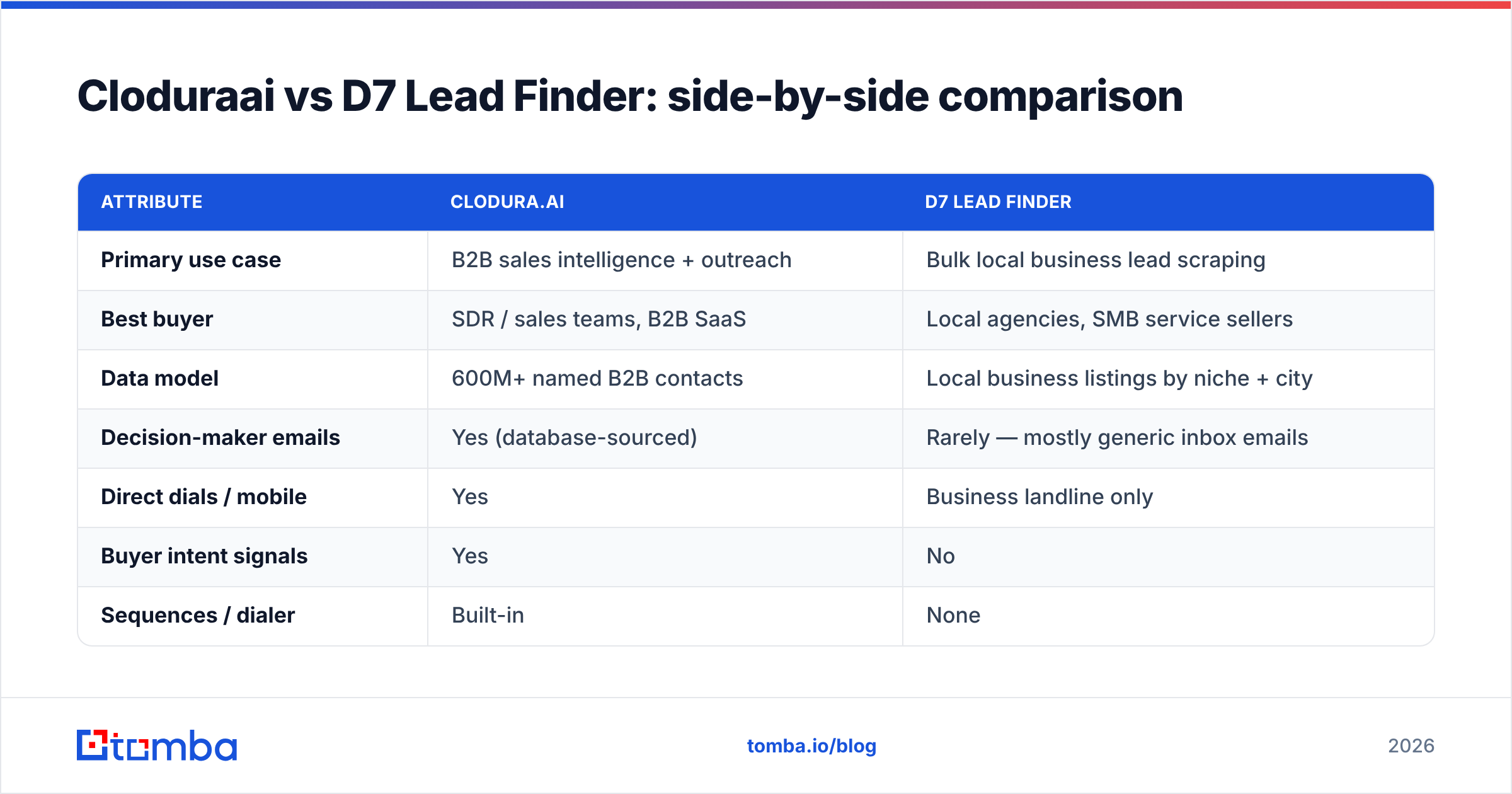
Here is the honest head-to-head. Pricing reflects publicly listed entry plans in 2026; both vendors move tiers often, so confirm on their sites.
| Attribute | Clodura.ai | D7 Lead Finder |
|---|---|---|
| Primary use case | B2B sales intelligence + outreach | Bulk local business lead scraping |
| Best buyer | SDR / sales teams, B2B SaaS | Local agencies, SMB service sellers |
| Data model | 600M+ named B2B contacts | Local business listings by niche + city |
| Decision-maker emails | Yes (database-sourced) | Rarely — mostly generic inbox emails |
| Direct dials / mobile | Yes | Business landline only |
| Buyer intent signals | Yes | No |
| Sequences / dialer | Built-in | None |
| Entry price | ~$33–$39/user/mo (annual) | ~$26.90/mo (lowest tier) |
| Free option | Limited free plan | 7-day trial style access |
| Email verification | Built-in, varies by freshness | Not a focus |
| Export | CSV, CRM sync | CSV |
The pattern is clear. Clodura is a per-seat sales platform; D7 is a low-cost list machine. Their prices look comparable, but you are buying different things — a workflow versus a spreadsheet.
Which has better data quality?#
Different failure modes, same lesson: verify before you send.
Clodura sources named-contact data from a large aggregated database. The risk with any database of that size is staleness — people change jobs every 18 months on average, so a "verified" record from last quarter may already bounce. The org charts and intent signals are genuinely useful, but treat the email field as a starting point, not a guarantee.
D7 is scraping public listings, so its accuracy depends on what the business published. Phone numbers tend to be solid. Emails are the weak spot — many rows have no personal email at all, just a shared info@ address that lands in a monitored-but-ignored inbox. For cold email that targets a person, that is a dead end.
This is where a verification step pays for itself. Running any exported list through an email verifier before your first campaign protects your sender reputation and keeps your bounce rate under the 2% threshold that mailbox providers watch. Neither Clodura nor D7 makes verification its core competency, so the responsibility lands on you.
For deliverability fundamentals, HubSpot's guidance on email bounce rate explains why a clean list matters more than a big one.
Cloduraai vs D7 Lead Finder pricing: what you actually pay#
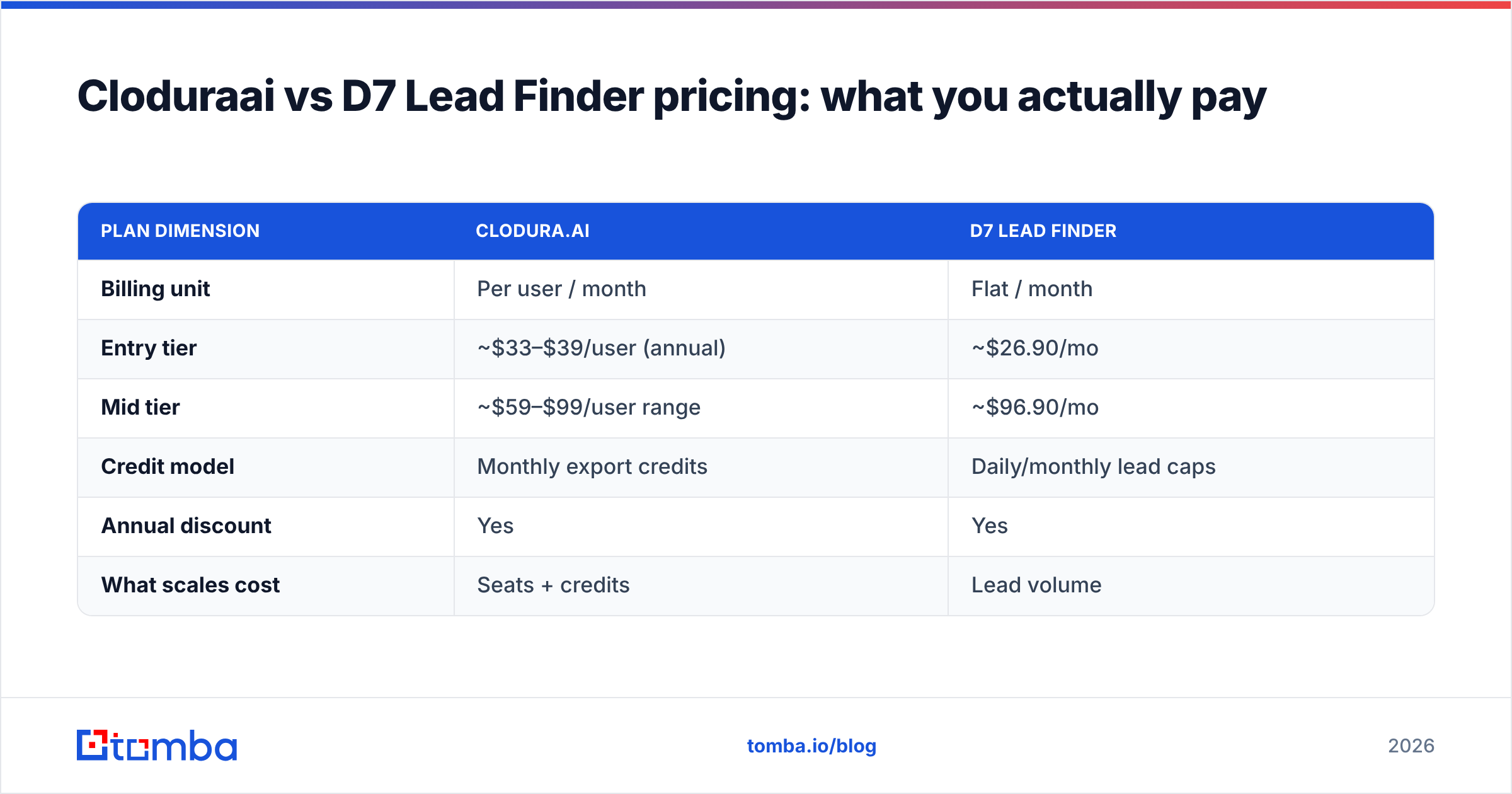
Sticker price is misleading because the unit differs. Clodura charges per user per month with credit caps on exports. D7 charges a flat monthly rate tied to how many leads you can pull.
| Plan dimension | Clodura.ai | D7 Lead Finder |
|---|---|---|
| Billing unit | Per user / month | Flat / month |
| Entry tier | ~$33–$39/user (annual) | ~$26.90/mo |
| Mid tier | ~$59–$99/user range | ~$96.90/mo |
| Credit model | Monthly export credits | Daily/monthly lead caps |
| Annual discount | Yes | Yes |
| What scales cost | Seats + credits | Lead volume |
For a three-person SDR team, Clodura's per-seat model adds up fast — you are paying for the platform three times. D7 stays flat regardless of headcount because one operator can pull lists for everyone. That flat structure is exactly why agencies like it and why enterprise sales teams outgrow it.
If you only need accurate emails rather than a full platform or a bulk scraper, compare both against transparent per-search Tomba pricing — the cost-per-valid-contact is usually the number that decides your budget.
When should you choose Clodura.ai?#
Pick Clodura if most of these are true:
- You sell B2B to named accounts and need decision-maker titles, not business categories.
- You run structured outbound and want sequences plus a dialer in one tool.
- Intent data drives your prioritization — funding, hiring, and tech-install triggers matter to your motion.
- You have a team of reps who each need a seat and will use the engagement features daily.
Clodura earns its price when the whole platform gets used. If your reps only ever export contacts and ignore the sequencer and dialer, you are paying platform money for a database. That is the most common reason teams churn off it — and a frequent driver behind searching for an Apollo alternative or a leaner stack.
When should you choose D7 Lead Finder?#
Pick D7 if:
- You sell to local SMBs — restaurants, contractors, clinics, retailers.
- You work by territory or niche, not by named company.
- Volume beats precision for your motion — you cold-call from lists and qualify on the phone.
- You want a flat, predictable cost independent of team size.
D7 is a workhorse for agencies that need 5,000 local businesses in a metro by Friday. Just go in knowing the email coverage is thin, so a phone-first or website-form-first follow-up usually outperforms cold email from a D7 list.
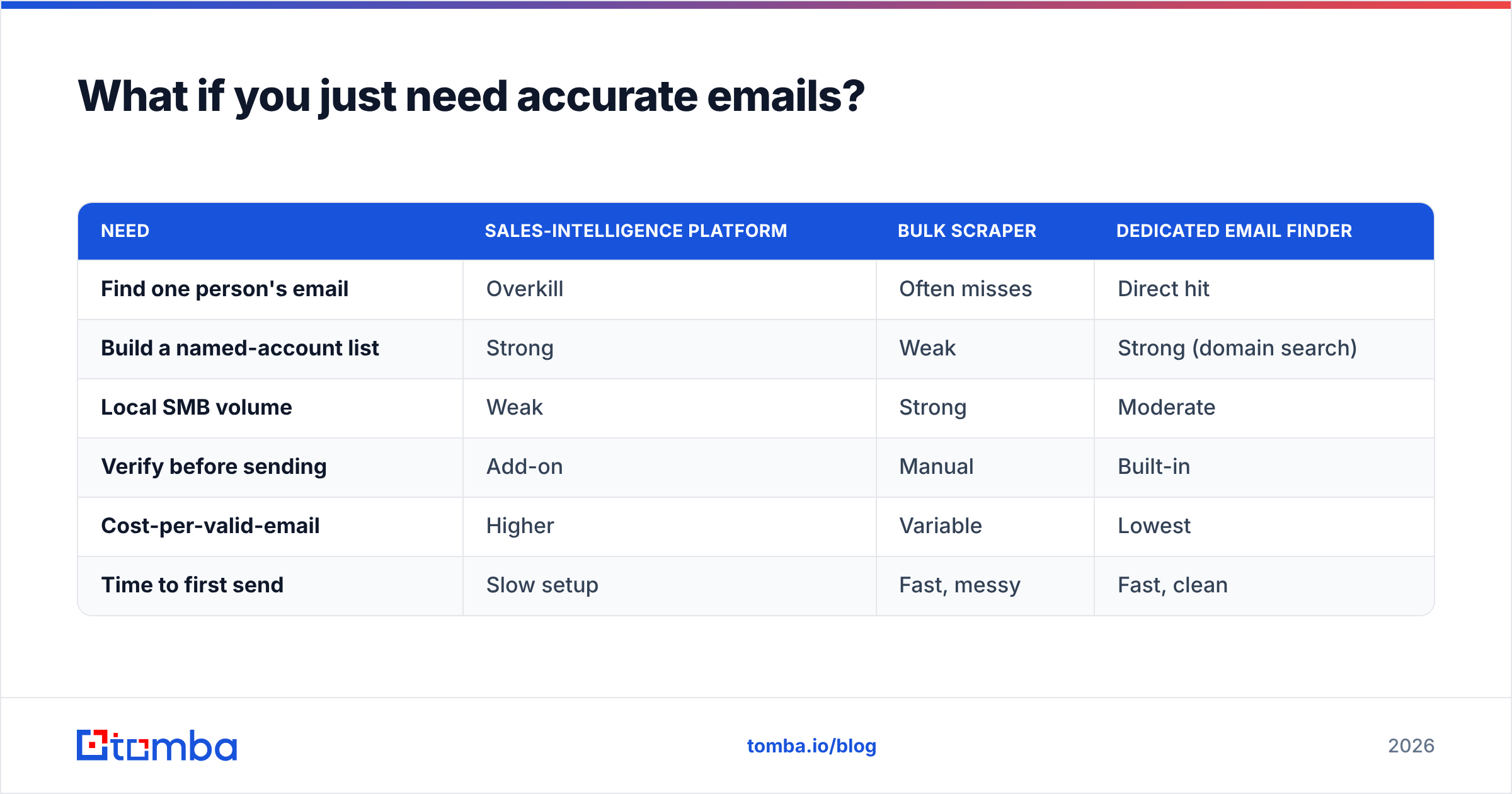
What if you just need accurate emails?#
Here is the uncomfortable truth both tools dance around: a lot of teams buy a platform or a scraper when what they actually need is verified email addresses for specific people. You already know who you want to reach — you just need the right address that lands in the inbox.
That is a narrower, cheaper problem than "buy a sales-intelligence suite." A dedicated email finder takes a name and a company domain and returns the verified professional email, with a confidence score and the source. No per-seat platform tax, no scraping a city of generic inboxes.
How the focused approach compares to the all-in-one tools:
| Need | Sales-intelligence platform | Bulk scraper | Dedicated email finder |
|---|---|---|---|
| Find one person's email | Overkill | Often misses | Direct hit |
| Build a named-account list | Strong | Weak | Strong (domain search) |
| Local SMB volume | Weak | Strong | Moderate |
| Verify before sending | Add-on | Manual | Built-in |
| Cost-per-valid-email | Higher | Variable | Lowest |
| Time to first send | Slow setup | Fast, messy | Fast, clean |
For named-account work, pairing domain search (every email pattern at a company) with bulk verification gives you a clean list without paying for a dialer, an org-chart module, and intent data you will not open. G2's lead intelligence category is a useful neutral place to sanity-check how buyers rate each tool type before you commit.
The bottom line#
There is no universal winner in Cloduraai vs D7 Lead Finder — there is only a winner for your motion.
- Sell B2B to named accounts with a real SDR team? Clodura.ai's platform breadth justifies the per-seat cost — if your team uses all of it.
- Sell services to local businesses at volume? D7 Lead Finder's flat-rate scraping is hard to beat on cost-per-lead.
- Just need verified emails for people you already identified? Neither — a dedicated finder is faster and cheaper per valid contact.
Whatever you pick, the verification step is non-negotiable. The biggest cost in lead gen is not the tool subscription; it is a damaged sender reputation from blasting an unverified list.
Want to skip the platform tax and get verified, source-backed B2B emails on demand? Try the Tomba Email Finder. Start on the free tier with 25 searches a month, then scale to Starter at $49/mo or Growth at $99/mo when your pipeline does — no per-seat lock-in, just accurate emails that reach the inbox.
// get started
Find, verify and enrich your first contacts today
Start on the free plan with 25 searches a month, then scale when your team is ready.
Free plan · No credit card required · GDPR & CCPA
// about the author