Cufinder vs No2Bounce (2026): Which B2B Data Tool Wins?
Cufinder finds leads; No2Bounce cleans lists. We compare accuracy, pricing, and real use cases for 2026 — plus a cheaper all-in-one pick that does both.
Cufinder and No2Bounce get bundled into the same "B2B email tools" bucket, but they solve different halves of the same problem. Cufinder finds contacts and enriches company data. No2Bounce verifies email addresses so your list doesn't bounce. If you're trying to decide between them, the honest answer is that most teams eventually need both jobs done — the real question is whether you buy two tools or one that covers the whole workflow.
This comparison breaks down what each platform actually does, where accuracy holds up, how pricing shakes out, and which one fits your stack in 2026.
TL;DR: Cufinder vs No2Bounce at a glance#
- Cufinder is a B2B lead-generation and data-enrichment platform: it finds emails, phone numbers, and company data from a name or domain.
- No2Bounce is a dedicated email-verification service: it takes a list you already have and flags invalid, risky, and catch-all addresses to cut your bounce rate.
- They're complementary, not direct rivals. Cufinder gets you contacts; No2Bounce cleans them before you send.
- Neither does the full loop alone — you'll likely pair them, which means two subscriptions, two dashboards, and two credit systems.
- If you want find + verify in one place, an all-in-one like Tomba Email Finder covers both jobs on a single plan with a real free tier.
What is Cufinder?#
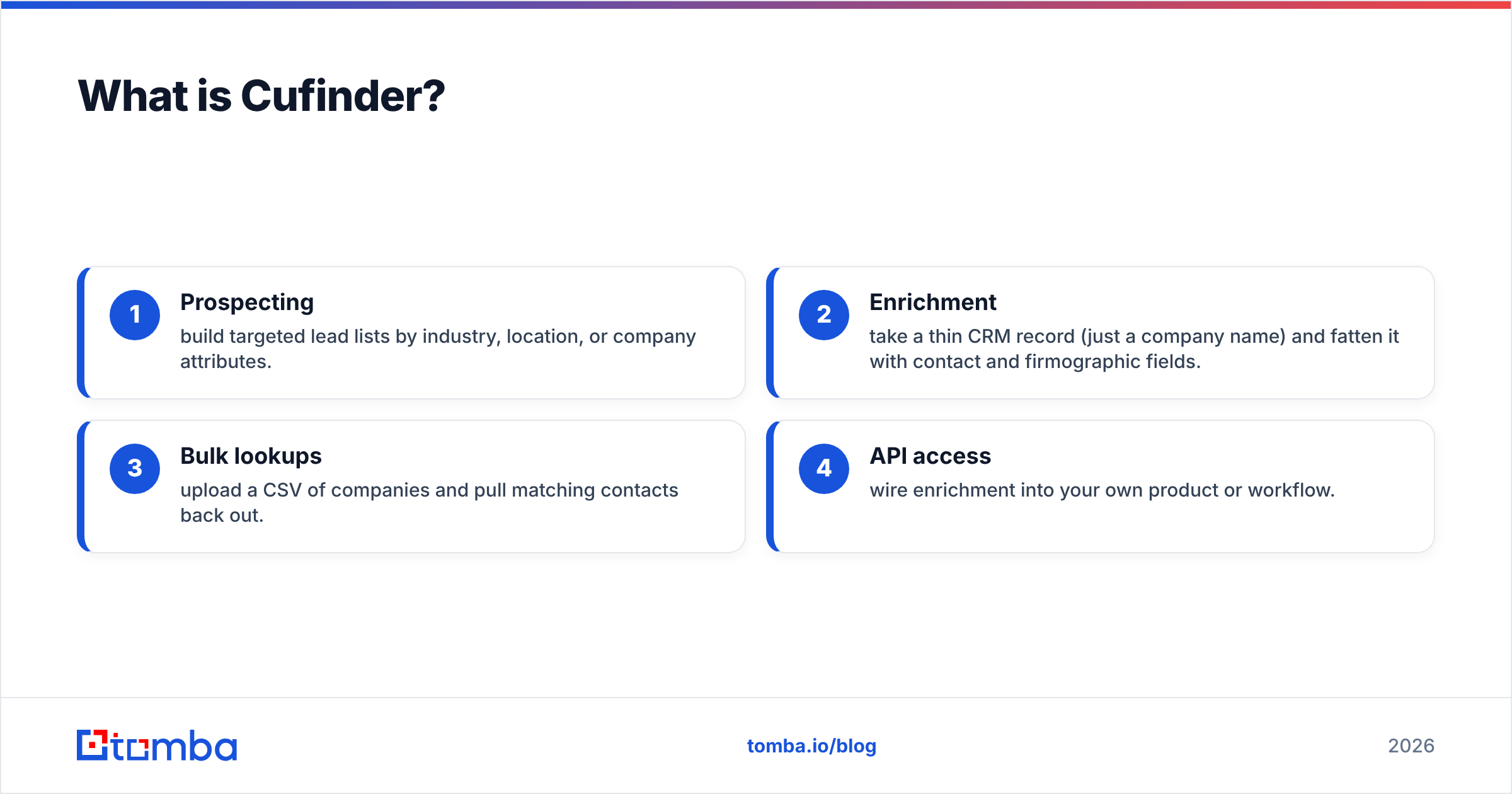
Cufinder is an AI-powered B2B prospecting and enrichment platform. You give it a company name, domain, or a person's name, and it returns work emails, phone numbers, LinkedIn profiles, and firmographic data like industry, size, and tech stack. It leans on a large company database and positions itself as an enrichment engine you can plug into your CRM or run in bulk.
The core use cases are:
- Prospecting — build targeted lead lists by industry, location, or company attributes.
- Enrichment — take a thin CRM record (just a company name) and fatten it with contact and firmographic fields.
- Bulk lookups — upload a CSV of companies and pull matching contacts back out.
- API access — wire enrichment into your own product or workflow.
Cufinder's strength is breadth: it's trying to be the front of your funnel, where raw contact discovery happens. Its weakness is the same as every finder — the data is only as good as its freshness, and a found email still has to survive a verification step before you trust it.

What is No2Bounce?#
No2Bounce is a focused email-verification tool. It doesn't find contacts — it validates the ones you bring. You upload a list, and it runs each address through checks for syntax, domain/MX records, mailbox existence, disposable domains, role accounts (like info@ or sales@), and catch-all servers. The output is a cleaner list segmented into deliverable, undeliverable, and risky buckets.
Why that matters: mailbox providers punish senders who hit dead addresses. A high bounce rate tanks your sender reputation and drags down inbox placement for every campaign after. Verification is the insurance policy that keeps your email deliverability intact.
No2Bounce competes in the same lane as ZeroBounce, Bouncer, and Debounce. Its job starts after you already have addresses — which is exactly why comparing it head-to-head with Cufinder is a bit apples-to-oranges. One fills the bucket; the other checks the bucket for holes.
Cufinder vs No2Bounce: the core difference#
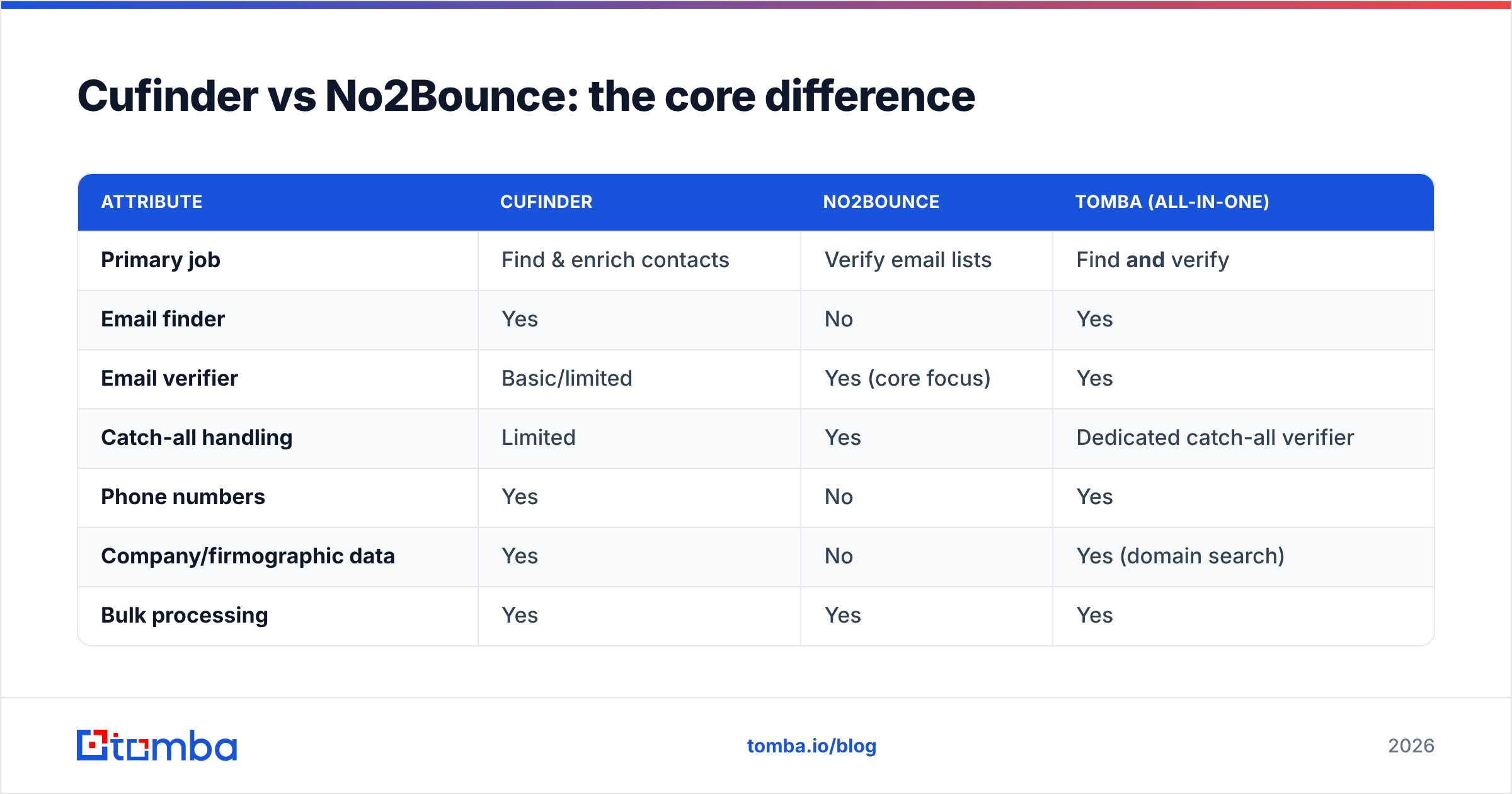
Here's the cleanest way to think about it: Cufinder is offense, No2Bounce is defense.
| Attribute | Cufinder | No2Bounce | Tomba (all-in-one) |
|---|---|---|---|
| Primary job | Find & enrich contacts | Verify email lists | Find and verify |
| Email finder | Yes | No | Yes |
| Email verifier | Basic/limited | Yes (core focus) | Yes |
| Catch-all handling | Limited | Yes | Dedicated catch-all verifier |
| Phone numbers | Yes | No | Yes |
| Company/firmographic data | Yes | No | Yes (domain search) |
| Bulk processing | Yes | Yes | Yes |
| Free tier | Limited trial | Trial credits | 25 searches/mo, free |
| API | Yes | Yes | Yes |
| Best for | Building lead lists | Cleaning lead lists | Doing both on one plan |
The table makes the gap obvious: if you only buy Cufinder, you still need a verifier before you send. If you only buy No2Bounce, you have nothing to verify until another tool finds the addresses. That's the structural reason teams end up paying twice.
How accurate are Cufinder and No2Bounce?#
Accuracy means two different things here, so judge each on its own axis.
For Cufinder, accuracy is match rate and correctness — of the contacts you request, how many come back, and how many of those are the right, current email. Finder accuracy across the industry ranges widely; the honest benchmark is that no finder hits 100%, and claims above ~95% deserve scrutiny. Freshness matters more than raw database size, because people change jobs constantly.

For No2Bounce, accuracy is verification precision — does it correctly catch dead mailboxes without false-flagging good ones, and how does it handle catch-all domains (servers that accept everything, so mailbox-level checks are inconclusive). Catch-all handling is where verifiers separate themselves; a tool that just marks every catch-all "risky" and moves on isn't doing much. A tool that probes intelligently — like a dedicated catch-all finder — recovers addresses others discard.
The practical takeaway: you can't verify your way to good data if the finder gave you stale contacts, and you can't trust a great finder without a verification pass. Accuracy is a two-step property, which is another argument for keeping both steps under one roof where they share the same data signals.
Pricing: Cufinder vs No2Bounce vs an all-in-one#
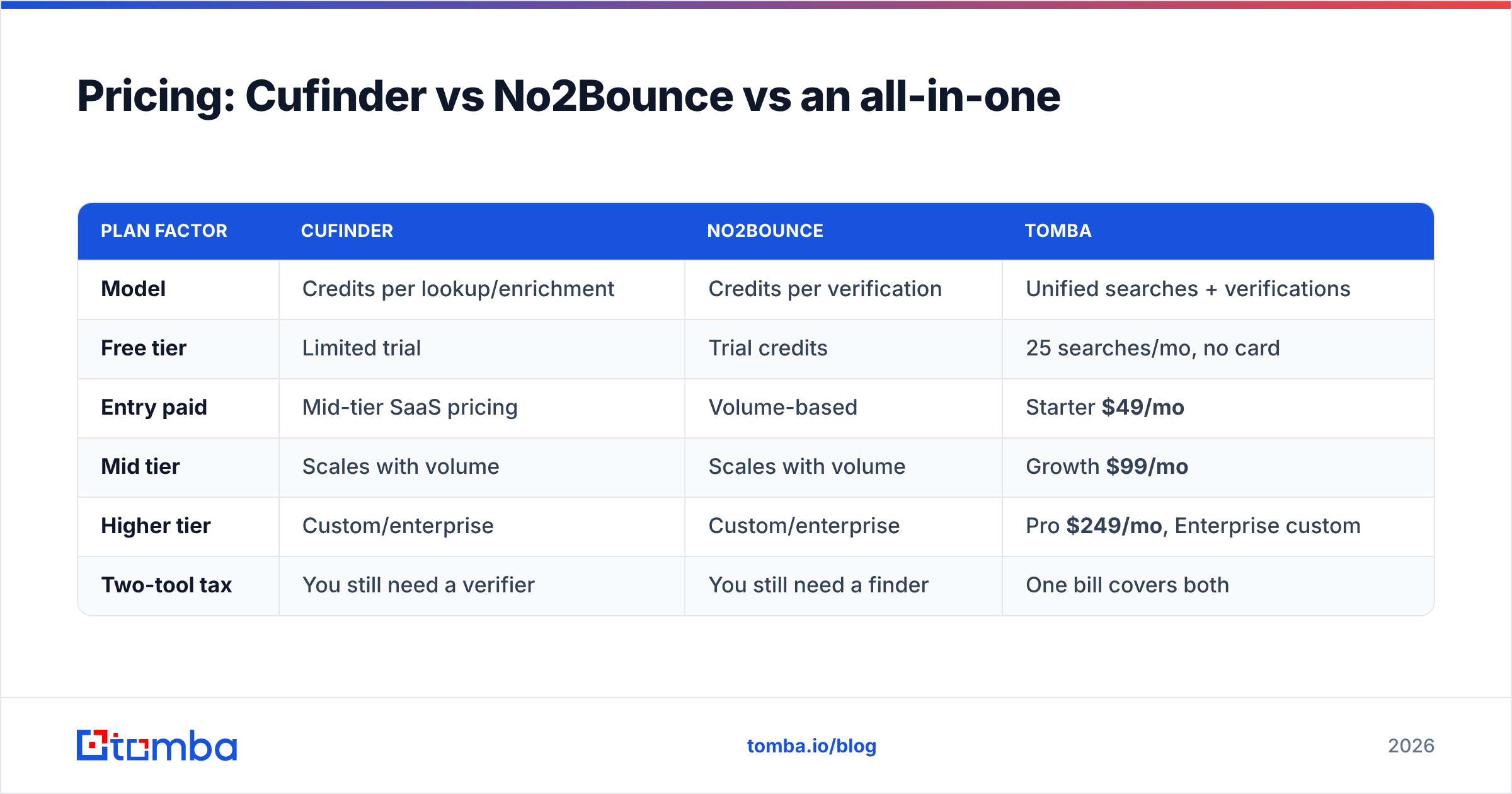
Both tools sell credits, but they meter different actions — Cufinder charges per enrichment/lookup, No2Bounce per verification. Stacking them means budgeting two credit pools that don't talk to each other. Exact list prices shift, so confirm current numbers on each vendor's own page and cross-check reviews on G2 or Capterra before you commit.
| Plan factor | Cufinder | No2Bounce | Tomba |
|---|---|---|---|
| Model | Credits per lookup/enrichment | Credits per verification | Unified searches + verifications |
| Free tier | Limited trial | Trial credits | 25 searches/mo, no card |
| Entry paid | Mid-tier SaaS pricing | Volume-based | Starter $49/mo |
| Mid tier | Scales with volume | Scales with volume | Growth $99/mo |
| Higher tier | Custom/enterprise | Custom/enterprise | Pro $249/mo, Enterprise custom |
| Two-tool tax | You still need a verifier | You still need a finder | One bill covers both |
The math that gets overlooked: two mid-tier subscriptions almost always cost more than one all-in-one plan that does find and verify together — before you count the operational overhead of reconciling two exports. See full Tomba pricing for the combined-plan breakdown.

When should you pick Cufinder?#
Choose Cufinder if your bottleneck is discovery, not cleaning. It's a reasonable pick when:
- You're building lists from scratch and need company + contact data enriched at scale.
- You already have a verifier you trust (or your ESP verifies inline) and just need the front-of-funnel filled.
- Firmographic enrichment is the point — you want tech stack, headcount, and industry tags, not just an email.
- You're wiring enrichment into a product and want an API to hydrate records automatically.
Cufinder is the wrong choice if you expected it to also guarantee deliverability. Finding an address and confirming it's live are separate operations, and a finder-first tool won't give you the verification depth a dedicated service does.
When should you pick No2Bounce?#
Choose No2Bounce if your bottleneck is list hygiene. It fits when:
- You have a big existing list — from events, sign-ups, or a legacy CRM — and bounce rates are hurting you.
- You send high volume and need to protect sender reputation before every send.
- You import from multiple sources and need one gate to standardize quality.
- You're already sourcing contacts elsewhere and just need a clean-up layer.
No2Bounce is the wrong choice as your only tool if you don't yet have addresses to check — it has no discovery engine. It's a defensive layer, and defense alone doesn't fill a pipeline.
Do you actually need both — or one tool that does both?#
For most sales and marketing teams, the honest workflow is: find → verify → send. Cufinder covers the first arrow, No2Bounce covers the second. Running them separately works, but you pay two bills, manage two credit systems, and shuttle CSVs between dashboards.
The alternative is a platform that does both natively. Tomba's email finder discovers work emails by name, domain, or company, and its built-in email verifier runs deliverability checks in the same pass — including catch-all verification that many single-purpose verifiers punt on. Add bulk lead generation for CSV-scale jobs and a real free tier (25 searches/month, no card), and you collapse two subscriptions into one.
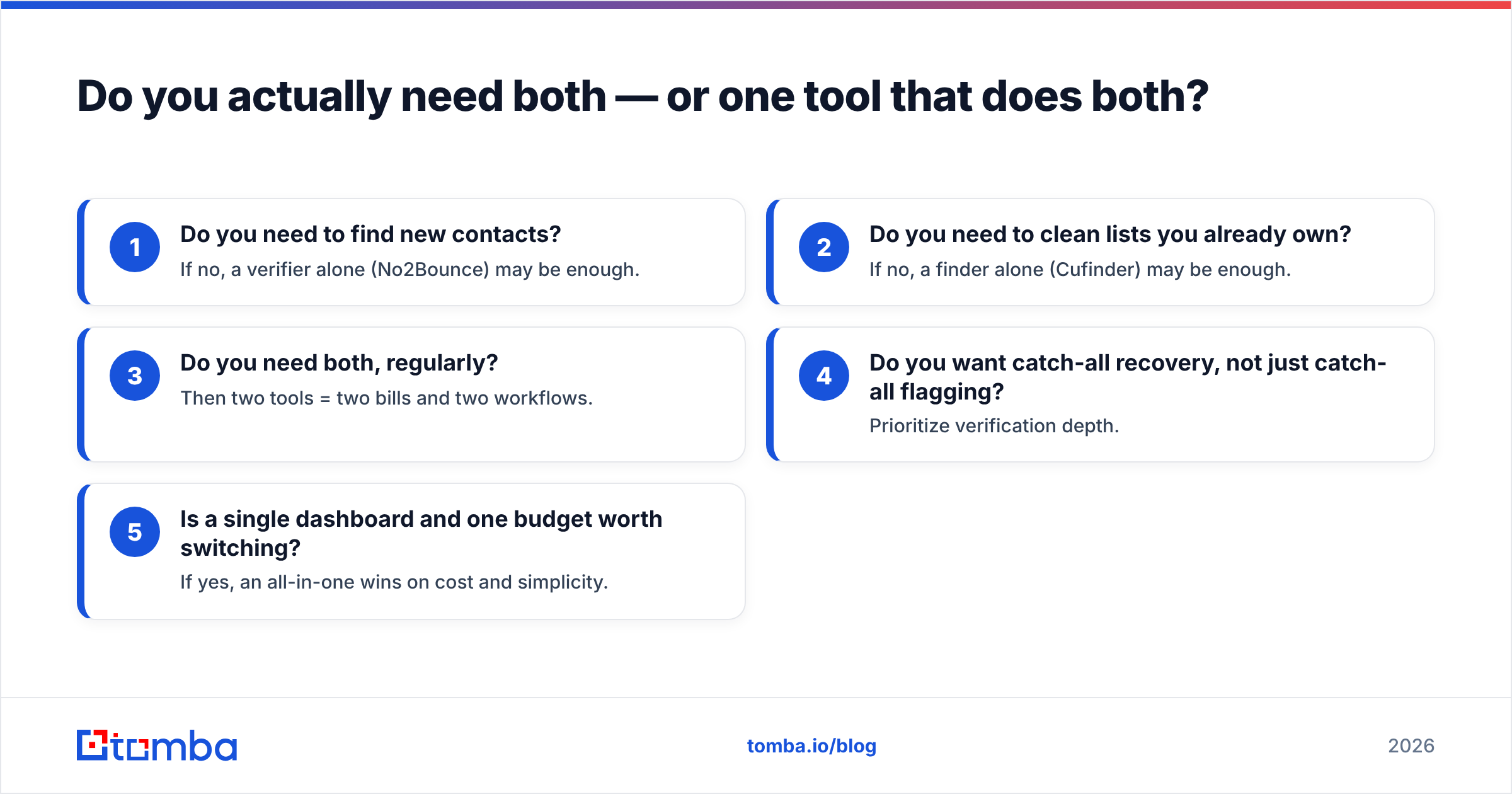
Here's the decision in five questions:
- Do you need to find new contacts? If no, a verifier alone (No2Bounce) may be enough.
- Do you need to clean lists you already own? If no, a finder alone (Cufinder) may be enough.
- Do you need both, regularly? Then two tools = two bills and two workflows.
- Do you want catch-all recovery, not just catch-all flagging? Prioritize verification depth.
- Is a single dashboard and one budget worth switching? If yes, an all-in-one wins on cost and simplicity.
Cufinder vs No2Bounce: the verdict#
Cufinder and No2Bounce aren't really competitors — they're two ends of the same pipeline. Cufinder wins if you only need discovery and enrichment. No2Bounce wins if you only need verification and list hygiene. But "only" is doing heavy lifting in both sentences, because a working outbound motion needs both jobs done well.
If you genuinely only have one problem, buy the specialist that solves it. If you have the full find-and-verify loop — which most growing teams do — running two point tools is the expensive, fiddly path. Consolidating into one platform cuts the two-tool tax and keeps your finding and verifying signals in sync.
That's where Tomba Email Finder fits: find professional emails by domain, name, or company, verify them in the same workflow, and start free with 25 searches a month before scaling to a $49/mo Starter plan. Try it against your own list, compare match and bounce rates side by side, and let the numbers pick your winner.
Sources: g2.com, capterra.com
Related guides#
Ready to find emails that actually work?
Join 150,000+ professionals who stopped guessing and started sending. Free credits on signup — no credit card required.
Get the Tomba newsletter
Practical outbound tactics and product updates — once every two weeks.
About the author