GrowMeOrganic vs Mailstand (2026): Which Cold Email Tool Wins?
One tool builds your list, the other protects your inbox. Here is an honest, feature-by-feature breakdown of GrowMeOrganic vs Mailstand — pricing, data quality, sending limits, and who each one actually fits.
GrowMeOrganic vs Mailstand is a common shortlist in cold outreach. It is also a bit of a trap. The two tools do not do the same job. One builds your list. The other spreads your sending across many mailboxes. Pick by your bottleneck, not by price.
TL;DR
- GrowMeOrganic and Mailstand are not the same product. GrowMeOrganic is an all-in-one prospecting suite: B2B database, LinkedIn extraction, email finder, and sequences. Mailstand is a sending-side tool. It links many mailboxes and spreads volume across them.
- If your bottleneck is finding people, GrowMeOrganic is the closer fit. If your bottleneck is landing in the inbox at volume, Mailstand is the closer fit.
- GrowMeOrganic wins on breadth and price-per-feature. Mailstand wins on mailbox management, rotation, and keeping per-inbox volume low.
- Neither one is a best-in-class data provider. Both are usually paired with a dedicated email finder and verifier before send.
- The realistic 2026 stack has three parts: a data layer, a sending layer, and a verification step in between. One tool rarely does all three well.
What are GrowMeOrganic and Mailstand?#
Think of it like a restaurant. GrowMeOrganic is the supplier that shows up with the ingredients: the contacts, the company filters, the LinkedIn exports. Mailstand is the kitchen line that gets plates out without burning anything: the mailboxes, the rotation, the throttling. You need both. Confusing one for the other is why a lot of outbound programs stall.
Here is the split in plain terms:
- GrowMeOrganic — a prospecting suite. GrowMeOrganic bundles a B2B contact database, a Chrome extension for LinkedIn and Sales Navigator, an email finder, a basic verifier, and a cold email sequencer. The pitch is "one subscription instead of five."
- Mailstand — a sending and mailbox layer. Mailstand links many email accounts and unifies them into shared campaigns. It then splits send volume so no single mailbox looks like a spam cannon. The value shows up when you run many domains and inboxes at once.
The overlap between them is real, and it is where most buyers get confused:
- Overlap zone. Both let you write a sequence, schedule follow-ups, and track opens and replies. That surface-level similarity is why they get compared. It is also why buyers get burned when they pick the wrong one.
- Where they both stop short. Neither company is built around data accuracy. GrowMeOrganic's database is broad but uneven by region and seniority. Mailstand assumes you arrive with a list already built.
- What that means for your budget. On paper, either tool replaces a dedicated email finder. In practice, skipping a real finder and a verification step is the top reason cold email programs post 8–15% bounce rates.
GrowMeOrganic vs Mailstand: how do they compare feature by feature?#
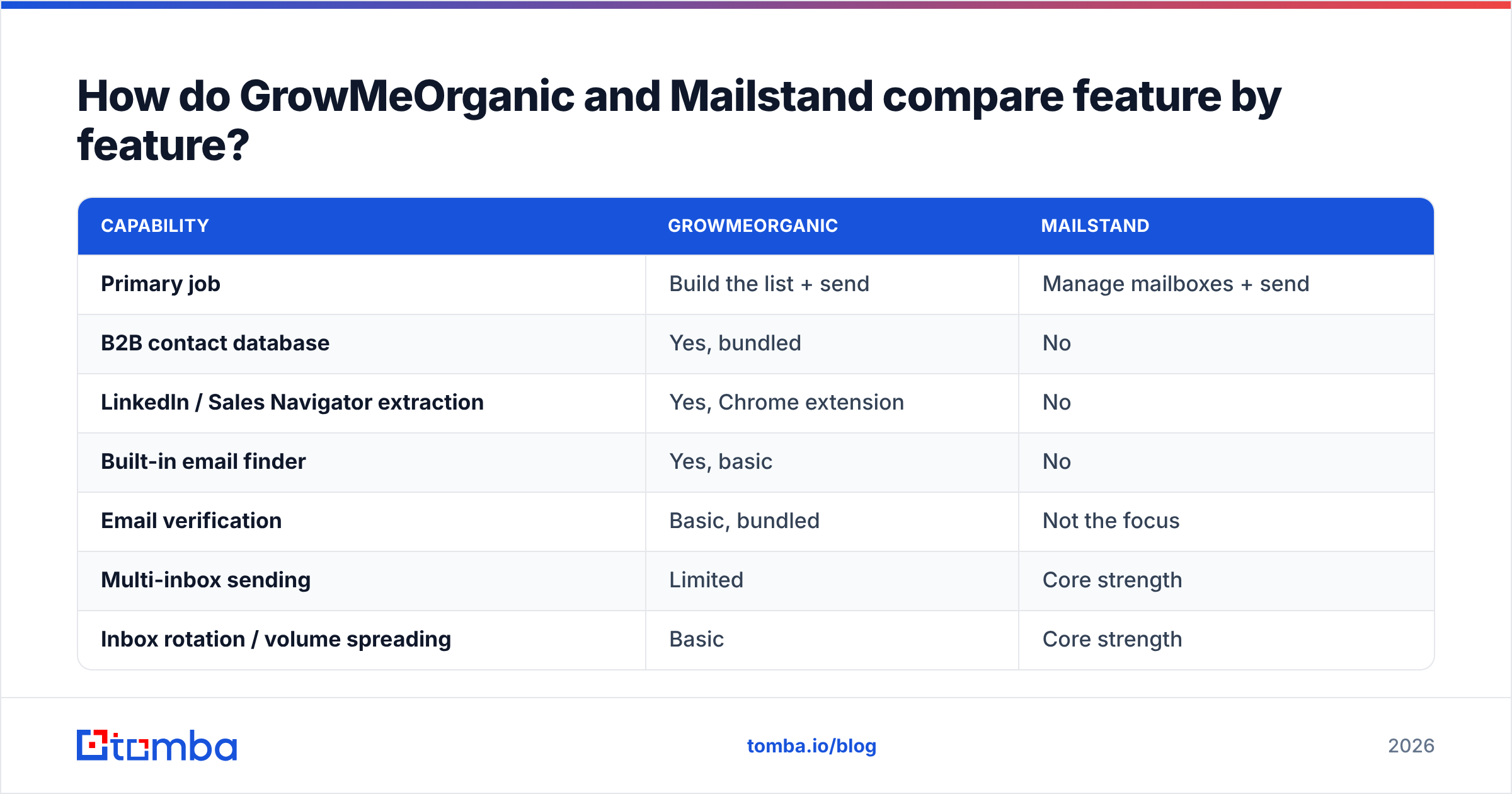
The honest question is not "which is better." It is "which layer of the problem does each one own?"
| Capability | GrowMeOrganic | Mailstand |
|---|---|---|
| Primary job | Build the list + send | Manage mailboxes + send |
| B2B contact database | Yes, bundled | No |
| LinkedIn / Sales Navigator extraction | Yes, Chrome extension | No |
| Built-in email finder | Yes, basic | No |
| Email verification | Basic, bundled | Not the focus |
| Multi-inbox sending | Limited | Core strength |
| Inbox rotation / volume spreading | Basic | Core strength |
| Unified inbox for replies | Limited | Yes |
| Sequences with conditional steps | Yes | Yes |
| Best for | Solo founders, agencies building lists from scratch | Teams running 10+ mailboxes across domains |
| Weakest at | Data accuracy at scale, deliverability tooling | Sourcing contacts — you must bring your own |
Read that table twice before you look at price. Most people who chose wrong compared the monthly cost. They should have compared which column solved their real constraint.
How does pricing compare in 2026?#
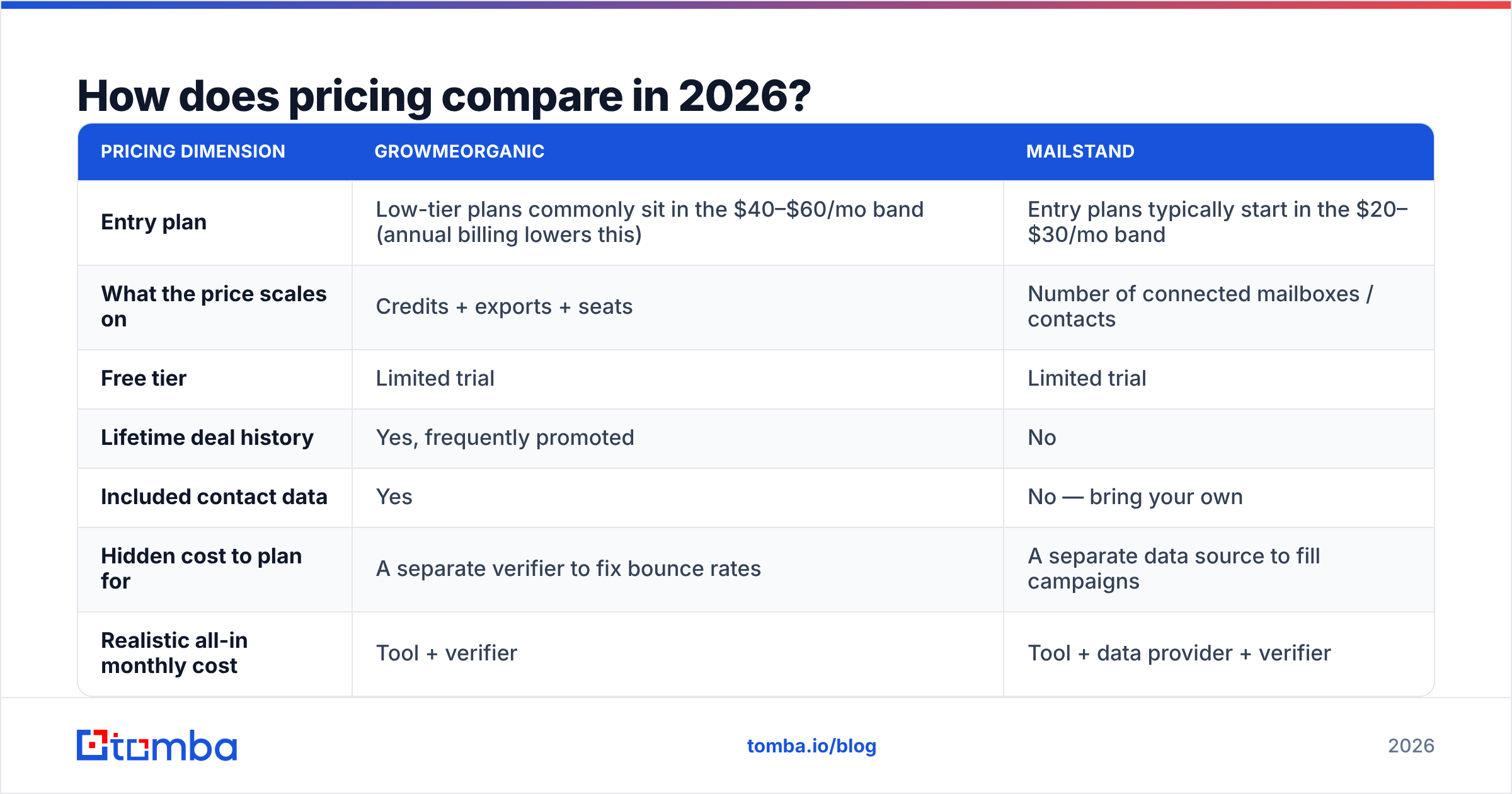
Pricing is where most GrowMeOrganic vs Mailstand comparisons start and stop. That is a mistake, but here are the numbers. Both platforms move their prices often. GrowMeOrganic in particular runs lifetime and annual deals that make list prices misleading. Treat the figures below as bands, and confirm them on each vendor's pricing page before you buy.
| Pricing dimension | GrowMeOrganic | Mailstand |
|---|---|---|
| Entry plan | Low-tier plans commonly sit in the $40–$60/mo band (annual billing lowers this) | Entry plans typically start in the $20–$30/mo band |
| What the price scales on | Credits + exports + seats | Number of connected mailboxes / contacts |
| Free tier | Limited trial | Limited trial |
| Lifetime deal history | Yes, frequently promoted | No |
| Included contact data | Yes | No — bring your own |
| Hidden cost to plan for | A separate verifier to fix bounce rates | A separate data source to fill campaigns |
| Realistic all-in monthly cost | Tool + verifier | Tool + data provider + verifier |
The "hidden cost" row matters more than the headline price. GrowMeOrganic looks cheap because data is included. Then you measure how much of that data bounces, and you add a verifier bill on top. Mailstand looks cheap because it does one job. Then you realise you still need to buy contacts.
Buyer reviews on G2 are a better signal than vendor pages. Look for reviews that mention bounce rate and data freshness. Skip the generic five-star "great support" ones.
Which one has better data quality?#
GrowMeOrganic has data. Mailstand mostly does not. That makes GrowMeOrganic the winner by default. It is a low bar, so it helps to say what "quality" means here.
Data quality in outbound breaks into four things you can measure:
- Coverage — the share of your target list that returns any email at all. Bundled databases tend to be strong in US mid-market. They thin out in EMEA, APAC, and small companies.
- Accuracy — of the emails returned, how many accept mail. Bundled finders usually lose to specialists here. For them the finder is a feature, not the product.
- Freshness — job changes kill roughly a quarter of B2B contact records each year. A database refreshed every quarter behaves very differently from one refreshed daily.
- Catch-all handling — many corporate domains accept every address at the SMTP layer. Tools that mark those "valid" inflate their accuracy claims. A real catch-all verifier flags them as a risk instead.
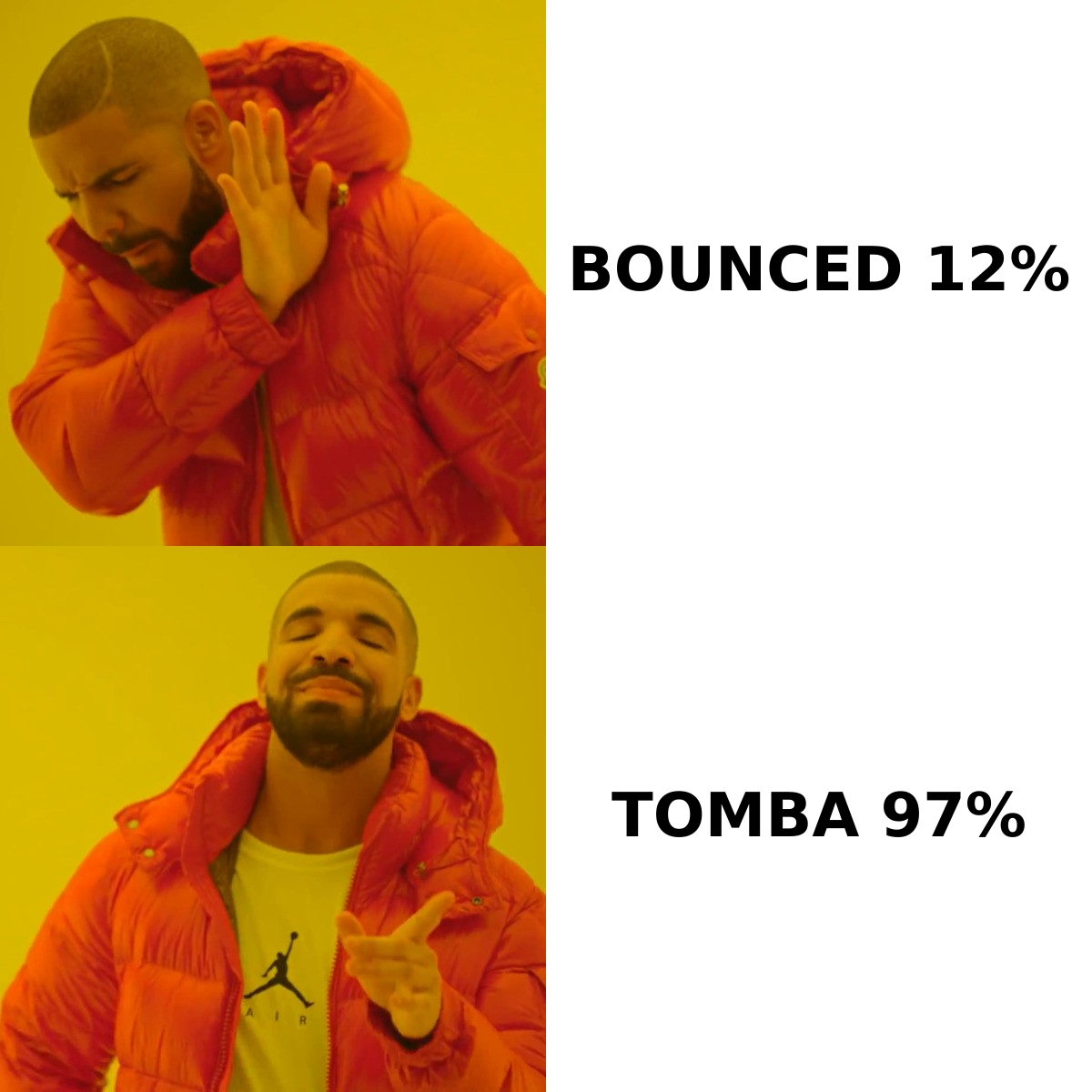
Are you seeing bounce rates above 5% from GrowMeOrganic's built-in finder? The fix is not a new sending tool. Run the export through a dedicated email verifier first. That one step often takes a 12% bounce rate under 3%. Your copy, your domains, and your schedule stay the same.
Is Mailstand better for deliverability at scale?#
For the mechanical part of deliverability, yes. For the reputation part, no tool saves you from a bad list.
Mailstand assumes you will run many mailboxes across several domains. It keeps each one under a safe daily cap. That architecture is correct. Sending 500 emails a day from one mailbox is a reputation problem, and no rotation logic undoes it. Sending 25 a day from twenty mailboxes looks normal. At that scale, Mailstand's mailbox management and unified reply view save real hours.
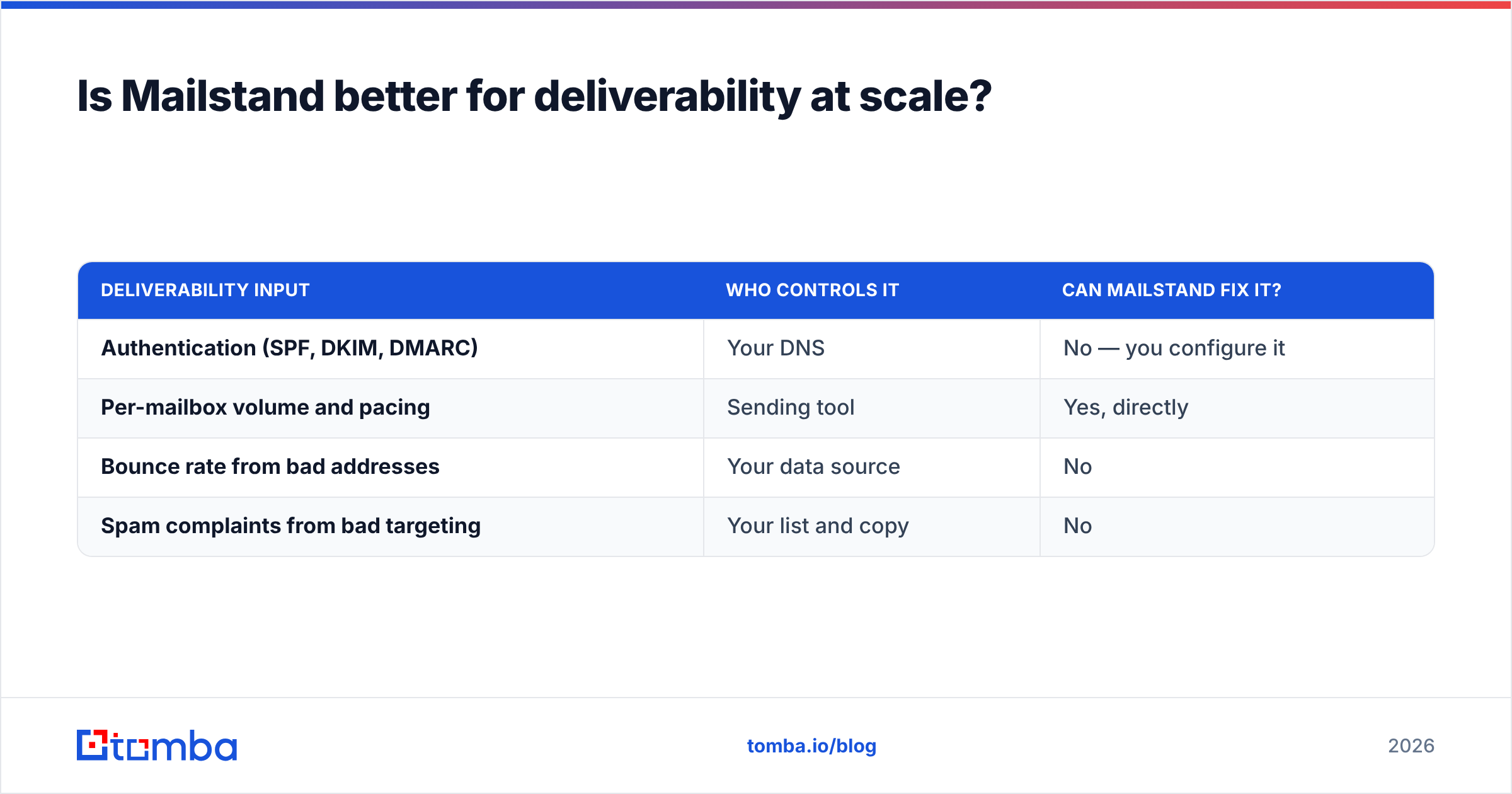
But spreading volume only controls one input. Email deliverability rests on four things. The sending tool touches exactly one of them:
| Deliverability input | Who controls it | Can Mailstand fix it? |
|---|---|---|
| Authentication (SPF, DKIM, DMARC) | Your DNS | No — you configure it |
| Per-mailbox volume and pacing | Sending tool | Yes, directly |
| Bounce rate from bad addresses | Your data source | No |
| Spam complaints from bad targeting | Your list and copy | No |
Two of those four rows point back at your data, not your sender. So teams that switch to Mailstand and still miss the inbox almost always have a list problem. Verify first. Then rotate.
Which should you pick for your team size and use case?#
The GrowMeOrganic vs Mailstand answer changes with your team shape and your sending volume.
- Solo founder, no list, under 500 sends a month. GrowMeOrganic. The bundled database and LinkedIn extractor take you from zero to a campaign without buying three tools. Add a verification pass before send and you will be fine.
- Agency running campaigns for several clients. GrowMeOrganic for sourcing. Budget for a specialist data layer per client vertical, because bundled databases rarely go deep enough in niche industries.
Bigger sending operations flip the answer:
- Sales team already sitting on a CRM full of accounts. Mailstand. You do not need another database. You need to email the accounts you have without torching your main domain.
- Outbound team running 10+ mailboxes across 3+ domains. Mailstand, clearly. Mailbox management at that scale is a real operational load, and that is the job the product exists to absorb.
- Anyone doing more than 5,000 contacts a month. Neither tool alone. Use a dedicated data and verification layer. Then pick the sending tool that matches your mailbox count.
What does a better 2026 stack actually look like?#
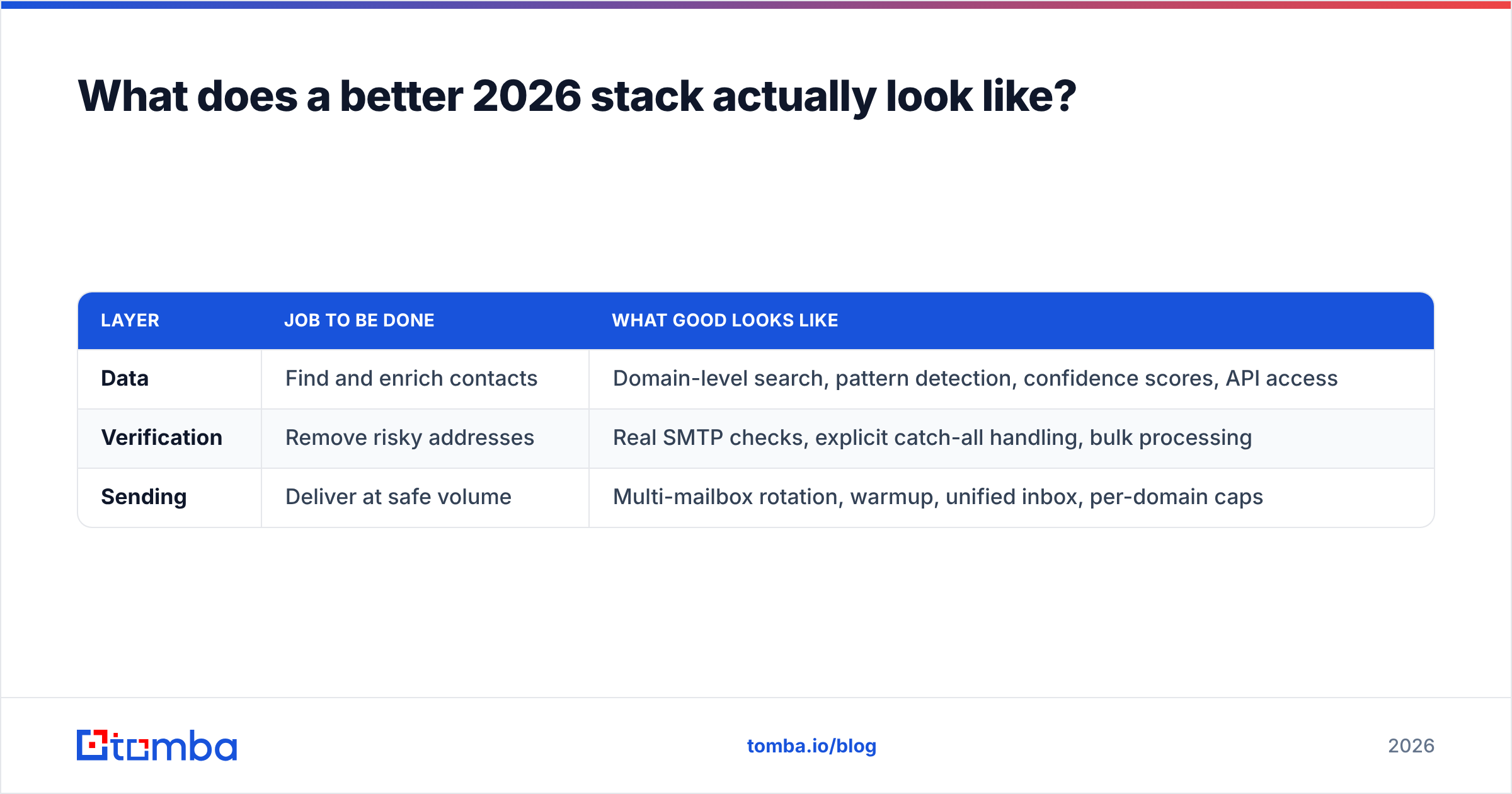
Split the problem into three jobs. Buy the best-fit tool for each. It usually costs less than one all-in-one suite plus the cleanup work.
| Layer | Job to be done | What good looks like |
|---|---|---|
| Data | Find and enrich contacts | Domain-level search, pattern detection, confidence scores, API access |
| Verification | Remove risky addresses | Real SMTP checks, explicit catch-all handling, bulk processing |
| Sending | Deliver at safe volume | Multi-mailbox rotation, warmup, unified inbox, per-domain caps |
In practice: source with a specialist finder, clean with a verifier, then send. Use GrowMeOrganic's sequencer for small volumes, Mailstand for many-mailbox operations, or a dedicated sender if you have outgrown both.
Tomba fits the first two layers. It does not compete on sending. Tomba pricing starts with a free tier at 25 searches a month. Paid plans run $49/mo for Starter, $99/mo for Growth, and $249/mo for Pro, with Enterprise custom. Do you process whole lists rather than one lookup at a time? The bulk email finder takes a CSV in and hands back a verified CSV. The API covers the same workflow.
What are the main pros and cons of each?#
GrowMeOrganic — pros: everything sits in one subscription; LinkedIn extraction is genuinely useful; frequent deals make it cheap to test; a good starting point when you have no list at all.
GrowMeOrganic — cons: data accuracy is the weak link, above all outside the US; the built-in verifier is no substitute for a real one; the sequencer is adequate rather than strong; support and refresh cadence get mixed reviews.
Mailstand — pros: mailbox rotation and the unified inbox are very good; per-inbox volume control is the right shape for 2026 sending; simple pricing; low overhead once it is set up.
Mailstand — cons: no data layer at all, so it is only half a solution; less useful below roughly five mailboxes; you still own authentication, warmup, and list hygiene.
How do you decide in five minutes?#
Answer one question: what stops you from sending 200 good emails tomorrow?
If the answer is "I don't know who to email," you have a data problem. GrowMeOrganic is the closer fit, paired with verification. If the answer is "I know who to email, but my domain can't take the volume," you have a sending problem. Mailstand is the closer fit. If the answer is "both," do not buy an all-in-one and hope.
Fix the data first. A clean list lifts deliverability, reply rate, and rep time at once. A better sender lifts one metric. That is the whole GrowMeOrganic vs Mailstand call, in one question.
Start by measuring your bounce rate on the last 500 emails you sent. Above 5%, your data is the constraint, whichever tool you were about to buy.
Ready to fix the data layer first? Run your next list through the Tomba Email Finder. Search by domain, name, or company, get confidence-scored results, and verify before a single message leaves your mailbox. The free tier covers 25 searches a month. That is enough to test your current provider's accuracy before you commit to anything.
Related guides#
Ready to find emails that actually work?
Join 150,000+ professionals who stopped guessing and started sending. Free credits on signup — no credit card required.
Get the Tomba newsletter
Practical outbound tactics and product updates — once every two weeks.
About the author