Jet Leads Pro vs OneMoreLead (2026): Honest Data Comparison
Two cheap B2B contact databases, two very different risk profiles. Here is how Jet Leads Pro and OneMoreLead compare on data sourcing, freshness, verification, and real cost per usable contact.
Jet Leads Pro vs OneMoreLead is a choice between two cheap B2B contact lists. Both promise bulk records for very little money. Only one of them shows its work. Here is how they compare on sources, freshness, checks, and the real cost per contact you can email.
TL;DR
- Jet Leads Pro vs OneMoreLead is the same bet, placed two ways. Both sell a pre-built B2B contact list. Neither one looks up an email live, at the moment you ask.
- OneMoreLead shows more of its work. It has a public site, reviews on G2 and Capterra, and a clear US-heavy focus. Jet Leads Pro tells you much less, and that itself is a signal.
- Age beats size. A 50M-record dump last refreshed 18 months ago will bounce harder than a 5M list refreshed weekly.
- Neither tool replaces checking. Whatever you export, run it through an outside email verifier before it touches your sending domain.
- Cost per usable contact beats cost per record. A $99 list where 45% of the mail lands costs more than a $249 tool where 95% lands.
Jet Leads Pro vs OneMoreLead: what are you buying?#
Both sit in the same bucket. They are pre-built B2B contact lists that you search, filter, and export as a CSV.
OneMoreLead sells itself as a B2B prospect list with tens of millions of records, most of them US firms. The pitch is volume plus filters. Pick an industry, a size band, a job title, and export. It has been sold through one-time and lifetime deals as well as plans. That is why you see wildly different prices quoted across the web.
Jet Leads Pro makes a similar offer: a cheap route to bulk B2B contacts. Here is the honest caveat. As of this writing, Jet Leads Pro says far less about where its data comes from, how often it is refreshed, and how it handles privacy law. There is no real body of outside reviews on the big software directories. That does not make the product bad. It does mean you buy on faith, not on proof. So treat any trial as an audit.
That gap frames the whole matchup. This is not a contest between two equally open platforms. It is a known quantity with mixed reviews against a near-unknown with almost no public track record.

How does each tool actually get its data?#
This question decides your bounce rate. Most vendors answer it vaguely. Here is the frame to apply to both tools, and to any list vendor you weigh up.
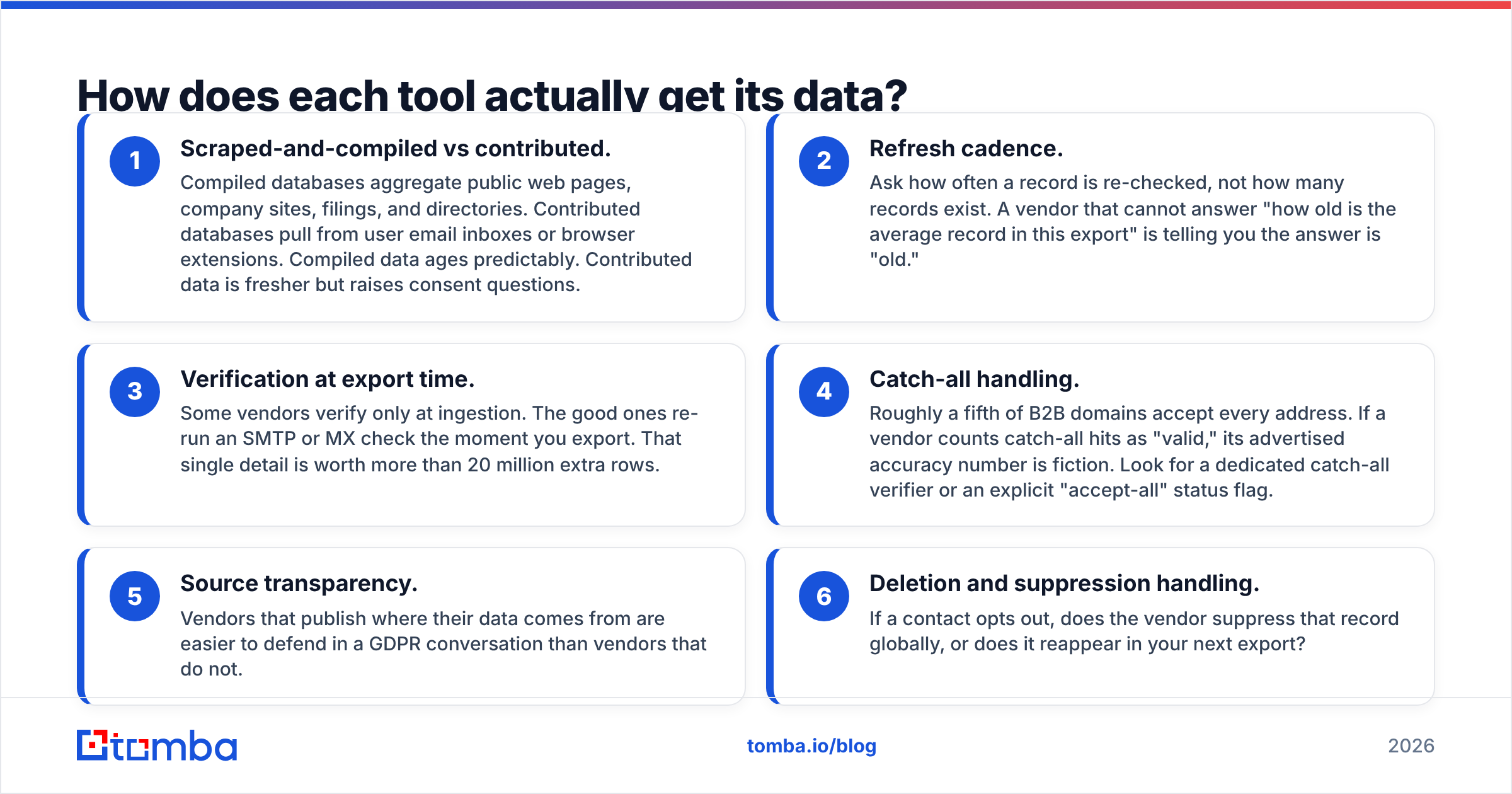
- Scraped or contributed. Scraped lists pull from public web pages, company sites, filings, and directories. Contributed lists pull from user inboxes or browser add-ons. Scraped data ages in a way you can predict. Contributed data is fresher, but it raises consent questions.
- Refresh rate. Ask how often a record is re-checked, not how many records exist. A vendor who cannot tell you how old the average record is has told you the answer: old.
- Checks at export time. Some vendors test an address once, on the day they add it. The good ones re-run an SMTP or MX check the moment you export. That one detail beats 20 million extra rows.
The next three are about what the vendor does with the rest of the data.
- Catch-all handling. Roughly a fifth of B2B domains accept every address. If a vendor counts those as "valid," its stated hit rate is fiction. Look for a dedicated catch-all verifier or a clear "accept-all" flag.
- Source transparency. Vendors who publish where their data comes from are easier to defend in a GDPR talk than vendors who do not.
- Opt-outs. If a contact opts out, does the vendor drop that record for good? Or does it show up again in your next export?
Run those six questions in a Jet Leads Pro vs OneMoreLead trial. The answers will split the two faster than any feature grid.
Which one has better data accuracy?#
Neither vendor publishes an audited hit rate. Treat their numbers as claims, not as measurements. You can measure it yourself, and the test takes about an hour.
Pull 200 contacts from each tool in a segment you know well. Use your own customer list as a control: firms you already sell to, where you know the real email format. Then check three things.
First, the format. Does the tool return first.last@domain.com when the firm uses flast@domain.com? A wrong pattern means the address was guessed, not seen. A free company email pattern check gives you the truth in seconds.
Second, role coverage. Lists lean toward whoever is most visible on the public web. Marketing and exec titles tend to be well covered. Ops, finance, and tech buyers tend to be thin. If your buyer is a VP of Supply Chain at a 200-person plant, volume claims mean nothing.
Third, hard bounces on a real send. This is the only number that counts. Send to 100 addresses from a throwaway subdomain, never your main one. Then count the hard bounces. Above 3% is a problem. Google and Yahoo now police bulk senders, so that risk is real, not in theory.

Both sides of the Jet Leads Pro vs OneMoreLead matchup are static lists. Static lists bounce more than live lookup tools, for one built-in reason. A stored record cannot know that someone changed jobs last Tuesday. A live domain search asks current sources at the moment you ask. A CSV asks a snapshot. Both have a place. Only one rots on your hard drive.
Jet Leads Pro vs OneMoreLead: how do they compare head to head?#
Prices move often, and both tools have been sold through promo and lifetime deals. Check the vendor's own page before you buy. The structure below is more stable than the price tags.
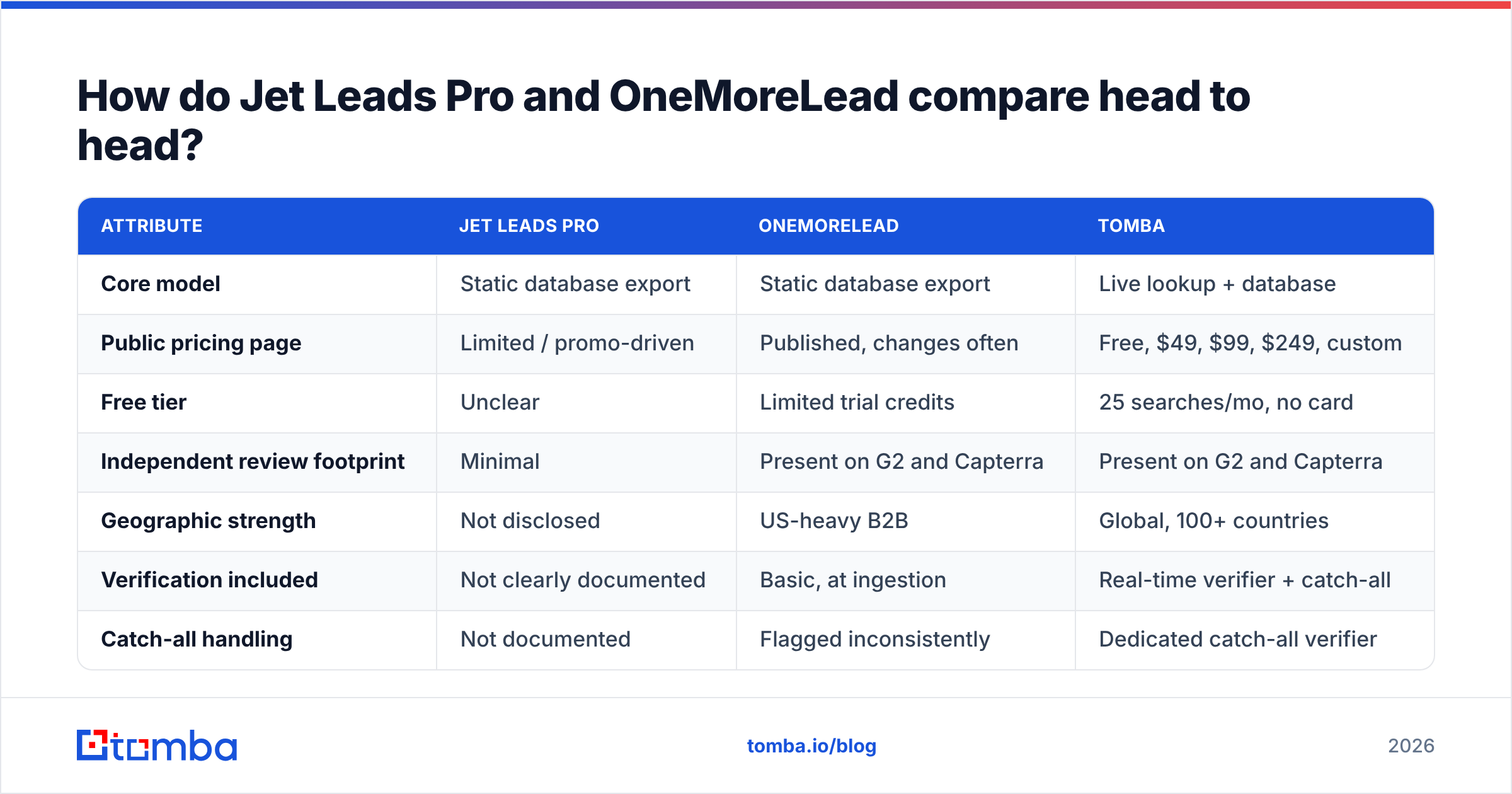
| Attribute | Jet Leads Pro | OneMoreLead | Tomba |
|---|---|---|---|
| Core model | Static database export | Static database export | Live lookup + database |
| Public pricing page | Limited / promo-driven | Published, changes often | Free, $49, $99, $249, custom |
| Free tier | Unclear | Limited trial credits | 25 searches/mo, no card |
| Independent review footprint | Minimal | Present on G2 and Capterra | Present on G2 and Capterra |
| Geographic strength | Not disclosed | US-heavy B2B | Global, 100+ countries |
| Verification included | Not clearly documented | Basic, at ingestion | Real-time verifier + catch-all |
| Catch-all handling | Not documented | Flagged inconsistently | Dedicated catch-all verifier |
| API access | Not advertised | Limited | Full REST API, CLI, MCP |
| CRM integrations | Manual CSV | CSV plus some native | HubSpot, Salesforce, Pipedrive, Zapier |
| Best for | Cheap volume experiments | US SMB list building | Accuracy-first outbound at any scale |

Two rows matter most. API access decides whether the tool lives inside your workflow or beside it. If a new signup can only be topped up when a human runs an export, that is not enrichment. That is homework. And catch-all handling is where cheap lists quietly pad their hit rates.
What does each option actually cost per usable contact?#
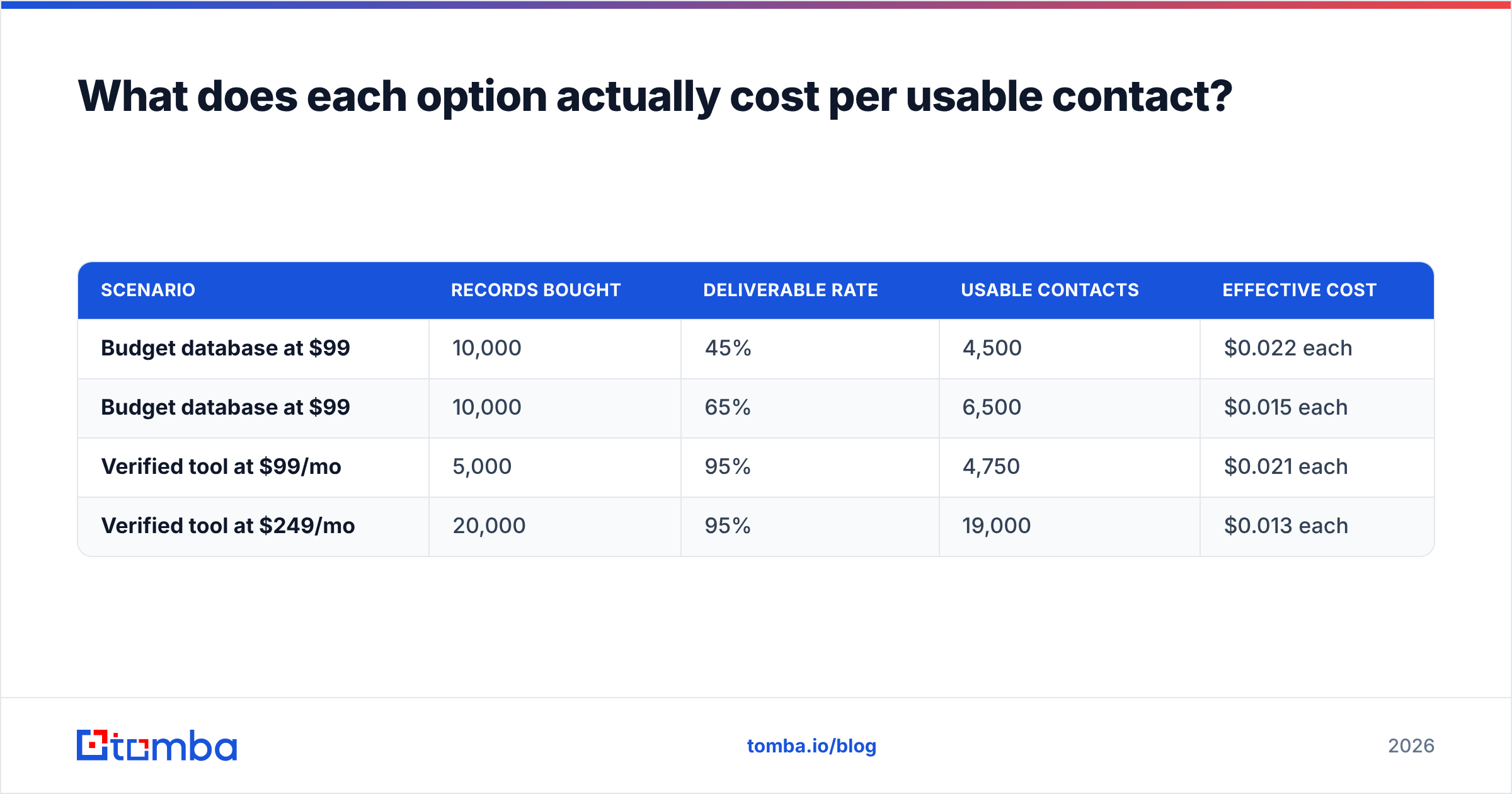
Sticker price is the wrong unit. Price it per contact you can safely email.
| Scenario | Records bought | Deliverable rate | Usable contacts | Effective cost |
|---|---|---|---|---|
| Budget database at $99 | 10,000 | 45% | 4,500 | $0.022 each |
| Budget database at $99 | 10,000 | 65% | 6,500 | $0.015 each |
| Verified tool at $99/mo | 5,000 | 95% | 4,750 | $0.021 each |
| Verified tool at $249/mo | 20,000 | 95% | 19,000 | $0.013 each |
The cheap list only wins when its deliverable rate is truly high. At 45% it costs the same per usable contact as a checked tool. That math also skips two real costs. Your reps burn hours on dead addresses. And a 30% bounce rate harms your sending domain. You cannot re-buy domain trust next month.

The cheapest setup you can defend is a hybrid. Buy volume where volume is cheap. Then push all of it through an outside check before import. A bulk verify pass on a 10,000-row export costs a slice of the list price. It turns an unknown file into a scored one, with catch-alls split out from confirmed hits, so you can send to each group in its own way.
Is Jet Leads Pro better than OneMoreLead for cold outbound?#
Here is the Jet Leads Pro vs OneMoreLead answer for cold email in 2026. OneMoreLead is the safer pick, and the reason is proof, not quality. You can read outside reviews on G2's lead intelligence category and Capterra's lead generation listings. You can find people who describe real outcomes, and set your hopes before you pay. With Jet Leads Pro you mostly have the vendor's word.
But "safer" is a low bar here. Both share the same weak spot for cold email. Neither is built around landing in the inbox. A static export hands you addresses. It does not hand you a valid flag, a catch-all flag, role-account detection, or a fresh check on the morning you launch. Those are the controls that keep a sending domain healthy. They decide whether your mail lands or gets filtered at the gate.
There is a second issue, and it grows every year: privacy law. Under GDPR and its cousins, B2B outreach on a legitimate interest basis holds up when you can explain how you got the data. "We bought a list" is a weak answer. "We looked up a published business address from a named source" is a strong one. Vendors who publish their sources make that talk survivable. Vendors who do not leave you holding the risk.
Where do both tools fall short?#
Three gaps show up with cheap static lists, whatever the brand.
Job-change decay. A quarter to a third of B2B records go stale within a year as people move roles. A list that is not re-checked all the time loses value from the day you export it.
Non-US and non-English coverage. Scraped lists lean toward markets with a dense web presence. If you sell into DACH, MENA, LATAM, or APAC, test your own region before you commit. Record-count headlines rarely match depth in one region.
No enrichment loop. A CSV cannot fill a blank field in your CRM, top up a new signup, or attach a phone number to a profile you just found. That needs an API, a data enrichment endpoint, or at least a native CRM link. Without one, your CRM decays as fast as your reps forget to update it.
In fairness, both tools do one thing well. They make tests cheap. If you want 2,000 names to see whether a brand new segment replies at all, a cheap list buys that answer without a year-long contract.
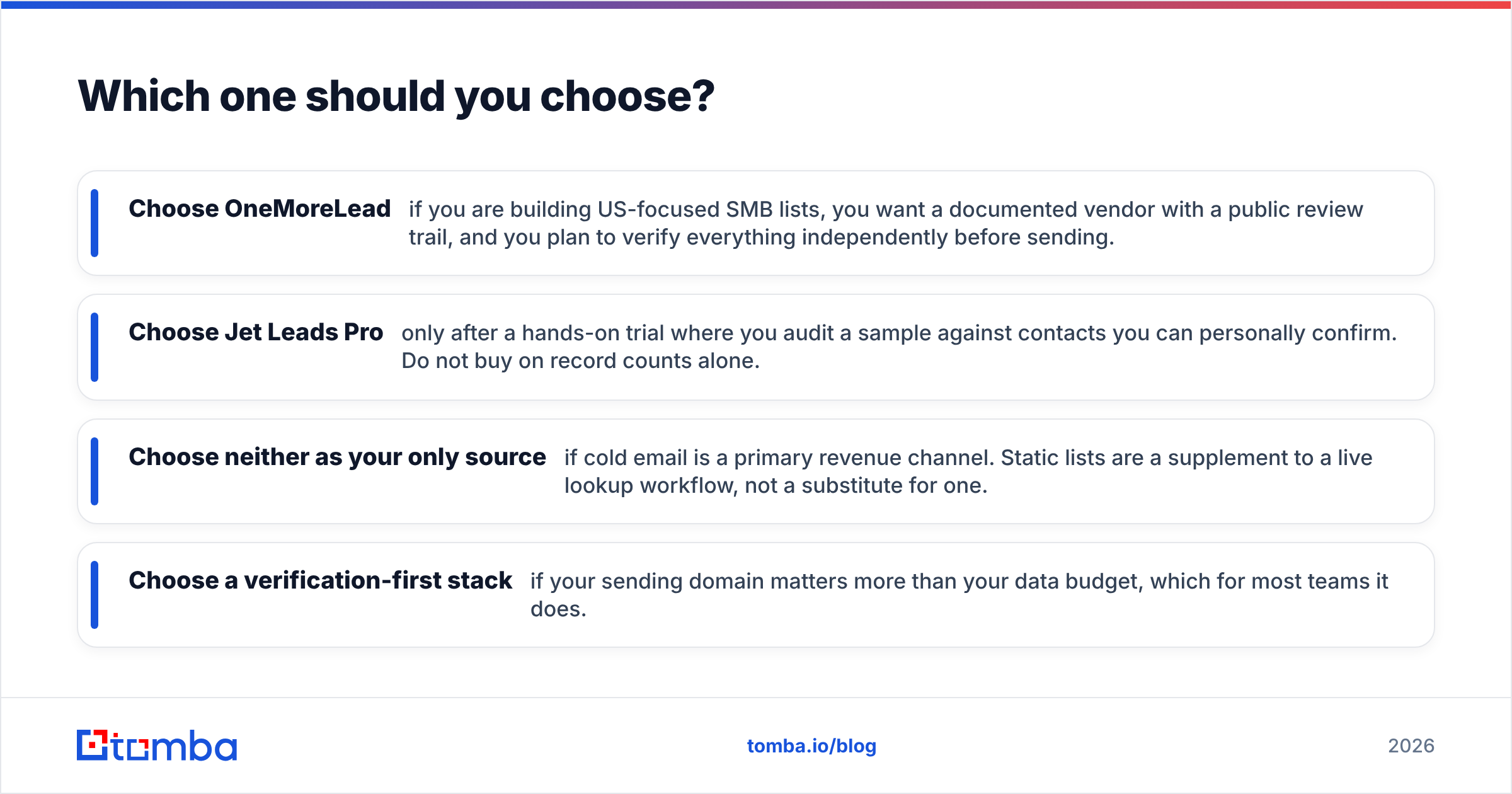
Which one should you choose?#
Here is the Jet Leads Pro vs OneMoreLead call, in plain terms.
- Choose OneMoreLead if you build US-focused SMB lists, you want a vendor with a public review trail, and you plan to check every address yourself before you send.
- Choose Jet Leads Pro only after a hands-on trial where you audit a sample against contacts you can confirm. Do not buy on record counts.
- Choose neither as your only source if cold email drives real revenue. A static list is a supplement to live lookup, not a swap for it.
- Choose a check-first stack if your sending domain matters more than your data budget. For most teams, it does.
Here is what works for teams sending real volume. Use a live finder for named accounts, where a wrong address costs you the meeting. Use a list export for broad top-of-funnel tests. Then put a check between both sources and your sequencer. That gate is the part teams skip, and it is the part that guards everything after it.
Want to benchmark either tool against a live one before you spend? Start with the Tomba Email Finder. The free tier gives you 25 searches a month with no card. That is enough to run the 200-contact test above and see the gap in your own data. Paid plans start at $49/mo, and full Tomba pricing is public, down to what happens to your credits when a lookup finds nothing. Run the test on your own buyer list. The numbers will tell you which tool earns the budget line.
Related guides#
// get started
Find, verify and enrich your first contacts today
Start on the free plan with 25 searches a month, then scale when your team is ready.
Free plan · No credit card required · GDPR & CCPA
// about the author