JustCall vs Kixie (2026): Which Sales Dialer Actually Wins?
JustCall and Kixie both promise faster dials and tighter CRM sync, but they win on different things. Here is a side-by-side on pricing, dialer speed, SMS, compliance, and which team each one actually fits.
TL;DR
- Kixie wins on raw outbound velocity. Its PowerDialer, local presence and connection-rate tuning are built for reps who want to burn through 200+ dials a day inside a CRM tab.
- JustCall wins on breadth. It is closer to a full business phone system with SMS, WhatsApp, AI transcription, and a wider integration catalog, so it fits teams where support and sales share the same numbers.
- Pricing is close, and both bill per user with add-ons. Expect roughly $30–$80 per user per month at list price, and budget separately for AI features, extra numbers, and outbound minutes.
- Neither tool sources phone numbers. They dial what you feed them, so your connect rate is capped by data quality long before it is capped by dialer speed.
- Pick Kixie if you run high-volume outbound on HubSpot or Pipedrive. Pick JustCall if you need one system for calls, texts, and inbound support.
What are JustCall and Kixie?#
Think of these two as different kinds of kitchen. JustCall is a full restaurant kitchen: it cooks calls, SMS, WhatsApp, voicemail drops, and AI call analysis on the same line, and it serves both sales and support teams. Kixie is a specialist grill station: fewer burners, but it sears outbound dials faster than almost anything else in the category.
Technically, JustCall is a cloud phone system from SaaS Labs. It gives you local and toll-free numbers in 70+ countries, a shared inbox for texting, call recording and transcription, an auto-dialer and predictive dialer on higher tiers, and an AI layer that scores calls and surfaces coaching moments.
Kixie is a sales engagement platform built around the PowerCall dialer. It lives as a Chrome extension bolted onto your CRM, plus a multi-line PowerDialer, local presence dialing, SMS templates, and automation rules that fire calls and texts off CRM events. Kixie has always framed itself as a connect-rate tool rather than a telephony platform.
That difference in identity explains almost every trade-off below.
How do JustCall and Kixie compare at a glance?#
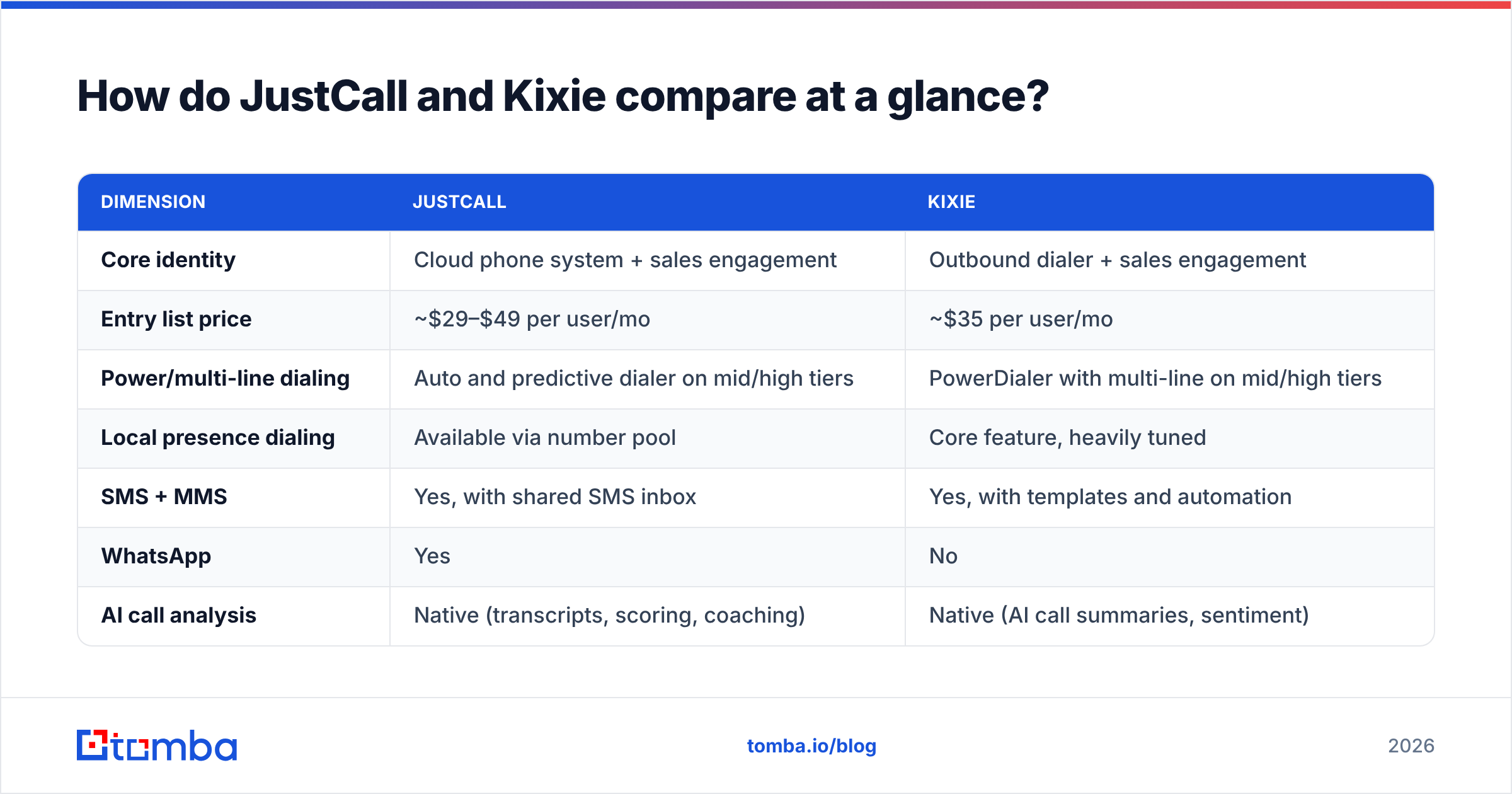
| Dimension | JustCall | Kixie |
|---|---|---|
| Core identity | Cloud phone system + sales engagement | Outbound dialer + sales engagement |
| Entry list price | ~$29–$49 per user/mo | ~$35 per user/mo |
| Power/multi-line dialing | Auto and predictive dialer on mid/high tiers | PowerDialer with multi-line on mid/high tiers |
| Local presence dialing | Available via number pool | Core feature, heavily tuned |
| SMS + MMS | Yes, with shared SMS inbox | Yes, with templates and automation |
| Yes | No | |
| AI call analysis | Native (transcripts, scoring, coaching) | Native (AI call summaries, sentiment) |
| Native CRM integrations | 100+ apps | ~25 focused CRM/sales apps |
| Inbound/support features | IVR, call queues, business hours, shared inbox | Basic IVR and routing |
| Best fit | Blended sales + support teams | High-volume SDR/BDR pods |
| Weakest point | Dialer feels heavier under high volume | Thin outside the CRM-plus-dialing workflow |
Note prices move. Both vendors publish current tiers on their own pricing pages, and both run annual discounts that change the math by 15–25%. Treat the numbers above as a starting shape, not a quote.
Which one has the better dialer?#
Kixie, if "better" means more conversations per hour.
The PowerDialer is the product. You load a list, choose one to ten concurrent lines, and Kixie dials ahead, drops voicemails, logs dispositions, and moves to the next record without the rep touching anything. Local presence rotates your caller ID to match the prospect's area code, and Kixie actively monitors number health to pull flagged numbers out of rotation. For a team whose whole day is dials, that compounding matters.
JustCall's dialer is capable but it is one module among many. The auto-dialer works well at moderate volume, and the predictive dialer on higher plans handles larger lists. Reps who make 40–80 calls a day usually never notice a difference. Reps making 250 dials a day tend to notice that Kixie's flow has fewer clicks between calls.
Here is how the dialing workflows actually differ in practice:
- List loading — Kixie pulls a CRM view or a CSV straight into a dial session. JustCall runs campaigns, which is more structured but slower to spin up ad hoc.
- Line concurrency — Kixie's multi-line dialing is the headline feature and is tuned to keep answer detection fast. JustCall's predictive dialer is gated to upper tiers.
- Disposition logging — Both write back to the CRM automatically. Kixie's dispositions are faster to hit mid-call; JustCall's are richer after the call.
- Voicemail drop — Both support pre-recorded drops. Kixie's is a single click inside the dial session.
- Local presence — Kixie treats this as a first-class feature with number rotation and spam-flag monitoring. JustCall supports it, but managing the number pool is more manual.
- Post-call AI — JustCall's transcript and coaching layer is deeper, with scorecards and keyword tracking that managers can actually run QA against.
If you are building a call-heavy motion, read the raw user reviews rather than vendor pages. G2's sales engagement category is the fastest way to see where each tool gets dinged by real admins.
How do pricing and hidden costs compare?#
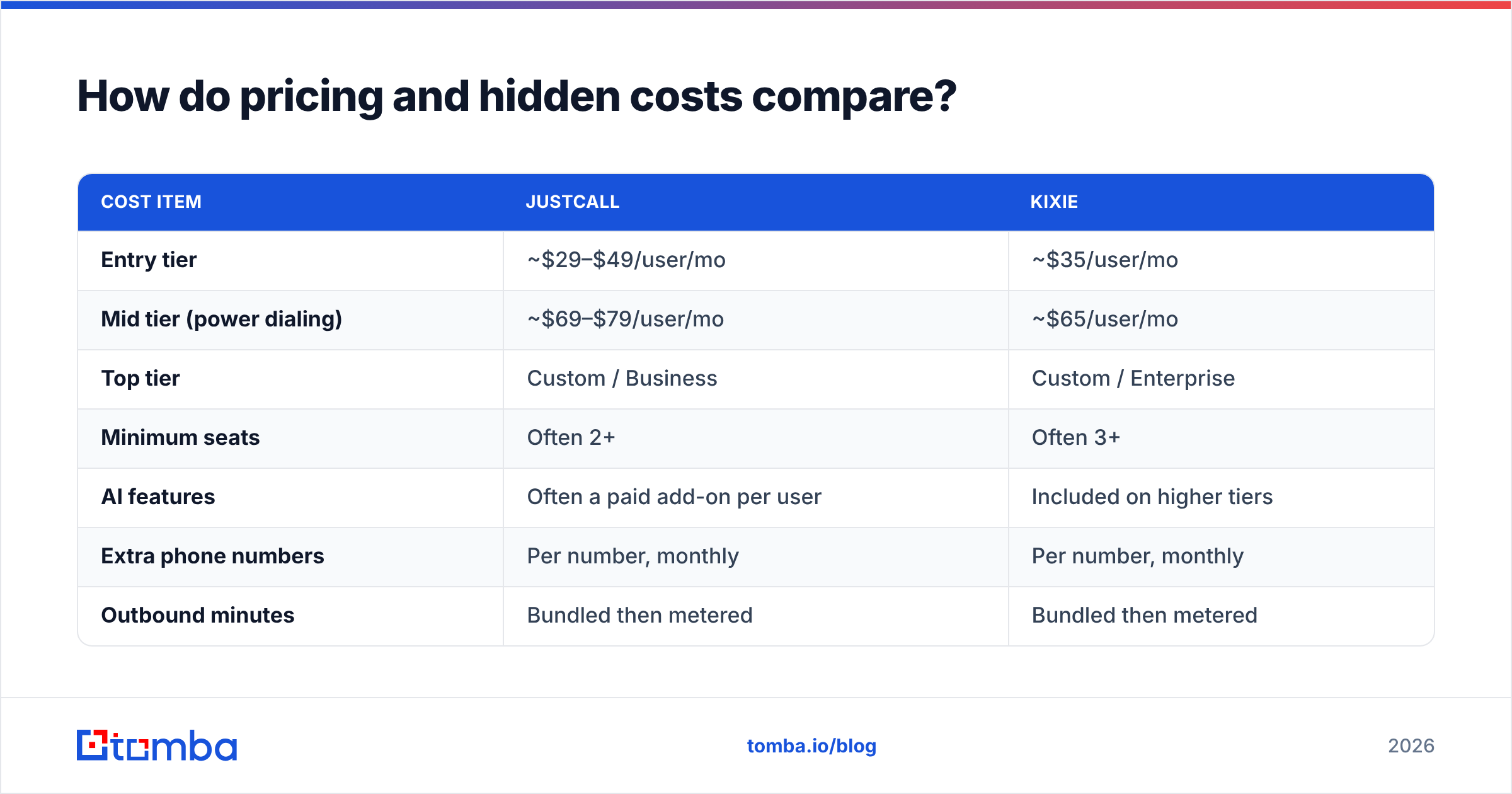
Both vendors do the same thing: a low sticker price per seat, then meaningful add-ons. The trap is assuming the seat price is the bill.
| Cost item | JustCall | Kixie |
|---|---|---|
| Entry tier | ~$29–$49/user/mo | ~$35/user/mo |
| Mid tier (power dialing) | ~$69–$79/user/mo | ~$65/user/mo |
| Top tier | Custom / Business | Custom / Enterprise |
| Minimum seats | Often 2+ | Often 3+ |
| AI features | Often a paid add-on per user | Included on higher tiers |
| Extra phone numbers | Per number, monthly | Per number, monthly |
| Outbound minutes | Bundled then metered | Bundled then metered |
| Annual discount | Yes | Yes |
| Free trial | Yes, limited | Yes, limited |
Two budgeting notes that catch teams out. First, minutes. Both bundle a monthly allowance and meter overage, so a team running multi-line dialing at volume can easily add 20–30% to the invoice. Second, numbers. Local presence needs a pool of numbers, and pools are billed per number. A 10-rep team wanting real geographic coverage in North America can be carrying 30–60 numbers.
The practical comparison is total cost per connected conversation, not cost per seat. A dialer that costs $15 more per rep but lifts connect rate from 4% to 7% is dramatically cheaper per meeting booked.
Which integrates better with your CRM?#
JustCall has more integrations. Kixie has deeper ones where it counts.
JustCall lists well over 100 connectors across CRMs, helpdesks, and automation platforms, plus an open API and Zapier support. If your stack includes something unusual, JustCall is likelier to already speak to it.
Kixie concentrates on the CRMs outbound teams actually live in: HubSpot, Salesforce, Pipedrive, Zoho, and a handful of others. Its Chrome extension overlays the CRM record so the rep never leaves the tab, and its automation rules can trigger a call or SMS from a pipeline stage change. That tight loop is why Kixie shows up so often in HubSpot-native sales orgs. HubSpot's own guidance on sales call workflows is a useful benchmark for what "native" should feel like.
Where you should be careful: click-to-call parity is not the same as data parity. Check specifically whether call recordings, transcripts, dispositions, and SMS threads all land as searchable objects in your CRM, or whether some of it stays trapped in the dialer's own reporting. That gap causes more RevOps pain than any feature difference.
What about SMS, compliance, and number reputation?#
Both tools support SMS and MMS in the US and Canada, and both require 10DLC registration for A2P messaging. Neither can shortcut that; expect a registration window and a per-campaign fee passed through from the carriers.
JustCall goes further on channels. It has a shared SMS inbox that behaves like a team helpdesk, WhatsApp Business support, and message templates that support and sales can share. If your customers text you back and someone has to own those replies, JustCall is the more honest fit.
Kixie's SMS is built for sequences: templated outbound, automated follow-ups tied to call outcomes, and click-to-text from the dialer. It is less of an inbox and more of a send engine.
On number reputation, both platforms now monitor spam labeling, but the underlying problem is behavioral. Numbers get flagged when a high volume of calls go unanswered or get marked as spam, which usually traces back to dialing wrong or stale numbers. No amount of caller-ID rotation fixes a list where 30% of the direct dials are dead. The same logic applies on email: sender reputation degrades from bad data, not from volume alone.

Is JustCall or Kixie better for your team size?#
Neither tool is universally better. Match to motion:
- 2–5 reps, blended sales and support — JustCall. You need one number pool, one inbox, and IVR that does not require a separate helpdesk. Kixie will feel thin on inbound.
- 5–25 SDRs running pure outbound on HubSpot or Pipedrive — Kixie. The PowerDialer plus CRM overlay is the shortest path from list to conversation, and the automation rules cut admin work.
- International or multi-region teams — JustCall. Broader number coverage, WhatsApp, and more localization make it the safer default outside North America.
- Managers who need call QA at scale — JustCall. Scorecards, keyword tracking, and transcript search are stronger for coaching programs.
- Teams already paying for a separate sequencer (Outreach, Salesloft, Instantly) — Kixie. You only need the dialing layer, so pay for the thing you are actually using.
- Agencies or RevOps consultancies with odd stacks — JustCall. The integration catalog and API surface reduce custom glue work.
If you are evaluating adjacent categories too, the Outreach alternative and Salesloft alternative landscapes overlap with both of these tools, and some teams end up consolidating rather than stacking.
What neither JustCall nor Kixie actually fixes?#
Your data. Both platforms are execution layers. They make dialing faster, log it cleanly, and analyze it afterward. Neither one finds the person, validates that the number is live, or tells you whether the contact still works there.
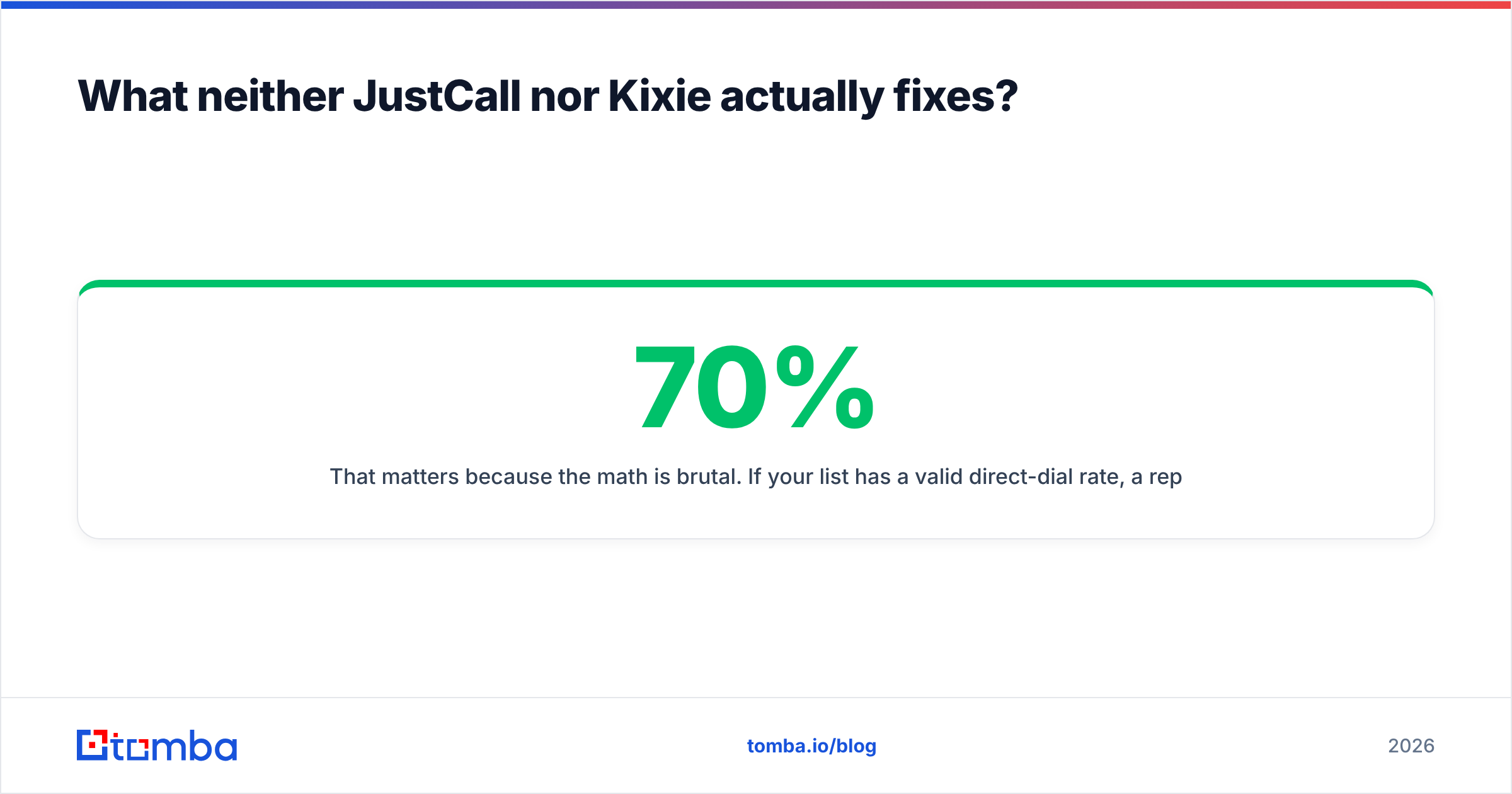
That matters because the math is brutal. If your list has a 70% valid direct-dial rate, a rep making 200 dials is really making 140. Add a typical 5% connect rate and you get seven conversations. Lift list validity to 90% and the same 200 dials produce nine conversations, a 28% improvement with zero change to the dialer, the script, or the rep.
Three things to fix before you blame the dialer:
- Source direct dials, not switchboards. A company main line routed through reception converts far worse than a mobile or direct extension. A dedicated phone finder that returns direct numbers changes the shape of the list.
- Validate before you load. Run numbers through a phone validator to strip disconnected lines and identify landline versus mobile. Dialing disconnected numbers is the fastest way to get your caller ID flagged.
- Enrich so the rep has a reason to call. Title, company size, and recent signals turn a cold dial into a relevant one. Data enrichment on the record before it hits the dial session is worth more than another concurrent line.
The same discipline applies to the email half of the sequence. Most outbound motions are call-plus-email, and a bounced email damages the domain the same way a dead dial damages the number. Verifying with an email verifier before a sequence launches is the cheapest insurance in the stack.
Frequently asked questions#
Is Kixie cheaper than JustCall? At entry tier they are close, and at the power-dialing tier Kixie is often slightly cheaper. The real variance comes from minutes, numbers, and whether AI features are bundled or added.
Can either replace a full business phone system? JustCall can for most small teams, with IVR, queues, business hours, and shared inboxes. Kixie is not designed for that and usually sits alongside a phone system or a helpdesk.
Do both support multi-line power dialing? Yes, on mid and upper tiers. Kixie's implementation is the more mature one and is what most reviewers single out.
Which is easier to roll out? Kixie, if you are already in a supported CRM, because the Chrome extension puts everything in one tab. JustCall takes longer to configure but does more once configured.
Do I still need a data provider? Yes. Neither tool sources or verifies contact data. They dial and log what you supply.
Where to start#
Run a two-week head-to-head with the same list in both tools, measure connect rate and conversations per rep-hour rather than dials, and check what actually writes back to your CRM. Most teams find the winner inside ten working days.
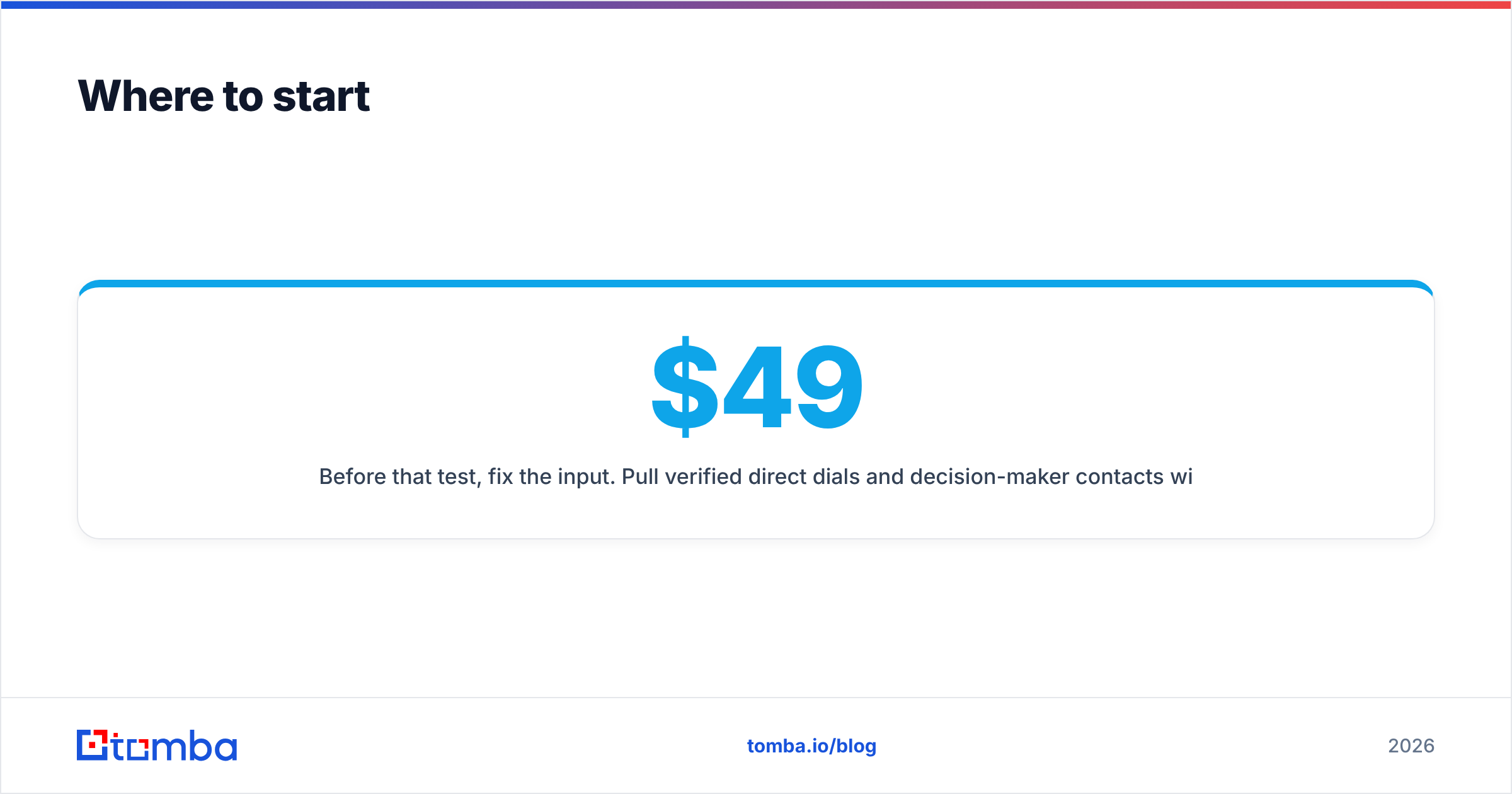
Before that test, fix the input. Pull verified direct dials and decision-maker contacts with Tomba's Email Finder and its companion phone and enrichment tools, then load a clean list into whichever dialer you are trialing. Tomba starts free with 25 searches a month, and paid plans begin at $49/mo on Starter, $99/mo on Growth, and $249/mo on Pro. See full Tomba pricing for team volumes. A faster dialer on a bad list is just a faster way to reach nobody.
Related guides#
// get started
Find, verify and enrich your first contacts today
Start on the free plan with 25 searches a month, then scale when your team is ready.
Free plan · No credit card required · GDPR & CCPA
// about the author