Kitt AI vs Warpleads: Which Lead Gen Tool Wins in 2026?
Kitt AI automates the prospecting workflow. Warpleads sells volume exports. We compare data quality, pricing models, export limits and real buying scenarios — plus where a dedicated verifier still beats both.
TL;DR
- Kitt AI and Warpleads are not the same category of product. Kitt AI sells an AI-driven prospecting workflow (research, list building, message drafting). Warpleads sells access to a large B2B contact database with export-heavy plans. Comparing them on "who has more emails" misses the point.
- Pick Warpleads if volume is your constraint. Export-first pricing wins when you need tens of thousands of contacts per month and you already own your sequencing stack.
- Pick Kitt AI if headcount is your constraint. Paying for automation only pays back when you don't have an SDR to do the research manually.
- Neither replaces verification. Bulk databases and AI agents both hand you addresses that were correct at crawl time, not at send time. Run a separate verification pass before the first email goes out.
- Budget reality: most teams end up with a database, a sending tool, and a verifier. Tomba's email verifier and bulk email finder fill the third slot from $49/mo, and there's a free tier at 25 searches/month to test the accuracy claim yourself.
What are Kitt AI and Warpleads, exactly?#
Start here, because the naming in this category is deliberately fuzzy and half the "vs" content online compares features that only one of the two products actually claims to have.
Warpleads is a B2B lead database. You filter a stored index by firmographic and role criteria, then export contacts in bulk. Its commercial hook is export volume — plans are built around moving large lists out of the platform rather than metering every single lookup. That model attracts agencies, high-volume outbound shops, and anyone whose cost per contact matters more than per-record confidence. You can see its current positioning on warpleads.com.
Kitt AI sits in the AI sales-assistant category: software that takes a target definition and runs the prospecting loop for you — find accounts, identify people, gather context, draft outreach. The pitch is labor replacement, not data resale. You're buying fewer hours of manual research, not a cheaper per-contact rate.
That difference drives everything else in this comparison. A database is priced per unit of data. An agent is priced per unit of work. When a vendor changes tiers or renames plans — and both categories do this often — check the live pricing page before you commit; the numbers below are directional, not contractual.
One more framing note: neither product is primarily an accuracy vendor. Databases optimize for coverage, agents optimize for throughput. Deliverability is a downstream problem you inherit either way.
How do Kitt AI and Warpleads compare head-to-head?#
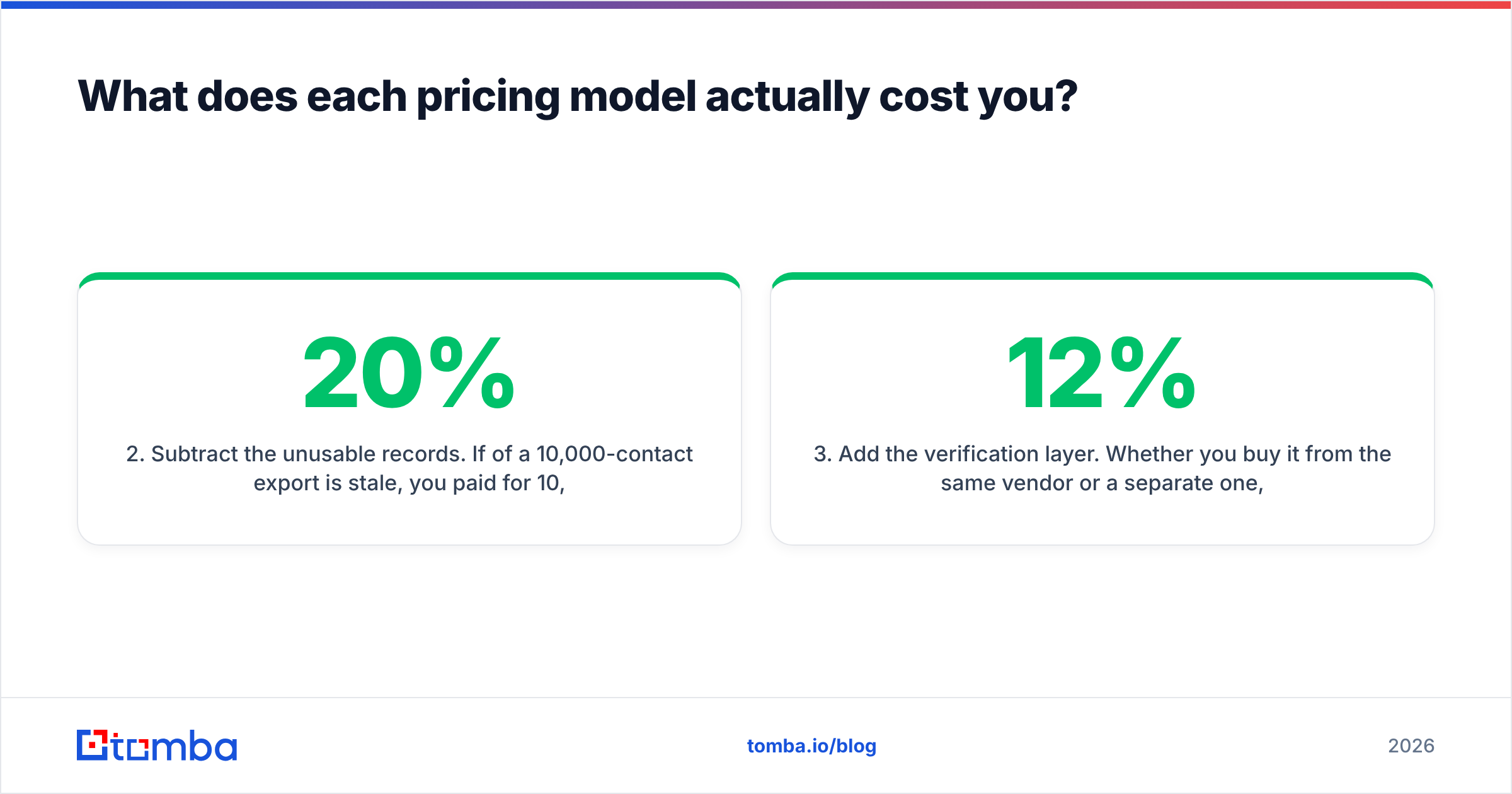
Here's the honest side-by-side. Where a cell says "varies," that's because the vendor scopes it per plan or per deal and publishing a hard number would be guesswork.
| Dimension | Kitt AI | Warpleads | Tomba (for reference) |
|---|---|---|---|
| Primary category | AI prospecting / SDR assistant | B2B lead database with bulk export | Email finding + verification |
| What you're buying | Automated research + outreach workflow | Contact records at volume | Per-contact accuracy and validation |
| Pricing logic | Seat / workflow based | Export-volume based | Credit tiers: Free (25/mo), $49, $99, $249 |
| Best for | Teams without SDR capacity | High-volume outbound and agencies | Anyone sending to a list they didn't verify |
| Bulk export | Secondary to the workflow | Core feature | Yes, via bulk tools and API |
| Built-in verification | Varies by plan | Varies by plan | Native, including catch-all handling |
| Sequencing / sending | Typically included in the workflow | Not the product — bring your own | Not the product — bring your own |
| API access | Varies | Varies | Documented REST API on paid tiers |
| Free entry point | Trial / demo-led | Trial-led | Permanent free tier, 25 searches/mo |
| Biggest risk | Automation quality on niche ICPs | Record staleness at volume | Not a sequencer; pair with a sender |
The pattern that emerges: Warpleads competes on cost per record, Kitt AI competes on cost per hour, and neither competes primarily on is this specific mailbox live today. That third question is the one your bounce rate cares about.
What does each pricing model actually cost you?#
Skip the sticker price. Compute cost per usable contact, which is the only number that maps to pipeline.
The math is simple. Take the monthly fee, divide by contacts you can actually reach, and add the cost of everything the tool doesn't do.
- Start with the plan fee. For export-priced databases like Warpleads, entry plans land in the double-digit-to-low-triple-digit monthly range depending on export ceiling. For workflow-priced tools like Kitt AI, expect seat-style pricing that scales with the number of reps or campaigns.
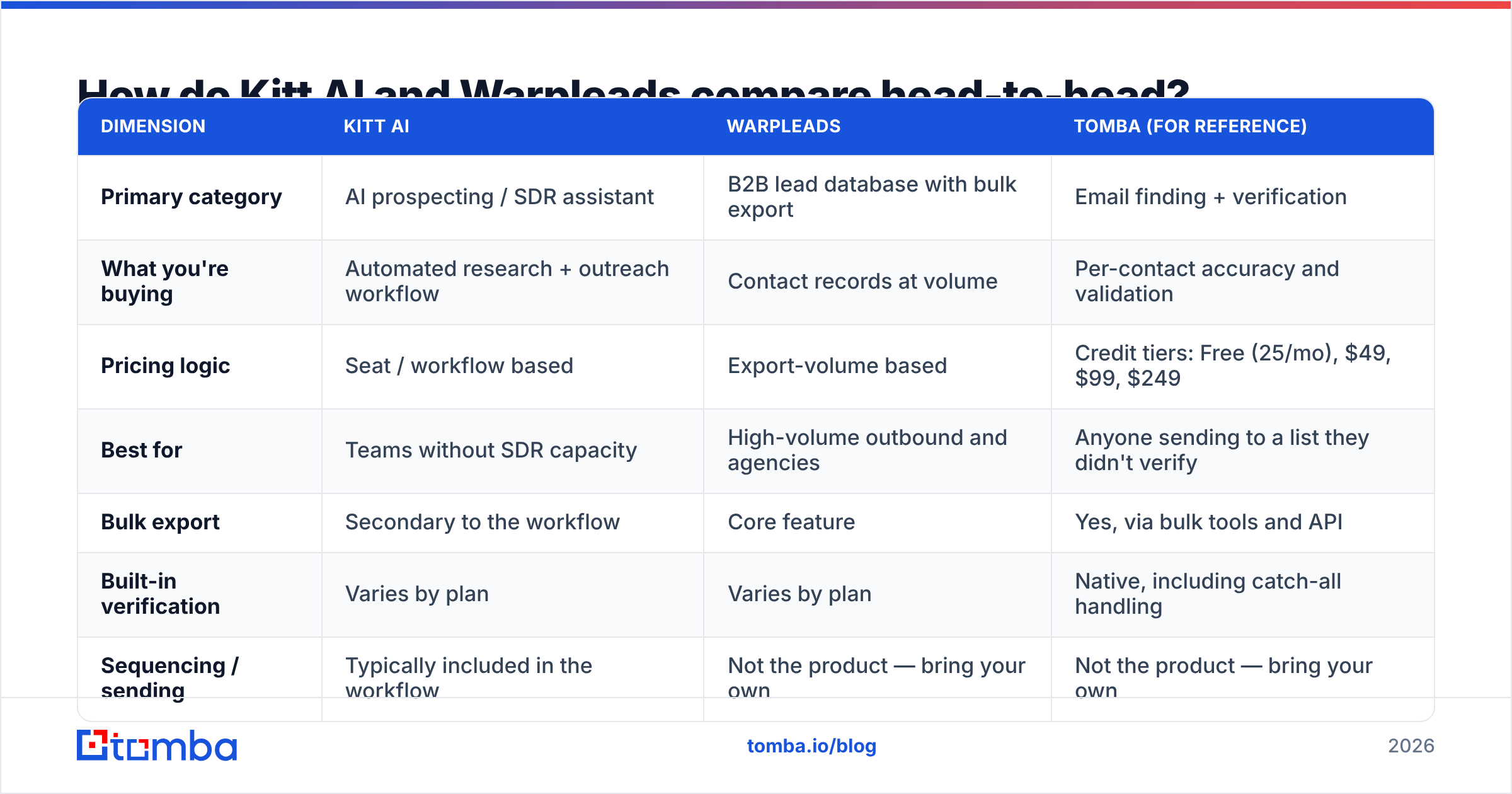
- Subtract the unusable records. If 20% of a 10,000-contact export is stale, you paid for 10,000 and got 8,000. A $99 plan just became $124 per 8,000 usable — before you sent anything.
- Add the verification layer. Whether you buy it from the same vendor or a separate one, verification is a line item. Pretending it's free is how teams end up with a 12% bounce rate.
- Add the sending stack. Databases don't send. Agents usually do, which is a real cost advantage for Kitt AI if you don't already own a sequencer — and a real waste if you do.
- Add the rework tax. Every hour a rep spends fixing a bad list is an hour not spent on calls. This is the cost line that AI-agent vendors price against, and it's legitimate — if the automation actually holds up on your ICP.
Run that five-line calculation on both vendors with your own numbers. The winner flips depending on whether your bottleneck is money or people. For a baseline on what verification-inclusive pricing looks like, Tomba pricing publishes tiers openly rather than routing you through a demo, which makes the comparison arithmetic easier.

Which one gives you better data accuracy?#
Neither vendor's accuracy is knowable from a marketing page, and you should distrust any blog post — including this one — that publishes a precise hit-rate for tools it doesn't own. What you can do is test both on the same sample and measure.
Here's a protocol that takes an afternoon and settles the argument:
- Build a 200-contact control list from accounts you already know — customers, churned logos, partners. You know the real email formats, so you can grade the output.
- Run the same query through both tools. Same domains, same roles, same seniority filters.
- Measure three things separately: coverage (how many of the 200 returned anything), correctness (how many matched the known-good address), and freshness (how many people still work there).
- Verify both outputs with a neutral third tool so you're not grading a vendor with its own grading rubric. A standalone email verification pass gives you a bounce-risk score independent of whoever sourced the record.
- Check the catch-all bucket explicitly. Catch-all domains accept everything at the SMTP layer, which means a naive verifier marks garbage as valid. Domains running catch-all configurations are common in mid-market and enterprise, and they're where most "verified" lists quietly rot. A dedicated catch-all verifier is the only way to separate real mailboxes from wildcard acceptance.
Two structural realities worth knowing before you run the test. First, database freshness decays fastest in high-churn functions — sales, marketing, and recruiting contacts go stale in months, not years. A database with huge raw coverage can still underperform on a list of SDR managers. Second, AI agents that generate rather than retrieve addresses will pattern-match a format and hand it back with confidence. Pattern-matching is fine as a candidate generator and dangerous as a final answer.
Is an AI prospecting agent better than a raw lead database?#
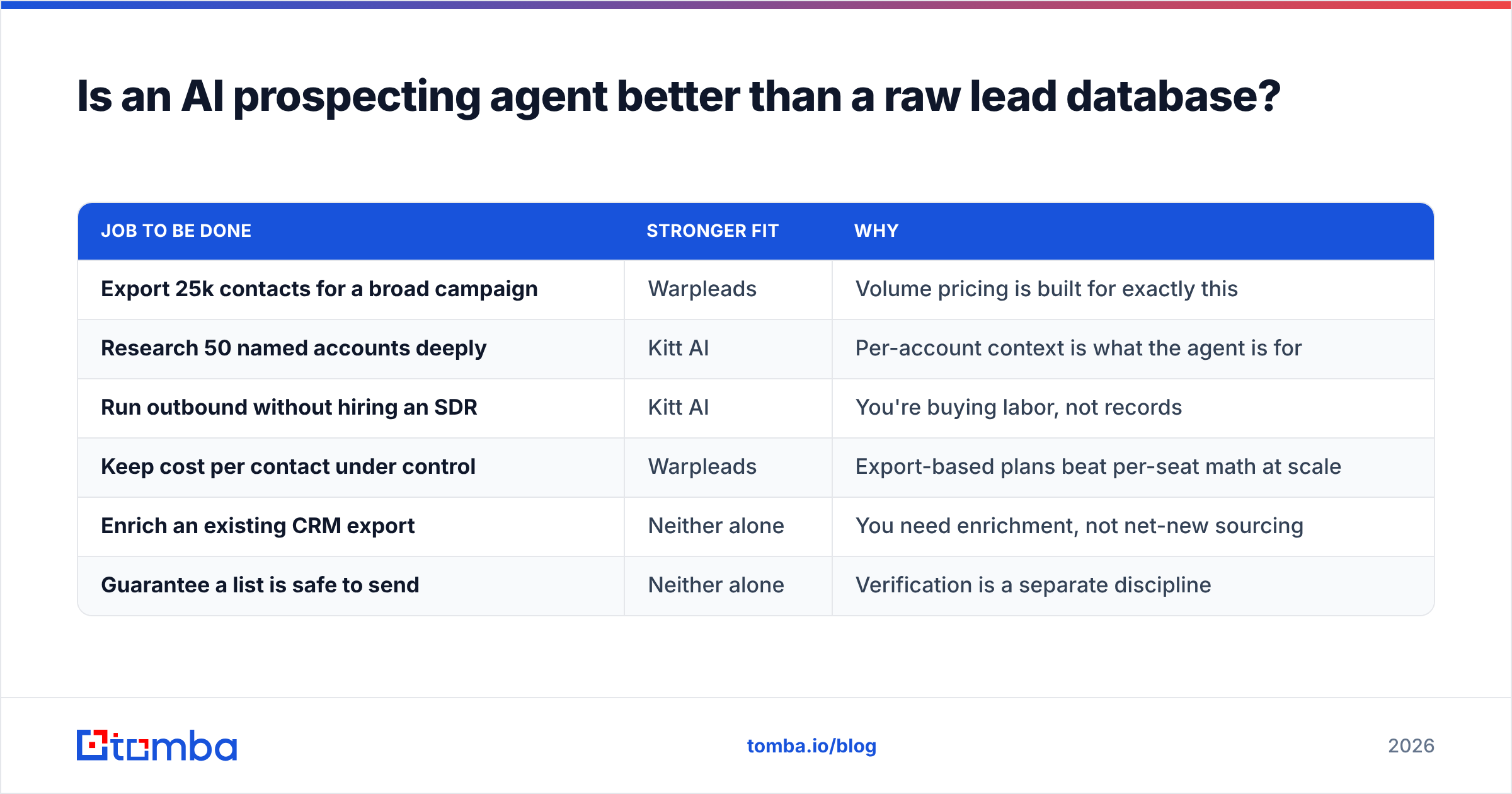
Better at what? Here's the split by job to be done.
| Job to be done | Stronger fit | Why |
|---|---|---|
| Export 25k contacts for a broad campaign | Warpleads | Volume pricing is built for exactly this |
| Research 50 named accounts deeply | Kitt AI | Per-account context is what the agent is for |
| Run outbound without hiring an SDR | Kitt AI | You're buying labor, not records |
| Keep cost per contact under control | Warpleads | Export-based plans beat per-seat math at scale |
| Enrich an existing CRM export | Neither alone | You need enrichment, not net-new sourcing |
| Guarantee a list is safe to send | Neither alone | Verification is a separate discipline |
The "neither alone" rows matter more than the rest. Most teams discover them after the contract is signed. If your actual problem is that your CRM has 40,000 records with missing or decayed emails, buying a new database adds duplicates and buying an agent adds noise — what you need is data enrichment against the records you already own.
There's also a governance angle that neither category advertises loudly. If you're prospecting into the EU or UK, bulk-exported personal data carries obligations under the GDPR regardless of which vendor supplied it. Volume plans make it trivially easy to export more personal data than your legal basis covers. Ask both vendors where the data originates and what their deletion-request process looks like — the answer quality varies wildly across this category, and buyer reviews on G2's lead intelligence category are a better signal than vendor claims.
Where does each tool break down?#
Every tool in this space has a failure mode. Knowing it in advance is worth more than a feature checklist.
Warpleads-style volume databases break down when:
- Your ICP is narrow. A 200-account TAM doesn't benefit from unlimited exports. You'll pay for breadth you can't use.
- You skip verification. High-volume exports plus no validation is the fastest known route to a burned sending domain.
- You need contextual signals. Firmographic filters tell you who to contact, not why now.
Kitt AI-style agents break down when:
- Your niche is unusual. Automation trained on mainstream SaaS ICPs gets weird on manufacturing, public sector, or non-English markets.
- You already have SDRs. You're paying to replace labor you've already bought.
- Output quality needs review anyway. If a human reads every AI-drafted email before it sends, the time savings shrink to the research step alone — which is still real, just smaller than the pitch implies.
And the shared failure mode for both: treating "found" as "deliverable." Sourcing and validation are different technical problems. Sourcing asks does this person exist and work here. Validation asks will a message to this string arrive today. A tool that's excellent at the first can be mediocre at the second without anyone noticing until the bounce report lands.

How should you actually decide between Kitt AI and Warpleads?#
Use constraints, not features. Answer these in order and the decision usually makes itself.
- What's your bottleneck — money or people? People bottleneck points to Kitt AI. Money bottleneck points to Warpleads.
- Do you already own a sequencer? If yes, an agent's bundled sending is redundant spend. If no, it's a genuine consolidation win.
- How big is your TAM? Under a few thousand accounts, volume pricing is wasted. Over 50,000, per-seat automation gets expensive fast.
- How weird is your ICP? The stranger your market, the more automation degrades and the more you want raw data plus human judgment.
- Who owns deliverability? If nobody on your team can answer what your current bounce rate is, fix that before adding volume from either vendor.
- What's your exit cost? Ask both about data portability. Exported records you own outright behave very differently at renewal than records locked behind a platform seat.
For a broader sanity check on outbound process before you add tooling, HubSpot's sales blog is a reasonable neutral reference — the operational fundamentals haven't changed as much as the tooling market implies.
Do you still need a dedicated email finder alongside either one?#
Usually yes, and the reason is boring: single-record precision.
Bulk databases are optimized for the list. AI agents are optimized for the workflow. Neither is optimized for the moment when a rep has one name, one company, and needs the right address in ten seconds with a confidence score attached. That's a different job, and it's the one a dedicated finder does.
Concretely, a standalone finder covers three gaps the other two leave open:
- Targeted lookups. One prospect, one answer, with a scored result rather than a bulk CSV. Tomba's email finder and domain search handle the "who works at this company and what's the format" question without spending export quota.
- Verification as a distinct step. Including catch-all handling, which is where most list hygiene actually fails.
- Programmatic access. If you're piping leads into a CRM or an internal scoring model, a documented email finder API beats a manual export loop. Tomba's paid tiers start at $49/mo, run through $99 and $249, with a free tier at 25 searches per month for testing before you commit.
This isn't a claim that Tomba replaces either vendor. It doesn't run your prospecting workflow and it isn't sold on export volume. It's the accuracy layer that sits underneath whichever of the two you pick — and if you're currently running bulk exports straight into a sequencer with no validation step, that's the highest-ROI fix available to you this quarter.
What else do buyers ask about Kitt AI vs Warpleads?#
Can you use both together? Yes, and some teams do — Warpleads for top-of-funnel volume, an AI agent for named-account research. It's expensive, but it's coherent if the two motions are genuinely separate.
Which has better support for non-US markets? Test it. Coverage outside North America and Western Europe varies enormously across every vendor in this category, and published coverage counts rarely break out by region. Run the 200-contact control test on your actual target geography.
Do either offer a real free tier? Both lean demo- and trial-led rather than permanent-free. If a permanent free allowance matters for evaluation, that's a genuine differentiator for tools like Tomba that publish one.
Is unlimited export actually unlimited? Read the fair-use clause. "Unlimited" in this category almost always has a rate ceiling or an acceptable-use definition sitting behind it. Ask for the number in writing before signing.
What bounce rate should you expect? Under 3% is healthy for cold outbound. Above 5% and mailbox providers start treating you differently. If your current list hasn't been validated, assume you're above 5% until proven otherwise.
The bottom line#
Kitt AI vs Warpleads isn't a winner-takes-all matchup — it's a question about which constraint is actually throttling your pipeline. Short on people, buy the workflow. Short on budget per contact, buy the volume. Short on trust in your data, buy neither first and fix verification instead.
Whichever way you go, don't let sourcing and deliverability collapse into the same line item. Test both vendors on a 200-contact control list, verify the output with a neutral tool, and decide on measured bounce rates rather than marketing pages. Start with the Tomba Email Finder free tier — 25 searches a month, no card — and use it as the independent referee for whichever platform you're evaluating. If the results hold up, you'll know before you sign. If they don't, you just saved a quarter of outbound.
Related guides#
// get started
Find, verify and enrich your first contacts today
Start on the free plan with 25 searches a month, then scale when your team is ready.
Free plan · No credit card required · GDPR & CCPA
// about the author