Lead Kahuna vs Seamless.AI (2026): Which Lead Tool Fits You?
One is a $299/year Windows scraper for local businesses. The other is a quote-only B2B contact database. Here's how Lead Kahuna and Seamless.AI compare on data, cost, and fit, and which one belongs in your stack.
TL;DR
- Lead Kahuna is a Windows desktop scraper that you pay for once a year. Third-party reviews put it at about $299/year. It pulls local-business listings: company names, websites, addresses, phone numbers and whatever emails it can find on public pages.
- Seamless.AI is a cloud B2B contact database with a Chrome extension. It returns named decision-makers with work emails and direct dials. Paid plans are now quote-only, and the free plan gives you 50 lifetime credits.
- The two tools don't really compete head to head. Lead Kahuna suits agencies selling to plumbers, dentists and restaurants. Seamless.AI suits SDR teams selling to VPs at mid-market and enterprise accounts.
- Neither tool gives you verified, person-level emails at a predictable per-contact price. That gap is why many teams add a separate email finder and verifier.
- Our pick: use Lead Kahuna for cheap, high-volume local lists. Use Seamless.AI only if you need a lot of phone data and can live with an annual contract. If you need verified emails on a monthly plan, look at a dedicated finder.
What is the real difference between Lead Kahuna and Seamless.AI?#
People who search "Lead Kahuna vs SeamlessAI" usually expect two versions of the same product. They aren't. The two tools solve different prospecting problems, and choosing the wrong one costs you more than the license fee.
Think of it as a fishing net versus a phone book. Lead Kahuna is the net. You pick a category and a city, and it collects every business listing it can reach from public directories and websites. The output is company-level: "Joe's Plumbing, 555-0100, info@joesplumbing.com."
Seamless.AI is the phone book. You search for a person or a company, and it returns individual contacts with job titles, verified-looking work emails and phone numbers. The output is person-level: "Jane Doe, VP Operations, jane.doe@acme.com, direct dial."
That split drives the rest of the comparison:
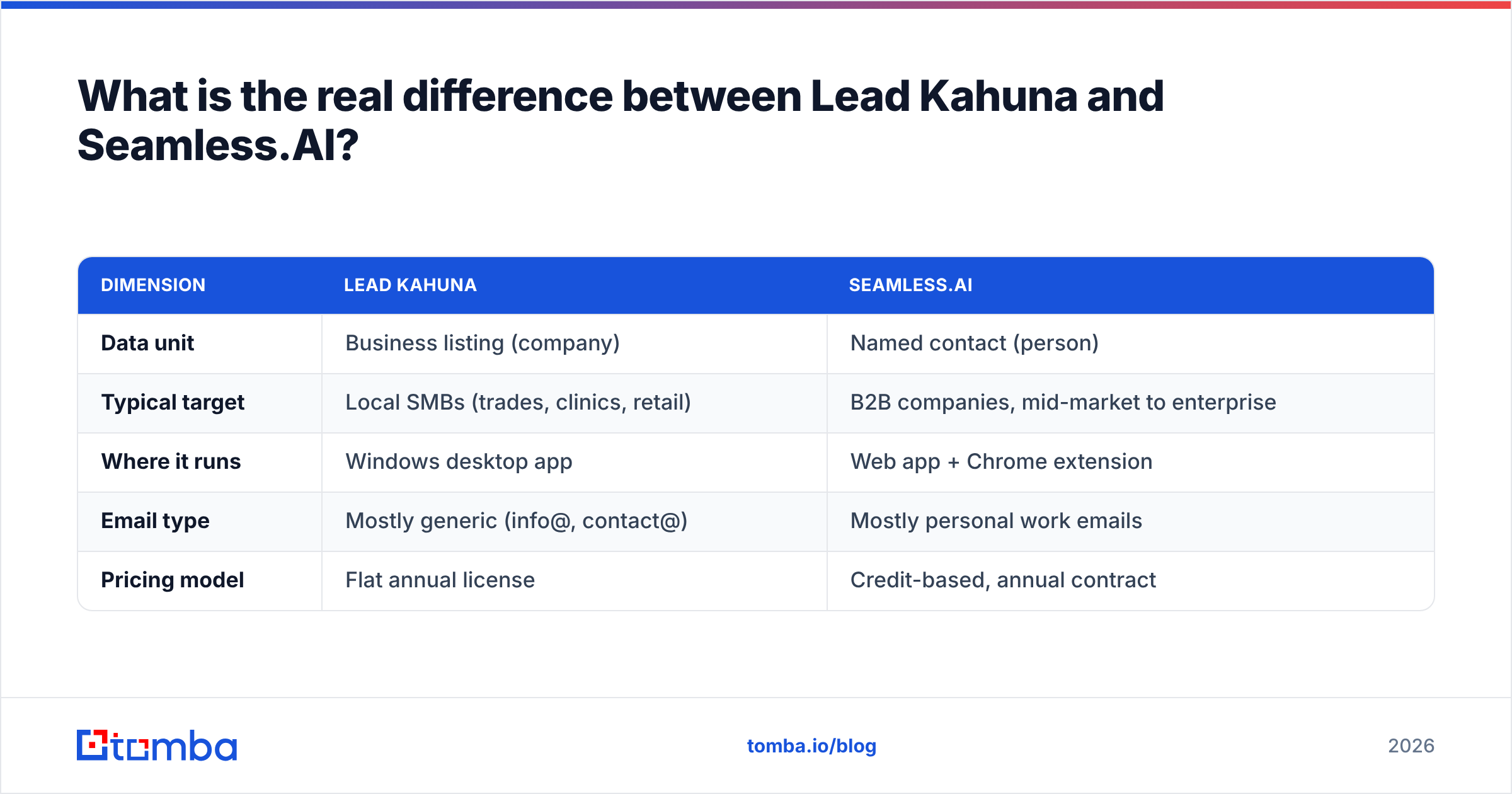
| Dimension | Lead Kahuna | Seamless.AI |
|---|---|---|
| Data unit | Business listing (company) | Named contact (person) |
| Typical target | Local SMBs (trades, clinics, retail) | B2B companies, mid-market to enterprise |
| Where it runs | Windows desktop app | Web app + Chrome extension |
| Email type | Mostly generic (info@, contact@) | Mostly personal work emails |
| Pricing model | Flat annual license | Credit-based, annual contract |
If you sell websites, SEO or reviews management to local businesses, Lead Kahuna's data shape fits you. If you sell software to directors and VPs, it won't, no matter how many listings it pulls.
What is Lead Kahuna and how does it work?#
Lead Kahuna is a lead-scraping program you install on a Windows machine. You choose a business category ("roofers", "dentists", "car dealerships") and a location. The software then pulls matching listings from public sources and crawls each company's website for contact details. Results export to CSV so you can load them into your CRM or cold email tool.
What it does well:
- Predictable cost. Reviewers report a one-time annual license of about $299. There are no per-lead credits, so a 5,000-row list costs the same as a 50-row list.
- Local-business coverage. Small businesses that barely exist in B2B databases, like a family-run HVAC company, usually do have a map listing and a website. Lead Kahuna reaches them.
- You own the process. Nothing is metered by a vendor. You run it, you keep the files.
Where it falls short:
- Throughput caps. Competitor comparisons, including Lead Scrape's breakdown, note that you need your own proxies to go past roughly 150 leads per day, and that it scrapes one city at a time. Proxies cost extra and take setup.
- Generic inboxes. Scraped emails tend to be role addresses like info@ or office@. Those inboxes get far lower reply rates than a decision-maker's own address, and role addresses on shared mailboxes are more likely to flag you as spam.
- No verification layer. A website listing an email doesn't mean the mailbox still accepts mail. You have to verify the list yourself before you send.
- Windows only. Mac-based teams need a VM or a spare PC.
Scraping public pages also carries its own considerations. If you haven't looked at how web scraping interacts with site terms and local privacy law, do that before you build a campaign on it.
What is Seamless.AI and how does it work?#
Seamless.AI calls itself a real-time search engine for B2B contacts. You search by name, company, title or industry, or you use the Chrome extension on LinkedIn and company websites. Seamless then looks up the contact's email and phone number and returns them. Each lookup uses a credit.
What it does well:
- Person-level data. You get named decision-makers with titles, which is what outbound teams selling to companies need.
- Phone numbers. Seamless puts a lot of weight on direct dials and mobile numbers, which cold-calling teams value.
- Workflow integrations. It connects to the major CRMs, so SDRs can push contacts to Salesforce or HubSpot without exporting CSVs by hand.
Where it falls short:
- Opaque pricing. In 2026 Seamless doesn't publish prices for its paid tiers. Several 2026 pricing breakdowns report that the old self-serve Basic plan (around $147/month on annual billing) has been removed. That leaves the Free plan with 50 lifetime credits, or a contact-sales Pro quote that reportedly needs several seats and an annual commitment.
- You pay per attempt. Third-party reviews say a credit is spent on every lookup, including lookups that return no valid email or phone. So your real cost per usable contact is higher than the sticker cost per credit.
- Contract friction. Auto-renewal and hard cancellations come up again and again in user reviews on G2. Read the order form carefully before you sign.
- Accuracy varies by segment. Coverage is strongest for US tech and mid-market companies. Results for SMBs and non-US markets are less consistent, which is common for real-time lookup tools.
Which tool gives you more accurate contact data?#
Accuracy only means something once you define the unit being measured.
For Lead Kahuna, accuracy means: is the business still operating, and does the scraped email or phone still work? Listing data is usually fresh because businesses keep their map profiles updated. Email quality is the weak point, because websites often show old addresses or contact forms instead of inboxes.
For Seamless.AI, accuracy means: is this the right person, still in this role, with a deliverable work email? Real-time lookup helps with job changes, but a guessed email pattern can still bounce, especially on catch-all domains that accept every address during SMTP checks.

The practical rule is the same for both: verify before you send. A bounce rate above about 2% starts to hurt sender reputation, and neither tool guarantees you'll stay under it. Run every list through an email verifier first. If much of your target market sits on catch-all domains, which is common with Microsoft 365 setups, use a verifier that handles catch-all separately instead of marking every address "risky."
How do Lead Kahuna and Seamless.AI compare side by side?#
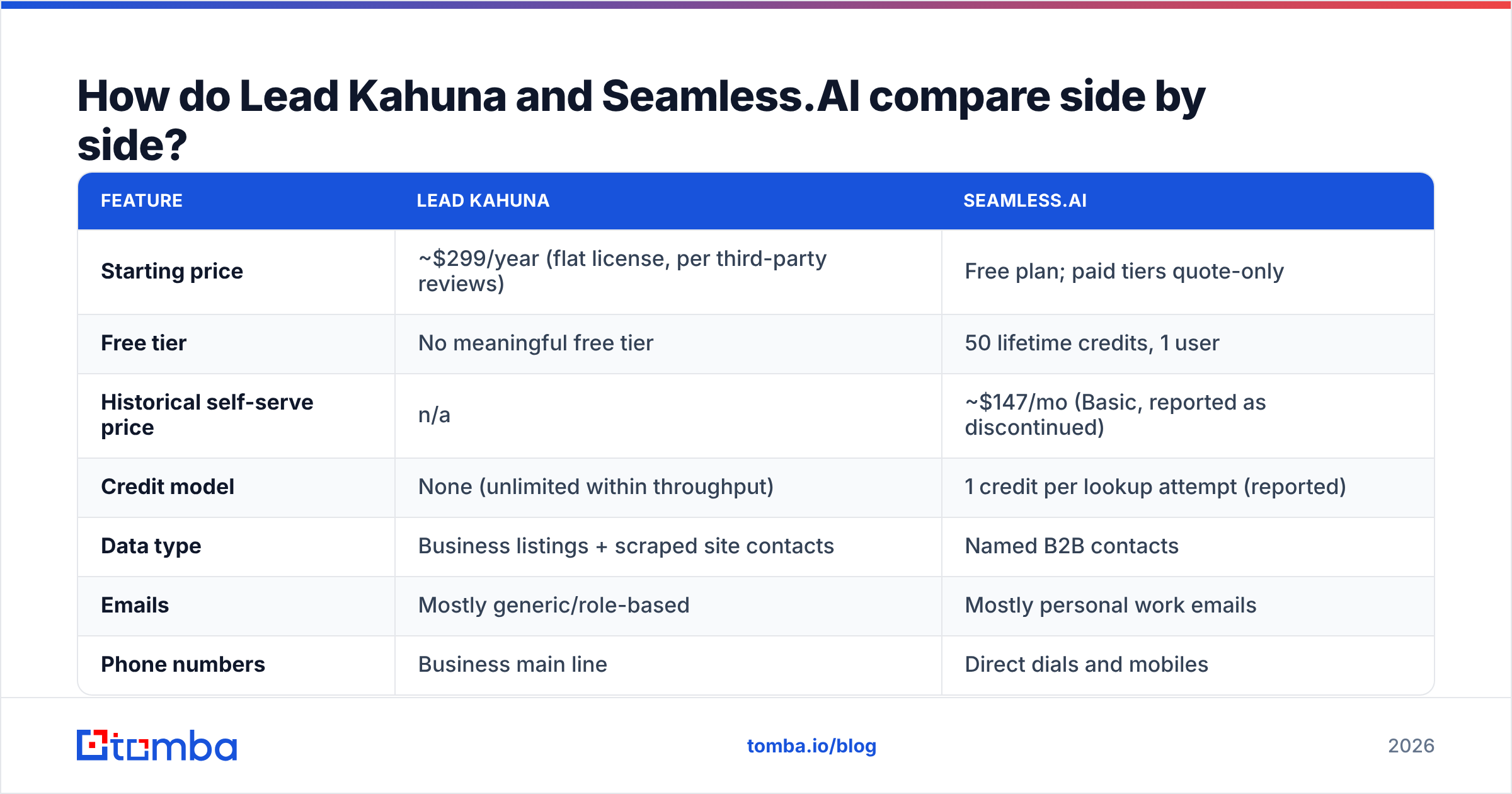
Here's the full comparison with 2026 figures. Where the vendor doesn't publish a number, we've marked it and used third-party reports.
| Feature | Lead Kahuna | Seamless.AI |
|---|---|---|
| Starting price | ~$299/year (flat license, per third-party reviews) | Free plan; paid tiers quote-only |
| Free tier | No meaningful free tier | 50 lifetime credits, 1 user |
| Historical self-serve price | n/a | ~$147/mo (Basic, reported as discontinued) |
| Credit model | None (unlimited within throughput) | 1 credit per lookup attempt (reported) |
| Data type | Business listings + scraped site contacts | Named B2B contacts |
| Emails | Mostly generic/role-based | Mostly personal work emails |
| Phone numbers | Business main line | Direct dials and mobiles |
| Job titles / seniority | No | Yes |
| Platform | Windows desktop | Web app + Chrome extension |
| CRM integrations | CSV export | Native CRM integrations |
| Daily volume limit | ~150 leads/day without proxies | Limited by credit balance |
| Contract | Annual license | Annual contract, auto-renew reported |
| Best for | Local-service agencies, SMB outreach | SDR teams targeting mid-market/enterprise |

The table makes the trade-off clear. Lead Kahuna gives you volume and cost certainty but shallow contact data. Seamless.AI gives you depth but uncertain costs and contract lock-in.
How much do Lead Kahuna and Seamless.AI actually cost per usable lead?#
List prices hide the number that matters: cost per contact you can actually email or call.
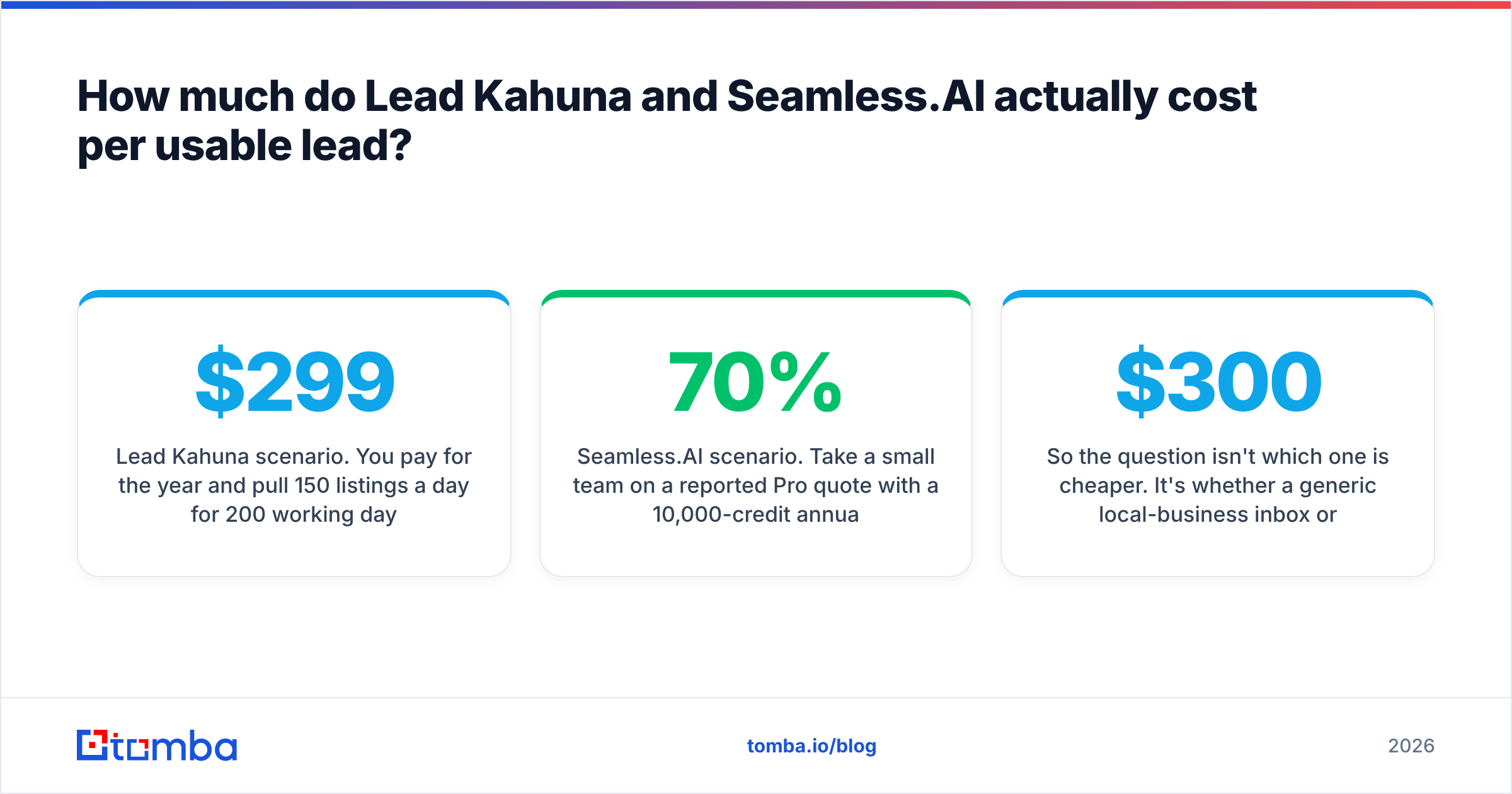
Lead Kahuna scenario. You pay $299 for the year and pull 150 listings a day for 200 working days, which is 30,000 listings. Maybe 40–60% of those have a scraped email at all. After verification, a meaningful share of those will be invalid or generic. Suppose you end up with 10,000 deliverable inboxes. That's roughly $0.03 per deliverable email, before proxy costs, your time and verification credits. Very cheap, but most of those inboxes are info@ addresses and not buyers.
Seamless.AI scenario. Take a small team on a reported Pro quote with a 10,000-credit annual package. If lookups return a usable email 70% of the time, you get about 7,000 usable contacts. Divide the annual contract (often reported in the low-to-mid thousands per seat, multiplied across a multi-seat minimum) by 7,000. You're typically paying somewhere between a few dollars and double-digit dollars per usable contact, depending on the terms you negotiate. More expensive, but each contact is a named decision-maker.
So the question isn't which one is cheaper. It's whether a generic local-business inbox or a named B2B buyer is worth more to your offer. For a $300/month local SEO retainer, Lead Kahuna's economics make sense. For a $30k ACV software deal, one extra meeting covers Seamless's cost.
Which tool should you choose for your use case?#
Use this decision list:
- You're an agency selling to local businesses. Choose Lead Kahuna. Map-listing data is the right source, and flat pricing lets you build big lists across verticals. Budget time for proxies and verification.
- You're an SDR team selling B2B software. Seamless.AI's person-level data fits better. Negotiate the contract terms (renewal notice window, credit rollover, seat count) before you sign, not after.
- You're a solo founder testing outbound. Neither is ideal. Lead Kahuna's data is too generic for B2B, and Seamless's free plan (50 lifetime credits) is too small for a real test while its paid plans need a sales call. A monthly, self-serve email finder fits better.
- Your team does a lot of cold calling. Seamless.AI, because of its direct-dial focus. Validate numbers before they hit the dialer.
- You need both local and B2B data. Pair a cheap listing source for account discovery with a person-level email finder for contact discovery, and verify everything in one pass.

Is there a middle ground between a desktop scraper and a quote-only database?#
Yes. The gap between these two tools is a real market, and a few categories of tools fill it.
Domain-first email finders start from the company website, as Lead Kahuna does, but return named people with work emails, as Seamless does. You enter a domain and get the people at that company plus their email pattern. A domain search is often the quickest way to turn a scraped list of local-business websites into actual owner and manager contacts.
Self-serve, monthly pricing removes the annual-contract risk. Tomba is one example. It has a free tier with 25 searches a month, and paid plans start at $49/month (Starter), then $99/month (Growth) and $249/month (Pro), with custom Enterprise pricing on top. You can see the full breakdown on the Tomba pricing page. Other self-serve finders use similar models. The point is that you can cancel in any month and scale credits to how much you actually send.
Built-in verification means you aren't paying for a lookup and then paying again to verify the result. Most dedicated finders check deliverability at lookup time and flag catch-all domains separately.
Tomba isn't the only option. If Seamless's contract terms are what's pushing you away, compare a few options in our Seamless.AI alternative breakdown. Apply the same test to any vendor: a published price, monthly billing and verification included.
A practical hybrid workflow:
- Use a listing scraper (Lead Kahuna or similar) to build the account list: local businesses in your target category and city.
- Run the website column through a domain search to find named owners and managers.
- Verify every email and treat catch-all results as their own segment.
- Send only to verified contacts, and keep generic inboxes in a separate, lower-volume sequence.
This workflow gives you Lead Kahuna's reach and cost with person-level contacts like Seamless's, and no annual lock-in.
Frequently asked questions#
Is Lead Kahuna a replacement for Seamless.AI?#
No. Lead Kahuna scrapes company-level local-business listings, and Seamless.AI returns named B2B contacts. They sit at different stages of prospecting. You might use Lead Kahuna to find accounts, but it won't give you a VP of Sales' work email.
Does Seamless.AI still have a cheap self-serve plan?#
Not as of 2026, according to several independent pricing reviews. The Free plan has 50 lifetime credits, and paid tiers go through sales with annual terms. Check seamless.ai directly for the latest before you budget.
Can I use Lead Kahuna on a Mac?#
Not natively. It's a Windows desktop app, so Mac users need a Windows VM or a separate machine.
Do I need to verify emails from either tool?#
Yes. Scraped website emails go stale, and real-time B2B lookups can still guess wrong on catch-all domains. Verifying before you send protects your domain's reputation whichever source you use.
The verdict: Lead Kahuna or Seamless.AI?#
Pick Lead Kahuna if you sell to local businesses, want a flat annual cost, and don't mind managing proxies and verifying lists yourself. Pick Seamless.AI if you sell B2B at a deal size that justifies an annual, quote-based contract, and phone data matters to your team. Pick neither if what you actually need is verified, person-level work emails on a plan you can cancel any month.
If you're in that last group, try Tomba Email Finder. Enter a name and company domain, or just a domain, and you get verified professional email addresses with confidence scores and sources. There's no annual contract, and the free tier gives you 25 searches a month to test it on your own target list. It also works well after a scraper like Lead Kahuna: take the websites from your local-business list, find the owners' real inboxes, and send only to addresses that will be delivered.
Related guides#
// get started
Find, verify and enrich your first contacts today
Start on the free plan with 25 searches a month, then scale when your team is ready.
Free plan · No credit card required · GDPR & CCPA
// about the author