Leadrocks vs Smartlead (2026): Lead Data Tool or Cold Email Sender?
Leadrocks and Smartlead often end up on the same shortlist, but they do different jobs. One finds the people you should email. The other sends the emails. Here's how to tell which one your outbound stack is actually missing.
TL;DR
- Leadrocks and Smartlead don't compete directly. Leadrocks is a B2B contact database and email finder. Smartlead is a cold email sending and deliverability platform. You use one to get leads and the other to email them.
- Pick Leadrocks if you have no reliable way to build prospect lists with work emails, especially from LinkedIn.
- Pick Smartlead if you already have lists and need to send at volume across many mailboxes with warmup, rotation, and a unified inbox.
- Most outbound teams end up with both kinds of tool: a data source and a sending engine. Verify every list before it reaches the sender, because bounces hurt your domain no matter which tool found the address.
- Pricing isn't comparable line by line. Leadrocks charges for contact data. Smartlead charges for active leads and sending volume.
Why are Leadrocks and Smartlead compared at all?#
People compare them because both appear in "cold outbound stack" roundups, and both are priced for SMBs and agencies. When you're putting together an outbound motion from scratch, it's easy to assume every tool on that list does roughly the same thing.
They don't. Picture your outbound motion as a restaurant. Leadrocks is the supplier that delivers the ingredients (names, companies, emails). Smartlead is the kitchen that cooks and serves them (sequences, sending, inbox management). A great kitchen can't do much with spoiled ingredients, and a pantry full of groceries doesn't feed anyone until somebody cooks.
So the real question behind "Leadrocks vs Smartlead" is which gap in your stack you're trying to fill. The rest of this post answers that, then covers pricing, deliverability risk, and the setups we see work in practice.
What is Leadrocks?#
Leadrocks is a B2B lead generation tool built around a searchable database of professional contacts, with a strong emphasis on LinkedIn-sourced profiles. The main workflow looks like this:
- Search or filter for prospects by job title, industry, company, or location.
- Reveal work emails (and sometimes other contact details) for the profiles you pick.
- Export the list as a CSV or push it into your outreach tool.
It also has a Chrome extension, so you can pull contact data while you browse LinkedIn profiles and search results. That fits SDRs who prospect by hand in LinkedIn and Sales Navigator and want an email next to each name without copy-pasting between tabs.
What Leadrocks doesn't do is send your campaigns. There's no multi-mailbox sending infrastructure, no warmup network, and no reply management. Once the list is exported, its job is finished.
What is Smartlead?#
Smartlead is a cold email automation platform built for high-volume senders, mainly agencies and outbound teams running dozens or hundreds of mailboxes. Its main features:
- Unlimited mailboxes on paid plans, so you can spread volume across many sending accounts.
- Automated warmup to build sender reputation on new inboxes.
- Mailbox rotation, which spreads sends across accounts so no single inbox gets overloaded.
- Master inbox (Unibox), which collects replies from every connected mailbox in one place.
- Multi-step sequences with spintax, conditional steps, and A/B testing.
- Agency features such as white-labeling and client sub-accounts.
Smartlead doesn't give you a large proprietary B2B contact database the way a data vendor does. You bring the leads and Smartlead sends to them. Whatever quality your list has, good or bad, shows up directly in your bounce rate and inbox placement.

How do Leadrocks and Smartlead differ at the core?#
The quickest way to see the split is to look at the job each tool does in an outbound workflow. There are five stages, and the two tools barely overlap:
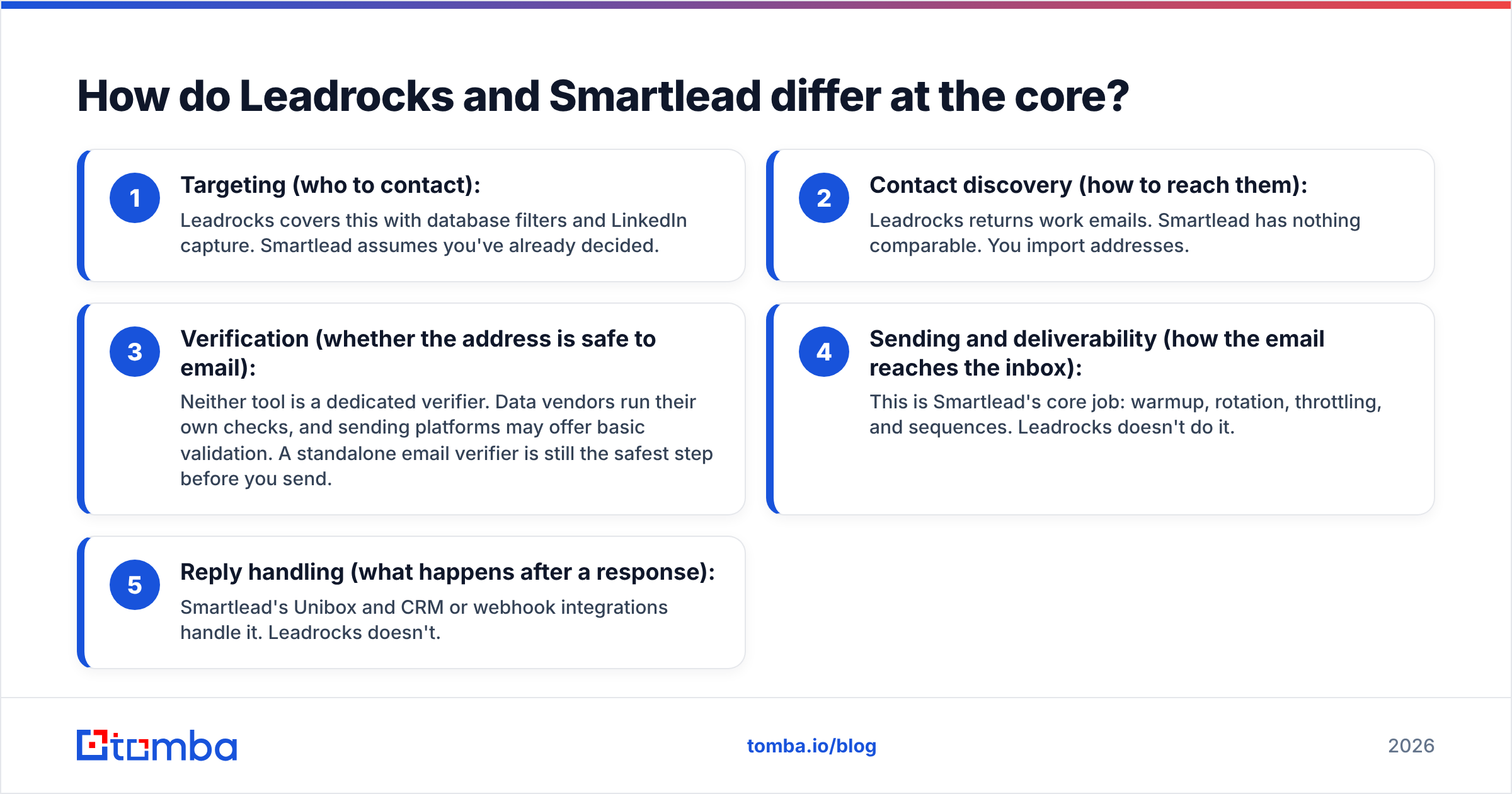
- Targeting (who to contact): Leadrocks covers this with database filters and LinkedIn capture. Smartlead assumes you've already decided.
- Contact discovery (how to reach them): Leadrocks returns work emails. Smartlead has nothing comparable. You import addresses.
- Verification (whether the address is safe to email): Neither tool is a dedicated verifier. Data vendors run their own checks, and sending platforms may offer basic validation. A standalone email verifier is still the safest step before you send.
- Sending and deliverability (how the email reaches the inbox): This is Smartlead's core job: warmup, rotation, throttling, and sequences. Leadrocks doesn't do it.
- Reply handling (what happens after a response): Smartlead's Unibox and CRM or webhook integrations handle it. Leadrocks doesn't.
If you've been treating these as rival products, this is the fix: they sit at opposite ends of the same pipeline.
Leadrocks vs Smartlead: how do the features compare?#
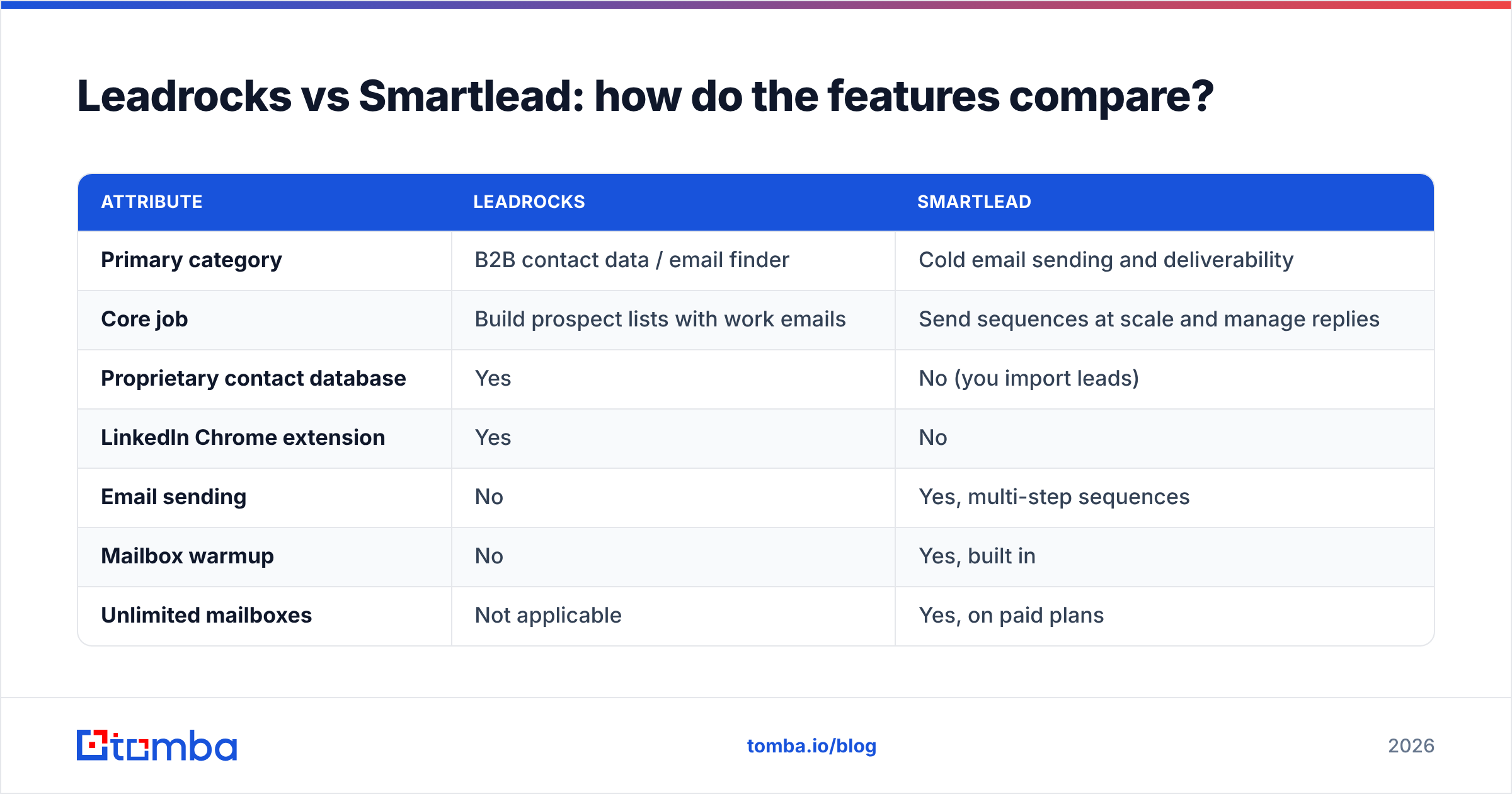
Here's the side-by-side. Pricing changes often, so treat the figures as a starting point and check each vendor's pricing page before you buy.
| Attribute | Leadrocks | Smartlead |
|---|---|---|
| Primary category | B2B contact data / email finder | Cold email sending and deliverability |
| Core job | Build prospect lists with work emails | Send sequences at scale and manage replies |
| Proprietary contact database | Yes | No (you import leads) |
| LinkedIn Chrome extension | Yes | No |
| Email sending | No | Yes, multi-step sequences |
| Mailbox warmup | No | Yes, built in |
| Unlimited mailboxes | Not applicable | Yes, on paid plans |
| Unified reply inbox | No | Yes (Unibox) |
| Agency / white-label features | Limited | Yes, client sub-accounts and white-label |
| Pricing model | Pay for contact data / credits | Pay for active leads and monthly send volume |
| Entry price (approx.) | Low-cost monthly plans; check leadrocks.io | From about $39/mo (Basic) |
| Best for | SDRs and founders who need lists | Agencies and teams sending high volume |
| Main limitation | Doesn't send or warm up | Doesn't find or source leads |
The table shows why "which is better" doesn't have one answer. If you're missing lists, Leadrocks is the better buy. If you're missing sending infrastructure, Smartlead is.
Which one should you choose for your situation?#
Start with what you already have. Four common scenarios:
You have mailboxes and a sender but no reliable lists. Pick Leadrocks or another data source. Adding a sending platform won't help if you have nobody to email.
You have lists but you're sending from a single Gmail or Outlook account. Pick Smartlead. Pushing volume through one inbox is how domains get burned. Rotation and warmup are what you're missing.
You're an agency running outbound for several clients. You'll almost certainly need both a data layer and a sending layer. Smartlead's client sub-accounts and white-labeling are strong here, and the data can come from Leadrocks or any other finder that exports clean CSVs.
You're a solo founder sending 20 to 50 emails a day. You may not need Smartlead yet. A good email finder, verification, and a lighter sequencing tool, or even manual sends, will get you surprisingly far. Add a volume sender once your daily sends outgrow a couple of mailboxes.
If you're still comparing senders, our Instantly alternative breakdown covers the platform most often compared with Smartlead.
How much do Leadrocks and Smartlead cost?#
You can't compare them directly, because they bill for different things.
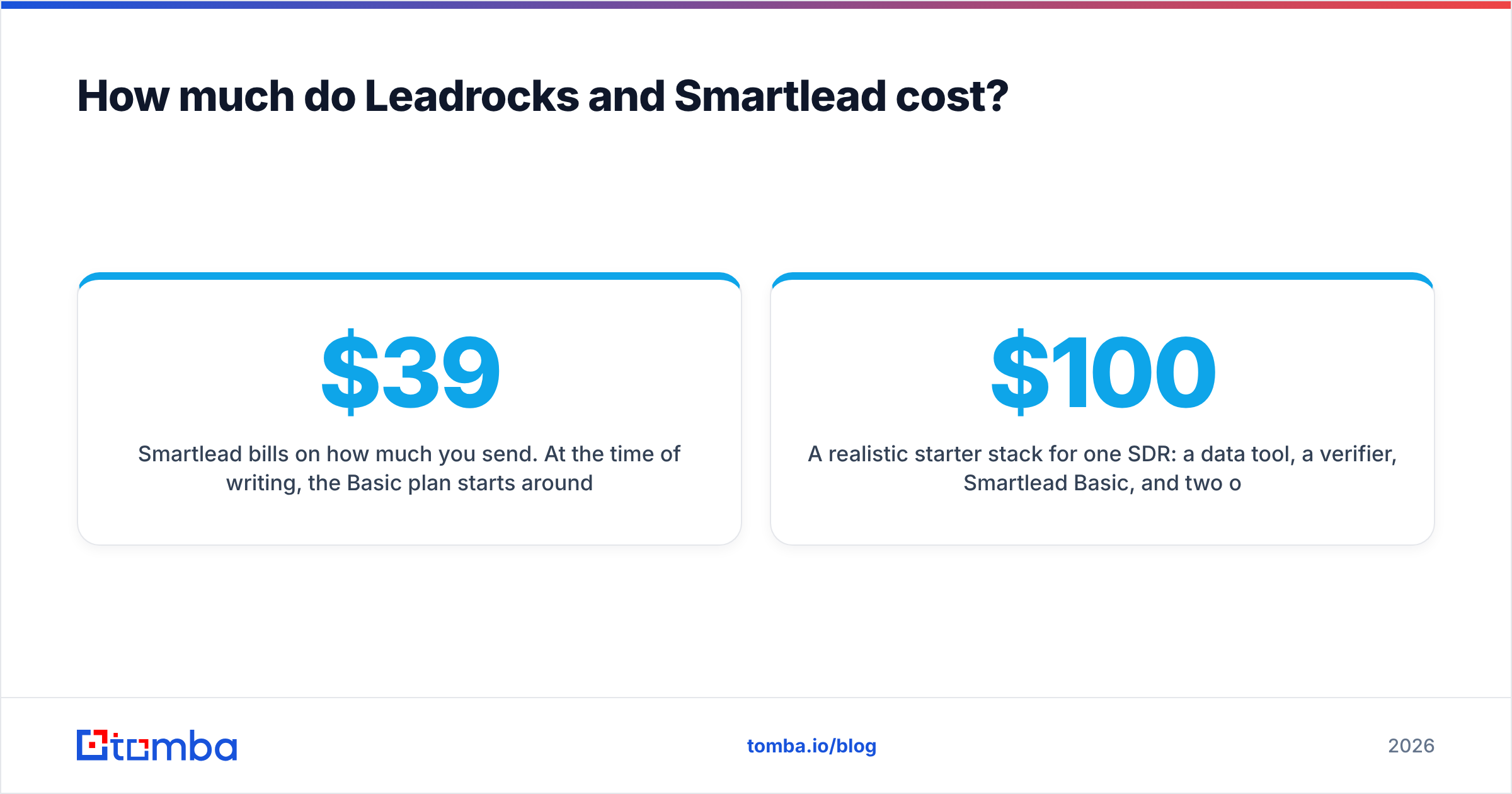
Smartlead bills on how much you send. At the time of writing, the Basic plan starts around $39/month and covers a few thousand active leads and several thousand emails per month. Higher tiers (Pro at roughly $94/month and up) raise the active-lead and email limits and add features such as API access and client management. The G2 listing for Smartlead is a useful cross-check for how users describe plan limits in practice.
Leadrocks bills for data: how many contacts you can reveal or export each month. The plans are aimed at individuals and small teams, so costs are modest, but check the current tiers on their site, since data vendors adjust credit allowances often.
Hidden costs to budget for, whichever you pick:
- Mailboxes and domains. Smartlead doesn't include inboxes. You pay separately for Google Workspace or Microsoft 365 seats plus secondary domains, and at agency scale that often costs more than the Smartlead subscription.
- Verification. If your data vendor doesn't guarantee deliverability, you'll pay per verified address somewhere.
- Enrichment. Phone numbers, firmographics, and technographics may need a separate tool or higher-tier credits.
A realistic starter stack for one SDR: a data tool, a verifier, Smartlead Basic, and two or three mailboxes on secondary domains. Expect to spend well over $100/month in total before you've written a line of copy.
What's the deliverability risk in each tool?#
The failure modes are different, and they compound when you put the tools together.
On the Leadrocks side, the risk is data freshness. Any database built from professional profiles ages. People change jobs, companies rebrand domains, and catch-all servers accept mail they later bounce. Typical B2B contact data decays by an estimated 20 to 30% a year, so a list that verified clean six months ago can bounce noticeably today.
On the Smartlead side, the risk is sending bad data at scale. Smartlead's warmup and rotation protect your sender reputation, but they can't make an invalid address valid. Load 10,000 unverified contacts into a campaign with 30 mailboxes and you've spread the damage across 30 inboxes instead of one. Smartlead does offer some lead validation, but a dedicated verification pass is still standard practice.
The fix is the same either way. Put a verification gate between the data source and the sender:
- Export your list from Leadrocks, or whichever finder you use.
- Run it through a bulk verifier and drop invalid, disposable, and high-risk addresses.
- Treat catch-all results separately. Send to them from lower-risk mailboxes or at lower volume.
- Import only the clean segment into Smartlead.
Mailbox providers such as Google set explicit spam and bounce thresholds for bulk senders, and Google's sender guidelines are worth reading before you scale any Smartlead campaign.

Are there tools that cover the data side more completely?#
Yes. If you're choosing Leadrocks mainly for the data, compare it against other finders before you commit. Things that separate data tools:
- How you search. Can you find emails by name plus company, by domain, or only through LinkedIn profiles? Domain-level search lets you pull every public address at a target account in one query.
- Whether verification is included. Some finders check each address in real time before returning it. Others hand you raw guesses.
- Catch-all handling. Most finders label these "unknown." Better tools add a confidence score or a dedicated catch-all check.
- Where you can use it. Chrome extension, Google Sheets add-on, API, and native CRM integrations each suit a different workflow.
- Price per usable contact. A cheap credit only helps if the address it returns doesn't bounce.
Tomba is one option on the data side. It combines an email finder, domain search, a built-in verifier, and a catch-all verifier, with a free tier of 25 searches a month so you can test data quality against your own ICP before paying. Paid plans start at $49/month (Starter), then Growth at $99/month and Pro at $249/month. Full breakdown on Tomba pricing. It exports cleanly to CSV and connects to the tools Smartlead users already run, so it slots into the same stage of the pipeline that Leadrocks fills.
None of this makes Leadrocks a bad choice. If your team lives in LinkedIn and its data covers your market well, it's a reasonable pick. The point is to judge the data layer on data quality, not on how it compares with a sending tool.
Can you connect Leadrocks and Smartlead?#
Yes, and that's the most common way to use them together. The simplest version:
- CSV hand-off. Export from Leadrocks, verify, then import into a Smartlead campaign with custom fields mapped (first name, company, title, personalization line).
- Automation hand-off. Use Zapier, Make, or webhooks to push new contacts into Smartlead as they're captured, with a verification step in the middle.
- CRM in the middle. Send leads to HubSpot or Pipedrive first, then sync campaign-ready segments to Smartlead. This is slower but keeps a single source of truth.
Whichever route you take, keep verification as its own step. When bounce rates climb, you'll want to know whether the cause was the data or the sending setup, and you can't tell if the two are blended together.
So, Leadrocks vs Smartlead: which wins?#
Neither one, because they aren't in the same contest.
- Leadrocks is the better buy when your bottleneck is finding the right people and their work emails, particularly through LinkedIn.
- Smartlead is the better buy when your bottleneck is sending at volume without wrecking your domains.
- A mature outbound team needs both a data source and a sending platform. The question is which specific tools fill each slot, and whether a verification step sits between them.
If you've read this far and realized your real gap is the data, meaning lists you can load into Smartlead without holding your breath over the bounce report, start there. Tomba Email Finder finds professional emails by name, domain, or company and verifies each result before you export, so the list that reaches your sender is ready to use. Try it on the free tier with 25 of your real target accounts, check the results against your current source, then plug the winner into your sending stack.
Related guides#
// get started
Find, verify and enrich your first contacts today
Start on the free plan with 25 searches a month, then scale when your team is ready.
Free plan · No credit card required · GDPR & CCPA
// about the author