LeadRocks vs TailorMails: Contact Data vs AI Email Personalization
LeadRocks finds B2B contacts. TailorMails writes personalized emails from LinkedIn profiles. They do different jobs, so here is which one your outbound stack is actually missing, plus the trap of running AI copy on unverified data.
TL;DR
- LeadRocks and TailorMails don't compete head-to-head. LeadRocks is a B2B contact database and email finder. TailorMails is an AI writer that turns LinkedIn profiles into personalized cold emails.
- Choose LeadRocks if your problem is who to email. You need names, emails, and phone numbers at scale. Its free plan gives you 50 credits a month, and paid plans are listed from about $29/mo.
- Choose TailorMails if you already have a list and your problem is what to say. Your reply rates are low because every email reads like a template.
- Most teams need both layers. You need verified contact data first and personalization second. Well-written AI copy sent to a bouncing address still bounces.
- Verify before you send. Whatever you use to source contacts, run the list through a verifier. Third-party reviews of large databases often report valid-email rates well below what vendors advertise.
What is the real difference between LeadRocks and TailorMails?#
People search "LeadRocks vs TailorMails" expecting two rival products. What they find is two tools that sit at different stages of the same outbound workflow.
Picture a cold email campaign as a letter delivery. LeadRocks gives you the address book. TailorMails writes the letter. You can't swap one for the other, just as a good pen won't tell you where someone lives.
In more detail:
- LeadRocks is a B2B lead database and prospecting tool. You search for people by title, company, industry, and location, then export emails and phone numbers. It also offers a LinkedIn Chrome extension for pulling contacts from profiles, plus a built-in email verifier and an API.
- TailorMails is an AI email generator. You give it a LinkedIn profile and it drafts a personalized opening line or a full cold email based on that person's role, background, and activity. It doesn't sell you contact data. It assumes you already know who you're writing to.
So the real question is which bottleneck is costing you more meetings right now: finding contacts or writing emails worth answering.
How do LeadRocks and TailorMails compare feature by feature?#
Here are the two tools side by side on the attributes that matter when you're building an outbound stack. Pricing changes often, so check each vendor's pricing page before you buy.
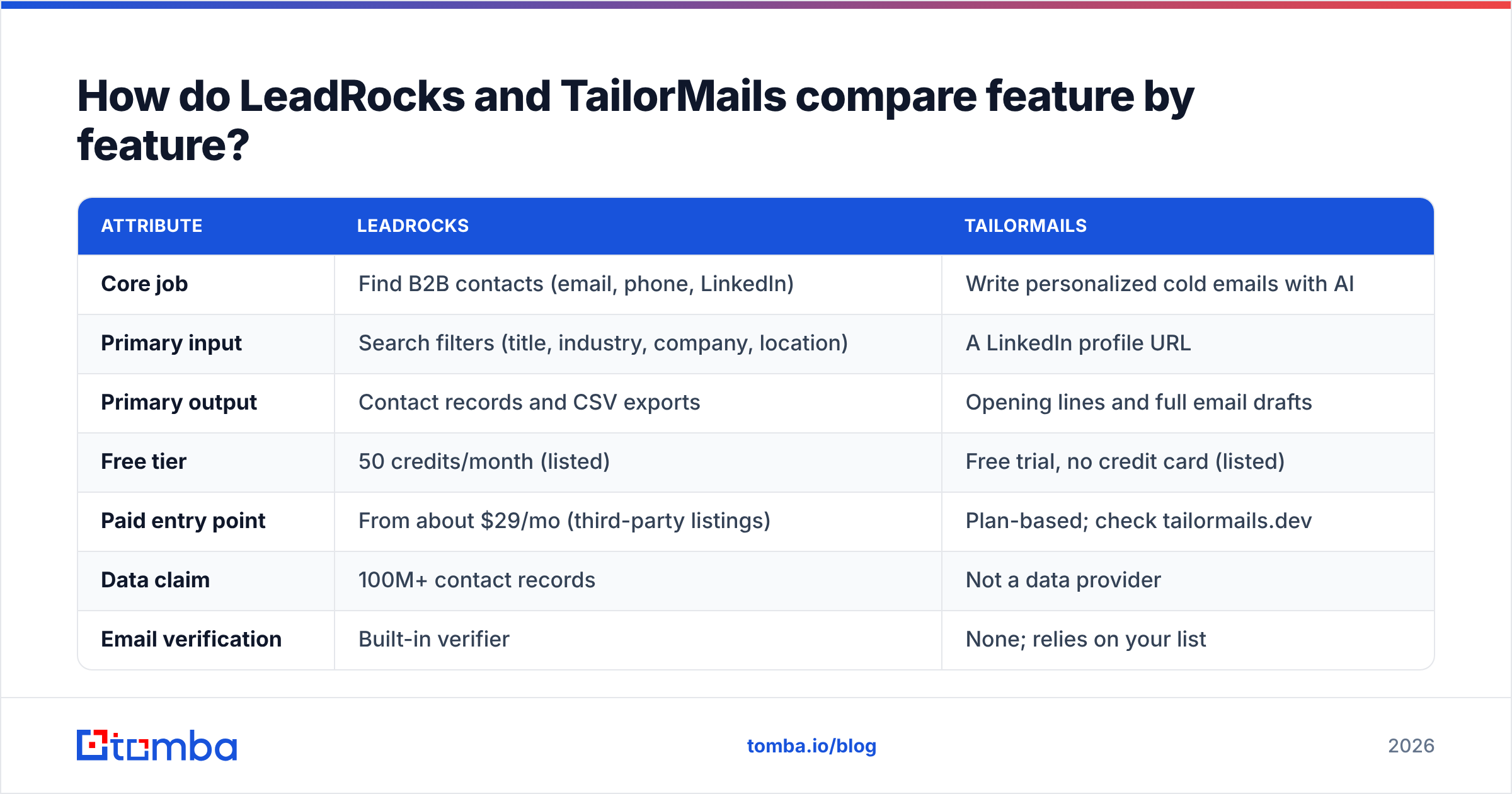
| Attribute | LeadRocks | TailorMails |
|---|---|---|
| Core job | Find B2B contacts (email, phone, LinkedIn) | Write personalized cold emails with AI |
| Primary input | Search filters (title, industry, company, location) | A LinkedIn profile URL |
| Primary output | Contact records and CSV exports | Opening lines and full email drafts |
| Free tier | 50 credits/month (listed) | Free trial, no credit card (listed) |
| Paid entry point | From about $29/mo (third-party listings) | Plan-based; check tailormails.dev |
| Data claim | 100M+ contact records | Not a data provider |
| Email verification | Built-in verifier | None; relies on your list |
| Chrome extension | Yes, for LinkedIn contact capture | Yes, profile-based generation workflow |
| API | Yes | Limited or not the core product |
| Best for | SDR teams building lists from scratch | Founders and SDRs with lists who need better copy |
| Main risk | Data accuracy varies by segment | Personalization is wasted if the address is wrong |
The table shows one tool is an input to the other. LeadRocks answers "who and where." TailorMails answers "what to say."
Is LeadRocks accurate enough to send cold email to?#
This question matters most, because a data tool is only as good as its bounce rate.
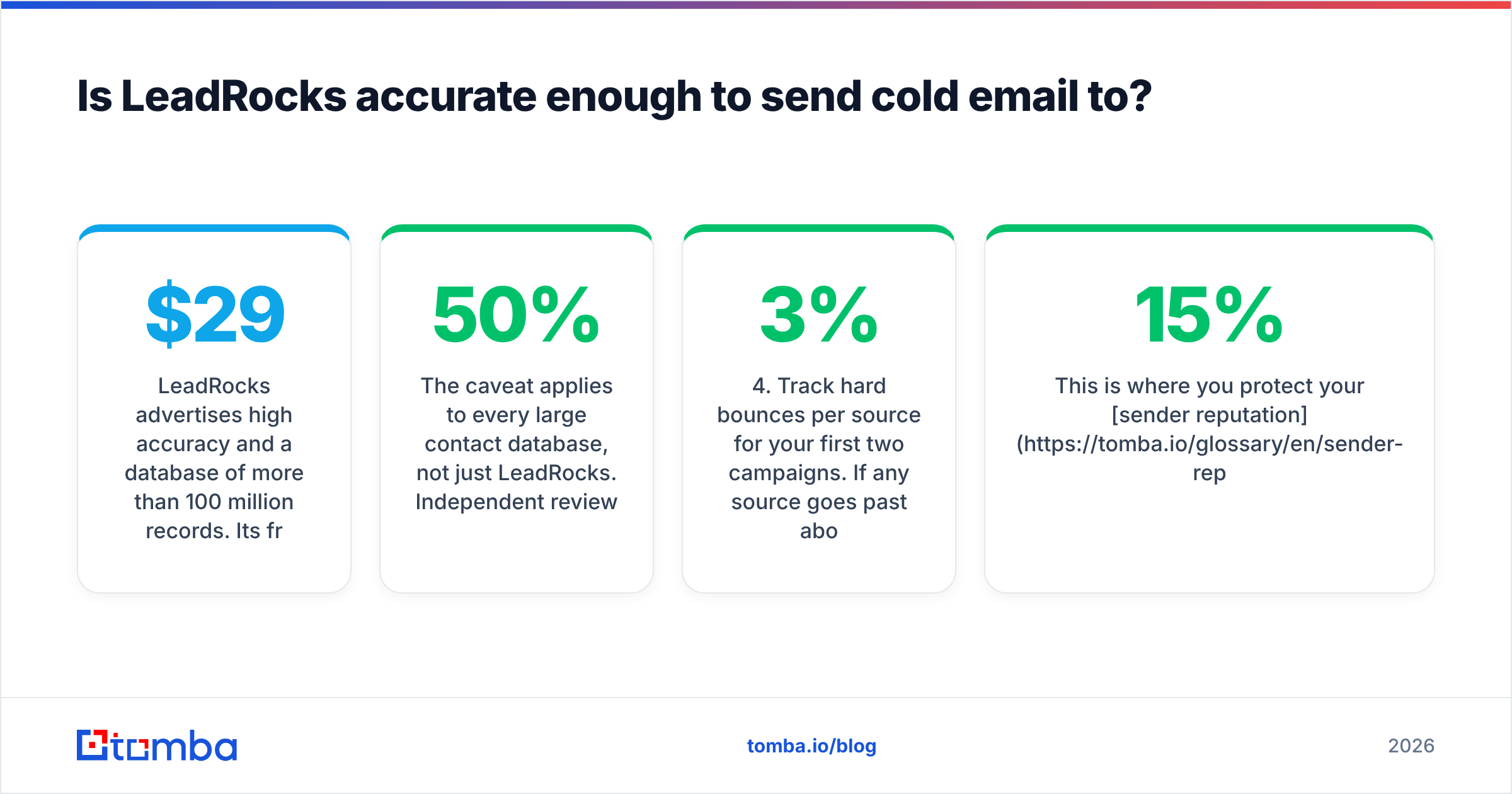
LeadRocks advertises high accuracy and a database of more than 100 million records. Its free plan (50 credits a month, unlimited users) is generous for testing, and it includes both emails and phone numbers, which not every entry-level tool does. The paid ladder runs from about $29/mo up to several hundred dollars a month for high-volume teams. It has also appeared as a lifetime deal on AppSumo, so check whether that's still available before you commit to a subscription.
The caveat applies to every large contact database, not just LeadRocks. Independent reviewers have reported valid-email rates well below vendor claims, sometimes in the 20–50% range depending on the segment tested. Fast-moving roles, small companies, and catch-all domains pull those numbers down across the whole industry.
In practice:
- Pull a test sample of 100–200 contacts from your real ICP, not a demo search.
- Run it through an independent email verifier before it touches your sending domain.
- Separate out catch-all addresses. A domain that accepts every address can't be confirmed with a simple SMTP check. A dedicated catch-all verifier helps you decide whether those contacts are worth the risk.
- Track hard bounces per source for your first two campaigns. If any source goes past about 2–3%, stop sending from it.
This is where you protect your sender reputation. A list that bounces 15% can damage a domain in a week, whatever the copy says.

Does TailorMails actually improve reply rates?#
TailorMails solves a real problem. Most cold emails fail because they're generic. "I noticed you're the VP of Sales at Acme" isn't personalization, and buyers can tell.
TailorMails reads the LinkedIn profile you give it and builds the opener around specific things: a recent role change, a career path, a post, or company context. On a small, high-value list, this can cut the time you spend researching each prospect from about 5–10 minutes to under a minute. Its free trial doesn't ask for a credit card, so you can test it on your own ICP before paying.
Where it works well:
- Founder-led sales with a few dozen high-value targets a week
- Account-based outreach where every account justifies a tailored message
- SDRs on new territory who need solid first drafts to edit, not blank pages
Where it runs out:
- It depends on LinkedIn profile quality. Sparse profiles produce generic openers.
- It doesn't find or verify email addresses. You still need a data source.
- Volume personalization has limits. At thousands of sends a week, you'll want copy generation inside your sequencer, not a separate step for each profile.
Treat AI drafts as drafts. Read every opener before it goes out. An AI line that gets someone's job history slightly wrong does more harm than no personalization at all. Prospects notice inaccurate "personal" details and remember them.
Which should you choose: LeadRocks or TailorMails?#
Start from the bottleneck, not the feature list. Here's a decision framework:
- You have no list and no contact data. Start with a data tool. LeadRocks fits if you want a searchable database with a free tier to test. TailorMails can't help until you have addresses.
- You have a list, but reply rates are under 1–2%. Your problem is likely copy or targeting, not data. TailorMails, or better manual research, is the higher-value fix.
- You have a list and your bounce rate is over 3%. Fix the data before anything else. Verify, remove invalid and risky contacts, and re-source what's missing. Personalization won't help you here.
- You run high-volume outbound (5,000+ emails a month). You need a reliable data layer with an API and bulk verification. Add personalization selectively for top-tier accounts rather than every contact.
- You're a solo founder doing targeted outreach. A light data tool for addresses plus TailorMails for openers is a lean, cheap stack.
Most teams end up at option 4 or 5. The comparison stops being "which one" and becomes "what do I pair with it."
What does a complete stack built around these tools look like?#
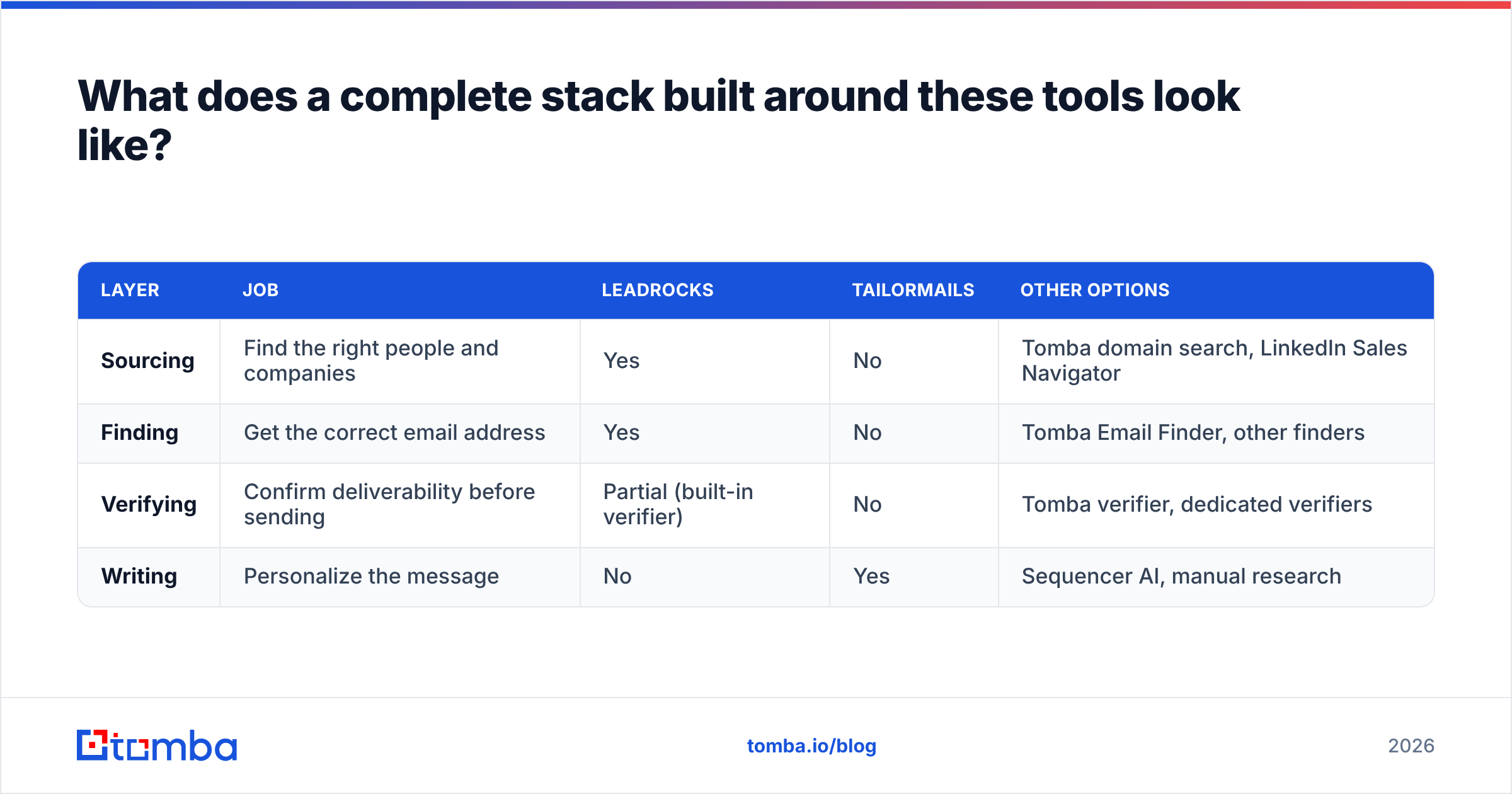
A working outbound stack has four layers. LeadRocks and TailorMails each cover part of one:
| Layer | Job | LeadRocks | TailorMails | Other options |
|---|---|---|---|---|
| Sourcing | Find the right people and companies | Yes | No | Tomba domain search, LinkedIn Sales Navigator |
| Finding | Get the correct email address | Yes | No | Tomba Email Finder, other finders |
| Verifying | Confirm deliverability before sending | Partial (built-in verifier) | No | Tomba verifier, dedicated verifiers |
| Writing | Personalize the message | No | Yes | Sequencer AI, manual research |
The verifying layer is where most stacks break. If you use LeadRocks for sourcing, check addresses with a second verifier. If you use TailorMails for writing, the data behind it has to come from somewhere reliable.
For the finding layer, look for a tool that lets you enter a name and company and get back an address with a confidence signal and public sources, rather than only a database row. That's the difference between a stored record from some point in the past and a lookup checked at the time you request it. A domain search is also useful for mapping everyone at a target account before you decide who to personalize for.
Integrations matter too. LeadRocks exports CSV and has an API. TailorMails fits a copy-paste or extension workflow. Before you commit, check whether each tool connects to your CRM and sequencer, or whether you'll spend Friday afternoons moving CSVs around. Review sites like G2 are useful for spotting integration complaints from real users.
How do the costs add up for a small team?#
Here's a realistic monthly budget for a two-person SDR team sending about 2,000 cold emails a month:
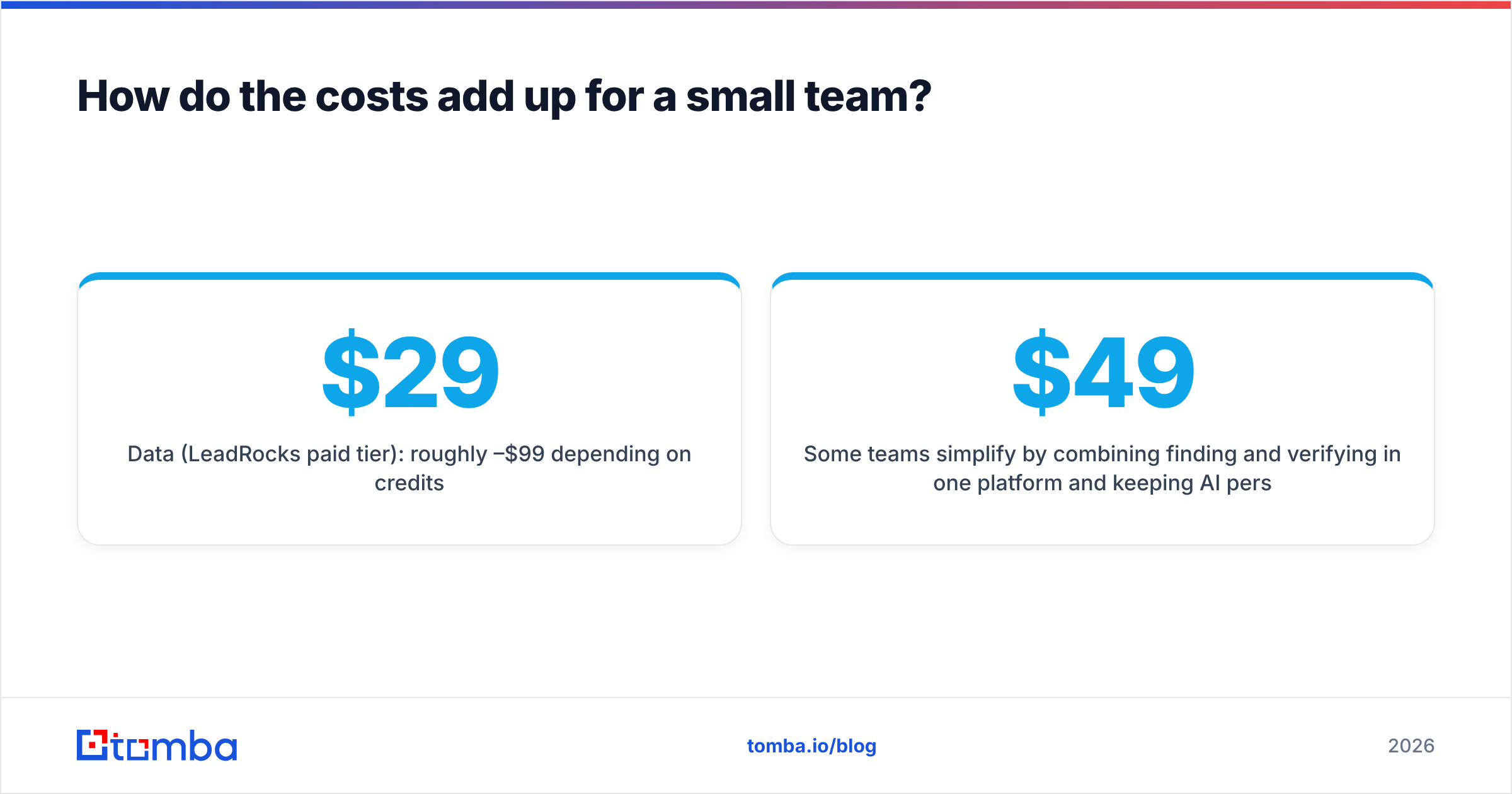
- Data (LeadRocks paid tier): roughly $29–$99/mo depending on credits
- Personalization (TailorMails): a plan on top, sized to the number of profiles you draft
- Independent verification: needed either way, because it's cheaper to catch a bad address than to recover a burned domain
- Sequencer and inbox warmup: usually the largest line item
The hidden cost is time, not subscriptions. Two separate tools mean two exports, two logins, and a manual step between them. If an SDR spends 30 minutes a day moving data between tabs, that's more than 10 hours a month, which is worth more than most of these subscriptions.
Some teams simplify by combining finding and verifying in one platform and keeping AI personalization in their sequencer. For comparison, Tomba bundles the email finder, verifier, and domain search: a free tier with 25 searches a month, Starter at $49/mo, Growth at $99/mo, and Pro at $249/mo. See the Tomba pricing page for current credit allowances.

What mistakes do teams make when combining data and AI personalization?#
These patterns come up again and again in outbound audits:
- Personalizing before verifying. Teams spend research or AI credits on contacts that bounce. Verify first, then personalize only the deliverable addresses.
- Treating AI openers as final copy. One wrong detail ("Congrats on the new role!" to someone who's been there four years) costs you credibility. Keep a human editing pass.
- Trusting one data source blindly. Every database has gaps. Cross-check high-value contacts against a second source.
- Ignoring catch-all domains. Enterprise domains are often catch-all. Sending to them unscored inflates your apparent bounce-safety while quietly hurting your reputation.
- Measuring opens instead of replies. Apple Mail Privacy Protection makes open rates unreliable. Judge TailorMails-style personalization by reply rate and meetings booked.
- Skipping the ICP step. Neither tool fixes bad targeting. A personalized email to the wrong buyer is still a wasted send.
What is the final verdict on LeadRocks vs TailorMails?#
LeadRocks wins if you need contacts. It has a large database, a useful free tier (50 credits a month), phone numbers included, and an entry price around $29/mo. Treat its accuracy claims as a starting point and verify independently.
TailorMails wins if you need better emails. It's a focused AI writer that turns LinkedIn profiles into specific openers, with a no-card free trial. It works best on smaller, higher-value lists where every reply matters.
Neither is complete by itself. A good outbound motion needs verified data and relevant copy. If you had to pick an order, fix the data first. Deliverability is the ceiling on everything else, and a great email in a spam folder or a bounce log gets zero replies.
Ready to fix the data layer first?#
If your personalization is ready but you're not confident in the addresses behind it, start with the data. The Tomba Email Finder finds professional email addresses by name, domain, or company and returns verification status and public sources with each result, so the contacts you pass to TailorMails, or any AI writer, actually reach an inbox. Start on the free plan with 25 searches a month, test it against your current source on your real ICP, and compare the bounce rates.
Related guides#
// get started
Find, verify and enrich your first contacts today
Start on the free plan with 25 searches a month, then scale when your team is ready.
Free plan · No credit card required · GDPR & CCPA
// about the author