Leadsgorilla vs Tomba (2026): Local Leads or B2B Email Finder?
Leadsgorilla finds local businesses with weak websites. Tomba finds and verifies the email addresses of the people who make the decisions. Here's how to choose between them, or when to use both.
TL;DR
- Leadsgorilla helps local marketing agencies find small businesses in a city or niche. It flags gaps like a site that isn't mobile-friendly, weak SEO, or a thin social presence, so you have a reason to pitch them.
- Tomba is a B2B email finder and verifier. It gets you the named, verified email address of a specific person at a company, by domain, by name, or in bulk.
- If your offer is "I'll fix your website, Google profile, or ads" and your buyers are local SMBs, Leadsgorilla's discovery and audit data fits your workflow.
- If you sell to companies and need to reach a specific decision-maker's inbox without bouncing, Tomba is the better choice. Its Free plan gives you 25 searches a month, and paid plans start at $49/mo.
- A lot of agencies use both. Leadsgorilla builds the list of prospects, and Tomba turns generic
info@inboxes into verified contacts for real people.
What is the real difference between Leadsgorilla and Tomba?#
People search "Leadsgorilla vs Tomba" as if the two tools compete for the same job. They mostly don't. They sit at different stages of a prospecting workflow.
Think of it like fishing. Leadsgorilla is the sonar: it tells you where the fish are and which ones look easy to catch. Tomba is the line and hook: it connects you to one specific fish. You can use sonar without a hook, but you won't land much. And a hook with no idea where to cast wastes time.
More concretely:
- Leadsgorilla is a local lead generation app built for agencies and freelancers who sell digital marketing services. You search by keyword and location ("dentists in Austin"), and it pulls businesses from public sources like map listings and directories. It then scores each business on signals such as website quality, mobile-friendliness, SEO basics, and social activity. The output is a list of businesses that probably need help, plus whatever contact details are publicly listed.
- Tomba is a contact data platform. Its core product is the email finder, which returns a person's professional email from their name and company domain. Around that sit an email verifier, domain search, a catch-all verifier, a phone finder, and data enrichment. The output is a verified email for the decision-maker, not the company's front desk.
That distinction matters because of how lead generation works in practice. Finding a company that needs your service is only half the job. The other half is reaching the person who can say yes.
How do Leadsgorilla and Tomba compare feature by feature?#
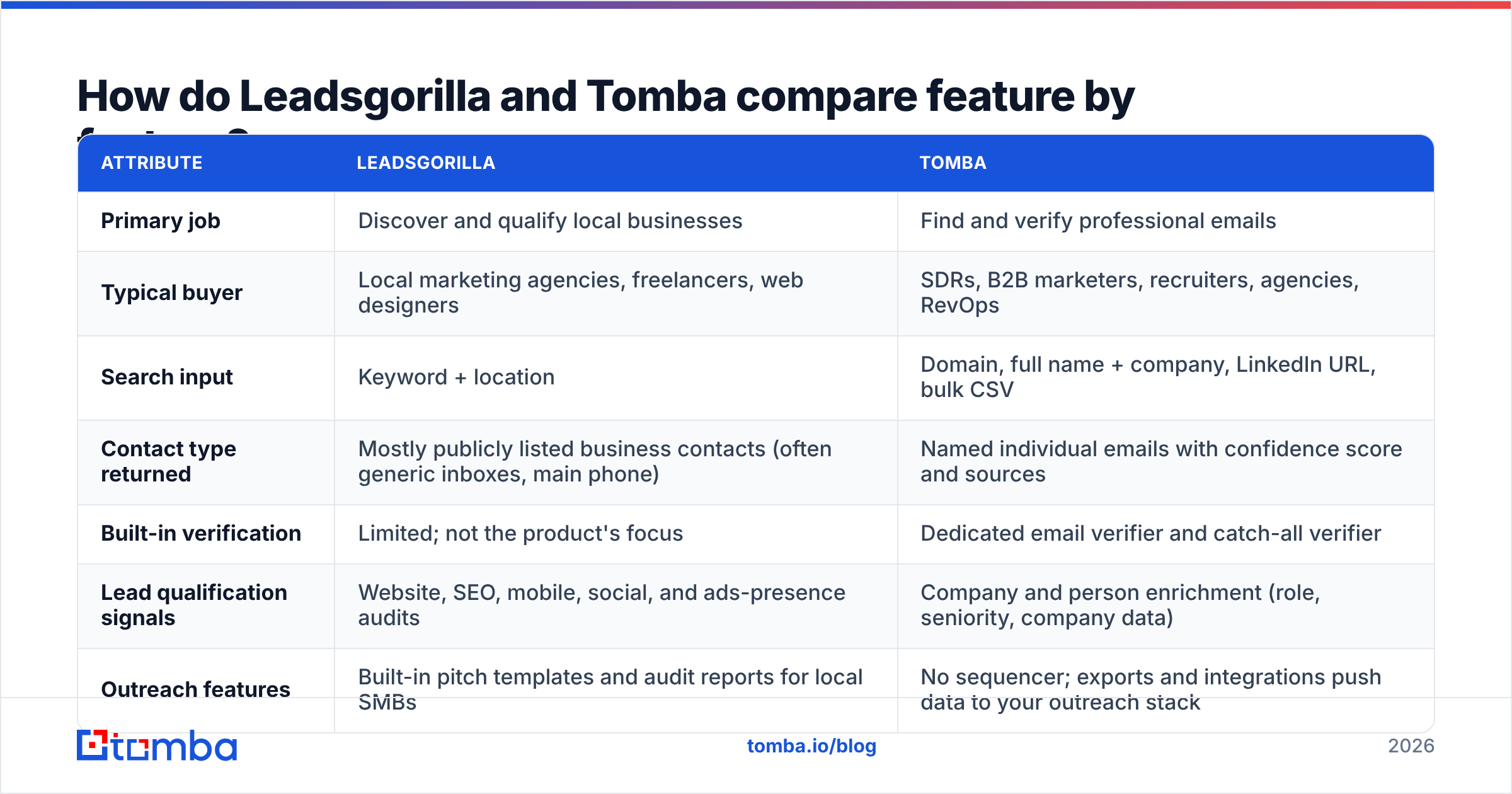
The table below compares both tools on the attributes that actually change your results. Leadsgorilla's packaging has changed over the years, with launch-style one-time licenses and upgrade tiers, so check the current terms on its site before you buy.
| Attribute | Leadsgorilla | Tomba |
|---|---|---|
| Primary job | Discover and qualify local businesses | Find and verify professional emails |
| Typical buyer | Local marketing agencies, freelancers, web designers | SDRs, B2B marketers, recruiters, agencies, RevOps |
| Search input | Keyword + location | Domain, full name + company, LinkedIn URL, bulk CSV |
| Contact type returned | Mostly publicly listed business contacts (often generic inboxes, main phone) | Named individual emails with confidence score and sources |
| Built-in verification | Limited; not the product's focus | Dedicated email verifier and catch-all verifier |
| Lead qualification signals | Website, SEO, mobile, social, and ads-presence audits | Company and person enrichment (role, seniority, company data) |
| Outreach features | Built-in pitch templates and audit reports for local SMBs | No sequencer; exports and integrations push data to your outreach stack |
| Integrations / API | Mainly in-app workflow and exports | API, CLI, Chrome extension, Google Sheets, Excel, HubSpot, Salesforce, Zapier, and more |
| Pricing model | Historically a one-time license plus upgrades (verify current offer) | Free (25 searches/mo), Starter $49/mo, Growth $99/mo, Pro $249/mo, Enterprise custom |
| Best for | "Who in this city needs my services?" | "What is this exact person's email, and will it deliver?" |
The short version: Leadsgorilla answers which business, and Tomba answers which person, at which address.
How does each tool fit into a prospecting workflow?#
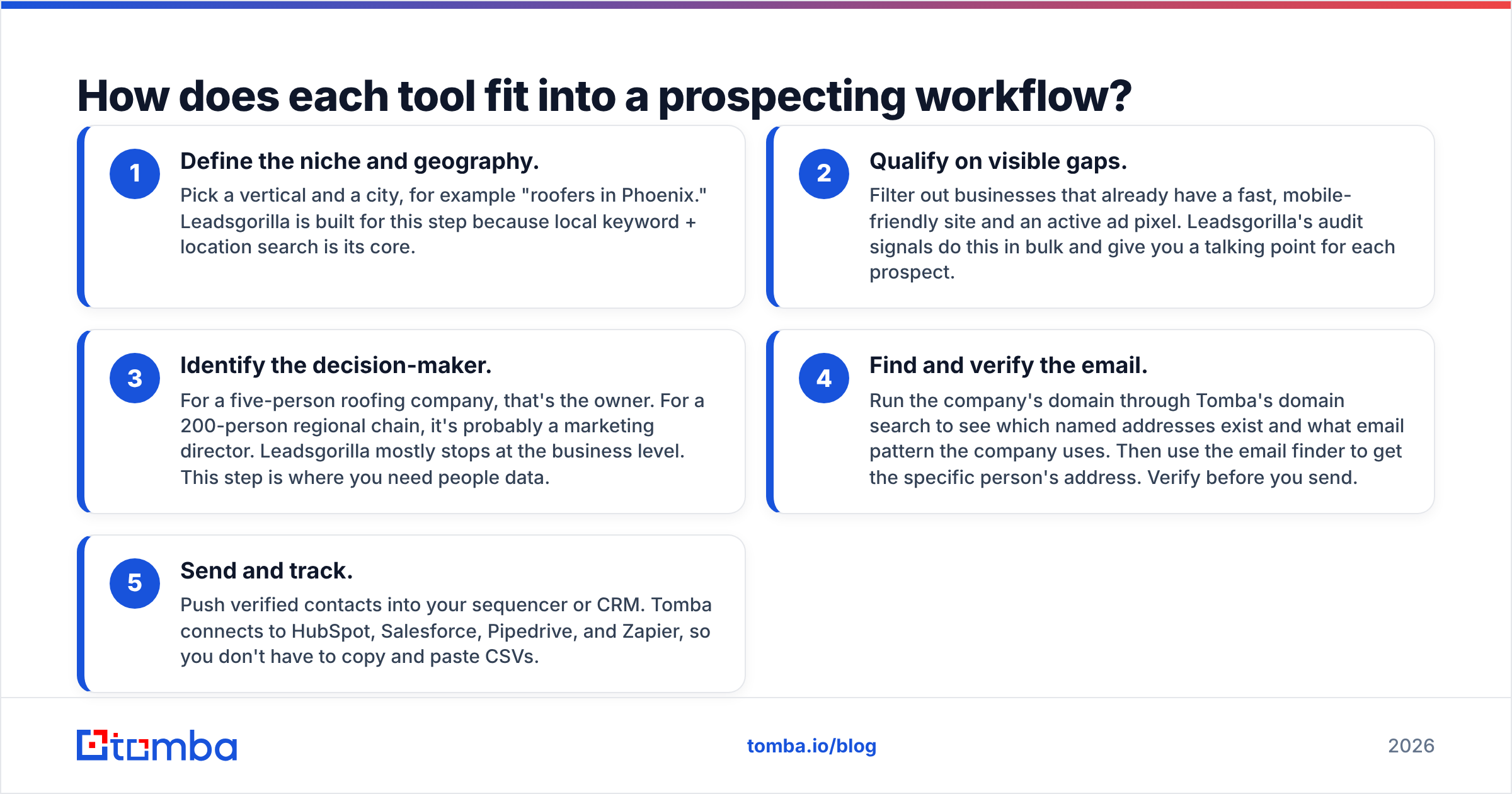
Here is a typical agency workflow and where each tool plugs in:
- Define the niche and geography. Pick a vertical and a city, for example "roofers in Phoenix." Leadsgorilla is built for this step because local keyword + location search is its core.
- Qualify on visible gaps. Filter out businesses that already have a fast, mobile-friendly site and an active ad pixel. Leadsgorilla's audit signals do this in bulk and give you a talking point for each prospect.
- Identify the decision-maker. For a five-person roofing company, that's the owner. For a 200-person regional chain, it's probably a marketing director. Leadsgorilla mostly stops at the business level. This step is where you need people data.
- Find and verify the email. Run the company's domain through Tomba's domain search to see which named addresses exist and what email pattern the company uses. Then use the email finder to get the specific person's address. Verify before you send.
- Send and track. Push verified contacts into your sequencer or CRM. Tomba connects to HubSpot, Salesforce, Pipedrive, and Zapier, so you don't have to copy and paste CSVs.
Steps 1 and 2 are where Leadsgorilla is strong. Steps 3 through 5 are where Tomba is strong. The weak point in most local outreach is the handoff between steps 2 and 3, when a promising prospect only comes with an info@ address.
Why do generic inboxes hurt local outreach?#
Scraped local data usually gives you whatever the business posted publicly: a contact form, a main phone line, and often an info@, office@, or hello@ address. Those inboxes are:
- Shared or unmonitored. A receptionist or an overflowing shared mailbox reads your audit pitch, not the owner.
- Filtered aggressively. Generic role addresses get flooded with vendor pitches, so both humans and filters learn to ignore cold mail sent to them.
- Poor for personalization. You can't open with "Hi Maria" when you don't know who Maria is.
Named addresses fix all three problems, but only if they're real. Guessed addresses (firstname@company.com because it "looks right") bounce often enough to hurt your sender reputation. That's why verification matters as much as discovery. Tomba checks each address against mail-server responses and flags catch-all domains separately, so you know which contacts are safe to send to and which are risky.
Which tool has better data for B2B decision-makers?#
For B2B decision-maker data, Tomba has the edge. For local SMB discovery, Leadsgorilla does.
Leadsgorilla's data model is built around the business listing: name, address, category, website, reviews, social profiles, and the audit results it runs on the site. That's exactly what you need to pick good prospects for a local services pitch.
Tomba's data model is built around the person and the domain. A lookup returns the email, a confidence score, the public sources where the address appeared, and enrichment fields such as role and company details. You can read how that data is collected on Tomba's data-sources page, and you can verify emails independently even if they came from another tool.
That matters more as your targets get bigger. A one-location barber shop may really run on info@. A multi-location dental group has an operations lead, a marketing manager, and a practice owner, each with their own inbox, and each cares about a different pitch.
How does pricing compare between Leadsgorilla and Tomba?#
The two pricing models suit different buyers.
Leadsgorilla has historically been sold as a one-time license, usually with upgrades for more features, agency or commercial rights, or higher limits. A one-time fee appeals to solo agencies that don't want another subscription. The trade-off is that one-time tools depend on the vendor continuing to maintain its data sources and scrapers. Before you buy, check the current offer, what's included, and recent user reviews on sites like G2 or Capterra.
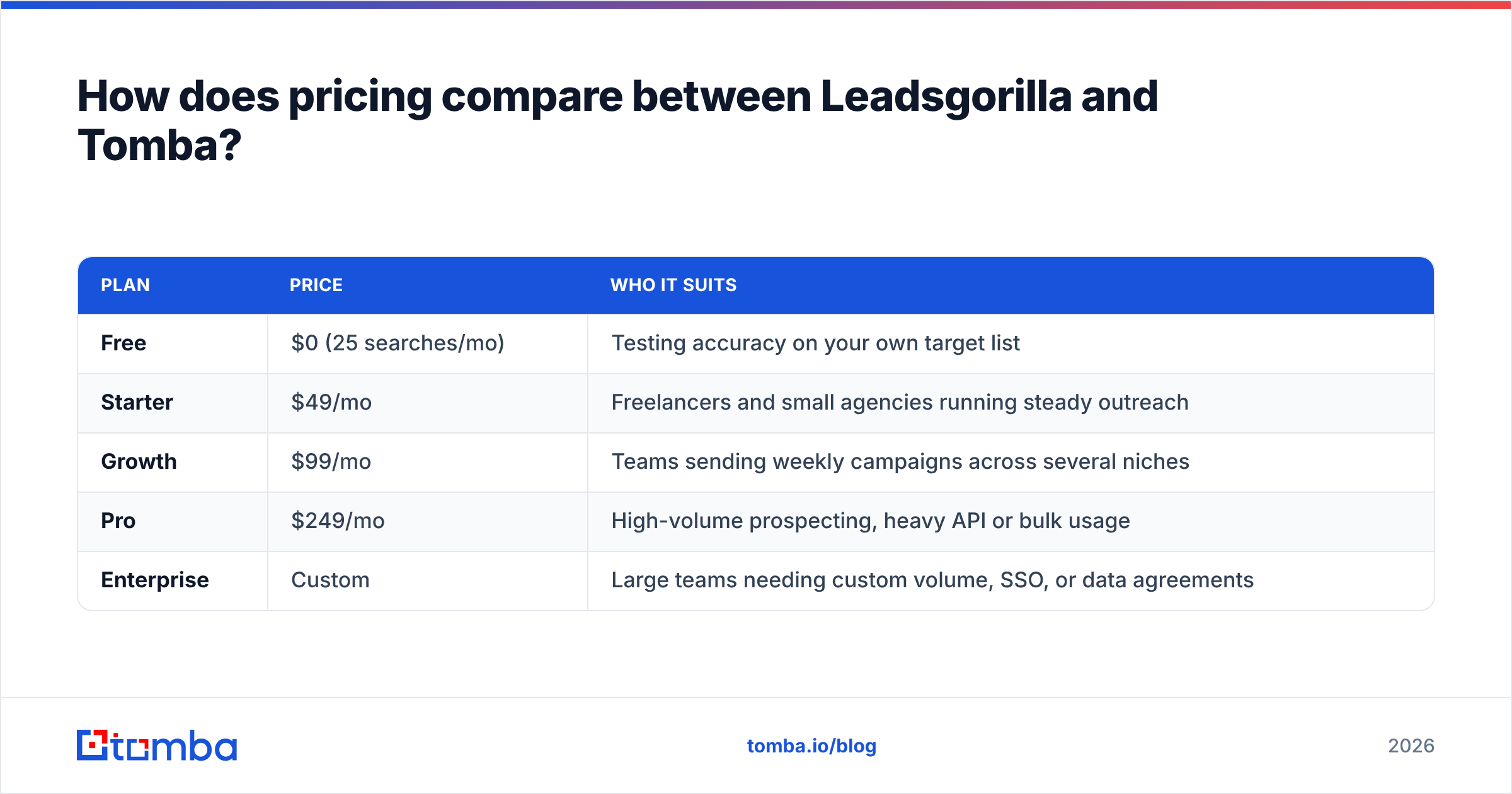
Tomba uses standard SaaS tiers:
| Plan | Price | Who it suits |
|---|---|---|
| Free | $0 (25 searches/mo) | Testing accuracy on your own target list |
| Starter | $49/mo | Freelancers and small agencies running steady outreach |
| Growth | $99/mo | Teams sending weekly campaigns across several niches |
| Pro | $249/mo | High-volume prospecting, heavy API or bulk usage |
| Enterprise | Custom | Large teams needing custom volume, SSO, or data agreements |
Full limits for each tier are on the Tomba pricing page.
The real cost isn't the sticker price, though. It's the cost per reply. A cheap list where 20% of the addresses bounce and the rest go to shared inboxes can cost more per booked call than a paid tool that delivers verified, named contacts. Work it out for your own funnel. The cheaper tool isn't always the cheaper outcome.
What happens if you skip verification?#
This is the part most local-agency guides leave out. Say you pull 1,000 businesses from a local search, grab every listed email, add some guessed owner@ addresses, and send them all through a new domain on day one. You'll likely see:
- A bounce rate high enough to trigger warnings from your email provider
- Spam-folder placement that lingers on later campaigns
- A domain you have to retire and warm up again from scratch

The fix is cheap and boring: verify before you send, keep daily volume low on new domains, and suppress catch-all addresses or test them in small batches. Whichever discovery tool you use, run the final list through a verifier first.
When should you choose Leadsgorilla?#
Leadsgorilla is a reasonable pick when:
- Your buyers are local SMBs. Restaurants, contractors, clinics, salons, and similar businesses where the owner is also the marketing department.
- Your pitch is audit-driven. "Your site doesn't load well on mobile, and you're not running retargeting." Leadsgorilla's signals give you that opener at scale.
- You want discovery and pitch materials in one place. Its built-in templates and reports save solo operators time.
- You prefer a one-time purchase and are comfortable checking that the product is still actively maintained.
It's a weaker fit when you sell to mid-market or enterprise companies, when you need individual contact data, or when your outreach stack depends on API access and CRM sync.
When should you choose Tomba?#
Tomba is the better pick when:
- You need the decision-maker, not the front desk. Name + domain in, verified email out.
- Deliverability matters. Built-in verification and catch-all handling protect your sender reputation.
- You work across any geography or company size. Tomba isn't tied to local listings, so it works just as well for a SaaS company in Berlin as for a law firm in Denver.
- You want it wired into your stack. API, Chrome extension, Google Sheets and Excel add-ins, and native CRM integrations mean enrichment happens where your team already works.
- You want to test before paying. The Free plan gives you 25 searches a month, enough to check hit rates against your real target list.
It's not a local business discovery engine, though. If you don't yet know which businesses to target, you need a list source first, such as Leadsgorilla, a directory export, or your own research.
Can you use Leadsgorilla and Tomba together?#
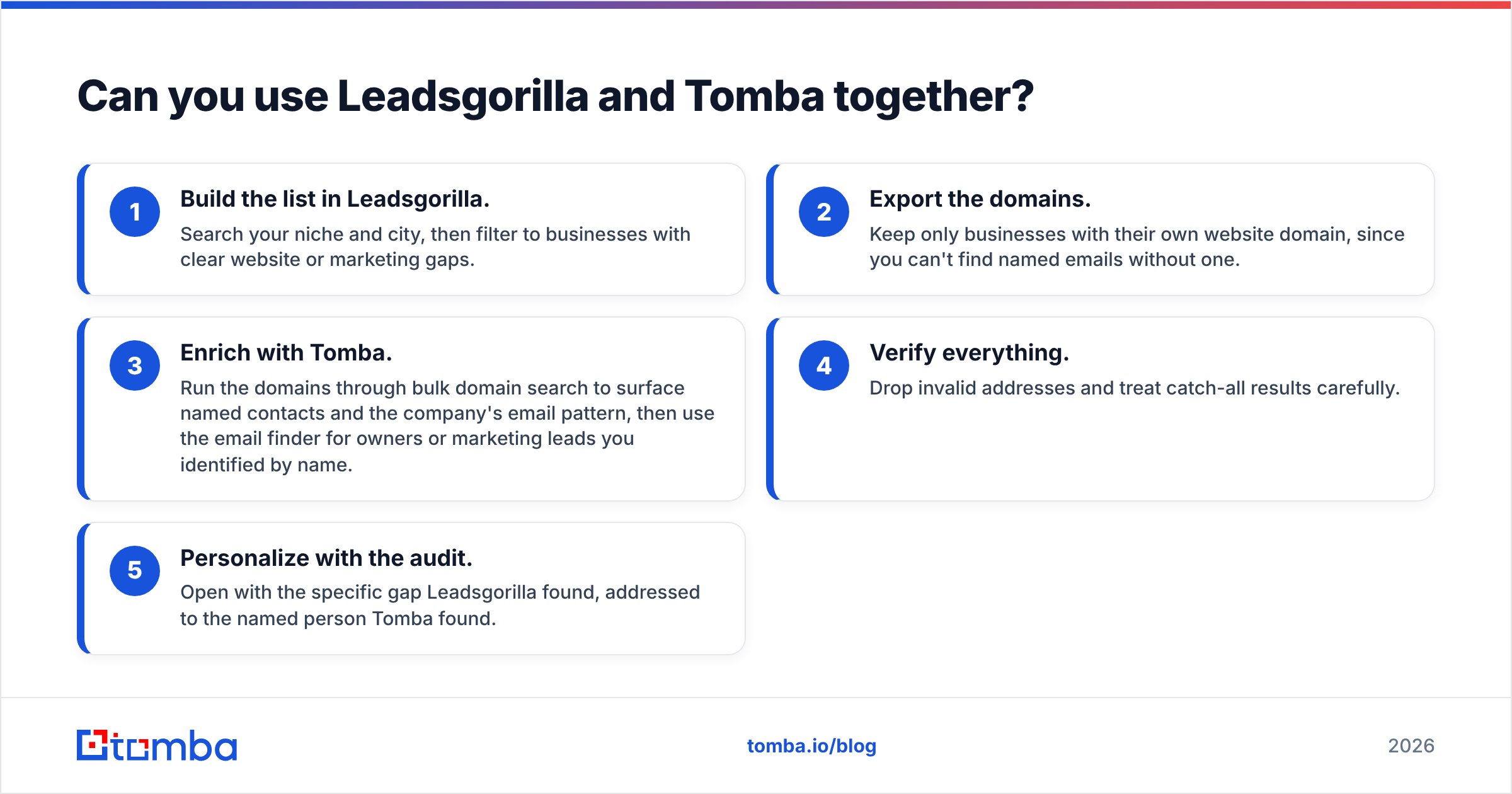
Yes, and for local agencies moving upmarket this is often the best setup. A practical stack looks like this:
- Build the list in Leadsgorilla. Search your niche and city, then filter to businesses with clear website or marketing gaps.
- Export the domains. Keep only businesses with their own website domain, since you can't find named emails without one.
- Enrich with Tomba. Run the domains through bulk domain search to surface named contacts and the company's email pattern, then use the email finder for owners or marketing leads you identified by name.
- Verify everything. Drop invalid addresses and treat catch-all results carefully.
- Personalize with the audit. Open with the specific gap Leadsgorilla found, addressed to the named person Tomba found.
This combines Leadsgorilla's local discovery and pitch angle with Tomba's contact accuracy. Neither tool has to do a job it wasn't built for.
Which one should you pick in 2026?#
It comes down to what's slowing you down right now.
- If you don't know who to pitch, start with a discovery tool like Leadsgorilla.
- If you know who to pitch but can't reach them reliably, meaning bounced emails, generic inboxes, and silence, the problem is contact data, and Tomba solves it.
- If you have both problems, use both, in that order.
For most B2B sellers, and for any agency whose clients are bigger than a single storefront, contact data is the tighter constraint. Discovery sources are everywhere. Verified, named inboxes are what separate a campaign that books calls from one that burns a domain.
If that sounds like your situation, start with the Tomba Email Finder. Run the 25 free monthly searches against the prospects you're already chasing, compare the named, verified addresses with what you're sending to today, and upgrade to Starter at $49/mo only if the reply rates justify it.
Related guides#
// get started
Find, verify and enrich your first contacts today
Start on the free plan with 25 searches a month, then scale when your team is ready.
Free plan · No credit card required · GDPR & CCPA
// about the author