Limeleads vs Ninjapear: Lead Database or Company Data API in 2026?
Limeleads sells verified US contacts you can filter and export. Ninjapear sells company intelligence through an API. They solve different problems, so here is how to tell which one you actually need.
TL;DR
- Limeleads is a US-focused B2B contact database. You filter, unlock, and export verified emails and mobile numbers. Paid plans start at $99/mo for 500 credits.
- Ninjapear is a company-intelligence API from Nubela, the team behind Proxycurl. It maps customers, competitors, funding, and employees from a website URL, and it also has a work-email lookup. Subscriptions start at $49/mo for 2,500 credits.
- Pick Limeleads if a salesperson needs a CSV of US prospects this afternoon. Pick Ninjapear if a developer is building account research, competitor mapping, or enrichment into a product or pipeline.
- Neither tool is built around domain-level email discovery plus verification. If that's the job, a dedicated email finder costs less per usable address.
Comparing Limeleads and Ninjapear head to head is a bit odd, because they overlap less than their category pages suggest. Both sell "B2B data," but one is built for a sales rep who works in a browser and the other for an engineer who works in a terminal. Most bad purchases here come from buying the right product for the wrong person.
This guide covers what each tool does, how the pricing works in practice, where each one falls short, and which to choose for your workflow.
What is Limeleads?#
Limeleads is a self-serve B2B lead database aimed mainly at US companies. You open the search interface, filter by industry, company size, location, job title, and seniority, then spend credits to reveal and export verified contacts. Third-party listings put the database at roughly 20 million contacts. That's small next to the big all-in-one platforms, but Limeleads has always pitched quality over breadth.
The core loop:
- Build a filter (for example, "VP Sales, 50-200 employees, SaaS, Texas").
- Preview matching records.
- Spend one credit per contact to unlock email and phone.
- Export to CSV or push to your CRM (HubSpot, Salesforce, and Zoho are listed integrations).
Emails are verified at the moment you unlock them, not only when the record was first collected. That matters a lot in a database product, because contact data decays every month as people change jobs.
Limeleads pricing has three published tiers: Pro at $99/mo (500 credits), Business at $150/mo, and Enterprise at $400/mo. There's no contract. Reviews on Capterra mostly praise its simplicity and complain about the limited coverage outside North America.
What is Ninjapear?#
Ninjapear is the current product line from Nubela, the company that used to run Proxycurl. Ninjapear doesn't give you a list of people to filter. It works from a company's website and returns the relationships around that company:
- Customer Listing API: who a company sells to
- Competitor Listing API: returns competitor websites for a target domain
- Company details and funding: firmographics, funding rounds, investors, and company updates
- Work Email endpoint: finds a person's work email from name plus company domain
- Person Profile endpoint: looks up a person from their work email (a reverse lookup)
- Similar People endpoint: finds people in the same role at competing companies
- Website Lookup: resolves a company name to its canonical URL
Everything is exposed as a REST API with bearer-token auth, and there are official JavaScript and Python client libraries. There's no point-and-click list builder like Limeleads has. If nobody on your team writes code or uses a tool like Make or n8n, you'll get little value from it.
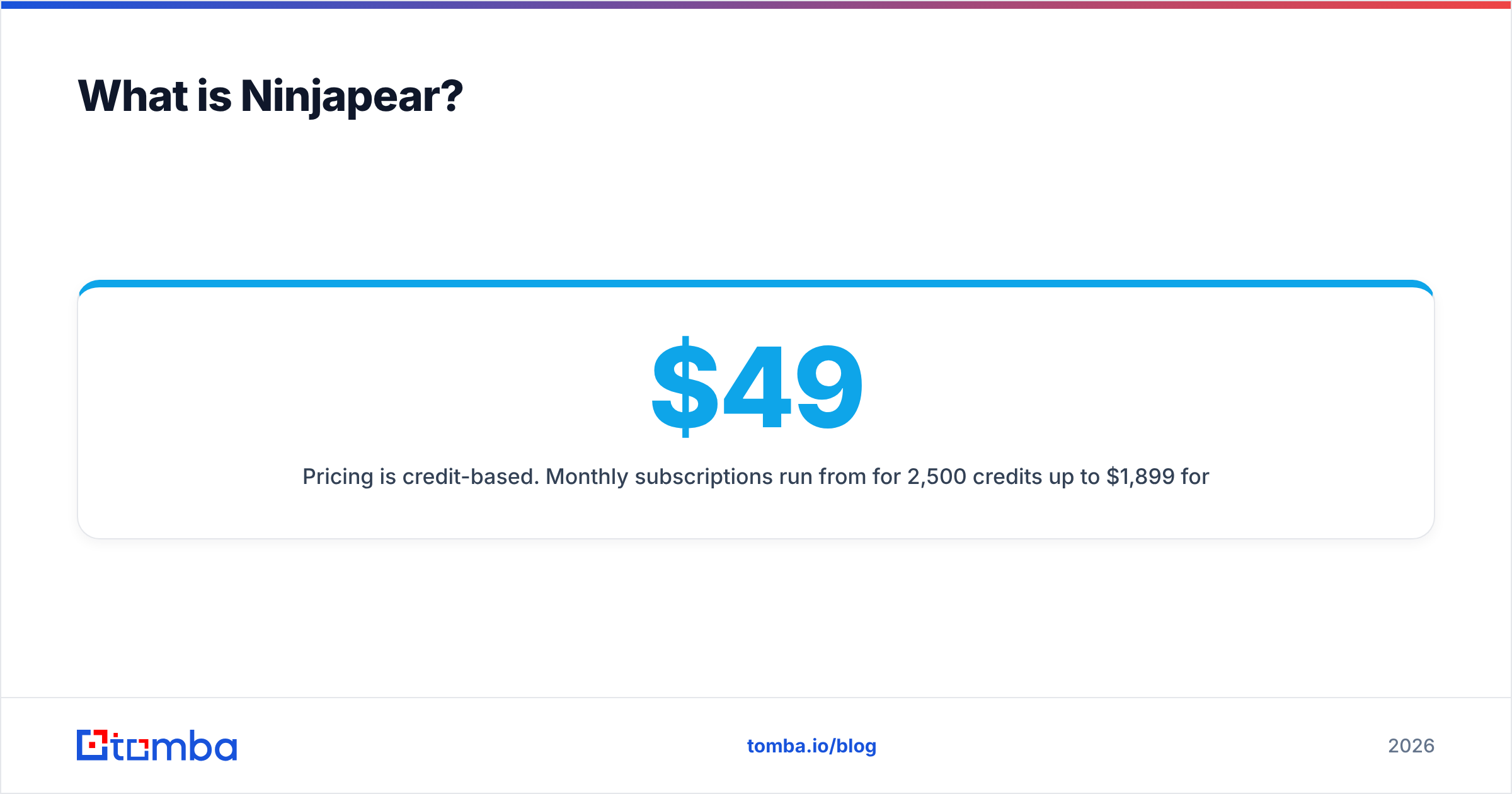
Pricing is credit-based. Monthly subscriptions run from $49 for 2,500 credits up to $1,899 for 211,000 credits, and subscription credits expire at the end of each billing cycle. Pay-as-you-go packs run from $10 for 100 credits to $1,000 for 56,000 credits and stay valid for 18 months. Different endpoints cost different amounts. For example, a company-details call costs 3 credits (up to 6 with extra flags), and funding data costs 2 credits plus 1 per unique investor. A free trial gives you 10 credits for 3 days.

How do Limeleads and Ninjapear compare side by side?#
This table covers the attributes that actually decide the purchase. All prices are published list prices as of 2026. Check both vendors before you buy, because credit allocations change.
| Attribute | Limeleads | Ninjapear |
|---|---|---|
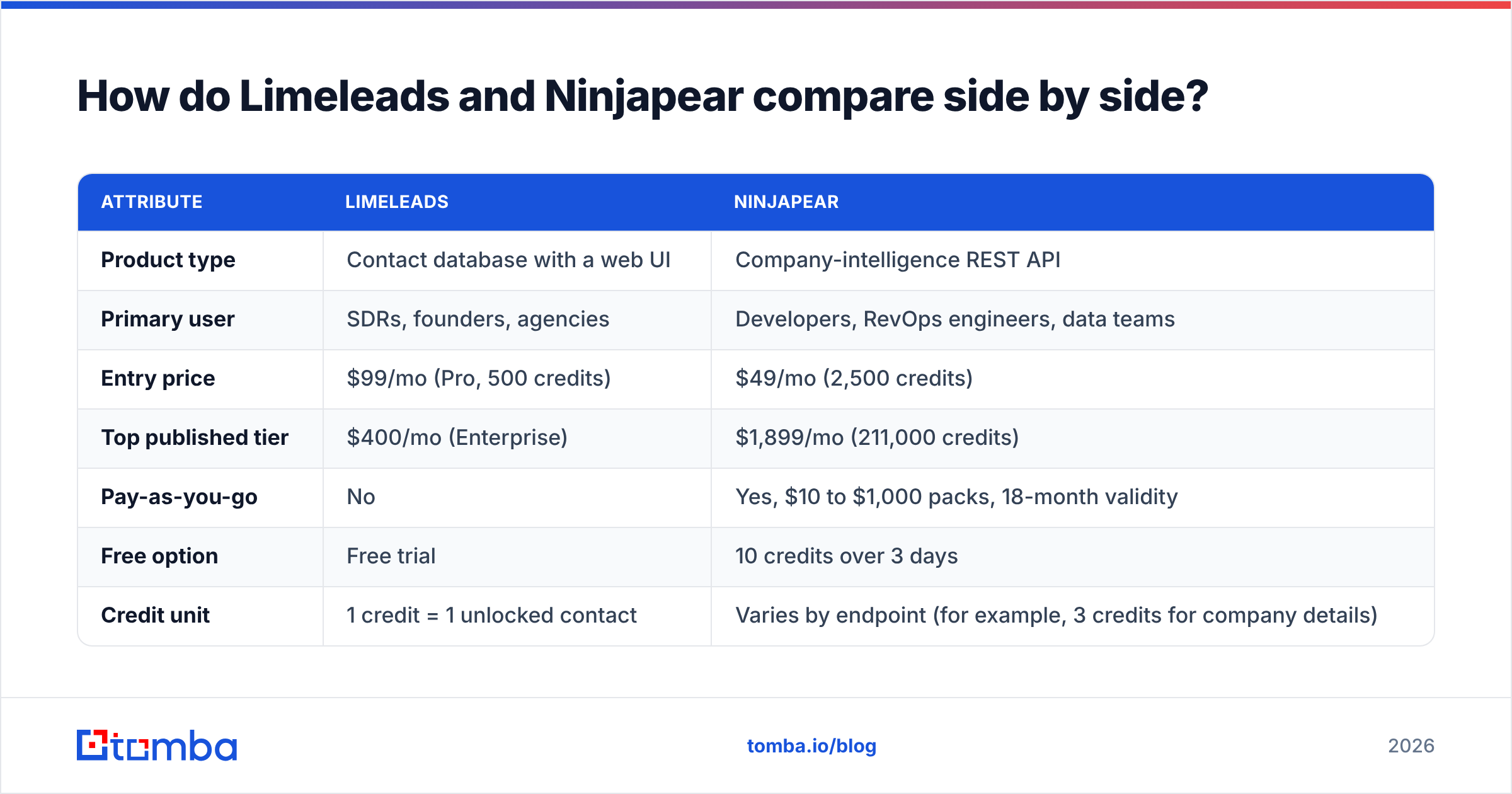
| Product type | Contact database with a web UI | Company-intelligence REST API |
| Primary user | SDRs, founders, agencies | Developers, RevOps engineers, data teams |
| Entry price | $99/mo (Pro, 500 credits) | $49/mo (2,500 credits) |
| Top published tier | $400/mo (Enterprise) | $1,899/mo (211,000 credits) |
| Pay-as-you-go | No | Yes, $10 to $1,000 packs, 18-month validity |
| Free option | Free trial | 10 credits over 3 days |
| Credit unit | 1 credit = 1 unlocked contact | Varies by endpoint (for example, 3 credits for company details) |
| Geographic strength | United States | Global web presence, depends on the endpoint |
| Contact emails | Yes, verified at unlock | Yes, via Work Email endpoint (name + domain) |
| Mobile numbers | Yes | Not a core focus |
| Customer / competitor mapping | No | Yes, a flagship feature |
| Funding + investor data | Limited firmographics | Yes |
| CRM integrations | HubSpot, Salesforce, Zoho | Build your own through the API |
| Learning curve | Minutes | Hours to days, depending on engineering skill |
The row that matters most is "Primary user." You can't compare cost per credit fairly when one credit gets you a finished contact record and another gets you part of an API response.
Which one is cheaper per usable result?#
Neither is cheaper across the board. It depends on what you count as a result.
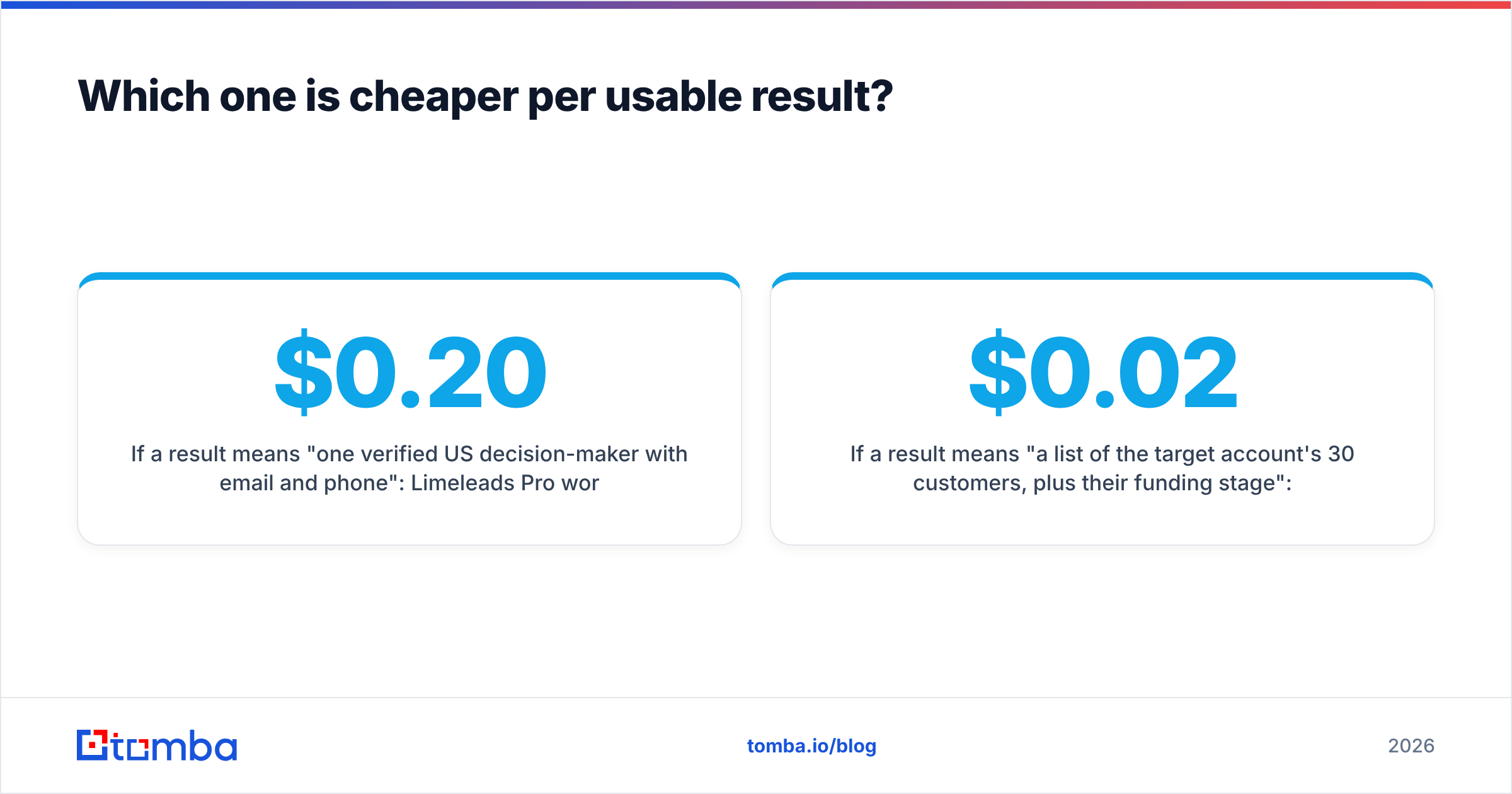
If a result means "one verified US decision-maker with email and phone": Limeleads Pro works out to about $0.20 per contact ($99 / 500). There's no engineering time and no wasted calls, because you preview before you unlock. For a rep who needs 400 contacts a month, that's cheap.
If a result means "a list of the target account's 30 customers, plus their funding stage": Limeleads can't do this at any price. On Ninjapear's entry plan, credits cost about $0.02 each ($49 / 2,500). Even with multi-credit endpoints, researching an account costs cents.
If a result means "the work email of a person whose name and company you already know": both tools can do it, but that's not the main job of either one. Limeleads makes you find the person inside its own database first. Ninjapear makes you call an API. A purpose-built email finder that searches by name plus domain and returns a confidence score is usually the more direct route.
Also watch for hidden costs:
- Ninjapear subscription credits expire monthly. If your usage is spiky, the 18-month pay-as-you-go packs cost more per credit but waste less.
- Limeleads coverage outside the US drops off. If a third of your pipeline is in DACH or APAC, you'll pay for a second data source anyway.
- Engineering time is a real cost. A Ninjapear integration that takes a developer two days to build and maintain can cost more than a year of a Limeleads subscription.
Where does each tool fall short?#
Limeleads limitations#
- US-centric coverage. Great for US SMB and mid-market, thin for Europe and Asia.
- Smaller database. About 20M contacts is enough for many niches, but broad or enterprise-wide searches can run out of records.
- No account-intelligence layer. You get people, not the relationships between companies. There are no competitor maps and no customer lists.
- Credits scale linearly. Once you need thousands of contacts a month, the per-contact price stops being competitive with bulk tools.
Ninjapear limitations#
- Developer-only in practice. There's no native list builder, so reps can't self-serve.
- Variable credit math. Each endpoint costs a different number of credits, so estimating monthly spend takes a spreadsheet.
- Short trial. Ten credits over three days is enough to test a few calls, not to benchmark data quality on your own accounts.
- Contact data is secondary. The Work Email endpoint exists, but the product is centred on company relationships. Mobile numbers and deep people-search filters aren't the focus.
Should you use Limeleads or Ninjapear for your use case?#
Match the tool to the job, not to the category label. These five common scenarios cover most buyers:
- Founder-led outbound to US SMBs. Choose Limeleads. You'll build a filtered list, export it, and start sequencing the same day. No code needed.
- Account-based research for an enterprise AE team. Choose Ninjapear. Pulling a target's customers, competitors, and investors automatically turns a 40-minute research task into an API call.
- Building a product feature (for example, "show competitors" inside your SaaS). Choose Ninjapear. It's an API first, so it fits naturally into your own product.
- Agency running campaigns for many clients across several countries. Neither tool is ideal. Limeleads is too US-focused, and Ninjapear needs engineering work for every client workflow. Look at a tool with broad domain search and bulk features instead.
- Cleaning up an existing CRM with bouncing addresses. Neither is a verifier. Run the list through a dedicated email verifier first, then enrich whatever survives.
If you're between scenarios 1 and 2, the honest answer is that some teams run both: Ninjapear to choose which accounts matter, and a contact tool to reach the people inside them.
How accurate is the data from each tool?#
Neither vendor publishes an independent third-party accuracy audit, so be careful with any exact percentage you read in a review. What you can check yourself:
- Limeleads verifies emails when you unlock them. That's the right design for a database product, because it catches people who changed jobs since the record was collected. Coverage can be the weak point even when accuracy isn't. A perfectly accurate database still fails you if your target isn't in it.
- Ninjapear builds company relationships from public web signals. Customer and competitor lists are only as good as what companies publish, such as case studies, logo walls, and comparison pages. Expect strong results for well-documented tech companies and thinner output for quiet, private businesses.
Run a simple test before you commit to either one. Take 50 accounts you already know well: current customers, closed-lost deals, and a few known competitors. Run them through the tool and score the output by hand. Fifty rows is enough to spot systematic gaps, and the free trials (or one month on the entry plan) cost less than a single bad campaign.
What do reviewers and buyers say about Limeleads and Ninjapear?#
On review sites like G2 and Capterra, feedback on Limeleads follows a pattern: users like the clean UI, the verified-at-export emails, and the lack of a contract. Complaints focus on database size and limited international data. Ninjapear is newer as a brand, so its public review footprint is smaller. Much of the reputation it inherits comes from Nubela's years running Proxycurl, which developers generally described as well documented and easy to integrate.
Keep in mind that review volume isn't the same as fit. A tool with 300 five-star reviews from US agencies tells you little about whether it will work for a Berlin-based data team.

Is there a simpler option if you mainly need email addresses?#
Look closely at both products and you'll see that the company domain is the join key underneath them. Limeleads ties contacts to companies, and Ninjapear takes a website URL as input for almost everything. If your actual goal is "give me the right person's email at this domain, and tell me whether it will bounce," a lot of what you'd pay for in either tool goes unused.
That's the case for a dedicated email-finding stack:
- Find by name + domain with a confidence score, instead of hoping the person exists in a fixed database
- Search a whole domain to see every public address and the company's email pattern
- Verify before you send, including catch-all domains, so your sender reputation holds up
- Use it where you already work: Chrome extension, Google Sheets, a bulk CSV upload, or an API if you do have engineers
For a sense of cost, Tomba's free tier includes 25 searches a month, and paid plans start at $49/mo (Starter), then $99/mo (Growth) and $249/mo (Pro), with custom Enterprise pricing. The full breakdown is on the Tomba pricing page. Teams that do want programmatic access, the kind of workflow Ninjapear targets, can use the Tomba API for finding and verification without learning a multi-credit endpoint model.
This doesn't replace Ninjapear's competitor and customer mapping, and it doesn't pretend to. It does replace most of what teams end up using Limeleads for, and it adds coverage outside the US.
Limeleads vs Ninjapear: what's the final verdict?#
Limeleads wins for non-technical US outbound. It's fast, predictable, and needs no engineering. At $99/mo for 500 verified contacts, the value is clear if your market is American and your team works in a browser.
Ninjapear wins for account intelligence and developer workflows. No simple database gives you customer lists, competitor maps, and funding data on demand. Its $49/mo entry point is cheap for engineers, but expensive if nobody is available to integrate it.
Neither is the best tool if what you really need is to find and verify emails at the companies you already target. In that case, a domain-first email finder gives you more usable addresses per dollar.
If your outbound starts with a company domain and ends with a sequence, try Tomba Email Finder. Enter a name and domain, or just a domain, and get addresses with confidence scores that you can verify before sending. Start on the free plan's 25 monthly searches, test it on the same 50 accounts you'd use to trial Limeleads or Ninjapear, and upgrade to Starter at $49/mo only once the results hold up.
Related guides#
// get started
Find, verify and enrich your first contacts today
Start on the free plan with 25 searches a month, then scale when your team is ready.
Free plan · No credit card required · GDPR & CCPA
// about the author