LimeLeads vs SeamlessAI (2026): Pricing, Data Quality, Our Pick
LimeLeads sells a filterable database of B2B contacts, and credits you don't use roll over. Seamless.AI runs a real-time contact search engine on annual contracts. Here's how their credits, data quality and true cost per contact compare, and which one fits your team.
LimeLeads vs SeamlessAI comes down to one question. Do you want to build lists from a database, or look people up one at a time? Here is how the two tools compare on price, data and fit.
TL;DR
- LimeLeads is a filterable B2B contact database. Plans are $99, $150 and $400 per month, and unused credits roll over. It suits small teams that want to build lists in batches.
- Seamless.AI is a real-time contact search engine with a Chrome extension. After a small free tier, it starts at about $147 per user per month, billed yearly. Pro and Enterprise are quote-only.
- On paper LimeLeads is cheaper per contact: roughly $0.08–$0.20 per credit, against Seamless.AI's roughly $0.59 on Basic. Seamless.AI has more reach through LinkedIn and more phone data.
- Neither tool removes the need to verify contacts before you send. Budget for a separate verification step whichever one you choose.
- If you mainly need work emails for named people or domains, a pay-per-lookup email finder like Tomba ($49/mo Starter) is often a cheaper third option.
What is the real difference between LimeLeads and Seamless.AI?#
The two tools answer different questions.
LimeLeads asks: "Who fits my ideal customer profile?" You filter a prebuilt database by industry, headcount, job title, location and similar fields. Then you preview the matches and spend credits to unlock the contacts you want. It works like a wholesale catalogue: you browse, pick and export in bulk.
Seamless.AI asks: "What are the contact details for this person or company right now?" It calls itself a real-time search engine. You search by name, company or title, or use the Chrome extension on LinkedIn. It builds and checks contact records when you ask. It works more like a research assistant you send out one request at a time.
That difference shapes almost everything else: how you pay, how fresh the data is, and which team profile gets more value.
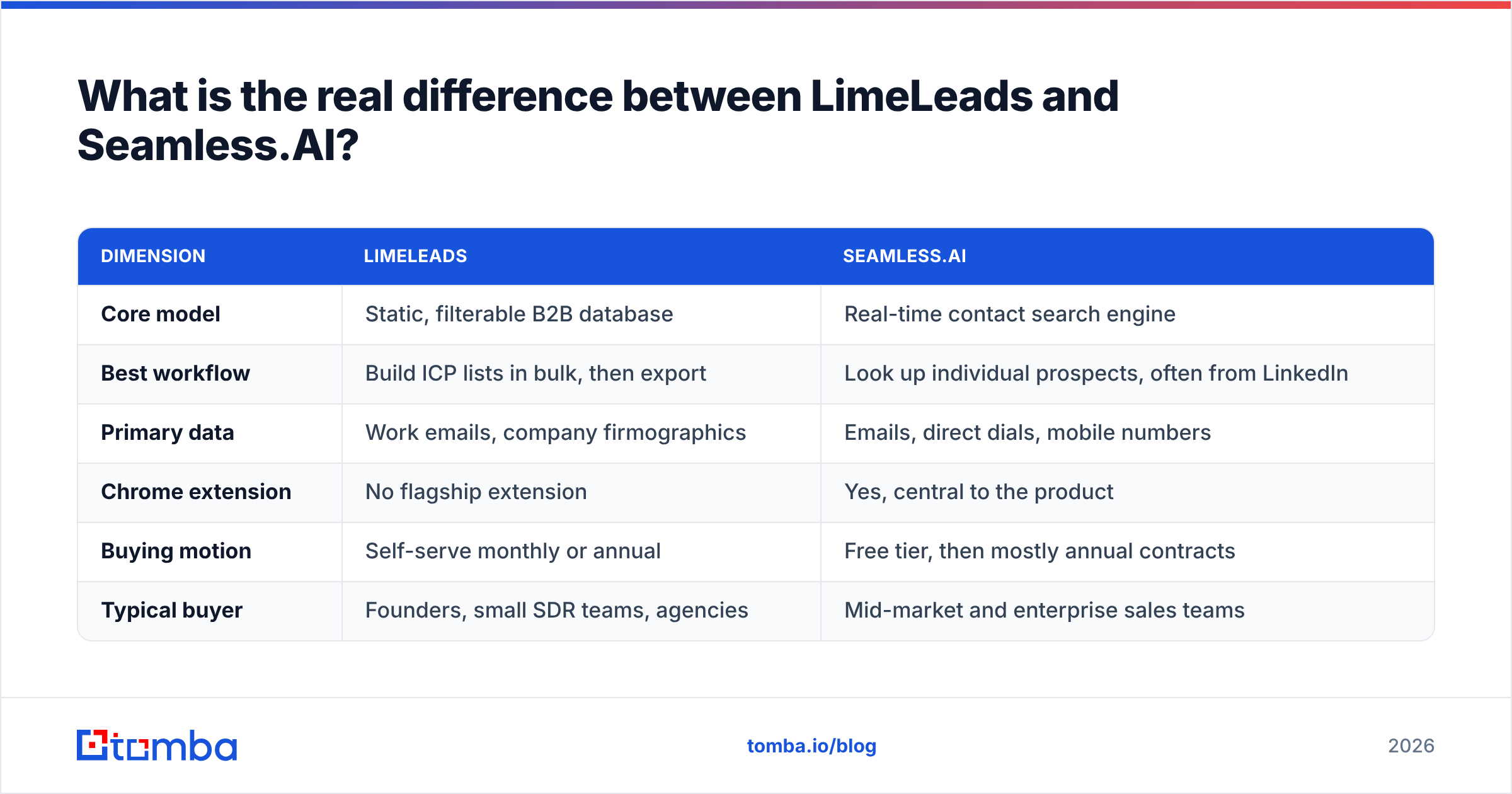
| Dimension | LimeLeads | Seamless.AI |
|---|---|---|
| Core model | Static, filterable B2B database | Real-time contact search engine |
| Best workflow | Build ICP lists in bulk, then export | Look up individual prospects, often from LinkedIn |
| Primary data | Work emails, company firmographics | Emails, direct dials, mobile numbers |
| Chrome extension | No flagship extension | Yes, central to the product |
| Buying motion | Self-serve monthly or annual | Free tier, then mostly annual contracts |
| Typical buyer | Founders, small SDR teams, agencies | Mid-market and enterprise sales teams |
How does LimeLeads pricing compare to Seamless.AI pricing?#
Pricing is where the two tools differ most, and it's usually the deciding factor for small teams.
LimeLeads publishes three plans, according to its Capterra listing and third-party pricing trackers:
- Pro at $99/month for 500 credits and 1 seat
- Business at $150/month for 1,500 credits and 2 seats
- Enterprise at $400/month for 5,000 credits and 5 seats
One credit unlocks one contact. Unused credits roll forward to the next billing cycle, which is uncommon in this category. Annual billing is advertised at about 35% off.
Seamless.AI is less transparent. The public tiers are:
- Free: a small credit allowance, around 50 credits, with the Chrome extension and basic export
- Basic: about $147/user/month billed annually, with a yearly credit pool (commonly reported as 3,000 credits/year)
- Pro and Enterprise: quote-only, with daily credit refresh, more integrations, admin seats and extras such as Pitch Intelligence
Third-party purchase data puts a typical Seamless.AI contract at just over $1,000 a year for small buyers. Multi-seat Pro deals commonly run into five figures. Check the current plan page on seamless.ai before you negotiate. Tiers and credit rules change often.
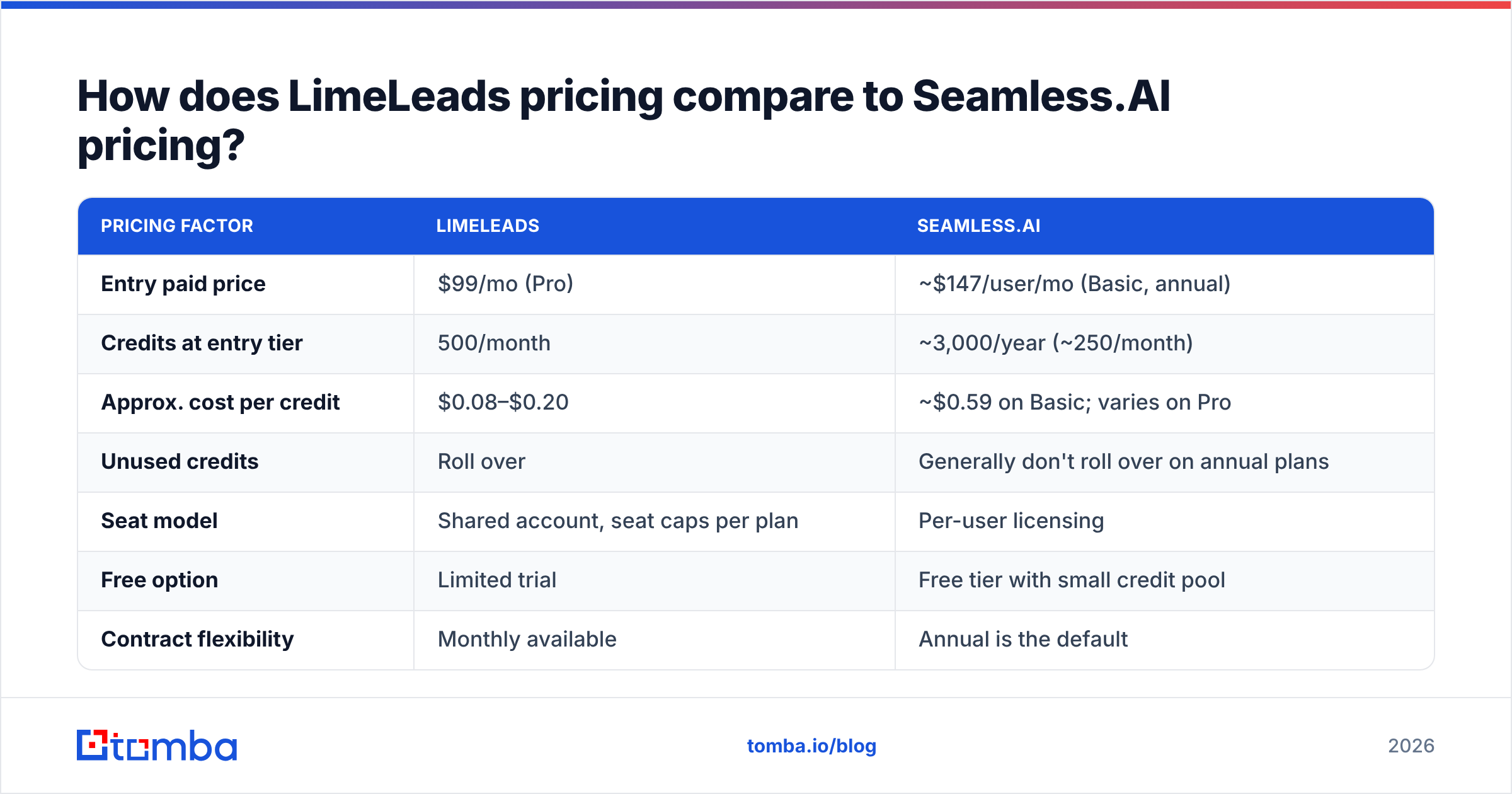
| Pricing factor | LimeLeads | Seamless.AI |
|---|---|---|
| Entry paid price | $99/mo (Pro) | ~$147/user/mo (Basic, annual) |
| Credits at entry tier | 500/month | ~3,000/year (~250/month) |
| Approx. cost per credit | $0.08–$0.20 | ~$0.59 on Basic; varies on Pro |
| Unused credits | Roll over | Generally don't roll over on annual plans |
| Seat model | Shared account, seat caps per plan | Per-user licensing |
| Free option | Limited trial | Free tier with small credit pool |
| Contract flexibility | Monthly available | Annual is the default |
What this means for you: if you're a solo founder or a two-person team sending a few hundred contacts a month, LimeLeads is cheaper per usable contact. Seamless.AI's price only starts to make sense if your reps need phone numbers and a LinkedIn-side workflow every day.

Which tool has better data accuracy?#
Neither vendor's accuracy claims should be taken at face value. What matters is how each one keeps data fresh.
LimeLeads says contacts are re-verified at the moment you unlock them. That is the right design for a static database. It catches addresses that went stale after the record was collected. The weak spot is coverage. A fixed database has gaps in niche industries, very new companies and non-US regions. A filter like "VP Ops at 50–200-person logistics firms in Germany" can return thin lists.
Seamless.AI builds and checks records when you search, so in theory it is fresher for any single person you look up. In practice, G2 and Capterra reviews are mixed. Users praise the phone numbers and the LinkedIn extension. They also often complain about bounced emails, old job titles and duplicate records. Browse the Seamless.AI reviews on G2 and filter by a company size close to yours. The patterns are consistent.
To test accuracy yourself, don't trust a vendor demo. Run this:
- Pick 100 contacts you already know are valid, for example current customers or recent meetings.
- Look up the same 100 in both tools using name plus company.
- Score three outcomes: found and correct, found but wrong, not found.
- Run every "found" email through an independent email verifier and count the deliverable, risky and invalid results.
- Compare cost per verified contact, not cost per credit.
Step 5 usually changes the ranking. A tool at $0.10 per credit with a 20% invalid rate can still beat one at $0.59 per credit with a 10% invalid rate. What you really pay for is contacts you can email.
What features does each tool actually give you?#
This is where Seamless.AI makes its case for the higher price.
Seamless.AI feature highlights
- Chrome extension that finds contacts while you browse LinkedIn and company websites
- Direct dials and mobile numbers, a real strength for teams that cold call
- Buyer intent and job-change signals on higher tiers
- Pitch Intelligence / AI writer for drafting outreach
- CRM integrations with Salesforce, HubSpot and others, fuller on Pro and above
LimeLeads feature highlights
- Deep firmographic filters covering industry, headcount, revenue band, location and job function
- Bulk list building and CSV export, which is the core workflow
- Verification when you unlock, so you don't pay for obviously dead addresses
- Simple team access with no per-seat add-on pricing inside plan limits
- Credit rollover, so a slow month doesn't waste your budget
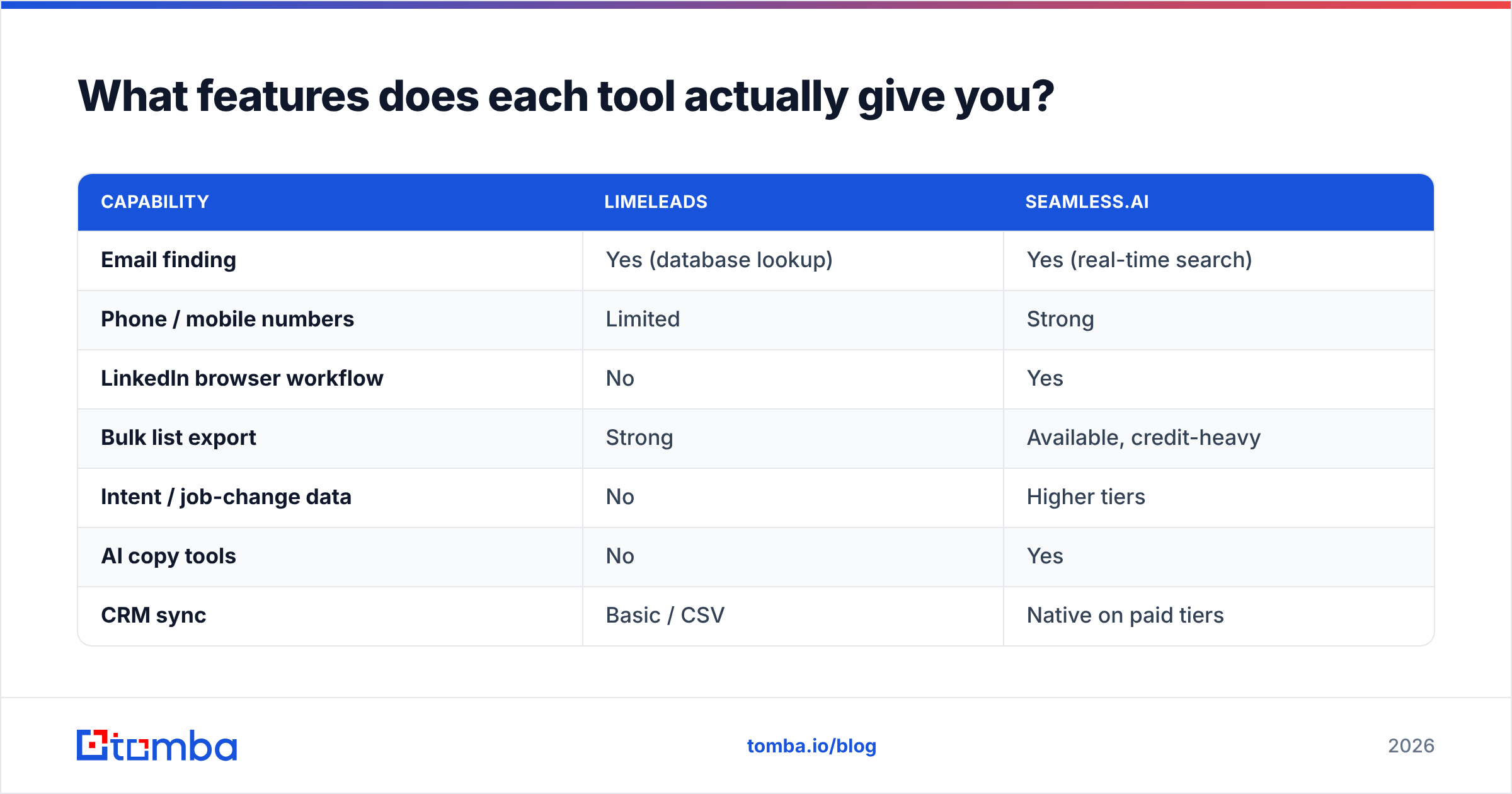
| Capability | LimeLeads | Seamless.AI |
|---|---|---|
| Email finding | Yes (database lookup) | Yes (real-time search) |
| Phone / mobile numbers | Limited | Strong |
| LinkedIn browser workflow | No | Yes |
| Bulk list export | Strong | Available, credit-heavy |
| Intent / job-change data | No | Higher tiers |
| AI copy tools | No | Yes |
| CRM sync | Basic / CSV | Native on paid tiers |
If your process is "filter, export, load into a sequencer", LimeLeads has fewer moving parts. If your reps live in LinkedIn and on the phone, Seamless.AI's extension and dialer data are the real value. LimeLeads can't match them there.
Who should choose LimeLeads?#
Choose LimeLeads if most of these apply:
- You build lists in batches (weekly or monthly) instead of looking prospects up one by one.
- Your ICP is well defined by firmographics such as industry, size and geography.
- Email is your main channel and phone is secondary or absent.
- You're budget-sensitive and want monthly billing with credits that roll over.
- You're an agency or small team that shares one account across a few people.
The main risk is coverage in narrow or international segments. Before you commit, run a trial search on your hardest segment, not your easiest one.
Who should choose Seamless.AI?#
Choose Seamless.AI if most of these apply:
- Your reps prospect from LinkedIn and want contact details without leaving the page.
- You need direct dials and mobiles for a cold-calling motion.
- You have budget for annual per-seat contracts and someone to negotiate them.
- You want intent or job-change signals bundled in, not bought separately.
- Your team is 5+ reps and needs admin controls and CRM sync.
The main risks are commercial rather than technical. Read the renewal terms carefully. Many buyers report annual contracts that auto-renew and are hard to cancel or downgrade mid-term.

Is there a cheaper option than both for finding work emails?#
Often, yes, depending on what you actually need.
Both LimeLeads and Seamless.AI bundle discovery ("who should I target?") with contact finding ("what's their email?"). Many teams already handle discovery in LinkedIn Sales Navigator, a CRM, event attendee lists or their own research. What those teams lack is a reliable way to turn name + company into a verified work email.
For that narrower job, a dedicated email finder is usually cheaper and easier to predict:
- Look up individuals by name + domain, pay per lookup, and skip seat licences.
- Run a domain search to pull every public work email at a target company, plus its email pattern.
- Verify before sending, so bounce rates stay low enough to protect your sending domain.
- Stay on monthly billing. Tomba pricing starts with a free tier (25 searches/month), then Starter at $49/mo, Growth at $99/mo and Pro at $249/mo, with Enterprise on custom terms.
That doesn't replace Seamless.AI's phone data or LimeLeads' firmographic filtering. If those are core to your motion, keep them. But if you're paying $147+ per seat mainly to get emails, compare the cost per verified email first. If you're already on Seamless.AI and re-evaluating, see our breakdown of the Seamless.AI alternative landscape.
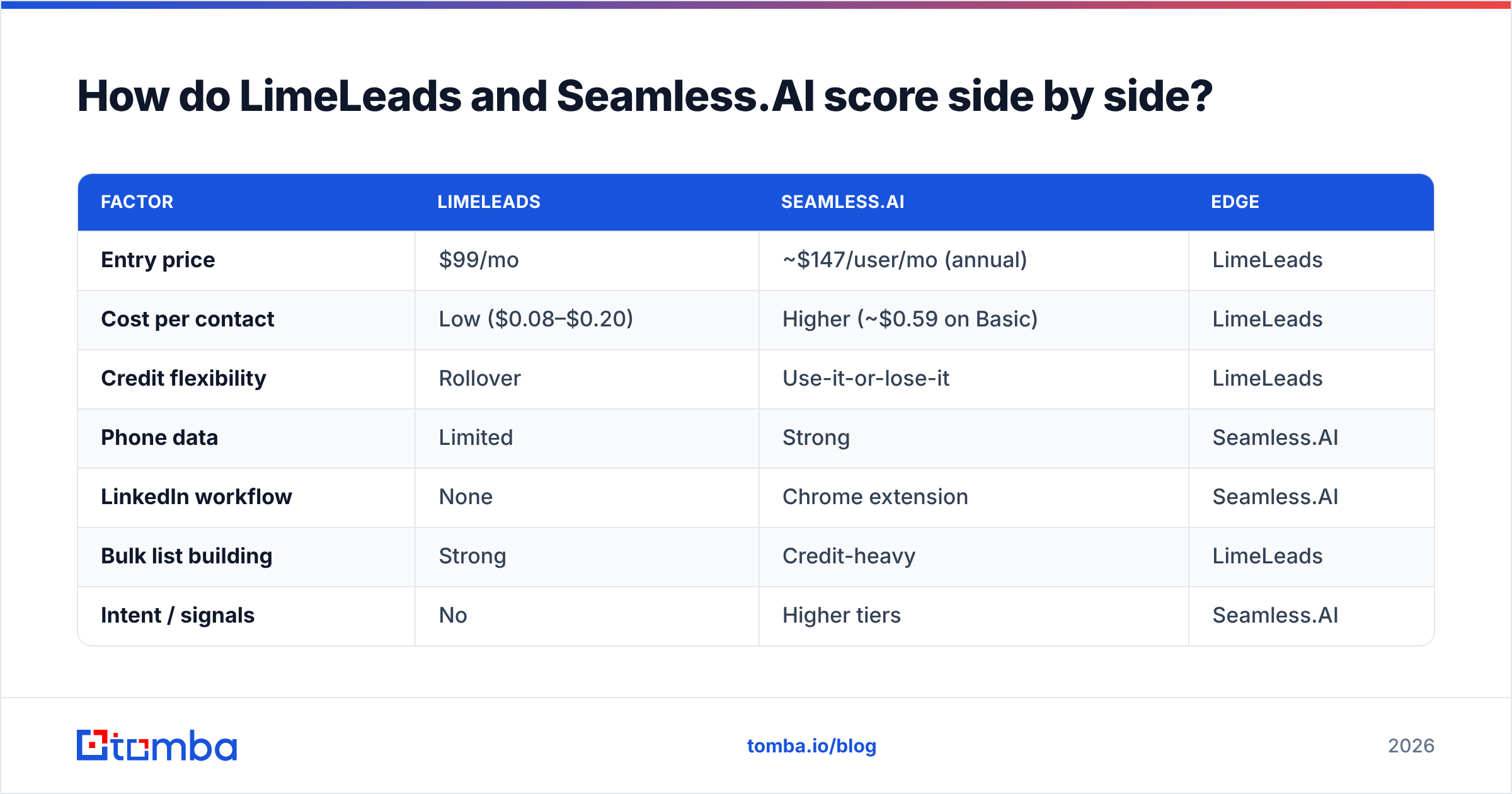
LimeLeads vs SeamlessAI: how do they score side by side?#
Here is the condensed verdict across the factors buyers ask about most:
| Factor | LimeLeads | Seamless.AI | Edge |
|---|---|---|---|
| Entry price | $99/mo | ~$147/user/mo (annual) | LimeLeads |
| Cost per contact | Low ($0.08–$0.20) | Higher (~$0.59 on Basic) | LimeLeads |
| Credit flexibility | Rollover | Use-it-or-lose-it | LimeLeads |
| Phone data | Limited | Strong | Seamless.AI |
| LinkedIn workflow | None | Chrome extension | Seamless.AI |
| Bulk list building | Strong | Credit-heavy | LimeLeads |
| Intent / signals | No | Higher tiers | Seamless.AI |
| Contract risk | Low (monthly option) | Higher (annual, auto-renew) | LimeLeads |
| Team admin and CRM sync | Basic | Strong on Pro+ | Seamless.AI |
Our pick for LimeLeads vs SeamlessAI:
- For small teams, founders and agencies running email-first outbound, LimeLeads is better value. The pricing is honest, credits roll over and the bulk export workflow fits how lean teams actually prospect.
- For funded sales teams that cold call and prospect from LinkedIn, Seamless.AI earns its higher price through phone data, the extension and CRM depth. Negotiate hard and put cancellation terms in writing.
- For teams that already know who to target and just need verified emails, neither is the most efficient buy. A pay-per-lookup email finder with built-in verification costs less and is simpler to run.
What should you check before signing with either vendor?#
Use this checklist in every trial:
- Test your hardest segment, not a demo-friendly one. Niche verticals and non-US regions show coverage gaps fastest.
- Measure the bounce rate yourself on a 100–200 contact sample, verified independently.
- Calculate cost per verified contact, including credits spent on records that turned out wrong.
- Read the renewal and cancellation clauses before you enter a card, especially on annual plans.
- Confirm CRM field mapping so enriched data lands in the right properties, not in a notes field.
- Check the credit rules: what costs a credit (email, phone, export) and whether unused credits expire.
A two-week trial that follows these steps tells you more than any comparison article, this one included.
Ready to find verified work emails without a per-seat contract?#
If you've weighed LimeLeads vs SeamlessAI and found you mostly need accurate work emails for people and companies you've already picked, try the Tomba Email Finder. Enter a name and company domain to get a verified professional email. You also get a confidence score and public sources where available. You can bulk-process a CSV or call it through the API. Start on the free tier with 25 searches a month, then move to Starter at $49/mo when your volume grows. It's monthly billing with no seat licences.
Related guides#
// get started
Find, verify and enrich your first contacts today
Start on the free plan with 25 searches a month, then scale when your team is ready.
Free plan · No credit card required · GDPR & CCPA
// about the author