7 Lindy Alternatives for AI Agents and Sales Automation in 2026
Lindy dropped its free plan and repriced its tiers in 2026. Here are 7 Lindy alternatives compared on pricing, credit models, control, and what each one does best for sales and ops teams.
TL;DR
- Lindy is a capable no-code AI agent builder. In 2026 it dropped its permanent free plan and moved to per-seat pricing with a shared credit pool, so many teams are checking what else is out there.
- Zapier Agents and Make fit best if your workflows already run on those platforms. n8n gives you the most control and the lowest cost at scale if you can self-host.
- Relevance AI and Gumloop are the closest matches to Lindy's "AI employee" idea. Relevance leans toward multi-agent sales teams, and Gumloop leans toward data-heavy pipelines.
- Clay is the specialist pick if your Lindy agents mostly do prospect research and enrichment.
- An agent is only as good as the contact data it works with. Whichever builder you choose, connect it to a verified email and enrichment source before you let it send anything.
What is Lindy, and why are teams looking for alternatives?#
Lindy (lindy.ai) is a no-code platform for building AI agents. It calls them "AI employees": they triage your inbox, take meeting notes, qualify inbound leads, draft follow-ups, and run small multi-step jobs across Gmail, Slack, HubSpot, and a few thousand other apps. It's polished, the templates are good, and a non-technical rep can get an agent running in an afternoon.
Most teams that go looking for Lindy alternatives do so for one of three reasons:
- Pricing changed. During 2026 Lindy removed its permanent free plan (there's now a 7-day trial) and moved to per-seat tiers that feed a shared credit pool. Third-party trackers list Plus, Pro, and Max tiers from roughly $30 to $200 per user per month, with extra credits at about $10 per 1,000. Check the live pricing page before you budget, because the tiers have been renamed at least once this year.
- Credit burn is hard to predict. One agent run can use a few credits or several hundred, depending on the model, the number of steps, and retries. A support-triage agent can burn through 250 to 1,000 credits a day.
- They've outgrown the abstraction. Once an agent needs branching logic, custom code, or strict data residency, a closed no-code builder starts to get in the way.
None of this makes Lindy a bad product. It means the "right" tool depends on who builds the agents, how much volume they run, and how much control you need.
What should you compare when evaluating Lindy alternatives?#
Think of it like hiring. Lindy sells you a ready-made assistant, while n8n hands you a workshop and a set of tools. Both get work done. The question is who builds, who maintains, and what each task costs you.
Score each platform on these five things before you look at feature lists:
- Pricing model. Per seat, per task, per credit, or per execution. Per-execution models (n8n, Make) are far cheaper for high-volume, low-complexity work. Per-credit models (Lindy, Gumloop, Relevance) are easier to start with but harder to forecast.
- Builder skill level. Can a sales rep build agents, or does it take a RevOps engineer? That decides who owns the automation after launch.
- Integration depth. A long list of app logos isn't the same as deep integration. Check whether the platform can read and write to your CRM, handle custom objects, and deal with rate limits.
- Model flexibility. Can you pick the LLM per step, bring your own API key, and cap spend? BYO keys can cut costs in half on heavy workloads.
- Data layer. Where do your agents get facts about prospects? Most agent failures in outbound come from bad inputs such as guessed emails or stale titles, not bad prompts.
Which Lindy alternatives are worth shortlisting in 2026?#
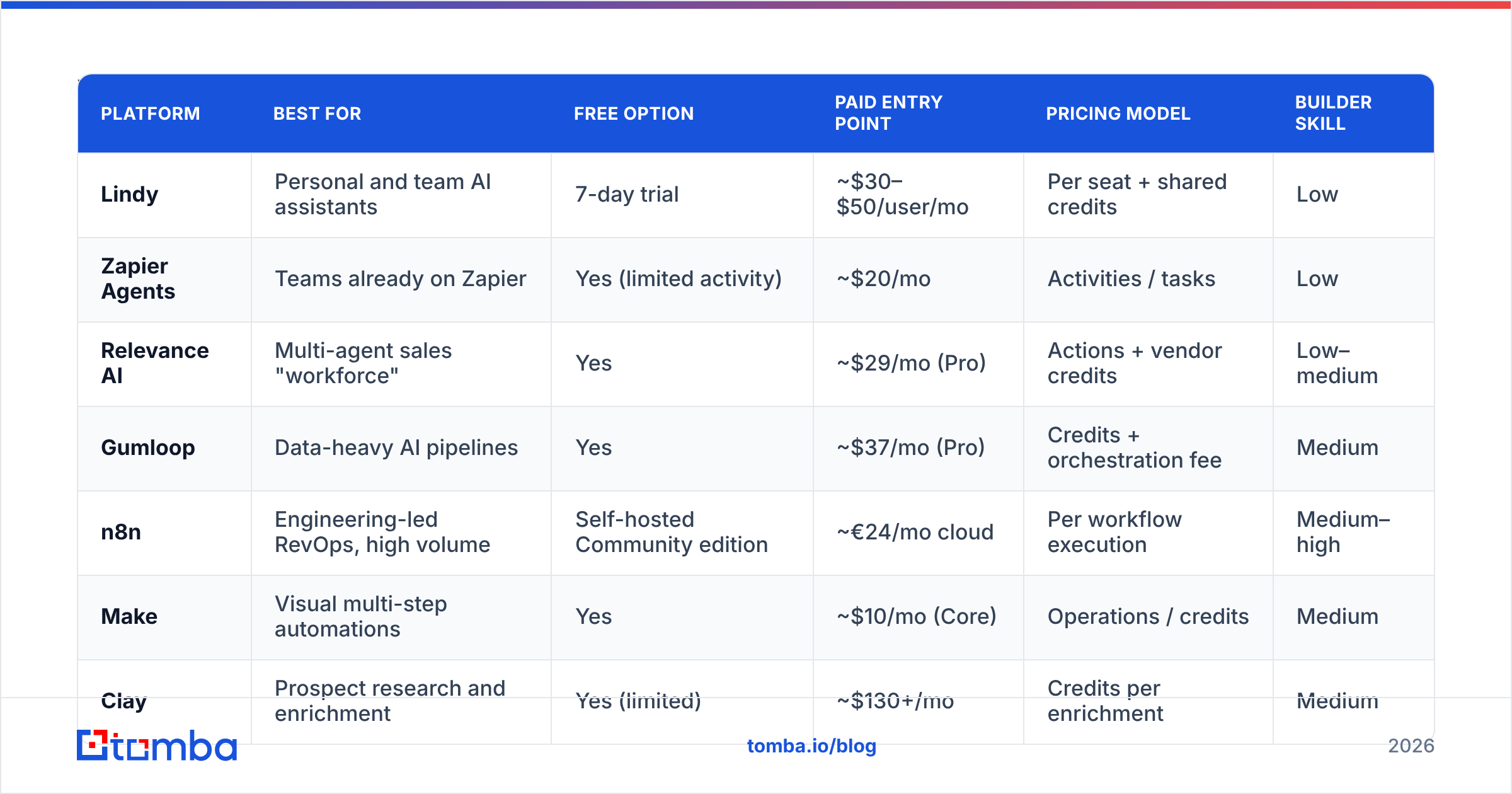
Here's the side-by-side view. Prices are entry-level list prices from public pricing pages and trackers as of September 2026. Vendors in this space reprice often, so treat them as ballpark figures.
| Platform | Best for | Free option | Paid entry point | Pricing model | Builder skill |
|---|---|---|---|---|---|
| Lindy | Personal and team AI assistants | 7-day trial | ~$30–$50/user/mo | Per seat + shared credits | Low |
| Zapier Agents | Teams already on Zapier | Yes (limited activity) | ~$20/mo | Activities / tasks | Low |
| Relevance AI | Multi-agent sales "workforce" | Yes | ~$29/mo (Pro) | Actions + vendor credits | Low–medium |
| Gumloop | Data-heavy AI pipelines | Yes | ~$37/mo (Pro) | Credits + orchestration fee | Medium |
| n8n | Engineering-led RevOps, high volume | Self-hosted Community edition | ~€24/mo cloud | Per workflow execution | Medium–high |
| Make | Visual multi-step automations | Yes | ~$10/mo (Core) | Operations / credits | Medium |
| Clay | Prospect research and enrichment | Yes (limited) | ~$130+/mo | Credits per enrichment | Medium |
1. Zapier Agents: best if you already live in Zapier#
Zapier (zapier.com/agents) added an agent layer on top of its 7,000+ app catalog. You describe a job in plain language ("when a demo is booked, research the company and post a brief to Slack") and the agent picks which Zapier actions to run.
Pros: the largest integration library in the category, your existing Zaps and auth carry over, and there's a usable free tier. Cons: agents are less configurable than Lindy's for long, multi-turn tasks, and heavy use pushes you into higher task tiers quickly.
Pick it if your ops team already maintains dozens of Zaps and you want agents without adding another vendor.
2. Relevance AI: best Lindy alternative for sales agent teams#
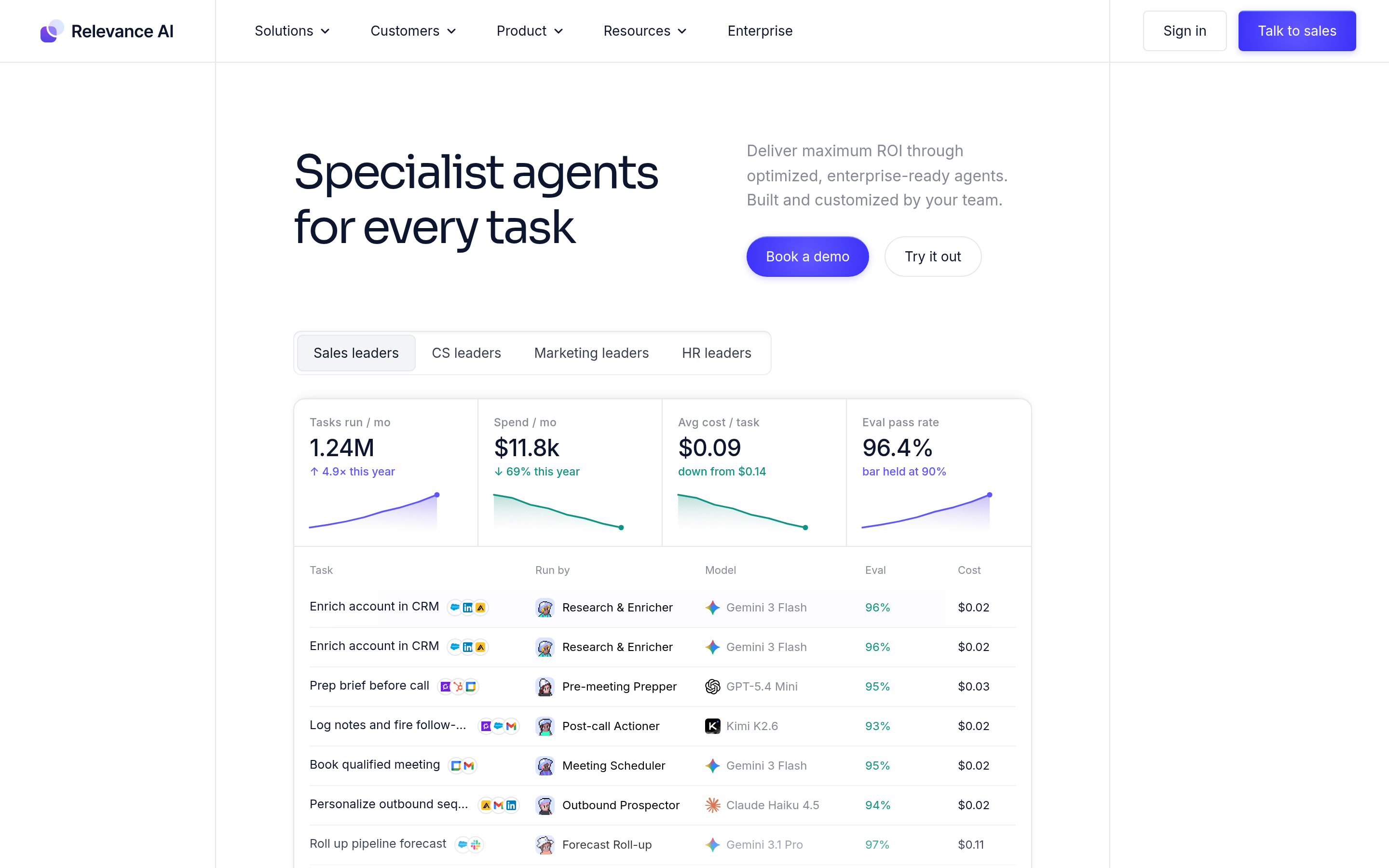
Relevance AI (relevanceai.com) is the closest to Lindy in spirit, but it's built around teams of agents: an SDR agent, a research agent, and a meeting-prep agent handing work to each other. It ships sales templates for inbound qualification and account research.
Pros: strong multi-agent orchestration, good sales templates, and you can bring your own LLM keys. Cons: the pricing splits "Actions" from "Vendor Credits," which takes a spreadsheet to model, and overage Actions are expensive (reported around $80 per 1,000).
Pick it if you want an AI SDR-style setup and have someone who'll own agent design.
3. Gumloop: best for data-heavy pipelines#
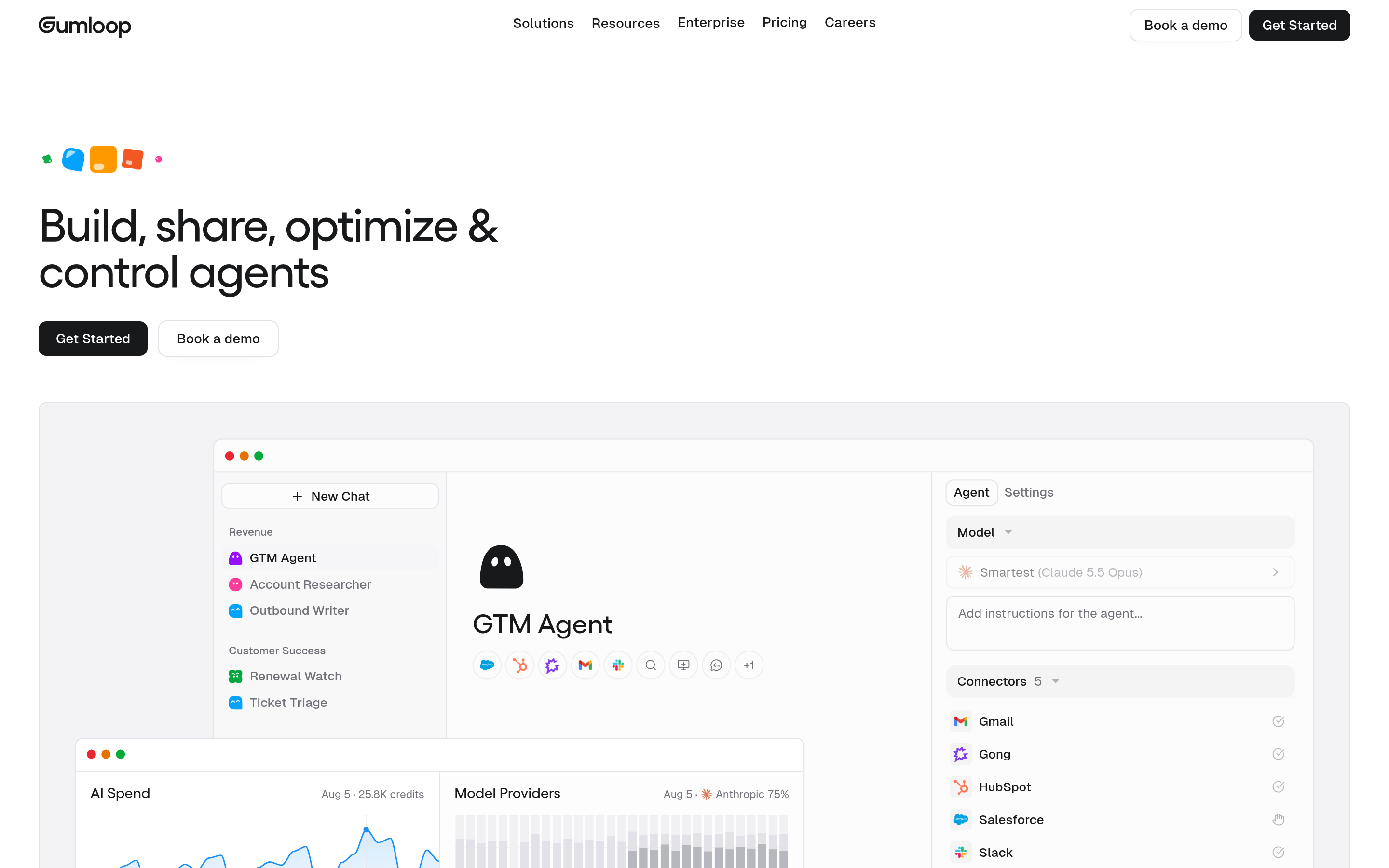
Gumloop is a node-based builder aimed at "AI plus data" jobs: scrape a list, enrich it, classify it, and write the result to Sheets or your CRM. It looks more like a flowchart than a chat assistant.
Pros: great for batch jobs, a readable visual canvas, and a generous free tier for testing. Cons: there's an orchestration fee on top of credit costs, and it's less suited to always-on "assistant" work like inbox triage.
Pick it if your Lindy agents mostly process lists rather than hold conversations.
4. n8n: best for control and cost at scale#
n8n (n8n.io) is a fair-code workflow platform with native AI agent nodes, LangChain-style tools, and memory. You can self-host the Community edition for free or pay for n8n Cloud.
Pros: you pay per workflow execution, not per step or token, so a 40-step agent costs the same as a 2-step one. You get full code escape hatches, self-hosting for data residency, and any LLM. Cons: you need a technical owner. Non-technical reps won't build in it without help.
Pick it if you run high volume, care about data residency, or already have a RevOps engineer. Pair it with the Tomba API through an HTTP node to find and verify contacts inside the same workflow.
5. Make: best visual builder on a budget#

Make (formerly Integromat) has added AI agents and LLM modules to its scenario builder. It sits between Zapier's simplicity and n8n's control.
Pros: a cheap entry tier, clear visual branching and error handling, and solid for multi-step ops. Cons: the agent features are younger than Lindy's, and operation counts add up quickly on loops.
Pick it if you want visual control without self-hosting and your budget is tight.
6. Clay: best for research and enrichment agents#
Clay isn't a general-purpose agent builder. It's a spreadsheet-style enrichment tool with an AI research agent built in. If most of your Lindy usage is "research this account and write a personalized first line," Clay does that job with more data sources.
Pros: waterfall enrichment across many providers, a strong AI research column, and it's built for outbound. Cons: there are no inbox or meeting agents, the credit costs are steep at volume, and the learning curve is real.
Pick it if prospect research is the main job and you don't need an assistant for the rest of your day.
7. Microsoft Copilot Studio: best for Microsoft 365 shops#
If your company runs on Outlook, Teams, and Dynamics, Copilot Studio lets you build agents inside the tenant you already have, with IT-approved governance.
Pros: native M365 context, enterprise security and compliance, and procurement is often already handled. Cons: it's clunky outside the Microsoft ecosystem, and licensing is confusing.
Pick it if IT won't approve another SaaS agent platform.
Is Lindy better than n8n or Zapier Agents?#
It depends on who is building. Here's a quick way to decide:
- A non-technical rep automating their own day (inbox, meetings, follow-ups): Lindy is still one of the easiest tools here. Zapier Agents is the nearest match.
- A RevOps team automating a process for 50 reps: n8n or Make. Per-execution pricing and version control matter more than a friendly UI at that scale.
- A growth team running list-based outbound: Clay or Gumloop, with a verified data source behind them.
For published reviews and user sentiment, the G2 AI agent builders category is worth reading. Filter reviews by company size, because a 5-person team and a 500-person team will rate these tools very differently.
Why do AI sales agents fail even on the best platform?#
Switching builders won't fix the most common failure: the agent works on bad data.
Take an SDR agent built in any of these tools. It gets a company name, guesses firstname@company.com, writes a nice personalized email, and sends it. If the address is wrong, you get a bounce. Get enough bounces and your domain's sender reputation drops, and then your human reps' emails start landing in spam too.
Agents make this worse because they're fast. A person sending 30 emails a day with a 10% bounce rate is a problem. An agent sending 500 a day at the same rate can damage your domain in a week.
Credit-based pricing adds a second cost. When an agent can't find a contact, many builders retry, re-search, or call a fallback model, and each retry uses credits. Bad input data costs you twice: once in deliverability, and again in wasted runs.
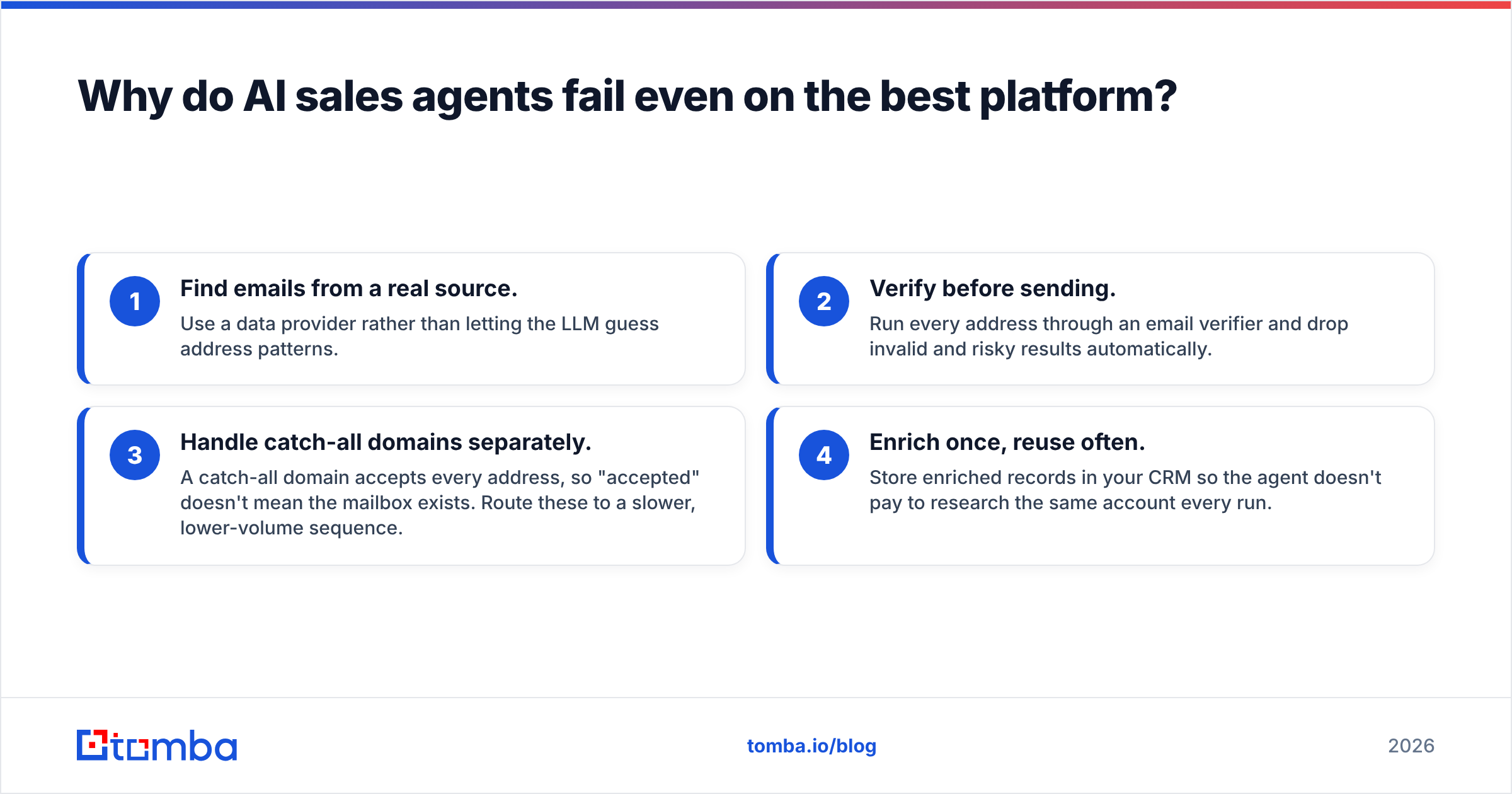
The fix is the same on every platform:
- Find emails from a real source. Use a data provider rather than letting the LLM guess address patterns.
- Verify before sending. Run every address through an email verifier and drop invalid and risky results automatically.
- Handle catch-all domains separately. A catch-all domain accepts every address, so "accepted" doesn't mean the mailbox exists. Route these to a slower, lower-volume sequence.
- Enrich once, reuse often. Store enriched records in your CRM so the agent doesn't pay to research the same account every run.
Every platform on this list can call an external API: Zapier and Make through native apps or webhooks, n8n through HTTP nodes, and Lindy, Relevance, and Gumloop through custom tool or API steps. If your agents run inside Claude or another MCP-aware client, the Tomba MCP server exposes email finding and verification as tools the agent can call directly.
How do you migrate off Lindy without breaking workflows?#
Don't rebuild everything at once. This sequence works for most teams:
- Inventory your agents. List each Lindy agent with its trigger, its steps, its monthly credit use, and who depends on it. Most teams find 20% of their agents drive 80% of the value.
- Sort by type. Assistant-style agents (inbox, calendar, meeting notes) go to Zapier Agents or stay on Lindy. Process agents (lead routing, enrichment, CRM hygiene) go to n8n or Make. List-processing agents go to Gumloop or Clay.
- Run in parallel for two weeks. Point the new agent at the same trigger in "draft only" mode and compare its outputs with Lindy's.
- Swap the data layer first. If you're rebuilding anyway, replace any "guess the email" steps with a proper find-and-verify step now. It's the change with the biggest effect on results.
- Cancel last. Keep the Lindy seat until the replacement has run cleanly through a full sales cycle.
A hybrid setup is common and perfectly reasonable: reps keep Lindy as a personal assistant, and the team-wide pipeline automation runs on n8n.
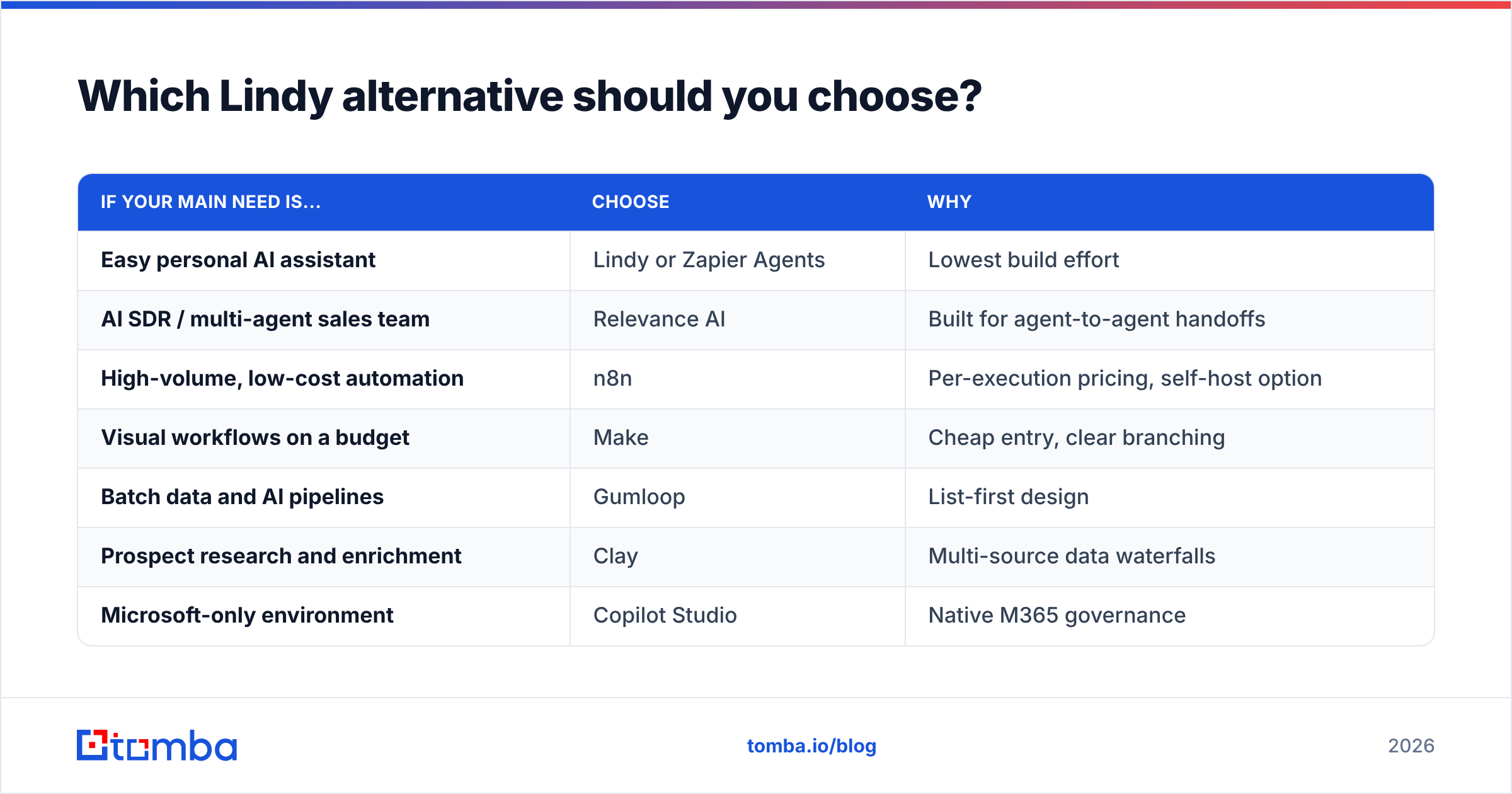
Which Lindy alternative should you choose?#
The short version:
| If your main need is... | Choose | Why |
|---|---|---|
| Easy personal AI assistant | Lindy or Zapier Agents | Lowest build effort |
| AI SDR / multi-agent sales team | Relevance AI | Built for agent-to-agent handoffs |
| High-volume, low-cost automation | n8n | Per-execution pricing, self-host option |
| Visual workflows on a budget | Make | Cheap entry, clear branching |
| Batch data and AI pipelines | Gumloop | List-first design |
| Prospect research and enrichment | Clay | Multi-source data waterfalls |
| Microsoft-only environment | Copilot Studio | Native M365 governance |
Whichever you pick, budget for the data layer as its own line item. The agent platform is the engine, and verified contact data is the fuel.
Give your agents contacts they can trust#
If you're rebuilding sales agents in any of these platforms, start with the input. Tomba Email Finder finds professional email addresses by name, domain, or company and returns a verification status with each result, so your agent sends only to addresses that exist. It plugs into n8n, Make, and Zapier through the API or native apps, and into Claude-based agents through MCP. The free tier covers 25 searches a month for testing a workflow, and paid plans start at $49/month when your agents go to production. See Tomba pricing for the full breakdown.
Related guides#
// get started
Find, verify and enrich your first contacts today
Start on the free plan with 25 searches a month, then scale when your team is ready.
Free plan · No credit card required · GDPR & CCPA
// about the author