ListKit vs SeamlessAI: Pricing, Data Quality, and Which to Pick
ListKit sells verified leads by the credit. Seamless.AI sells per-seat sales intelligence behind a sales call. Here is how they differ on price, data quality, contracts and workflow, and which one fits your team.
This ListKit vs SeamlessAI comparison covers price, data quality, contracts and workflow. Use it to pick the right tool before you sign.
TL;DR
- ListKit is a credit-based B2B lead database for agencies and cold email teams. You filter, export triple-verified emails, and load them into your sequencer. Every plan has the same features. Only the credit volume changes.
- Seamless.AI is a per-seat sales intelligence platform with a Chrome extension, buyer intent, job-change alerts and AI writing tools. Paid plans are quote-only, usually about $147–$299 per user per month on annual terms.
- Cost: ListKit is cheaper and easier to predict for high-volume exports. Seamless.AI gets expensive once you add seats.
- Workflow fit: ListKit suits bulk list building. Seamless.AI suits reps who prospect one account at a time.
- Neither is a precision email finder. If you already know who to reach, a dedicated finder like Tomba ($49/mo Starter) costs less.
What is the real difference between ListKit and Seamless.AI?#
They answer different questions. ListKit answers "give me 5,000 verified contacts that match this ICP so I can send a campaign." Seamless.AI answers "help each rep find, research and reach the right buyer at this account."
That shapes how each tool charges, how you use it each day, and who owns it.
ListKit (listkit.io) grew out of the cold email agency world. You set filters for industry, headcount, title, location and technology, preview the results, and export. ListKit says its emails are "triple-verified," meaning each one is checked by several verification passes before you pay for it. The whole product is built around feeding sending tools like Instantly or Smartlead.
Seamless.AI (seamless.ai) calls itself a real-time search engine for B2B contacts. It does not only serve a static database. It looks up and verifies contact data when you run a search. It sells to sales orgs, not agencies. The tools are built around the individual rep: a LinkedIn Chrome extension, CRM sync, intent signals, job-change tracking, and AI-written outreach.
Think of it like a warehouse club versus a personal shopper. ListKit sells in bulk at a lower price per unit. Seamless.AI charges for the service around each search.
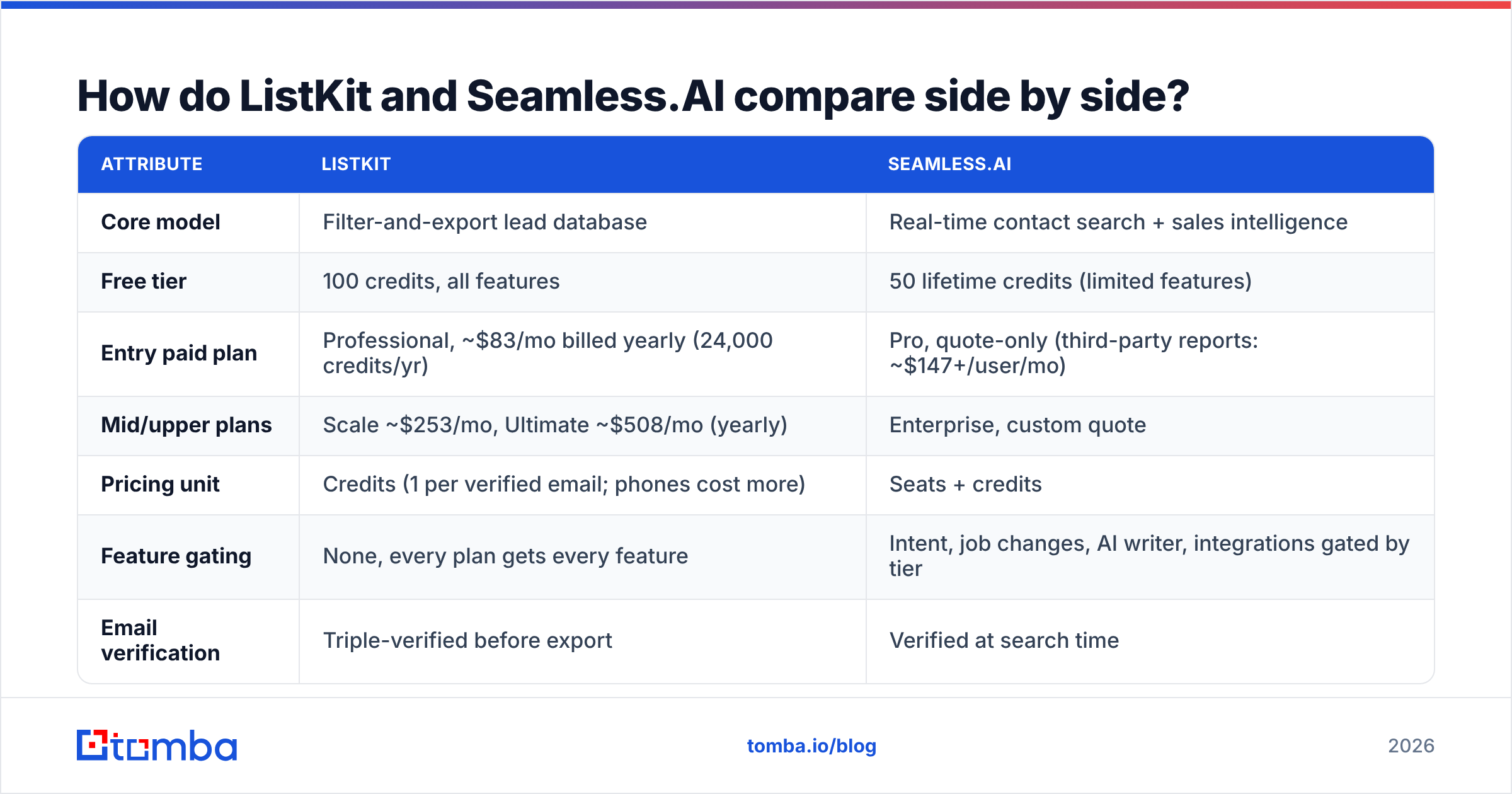
How do ListKit and Seamless.AI compare side by side?#
| Attribute | ListKit | Seamless.AI |
|---|---|---|
| Core model | Filter-and-export lead database | Real-time contact search + sales intelligence |
| Free tier | 100 credits, all features | 50 lifetime credits (limited features) |
| Entry paid plan | Professional, ~$83/mo billed yearly (24,000 credits/yr) | Pro, quote-only (third-party reports: ~$147+/user/mo) |
| Mid/upper plans | Scale ~$253/mo, Ultimate ~$508/mo (yearly) | Enterprise, custom quote |
| Pricing unit | Credits (1 per verified email; phones cost more) | Seats + credits |
| Feature gating | None, every plan gets every feature | Intent, job changes, AI writer, integrations gated by tier |
| Email verification | Triple-verified before export | Verified at search time |
| Phone numbers | Yes, extra credits per number found | Yes, direct dials on paid tiers |
| Chrome / LinkedIn extension | Limited | Yes, core part of the workflow |
| CRM integrations | CSV + sequencer exports, some native | Salesforce, HubSpot, Outreach, Salesloft and more |
| Contract terms | Monthly or annual, self-serve | Annual common; reviewers report 60-day cancellation notice |
| Best for | Agencies, founders, cold email operators | Mid-market and enterprise SDR/AE teams |
Pricing reflects publicly reported 2026 figures. Seamless.AI does not publish paid-plan prices, so treat those numbers as ranges, not quotes.

How does pricing actually work on each platform?#
This is where most buyers make their decision, and it is also where the hidden costs show up.
ListKit pricing#
ListKit charges for data, not access. Every plan, including the free tier, has the same features. You only choose how many credits you need:
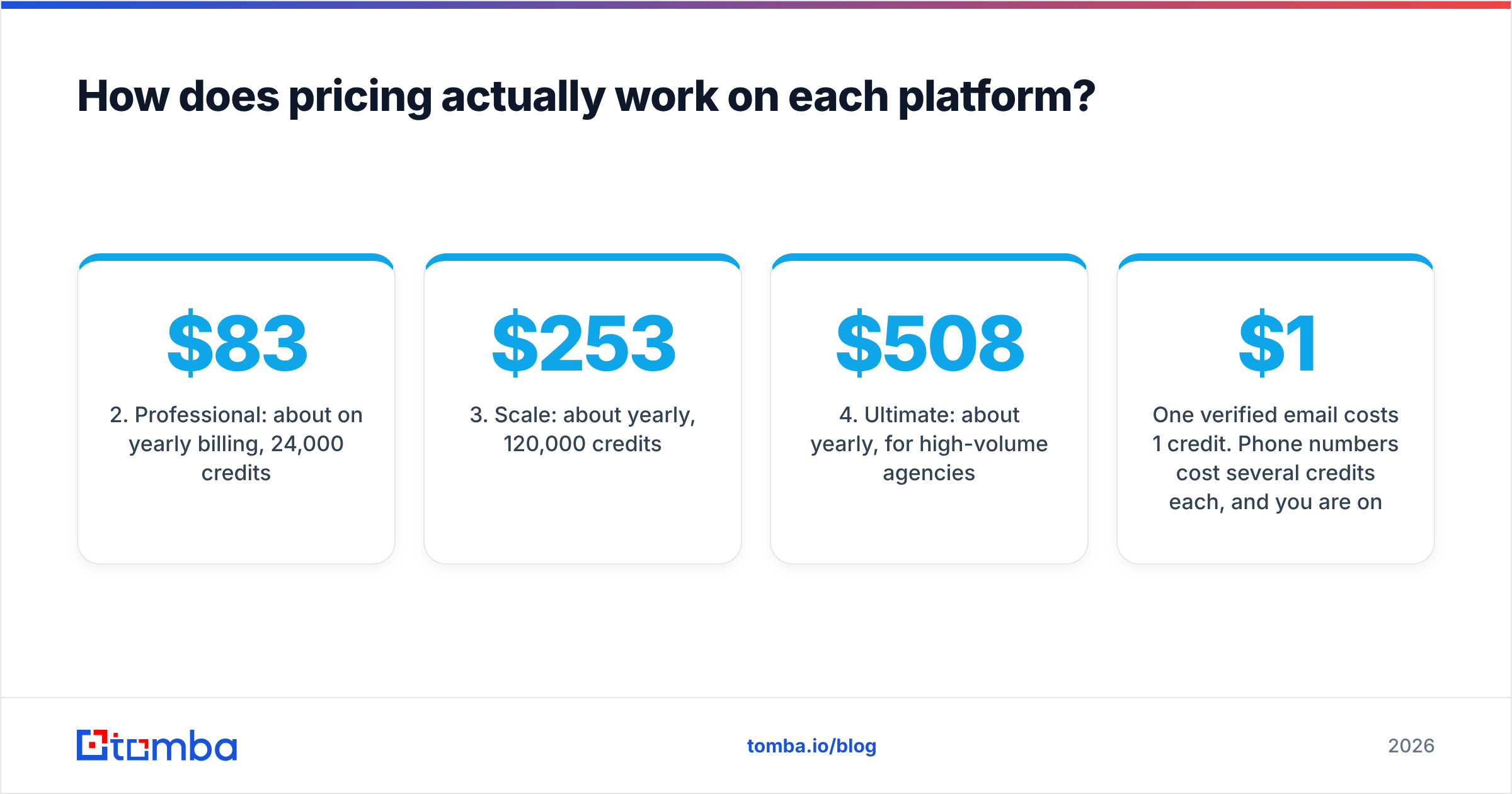
- Free: 100 credits to test data quality on your own ICP.
- Professional: about $83/mo on yearly billing, 24,000 credits per year.
- Scale: about $253/mo yearly, 120,000 credits per year.
- Ultimate: about $508/mo yearly, for high-volume agencies.
One verified email costs 1 credit. Phone numbers cost several credits each, and you are only charged when a number is found. Monthly billing exists, but it gives you far fewer credits per dollar, so yearly is the real price. If you run campaigns for multiple clients, this model is easy to budget: 24,000 contacts a year for about $1,000 works out to roughly 4 cents per lead.
Seamless.AI pricing#
Seamless.AI does not publish paid prices. You get a free plan with a small, one-time pool of credits, then book a sales call for Pro or Enterprise. Third-party breakdowns in 2026 put paid seats at roughly $147–$299 per user per month, usually on an annual contract. Pro plans are often structured around a shared daily credit pool across multiple licenses, not per-user monthly caps.
Three cost factors to check before you sign:
- Seat minimums. Some Pro packages are sold in multi-license bundles. A five-rep team can end up with a five-figure annual contract.
- Cancellation notice. Multiple reviewers on G2 report a 60-day notice requirement before renewal. Put a calendar reminder on day one.
- Credit consumption rules. Some reviewers say lookups that return weak or no data still use credits. Ask your rep to spell out exactly when a credit is charged.

The short version: at small team sizes, ListKit's annual cost is often less than one Seamless.AI seat.
Which tool has better data quality?#
Both vendors make strong accuracy claims, and neither publishes an independent audit. Your own test will tell you more than their marketing.
ListKit's advantage is that verification happens before export. You do not pay for an address that fails the check, so bounce rates on cold campaigns tend to stay low. The downside is the source: like any static database, ListKit has records that age. People change jobs, and a list that was clean at export can decay within a quarter.
Seamless.AI's advantage is freshness at the moment you search, because it looks up data when you query it. Its downsides, based on user reviews, are inconsistent phone accuracy and variable coverage outside North America. G2 and Capterra reviews repeatedly mention "hit or miss" data depending on region and seniority.

Whichever tool you choose, do not skip your own verification step before sending. Run every export through an independent email verifier right before it goes into a sequence. This matters most for catch-all domains, where "valid" really means "the server accepts everything." It is cheap insurance for your sender reputation.
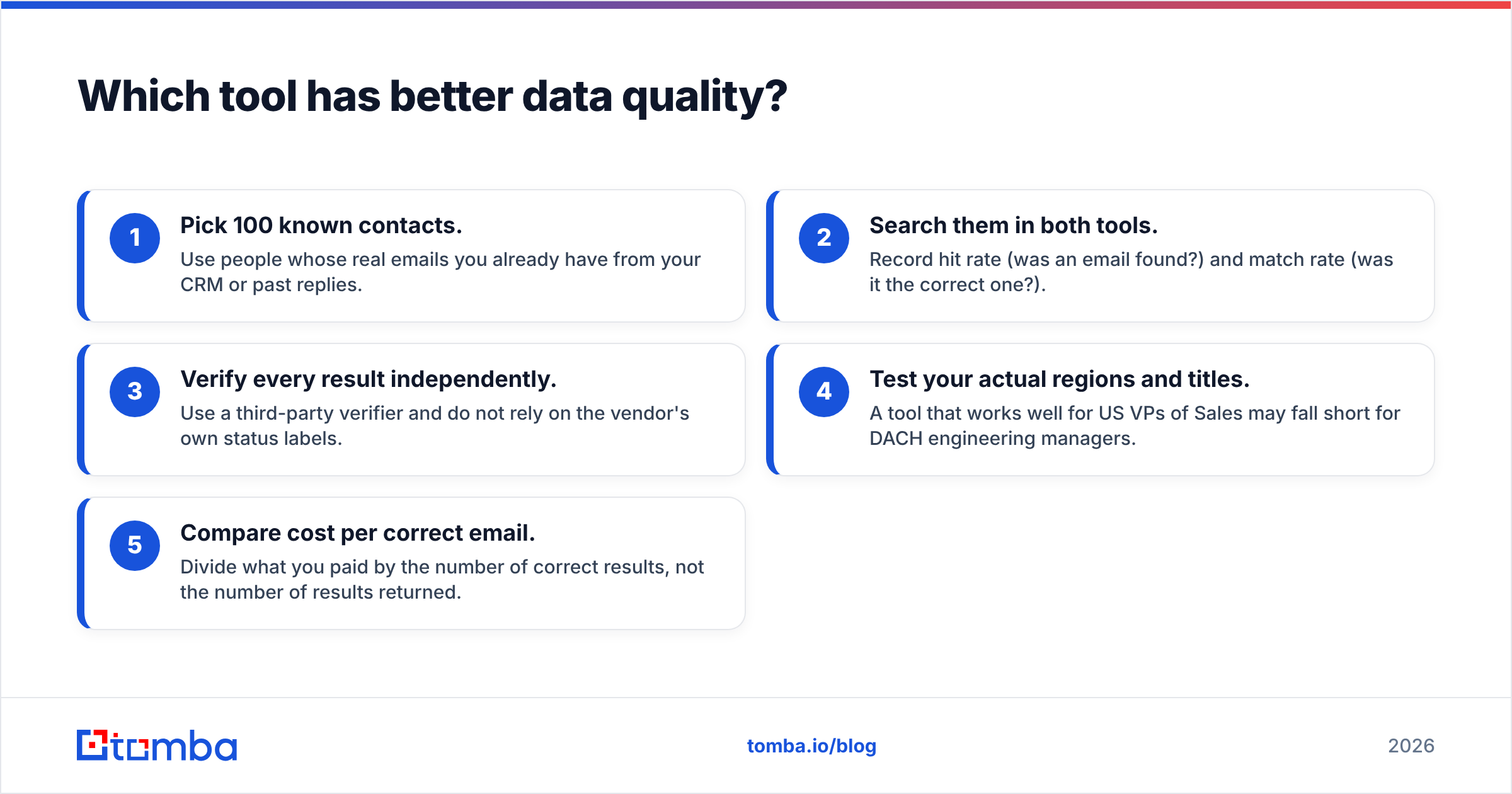
How to run a fair accuracy test#
Use this process in both free trials:
- Pick 100 known contacts. Use people whose real emails you already have from your CRM or past replies.
- Search them in both tools. Record hit rate (was an email found?) and match rate (was it the correct one?).
- Verify every result independently. Use a third-party verifier and do not rely on the vendor's own status labels.
- Test your actual regions and titles. A tool that works well for US VPs of Sales may fall short for DACH engineering managers.
- Compare cost per correct email. Divide what you paid by the number of correct results, not the number of results returned.
Which one fits your team's workflow?#
Features only matter if they match how your team works day to day.
Choose ListKit if you:#
- Run cold email at volume. Agencies and outbound operators sending thousands of emails a week need bulk exports, not one-by-one lookups.
- Want predictable spend. Credits in, leads out. No seat math, no surprise renewal calls.
- Build lists by filter, not by name. "Every Series A fintech in the UK with 20–200 employees" is exactly the kind of query ListKit is built for.
- Already have a sequencer. ListKit feeds Instantly, Smartlead and similar tools. It does not try to replace them.
Choose Seamless.AI if you:#
- Run a multi-rep sales team. Seat-based access, admin controls and CRM sync matter more once you have 10+ reps.
- Prospect from LinkedIn. The Chrome extension turns profile browsing into contact capture.
- Want signals, not just contacts. Buyer intent and job-change alerts help reps time their outreach.
- Live in Salesforce or HubSpot. Seamless.AI's native integrations push enriched records directly into your CRM without CSV cleanup.

What do users complain about with each tool?#
Every tool has trade-offs. Here are the recurring complaints from public reviews.
ListKit
- Coverage outside the US and UK is thinner, especially for smaller companies.
- There are fewer research features: no deep intent data and limited account insights.
- Monthly billing is much worse value than annual, which catches some buyers out.
Seamless.AI
- There is no public pricing, and sales calls can be persistent.
- Annual contracts and cancellation notice periods show up often in negative reviews.
- Phone and email accuracy varies by region and seniority.
- The interface has a learning curve once you use intent, lists, the writer and integrations together.
If the contract terms are what worry you, it is worth reading a broader Seamless.AI alternative breakdown before your renewal date.
Is ListKit better than Seamless.AI?#
For most small teams, agencies and founders running cold email: yes, ListKit is the better buy. You get verified bulk data, every feature on every plan, and a cost per lead that is hard to beat on annual billing.
For sales orgs with 10+ reps working named accounts in a CRM, Seamless.AI can justify its price through its extension, intent signals and native integrations. That only holds if your reps will use those features every day and your finance team accepts the contract terms.
A quick ListKit vs SeamlessAI decision rule:
| Your situation | Pick |
|---|---|
| Agency sending cold email for clients | ListKit |
| Solo founder or 1–3 person outbound team | ListKit |
| 10+ SDRs prospecting from LinkedIn into Salesforce | Seamless.AI |
| You need intent data and job-change alerts | Seamless.AI |
| You already have target names and just need emails | Neither, use a dedicated email finder |
Is there a cheaper option if you just need emails?#
Yes. Many teams comparing ListKit and Seamless.AI don't actually need a lead database or a sales intelligence suite. They already know the companies, and often the people. They just need a verified address.
In that case you are paying for search and discovery you won't use. A dedicated email finder that looks up an address from a name plus domain, or pulls every public address at a company, does the job for less. Tomba's free tier includes 25 searches a month, and paid plans start at $49/mo Starter, $99/mo Growth and $249/mo Pro. Full breakdown on the Tomba pricing page. You also get monthly billing with no seat minimums.
A practical stack many outbound teams use:
- Build the account list in whatever database you already pay for, or from your CRM.
- Find the right people via LinkedIn or company pages.
- Find and verify emails with a dedicated finder and verifier.
- Send from your existing sequencer.
Final verdict: ListKit vs SeamlessAI#
ListKit and Seamless.AI are both legitimate, well-used tools, and both solve real problems. They just aren't the same problem. ListKit is the more efficient choice when you need large volumes of verified leads on a predictable budget. Seamless.AI is the more complete choice for larger sales teams that want contact data built into a rep workflow, and are willing to accept per-seat pricing and annual contracts to get it.
Before you commit to either, use both free tiers, run the 100-contact accuracy test above, and calculate cost per correct email.
If your test shows that what you really need is accurate addresses for people you have already picked, skip the database subscription. Try Tomba Email Finder free: find professional emails by name, domain or company, verify them in the same workflow, and upgrade to the $49/mo Starter plan only when your volume calls for it.
Related guides#
// get started
Find, verify and enrich your first contacts today
Start on the free plan with 25 searches a month, then scale when your team is ready.
Free plan · No credit card required · GDPR & CCPA
// about the author