LoopUp Pricing, Reviews, Pros and Cons: The 2026 Buyer's Guide
LoopUp doesn't publish its prices. Here's what the quote-based model really costs, what 145+ user reviews say, and when LoopUp beats Microsoft's own Teams Calling Plans.
TL;DR
- LoopUp does not publish prices. Every deal is quoted. What you pay depends on how many countries you need, how many users you have, how many numbers you port, and how many minutes you use.
- The product has changed. LoopUp started out as a premium remote-meetings and audio-conferencing tool. Today it sells managed Microsoft Teams telephony (PSTN calling) across 100+ countries, with one contract, one portal and 24/7 support.
- Reviews are strong but dated. LoopUp scores about 4.6/5 on Capterra (125 reviews) and 4.4/5 on G2 (20 reviews). Most of those reviews describe the older conferencing product, not the current Teams calling service.
- It's best for multinationals. If you need Teams calling in more countries than Microsoft's own Calling Plans cover, LoopUp is worth a quote. If you're a single-country SMB, Microsoft's bundled plans or a local Operator Connect carrier will almost always cost less.
- Budget for the full stack. Microsoft's Teams Phone license is paid separately from LoopUp's calling service. Sales teams also need clean contact data before any phone system makes them money.
What is LoopUp, and what are you actually paying for?#
LoopUp is a UK-founded communications provider. For most of its history it sold "premium remote meetings": audio conferencing without dial-in numbers or PIN codes. That model depended on high per-minute conferencing fees. Once Zoom and Teams made video meetings effectively free, the company moved toward what it now calls its core business, global Microsoft Teams telephony for multinational enterprises.
In practice, you're buying three things:
- PSTN connectivity for Teams. Your users can make and receive ordinary phone calls from the Teams client, delivered through Direct Routing or Operator Connect.
- Global number coverage. Local numbers, number porting and regulatory compliance in 100+ countries, all under a single contract.
- Managed service. One management portal and one 24/7 multilingual support team, so you aren't juggling a separate carrier in every region.
An analogy helps here. Microsoft Teams is the building. LoopUp is the utility company that runs the phone lines into every office you have, in every country, and sends you one bill. You still pay rent on the building, meaning Microsoft's Teams Phone license, separately.
That split is the first thing to understand about LoopUp pricing. A LoopUp quote on its own doesn't show your full per-user cost.
How much does LoopUp cost in 2026?#
LoopUp's pricing is available only on request. There's no public per-user price, no free tier and no self-serve checkout. The G2 pricing page for LoopUp shows the same: no published tiers.
From how managed Teams telephony is usually sold, and from what LoopUp says it offers, a quote is built from these parts:
- Per-user service fee. A monthly charge for each enabled Teams voice user.
- Calling bundles or per-minute rates. Domestic and international minutes, either pooled or pay-as-you-go.
- Number charges. Monthly fees for DIDs (direct-dial numbers), plus porting costs for moving your existing numbers.
- Onboarding and professional services. Migration, porting projects and configuration. These are often one-off fees.
- Contract term. Multi-year commitments usually get better unit pricing.
Because the old conferencing product was billed per minute, some older review-site listings still describe LoopUp as "per-minute pricing." That doesn't reflect how the Teams telephony service is packaged today, so don't use those listings to set your budget.
What does the Microsoft side cost?#
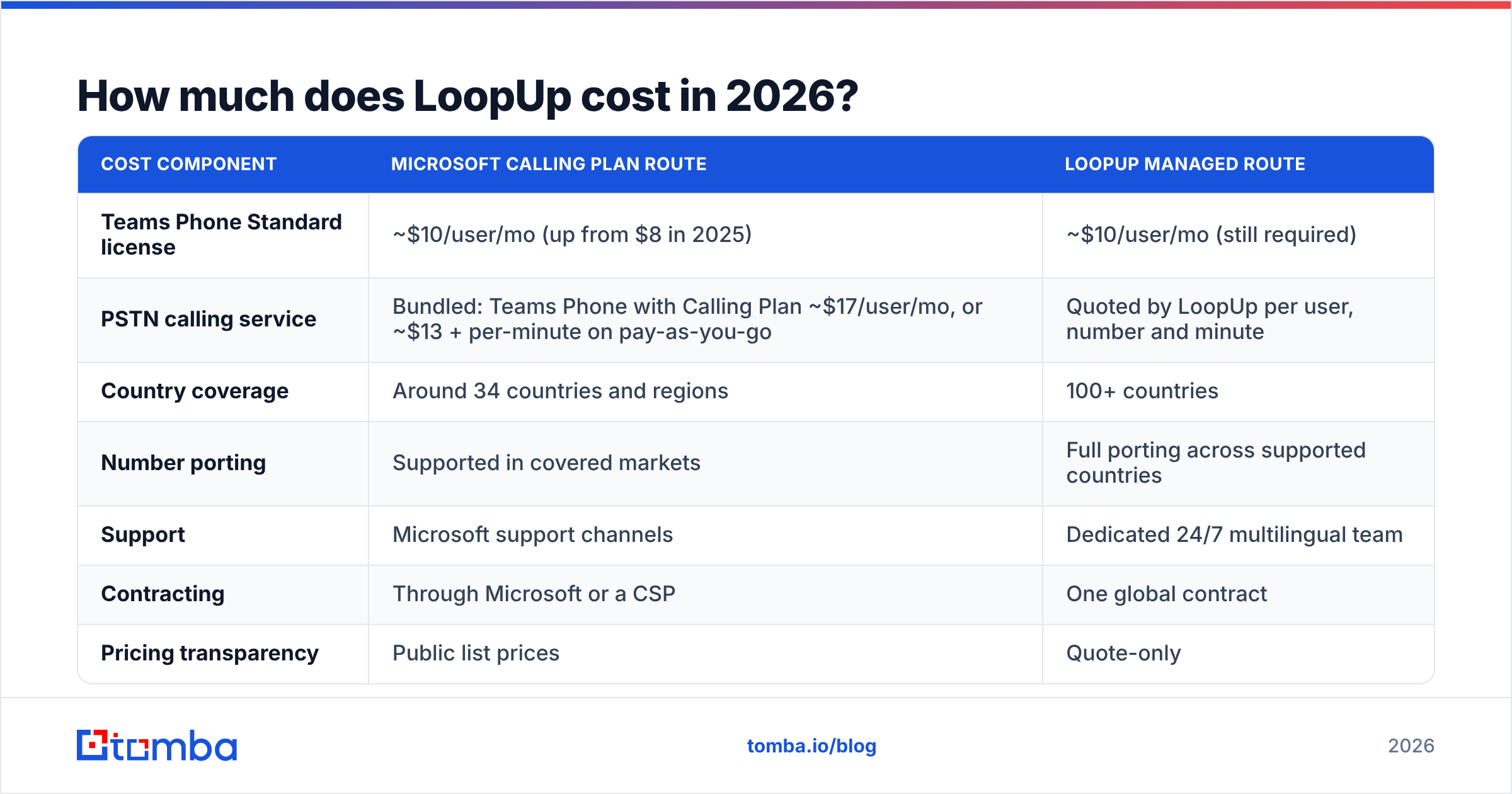
Whatever LoopUp quotes, you'll also pay Microsoft. Based on published 2026 breakdowns of Microsoft Teams calling costs, the reference points look roughly like this:
| Cost component | Microsoft Calling Plan route | LoopUp managed route |
|---|---|---|
| Teams Phone Standard license | ~$10/user/mo (up from $8 in 2025) | ~$10/user/mo (still required) |
| PSTN calling service | Bundled: Teams Phone with Calling Plan ~$17/user/mo, or ~$13 + per-minute on pay-as-you-go | Quoted by LoopUp per user, number and minute |
| Country coverage | Around 34 countries and regions | 100+ countries |
| Number porting | Supported in covered markets | Full porting across supported countries |
| Support | Microsoft support channels | Dedicated 24/7 multilingual team |
| Contracting | Through Microsoft or a CSP | One global contract |
| Pricing transparency | Public list prices | Quote-only |
The honest takeaway: if all your users sit in countries Microsoft covers, it's hard for a managed provider to beat the bundled Calling Plan on price alone. LoopUp's case gets stronger with every country you add that Microsoft doesn't cover, where you'd otherwise have to find, contract and manage a local carrier yourself.
What do LoopUp reviews say?#
LoopUp's review footprint is small but positive. On Capterra, LoopUp averages 4.6 out of 5 across 125 verified reviews. G2 shows 4.4 out of 5 from 20 reviews.
One caveat before you weigh them: most of these reviews are about LoopUp's remote-meetings product. Comments about "no dial-in codes" and "screen sharing" describe a service that is no longer the company's main focus. Use them as evidence of LoopUp's support culture and reliability, not as a review of its Teams calling features.
Recurring praise#
- Ease of use. Reviewers keep saying they liked that meetings didn't need dial-in numbers and PINs. Participants were called directly.
- Call quality. Many reviews describe audio quality as consistently very good.
- Lightweight client. Users noted it used far less CPU and memory than competing conferencing software.
- Screen sharing. Often described as simpler than rival tools.
- Customer support. The most consistent theme. Support staff are called friendly, fast and knowledgeable.
Recurring complaints#
- Login friction. Some users found there were too many codes and login steps.
- Occasional dropped calls. A minority reported connection problems.
- Missing collaboration features. No chat or hand-raise in the conferencing product.
- Latency. A few reviewers said lag was noticeably worse than on some competitors.
For the Teams telephony service, the useful signal is the support theme. When you run phone systems in 40 countries, the quality of the support desk matters more than almost any feature.
What are LoopUp's pros and cons?#
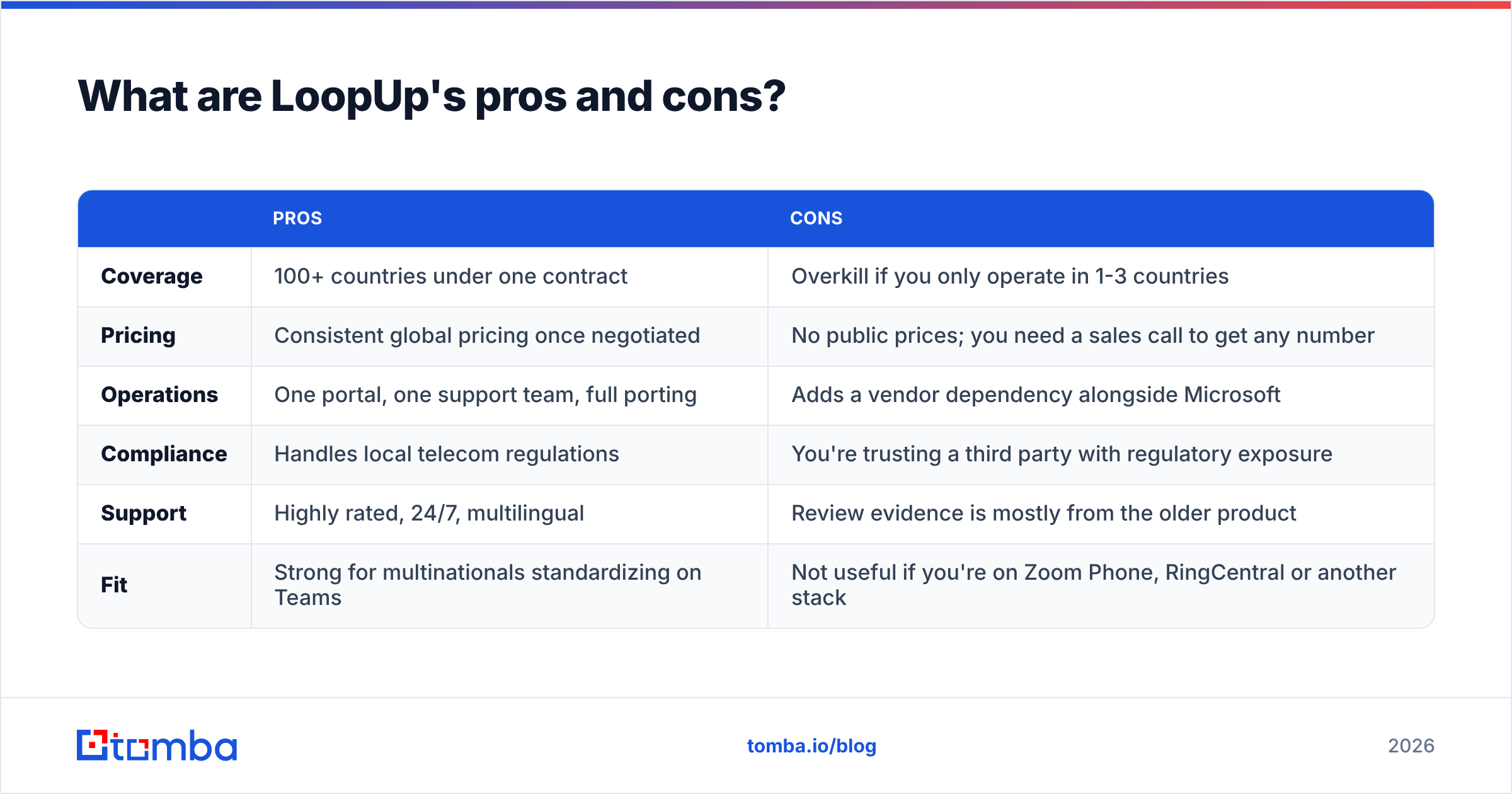
Here's a direct summary based on the product as it's sold in 2026.
| Pros | Cons | |
|---|---|---|
| Coverage | 100+ countries under one contract | Overkill if you only operate in 1-3 countries |
| Pricing | Consistent global pricing once negotiated | No public prices; you need a sales call to get any number |
| Operations | One portal, one support team, full porting | Adds a vendor dependency alongside Microsoft |
| Compliance | Handles local telecom regulations | You're trusting a third party with regulatory exposure |
| Support | Highly rated, 24/7, multilingual | Review evidence is mostly from the older product |
| Fit | Strong for multinationals standardizing on Teams | Not useful if you're on Zoom Phone, RingCentral or another stack |
Who should pick LoopUp?#
- Multinationals already on Microsoft 365. You want every office on Teams calling, and you have users outside Microsoft's Calling Plan countries.
- IT teams tired of carrier sprawl. If you have 15 regional telecom contracts today, consolidating them is where LoopUp earns its fee.
- Organizations facing a PBX end-of-life. Moving from on-prem PBXs to Teams is a natural project for a managed provider.
Who should skip it?#
- Single-country companies. Microsoft's Calling Plans, or a local Operator Connect carrier, will be simpler and cheaper.
- Startups and SMBs. Quote-only enterprise contracts rarely suit a 20-person team.
- Non-Microsoft shops. LoopUp's current value is tied to Teams.
Is LoopUp better than Microsoft Calling Plans or Direct Routing on your own?#
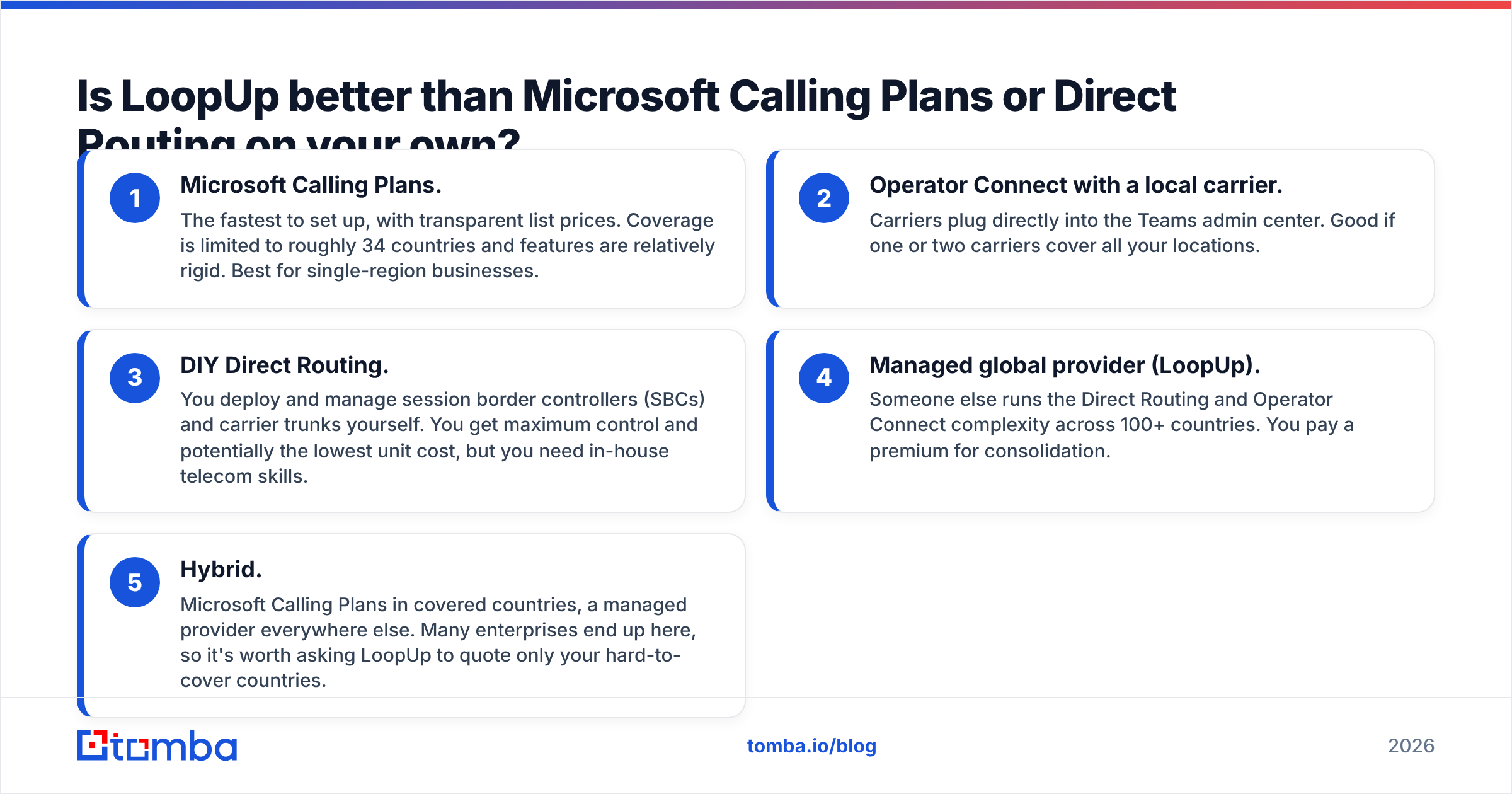
You have three realistic ways to get PSTN calling into Teams. Here's how they compare:
- Microsoft Calling Plans. The fastest to set up, with transparent list prices. Coverage is limited to roughly 34 countries and features are relatively rigid. Best for single-region businesses.
- Operator Connect with a local carrier. Carriers plug directly into the Teams admin center. Good if one or two carriers cover all your locations.
- DIY Direct Routing. You deploy and manage session border controllers (SBCs) and carrier trunks yourself. You get maximum control and potentially the lowest unit cost, but you need in-house telecom skills.
- Managed global provider (LoopUp). Someone else runs the Direct Routing and Operator Connect complexity across 100+ countries. You pay a premium for consolidation.
- Hybrid. Microsoft Calling Plans in covered countries, a managed provider everywhere else. Many enterprises end up here, so it's worth asking LoopUp to quote only your hard-to-cover countries.
A practical test: count the countries where you need Teams calling, then count how many of them Microsoft Calling Plans don't cover. If the second number is zero, start with Microsoft. If it's more than a handful, get a LoopUp quote and compare it against the internal cost of managing those carriers yourself, including staff time.
What hidden costs should you ask LoopUp about?#
Since there's no public price list, the quality of your quote depends on the questions you ask. Put these on your checklist:
- Porting fees per number and per country. Porting is where migration budgets tend to blow up.
- Minimum user or minimum spend commitments. Find out what happens if you shrink headcount mid-contract.
- International and mobile termination rates. Calls to mobiles in some regions cost far more than calls to landlines.
- Emergency calling (E911/E112) compliance costs. These vary by country.
- Early-termination terms. Multi-year contracts are common. Negotiate an exit clause.
- Separate Microsoft licensing. Confirm whether the quote assumes you already hold Teams Phone licenses. It usually does.
Ask for a sample invoice for a 50-user office in two different countries. It's the fastest way to turn a vague proposal into a real per-seat number.
Does a better phone system help your sales team sell more?#
Only if the numbers your reps dial are right. This is the part that telephony buying guides usually skip. A sales team can have flawless call quality in 100 countries and still waste half its day on disconnected numbers, switchboards and people who left the company two years ago.
If part of your reason for evaluating LoopUp is to enable outbound calling from Teams, budget for the data layer as well:
- Find direct dials, not HQ lines. A phone finder returns B2B mobile and direct numbers tied to a named contact.
- Validate before you load the dialer. Running your list through a phone validator removes dead and mis-formatted numbers before they eat up call minutes, which matters when you pay per minute.
- Pair calls with email. Multi-channel sequences get better connect rates. An email finder gives reps a verified email for each contact they call, so a missed call can turn straight into a follow-up.
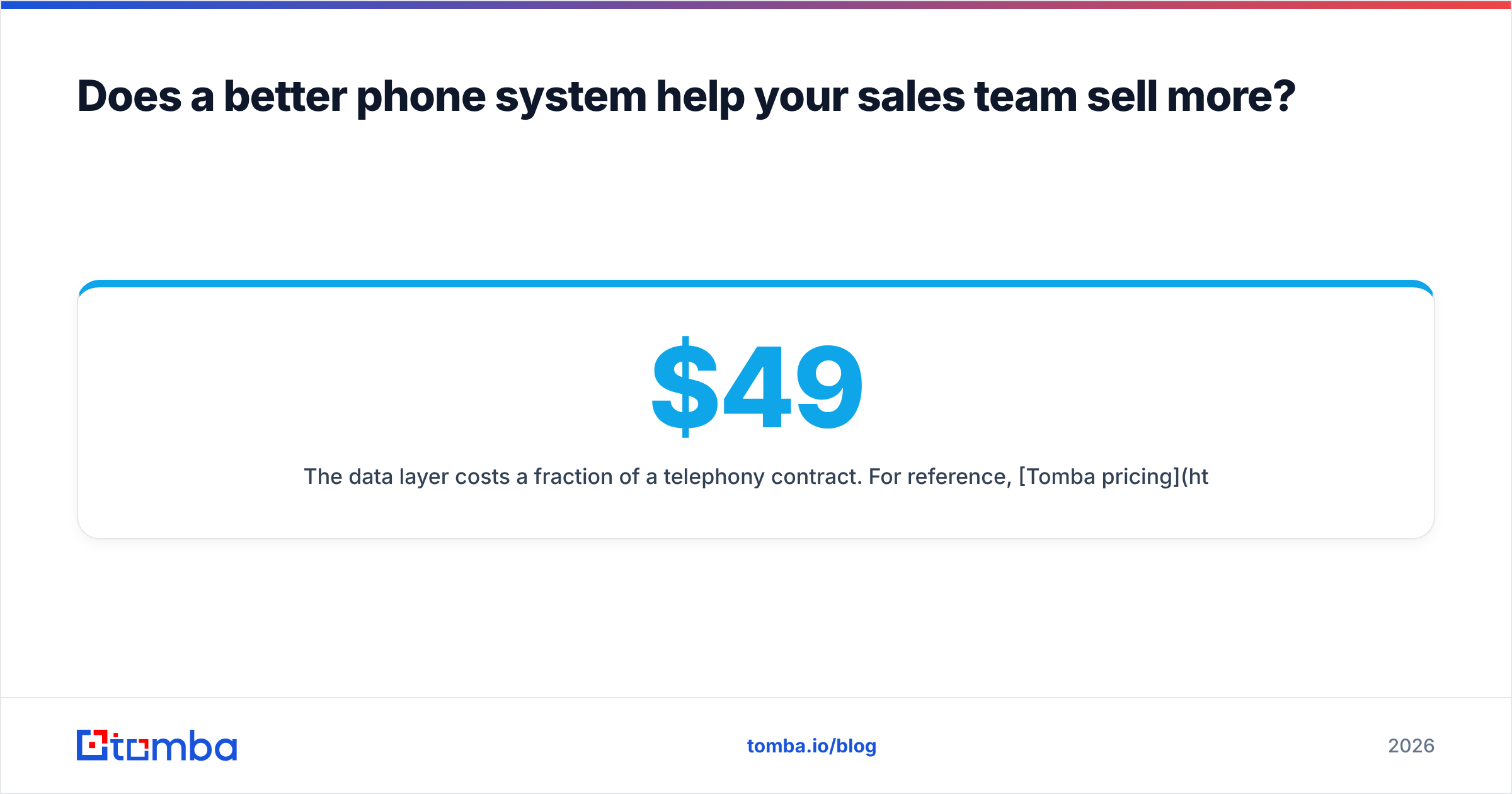
The data layer costs a fraction of a telephony contract. For reference, Tomba pricing starts with a free tier of 25 searches a month, then Starter at $49/mo, Growth at $99/mo and Pro at $249/mo, with Enterprise on custom terms. That's small next to what a sales team spends on minutes and seats.
So, is LoopUp worth it in 2026?#
For the right buyer, yes. LoopUp solves a real, costly problem: running consistent Teams calling across dozens of countries without managing dozens of carriers. Its support reputation is well earned, and one contract with one portal has real operational value for global IT teams.
For everyone else, the quote-only model is a warning sign rather than a selling point. If you operate in a few countries that Microsoft already covers, the bundled Teams Phone with Calling Plan (around $17/user/month at list price) is transparent, fast to set up, and hard to beat.
Here's how to decide:
- Choose LoopUp if you have many countries, many carriers today, and you're committed to Microsoft Teams.
- Choose Microsoft Calling Plans if you have one region, want predictable pricing and don't need advanced telephony.
- Choose DIY Direct Routing if you have strong in-house telecom engineers and want maximum control.
- Choose a hybrid if most users are in covered countries and a few offices sit outside that coverage.
Whichever route you pick, get at least two competing quotes, insist on a sample invoice, and separate Microsoft licensing from the provider's service fees so you're comparing like with like.
Ready to make every call and email count?#
A global phone system only pays off when your reps reach the right people. Before you load contacts into Teams calling or a sales dialer, make sure the data behind them is accurate. Tomba Email Finder finds verified professional email addresses by name, domain or company, so every call can be backed by a follow-up that actually lands. Start on the free plan with 25 searches a month and see how much cleaner your outbound list gets.
Related guides#
// get started
Find, verify and enrich your first contacts today
Start on the free plan with 25 searches a month, then scale when your team is ready.
Free plan · No credit card required · GDPR & CCPA
// about the author