Mailcheck vs Seamless.AI in 2026: Which Tool Do You Actually Need?
Mailcheck cleans email lists you already have. Seamless.AI builds new lists from a large contact database. We compare pricing, contracts, data quality and real annual costs so you know which one your outbound process needs.
TL;DR
- Mailcheck (mailcheck.co) and Seamless.AI do different jobs. Mailcheck verifies email addresses you already have. Seamless.AI finds new contacts, emails and phone numbers included, in a large B2B database.
- On price, Mailcheck is the cheap one. Paid plans start around $10/mo for 1,000 validations. Seamless.AI's Basic plan is reported at about $147/mo billed annually, and Pro and Enterprise are quote-only.
- Seamless.AI's main risk is the contract. Paid plans are typically annual and auto-renew, so look at the renewal window before you sign.
- Neither tool covers the whole workflow. If you pick Seamless.AI you still need a verifier. If you pick Mailcheck you still need a way to find contacts.
- If you want finding and verifying in one place on monthly billing, a combined tool such as Tomba (from $49/mo) is worth adding to your shortlist.
What is Mailcheck vs SeamlessAI, and why is the comparison lopsided?#
Most "X vs Y" posts compare two tools that compete for the same budget line. This one doesn't. People search for "Mailcheck vs SeamlessAI" because both come up when they're building an outbound list, but the products sit at opposite ends of that process.
- Seamless.AI is a sales-intelligence platform. You search by company, title, industry or location, and it returns contacts with emails and direct dials. It also runs a Chrome extension that works on LinkedIn and company websites.
- Mailcheck is an email validation service. You upload a list or call its API, and it tells you which addresses are deliverable, risky, or invalid so you don't damage your sender reputation.
A rough analogy: Seamless.AI is the fishing boat and Mailcheck is the inspector on the dock who checks the catch before it reaches the market. You can run one without the other, but the work goes better with both.
So the useful question isn't which tool is better overall. It's which problem you actually have right now.
How do Mailcheck and Seamless.AI compare feature by feature?#
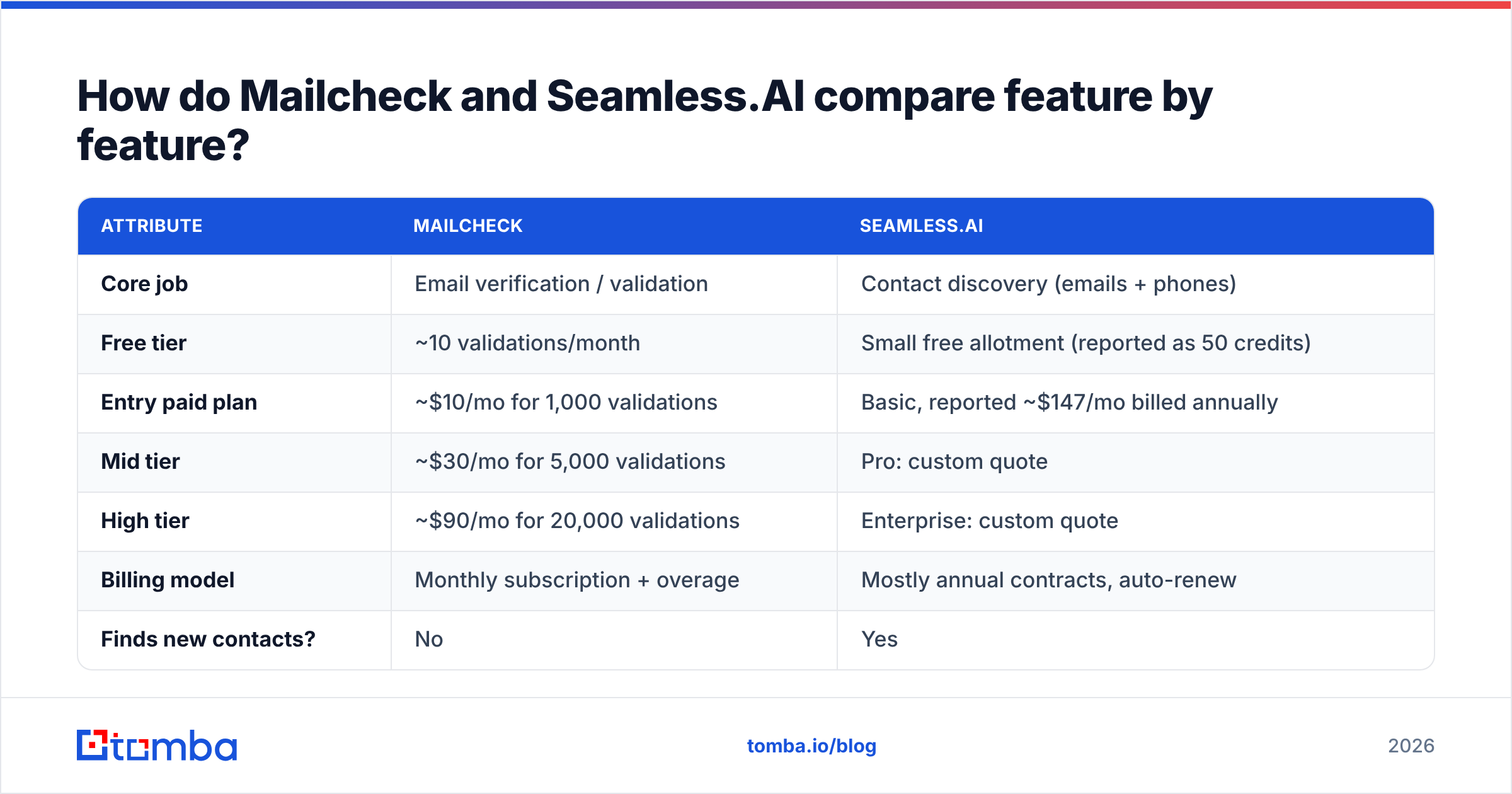
Here's the side-by-side. Prices are taken from public pricing pages and third-party snapshots as of 2026. Both vendors change their plans, so confirm on their sites before you buy.
| Attribute | Mailcheck | Seamless.AI |
|---|---|---|
| Core job | Email verification / validation | Contact discovery (emails + phones) |
| Free tier | ~10 validations/month | Small free allotment (reported as 50 credits) |
| Entry paid plan | ~$10/mo for 1,000 validations | Basic, reported ~$147/mo billed annually |
| Mid tier | ~$30/mo for 5,000 validations | Pro: custom quote |
| High tier | ~$90/mo for 20,000 validations | Enterprise: custom quote |
| Billing model | Monthly subscription + overage | Mostly annual contracts, auto-renew |
| Finds new contacts? | No | Yes |
| Phone numbers | No | Yes (direct dials and mobiles) |
| API | Yes | Yes, on higher tiers |
| CRM integrations | Limited | Salesforce, HubSpot, others |
| Best for | Cleaning lists before a send | Building lists from scratch |
The cost gap is large. A team that only needs to clean 5,000 addresses a month could pay about $360 a year with Mailcheck. Seamless.AI's entry plan alone, at the reported price, comes to roughly $1,764 a year before add-ons such as intent data or the AI writer.
That comparison doesn't make Mailcheck the better deal on its own terms, though. If you have no list yet, $360 of verification credits gets you nothing.

What does Seamless.AI do well, and where does it fall short?#
Strengths
- Search coverage. Seamless.AI searches a large real-time index, so it works for the "give me every VP of Ops at logistics companies in Texas" kind of query. Mailcheck can't answer that at all.
- Phone numbers. If your outbound includes calling, Seamless.AI returns direct dials and mobiles. Verifiers don't.
- Chrome extension. Reps can pull contacts while browsing LinkedIn profiles and company pages without leaving the tab.
- CRM push. Native Salesforce and HubSpot integrations mean found contacts go straight into your pipeline.
Weaknesses
- Contract terms. Reviewers on G2 regularly complain about annual auto-renewals and cancellation windows. Put the renewal date in your calendar the day you sign.
- Data accuracy varies. Because results are built on the fly, bounce rates differ by segment. Many teams run Seamless.AI exports through a separate verifier before sending, which means paying twice for the same contacts.
- Opaque pricing above Basic. You'll need a sales call to price Pro or Enterprise, and add-ons are billed separately.
- Credit math. Credits are consumed on reveal, so a messy search can use up credits on contacts you never contact.
What does Mailcheck do well, and where does it fall short?#
Strengths
- Price per validation. At roughly $0.002–$0.01 per check depending on plan, it's among the cheaper options in the category.
- Monthly plans. You aren't locked into a year, so you can upgrade in a busy month and downgrade afterwards.
- Focus. It does one thing, protecting your sender reputation by removing bad addresses before they bounce.
- API access. You can verify at the point of capture (signup forms, CRM entry) rather than only in batches.
Weaknesses
- It doesn't find anyone. If an address is wrong, Mailcheck tells you so but doesn't suggest the right one.
- Catch-all domains. Like most verifiers, it can only report many catch-all addresses as "risky" or "unknown". A large share of B2B domains accept all mail, so a lot of your list may come back in that grey zone.
- Smaller ecosystem. It has fewer native integrations than larger verifiers or full sales platforms, so expect to use CSV uploads or the API.
Which tool should you choose for your use case?#
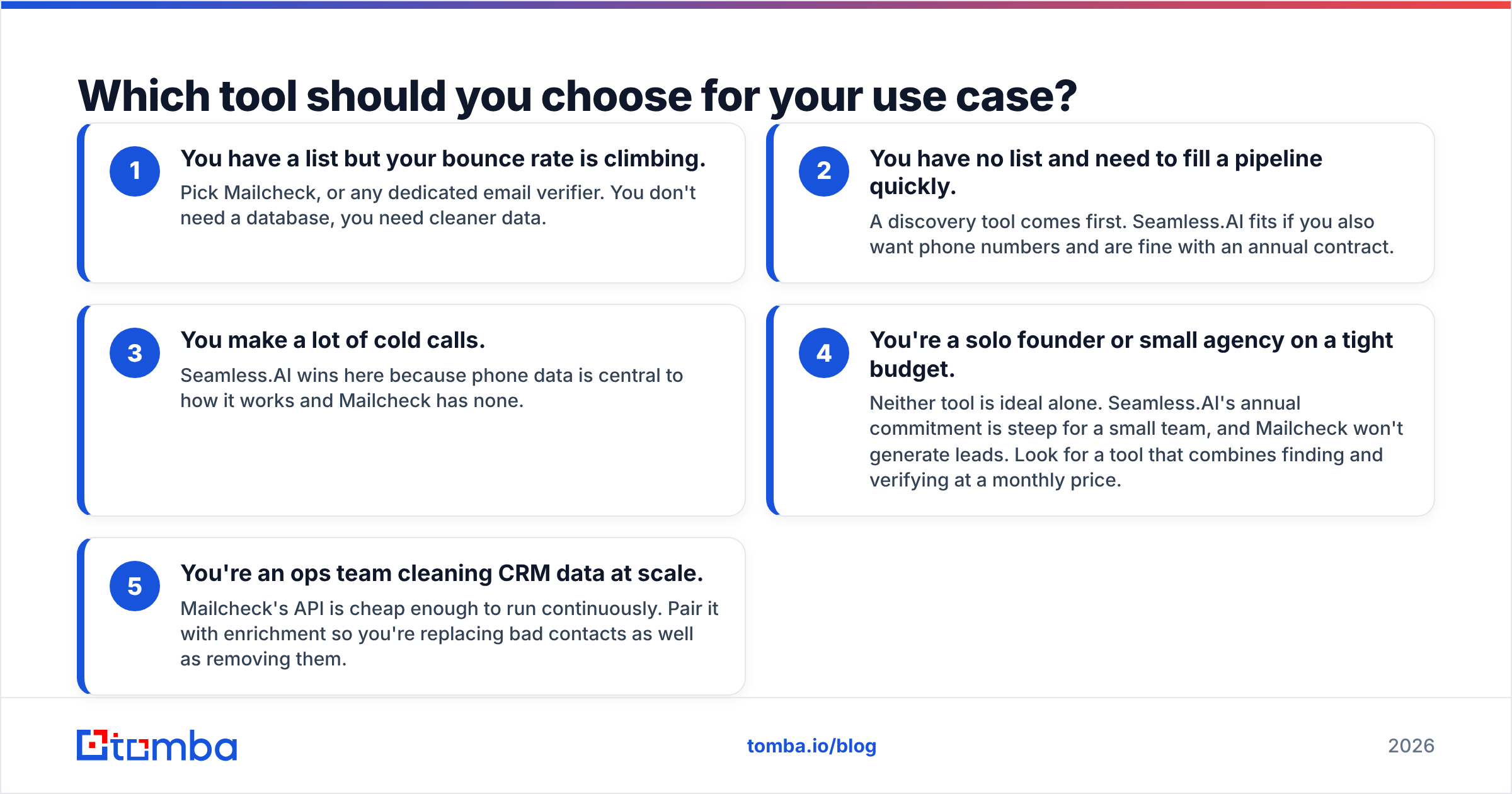
Use this decision list. Each item matches a common starting point.
- You have a list but your bounce rate is climbing. Pick Mailcheck, or any dedicated email verifier. You don't need a database, you need cleaner data.
- You have no list and need to fill a pipeline quickly. A discovery tool comes first. Seamless.AI fits if you also want phone numbers and are fine with an annual contract.
- You make a lot of cold calls. Seamless.AI wins here because phone data is central to how it works and Mailcheck has none.
- You're a solo founder or small agency on a tight budget. Neither tool is ideal alone. Seamless.AI's annual commitment is steep for a small team, and Mailcheck won't generate leads. Look for a tool that combines finding and verifying at a monthly price.
- You're an ops team cleaning CRM data at scale. Mailcheck's API is cheap enough to run continuously. Pair it with enrichment so you're replacing bad contacts as well as removing them.
Is there a tool that does both finding and verifying?#
Yes. This is the gap most buyers in this comparison end up in. The typical stack looks like this:
- Seamless.AI (or similar) to find contacts
- Mailcheck (or similar) to verify them
- A sequencer to send
That means two data bills, two sets of credits, and a CSV moving between tools in the middle. Combined platforms remove the middle step by verifying every address as it's found.
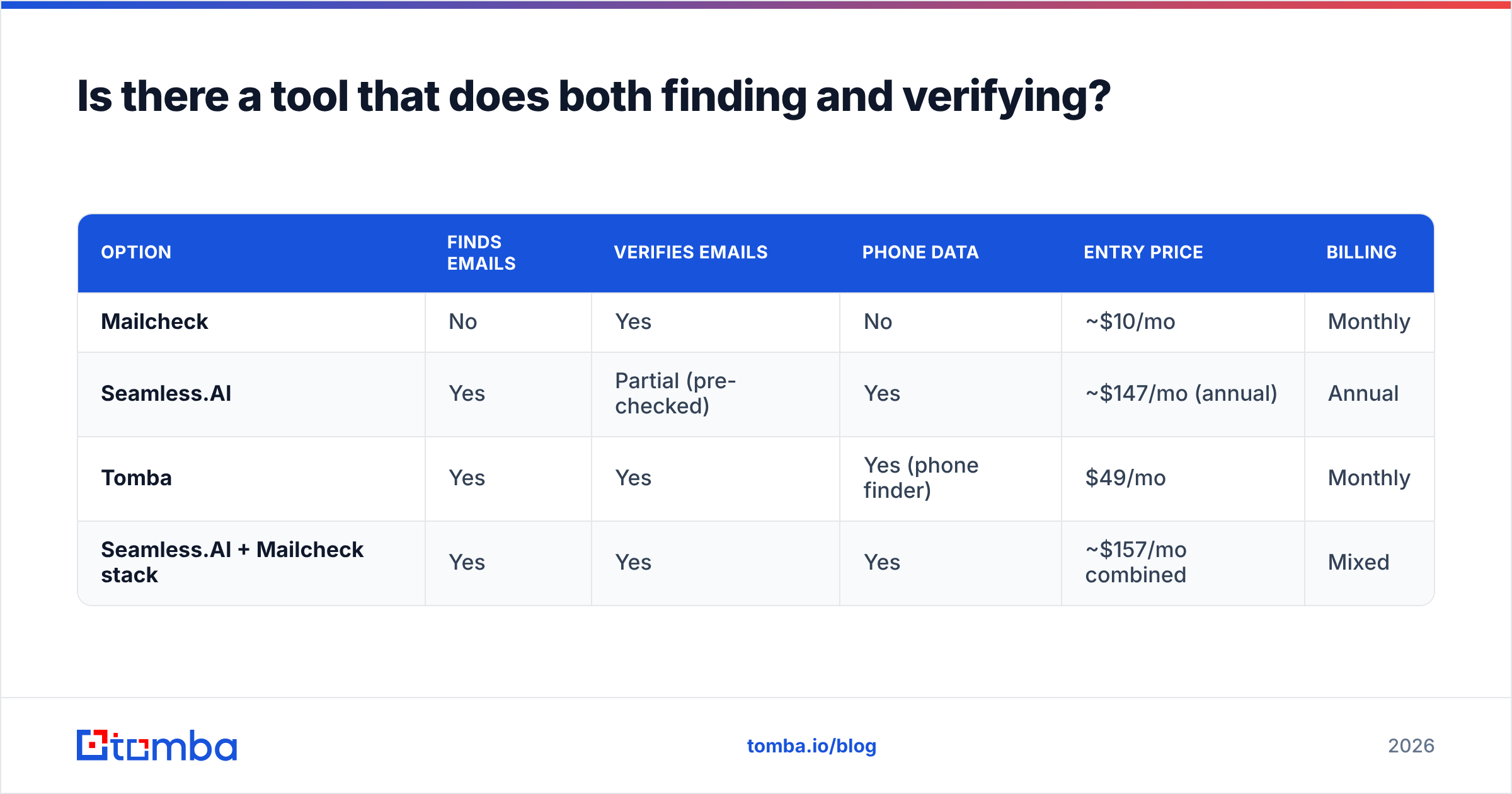
| Option | Finds emails | Verifies emails | Phone data | Entry price | Billing |
|---|---|---|---|---|---|
| Mailcheck | No | Yes | No | ~$10/mo | Monthly |
| Seamless.AI | Yes | Partial (pre-checked) | Yes | ~$147/mo (annual) | Annual |
| Tomba | Yes | Yes | Yes (phone finder) | $49/mo | Monthly |
| Seamless.AI + Mailcheck stack | Yes | Yes | Yes | ~$157/mo combined | Mixed |
Tomba's email finder looks up addresses by domain, name or company, and its verifier runs the deliverability check during the same lookup. It also includes domain search, a catch-all verifier and a phone finder. The free tier gives 25 searches a month, and paid plans run $49 (Starter), $99 (Growth) and $249 (Pro), with full details on the Tomba pricing page.
To be fair to Seamless.AI: if you need very large volumes of direct dials and your team works mainly from a sales-intelligence UI, a full platform can be worth the annual commitment. Tomba's strengths are email discovery, verification and a usable API at a monthly price, not replacing a full calling database. For a deeper look at that trade-off, see our Seamless.AI alternative breakdown.

How do the costs add up over a year?#
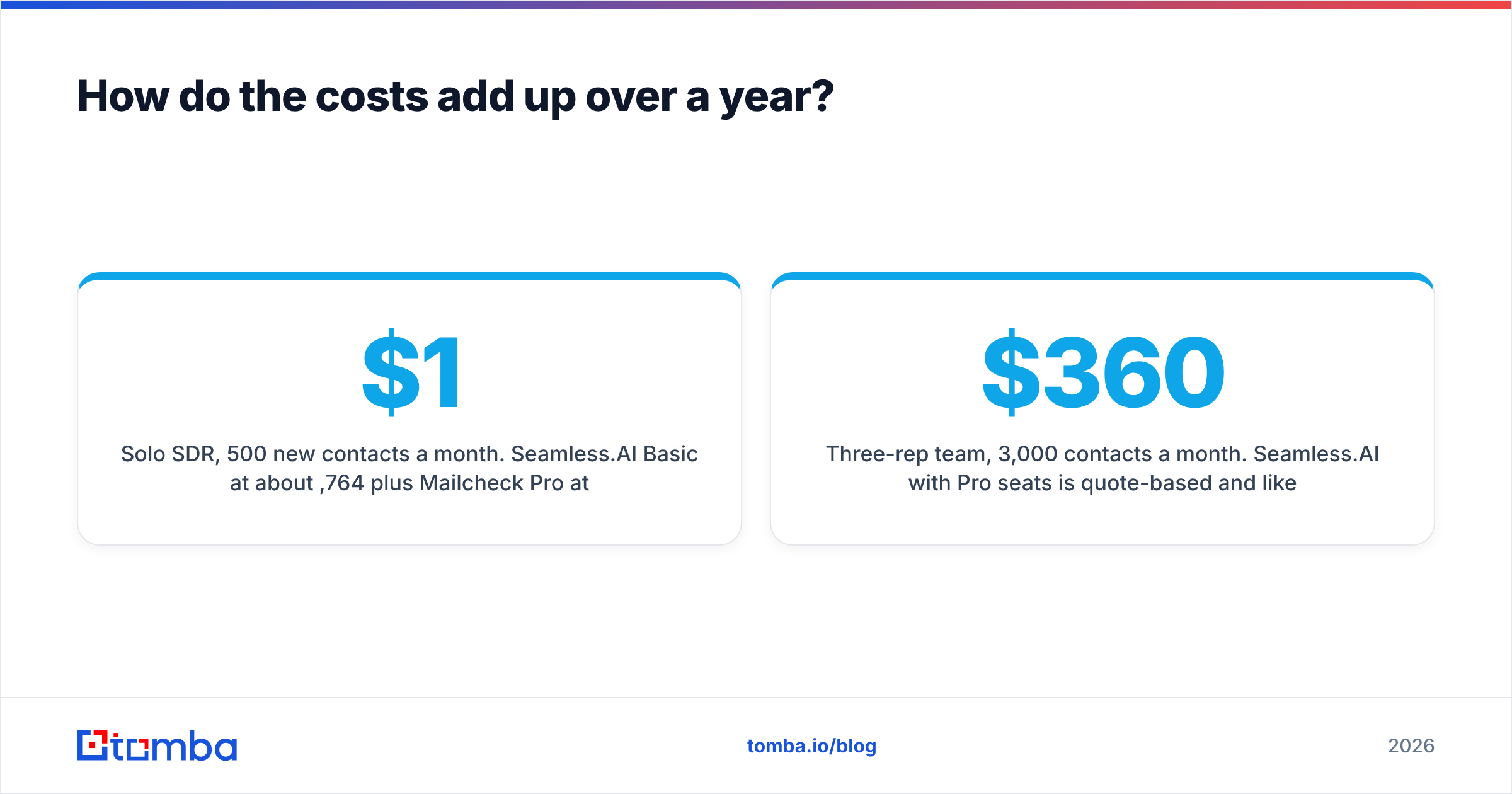
Here are three typical team profiles priced with the figures above. These are estimates, so plug in your own quotes.
- Solo SDR, 500 new contacts a month. Seamless.AI Basic at about $1,764/year plus Mailcheck Pro at $120/year comes to roughly $1,884. A combined monthly tool at the entry tier comes to about $588/year.
- Three-rep team, 3,000 contacts a month. Seamless.AI with Pro seats is quote-based and likely several thousand dollars a year, plus Mailcheck Agency at $360/year. The verifier is the small line item and the data platform is the big one.
- Ops team cleaning a 50,000-record CRM once, then 2,000 a month. Mailcheck alone covers most of this. A discovery tool only becomes necessary when you start replacing the bad records.
The pattern is consistent. Verification is cheap, discovery is expensive, and the biggest cost driver is the contract structure rather than the per-credit price.
What should you check before signing with either vendor?#
A short due-diligence checklist:
- Run a blind test. Take 200 contacts you know are valid (current customers, for example) and 50 you know have bounced. See how each tool classifies them.
- Ask how catch-alls are handled. Ask what percentage of your list returns "unknown", because that figure drives your real cost per usable lead.
- Read the renewal clause. This matters mostly for Seamless.AI. Find out how many days' notice you need to cancel and whether that applies to seats or to the whole contract.
- Check the reviews on Capterra and G2 for complaints from the last 6 months, not the overall star rating.
- Confirm data compliance. Ask both vendors how they source data and how they handle GDPR and CCPA deletion requests.
Mailcheck vs Seamless.AI: what's the final verdict?#
- Choose Mailcheck if you already have contacts and only need to stop bouncing. It's cheap, monthly, and focused.
- Choose Seamless.AI if you need phone-heavy prospecting at volume and can accept an annual contract and a separate verification step.
- Choose a combined finder and verifier if you want one tool, one bill, and monthly flexibility.
For most small and mid-sized outbound teams, the third option makes the most sense. You get new contacts and clean data without paying for two subscriptions to fix one workflow.
If that's you, try the Tomba Email Finder. Enter a domain or a name and company, and you'll get verified professional email addresses back, with 25 free searches a month to test it against your own list before you spend anything.
Related guides#
// start free
See who Tomba finds at any company
Type a company's domain to see its people, their roles and verified work emails, each with the pages it was found on. Free account, no card.
Free plan · No credit card required · GDPR & CCPA
// about the author