B2B Data Appending in 2026: The Complete Enrichment Guide
Stale CRM records cost you meetings. Learn how B2B data appending fills the gaps — emails, phones, firmographics — and how to do it without poisoning deliverability.
TL;DR
- B2B data appending is the process of adding missing or updated fields — emails, phone numbers, job titles, firmographics — to records you already own.
- The biggest payoff is not "more data," it's connectable data: a record with a verified email and a confirmed title is worth ten half-blank rows.
- Append accuracy decays fast. B2B contact data goes stale at roughly 25–30% per year, so appending is a recurring job, not a one-time cleanup.
- Always verify after you append. Adding an unverified email to your CRM and blasting it is the fastest way to wreck sender reputation.
- Match on stable keys (domain, LinkedIn URL, company + full name) — not on email alone, which is the field most likely to be wrong.
What is B2B data appending?#
B2B data appending is filling the blanks in records you already have. You start with a partial record — maybe just a name and a company, or an email with no phone number — and you match it against a reference dataset to add the fields you're missing.
Think of it like a library re-shelving returned books. The books (your contacts) already exist; appending is the librarian walking each one back to its correct spot and adding the missing call number, author, and edition so anyone can find it again. Technically, appending is a record-matching operation: you join your row to an external source on a shared key and copy over the fields you lack.
There are a few common flavors:
- Email append — add a verified business email to a name + company.
- Phone append — add a direct dial or mobile to a contact.
- Firmographic append — add company size, industry, revenue, tech stack, location.
- Social append — add LinkedIn, company socials, or other profile URLs.
- Demographic / role append — add job title, seniority, department.
Appending sits next to — but is not the same as — broader data enrichment. Enrichment is the umbrella concept (making a record more useful); appending is the specific act of adding fields that were missing.
Why does appended data matter for revenue?#
Conclusion first: incomplete records quietly kill pipeline, and appending is the cheapest fix. A rep who can't reach a contact doesn't log "bad data" — they just move on, and that lost meeting never shows up in a dashboard.
The decay is the real enemy. People change jobs, companies rebrand, area codes shift. Gartner has estimated that poor data quality costs organizations millions annually, and the B2B-specific number most teams cite is a 25–30% annual decay rate on contact records. That means a list you bought 18 months ago is now roughly half wrong.
Here's what clean, appended records unlock in practice:
- Higher connect rates — a verified direct dial beats a switchboard number every time.
- Better routing and scoring — you can't score or route a lead with no industry, size, or title.
- Cleaner segmentation — firmographic fields let you build ICP segments that actually match your ICP.
- Protected deliverability — verified emails keep bounce rates low, which protects sender reputation.

What fields should you append first?#
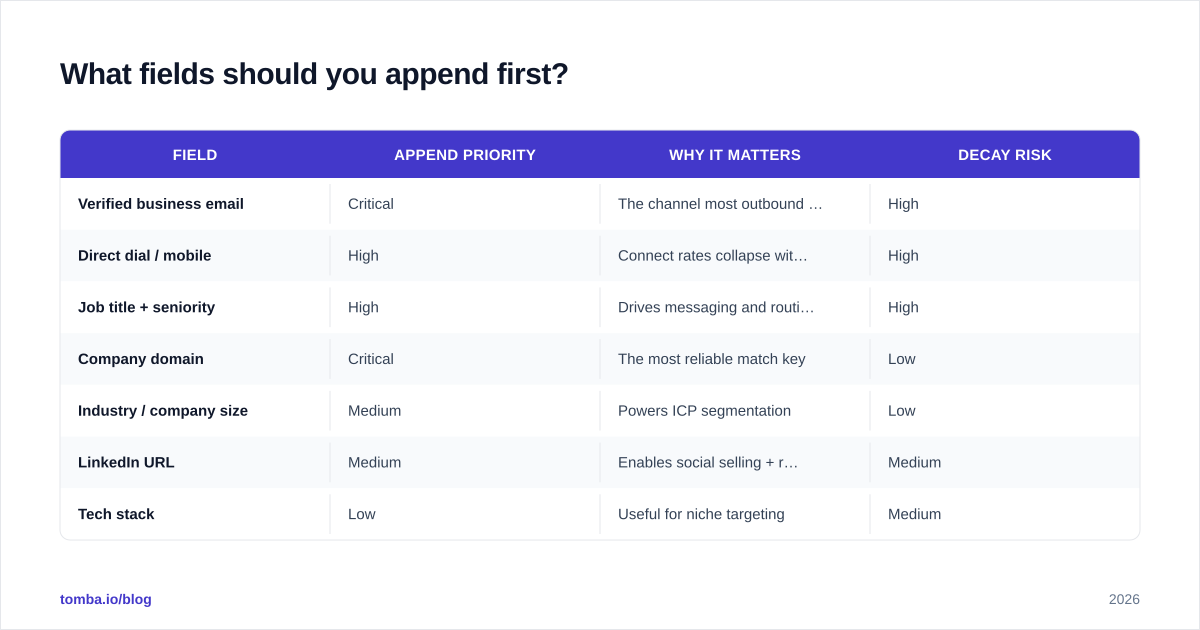
Not every field is worth the credit. Prioritize by actionability — what does a rep need to take the next step today?
| Field | Append priority | Why it matters | Decay risk |
|---|---|---|---|
| Verified business email | Critical | The channel most outbound runs on | High |
| Direct dial / mobile | High | Connect rates collapse without it | High |
| Job title + seniority | High | Drives messaging and routing | High |
| Company domain | Critical | The most reliable match key | Low |
| Industry / company size | Medium | Powers ICP segmentation | Low |
| LinkedIn URL | Medium | Enables social selling + re-verification | Medium |
| Tech stack | Low | Useful for niche targeting | Medium |
The pattern: append the high-decay, high-action fields (email, phone, title) on a recurring cadence, and treat low-decay firmographics as a near-one-time enrichment. Stable keys like domain barely change, so you append them once and use them forever as your match anchor.
How does the B2B data appending process work?#
A reliable append pipeline has five stages. Skip any of them and you'll either match too little or trust too much.
- Normalize your input. Standardize company names, strip "Inc./Ltd.", resolve domains, and split full names. Garbage keys produce garbage matches.
- Choose your match key. Match on the most stable identifier available — domain, LinkedIn URL, or company + full name. Never match on email alone; it's the field most likely to already be wrong.
- Match against a reference source. Send your normalized keys to a provider or your own B2B database and pull candidate fields.
- Verify before you write. Run every appended email through an email verifier and validate phone numbers. Appending an unverified email straight into your CRM is how teams nuke their bounce rate.
- Write back with provenance. Store where each field came from and when. Provenance lets you re-append confidently later and audit any field a rep disputes.
For large lists, run steps 3–4 as a batch job. A bulk email finder lets you push thousands of rows through match-then-verify in one pass instead of one record at a time.

Where does appended data come from?#
This is the question most buyers skip, and it's the one that determines accuracy. Append data is only as good as its source and how recently that source was confirmed. Broadly, providers pull from:
- Public web crawling — company sites, directories, public profiles.
- Pattern inference — deriving likely email formats from a domain's known pattern, then verifying via SMTP.
- Contributed / network data — opt-in data shared across a user network.
- Licensed datasets — purchased firmographic and contact files.
The strongest providers blend sources and then re-verify at query time rather than serving a year-old cached row. If a vendor won't tell you how they source and refresh, treat their accuracy claims as marketing. Tomba publishes where its data comes from, which is the kind of transparency you should demand before trusting any append result.
Is buying a list the same as appending data?#
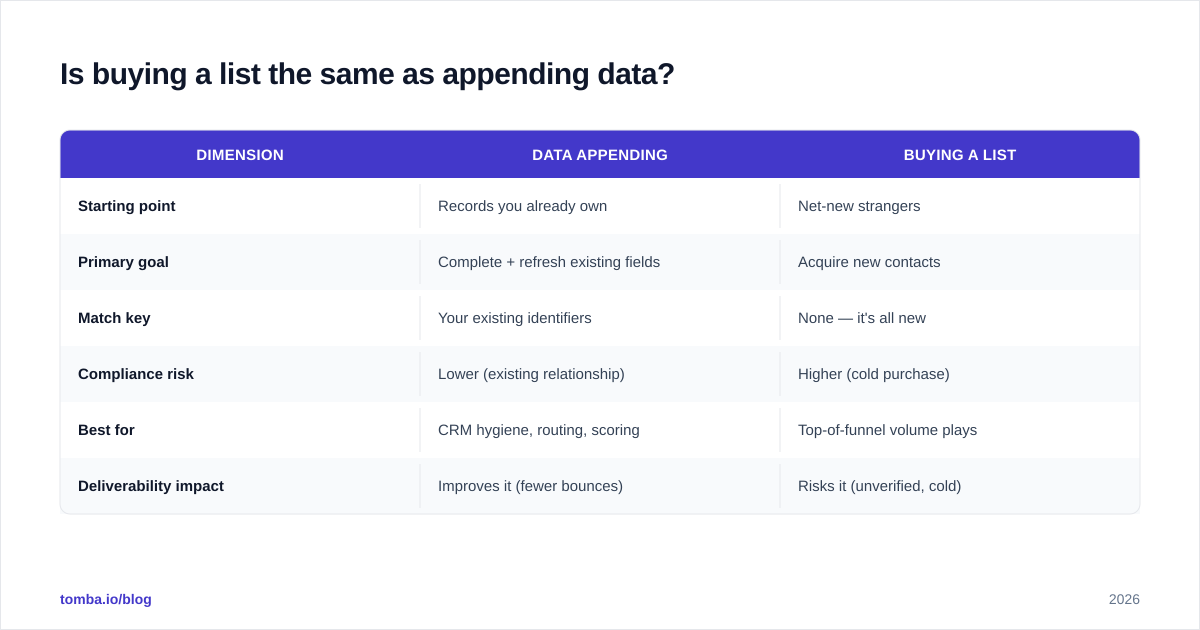
No — and conflating them is a costly mistake. Buying a list means acquiring new contacts you've never had a relationship with. Appending means enriching contacts you already obtained, often through opt-in or first-party channels. The compliance posture is completely different.
| Dimension | Data appending | Buying a list |
|---|---|---|
| Starting point | Records you already own | Net-new strangers |
| Primary goal | Complete + refresh existing fields | Acquire new contacts |
| Match key | Your existing identifiers | None — it's all new |
| Compliance risk | Lower (existing relationship) | Higher (cold purchase) |
| Best for | CRM hygiene, routing, scoring | Top-of-funnel volume plays |
| Deliverability impact | Improves it (fewer bounces) | Risks it (unverified, cold) |
Appending is the safer, higher-ROI motion for most teams because you're improving assets you already have a basis to contact. If you do both, append first — a clean house beats a bigger pile.
How do you measure append quality?#
Three metrics, in order of importance:
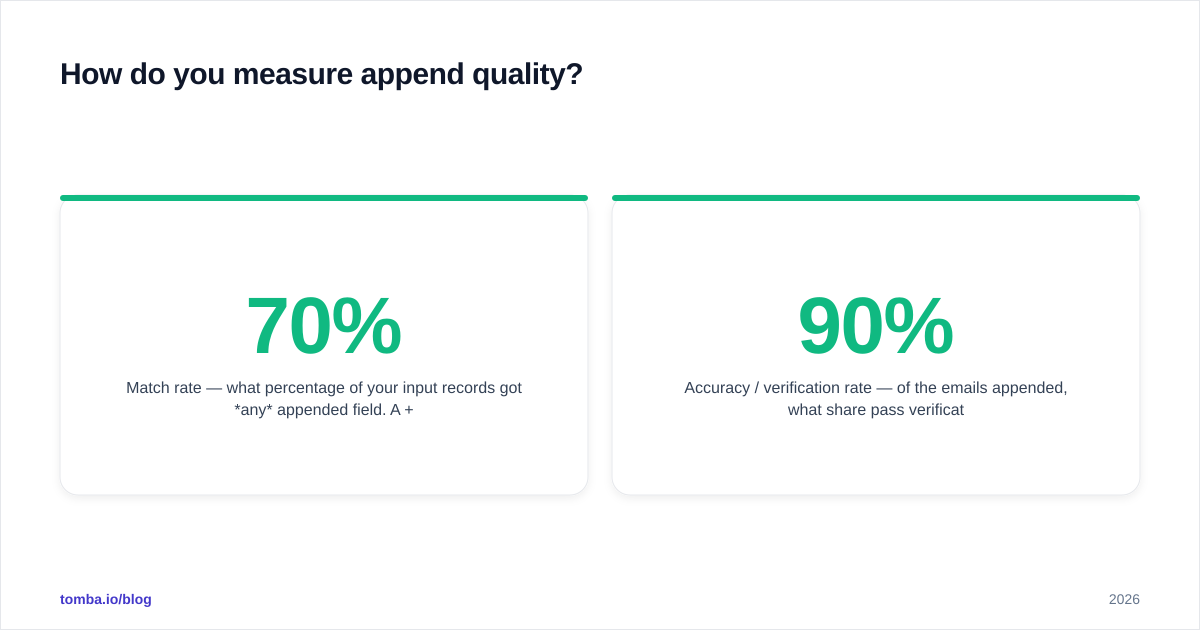
- Match rate — what percentage of your input records got any appended field. A 70%+ match rate on a clean input list is healthy; below 40% usually signals dirty input keys, not a bad provider.
- Accuracy / verification rate — of the emails appended, what share pass verification as valid (not catch-all, not invalid). This matters far more than match rate. A 90% match rate at 50% accuracy is worse than a 60% match at 95%.
- Field freshness — how recently the appended field was confirmed. Ask providers for this; the good ones expose a "last verified" date.
A trap worth naming: vendors love to advertise match rate because it's the flattering number. Always weight accuracy higher. You can append a phone to every row and still have a useless list if half the numbers don't ring through.
What are common B2B data appending mistakes?#
- Appending without verifying. The single most damaging habit. Verify every email and phone before write-back. HubSpot's research on email deliverability is blunt about how fast bounces erode sender trust.
- Matching on email. Email is the field most likely to be stale, so using it as your join key matches the wrong records to each other. Use domain or LinkedIn.
- Overwriting good data. If a rep manually confirmed a title last week, don't let an append job clobber it with a guess. Append into empty fields by default; only overwrite when the new source is fresher and verified.
- Treating it as one-and-done. Decay is continuous. Schedule a quarterly re-append on high-decay fields rather than a heroic annual cleanup.
- Ignoring catch-all domains. Catch-all servers accept everything, so a "valid" result can be meaningless. Use a dedicated catch-all verifier to separate real mailboxes from accept-alls before you trust the append.
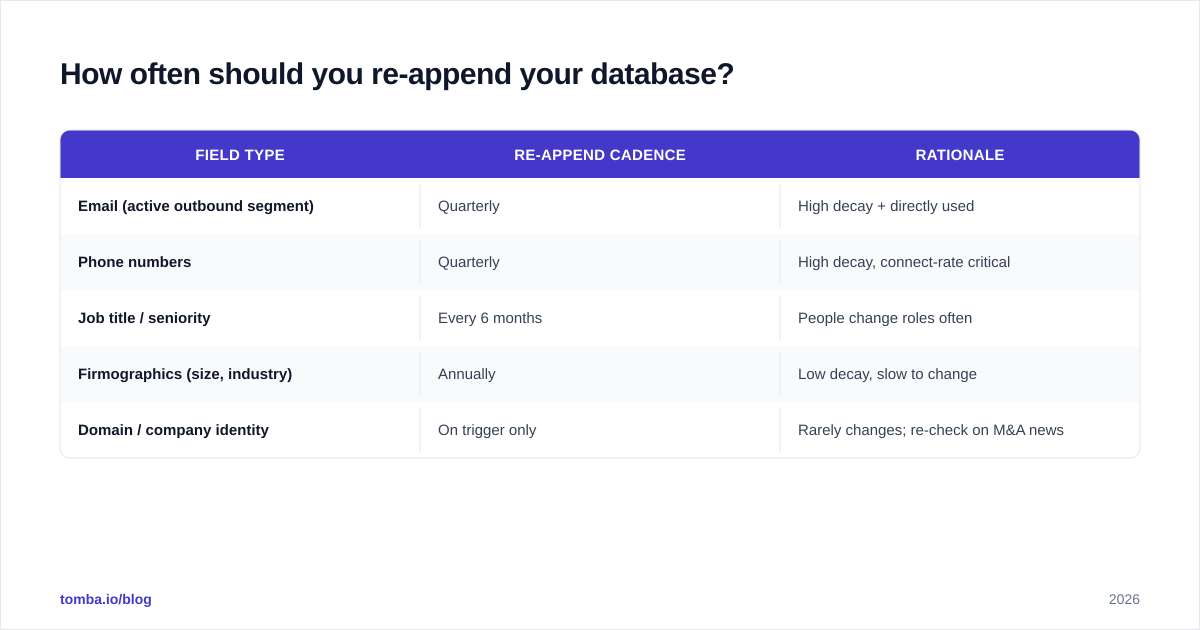
How often should you re-append your database?#
Match the cadence to the decay rate of each field. A practical schedule:
| Field type | Re-append cadence | Rationale |
|---|---|---|
| Email (active outbound segment) | Quarterly | High decay + directly used |
| Phone numbers | Quarterly | High decay, connect-rate critical |
| Job title / seniority | Every 6 months | People change roles often |
| Firmographics (size, industry) | Annually | Low decay, slow to change |
| Domain / company identity | On trigger only | Rarely changes; re-check on M&A news |
The key insight: don't re-append everything on the same clock. Burning credits to re-confirm a company's industry every quarter is waste; re-confirming the email on a contact you're about to sequence is essential.
Can you append phone and social data too?#
Yes, and they're often the higher-value appends in 2026 as inbox saturation pushes teams toward multichannel. A phone finder adds direct dials and mobiles so reps aren't stuck at the switchboard, and social appends (LinkedIn, company profiles) feed social selling plays and give you a second channel to re-verify a contact who's gone quiet.
The same rule applies across every channel: append, then validate. A phone number that doesn't connect is as useless as an email that bounces — validate the number before a rep wastes a dial on it.
How does appending fit your broader data stack?#
Appending is a layer, not a destination. It feeds the systems your team already lives in. Most stacks connect the append step to a CRM like Salesforce so enriched records flow straight to reps, with a verification gate in between. The healthy architecture looks like: capture → normalize → append → verify → write back to CRM → re-append on a cadence.
Done this way, appending stops being a periodic fire drill and becomes background hygiene — your records get more complete over time instead of decaying into noise.
Getting started#
Start small and prove it. Take one stale segment — say, leads from 12 months ago with missing phone numbers — and run them through a match-then-verify pass. Measure the lift in connect rate before you scale to the whole database.
If you want the find-and-verify steps in one place, Tomba's Email Finder locates and confirms professional emails by name, domain, or company, and pairs with its verifier and bulk tools so you can append and validate in a single workflow rather than stitching three vendors together. The free tier gives you 25 searches a month to test match quality on your own list, and paid plans start at $49/mo — see the full Tomba pricing breakdown to match a tier to your volume. Clean records aren't a luxury; they're the cheapest pipeline you'll ever buy.
// get started
Find, verify and enrich your first contacts today
Start on the free plan with 25 searches a month, then scale when your team is ready.
Free plan · No credit card required · GDPR & CCPA
// about the author