B2B Data Enrichment in 2026: The Complete Guide for Sales Teams
Thin lead lists kill pipeline. Learn how B2B data enrichment fills the gaps — firmographics, emails, phones, intent — and which 2026 workflow actually scales.
TL;DR
- B2B data enrichment appends missing firmographic, contact, and intent fields to records you already have — turning a bare email or company name into a sales-ready profile.
- Decay is the real enemy: roughly 25-30% of B2B contact data goes stale every year, so enrichment is a continuous process, not a one-time import.
- The best stack combines an accurate email/contact finder, a verifier, and automated CRM sync — not a single "magic" database.
- Budget by coverage and accuracy per record, not headline credit counts. A cheap provider that misses half your accounts costs more than it saves.
- A practical 2026 workflow: trigger enrichment on record creation, verify before sync, re-enrich on a 90-day cadence, and route only complete records to reps.
What is B2B data enrichment?#
B2B data enrichment is the process of taking a partial record — a name, an email, a company domain — and automatically filling in the fields you're missing: job title, company size, industry, revenue, location, direct phone, LinkedIn URL, and sometimes buying intent.
Think of it like a passport check at an airport. You arrive with one piece of ID (an email address), and the system cross-references trusted databases to confirm who you are and attach everything else on file — nationality, status, history. Technically, enrichment matches your seed field against one or more data sources, resolves the entity, and writes the appended attributes back to your record.
There are two flavours you'll deal with constantly:
- Contact-level enrichment — appends person data: verified work email, direct dial, title, seniority, social profiles.
- Company-level (firmographic) enrichment — appends account data: employee count, revenue band, tech stack, funding, industry codes.
Most real workflows need both. A clean firmographic record tells you which accounts to chase; contact enrichment tells you who to email and how to reach them.
Why does B2B data decay so fast?#
Because people move. The reason enrichment is a recurring line item and not a one-off is simple: B2B contact data rots. Industry estimates from vendors like HubSpot and analysts at Gartner consistently put annual decay in the 25-30% range — job changes, company rebrands, domain migrations, and number changes all compound.
Run the math on a 50,000-record database. At 28% annual decay, roughly 14,000 records degrade every year — about 1,150 every month. If you enriched once at import and never touched the data again, within 18 months nearly half your list would be wrong. That's wasted send volume, bounced emails dragging your sender reputation down, and reps calling disconnected numbers.
This is why modern teams treat enrichment as a pipeline stage, not a project. You enrich on creation, re-verify on a cadence, and quarantine anything that fails. Pairing enrichment with ongoing email verification is what keeps the decay curve from silently eroding your deliverability.

What fields actually matter for enrichment?#
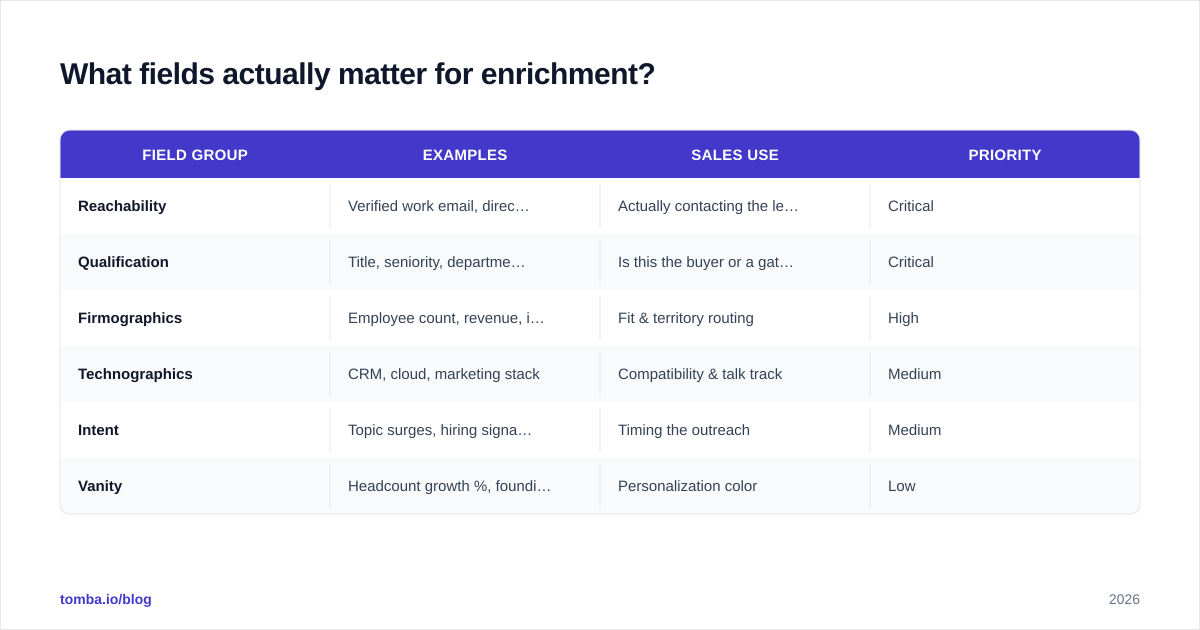
Not all appended fields move revenue equally. Chasing 40 attributes when your reps act on 6 is a common waste. Here's how the typical field set breaks down by impact.
| Field group | Examples | Sales use | Priority |
|---|---|---|---|
| Reachability | Verified work email, direct phone, LinkedIn URL | Actually contacting the lead | Critical |
| Qualification | Title, seniority, department | Is this the buyer or a gatekeeper? | Critical |
| Firmographics | Employee count, revenue, industry | Fit & territory routing | High |
| Technographics | CRM, cloud, marketing stack | Compatibility & talk track | Medium |
| Intent | Topic surges, hiring signals, funding | Timing the outreach | Medium |
| Vanity | Headcount growth %, founding year | Personalization color | Low |
Start with reachability and qualification. A record with a verified email and a confirmed title is sellable today. A record with 30 firmographic fields but an unverified, guessed email is a bounce waiting to happen. When you scope an enrichment vendor, weight your evaluation toward the accuracy of the reachability fields above everything else.
How do you choose a B2B data enrichment provider?#
Pick on match rate and accuracy for your market, not on the size of the database the vendor advertises. A provider claiming 700 million contacts is useless if it only resolves 40% of your specific ICP. Here's the evaluation framework that separates real coverage from marketing claims.
Score every candidate on five axes:
- Match rate — of 1,000 of your records, how many get enriched at all?
- Accuracy — of those matches, how many fields are correct and verified (not guessed)?
- Freshness — how often is the underlying data refreshed and re-validated?
- Compliance — GDPR/CCPA-ready sourcing, opt-out handling, documented provenance.
- Integration — native CRM sync, a clean API, and bulk tooling.
Always run a paid pilot against your own seed list before committing. Vendor benchmarks are run on data that flatters the vendor. Check independent reviews on G2 for category context, but trust your own pilot results over any star rating.
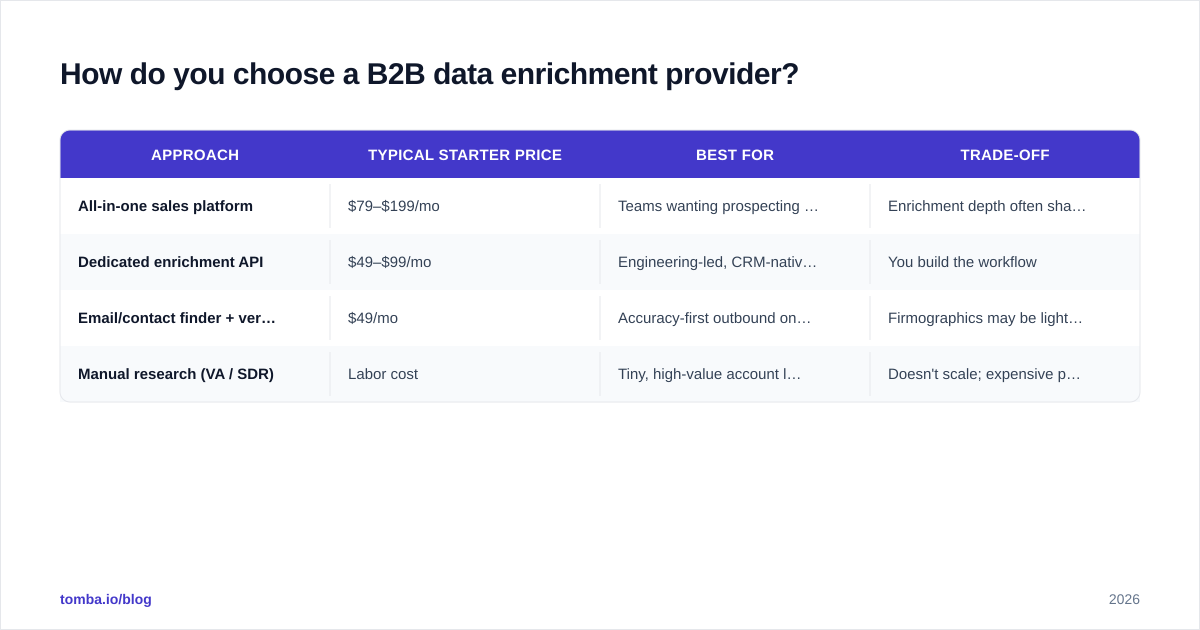
Here's how the common approaches stack up at a 2026 starting price point.
| Approach | Typical starter price | Best for | Trade-off |
|---|---|---|---|
| All-in-one sales platform | $79–$199/mo | Teams wanting prospecting + sequencing in one | Enrichment depth often shallow; locked-in |
| Dedicated enrichment API | $49–$99/mo | Engineering-led, CRM-native enrichment | You build the workflow |
| Email/contact finder + verifier | $49/mo | Accuracy-first outbound on a budget | Firmographics may be lighter |
| Manual research (VA / SDR) | Labor cost | Tiny, high-value account lists | Doesn't scale; expensive per record |
For most outbound teams, a dedicated finder-plus-verifier wins on cost per usable record. Tomba pricing starts on a free tier (25 searches/mo) and a $49/mo Starter plan, which is enough to pilot real volume before scaling to Growth or Pro.
What does a modern enrichment workflow look like?#
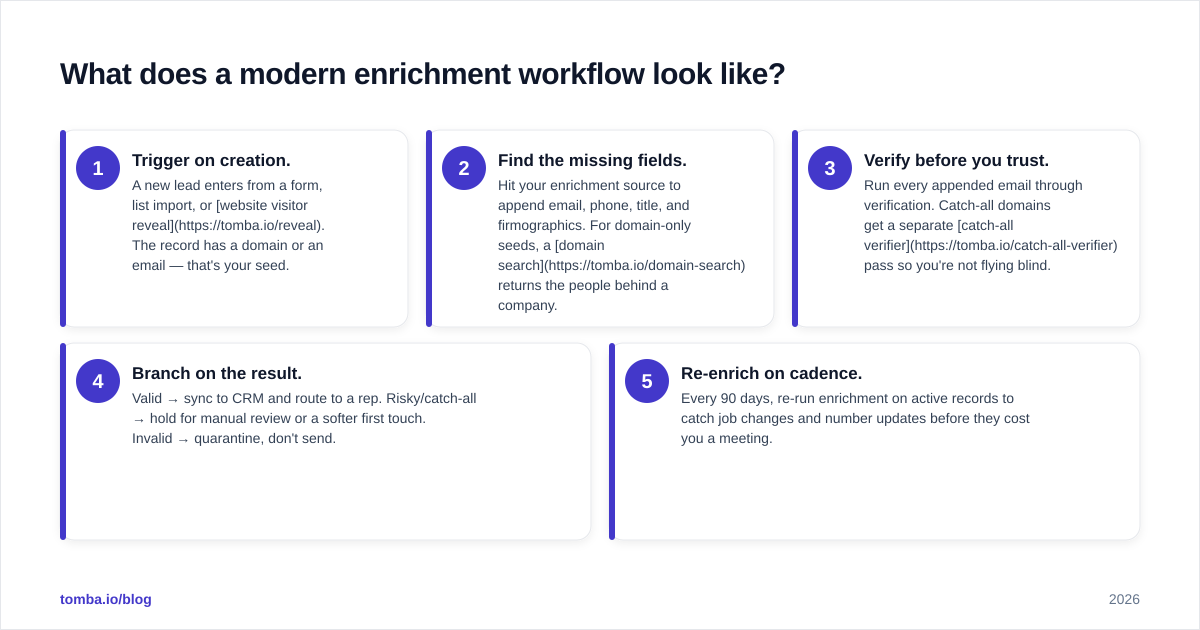
The 2026 standard is event-driven enrichment wired directly into your CRM, with verification gating every write. No more monthly batch dumps that arrive already stale.
Here's the loop that actually scales:
- Trigger on creation. A new lead enters from a form, list import, or website visitor reveal. The record has a domain or an email — that's your seed.
- Find the missing fields. Hit your enrichment source to append email, phone, title, and firmographics. For domain-only seeds, a domain search returns the people behind a company.
- Verify before you trust. Run every appended email through verification. Catch-all domains get a separate catch-all verifier pass so you're not flying blind.
- Branch on the result. Valid → sync to CRM and route to a rep. Risky/catch-all → hold for manual review or a softer first touch. Invalid → quarantine, don't send.
- Re-enrich on cadence. Every 90 days, re-run enrichment on active records to catch job changes and number updates before they cost you a meeting.
For high volume, do this in batches rather than one record at a time. A bulk email finder lets you process thousands of seeds at once and reconcile the results back into your system, while the API path suits real-time, per-record enrichment on form submission.
How do you measure enrichment ROI?#
Measure cost per usable record and downstream conversion lift, not credits spent. The headline price of an enrichment plan is meaningless until you divide it by how many records actually became sellable.
Use this simple calculation:
- Usable records = total records enriched × match rate × accuracy rate
- Cost per usable record = plan cost ÷ usable records
- Pipeline lift = (reply/connect rate on enriched records) − (rate on un-enriched records)
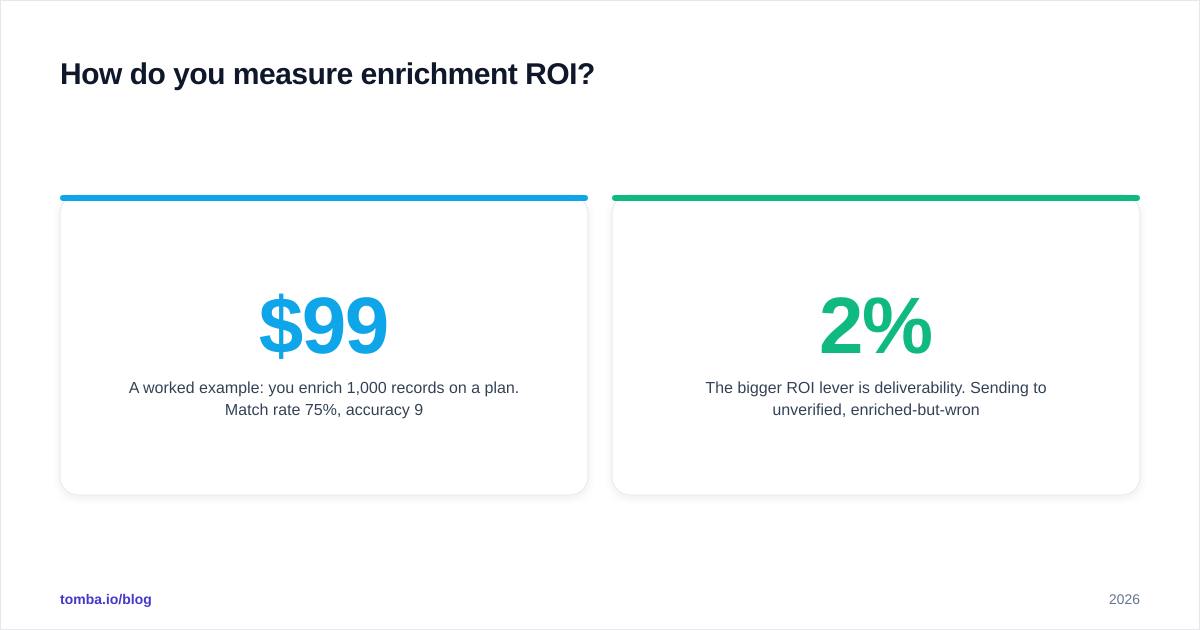
A worked example: you enrich 1,000 records on a $99/mo plan. Match rate 75%, accuracy 90% → 675 usable records → $0.147 per usable record. If a competitor charges $49 but resolves only 45% at 70% accuracy → 315 usable records → $0.156 per usable record, and you've doubled your bounce risk. The "cheaper" tool is more expensive per outcome.
The bigger ROI lever is deliverability. Sending to unverified, enriched-but-wrong emails spikes bounces, and bounce rates above ~2% start damaging sender reputation, which suppresses every future send. Verification inside the enrichment loop isn't a nice-to-have — it protects the channel your whole pipeline depends on. Salesforce's own State of Sales research repeatedly ties data quality directly to rep productivity and quota attainment.
What are the most common enrichment mistakes?#
Most enrichment failures aren't tooling problems — they're process problems. Avoid these five and you'll outperform teams paying for far pricier databases.
- Enriching once and never again. Decay guarantees your data is wrong within months. Schedule re-enrichment.
- Skipping verification. Appended ≠ accurate. An enriched email that's never verified is a guess with a confidence problem.
- Over-collecting fields. If reps only act on email, phone, and title, stop paying to append 30 attributes nobody opens.
- Ignoring compliance provenance. Cheap data with murky sourcing is a legal and deliverability risk. Demand documented data sources.
- No routing logic. Enriching a record but still dumping incomplete leads on reps wastes the whole exercise. Gate routing on field completeness.
Fix the process first. The right tool amplifies a good workflow; it can't rescue a broken one.
Build vs. buy: should you assemble your own enrichment stack?#
Buy the data sources; build the orchestration. Almost no team should be sourcing and validating contact data from scratch — that's a full-time data operation. But the workflow connecting find → verify → sync is yours to own, because it encodes your ICP rules and routing logic.
The pragmatic 2026 setup for most B2B teams:
- A reliable email finder for the reachability fields that matter most.
- A verifier in the loop so nothing unverified reaches your sender domain.
- An API or native integration to push clean records into HubSpot, Salesforce, or Pipedrive automatically.
- A 90-day re-enrichment job so the database self-heals against decay.
That stack costs less than a single all-in-one seat at most vendors and gives you far more control over accuracy and compliance.
Where Tomba fits#
If your priority is accurate, verified contact data feeding a clean CRM — without overpaying for a bloated all-in-one platform — start with the Tomba Email Finder. It finds professional email addresses by name, company, or domain, verifies them in the same flow, and pushes results straight into your stack through the API, bulk tools, or native integrations. The free tier gives you 25 searches a month to pilot against your own list, and the $49/mo Starter plan scales that into real outbound volume. Enrich once, verify always, and let the data heal itself on a cadence — that's how you keep pipeline full without burning your sender reputation. Run a test batch of your own records today and measure the cost per usable contact for yourself.
Ready to find emails that actually work?
Join 150,000+ professionals who stopped guessing and started sending. Free credits on signup — no credit card required.
Get the Tomba newsletter
Practical outbound tactics and product updates — once every two weeks.
About the author