B2B Sales Tools in 2026: How to Build a Winning Stack
A practical, category-by-category guide to building a B2B sales tools stack in 2026 — what each layer does, what it costs, and how to avoid paying for overlap.
TL;DR
- A modern B2B sales tools stack has seven functional layers: data, engagement, CRM, automation, intelligence, enablement, and revenue ops. Most teams overpay because they buy overlapping tools across those layers.
- Spend follows a rough rule: data + CRM are non-negotiable, engagement and automation drive output, and intelligence/RevOps only pay off once you have volume to analyze.
- The fastest way to waste money is buying a $1,000/seat all-in-one platform before you have a repeatable motion. Start with accurate data and a CRM, then add layers.
- Data accuracy is the multiplier on everything downstream. Bad contact data quietly taxes every other tool you own.
- Use the comparison table and the seven-layer framework below to audit your current stack and kill redundant spend.
What counts as a "B2B sales tool" in 2026?#
A B2B sales tool is any software that helps a revenue team find, contact, qualify, or close business buyers. That definition is broad on purpose — the category now spans everything from a $0 Chrome extension that pulls an email address to a six-figure revenue-intelligence platform that scores every deal in your pipeline.
Think of your stack like a kitchen. The CRM is the refrigerator — everything gets stored and organized there. Data tools are your grocery supply. Engagement tools are the stove where the actual cooking happens. And the fancy intelligence dashboards? Those are the thermometers and timers that stop you from burning dinner. You need the fridge and the groceries first. You do not need a $400 sous-vide circulator to make a sandwich.
The mistake most teams make is shopping by brand instead of by layer. They see a competitor using a logo and buy it, then discover it overlaps 60% with something they already pay for. This guide fixes that by organizing the entire market into seven layers, so you can see exactly where each dollar goes.
What are the seven layers of a B2B sales stack?#
Every sales tool on the market fits into one of seven functional layers. Map your current spend against these and overlap becomes obvious immediately.
- Data & prospecting — finds the right accounts and the contact details to reach them. Email finders, phone finders, and B2B databases live here.
- Engagement & sequencing — sends and tracks multichannel outreach (email, LinkedIn, calls). This is where reps spend their day.
- CRM — the single source of truth for accounts, contacts, and deals.
- Sales automation — removes manual steps: data entry, list building, enrichment, handoffs.
- Sales intelligence — conversation analytics, deal scoring, and forecasting.
- Sales enablement — content, training, and coaching that lift rep performance.
- Revenue operations (RevOps) — the connective tissue: reporting, attribution, and process governance across the whole funnel.
You do not need all seven on day one. A two-person team can run effectively on layers 1, 2, and 3. The later layers earn their keep only when you have enough volume to analyze — buying a revenue operations platform before you have repeatable pipeline is buying a thermometer with no oven.
Which layer should you buy first?#
Start with data and CRM, in that order, because they are the foundation everything else sits on.
Here is the uncomfortable truth about layer 1: every other tool in your stack inherits the quality of your contact data. Your $30,000 sequencing platform sending to a 40%-bounce list is just an expensive way to torch your domain reputation. Accurate data is the multiplier on all downstream spend, which is why it is the first thing to get right and the last thing to cut.
That is also why an email finder and an email verifier belong at the very base of the stack. Finding the address is half the job; confirming it is deliverable before you hit send is the half that protects everything you build on top. If you only fund one layer this quarter, fund this one.
CRM comes second because it is where the data lives and where the deal lifecycle is tracked. Without it, every other tool is an island. With it, the rest of your stack has something to read from and write to.
How do the main B2B sales tool categories compare?#
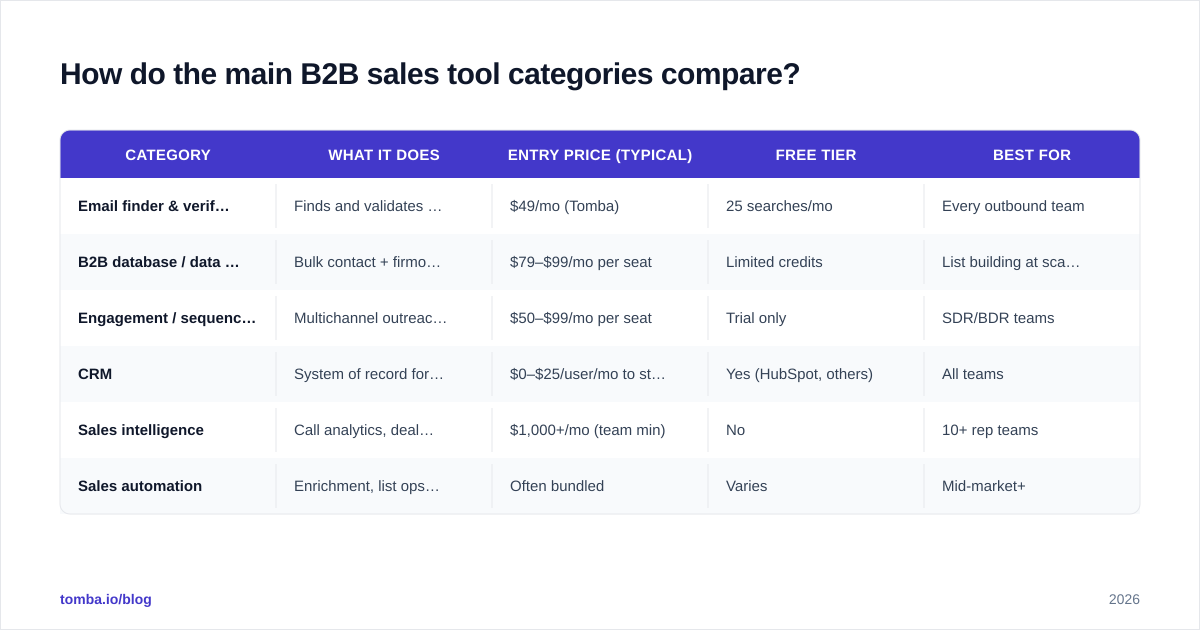
Here is a side-by-side look at the core categories, with realistic 2026 entry pricing and the job each one actually does. Prices are starting tiers; enterprise quotes run far higher.
| Category | What it does | Entry price (typical) | Free tier | Best for |
|---|---|---|---|---|
| Email finder & verifier | Finds and validates business emails by name/domain | $49/mo (Tomba) | 25 searches/mo | Every outbound team |
| B2B database / data platform | Bulk contact + firmographic data | $79–$99/mo per seat | Limited credits | List building at scale |
| Engagement / sequencing | Multichannel outreach + tracking | $50–$99/mo per seat | Trial only | SDR/BDR teams |
| CRM | System of record for deals | $0–$25/user/mo to start | Yes (HubSpot, others) | All teams |
| Sales intelligence | Call analytics, deal scoring | $1,000+/mo (team min) | No | 10+ rep teams |
| Sales automation | Enrichment, list ops, handoffs | Often bundled | Varies | Mid-market+ |
A few things jump out. First, the foundational layers (data, CRM) are cheap or free to start, while the analytical layers (intelligence) carry a hard floor in the thousands. Second, "free tier" is real at the bottom of the stack and nonexistent at the top — vendors give away prospecting credits to hook you and charge a premium for analytics once you are dependent. For full context on where one of these tools sits, the published Tomba pricing page is a useful reference point for what honest entry pricing looks like in the data layer.
You can cross-check any vendor's claims on independent review sites like G2 and Capterra before you commit — buyer reviews surface the integration headaches and hidden seat minimums that sales demos skip.
Do you need an all-in-one platform or best-of-breed tools?#
It depends on your stage, and the honest answer is "best-of-breed early, consolidate later."
All-in-one platforms (the ones that bundle data, sequencing, and dialer into one login) are seductive because they promise one bill and one vendor. The catch is that they are usually excellent at one layer and mediocre at the other two. You end up paying a premium seat price for a "good enough" database and a dialer your reps will not use.
Choose best-of-breed when: you are under ~15 reps, your motion is still changing, and you want to swap any single layer without re-platforming. Best-of-breed lets you put the best email finder, the best CRM, and the best sequencer together and replace any one of them in a weekend.
Choose all-in-one when: you have a settled, high-volume motion, procurement wants fewer contracts, and the integration tax of stitching tools together costs more than the platform premium.
The trap is buying the all-in-one first — paying enterprise prices to discover your motion, then realizing the bundled data layer can't be swapped out when it underperforms. Discover cheap, consolidate expensive.
How much should you actually spend on a sales stack?#
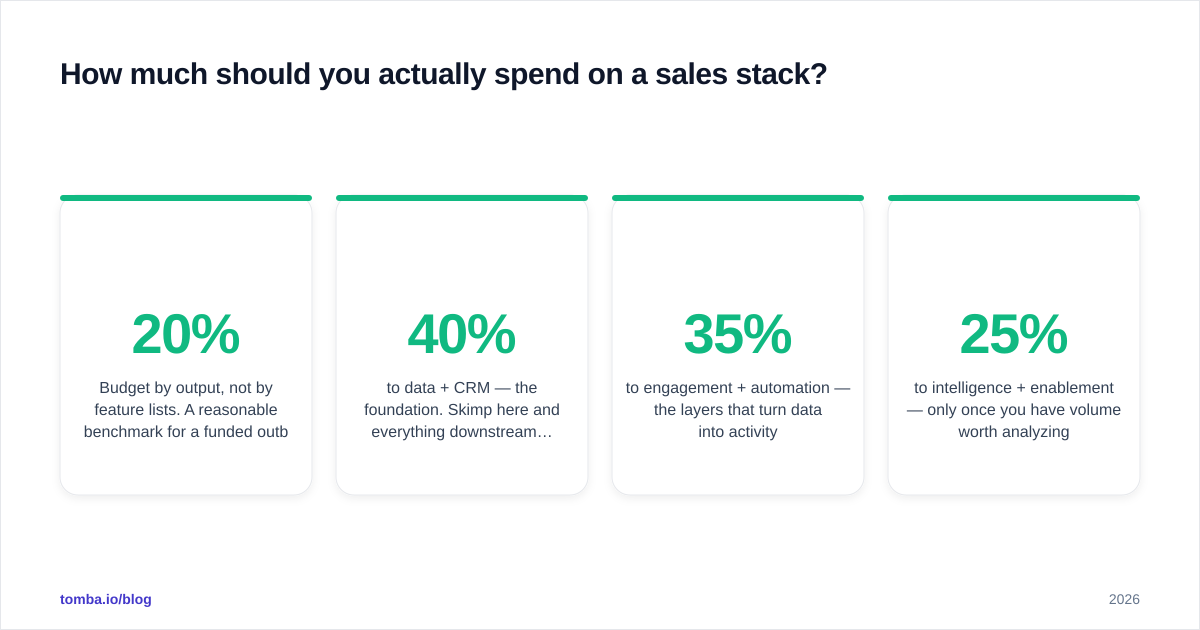
Budget by output, not by feature lists. A reasonable benchmark for a funded outbound team is roughly 10–20% of a rep's fully-loaded cost going to tooling — and the split inside that budget matters more than the total.
A healthy allocation for an early-stage team looks like this:
- 40% to data + CRM — the foundation. Skimp here and everything downstream degrades.
- 35% to engagement + automation — the layers that turn data into activity.
- 25% to intelligence + enablement — only once you have volume worth analyzing.
The single most common budget leak is overlap. Teams pay for a database inside their engagement tool, a second standalone database, and an email finder — three tools doing one job. Run the seven-layer audit above and you will almost always find two line items you can collapse into one. Killing redundant spend is faster than negotiating discounts and it improves data hygiene at the same time, because one source of truth beats three conflicting ones.
There is also a hidden cost that never shows up on an invoice: the deliverability tax of bad data. Sending to unverified addresses raises your bounce rate, drags down your sender reputation, and quietly lowers the inbox-placement of every campaign — including the ones to good addresses. A modest spend on verification protects the much larger spend on engagement. That is why email deliverability belongs in the budget conversation even though it has no glamorous dashboard.
What's the minimum viable B2B sales stack?#
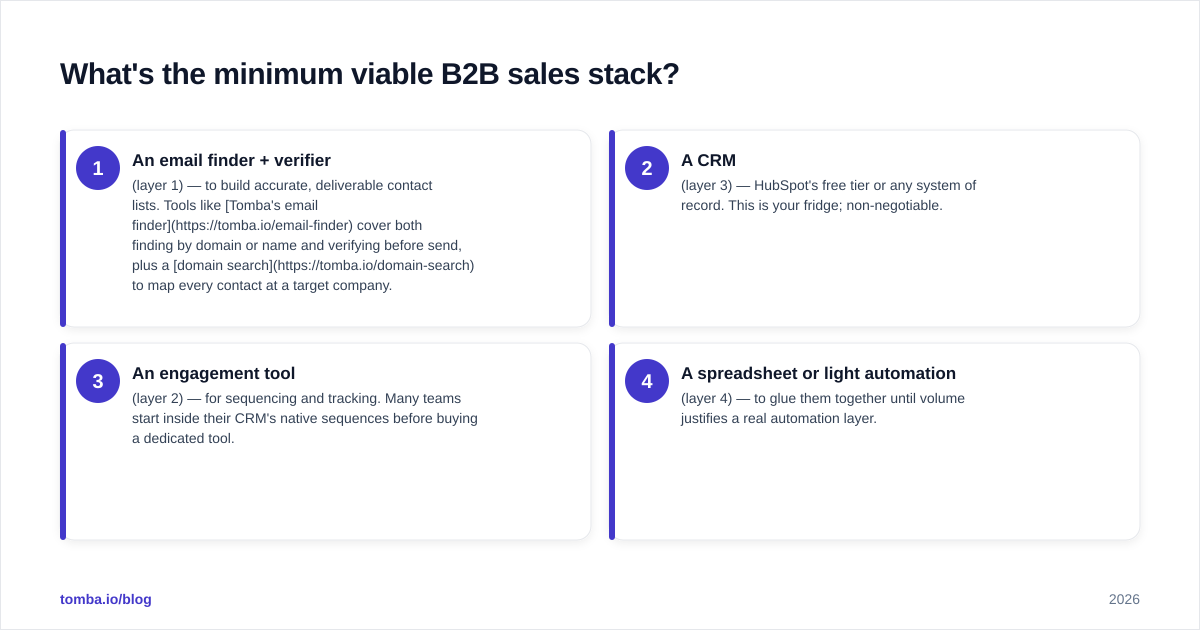
For a team just starting outbound, four tools cover the whole job:
- An email finder + verifier (layer 1) — to build accurate, deliverable contact lists. Tools like Tomba's email finder cover both finding by domain or name and verifying before send, plus a domain search to map every contact at a target company.
- A CRM (layer 3) — HubSpot's free tier or any system of record. This is your fridge; non-negotiable.
- An engagement tool (layer 2) — for sequencing and tracking. Many teams start inside their CRM's native sequences before buying a dedicated tool.
- A spreadsheet or light automation (layer 4) — to glue them together until volume justifies a real automation layer.
That is it. Everything else — conversation intelligence, forecasting, enablement content libraries — is an upgrade you add when the volume justifies the analysis, not a starting requirement. A two-person team running these four well will out-produce a ten-person team drowning in twelve half-configured platforms.
As you scale, the question is never "what's the newest tool?" It's "which layer is now the bottleneck?" If reps are spending hours building lists, add automation. If you can't tell which deals will close, add intelligence. Let the bottleneck — not the demo — drive the next purchase.
How do you evaluate a new B2B sales tool before buying?#
Run every candidate through the same five questions before the demo even ends:
- Which layer does it occupy, and do I already pay for that layer? If yes, you are evaluating a replacement, not an addition — judge it against what you have, not against zero.
- What's the real accuracy or quality number? For data tools, ask for verified-rate and bounce-rate benchmarks, then test on a sample of accounts you pick, not their demo data. Vendor-chosen examples are always flattering.
- Does it integrate natively with my CRM? A tool that needs a CSV export every morning is a tool your team will abandon by week three. Check for a real HubSpot integration or Salesforce connector, not a "Zapier-only" footnote.
- What's the true per-outcome cost? Divide the price by the unit that matters — verified contacts, booked meetings, sourced pipeline — not by the seat. The cheap seat with expensive credits often loses to the pricier seat with generous limits.
- Can I leave? Data portability and contract length decide how much leverage you keep. Month-to-month with full export beats an annual lock-in with a shiny dashboard.
Score each tool on those five and the winner is usually obvious — and usually not the one with the best sales rep. For deeper vendor research, Salesforce's own resources and HubSpot's sales blog are solid neutral primers on how the categories are supposed to work, independent of any single vendor's pitch.
The bottom line#
Build your B2B sales tools stack from the foundation up: accurate data first, CRM second, engagement and automation third, and the analytical layers only once you have volume worth analyzing. Audit by layer, kill the overlap, and let the bottleneck pick your next purchase instead of the slickest demo.
If your foundation layer is the gap — and for most teams it is — start there. Tomba's Email Finder finds professional emails by name, domain, or company and verifies them before you send, so the rest of your stack inherits clean, deliverable data instead of a 40% bounce rate. The free tier gives you 25 searches a month to test it on accounts you actually care about, and paid plans start at $49/mo when you're ready to scale. Get the base layer right, and every dollar above it works harder.
Ready to find emails that actually work?
Join 150,000+ professionals who stopped guessing and started sending. Free credits on signup — no credit card required.
Get the Tomba newsletter
Practical outbound tactics and product updates — once every two weeks.
About the author