Cloud Telephony for B2B Sales: The 2026 Buyer's Guide
Cloud telephony moves your sales calls to the internet — cheaper, smarter, and CRM-connected. Here's how it works and how to pick a platform in 2026.
TL;DR
- Cloud telephony runs your business phone system over the internet instead of copper lines or on-prem PBX hardware — you get calling, routing, recording, and analytics from a browser or app.
- For B2B sales teams it means lower cost per seat, instant scaling, local caller IDs, and native CRM logging — the difference between 40 dials a day and 120.
- Pricing in 2026 runs roughly $15–$150 per user/month depending on whether you buy a UCaaS suite, a dedicated sales dialer, or a developer-grade CPaaS API.
- The platform only matters if the numbers you dial are real. Bad data kills connect rates faster than any feature gap, so pair telephony with verified contact records.
- Use the comparison table and the buyer framework below to shortlist, then validate phone and email data with a tool like Tomba before you load a single list.
What is cloud telephony?#
Cloud telephony is a phone system that lives on a provider's servers and reaches you over the internet, instead of through physical phone lines or a server closet full of PBX hardware. Think of it like the shift from owning DVDs to streaming: the capability is identical, but you stop maintaining the boxes, the wiring, and the upgrades — you just log in and use it.
Technically, calls travel as data packets using VoIP (Voice over Internet Protocol). When your rep clicks "call" in a CRM, the cloud platform converts voice to data, routes it across the internet to a carrier, and hands it off to the public phone network so it rings a normal phone on the other end. The recipient never knows or cares that the call started in a browser tab.
For a B2B sales org, that architecture unlocks things a desk phone never could: spinning up a new rep's line in minutes, showing a local area code anywhere in the country, recording every call for coaching, and writing call outcomes straight into your CRM without manual data entry.
How does cloud telephony actually work?#
Three layers do the work, and understanding them helps you buy the right tier.
The signaling and media layer (VoIP/SIP). Session Initiation Protocol sets up, manages, and tears down each call. Your audio is compressed into packets and shipped over the same internet connection your laptop uses. A decent connection — 100 kbps per concurrent call, low jitter — is all a rep needs.
The platform layer. This is what you actually see: the dialer, call queues, IVR menus, voicemail drop, local presence, call recording, and live transcription. Sales-focused platforms add power dialers and parallel dialing that can ring four or more numbers at once and connect a rep only when a human answers.
The integration layer. This is where revenue teams win or lose. Native connections to HubSpot, Salesforce, or Pipedrive mean every call logs itself, every voicemail attaches to the contact, and managers get dashboards without a single spreadsheet. If a platform can't write back to your CRM cleanly, treat it as a consumer phone app, not a sales tool.
Why do B2B sales teams move to cloud telephony?#
The short version: more conversations, lower cost, better coaching. Here's what changes when you cut the cord.
Dial volume goes up. Manual dialing from a desk phone caps a rep around 40–50 dials a day. A power or parallel dialer pushes that to 100–150, because the system handles the dead air — busy signals, voicemails, no-answers — and only routes live humans to the rep.
Connect rates improve with local presence. Prospects answer local numbers far more often than unknown toll-free or out-of-state ones. Cloud platforms rotate a local caller ID matched to the prospect's area code automatically.
Coaching becomes data, not anecdote. Every call is recorded and transcribed. Managers review talk-to-listen ratios, flag objection patterns, and build a sales enablement library from real wins instead of role-play.
Costs drop and scale flexibly. No hardware, no per-line carrier contracts, no IT ticket to add a seat. You pay per user, and you can add ten reps for a quarter-long push and remove them after.
But none of this matters if the dialer is firing at disconnected numbers. A power dialer hitting a list of stale or wrong phone numbers just burns through bad data faster. That's why high-performing teams treat data quality as part of their telephony stack, not a separate afterthought — verified contact records are the fuel the engine runs on.
What types of cloud telephony platforms exist?#
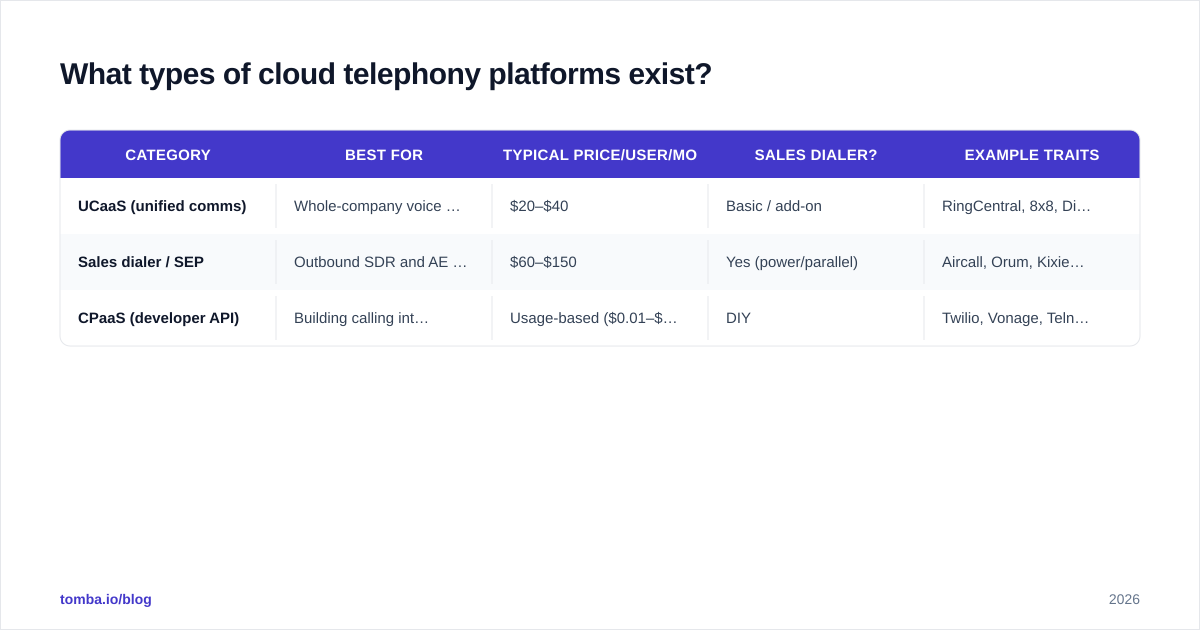
Not every "cloud phone" is built for outbound sales. There are three broad categories, and buying the wrong one is the most common mistake.
| Category | Best for | Typical price/user/mo | Sales dialer? | Example traits |
|---|---|---|---|---|
| UCaaS (unified comms) | Whole-company voice + video + chat | $20–$40 | Basic / add-on | RingCentral, 8x8, Dialpad |
| Sales dialer / SEP | Outbound SDR and AE teams | $60–$150 | Yes (power/parallel) | Aircall, Orum, Kixie, Salesloft Dialer |
| CPaaS (developer API) | Building calling into your own app | Usage-based ($0.01–$0.02/min) | DIY | Twilio, Vonage, Telnyx |
UCaaS suits companies that mostly need reliable internal and inbound phones with some outbound. Sales engagement dialers are purpose-built for high-volume outbound — they're the right pick if dial volume is your bottleneck. CPaaS is for engineering teams embedding voice into a product; powerful, but you're building the sales features yourself.
For most B2B revenue teams reading this, the sales dialer category is the center of gravity — but you'll often run a UCaaS suite for the broader org and bolt a dialer onto the SDR team.
Which cloud telephony platform is best for sales in 2026?#
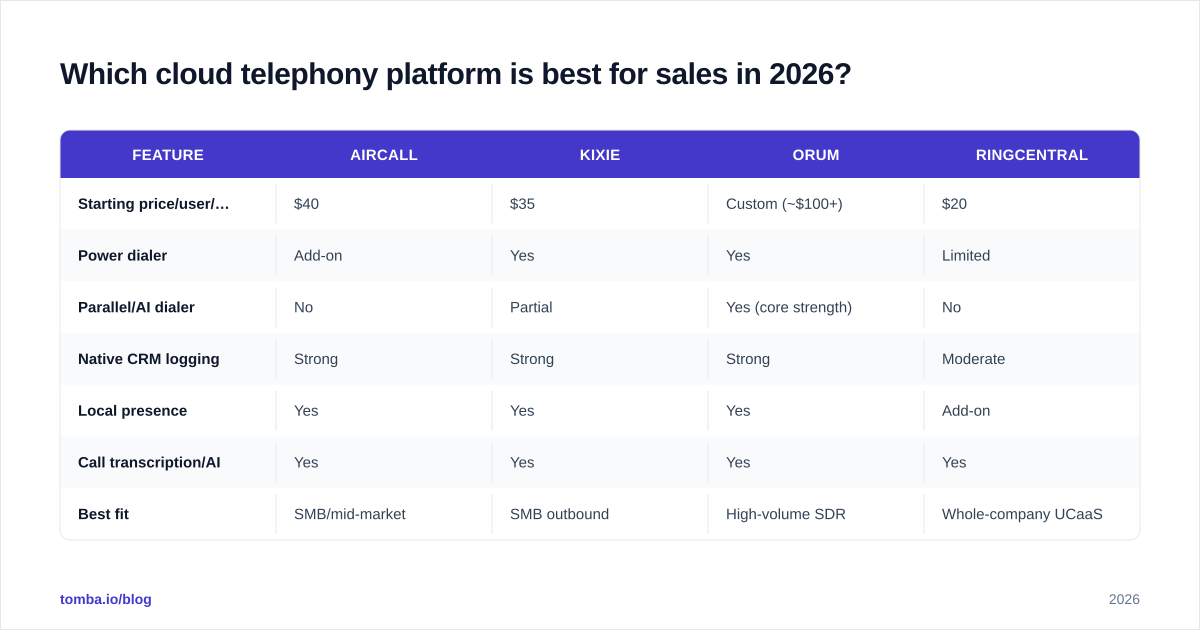
There's no single winner — the right answer depends on team size, CRM, and whether you need parallel dialing. Here's an honest head-to-head of common picks across the attributes that actually move pipeline.
| Feature | Aircall | Kixie | Orum | RingCentral |
|---|---|---|---|---|
| Starting price/user/mo | $40 | $35 | Custom (~$100+) | $20 |
| Power dialer | Add-on | Yes | Yes | Limited |
| Parallel/AI dialer | No | Partial | Yes (core strength) | No |
| Native CRM logging | Strong | Strong | Strong | Moderate |
| Local presence | Yes | Yes | Yes | Add-on |
| Call transcription/AI | Yes | Yes | Yes | Yes |
| Best fit | SMB/mid-market | SMB outbound | High-volume SDR | Whole-company UCaaS |
A few practical reads on this table:
- If your bottleneck is raw conversation count, a parallel dialer like Orum dwarfs everything else — reps talk to 3–4x more people per hour.
- If you want one tool for the whole company with solid-enough outbound, RingCentral or another UCaaS suite is cheaper per seat.
- If you're an SMB outbound team on HubSpot or Pipedrive, Kixie and Aircall both log cleanly and cost less than enterprise SEPs.
Always validate current pricing on the vendor's own site — these tiers shift. G2 and Capterra are useful for filtering by company size and reading verified reviews before you book a demo. Check G2's contact center category and Capterra for current rankings.
How do you choose the right cloud telephony platform?#
Score candidates against six criteria. Weight them to your situation — an enterprise team cares more about compliance, an SMB cares more about setup speed.
- CRM fit. Does it write calls, recordings, and outcomes natively to your CRM? A native HubSpot or Salesforce integration beats a
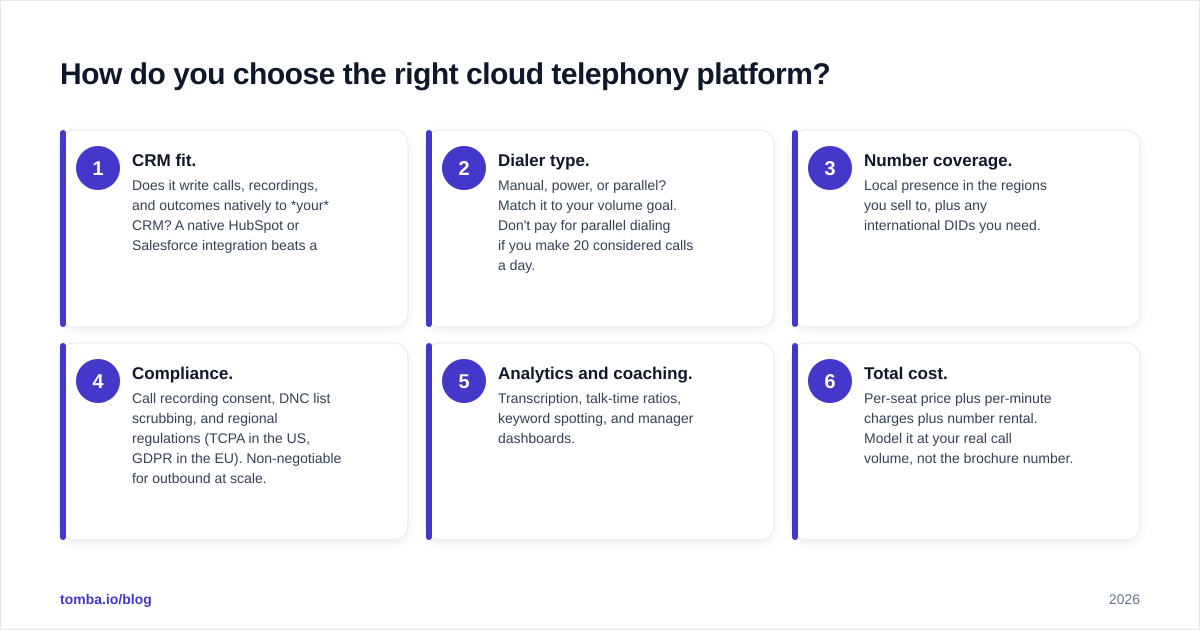
Zapier workaround every time. 2. Dialer type. Manual, power, or parallel? Match it to your volume goal. Don't pay for parallel dialing if you make 20 considered calls a day. 3. Number coverage. Local presence in the regions you sell to, plus any international DIDs you need. 4. Compliance. Call recording consent, DNC list scrubbing, and regional regulations (TCPA in the US, GDPR in the EU). Non-negotiable for outbound at scale. 5. Analytics and coaching. Transcription, talk-time ratios, keyword spotting, and manager dashboards. 6. Total cost. Per-seat price plus per-minute charges plus number rental. Model it at your real call volume, not the brochure number.
Build a simple scorecard, give each criterion a 1–5 weight, and run two or three finalists through a paid trial with your actual reps and real lists. The tool that feels best in a demo isn't always the one that lifts connect rates in production.
How does data quality affect cloud telephony ROI?#
Your dialer is only as good as the numbers you feed it. This is the part most telephony buyers underestimate, and it's where deals quietly die.
A parallel dialer that triples your dial volume also triples your exposure to bad data. If 30% of your phone numbers are wrong or disconnected, you've just paid a premium tool to reach voicemail and dead lines faster. The math is brutal: connect rate is the multiplier on every other telephony feature you bought.
So the workflow that actually wins looks like this:
- Enrich first. Pull verified, current direct-dial numbers and mobile numbers for your target accounts. A phone finder surfaces B2B phone numbers tied to a real person and company, and a phone validator confirms the line is active before you ever dial it.
- Pair phone with email. Most outbound sequences blend calls with email. Build the list with an email finder so a rep can call, then follow up by email on the same contact without switching tools or re-researching.
- Verify continuously. Data decays 2–3% a month as people change jobs. Re-validate before each campaign instead of trusting a list you built last quarter. Run lists through an email verifier to keep bounce rates low and protect sender reputation.
Treat enrichment and validation as a step before the dialer, not a nice-to-have. The cheapest way to lift the ROI of an expensive telephony platform is to make sure every number it dials is real.
For a deeper look at how accurate contact data is sourced and maintained, Tomba documents its data sources and methodology — worth reading before you trust any vendor's numbers.
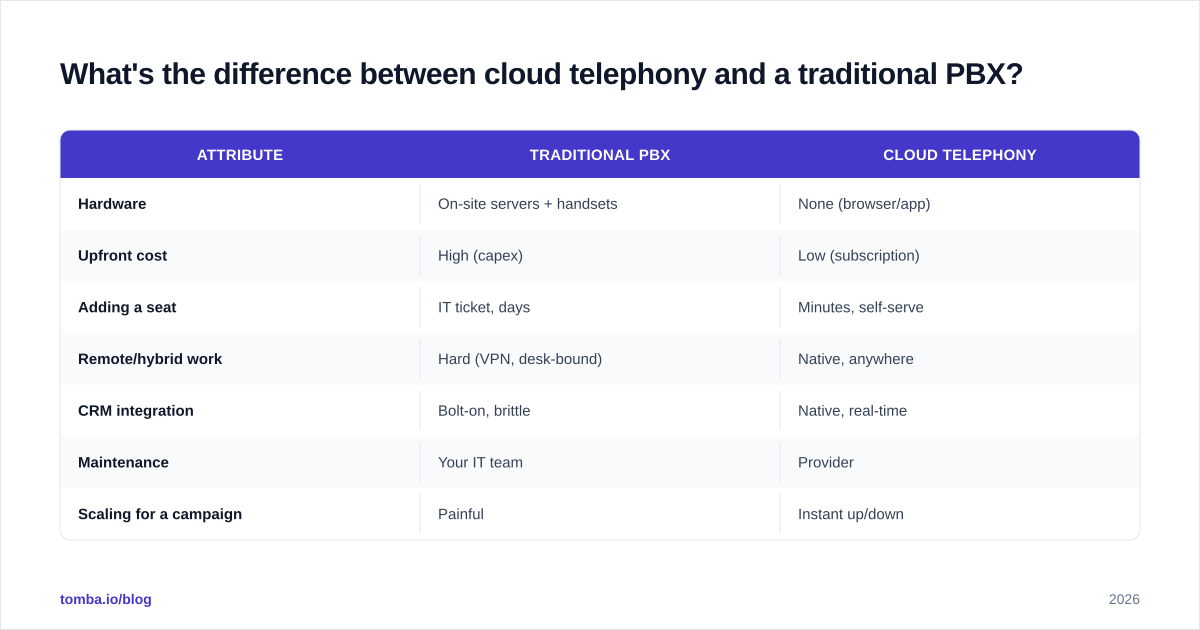
What's the difference between cloud telephony and a traditional PBX?#
Quick reference for anyone still weighing the migration:
| Attribute | Traditional PBX | Cloud telephony |
|---|---|---|
| Hardware | On-site servers + handsets | None (browser/app) |
| Upfront cost | High (capex) | Low (subscription) |
| Adding a seat | IT ticket, days | Minutes, self-serve |
| Remote/hybrid work | Hard (VPN, desk-bound) | Native, anywhere |
| CRM integration | Bolt-on, brittle | Native, real-time |
| Maintenance | Your IT team | Provider |
| Scaling for a campaign | Painful | Instant up/down |
The only scenarios where on-prem still makes sense are heavily regulated environments with strict data-residency rules or sites with genuinely unreliable internet. For everyone else, the migration math favors the cloud.
Frequently overlooked: compliance and deliverability#
Two things that sink outbound programs even with great tooling:
- Calling compliance. Maintain consent records, scrub against do-not-call lists, and respect local calling-hour windows. Most quality platforms include this, but you own the configuration.
- Multichannel reputation. When you blend calls with email, your email deliverability and sender reputation directly affect whether the follow-up even lands. A clean, verified list protects both the phone and the inbox channel.
The teams that win in 2026 don't think of "the dialer" and "the email tool" as separate stacks. They think of one motion — reach a verified human by phone or inbox — and build the data layer to support both.
The bottom line#
Cloud telephony is no longer optional for serious B2B sales teams. It cuts cost, multiplies conversations, and turns every call into coachable data. But the platform is the engine, not the fuel. Pick the dialer that fits your volume and CRM, then make sure every number and email it touches is verified and current.
That data layer is exactly what Tomba is built for. Use the Tomba Email Finder to build accurate, ready-to-dial contact lists by domain, name, or company — and pair it with the phone finder and verifier so your shiny new telephony platform spends its time talking to real prospects instead of dead lines. Start free with 25 searches a month, and check Tomba pricing when you're ready to scale your outbound. The dialer gets the credit; the data does the work.
// get started
Find, verify and enrich your first contacts today
Start on the free plan with 25 searches a month, then scale when your team is ready.
Free plan · No credit card required · GDPR & CCPA
// about the author