Digital Sales Room: The 2026 Guide for B2B Sales Teams
A digital sales room turns scattered decks, emails, and contracts into one shared deal link. Here's how digital sales rooms work, who they're for, and how to pick one in 2026.
TL;DR
- A digital sales room (DSR) is a single, secure web link where a seller and a buying group share content, track engagement, and move a deal forward — replacing scattered email threads and forwarded PDFs.
- DSRs matter because the average B2B purchase now involves 6–10 stakeholders, and most buying happens when no rep is in the room.
- The best rooms combine content, mutual action plans, and analytics so you can see exactly which stakeholder opened what.
- A DSR only works if the contacts inside it are real — bad data kills follow-up faster than any missing feature.
- This guide covers what a digital sales room is, who needs one, a tool comparison, and how to feed it accurate contact data.
What is a digital sales room?#
A digital sales room is a shared, branded microsite for a single deal. Think of it like a private deal headquarters: instead of mailing a buyer fourteen separate attachments over six weeks, you give them one link that holds the proposal, the demo recording, the pricing, the security docs, and the next steps — all in one place, all kept current.
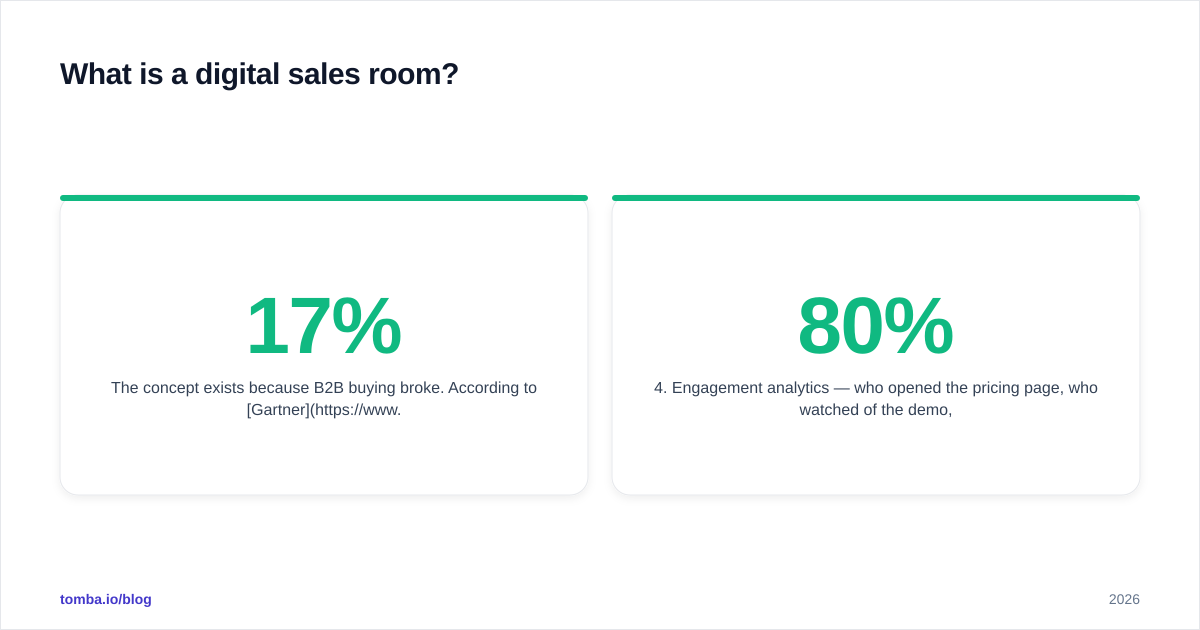
The concept exists because B2B buying broke. According to Gartner, a typical buying group for a complex solution involves six to ten decision-makers, each armed with their own pile of research. Buyers now spend only about 17% of the purchase journey actually meeting with potential suppliers — and when you split that across three or four vendors, any single rep gets roughly 5% of the buyer's time. The digital sales room is how you stay useful during the other 95%.
A modern DSR usually bundles five things:
- Curated content — decks, case studies, ROI calculators, recorded demos.
- A mutual action plan — a shared checklist of who does what, by when.
- Stakeholder access — the champion can forward the room internally without you losing visibility.
- Engagement analytics — who opened the pricing page, who watched 80% of the demo, who went quiet.
- Deal artifacts — order forms, contracts, and e-signature in the same place.
Why do B2B sales teams need a digital sales room in 2026?#
The short answer: because the buying committee does its real work without you. The longer answer comes down to four failures that DSRs fix.
Content goes stale and gets lost. When you email a v3 proposal, the buyer's procurement lead is still circulating v1 they found in a different thread. A room holds one canonical version that you update in place.
Champions can't sell internally. Your contact has to convince a CFO, an IT lead, and a security reviewer you may never speak to. If all they have is a forwarded PDF, your message degrades with every hop. A room gives them a clean, self-explanatory package to share.
You're flying blind between meetings. Email opens are noisy and often blocked. A DSR tells you a named stakeholder spent four minutes on the security page yesterday — that's a buying signal you can act on.
Handoffs leak. When a deal moves from SDR to AE to CS, context evaporates. The room is the durable record of the whole relationship.
If you want to ground these signals in pipeline reality, pair the room with your CRM so engagement events update the opportunity automatically, and watch your response rate on follow-ups climb because you're reaching out with context instead of "just checking in."
How does a digital sales room actually work?#
A room follows the deal lifecycle. Here's the typical flow, end to end.
Stage 1 — Create. After a discovery call, the rep spins up a room from a template (e.g. "Mid-market SaaS evaluation"). It auto-fills the buyer's logo, the relevant case studies, and a starter action plan.
Stage 2 — Share. The rep sends one link. No login wall for the first view — friction here loses champions. Access can be gated later for sensitive docs.
Stage 3 — Engage. The buyer browses, forwards internally, and leaves comments. Every action is logged against a contact.
Stage 4 — Coordinate. The mutual action plan keeps both sides honest: "Security review — buyer, by March 14," "Redlines returned — seller, by March 18." Nobody wonders what's next.
Stage 5 — Close. Order form and e-signature live in the room. The whole audit trail stays attached to the account for renewal.
The catch in every stage is data quality. A room is only as good as the people you can actually reach inside it. If your champion goes dark and you don't have a verified email for the economic buyer, the room becomes a very pretty dead end. This is where an accurate email finder earns its place in the stack — surfacing the additional stakeholders the room reveals but your CRM never captured.
What's the difference between a digital sales room and a sales enablement portal?#
People conflate the two. They solve different problems.
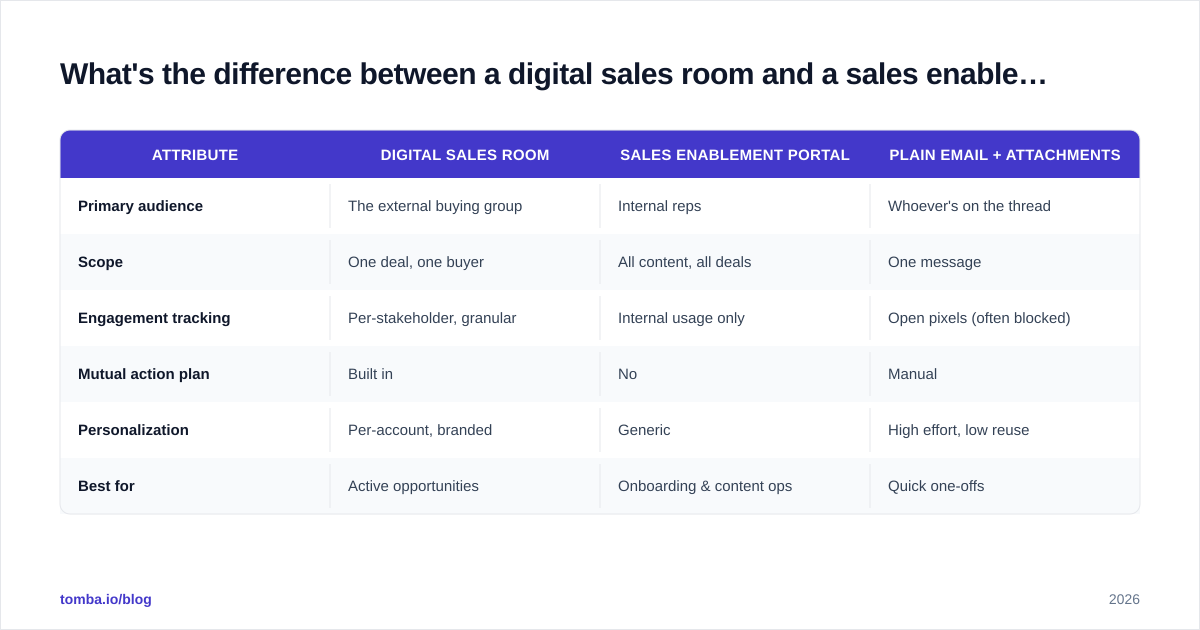
| Attribute | Digital Sales Room | Sales Enablement Portal | Plain Email + Attachments |
|---|---|---|---|
| Primary audience | The external buying group | Internal reps | Whoever's on the thread |
| Scope | One deal, one buyer | All content, all deals | One message |
| Engagement tracking | Per-stakeholder, granular | Internal usage only | Open pixels (often blocked) |
| Mutual action plan | Built in | No | Manual |
| Personalization | Per-account, branded | Generic | High effort, low reuse |
| Best for | Active opportunities | Onboarding & content ops | Quick one-offs |
In practice they're complementary: the enablement portal is where reps find the best case study; the digital sales room is where that case study gets delivered to a named buyer with tracking attached.
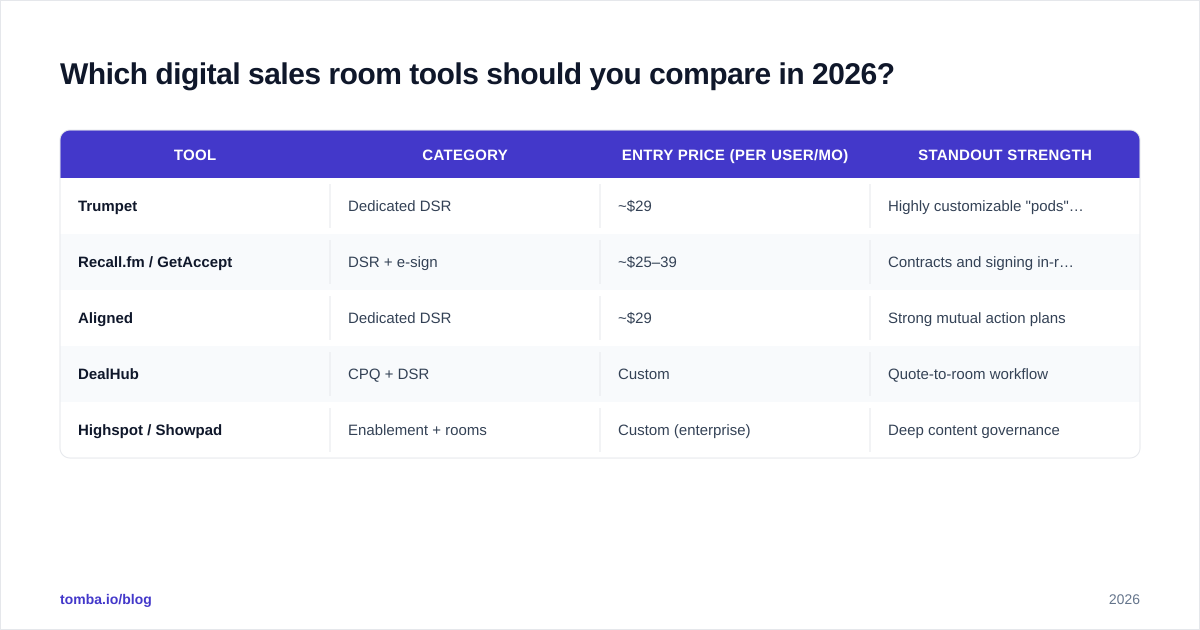
Which digital sales room tools should you compare in 2026?#
The category has matured into a few recognizable groups: dedicated DSR platforms, content-tracking tools that grew into rooms, and revenue platforms that bolted rooms on. Pricing below reflects publicly listed entry tiers and should be verified on each vendor's site before you buy.
| Tool | Category | Entry price (per user/mo) | Standout strength |
|---|---|---|---|
| Trumpet | Dedicated DSR | ~$29 | Highly customizable "pods" layout |
| Recall.fm / GetAccept | DSR + e-sign | ~$25–39 | Contracts and signing in-room |
| Aligned | Dedicated DSR | ~$29 | Strong mutual action plans |
| DealHub | CPQ + DSR | Custom | Quote-to-room workflow |
| Highspot / Showpad | Enablement + rooms | Custom (enterprise) | Deep content governance |
A few buying notes:
- If signing matters most, prioritize tools with native e-signature so the deal never leaves the room.
- If you live in complex committees, weight the mutual action plan and per-stakeholder analytics heavily.
- If you're enterprise, content governance and CRM sync will matter more than slick templates.
You can compare verified user reviews for any of these on G2 before committing to a trial. Whatever you pick, confirm it pushes engagement events back into your CRM — a room that doesn't sync is just another silo. Most do this through native HubSpot or Salesforce connectors, or through [
Zapier](https://tomba.io/integrations/zapier) when a native one is missing.
How do you fill a digital sales room with the right people and data?#
This is the part most teams underestimate. The room is the stage; the contacts are the cast. Get the cast wrong and the production fails.
A digital sales room actively exposes your data gaps. The moment your champion forwards the link to a VP of Engineering you've never met, you have a new stakeholder with no email, no phone, and no record. You need to identify and reach that person fast, while the deal is warm.
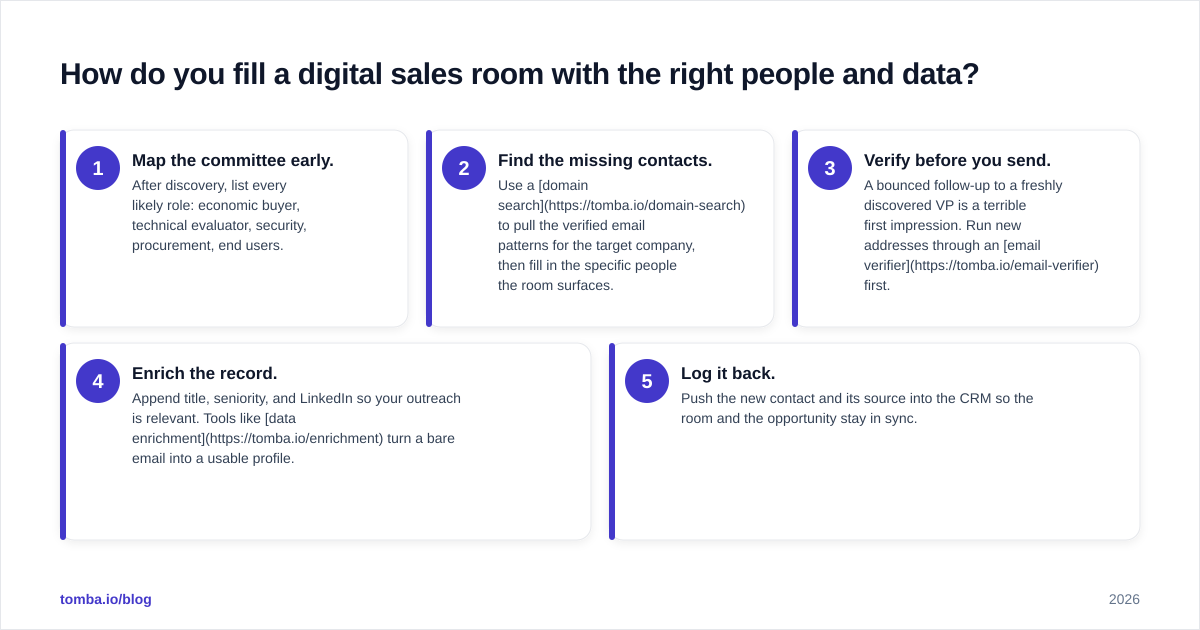
Here's a practical data workflow around your DSR:
- Map the committee early. After discovery, list every likely role: economic buyer, technical evaluator, security, procurement, end users.
- Find the missing contacts. Use a domain search to pull the verified email patterns for the target company, then fill in the specific people the room surfaces.
- Verify before you send. A bounced follow-up to a freshly discovered VP is a terrible first impression. Run new addresses through an email verifier first.
- Enrich the record. Append title, seniority, and LinkedIn so your outreach is relevant. Tools like data enrichment turn a bare email into a usable profile.
- Log it back. Push the new contact and its source into the CRM so the room and the opportunity stay in sync.
This is the unglamorous engine behind every "buyer-centric" buzzword. The reps who win complex deals aren't the ones with the prettiest room — they're the ones who can reach the seventh stakeholder the same afternoon they appear.
What does a good digital sales room playbook look like?#
Tooling without process is decoration. A repeatable DSR playbook usually includes:
- Templates by segment. Don't rebuild from scratch. Have a mid-market template, an enterprise template, and a renewal template.
- A standard mutual action plan. Pre-load the common milestones (legal review, security questionnaire, pilot) and edit per deal.
- Engagement thresholds that trigger action. Example: if no stakeholder opens the room for seven days, the AE gets a task to re-engage the champion.
- A stakeholder coverage rule. No deal advances to "proposal" stage until you have verified contact details for at least three roles in the committee.
- Clean handoff hygiene. When the deal closes, the room (and its full history) transfers to onboarding so CS starts with context.
Tie these rules to data quality and you close the loop: the room captures who's involved, your finder-and-verifier stack makes sure you can reach them, and your CRM keeps the whole thing honest.
Common mistakes to avoid#
- Over-gating. Forcing a login on the first visit kills champion forwarding. Keep the front door open.
- Static rooms. A room you build once and never update is just a fancy PDF. Refresh content as the deal evolves.
- Ignoring the analytics. The whole point is signal. If nobody reads the engagement data, you've bought a brochure.
- Skipping verification. Adding unverified emails to chase new stakeholders torches your sender reputation. Verify first, always.
- No owner. Someone must own room hygiene per deal — usually the AE. Unowned rooms rot.
The bottom line#
A digital sales room fixes the core problem of modern B2B selling: most of the decision happens when you're not there. By centralizing content, coordinating next steps, and tracking every stakeholder, a DSR keeps you relevant across a long, multi-threaded buying journey. But the room is only as strong as the contact data inside it. The deal moves when you can actually reach the people the room reveals.
That's where your data layer comes in. When a new stakeholder appears in the room, Tomba Email Finder lets you find and verify their professional email in seconds — by name, company, or domain — so your follow-up lands in the right inbox while the deal is still hot. Start free with 25 searches a month, or scale up on a Tomba plan from $49/mo as your pipeline grows. Build the room, then make sure every seat in it has a name you can reach.
// get started
Find, verify and enrich your first contacts today
Start on the free plan with 25 searches a month, then scale when your team is ready.
Free plan · No credit card required · GDPR & CCPA
// about the author