Mail Merge for Cold Email: The Complete 2026 Guide
Mail merge turns one template into hundreds of personalized cold emails. Here's how it works in 2026, which tools to use, and how to keep deliverability intact.
TL;DR
- Mail merge for cold email replaces placeholders like
{{first_name}}and{{company}}in a single template with real values from a contact list, so every recipient gets a message that reads as one-to-one. - The quality of your merge is only as good as your data — bad fields produce "Hi {{first_name}}," disasters, and unverified addresses wreck deliverability.
- You can run mail merge from Gmail, Outlook, Google Sheets, a CRM, or a dedicated cold email platform. Each trades simplicity for scale and safety.
- The 2026 best practice is verify-then-merge: clean and enrich your list before the send, not after the bounces.
- Personalization beyond
{{first_name}}— custom intro lines, dynamic case studies, conditional snippets — is what separates a 2% reply rate from a 12% one.
What is mail merge for cold email?#
Mail merge is a templating trick: you write one message with placeholder fields, attach a list of contacts, and the software stitches them together into hundreds of individualized emails. Think of it like a restaurant printing personalized place cards from a guest spreadsheet — the layout is identical, but every card carries a different name.
In a cold email context, that template might look like this:
Hi {{first_name}}, I noticed {{company}} is hiring SDRs in {{city}}. We helped {{competitor}} cut ramp time by 30%...
Feed it a clean list and each prospect receives a message that looks hand-written. Feed it a messy list and you broadcast your automation to the entire world. That gap — between "looks personal" and "obviously a blast" — is the whole game.
Mail merge has existed since word processors in the 1980s (the Wikipedia entry on mail merge traces it back to early WordStar and Microsoft Word). What changed for cold outreach is the data layer underneath it: you can now pull verified emails, job titles, recent funding rounds, and tech-stack signals into your merge fields automatically.
How does mail merge actually work?#
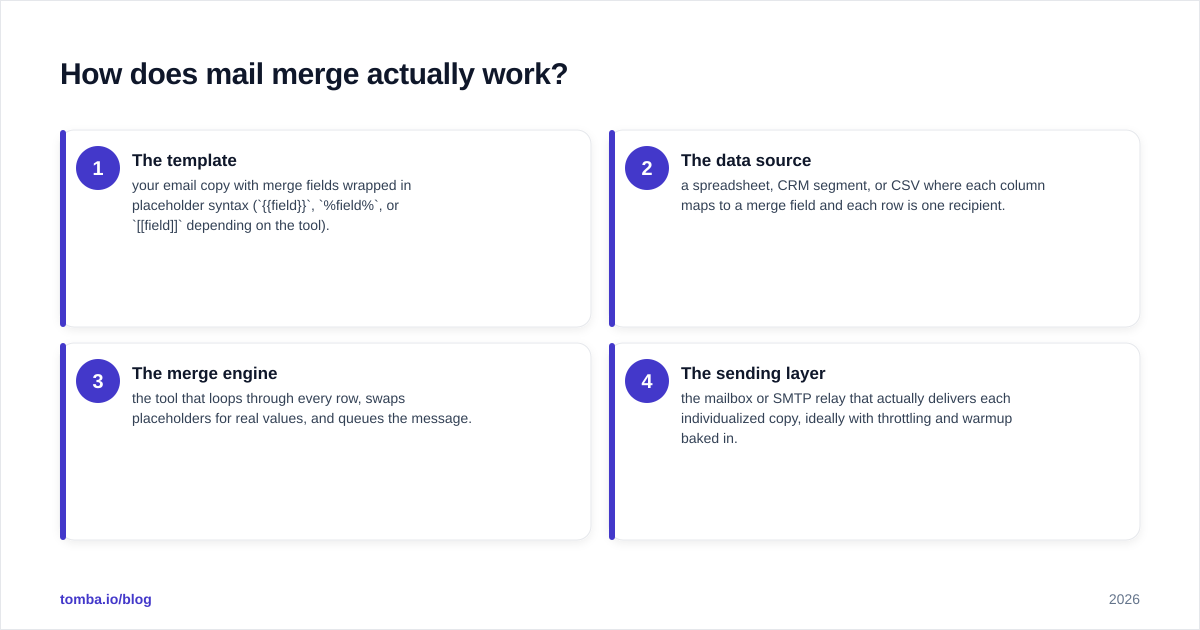
Every mail merge has four moving parts. Get all four right and the system disappears; get one wrong and it shows.
- The template — your email copy with merge fields wrapped in placeholder syntax (
{{field}},%field%, or[[field]]depending on the tool). - The data source — a spreadsheet, CRM segment, or CSV where each column maps to a merge field and each row is one recipient.
- The merge engine — the tool that loops through every row, swaps placeholders for real values, and queues the message.
- The sending layer — the mailbox or SMTP relay that actually delivers each individualized copy, ideally with throttling and warmup baked in.
The failure modes almost always live in the data source. A blank company cell, an address that no longer exists, or a first-name field that contains "Dr. Sarah Chen, VP" instead of "Sarah" — each of these produces an awkward, trust-destroying send. This is why serious senders treat list hygiene as step zero, not an afterthought.
What's the difference between mail merge and a cold email sequence?#
People conflate the two, but they solve different problems.
A mail merge is a single personalized send. A sequence (or cadence) is a series of timed follow-ups, each of which can itself be a mail merge. Modern cold email platforms blur the line — they run merges inside multi-step sequences with conditional logic ("if no open after 3 days, send follow-up B").
The mental model: mail merge is the personalization engine; the sequence is the timing engine. You want both. A perfectly personalized email that never follows up leaves 60–70% of replies on the table, because most cold-email responses arrive on the second or third touch.
Which mail merge tool should you use?#
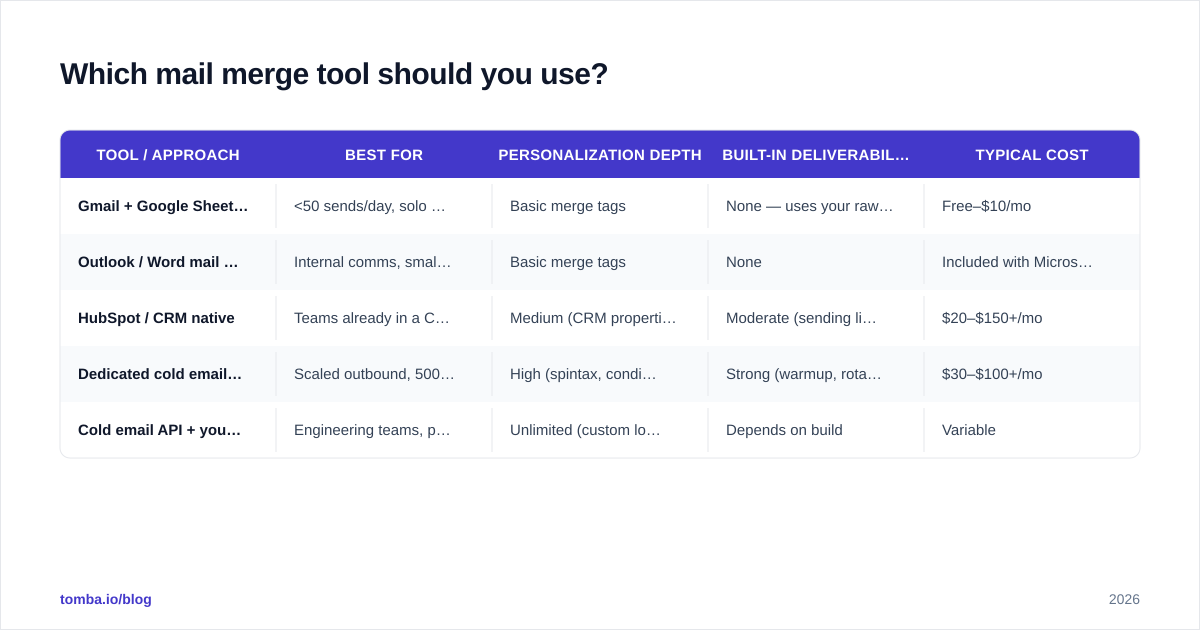
The right tool depends on your volume, your tolerance for setup, and how much deliverability protection you need. Here's an honest comparison across the main options in 2026.
| Tool / approach | Best for | Personalization depth | Built-in deliverability safety | Typical cost |
|---|---|---|---|---|
| Gmail + Google Sheets (manual / add-on) | <50 sends/day, solo founders | Basic merge tags | None — uses your raw mailbox | Free–$10/mo |
| Outlook / Word mail merge | Internal comms, small lists | Basic merge tags | None | Included with Microsoft 365 |
| HubSpot / CRM native | Teams already in a CRM | Medium (CRM properties) | Moderate (sending limits) | $20–$150+/mo |
| Dedicated cold email platform (Instantly, Saleshandy, Smartlead) | Scaled outbound, 500+ sends/day | High (spintax, conditional, AI lines) | Strong (warmup, rotation, throttling) | $30–$100+/mo |
| Cold email API + your own stack | Engineering teams, product-led outreach | Unlimited (custom logic) | Depends on build | Variable |
A few honest takeaways:
- Gmail mail merge is fine to start and terrible to scale. Google caps you around 500 recipients/day on Workspace, and a raw mailbox with no warmup lands in spam fast once volume climbs.
- CRMs like HubSpot are convenient because the data already lives there, but their sending limits and deliverability tooling lag behind dedicated platforms.
- Dedicated platforms win on safety — inbox rotation, automatic warmup, and reply detection — which matters more than raw merge features once you're sending real volume.
The tool is rarely the bottleneck, though. The data is.

Why does your contact data make or break the merge?#
Conclusion first: a flawless template on a dirty list performs worse than an average template on a clean one. Personalization amplifies whatever you feed it — including garbage.
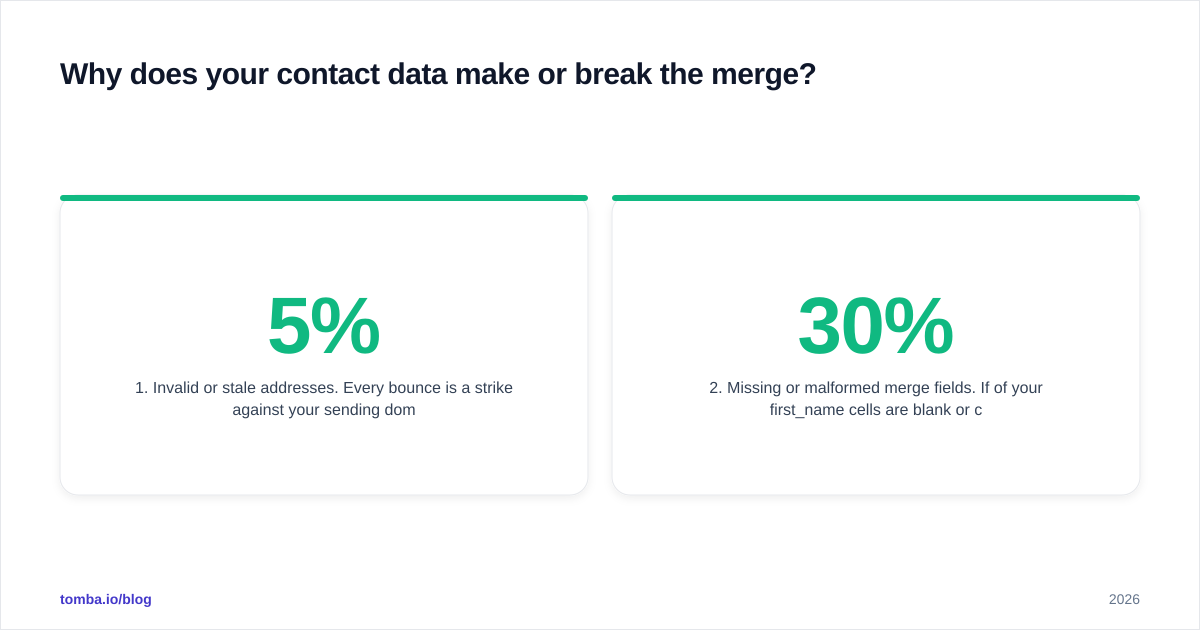
Two data problems sink most mail merges:
1. Invalid or stale addresses. Every bounce is a strike against your sending domain's reputation. Cross a ~3–5% bounce rate and mailbox providers start routing you to spam regardless of content. Before any merge, run your list through an email verifier to strip dead addresses and flag risky ones. Catch-all domains deserve extra scrutiny — use a catch-all verifier so you're not guessing whether an address actually accepts mail.
2. Missing or malformed merge fields. If 30% of your first_name cells are blank or contain full names, 30% of your sends look broken. The fix is enrichment: fill the gaps before the merge runs. If you're starting from just a company domain, a domain search returns the verified email patterns and named contacts you need to populate those columns.
The 2026 workflow is verify-then-merge, not send-then-apologize. You clean and enrich the list as a deliberate pre-send step, so the merge engine only ever sees complete, valid rows.
For deeper context on why this matters, see Tomba's primer on email deliverability — bounce rate, sender reputation, and engagement signals all compound off the quality of your initial list.
How do you write merge fields that don't sound robotic?#
{{first_name}} is table stakes. Everyone uses it, so it no longer signals effort. The reply-rate lift in 2026 comes from contextual merge fields — variables that prove you did homework.
Tiers of personalization, weakest to strongest:
- Identity fields:
{{first_name}},{{company}},{{title}}. Baseline. Necessary but not persuasive. - Contextual fields:
{{recent_funding}},{{tech_stack}},{{job_opening}},{{city}}. These reference something specific to the prospect. - Custom line fields: a
{{intro_line}}column where each row holds a one-sentence observation written (by a human or AI) about that specific company. This is the single highest-leverage field you can add. - Conditional / spintax fields: dynamic snippets that swap based on industry or segment, so a SaaS prospect and a manufacturing prospect get different proof points from the same template.
A practical rule: every merge field should pass the "could I have written this by hand?" test. Hi {{first_name}} passes. Saw your {{recent_event}} — congrats on {{milestone}} passes and impresses. Dear {{first_name}} {{last_name}} from {{company}} in {{industry}} reads like a database vomited on the page. More fields is not more personal; more relevance per field is.
If you want help drafting the copy around those fields, Tomba's cold email templates and the subject line generator give you proven structures you can drop merge tags into.

What deliverability rules apply to mail merge sends?#
Mail merge makes it trivial to send 1,000 emails in an afternoon. That's exactly why it's dangerous. The volume that mail merge unlocks is the volume that gets domains blacklisted when the fundamentals aren't in place.
Non-negotiables before you scale a merge:
- Authenticate your domain. SPF, DKIM, and DMARC records must be configured. Without them, even perfect content lands in spam. Run a quick check with an SPF checker before your first real send.
- Warm up new mailboxes. A fresh sending domain that suddenly blasts 500 merged emails looks exactly like a spammer. Ramp volume gradually over 2–4 weeks.
- Throttle and randomize. Send in small batches with natural delays, not 1,000 messages in one synchronized burst. Dedicated platforms automate this; manual Gmail merges do not.
- Keep bounce rate under control. This loops back to verification — covered above, and worth repeating because it's the most common cause of sudden deliverability collapse.
- Monitor reply and spam-complaint rates. A high complaint rate is a faster route to the spam folder than any keyword filter.
Google and Microsoft both tightened bulk-sender requirements in recent years; the major mailbox providers now expect authenticated, low-complaint, engagement-positive senders. A mail merge that ignores these rules doesn't just underperform — it can torch a domain you can't easily replace. For the broader picture, Mailchimp's deliverability resources are a solid vendor-neutral starting point.
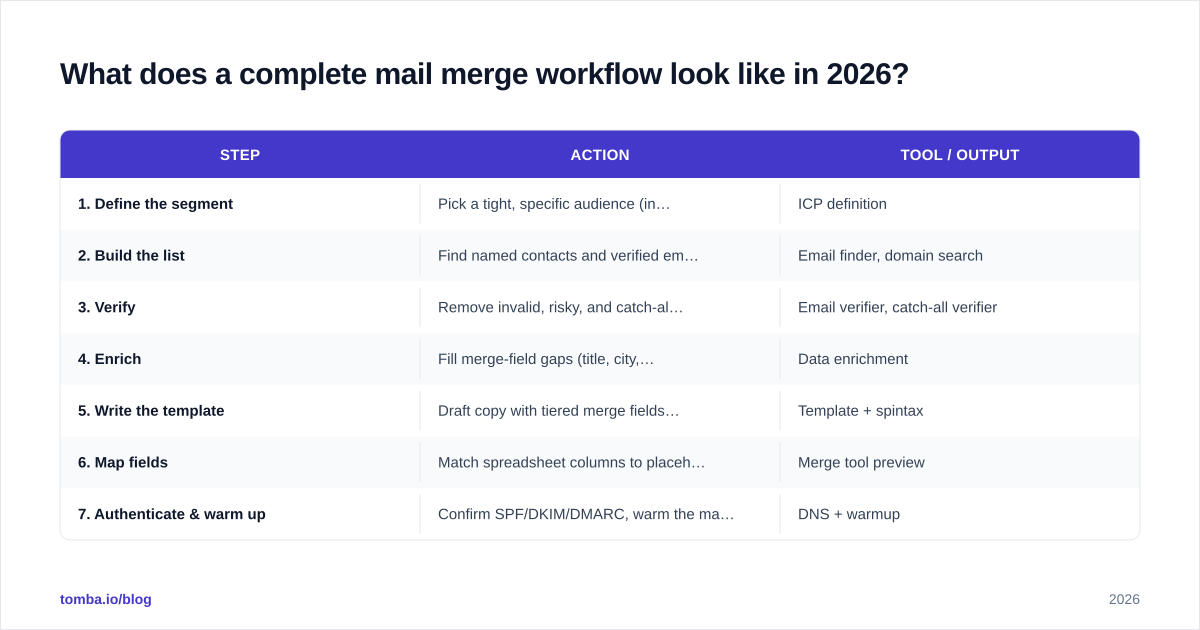
What does a complete mail merge workflow look like in 2026?#
Here's the end-to-end sequence that high-performing teams actually run. Notice how much happens before the merge.
| Step | Action | Tool / output |
|---|---|---|
| 1. Define the segment | Pick a tight, specific audience (industry + size + role) | ICP definition |
| 2. Build the list | Find named contacts and verified emails | Email finder, domain search |
| 3. Verify | Remove invalid, risky, and catch-all addresses | Email verifier, catch-all verifier |
| 4. Enrich | Fill merge-field gaps (title, city, funding, tech) | Data enrichment |
| 5. Write the template | Draft copy with tiered merge fields + custom intro line | Template + spintax |
| 6. Map fields | Match spreadsheet columns to placeholders, QA on 5 rows | Merge tool preview |
| 7. Authenticate & warm up | Confirm SPF/DKIM/DMARC, warm the mailbox | DNS + warmup |
| 8. Send throttled | Batch with delays, rotate inboxes if scaling | Cold email platform |
| 9. Follow up | 2–3 timed, also-personalized follow-ups | Sequence engine |
| 10. Measure & clean | Track replies, suppress bounces, refine for next batch | Analytics |
The pattern is clear: steps 1–4 (find, verify, enrich) determine 80% of your outcome, and they all happen before a single merge field gets rendered. Teams that obsess over template wording while skipping verification are optimizing the wrong half of the funnel.
This is also where building the list correctly pays compounding dividends. If you start from accurate, verified contacts — pulled via a reliable email finder rather than scraped from a stale CSV — every downstream step gets easier and every merge field gets more trustworthy.
How do you scale mail merge without losing personalization?#
The tension at scale is real: more recipients usually means thinner personalization. You resolve it by automating the research, not faking the relevance.
Three levers:
- Pre-compute custom lines at the data layer. Use enrichment plus AI to generate a personalized
{{intro_line}}for every row in advance, stored as a column. The merge then just renders text that was individually prepared — scalable and genuinely specific. - Segment tighter, send smaller. Ten lists of 100 hyper-relevant prospects beat one list of 1,000 generic ones. Each segment gets a template tuned to its pain point.
- Use an API for product-led volume. If outreach is core to your product, wiring an email finder API into your stack lets you find, verify, and merge programmatically — no spreadsheet round-trips. For bulk one-off campaigns, a bulk email finder handles thousands of lookups in a single pass.
Scaling personalization isn't about clever placeholder syntax. It's about doing the research work upfront, at the data layer, so the merge engine has rich, accurate material to render. The merge is the last, easy step — the value was created long before it ran.
Common mail merge mistakes (and quick fixes)#
- Sending without a test row. Always merge against your own address first. Catch the broken
{{field}}before your prospects do. - Leaving fallback values blank. Set a default (e.g.,
{{first_name | "there"}}) so empty cells degrade gracefully instead of printing "Hi ,". - Over-merging. Five contextual fields in one paragraph reads as automation. One sharp, relevant line beats five shallow ones.
- Skipping verification to "save time." The time you save is repaid with interest in bounces and a damaged domain.
- Same template for every segment. A merge field is not a strategy. Different audiences need different proof points, not just different names.
Closing: start with the data, not the template#
Mail merge is only as strong as the list under it. You can master every placeholder, write the sharpest copy, and pick the best sending platform — and still land in spam if your addresses bounce and your fields are half-empty. The teams winning at cold email in 2026 win because they verify and enrich before they merge.
That's where the Tomba Email Finder earns its place in the workflow. It finds verified, deliverable email addresses by name, domain, or company — the clean, complete data that makes every merge field land. Start on the free tier (25 searches/month) to test your first list, then scale through the Starter plan at $49/mo or Growth at $99/mo as your outbound grows. Build the list right, and the mail merge takes care of itself.
// get started
Find, verify and enrich your first contacts today
Start on the free plan with 25 searches a month, then scale when your team is ready.
Free plan · No credit card required · GDPR & CCPA
// about the author