DNS & MX Records for Email Deliverability: A 2026 Guide
Your MX records decide whether email even reaches your domain — and whether your cold outreach lands in the inbox or spam. Here's how DNS, MX, SPF, DKIM, and DMARC fit together in 2026.
TL;DR
- MX (Mail Exchange) records are the DNS entries that tell the internet which servers accept email for your domain. No valid MX record means no inbound mail — full stop.
- MX records handle receiving, but deliverability of the mail you send depends on three more DNS records: SPF, DKIM, and DMARC. Treat them as one system.
- A single typo, a missing priority value, or an SPF record with too many DNS lookups can silently push your cold emails into spam.
- Catch-all domains, stale MX hosts, and unverified addresses inflate bounce rates and wreck sender reputation. Verify before you send.
- This guide walks through every record type, a copy-ready DNS checklist, and how to validate your setup before a campaign goes out.
What is a DNS MX record?#
An MX record is a line in your domain's DNS that says "send email for this domain to this mail server." That's the whole job. When someone emails you@yourcompany.com, the sending server looks up the MX record for yourcompany.com, finds the hostname of your mail server (say, aspmx.l.google.com), and routes the message there.
Think of DNS as the phone book of the internet and the MX record as the specific "mail department" extension. The A record points a domain to a website's IP address; the MX record points it to the mailbox. They are separate jobs, which is why your website and your email can live on completely different servers.
A standard MX record has three parts:
- Host/name — the domain it applies to (often
@for the root domain). - Priority — a number where lower wins.
10is tried before20. This is how providers set up primary and backup mail servers. - Value/target — the hostname of the receiving mail server (never an IP address; MX must point to a hostname).
If you use Google Workspace, Microsoft 365, or a transactional provider, they hand you exact MX records to paste into your DNS. Get one character wrong and inbound email quietly fails.
Why do MX records matter for email deliverability?#
Short answer: MX records are the foundation that the rest of email authentication is built on, and receiving servers actively check them as a trust signal.
Here's the connection most people miss. MX records technically govern incoming mail. But mailbox providers like Gmail and Outlook treat your domain's DNS hygiene as a whole. When you send a cold email, the receiving server does reverse checks: Does this domain have valid MX records? Does the return-path domain resolve? Is there an SPF record authorizing this sender? A domain that can't receive mail but blasts thousands of outbound messages looks exactly like a throwaway spam domain — because that's what spammers use.
So a clean MX setup does two things:
- It lets you actually receive replies, bounces, and out-of-office messages — which you need to manage a campaign.
- It signals to filters that you're a legitimate, fully configured domain, not a burner.
This is why email deliverability is never about a single setting. It's the combined weight of DNS records, sender reputation, list quality, and content. MX is step one.
What DNS records does email actually need?#
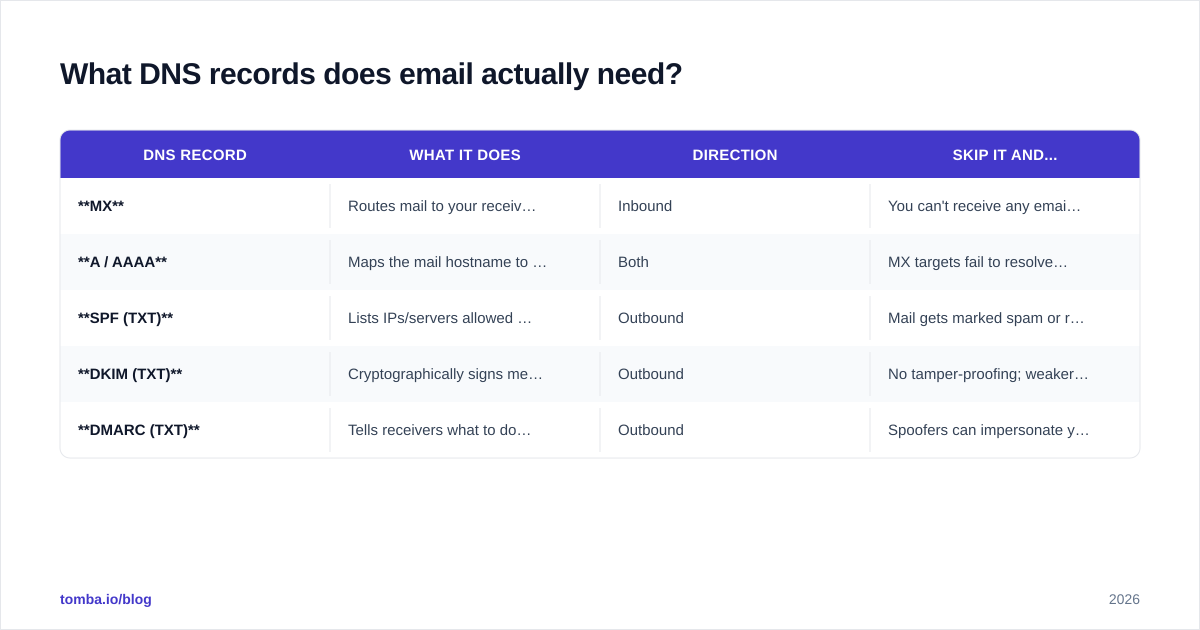
Five records do the heavy lifting. Here's how they compare and what each one is responsible for.
| DNS record | What it does | Direction | Skip it and... |
|---|---|---|---|
| MX | Routes mail to your receiving server | Inbound | You can't receive any email at all |
| A / AAAA | Maps the mail hostname to an IP | Both | MX targets fail to resolve; routing breaks |
| SPF (TXT) | Lists IPs/servers allowed to send as your domain | Outbound | Mail gets marked spam or rejected |
| DKIM (TXT) | Cryptographically signs messages to prove they weren't altered | Outbound | No tamper-proofing; weaker trust score |
| DMARC (TXT) | Tells receivers what to do when SPF/DKIM fail, and where to send reports | Outbound | Spoofers can impersonate your domain freely |
A few rules that trip people up:
- MX must point to a hostname, not an IP.
mail.yourcompany.comis valid;192.0.2.10is not. - You can have multiple MX records with different priorities for redundancy. Most managed providers give you several.
- SPF allows only one TXT record of type SPF per domain, and it must stay under 10 DNS lookups or it returns
permerrorand effectively fails. - DMARC builds on SPF and DKIM — it does nothing on its own until at least one of them is passing and aligned.
For the deeper definitions of each, the SPF record glossary entry and the official DMARC.org overview are worth bookmarking.
How does an email DNS lookup work, step by step?#
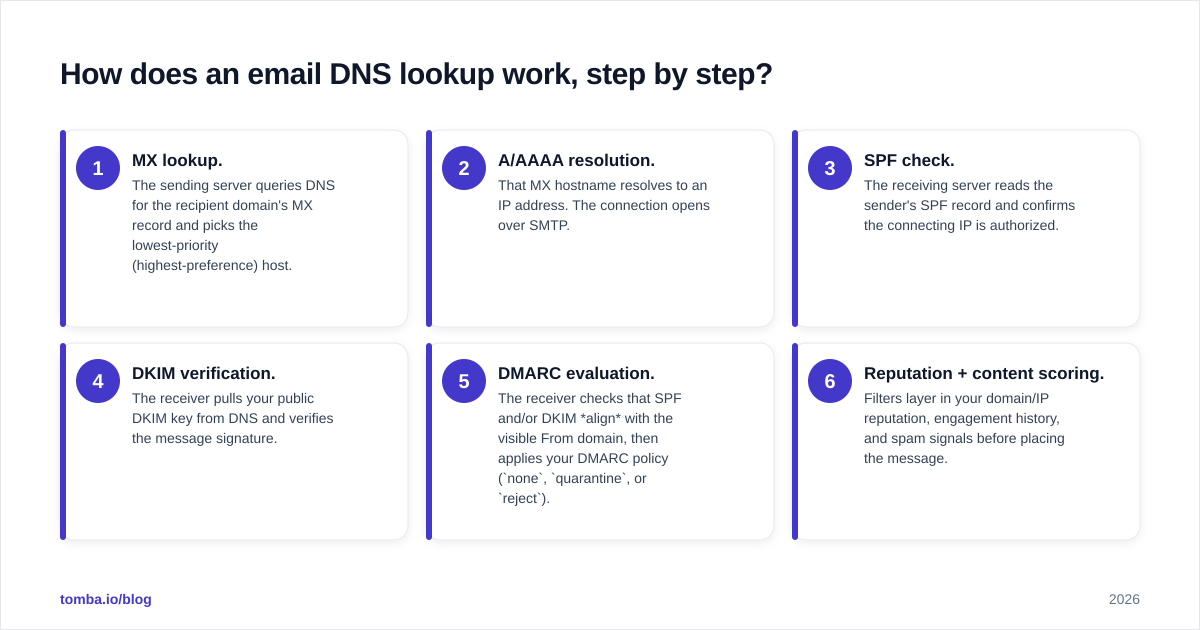
When you hit send, here's the sequence that decides inbox vs. spam:
- MX lookup. The sending server queries DNS for the recipient domain's MX record and picks the lowest-priority (highest-preference) host.
- A/AAAA resolution. That MX hostname resolves to an IP address. The connection opens over SMTP.
- SPF check. The receiving server reads the sender's SPF record and confirms the connecting IP is authorized.
- DKIM verification. The receiver pulls your public DKIM key from DNS and verifies the message signature.
- DMARC evaluation. The receiver checks that SPF and/or DKIM align with the visible From domain, then applies your DMARC policy (
none,quarantine, orreject). - Reputation + content scoring. Filters layer in your domain/IP reputation, engagement history, and spam signals before placing the message.
Any failure in steps 3–5 hands the filter a reason to distrust you. Pass all three with alignment, and you've cleared the technical bar — the rest comes down to list quality and content.
Is your MX setup actually working? A validation checklist#
Don't trust that it's right because you pasted the records. Verify. Run through this before any campaign:
- MX resolves and has a priority. Use
dig MX yourcompany.com +short(Linux/macOS) ornslookup -type=mx yourcompany.com(Windows). You should see a priority number and a hostname. - The MX hostname resolves to an IP.
dig A mail.yourcompany.com +shortshould return an address. - SPF exists, is one record, under 10 lookups. A second SPF TXT record invalidates both.
- DKIM selector publishes a key. Check the selector your provider gave you (e.g.
google._domainkey.yourcompany.com). - DMARC record exists at
_dmarc.yourcompany.comwith at leastp=noneand arua=reporting address. - No dangling test records. Old MX entries pointing to decommissioned servers cause intermittent failures.
- Reverse DNS (PTR) matches for your sending IP if you run your own server.
For ongoing monitoring, Google Postmaster Tools (and Google's own Postmaster Tools) surface your domain reputation, spam rate, and authentication pass rates straight from the source. Microsoft offers SNDS for the same purpose. If your spam rate creeps above 0.3%, treat it as a fire.
One detail people forget: MX records and the authentication stack tell receivers you're configured correctly, but they say nothing about whether the addresses you're emailing are real. That's a separate failure mode.
How do bad addresses undo a perfect DNS setup?#
You can have flawless MX, SPF, DKIM, and DMARC and still tank in the inbox — because deliverability is also about who you send to. Every hard bounce, spam trap, and dead mailbox you hit chips away at the reputation your DNS records worked to build.
This is where the receiving side bites back. When you email an address that doesn't exist, the recipient's mail server (located via its MX record) returns a bounce. Too many bounces in a short window and Gmail or Outlook flags your domain as a careless sender, regardless of how clean your DNS is.
The fix is upstream: validate the list before you send.
- Use an email verifier to remove invalid, role-based, and risky addresses before they ever generate a bounce.
- Watch out for catch-all domains — servers configured to accept mail for any address, which makes simple SMTP checks return a false "valid." A dedicated catch-all verifier digs deeper than a basic ping.
- When you're sourcing new contacts, pull them from a tool that returns confidence-scored, deliverable addresses rather than guessed permutations.
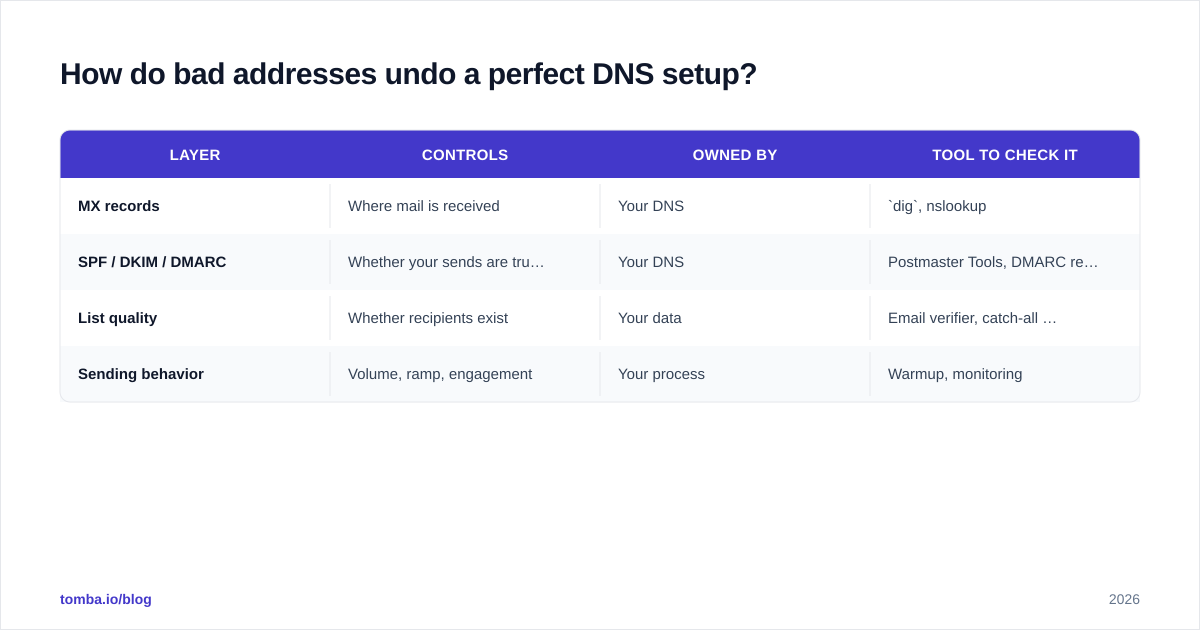
Here's how the two halves of the system map together:
| Layer | Controls | Owned by | Tool to check it |
|---|---|---|---|
| MX records | Where mail is received | Your DNS | dig, nslookup |
| SPF / DKIM / DMARC | Whether your sends are trusted | Your DNS | Postmaster Tools, DMARC reports |
| List quality | Whether recipients exist | Your data | Email verifier, catch-all verifier |
| Sending behavior | Volume, ramp, engagement | Your process | Warmup, monitoring |
Skip any row and the others can't save you.

What are the most common MX and DNS mistakes?#
After enough campaigns, the same failures show up again and again:
- MX pointing to an IP address. Invalid by spec. It must be a hostname.
- A trailing dot or typo in the target hostname.
aspmx.l.google.comvsaspmx.l.google.com.— DNS interfaces vary on whether they want the dot. Read your provider's instructions. - Two SPF records. Merge them into one. Multiple SPF TXT records cause a permanent error.
- SPF over 10 lookups. Every
include:that chains to another provider counts. Flatten or consolidate. DMARC p=rejectswitched on too early. Gonone→quarantine→rejectgradually while reading the reports, or you'll block your own legitimate mail.- Forgetting the return-path/bounce domain also needs valid DNS. Misaligned return paths fail DMARC even when the visible From looks fine.
- Stale MX after a provider migration. Old Google or Microsoft MX records left behind route mail into a black hole.
- No monitoring. DNS isn't "set and forget." A registrar change, an expired key, or a provider update can break it months later.
If you're sending cold outreach at scale, pair this DNS hygiene with disciplined list management. Even the best Tomba pricing tier won't help a campaign aimed at addresses that bounce — the DNS layer and the data layer have to be clean together. For the broader picture of how filters weigh these signals, HubSpot's email deliverability guide is a solid non-vendor reference, and Wikipedia's MX record entry covers the spec precisely.
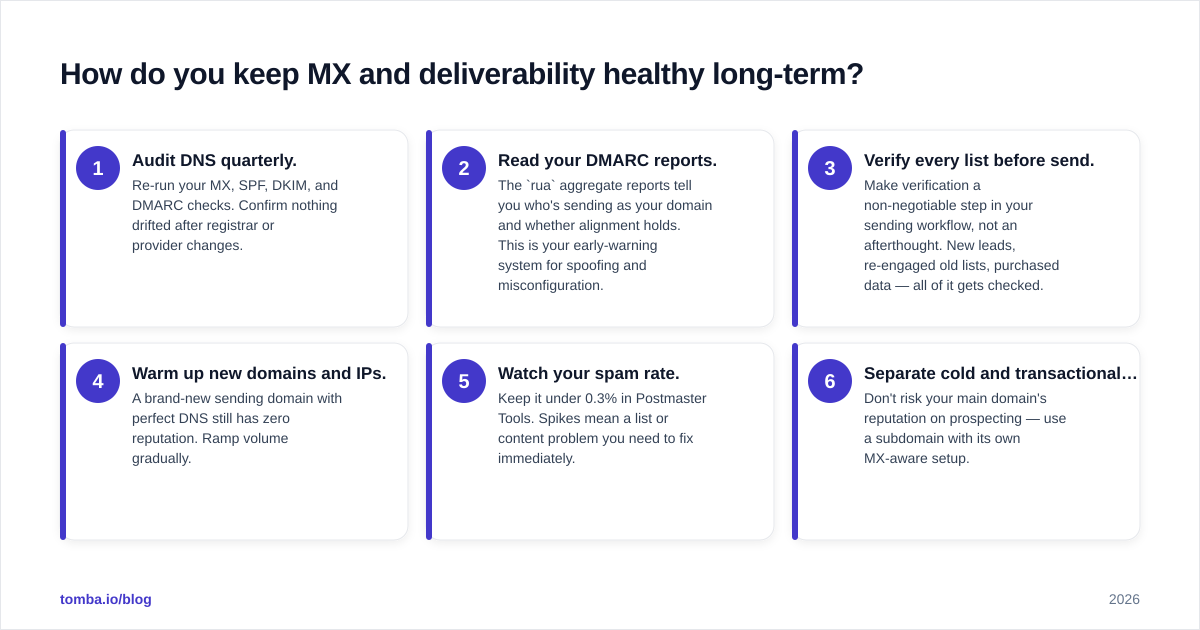
How do you keep MX and deliverability healthy long-term?#
Treat it as a recurring checklist, not a one-time setup:
- Audit DNS quarterly. Re-run your MX, SPF, DKIM, and DMARC checks. Confirm nothing drifted after registrar or provider changes.
- Read your DMARC reports. The
ruaaggregate reports tell you who's sending as your domain and whether alignment holds. This is your early-warning system for spoofing and misconfiguration. - Verify every list before send. Make verification a non-negotiable step in your sending workflow, not an afterthought. New leads, re-engaged old lists, purchased data — all of it gets checked.
- Warm up new domains and IPs. A brand-new sending domain with perfect DNS still has zero reputation. Ramp volume gradually.
- Watch your spam rate. Keep it under 0.3% in Postmaster Tools. Spikes mean a list or content problem you need to fix immediately.
- Separate cold and transactional sending. Don't risk your main domain's reputation on prospecting — use a subdomain with its own MX-aware setup.
DNS gives mailbox providers a reason to trust your domain. List quality gives them a reason to keep trusting it. Sustained inbox placement is the product of both, maintained over time.
Put clean data behind your clean DNS#
You've done the hard part — MX records routing correctly, SPF, DKIM, and DMARC all aligned. Don't waste it on a list full of addresses that bounce. Tomba's Email Finder returns professional, confidence-scored email addresses by name, domain, or company, so the contacts you send to are real before they ever touch your sending reputation. Pair it with Tomba's built-in email verifier and catch-all verifier to strip out the risky addresses that turn a healthy domain into a spam-foldered one.
Start free with 25 searches a month, then scale on the Starter plan at $49/mo when your outreach grows. Clean DNS plus clean data is how cold email actually lands in 2026 — get both right and the inbox opens up.
// get started
Find, verify and enrich your first contacts today
Start on the free plan with 25 searches a month, then scale when your team is ready.
Free plan · No credit card required · GDPR & CCPA
// about the author