Email Deliverability Technical Testing: The 2026 Playbook
A no-fluff technical guide to email deliverability testing in 2026: SPF, DKIM, DMARC, seed tests, blocklists, and the exact tools that prove your mail reaches the inbox.
TL;DR
- Email deliverability testing is the practice of proving — with evidence, not hope — that your messages authenticate correctly and land in the inbox, not spam or the void.
- The technical core is three records (SPF, DKIM, DMARC) plus reputation signals (blocklists, spam-content score, engagement). Get all of them green before you scale volume.
- Run a layered workflow: authentication checks → content/spam scoring → seed-list inbox placement → ongoing reputation monitoring.
- Free tools (mail-tester, Google Postmaster, MXToolbox) cover most of what a small team needs; paid seed-test platforms add per-provider placement data.
- Test on every meaningful change: new sending domain, new IP, new ESP, template overhaul, or a sudden volume jump.
If you send cold email, newsletters, or transactional mail and you have never run a structured deliverability test, you are flying blind. The inbox is a black box: a provider can silently route you to spam and never tell you. Technical testing is how you pry that box open.
What is email deliverability testing?#
Email deliverability testing is a set of repeatable checks that measure whether your mail is authenticated, trusted, and actually delivered to the inbox folder of real mailbox providers.
Think of it like a pre-flight checklist for a pilot. The plane might look ready, but you still walk around and verify flaps, fuel, and instruments before takeoff — because "looks fine" is not the same as "is fine." Deliverability testing is that walk-around for your sending setup.
There is an important distinction people blur constantly:
- Delivery means the receiving server accepted the message (no bounce).
- Deliverability means it landed where a human will see it — the inbox, not the spam folder.
You can have 99% delivery and 20% inbox placement at the same time. Bounce rates tell you nothing about folder placement, which is why dedicated testing exists. For a deeper definition, see Tomba's glossary entry on email deliverability.
What are the technical pillars you have to test?#
Four layers, tested in order. Each one gates the next — there is no point optimizing content if your DKIM signature is broken.
1. Authentication (SPF, DKIM, DMARC)#
These three DNS records tell receiving servers that you are who you claim to be. Spoofers can't fake them, so providers lean on them heavily.
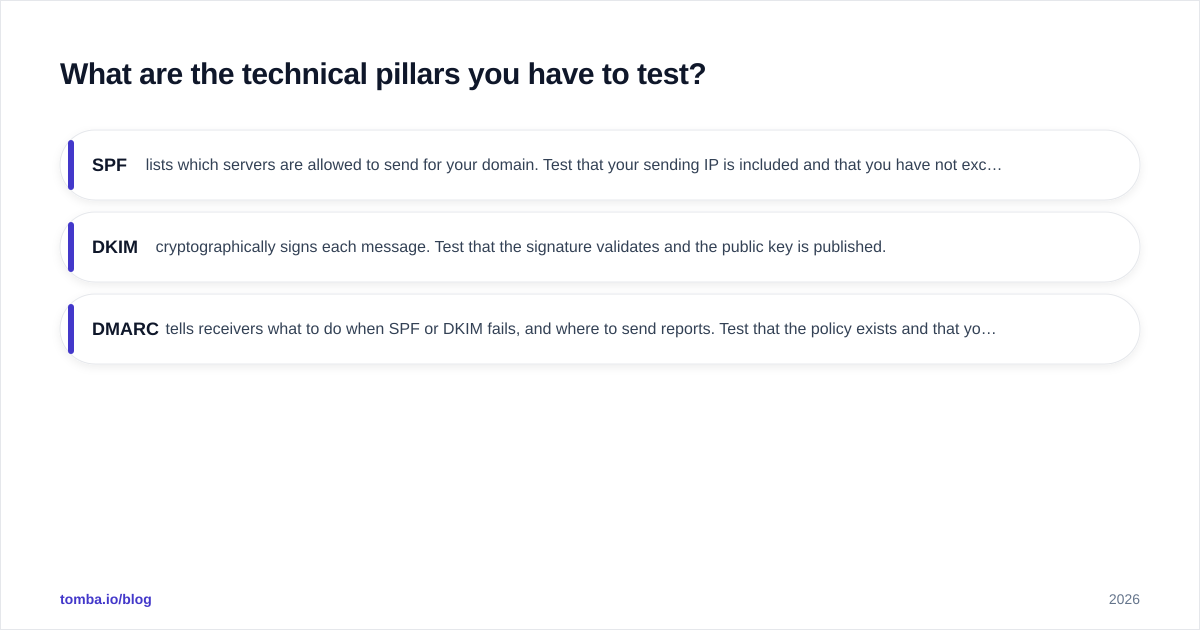
- SPF lists which servers are allowed to send for your domain. Test that your sending IP is included and that you have not exceeded the 10-DNS-lookup limit. Run a quick check with an SPF checker.
- DKIM cryptographically signs each message. Test that the signature validates and the public key is published.
- DMARC tells receivers what to do when SPF or DKIM fails, and where to send reports. Test that the policy exists and that your real mail passes alignment.
A failure here is the single most common reason good mail goes to spam. The official DMARC.org overview is worth reading once end to end.
2. Content and spam scoring#
Spam filters score the message itself: subject line, text-to-image ratio, link reputation, spammy phrases, and broken HTML. A high score can sink an otherwise-authenticated message.
3. Reputation and blocklists#
Mailbox providers track your domain and IP reputation over time. If either lands on a blocklist (Spamhaus, Barracuda, SORBS), placement collapses. Check yours with a blacklist checker before and during any campaign.
4. Inbox placement (seed testing)#
This is the only test that answers the real question: for Gmail, Outlook, Yahoo, and the rest, did I hit Inbox, Promotions, or Spam? You send to a set of seed addresses across providers and read back the placement.
How do you actually run a deliverability test, step by step?#
Here is the workflow I run on every new sending setup. It takes about 30 minutes the first time.
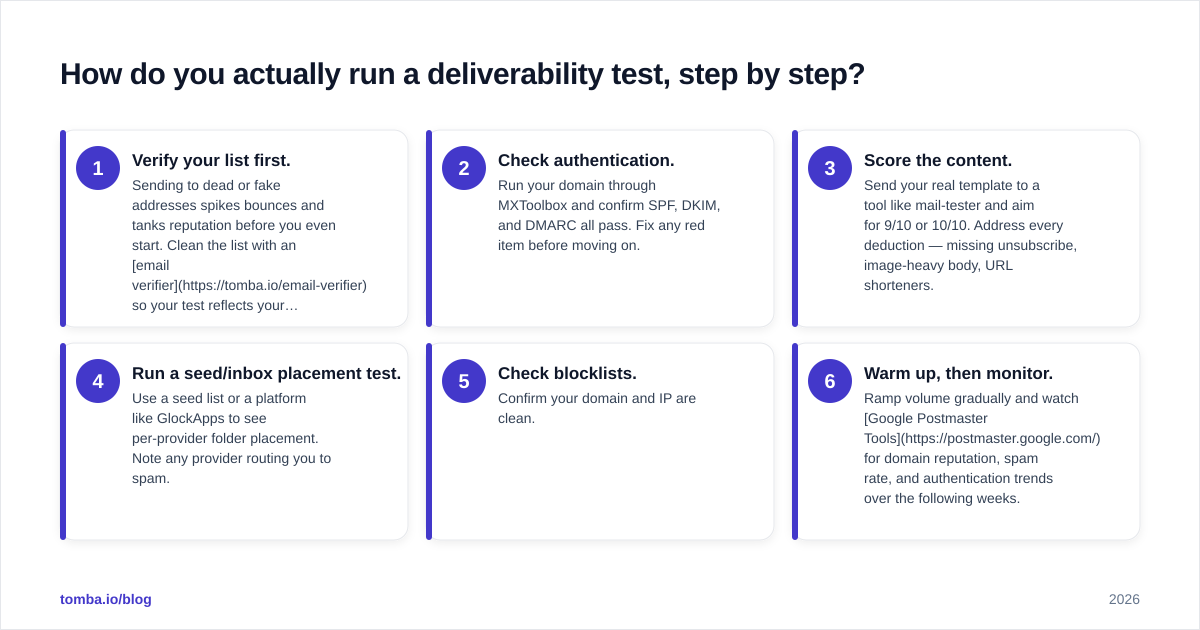
- Verify your list first. Sending to dead or fake addresses spikes bounces and tanks reputation before you even start. Clean the list with an email verifier so your test reflects your setup, not bad data.
- Check authentication. Run your domain through MXToolbox and confirm SPF, DKIM, and DMARC all pass. Fix any red item before moving on.
- Score the content. Send your real template to a tool like mail-tester and aim for 9/10 or 10/10. Address every deduction — missing unsubscribe, image-heavy body, URL shorteners.
- Run a seed/inbox placement test. Use a seed list or a platform like GlockApps to see per-provider folder placement. Note any provider routing you to spam.
- Check blocklists. Confirm your domain and IP are clean.
- Warm up, then monitor. Ramp volume gradually and watch Google Postmaster Tools for domain reputation, spam rate, and authentication trends over the following weeks.
Skipping step 1 is the most common mistake. A pristine SPF record means nothing if 15% of your list bounces — providers read that as careless sending and punish you regardless of your DNS.
Which deliverability testing tools should you use?#
You do not need every tool. You need one per layer. Here is how the common options stack up.
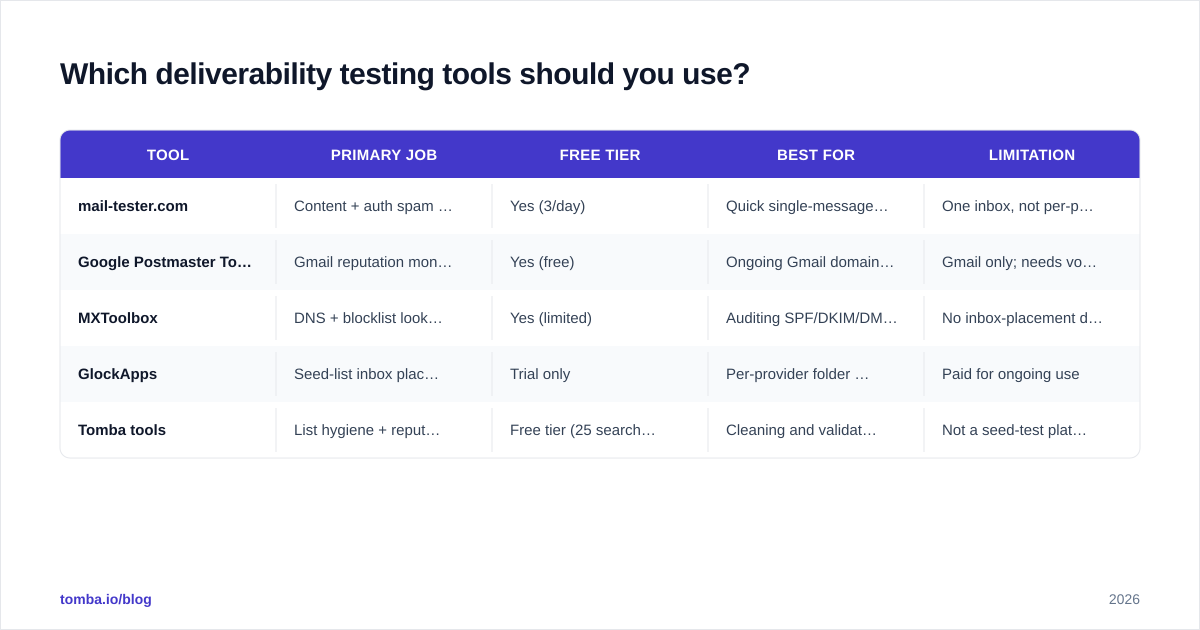
| Tool | Primary job | Free tier | Best for | Limitation |
|---|---|---|---|---|
| mail-tester.com | Content + auth spam score | Yes (3/day) | Quick single-message scoring | One inbox, not per-provider placement |
| Google Postmaster Tools | Gmail reputation monitoring | Yes (free) | Ongoing Gmail domain reputation | Gmail only; needs volume to show data |
| MXToolbox | DNS + blocklist lookups | Yes (limited) | Auditing SPF/DKIM/DMARC + blocklists | No inbox-placement data |
| GlockApps | Seed-list inbox placement | Trial only | Per-provider folder placement | Paid for ongoing use |
| Tomba tools | List hygiene + reputation checks | Free tier (25 searches) | Cleaning and validating before send | Not a seed-test platform |
A practical 2026 stack for a lean team: MXToolbox for authentication, mail-tester for content scoring, Google Postmaster for ongoing Gmail reputation, and Tomba's spam checker and verifier for pre-send hygiene. Add a paid seed platform only when revenue depends on knowing exact per-provider placement.
How often should you test, and what triggers a re-test?#
Test on change, not on a calendar. Reputation is event-driven, so your testing should be too.
Re-run the full workflow whenever any of these happens:
- You launch a new sending domain or subdomain.
- You move to a new dedicated IP or a new ESP.
- You overhaul your template (new HTML framework, big image changes, new link domains).
- Your volume jumps sharply — a 10x week is a reputation event.
- Postmaster shows reputation slipping from High to Medium, or spam complaints tick up.
- You re-engage a cold or old list after months of silence.
For steady-state sending, a light monthly check (authentication still green, blocklists still clean, Postmaster still healthy) is enough. The heavy seed tests are for changes and for diagnosing a sudden drop in replies or opens.
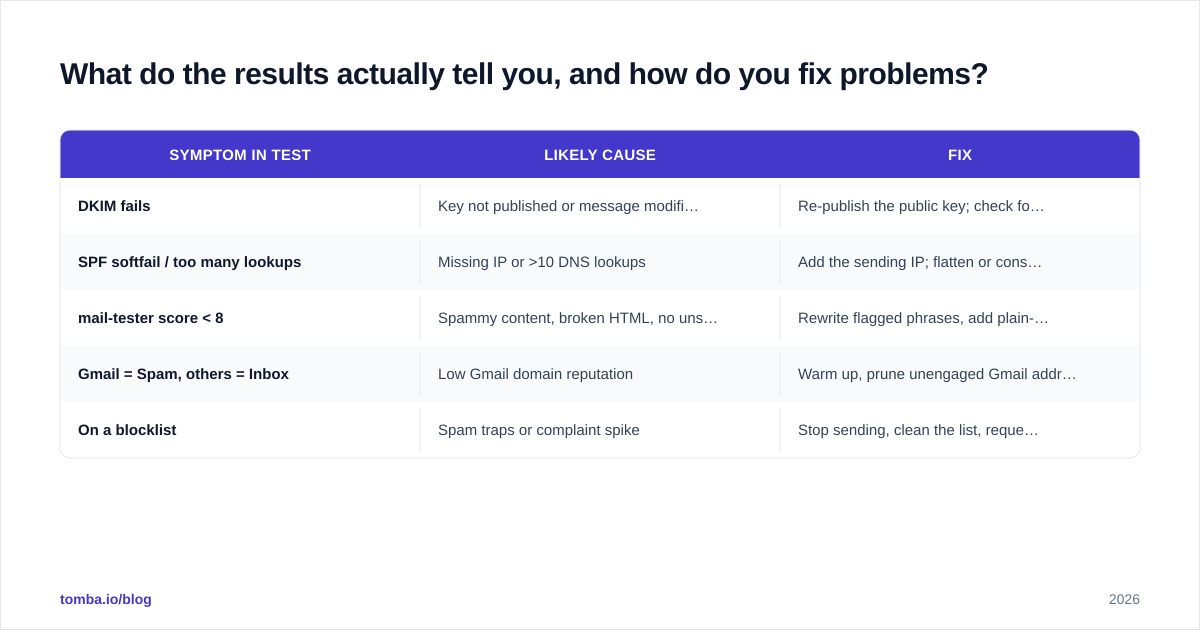
What do the results actually tell you, and how do you fix problems?#
A test is only useful if you can act on it. Map each failure to a fix:
| Symptom in test | Likely cause | Fix |
|---|---|---|
| DKIM fails | Key not published or message modified in transit | Re-publish the public key; check for forwarders rewriting the body |
| SPF softfail / too many lookups | Missing IP or >10 DNS lookups | Add the sending IP; flatten or consolidate includes |
| mail-tester score < 8 | Spammy content, broken HTML, no unsubscribe | Rewrite flagged phrases, add plain-text part, add unsubscribe |
| Gmail = Spam, others = Inbox | Low Gmail domain reputation | Warm up, prune unengaged Gmail addresses, raise engagement |
| On a blocklist | Spam traps or complaint spike | Stop sending, clean the list, request delisting |
Notice the recurring theme: list quality drives most reputation problems. Spam traps, hard bounces, and unengaged contacts are the fastest way to wreck placement. That is why the cheapest, highest-leverage deliverability move is validating and enriching your list before it ever touches a send.
It also matters where your contacts come from. Scraped or guessed addresses carry far more risk of traps and bounces than verified, source-backed data. If you are building lists for outreach, start from accurate contacts — find verified professional emails with a real email finder instead of permutating addresses and hoping they resolve.
What is the difference between deliverability testing and monitoring?#
Testing is a snapshot; monitoring is a movie.
- Testing is what you do before and during a launch — a deliberate, point-in-time check that everything authenticates and places correctly.
- Monitoring is the continuous watch after launch — Postmaster reputation trends, DMARC aggregate reports, complaint and bounce rates over weeks.
You need both. Testing catches setup mistakes; monitoring catches slow decay — the gradual reputation erosion that happens when engagement drops and you don't notice until replies dry up. Pair a strong pre-send test with a weekly five-minute monitoring glance and you will catch 90% of problems before they cost you a campaign.
Common questions#
Does a 10/10 spam score guarantee the inbox? No. A perfect content score means your message isn't obviously spammy, but placement still depends on domain reputation and recipient engagement. Use it as a floor, not a guarantee.
Can I test deliverability for cold outreach the same way? Yes — the technical layers are identical. Cold email just makes list hygiene and warmup even more critical, because you have no prior engagement to lean on.
Is shared IP or dedicated IP better for testing? On shared IPs your reputation rides on the pool, so seed tests reflect neighbors' behavior too. Dedicated IPs give cleaner, more controllable test results but require disciplined warmup.
Start with a clean, accurate list#
Every deliverability test you run is only as honest as the list behind it. Authentication, content scoring, and seed tests all assume you are sending to real, reachable people — feed them bounces and traps and the results lie to you. The highest-leverage place to start is the contacts themselves.
Use the Tomba Email Finder to build outreach lists from verified, source-backed professional emails instead of guessed addresses, then pair it with Tomba's verifier and spam checker before you send. You can try it on the free tier (25 searches/month), and move to Starter at $49/mo when you scale. Clean inputs, honest tests, better inbox placement — in that order.
// get started
Find, verify and enrich your first contacts today
Start on the free plan with 25 searches a month, then scale when your team is ready.
Free plan · No credit card required · GDPR & CCPA
// about the author