8 Common Email Formats and Patterns to Know in 2026
Stop guessing work emails. Learn the 8 most common email formats and patterns, how to detect a company's pattern, and how to verify a guess before you hit send.
Knowing a person's name and company is only half the battle. The other half is figuring out which of a dozen possible email formats their employer actually uses — and whether the address you assembled will land or bounce.
This guide breaks down the email formats and patterns you'll meet in the wild, how to detect the pattern a company uses, and how to confirm a guess before it ever touches your sequence.
TL;DR#
- Roughly 8 email patterns cover the overwhelming majority of B2B inboxes;
first.last@andfirst@dominate. - A company almost always uses one consistent pattern, so finding one known address often unlocks everyone.
- Guessing the format is step one; verifying the address is the step that protects your deliverability.
- Catch-all domains accept everything, so a "valid" SMTP response doesn't always mean a real mailbox — treat catch-alls separately.
- Tools like a company email pattern checker and an email permutator turn manual guesswork into a two-minute task.
What are email formats and patterns?#
An email pattern is the rule a company uses to build every employee's address from their name. The format is the template; the pattern is that template applied consistently across the organization.
Think of it like a license-plate scheme. Once you know your state issues plates as "3 letters, 4 numbers," you can recognize a valid one instantly — even one you've never seen. Company email works the same way: learn that Acme uses first.last@acme.com, and you can reconstruct any Acme employee's address from their name alone.
Technically, the local part (everything before the @) is governed by RFC 5321, which permits a wide range of characters. In practice, corporate IT teams pick one human-readable convention and enforce it through their identity provider, so you only ever see a handful of formats.
What are the most common email formats and patterns?#
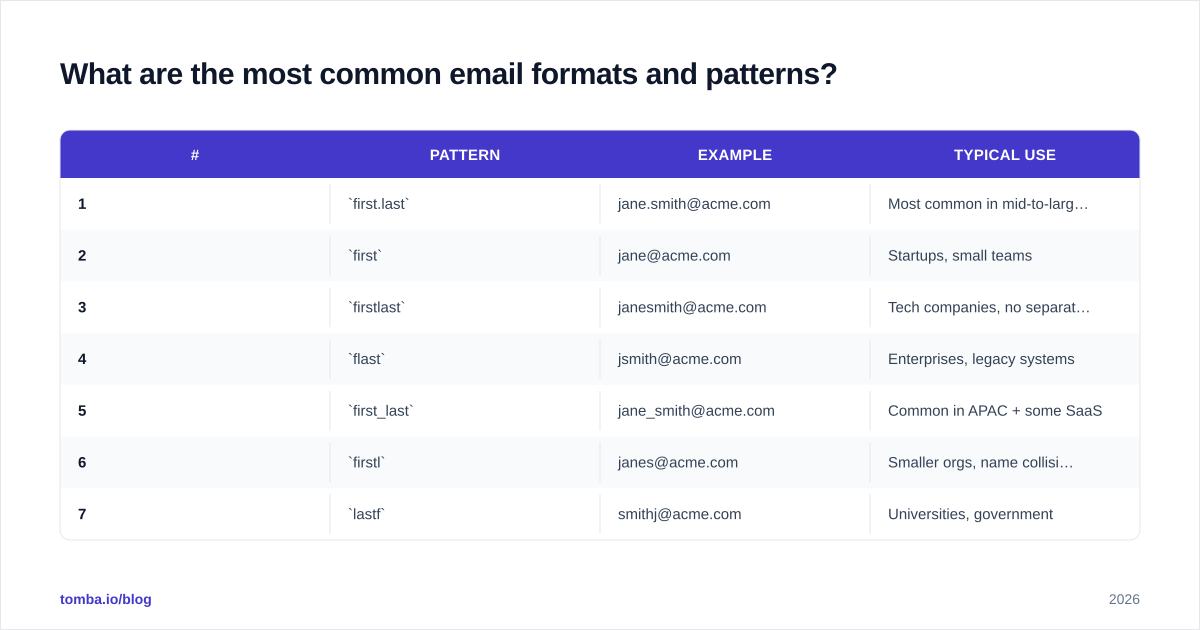
Here are the eight patterns that account for the vast majority of business addresses, using "Jane Smith" at acme.com as the example.
| # | Pattern | Example | Typical use |
|---|---|---|---|
| 1 | first.last |
jane.smith@acme.com | Most common in mid-to-large B2B |
| 2 | first |
jane@acme.com | Startups, small teams |
| 3 | firstlast |
janesmith@acme.com | Tech companies, no separator |
| 4 | flast |
jsmith@acme.com | Enterprises, legacy systems |
| 5 | first_last |
jane_smith@acme.com | Common in APAC + some SaaS |
| 6 | firstl |
janes@acme.com | Smaller orgs, name collisions |
| 7 | lastf |
smithj@acme.com | Universities, government |
| 8 | last.first |
smith.jane@acme.com | Some EU + Asian firms |
A few patterns beyond these eight show up occasionally — f.last, first.l, or department aliases like sales@ and support@ — but if you can confirm which of the eight above a domain uses, you've solved the puzzle for nearly every contact there.
Wait — that image is a placeholder. Here's the real one:
Why does the email pattern matter so much?#
Because one known address unlocks an entire company.
Suppose you're prospecting into a 400-person company and you already have one verified contact: mike.jones@acme.com. That single data point tells you the pattern is first.last. Now every other name on your list — Jane Smith, Raj Patel, Chen Wei — converts to a high-confidence guess in seconds. You don't need to find 400 emails; you need to find one and infer the rest.
This is exactly how a domain search works under the hood. It crawls public sources for known addresses at a domain, detects the dominant pattern, and reports both the pattern and the confidence level. According to HubSpot's research on sales productivity, reps spend a huge share of their week on non-selling tasks like manual data entry — pattern inference is one of the easiest of those tasks to automate away.
How do you detect a company's email pattern?#
You have four practical routes, in rough order of speed.
1. Find one known address. Search the company's contact page, press releases, team bios, or a colleague's inbox. One real address reveals the pattern instantly.
2. Use a pattern checker. Enter a domain into a company email pattern tool and it returns the most likely format plus a confidence score, drawn from addresses already observed at that domain.
3. Read the author bylines. Blog posts, whitepapers, and PR contacts frequently expose addresses. An author finder pulls the email tied to a specific article's writer, which doubles as a pattern sample.
4. Generate and verify. When you can't find a single sample, fall back to building every plausible permutation and testing them — covered in the next section.
How do you guess an email when you don't know the pattern?#
You permute, then you verify. Don't ship guesses straight into a campaign.
Start by feeding the name and domain into an email permutator. It expands "Jane Smith" + "acme.com" into the full set of candidates:
- jane.smith@acme.com
- jsmith@acme.com
- jane@acme.com
- janesmith@acme.com
- smith.jane@acme.com
- jane_smith@acme.com
You now have a candidate list — but a list of guesses is a liability, not an asset. Sending to all of them guarantees bounces, and bounces are the fastest way to wreck your sender reputation. The fix is to verify every candidate and keep only the deliverable one.

How do you verify a guessed email address?#
Run each candidate through an email verifier before it enters your sequence. A good verifier performs several layered checks:
- Syntax — is the address even well-formed under RFC rules?
- Domain / MX — does the domain exist and accept mail?
- SMTP — does the mailbox respond as deliverable at the server level?
- Catch-all detection — does the domain accept everything, making a positive result ambiguous?
That last point trips up a lot of prospectors. A catch-all domain returns "valid" for any address you throw at it, real or invented. So a clean verification on a catch-all isn't proof the mailbox exists. For those domains, lean on a dedicated catch-all verifier and weight the result by additional signals — pattern confidence, whether the name appears elsewhere at the company, and engagement once you send.
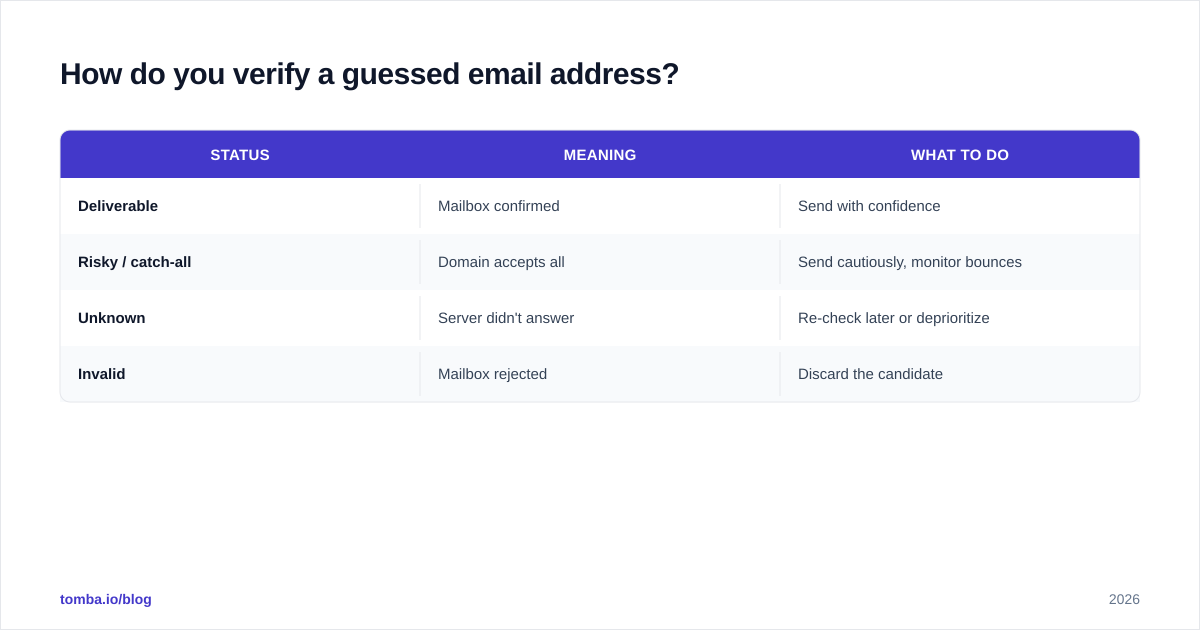
Here's how the verification statuses typically map to action:
| Status | Meaning | What to do |
|---|---|---|
| Deliverable | Mailbox confirmed | Send with confidence |
| Risky / catch-all | Domain accepts all | Send cautiously, monitor bounces |
| Unknown | Server didn't answer | Re-check later or deprioritize |
| Invalid | Mailbox rejected | Discard the candidate |
When should you guess versus look it up directly?#
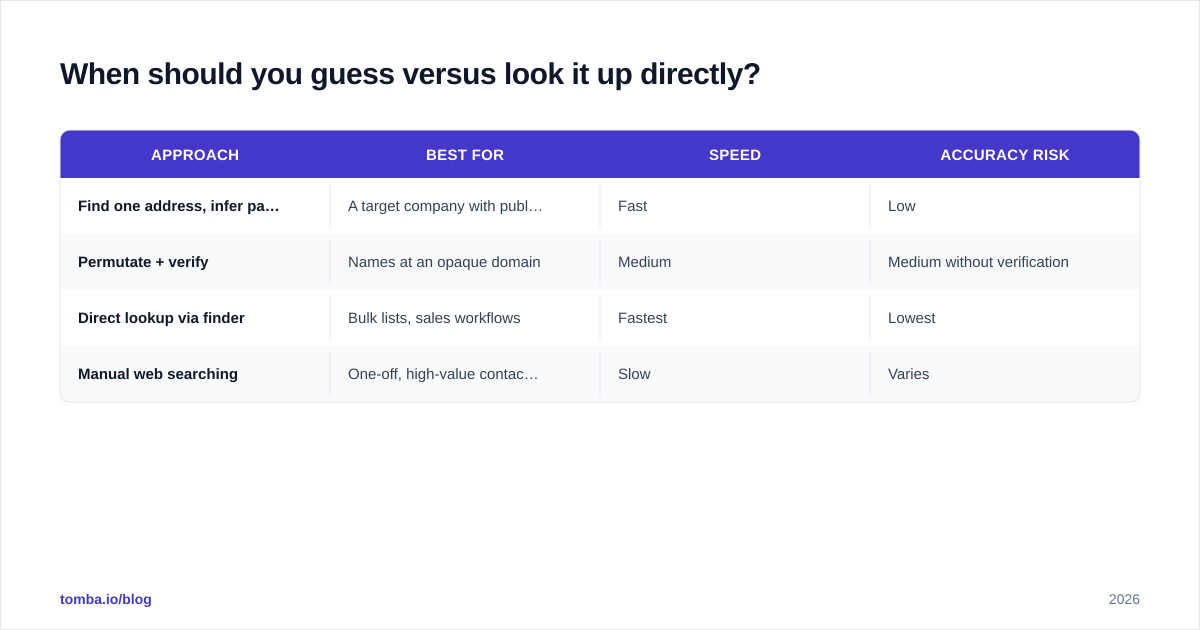
Guessing-plus-verifying is a fallback, not a first choice. When the contact already exists in a reliable dataset, skip the permutation step entirely.
| Approach | Best for | Speed | Accuracy risk |
|---|---|---|---|
| Find one address, infer pattern | A target company with public contacts | Fast | Low |
| Permutate + verify | Names at an opaque domain | Medium | Medium without verification |
| Direct lookup via finder | Bulk lists, sales workflows | Fastest | Lowest |
| Manual web searching | One-off, high-value contacts | Slow | Varies |
For anything past a handful of contacts, a purpose-built email finder collapses all four steps — pattern detection, permutation, lookup, and verification — into a single query, and a bulk email finder does it across a whole CSV at once. You can compare what each tier costs on the Tomba pricing page; if you're evaluating options broadly, independent reviews on G2 are a useful sanity check against vendor claims.
How do email patterns differ across regions and company types?#
Patterns aren't random — they cluster by org type and geography.
- Enterprises and legacy IT lean on
flast(jsmith@) because it was compact for early mail systems and scales with employee directories. - Startups and small teams love
first@for its friendliness, until two Janes join and force a switch. - Universities and government favor
lastforlast.first, often tied to formal record systems. - APAC and parts of the EU show more
first_lastandlast.firstthan North America.
The practical takeaway: don't assume a US convention applies globally. When a first.last guess bounces at a Tokyo or Munich domain, your next candidate should be first_last or last.first, not another North-American format.
What mistakes should you avoid with email patterns?#
Three errors cause most of the damage.
Treating one pattern as universal. Even within a single company, acquisitions and sub-brands can run a second domain with its own convention. Detect per domain, not per company.
Skipping verification. A pattern guess is a hypothesis. Sending unverified hypotheses to hundreds of inboxes is how good domains end up on blocklists. Always pass guesses through verification first.
Ignoring catch-alls. "Valid" on a catch-all domain is not the same as "real." Flag those addresses and validate them with extra signals before you trust them.
Hard-coding nicknames. "Mike" might be "michael@" in the directory. Generate both the legal and the common name when you permute, or you'll miss live mailboxes.
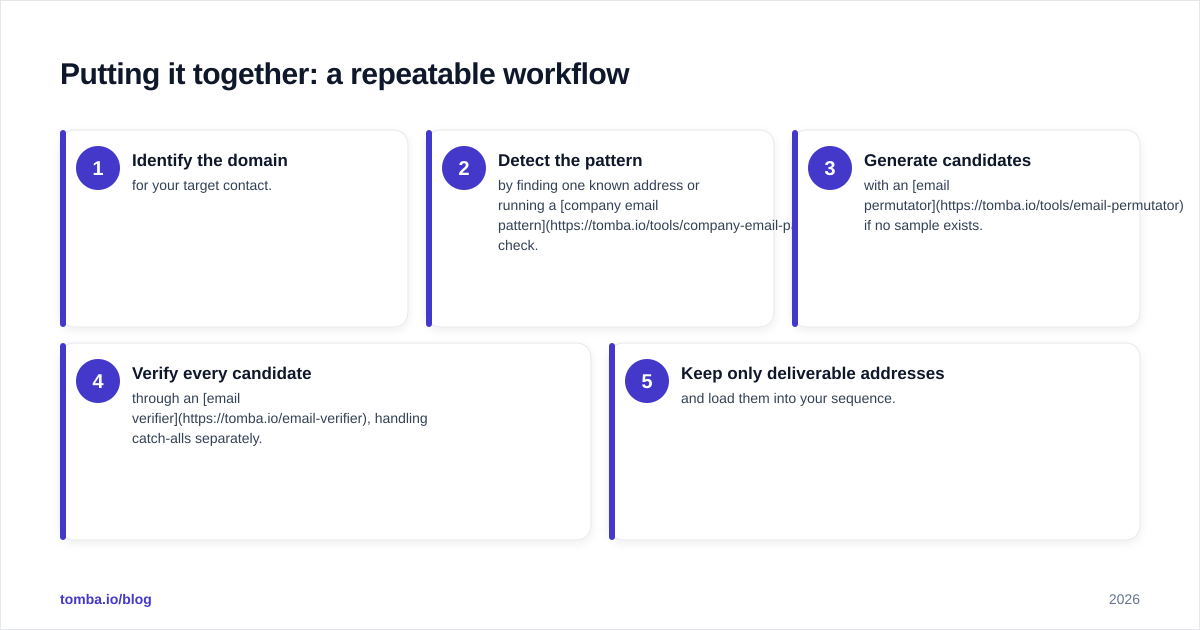
Putting it together: a repeatable workflow#
- Identify the domain for your target contact.
- Detect the pattern by finding one known address or running a company email pattern check.
- Generate candidates with an email permutator if no sample exists.
- Verify every candidate through an email verifier, handling catch-alls separately.
- Keep only deliverable addresses and load them into your sequence.
Do this once by hand to understand it; automate it forever after.
Start finding the right format, the first time#
You now know the eight patterns, how to detect which one a domain uses, and why verification is non-negotiable. The fastest way to apply all of it is to let a tool do the inference for you. The Tomba Email Finder detects a company's pattern, builds the correct address from a name and domain, and verifies it in the same step — so you spend your time selling instead of guessing. Start on the free tier (25 searches a month) and scale to a paid plan only once it's earning its keep.
Stop guessing email formats. Detect the pattern, verify the result, and send with confidence.
Ready to find emails that actually work?
Join 150,000+ professionals who stopped guessing and started sending. Free credits on signup — no credit card required.
Get the Tomba newsletter
Practical outbound tactics and product updates — once every two weeks.
About the author