Email Tracking in 2026: The Complete Sales Team Guide
Email tracking tells you who opened, clicked, and ignored your sales emails — so you stop guessing and start following up at the right moment. Here's how it works in 2026.
TL;DR
- Email tracking tells you when a prospect opens your email, clicks a link, or downloads an attachment — turning blind sends into timed, evidence-based follow-ups.
- It works through a tiny tracking pixel and wrapped links; modern tools layer this onto Gmail, Outlook, and your CRM automatically.
- Open tracking has gotten noisier since Apple Mail Privacy Protection, so in 2026 the smart play is to weight clicks and replies over raw opens.
- The best tool for you depends on volume: free extensions for solo reps, full sequencing platforms for teams, and CRM-native tracking for revenue orgs.
- Tracking is worthless if your list is full of dead addresses — verified, accurate contact data is the input that makes every open-rate number real.
What is email tracking?#
Email tracking is the practice of knowing what happens to a message after you hit send: whether it was opened, when, how many times, from what device, and whether any links inside were clicked.
Think of it like a delivery receipt for a package. Without tracking, you drop the box at the post office and hope. With tracking, you get a ping when it's out for delivery, another when it lands on the doorstep, and one more when someone opens it. For a sales rep, that last ping — "Sarah just opened your proposal for the third time" — is the difference between a cold follow-up and a perfectly timed one.
In a B2B sales context, email tracking usually bundles a few signals together:
- Open tracking — did they open it, and how often?
- Link tracking — which links did they click?
- Attachment tracking — did they view the PDF you sent?
- Reply and engagement scoring — combining the above into a "warmth" score.
The goal isn't surveillance for its own sake. It's prioritization. When you send 80 emails a day, tracking tells you which 5 prospects to call first.
How does email tracking actually work?#
Two mechanisms do almost all the work: the tracking pixel and the wrapped link.
The tracking pixel. When you enable tracking, the tool embeds a 1x1 transparent image in your email — invisible to the reader. That image lives on the tracking provider's server. The moment the recipient's email client loads the image, the server records a request: timestamp, approximate location, device type. That request is the "open." No image load, no recorded open.
Wrapped links. Every link in your email gets rewritten to route through the tracking server first, then redirect to the real destination. The reader never notices the half-second hop, but you get a precise log of which link was clicked and when.
The CRM sync. Modern platforms tie both signals back to a contact record. So instead of a raw log, you see "Acme Corp · VP Marketing · opened 4x · clicked pricing link" right inside your pipeline.
Here's the catch every rep needs to understand in 2026: open tracking is no longer fully reliable. Apple's Mail Privacy Protection (MPP), rolled out across iPhone and Mac Mail, pre-loads tracking pixels on Apple's servers whether or not the human actually opens the email. That inflates open rates and fabricates "opens" that never happened. Gmail and privacy-focused clients add their own noise by caching or proxying images.
The practical response: treat opens as a soft signal and clicks as a hard one. A click requires a deliberate human action that MPP can't fake. If your tool reports a click on your pricing page, that prospect is real and warm.
Why does email tracking matter for sales?#
Because timing is most of the game, and tracking is the only thing that makes timing visible.
A follow-up sent 30 minutes after a prospect re-opens your proposal lands very differently than one sent at random on a Tuesday. Reply rate data consistently shows that engagement-triggered follow-ups outperform scheduled ones, because you're reaching out when the buyer is already thinking about you.
Tracking also kills two expensive habits:
- Over-following-up with the wrong people. If someone has opened your email zero times across three sends, that's a signal to deprioritize — not to send a fourth.
- Under-following-up with the right people. The prospect who opened your deck eight times and clicked the pricing link is screaming intent. Without tracking, that person looks identical to a ghost.
There's a measurement benefit too. When you A/B test subject lines or send times, tracking is your scoreboard. You can't improve what you can't see, and "I think that email did well" is not a metric.
What are the best email tracking tools in 2026?#
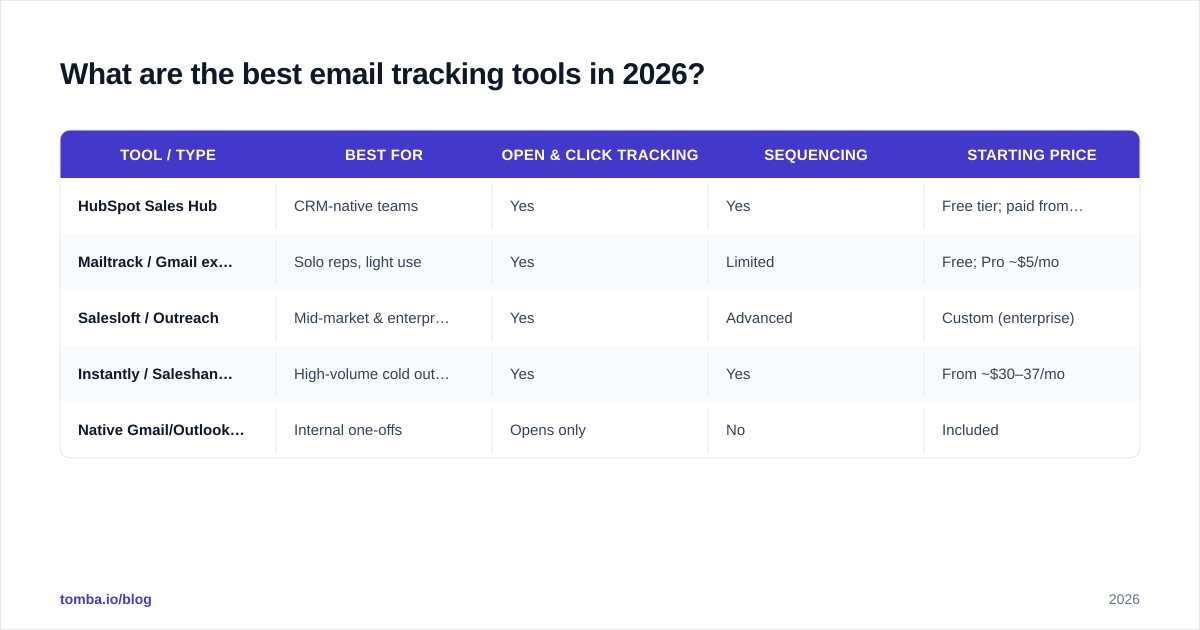
There's no single winner — the right tool depends on how many emails you send and where your workflow lives. Here's an honest comparison of the main categories.
| Tool / Type | Best for | Open & click tracking | Sequencing | Starting price |
|---|---|---|---|---|
| HubSpot Sales Hub | CRM-native teams | Yes | Yes | Free tier; paid from ~$20/seat/mo |
| Mailtrack / Gmail extensions | Solo reps, light use | Yes | Limited | Free; Pro ~$5/mo |
| Salesloft / Outreach | Mid-market & enterprise SDR teams | Yes | Advanced | Custom (enterprise) |
| Instantly / Saleshandy | High-volume cold outreach | Yes | Yes | From ~$30–37/mo |
| Native Gmail/Outlook read receipts | Internal one-offs | Opens only | No | Included |
A few notes that the pricing tables won't tell you:
- Browser extensions (the Gmail-sidebar type) are the fastest way to start. They install in two minutes and track every email you send manually. The ceiling is low — no team analytics, weak sequencing — but for an account executive sending personalized one-to-one emails, that's often enough.
- Sequencing platforms like Salesloft and Outreach combine tracking with multi-step cadences. You're paying for orchestration, not just the pixel.
- CRM-native tracking (HubSpot, Salesforce) keeps the data where your reps already work. If your team lives in the CRM, this beats bolting on a separate tool.
For a deeper look at how tracking fits into broader sales automation, the category has matured fast — most platforms now bundle tracking, sequencing, and reporting into one seat.
Is open tracking still accurate in 2026?#
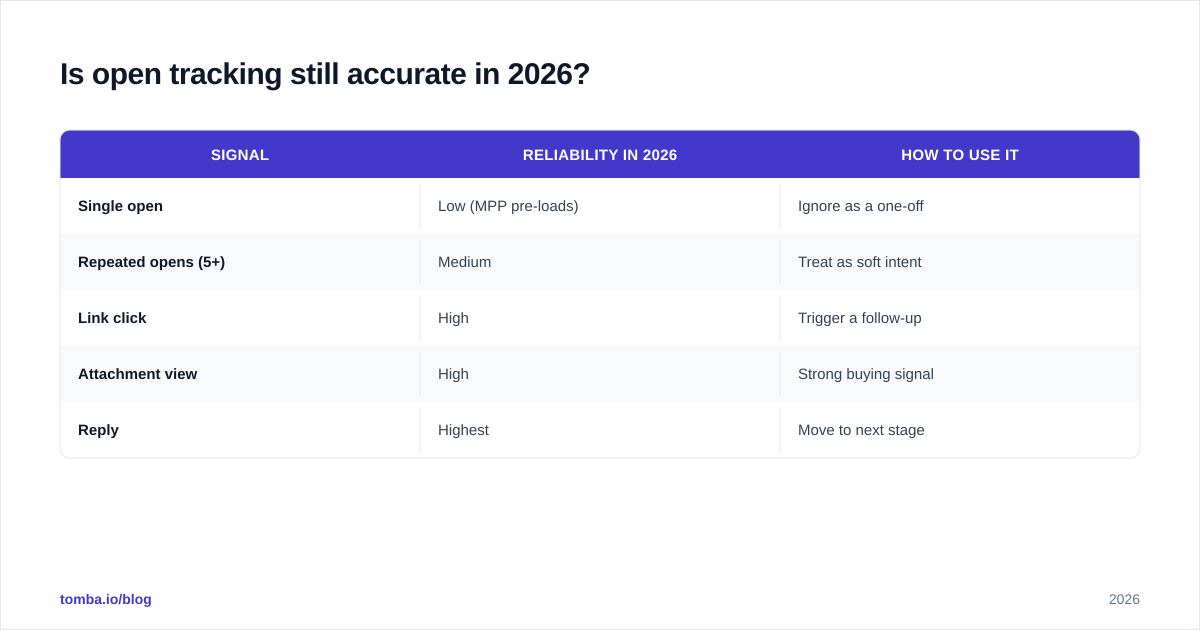
Short answer: open rates are inflated, but open trends still carry signal — and clicks remain trustworthy.
Let me break down what to trust and what to discount:
| Signal | Reliability in 2026 | How to use it |
|---|---|---|
| Single open | Low (MPP pre-loads) | Ignore as a one-off |
| Repeated opens (5+) | Medium | Treat as soft intent |
| Link click | High | Trigger a follow-up |
| Attachment view | High | Strong buying signal |
| Reply | Highest | Move to next stage |
Apple's Mail Privacy Protection is the main reason single opens lost their meaning — Apple's proxy fetches your pixel on the recipient's behalf, so you can record an "open" the human never performed. The fix isn't to abandon tracking; it's to stop building your pipeline on the weakest signal.
Practically: configure your tools to alert you on clicks and attachment views, not opens. Keep open rate as a directional metric for subject-line testing across large samples, where the noise averages out, but never as a per-prospect trigger.
How do you set up email tracking the right way?#
The mechanics take five minutes; doing it well takes a bit of discipline. Here's a repeatable setup.
1. Start with a clean, verified list. Tracking a bounced or fake address produces zero signal and quietly tanks your sender reputation. Run contacts through an email verifier before you ever hit send. Garbage in, garbage tracked.
2. Install the tracker that matches your workflow. Gmail extension for solo work, CRM integration for team work. Don't run three overlapping trackers — they conflict and double-count.
3. Turn off open-only alerts; turn on click and reply alerts. This single config change filters out 80% of the MPP noise and surfaces the prospects who actually did something.
4. Sync everything to the CRM. A tracked open that lives only in your inbox is invisible to your manager and useless for forecasting. Pipe the data into the contact record.
5. Build one follow-up rule and actually follow it. Example: "If a prospect clicks the pricing link and doesn't reply within 24 hours, send a one-line check-in." Tracking without a rule attached is just a dashboard you'll stop looking at.
What are the privacy and deliverability risks?#
Tracking sits in a gray zone, and ignoring that is how reps end up in spam folders or compliance trouble.
Privacy law. GDPR, CASL, and similar regimes treat tracking pixels as a form of monitoring. For cold B2B outreach in many jurisdictions you're operating under legitimate-interest grounds, but you should still honor unsubscribe requests instantly and avoid tracking people who've opted out. When in doubt, check the rules for the recipient's region, not yours.
Deliverability. Wrapped links and tracking domains can trip spam filters if the tracking domain has a bad reputation or isn't authenticated. Two protections matter:
- Use a tool that lets you set a custom tracking domain with proper SPF/DKIM alignment, rather than a shared one that hundreds of spammy senders also use.
- Don't stuff a short email with five wrapped links — that pattern reads as bulk marketing to filters.
The trust cost. Some buyers dislike being tracked, and sophisticated ones can spot a wrapped link by hovering over it. The mitigation is simple: track for your prioritization, not to play games. Don't fire off a "just following up!" email 90 seconds after an open in a way that obviously screams "I'm watching you." Wait, use the signal as context, and reach out like a human.
For more on protecting your sender reputation while you scale outreach, sender reputation is worth understanding before you turn the volume up.
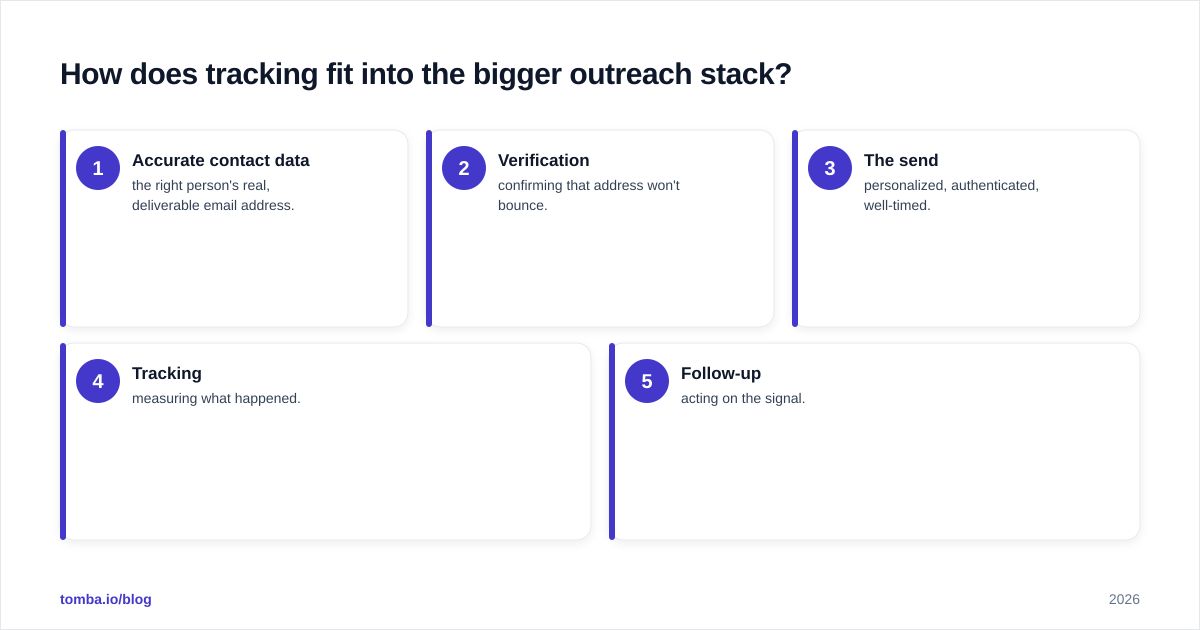
How does tracking fit into the bigger outreach stack?#
Tracking is one layer in a chain, and it's only as strong as the layer before it: your data.
Here's the dependency, top to bottom:
- Accurate contact data — the right person's real, deliverable email address.
- Verification — confirming that address won't bounce.
- The send — personalized, authenticated, well-timed.
- Tracking — measuring what happened.
- Follow-up — acting on the signal.
Most teams obsess over layers 3–5 and neglect layers 1–2. That's backwards. If 20% of your list is wrong or dead, your tracking data is built on sand: your "open rate" is calculated against a denominator full of addresses no human will ever read. Fix the input first.
This is where finding and verifying contacts upstream pays off twice — once in deliverability, once in clean tracking metrics. A domain search to pull verified contacts at a target company, run through verification, gives your tracking something real to measure. You can read independent reviews of these data tools on G2 before committing.
Frequently asked questions#
Can the recipient tell I'm tracking their email? Not from a normal open — the pixel is invisible. A technically savvy recipient can sometimes spot a wrapped link by hovering, or block remote images entirely. Most people never notice.
Does email tracking hurt deliverability? It can, if you use a low-reputation shared tracking domain or overload emails with wrapped links. A custom, authenticated tracking domain and restrained link usage keep you safe.
Is free email tracking good enough? For a solo rep sending one-to-one emails, a free Gmail extension is genuinely fine. The moment you need team analytics, sequencing, or CRM sync, you'll want a paid platform.
Why are my open rates suddenly so high? Almost certainly Apple Mail Privacy Protection inflating them. Shift your attention to click and reply rates, which MPP can't fake.
Where Tomba fits in your tracking stack#
Email tracking only works when the address you're tracking is real. That's the part Tomba handles. Use the Tomba Email Finder to source verified professional emails by name, company, or domain, run them through the built-in verifier, and feed clean, deliverable contacts into whatever tracking tool you prefer — HubSpot, Salesloft, or a Gmail extension.
Tomba's free tier gives you 25 searches a month to test the workflow; paid plans start at $49/mo (Starter), with Growth at $99/mo and Pro at $249/mo. See full Tomba pricing for credit limits per tier. Build your list on accurate data, track the clicks that actually matter, and follow up when the signal is real — that's the whole game in 2026.
// get started
Find, verify and enrich your first contacts today
Start on the free plan with 25 searches a month, then scale when your team is ready.
Free plan · No credit card required · GDPR & CCPA
// about the author