How to Build a Sales Automation Stack in 2026 (Platforms Guide)
Most teams don't have a sales automation stack — they have ten disconnected tools. Here's how to architect platforms that compound pipeline instead of bloating spend.
TL;DR
- A sales automation stack is not a pile of tools — it's four coordinated layers: data, engagement, workflow/CRM, and intelligence. Most teams over-buy in one layer and starve another.
- The fastest way to waste budget in 2026 is buying overlapping platforms (three tools that all "find emails," none that talk to each other).
- Start from the data layer. Bad contact data poisons every automation downstream, no matter how good your sequencer is.
- A lean five-tool stack beats a bloated fifteen-tool stack on cost, deliverability, and rep adoption.
- Use the layered framework below to audit what you have, kill redundancy, and decide what to buy next.
What is a sales automation stack?#
A sales automation stack is the connected set of platforms that move a prospect from "unknown contact" to "booked meeting" without a rep doing manual busywork at every step. Think of it like a kitchen line in a restaurant: prep station, cooking station, plating, and the expediter who keeps it all in sync. If any station is missing or disconnected, orders pile up and quality drops — even if one station is world-class.
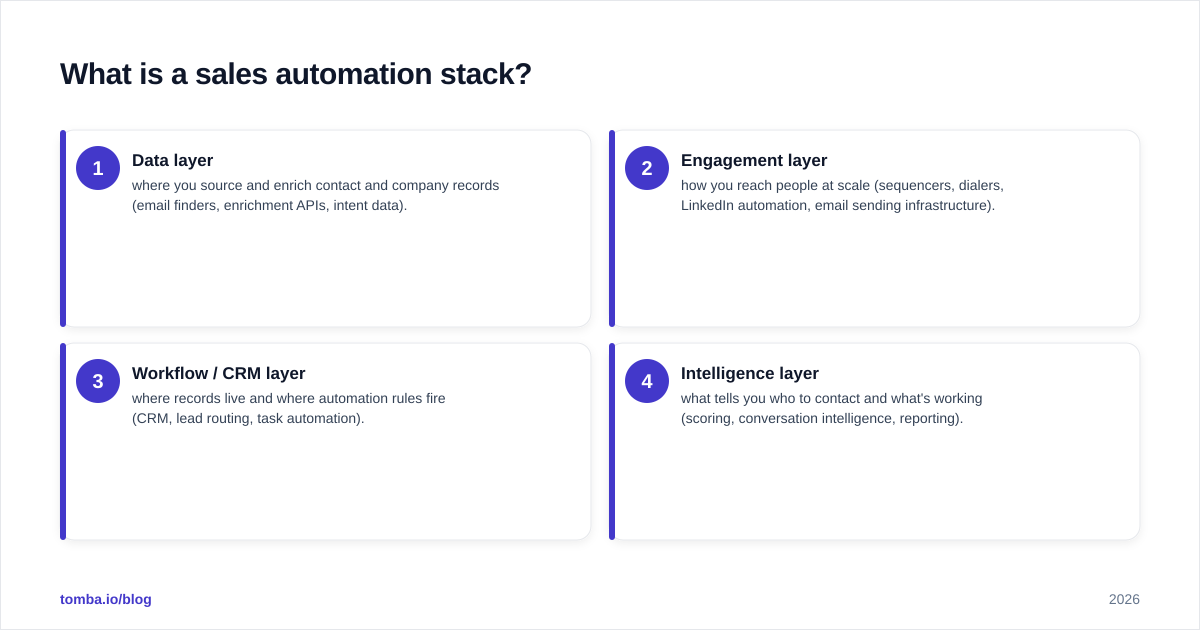
Technically, the stack spans four layers:
- Data layer — where you source and enrich contact and company records (email finders, enrichment APIs, intent data).
- Engagement layer — how you reach people at scale (sequencers, dialers, LinkedIn automation, email sending infrastructure).
- Workflow / CRM layer — where records live and where automation rules fire (CRM, lead routing, task automation).
- Intelligence layer — what tells you who to contact and what's working (scoring, conversation intelligence, reporting).
The mistake almost every team makes is buying tools layer by layer in isolation — a sequencer because a competitor uses one, an intent tool because a webinar pitched it — without checking whether the layers actually hand off to each other. The result is a stack that looks impressive on a slide and leaks data at every seam.
Why does the data layer come first?#
Garbage in, garbage out — and in a sales stack, garbage compounds. If your data layer feeds wrong or stale emails into your engagement layer, you don't just lose those sends. You burn sender reputation, trip spam filters, and degrade deliverability for every other prospect in the same domain.
That's why the data layer is the foundation, not an afterthought. Before you spend on a fancy sequencer, you need:
- Accurate email discovery — a reliable email finder that returns verified, deliverable addresses by name and domain.
- Verification — an email verifier that catches catch-all domains, role accounts, and dead mailboxes before you send.
- Enrichment — data enrichment to fill in title, company size, and phone so your downstream rules have something to segment on.
A quick gut check: pull 100 contacts from your current source and run them through verification. If more than 5–8% bounce or come back "risky," your data layer is the bottleneck — fixing the engagement layer won't help. According to deliverability guidance published by vendors like HubSpot, keeping hard-bounce rates under 2% is the practical threshold for protecting sender reputation.
What are the core platforms in each layer?#
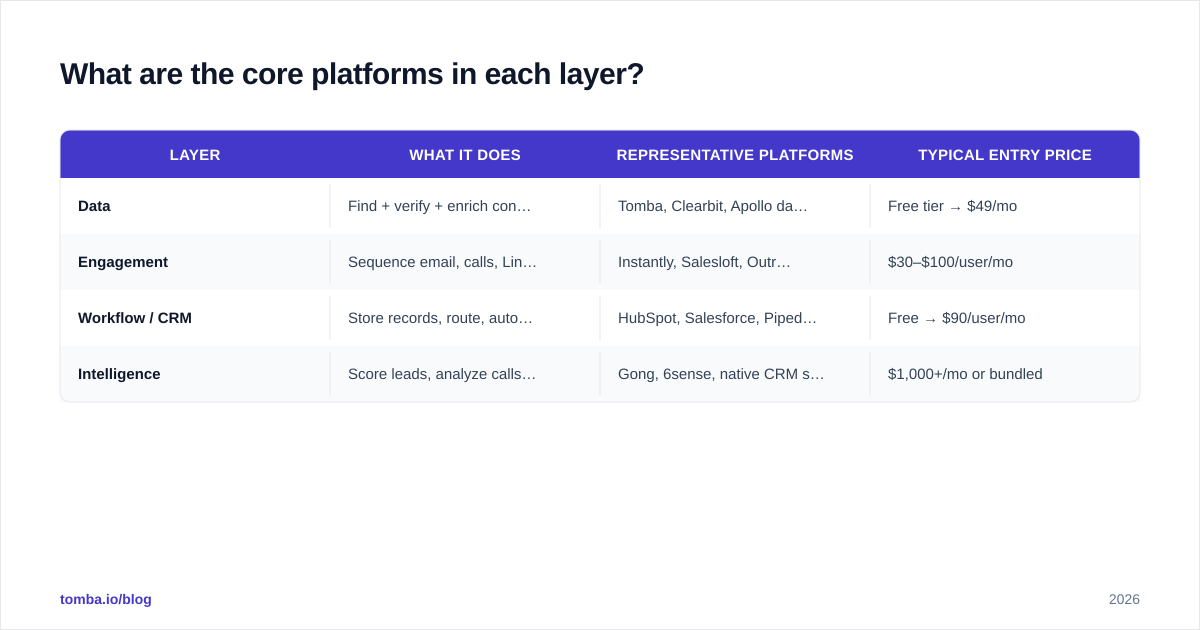
You don't need a tool in every sub-category. You need one solid platform per layer that integrates cleanly with the next. Here's how the common options map.
| Layer | What it does | Representative platforms | Typical entry price |
|---|---|---|---|
| Data | Find + verify + enrich contacts | Tomba, Clearbit, Apollo data | Free tier → $49/mo |
| Engagement | Sequence email, calls, LinkedIn | Instantly, Salesloft, Outreach | $30–$100/user/mo |
| Workflow / CRM | Store records, route, automate tasks | HubSpot, Salesforce, Pipedrive | Free → $90/user/mo |
| Intelligence | Score leads, analyze calls, report | Gong, 6sense, native CRM scoring | $1,000+/mo or bundled |
A few honest notes on this table. "Representative" does not mean "best for you" — a 3-rep startup and a 200-rep enterprise will pick different rows. And several platforms blur the lines: Apollo, for example, sells data and engagement, which is convenient until you want to swap one layer and find you're locked into both. Tomba pricing sits in the data layer with a Free tier (25 searches/mo), Starter at $49/mo, Growth at $99/mo, and Pro at $249/mo, so you can keep the data layer independent of whatever sequencer you standardize on.
You can compare category leaders and read peer reviews on G2 before committing — vendor pricing pages rarely surface the integration gotchas that show up in real reviews.
How do the layers connect into a working stack?#
The value isn't in the boxes — it's in the arrows between them. A working stack passes a record cleanly from discovery to outreach to CRM to reporting, with no copy-paste step in between.
Here's the handoff path that should run with zero manual touches:
- A target account enters the data layer. The email finder API returns verified contacts and enrichment fields.
- Those contacts sync into the CRM via a native HubSpot integration (or Salesforce, Pipedrive, etc.), deduped on the way in.
- CRM rules enroll qualifying contacts into the engagement layer's sequence.
- Replies and meeting bookings write back to the CRM; the intelligence layer scores and reports on what converted.
If any of those arrows requires a human exporting a CSV, that's where your stack breaks — and where data goes stale. The integration layer is the actual product you're buying; the individual tools are just endpoints.
Lean stack vs. bloated stack: which wins?#
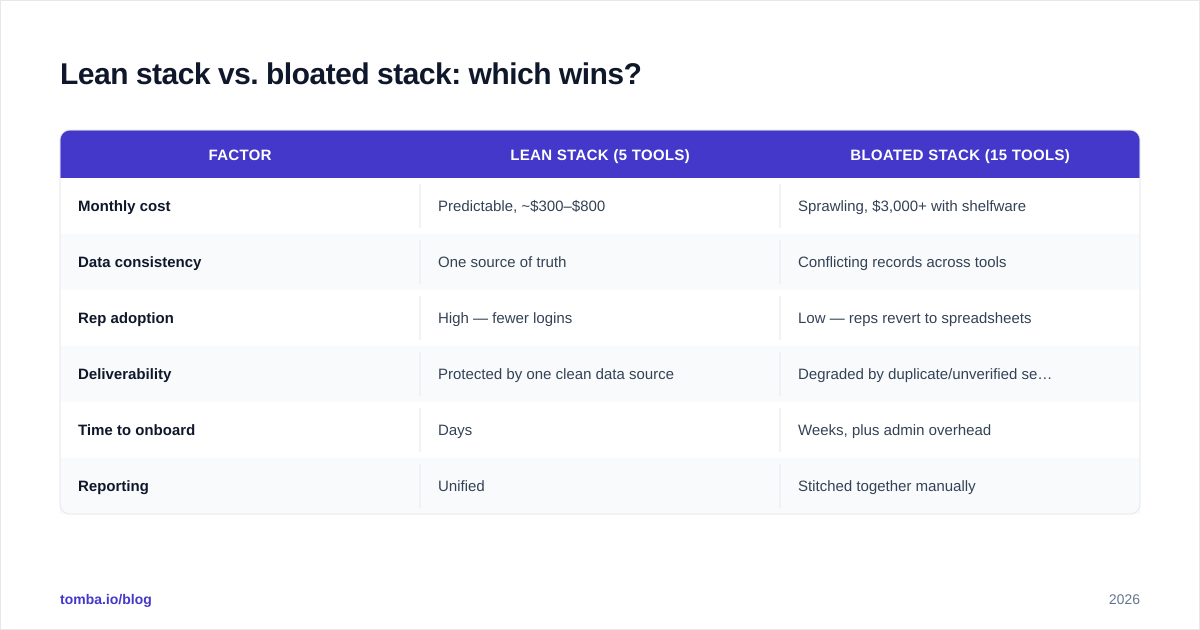
A lean stack wins on almost every metric that matters — and here's the comparison that usually ends the debate internally.
| Factor | Lean stack (5 tools) | Bloated stack (15 tools) |
|---|---|---|
| Monthly cost | Predictable, ~$300–$800 | Sprawling, $3,000+ with shelfware |
| Data consistency | One source of truth | Conflicting records across tools |
| Rep adoption | High — fewer logins | Low — reps revert to spreadsheets |
| Deliverability | Protected by one clean data source | Degraded by duplicate/unverified sends |
| Time to onboard | Days | Weeks, plus admin overhead |
| Reporting | Unified | Stitched together manually |
Bloat usually creeps in through redundancy: two tools that both find emails, two that both sequence, an intent platform nobody checks. Every redundant tool adds a data silo and a reconciliation tax. The discipline is to buy one platform per layer and force it to integrate, rather than buying a new tool every time a feature gap appears.
There's a second hidden cost to bloat: deliverability. When multiple tools pull from different, unverified contact lists, you send to dead addresses you'd already have flagged with a single clean data source. Consolidating discovery and verification into one layer is one of the cheapest deliverability wins available.
How do you audit and build your stack?#
Use the four-layer framework as a scorecard. For each layer, answer three questions: Do I have a platform here? Does it integrate with the layer next to it? Is it duplicated anywhere else?
Step 1 — Map what you own. List every sales tool and tag it with its primary layer. Tools that don't map cleanly to a layer, or that map to a layer you already cover, are your first cancellation candidates.
Step 2 — Fix the data layer first. Verify a sample of your current contacts. If accuracy is weak, fix this before anything else — it's the cheapest, highest-leverage change. Standardize on a single discovery-plus-verification source and connect it to your CRM. For account-based work, layering in a domain search lets you pull every relevant contact at a target company in one pass instead of guessing names.
Step 3 — Pick one engagement platform. Match it to your motion: high-volume cold email favors a deliverability-focused sequencer; multi-threaded enterprise deals favor a platform with strong call and LinkedIn support. Don't run two.
Step 4 — Make the CRM the spine. Every other tool should read from and write to the CRM. If a tool can't sync natively or through your integrations layer (Zapier, Make, native connectors), treat that as a serious mark against it.
Step 5 — Add intelligence last. Scoring and conversation intelligence are multipliers, not foundations. They only pay off once the first three layers feed them clean, complete data. Buying Gong before you've fixed your data layer is like installing a dashboard in a car with no engine.
What does a starter stack look like in 2026?#
For a small B2B team getting off spreadsheets, a defensible five-tool stack looks like this:
| Layer | Pick | Why |
|---|---|---|
| Data | Tomba (Free → $49/mo) | Verified email finder + enrichment + API, CRM-native |
| Engagement | A deliverability-first sequencer | Protects sender reputation at volume |
| CRM | HubSpot or Pipedrive | Free/cheap entry, strong native integrations |
| Workflow | Zapier or Make | Glue for any non-native handoff |
| Intelligence | Native CRM scoring | Free, good enough until you scale |
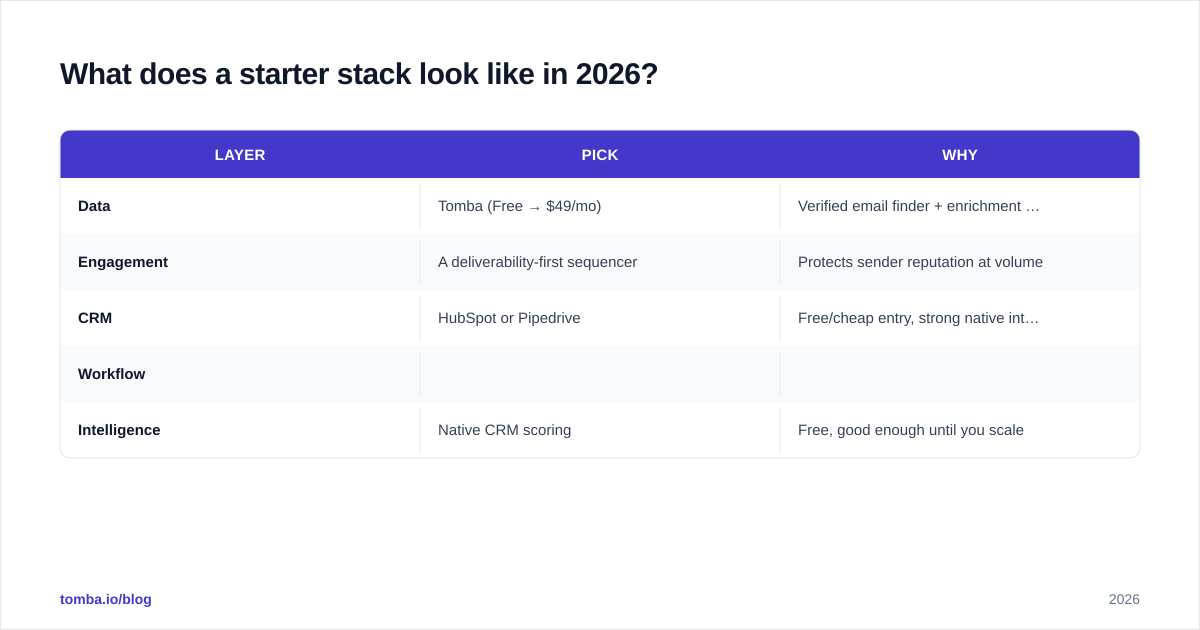
Total monthly cost can stay under $500 for a small team — a fraction of a single seat of some all-in-one suites — while covering all four layers with clean handoffs. As you grow, you upgrade layers individually instead of ripping out a monolith. That modularity is the whole point: the Salesforce ecosystem and others reward teams that keep layers swappable rather than locking everything into one vendor's roadmap.
The pattern to internalize: spend on the data layer first because it protects everything downstream, keep the CRM as your single source of truth, and resist every "all-in-one" pitch that quietly forces you to abandon a layer you've already optimized.
Build the foundation before you automate#
If you take one thing from this: a sales automation stack is only as strong as the data flowing through it. Sequencers, dialers, and AI scoring all amplify whatever you feed them — including bad contacts. Start by locking down a clean, verified, enriched data layer, then build outward.
That's exactly where Tomba Email Finder fits. It anchors the data layer with verified email discovery, enrichment, and a developer-friendly API that plugs straight into your CRM and sequencer — so every downstream automation runs on contacts that actually exist. Start on the Free tier (25 searches/mo), confirm your bounce rate drops, then scale the rest of your stack on a foundation you can trust.
// get started
Find, verify and enrich your first contacts today
Start on the free plan with 25 searches a month, then scale when your team is ready.
Free plan · No credit card required · GDPR & CCPA
// about the author