Sales Hub Sales Process Pipeline: A 2026 Build Guide
Your sales hub is only as good as the pipeline inside it. Here's how to design sales process stages that forecast accurately and move deals faster in 2026.
Your sales hub is a filing cabinet until you define the process that runs through it. Most teams buy a CRM, accept the default deal stages, and wonder why their forecast is wrong by 40% every quarter. The problem is rarely the software. It's the undefined pipeline living inside it.
This guide shows you how to design a sales process and pipeline that your sales hub can actually enforce — stage by stage, with exit criteria, clean data, and the tooling that keeps it honest.
TL;DR#
- A sales hub sales process pipeline is the documented set of stages a deal moves through inside your CRM, plus the rules that govern movement between them.
- Default pipeline stages (the ones HubSpot or Salesforce ship with) are starting points, not finished processes — you must define exit criteria for each stage.
- Pipelines fail on data, not design: duplicate contacts, stale records, and missing emails quietly corrupt your forecast.
- Aim for 5–7 stages mapped to buyer actions, not seller activities. More stages create false precision.
- Feed the top of the pipeline with verified contact data so reps spend time selling, not chasing bounced emails.
What is a sales hub sales process pipeline?#
A sales hub sales process pipeline is the structured path every deal travels inside your sales platform, from first touch to closed-won or closed-lost. Think of it like an airport's arrivals system: a plane (deal) can't taxi to the gate (close) until it has cleared the runway, customs, and baggage in a fixed order. The "sales hub" is the control tower — HubSpot Sales Hub, Salesforce, Pipedrive, or any CRM where deals live. The "process" is the agreed sequence of stages. The "pipeline" is the visual board that shows where each deal sits right now.
The three words get blurred in practice, so separate them:
- Process — the methodology (qualify, demo, propose, negotiate).
- Pipeline — the live inventory of open deals at each stage.
- Sales hub — the software that records and reports both.
When these align, your weekly forecast becomes a math problem instead of a guessing game. When they drift apart, you get the situation below.
According to Gartner research on sales technology, the teams that see ROI from CRM investment are the ones that standardize their process before configuring the tool — not after. The software amplifies whatever process you bring to it, good or bad.
Why do default pipeline stages fail?#
Default stages fail because they describe what the seller is doing, not what the buyer has committed to. "Demo scheduled," "proposal sent," and "contract sent" are all seller activities. A buyer can sit in "proposal sent" for ninety days while the deal is functionally dead.
Stages should be defined by buyer commitments that are observable and binary:
- Did the economic buyer agree to a next meeting? Yes or no.
- Has the prospect confirmed budget exists? Yes or no.
- Has procurement received the contract? Yes or no.
This single shift — from activity-based to commitment-based stages — is what separates a forecast you can defend from one you apologize for. It also makes your win rate measurable per stage, so you can see exactly where deals leak out.
How many pipeline stages should you have?#
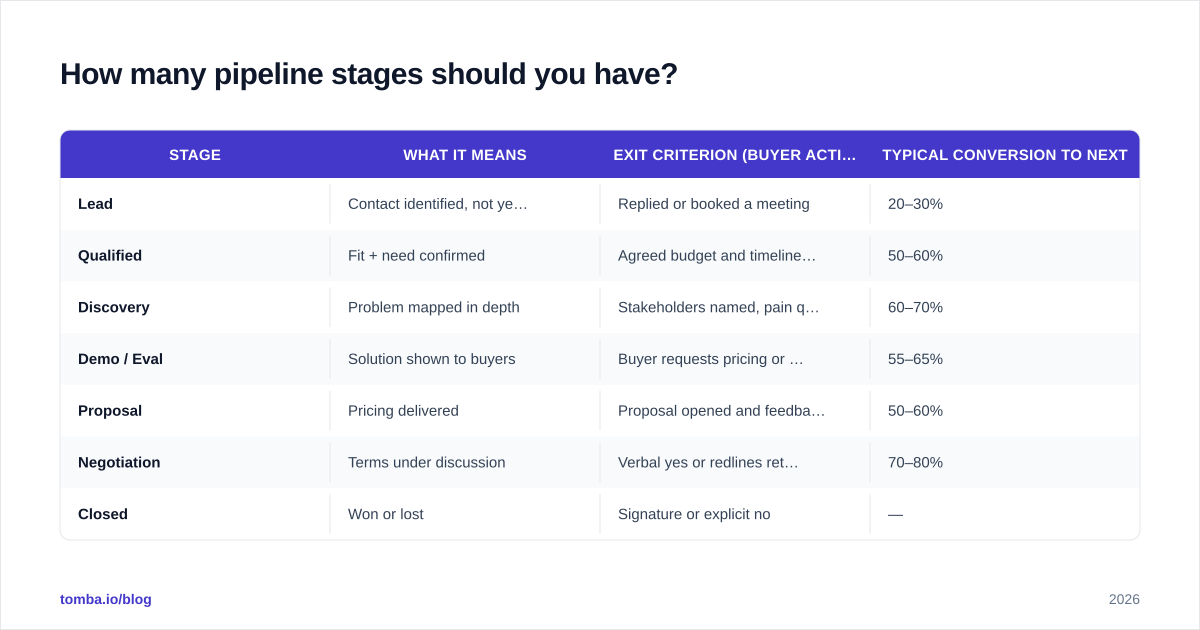
Five to seven stages is the sweet spot for most B2B teams. Fewer than five and you lose diagnostic resolution — you can't tell where deals stall. More than eight and reps stop updating the CRM accurately because the precision is fake.
Here is a battle-tested seven-stage structure with the buyer-side exit criterion that unlocks each move:
| Stage | What it means | Exit criterion (buyer action) | Typical conversion to next |
|---|---|---|---|
| Lead | Contact identified, not yet engaged | Replied or booked a meeting | 20–30% |
| Qualified | Fit + need confirmed | Agreed budget and timeline exist | 50–60% |
| Discovery | Problem mapped in depth | Stakeholders named, pain quantified | 60–70% |
| Demo / Eval | Solution shown to buyers | Buyer requests pricing or proposal | 55–65% |
| Proposal | Pricing delivered | Proposal opened and feedback given | 50–60% |
| Negotiation | Terms under discussion | Verbal yes or redlines returned | 70–80% |
| Closed | Won or lost | Signature or explicit no | — |
Notice that every exit criterion is something the buyer does. If a rep can't point to the buyer action, the deal hasn't earned the next stage. This discipline is what keeps your pipeline from inflating.
What does each stage need to be enforceable?#
A stage is only real if your sales hub can enforce it. That means three properties per stage:
- A required field or property the rep must fill (e.g., "next step date," "budget confirmed").
- An automation that flags or rots deals sitting too long (HubSpot workflows, Salesforce flows).
- A reporting view that rolls the stage into the forecast with a probability weight.
If your stage has none of these, it's decoration. Most CRMs let you make properties required at stage transitions — use that aggressively. The friction is the feature: it forces honest data entry. You can connect Tomba directly through the HubSpot integration so enriched contact and company fields populate automatically rather than relying on reps to type them.
Is HubSpot Sales Hub better than Salesforce for pipeline management?#
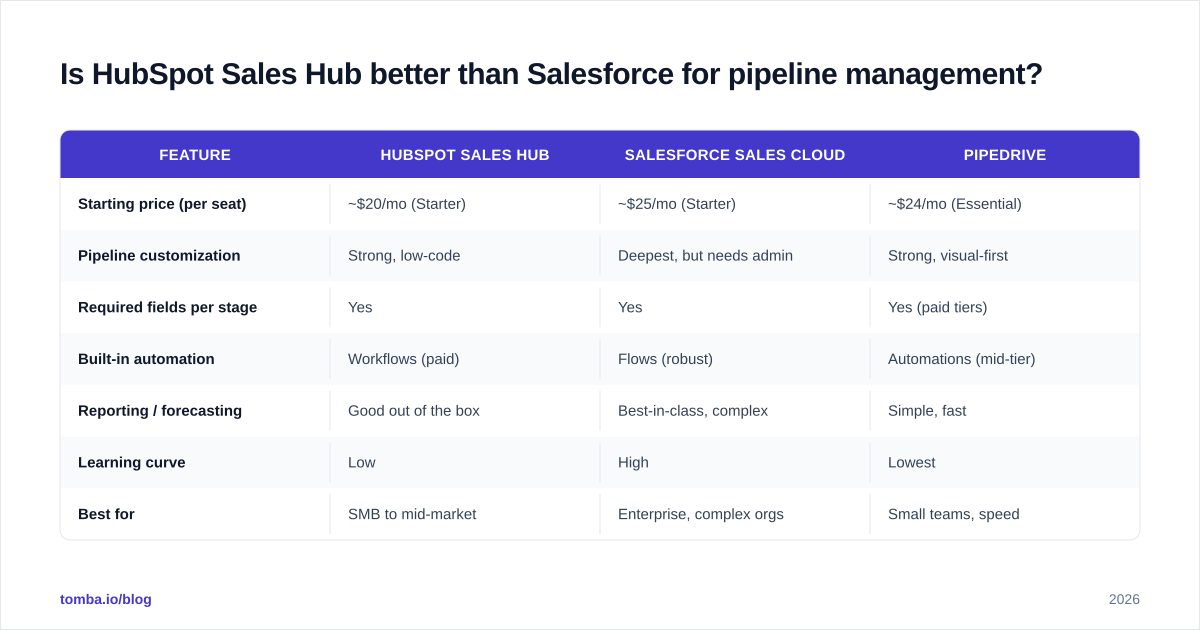
Neither is categorically better — they fit different team shapes. Here's an honest comparison of the two dominant sales hubs plus a lightweight alternative, scored on what actually matters for pipeline discipline.
| Feature | HubSpot Sales Hub | Salesforce Sales Cloud | Pipedrive |
|---|---|---|---|
| Starting price (per seat) | ~$20/mo (Starter) | ~$25/mo (Starter) | ~$24/mo (Essential) |
| Pipeline customization | Strong, low-code | Deepest, but needs admin | Strong, visual-first |
| Required fields per stage | Yes | Yes | Yes (paid tiers) |
| Built-in automation | Workflows (paid) | Flows (robust) | Automations (mid-tier) |
| Reporting / forecasting | Good out of the box | Best-in-class, complex | Simple, fast |
| Learning curve | Low | High | Lowest |
| Best for | SMB to mid-market | Enterprise, complex orgs | Small teams, speed |
Reference G2 category grids for current per-seat pricing — tiers shift often. The decision rule is simple: if you have a dedicated RevOps admin and complex territories, Salesforce rewards the investment. If you want speed and a shallow learning curve, HubSpot or Pipedrive get a clean pipeline live in a week.
Whatever hub you choose, the CRM is the engine — but it runs on the fuel quality of your contact data, which is where most pipelines quietly break.
Why does data hygiene make or break your pipeline?#
Because a pipeline built on bad data forecasts confidently and wrongly. Three silent killers:
- Duplicate deals and contacts inflate pipeline value and double-count revenue.
- Stale records keep dead deals "open," skewing stage conversion math.
- Bad or missing emails mean top-of-funnel outreach bounces, so qualified leads never enter the pipeline at all.
That last one is the leak most teams ignore. If 20% of the emails your reps source bounce, you're not just wasting sends — you're poisoning your sender reputation and shrinking the lead stage that everything downstream depends on. The fix is to verify contact data before it enters the hub, not after a campaign craters.

This is also the moment teams get distracted. A new AI dialer or sequencing tool looks more exciting than fixing duplicate records — but the unglamorous data work is what moves the forecast. Use a data enrichment step to fill missing fields and an email verifier to scrub addresses before they ever hit a deal record.
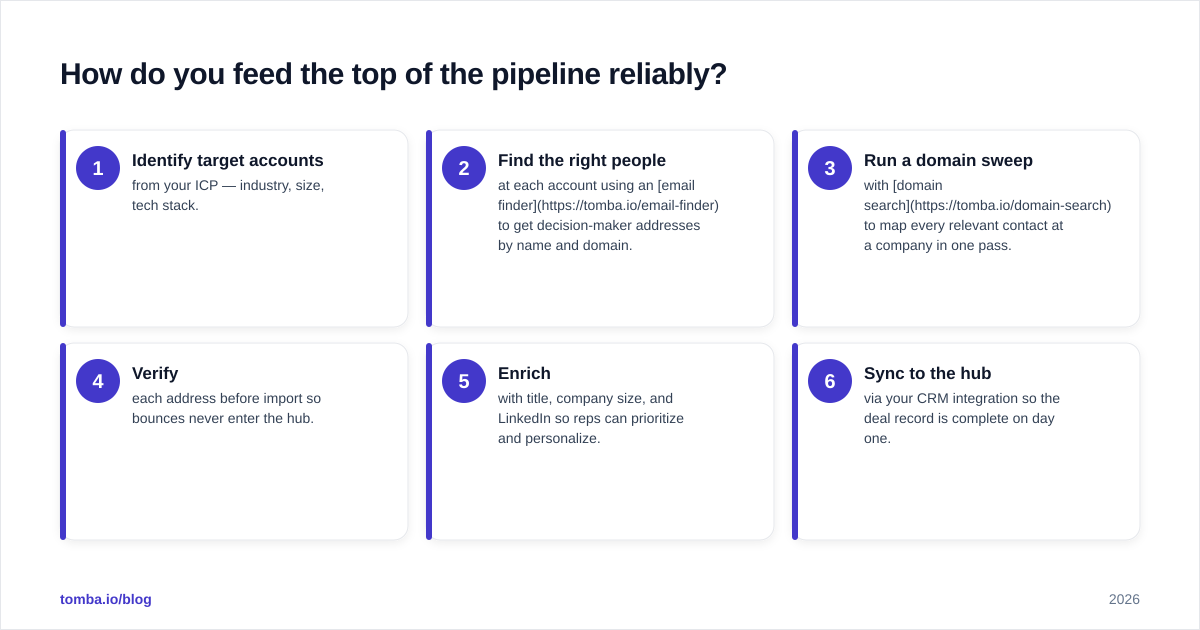
How do you feed the top of the pipeline reliably?#
You feed it with verified, role-targeted contacts so every lead that enters is reachable. A repeatable intake motion looks like this:
- Identify target accounts from your ICP — industry, size, tech stack.
- Find the right people at each account using an email finder to get decision-maker addresses by name and domain.
- Run a domain sweep with domain search to map every relevant contact at a company in one pass.
- Verify each address before import so bounces never enter the hub.
- Enrich with title, company size, and LinkedIn so reps can prioritize and personalize.
- Sync to the hub via your CRM integration so the deal record is complete on day one.
When this intake is clean, your "Lead" stage stops being a junk drawer and becomes a forecastable inventory. Reps spend their hours on conversations, not on chasing dead addresses or retyping company data.
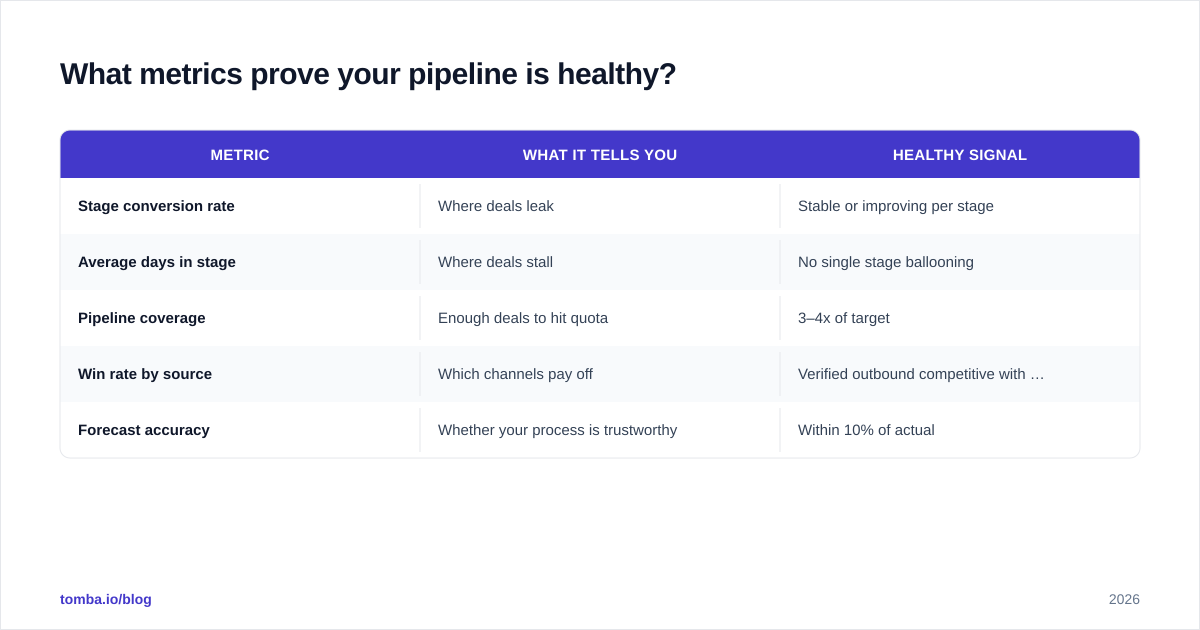
What metrics prove your pipeline is healthy?#
Track these five and you'll catch problems before the quarter ends:
| Metric | What it tells you | Healthy signal |
|---|---|---|
| Stage conversion rate | Where deals leak | Stable or improving per stage |
| Average days in stage | Where deals stall | No single stage ballooning |
| Pipeline coverage | Enough deals to hit quota | 3–4x of target |
| Win rate by source | Which channels pay off | Verified outbound competitive with inbound |
| Forecast accuracy | Whether your process is trustworthy | Within 10% of actual |
If average days-in-stage spikes for "Proposal," your pricing or follow-up is broken. If pipeline coverage drops below 3x, your top-of-funnel intake — the contact sourcing step above — needs more volume. The metrics point you straight at the fix.
How do you roll this out without reps rebelling?#
Change management beats configuration every time. Reps abandon CRMs that feel like surveillance. Three moves that get adoption:
- Map stages to how reps already think. If they say "kicking the tires," that's your Discovery stage. Use their language in stage names.
- Make data entry pay them back. Auto-populate fields through enrichment so updating the CRM saves them work instead of adding it.
- Review the pipeline, not the people. In deal reviews, ask "what does this deal need to advance?" not "why didn't you update Salesforce?"
A pipeline that reps trust is a pipeline they maintain. And a maintained pipeline is the only kind that forecasts.
The bottom line#
A sales hub sales process pipeline works when three things line up: stages defined by buyer commitments, exit criteria your CRM enforces, and contact data clean enough to trust. The software is the easy part. The process design and the data hygiene are where deals are won or lost.
Start by feeding the top of your funnel with verified, decision-maker contacts so your pipeline reflects real, reachable opportunities — not a list of bounced guesses. Tomba's Email Finder lets you source accurate professional emails by name, company, or domain, verify them before they hit your CRM, and sync straight into your sales hub. Try it on the free tier (25 searches a month) and see how a clean lead stage changes your forecast — then check Tomba pricing when you're ready to scale outbound volume.
Ready to find emails that actually work?
Join 150,000+ professionals who stopped guessing and started sending. Free credits on signup — no credit card required.
Get the Tomba newsletter
Practical outbound tactics and product updates — once every two weeks.
About the author