Sales Hub Sales Process & Pipeline Deal Management 2026
How to build a repeatable sales process, design a clean pipeline, and run deal management inside a sales hub in 2026 — stages, automation, and the data that feeds it.
(title rendered separately)
Your pipeline is not a list of deals. It is a model of how your team turns a stranger into revenue — and if that model is wrong, every forecast built on it is fiction. A sales hub is where the process, the pipeline, and the individual deals finally live in one place instead of three spreadsheets and a sticky note.
This guide breaks down how to design that system in 2026: the difference between process and pipeline, how to build stages that actually predict outcomes, how deal management works inside a hub, and the data layer that keeps the whole thing from rotting.
TL;DR#
- Sales process is the repeatable sequence of actions your team takes; pipeline is the visual board that tracks deals through those stages; deal management is the day-to-day work of moving each opportunity forward.
- A good pipeline has 5–7 buyer-action-based stages, each with a clear exit criterion — not vague labels like "Working" or "Hot."
- A sales hub (HubSpot, Salesforce, Pipedrive) centralizes all three, but it is only as accurate as the contact data you feed it.
- Automate the boring transitions (stage rot alerts, task creation, owner assignment) and let reps spend time on the human parts.
- Dirty data is the silent pipeline killer — verify contacts and enrich records before they hit your CRM, not after.
What is the difference between a sales process, a pipeline, and deal management?#
Think of it like cooking in a restaurant. The sales process is the recipe — the fixed steps every dish follows. The pipeline is the pass where tickets line up so the kitchen sees what's cooking and how far along it is. Deal management is the chef actually working a single order: prepping, timing, plating.
People conflate these three constantly, and the confusion shows up in bad forecasts.
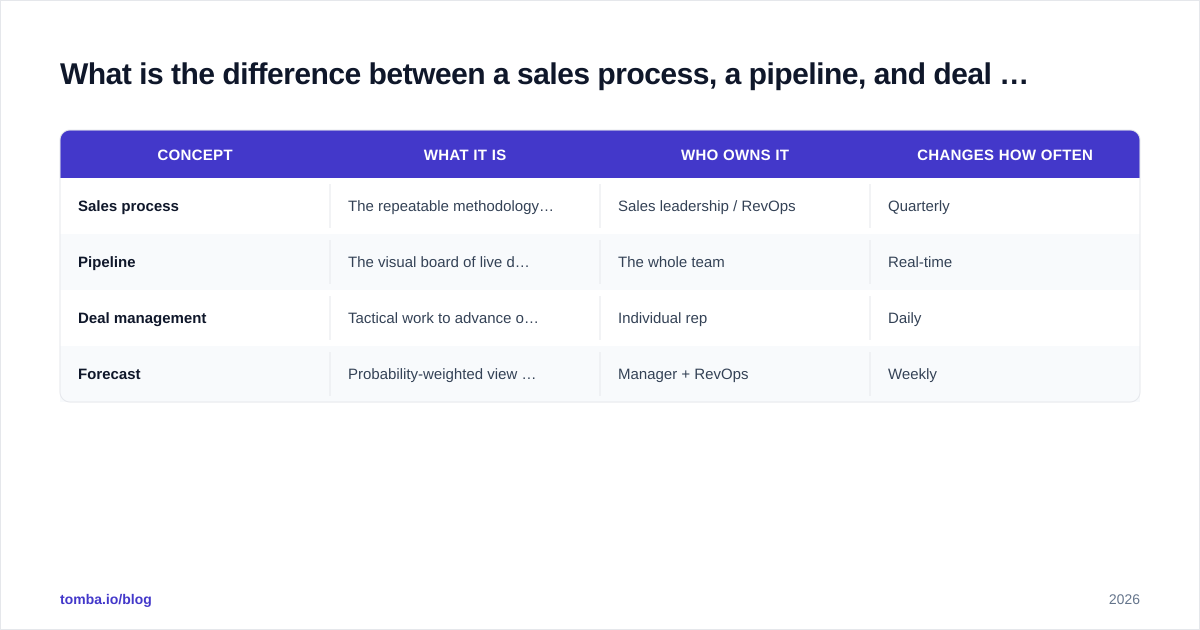
| Concept | What it is | Who owns it | Changes how often |
|---|---|---|---|
| Sales process | The repeatable methodology and stage definitions | Sales leadership / RevOps | Quarterly |
| Pipeline | The visual board of live deals by stage | The whole team | Real-time |
| Deal management | Tactical work to advance one opportunity | Individual rep | Daily |
| Forecast | Probability-weighted view of pipeline | Manager + RevOps | Weekly |
The reason this matters: you cannot fix a forecasting problem by tweaking the pipeline view. If reps are sandbagging or stages are mushy, that is a process problem. The hub just renders whatever model you give it.
How do you design pipeline stages that actually predict revenue?#
Conclusion first: name your stages after buyer actions, not seller feelings. "Demo Scheduled" is verifiable. "Interested" is a vibe.
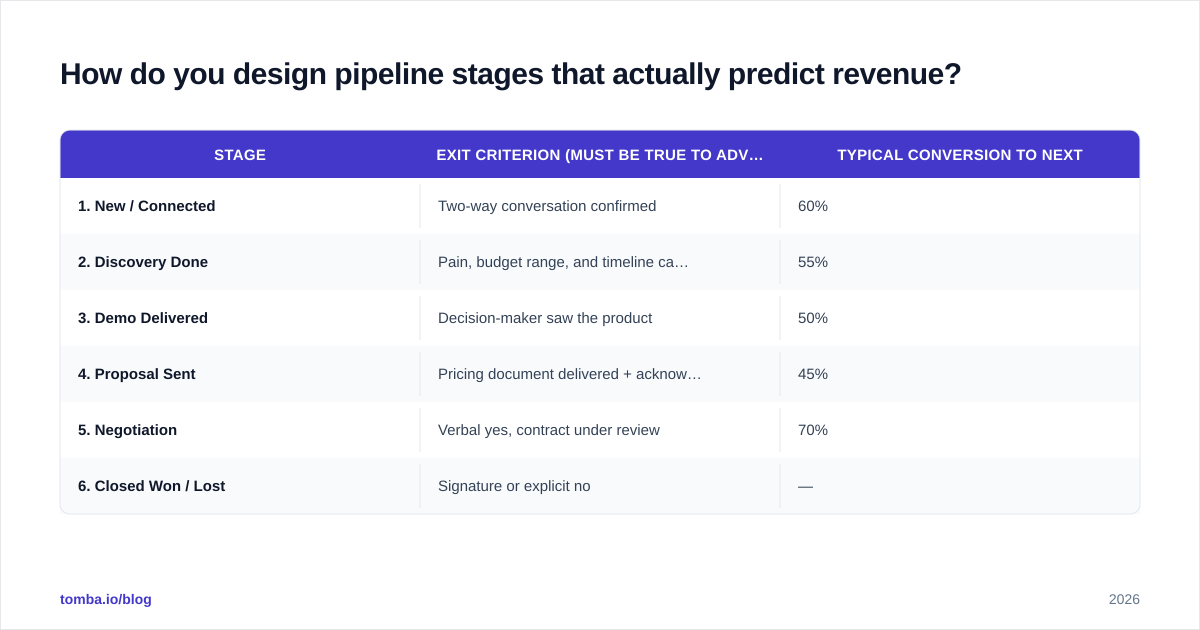
A stage is only useful if it has an objective exit criterion — a fact that must be true before a deal can move forward. When every rep agrees on what "true" looks like, your conversion rates between stages become a stable, trustworthy signal.
Here is a clean B2B SaaS pipeline most teams can adapt:
| Stage | Exit criterion (must be true to advance) | Typical conversion to next |
|---|---|---|
| 1. New / Connected | Two-way conversation confirmed | 60% |
| 2. Discovery Done | Pain, budget range, and timeline captured | 55% |
| 3. Demo Delivered | Decision-maker saw the product | 50% |
| 4. Proposal Sent | Pricing document delivered + acknowledged | 45% |
| 5. Negotiation | Verbal yes, contract under review | 70% |
| 6. Closed Won / Lost | Signature or explicit no | — |
Five to seven stages is the sweet spot. Fewer than five and you lose diagnostic resolution; more than seven and reps stop updating them honestly. HubSpot's own sales pipeline guidance and most CRM vendors converge on this range for a reason — it maps to how buyers actually make decisions.
One rule worth tattooing on the team: a deal can only move forward when its exit criterion is met, but it can skip backward freely. Deals slide back. Pretending they don't is how you build a forecast that lies to you.
What does deal management look like inside a sales hub?#
Deal management is the unglamorous middle: the 14 to 90 days between "interested" and "signed" where most revenue is won or quietly lost. A sales hub helps by making the next action obvious and the stalled deals impossible to ignore.
The core moves inside any hub:
- Stage rot alerts. If a deal sits in one stage past its average dwell time, flag it. A deal stuck in "Proposal Sent" for 30 days is dying — surface it before the rep forgets it exists.
- Next-step enforcement. Every open deal should have a scheduled next activity. No next step = the deal is effectively abandoned.
- Automated task creation. When a deal hits "Demo Delivered," auto-create the follow-up and proposal tasks so nothing depends on memory.
- Owner and territory routing. New deals route to the right rep automatically based on region, size, or vertical.
- Activity logging. Calls, emails, and meetings attach to the deal record so the next person inheriting it has full context.
This is also where your sales process intersects with sales automation — the goal is to automate the transitions and notifications, not the relationship. A bot can remind a rep to follow up; it cannot read the room on a negotiation call.

Which sales hub should you use for pipeline and deal management?#
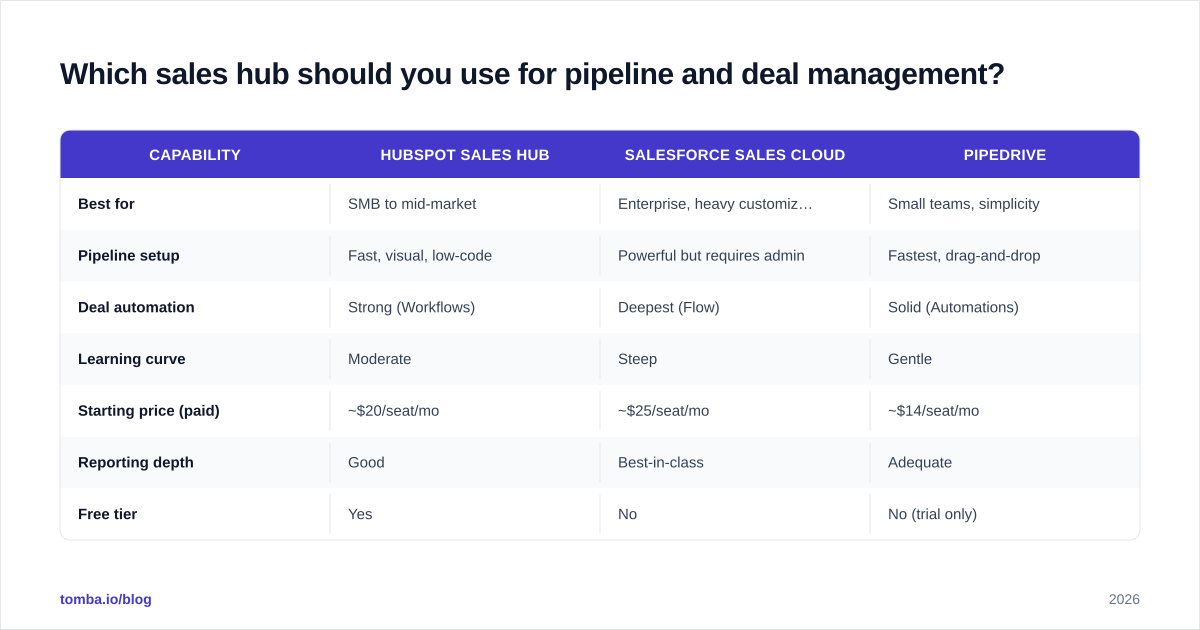
There is no universal winner — the right hub depends on team size, budget, and how much process complexity you actually need. Here is an honest comparison of the three most common choices in 2026.
| Capability | HubSpot Sales Hub | Salesforce Sales Cloud | Pipedrive |
|---|---|---|---|
| Best for | SMB to mid-market | Enterprise, heavy customization | Small teams, simplicity |
| Pipeline setup | Fast, visual, low-code | Powerful but requires admin | Fastest, drag-and-drop |
| Deal automation | Strong (Workflows) | Deepest (Flow) | Solid (Automations) |
| Learning curve | Moderate | Steep | Gentle |
| Starting price (paid) | ~$20/seat/mo | ~$25/seat/mo | ~$14/seat/mo |
| Reporting depth | Good | Best-in-class | Adequate |
| Free tier | Yes | No | No (trial only) |
A few honest takes:
- Pick HubSpot if you want strong automation without a dedicated admin, and you value the free CRM tier to start. See its Sales Hub pricing directly — vendor pricing changes often, so always confirm.
- Pick Salesforce if you have complex territories, custom objects, and the headcount to maintain it. Read independent reviews on G2 before committing.
- Pick Pipedrive if your team is small, your process is linear, and you want something a rep can master in an afternoon.
The tool matters less than the discipline. A clean process in Pipedrive beats a messy one in Salesforce every time.
How does data quality break (or save) your pipeline?#
Here is the uncomfortable truth most pipeline guides skip: your sales hub is a garbage-in, garbage-out machine. The most elegant stage definitions in the world cannot save a pipeline built on bounced emails, wrong job titles, and contacts who left the company eight months ago.
Bad data costs you in three compounding ways:
- Wasted rep hours. Reps chase contacts who never receive the email or who no longer hold the role.
- Skewed forecasts. Deals with no reachable contact still sit in the pipeline inflating the number.
- Deliverability damage. Sending to invalid addresses tanks your sender reputation and pushes even your good emails to spam.
The fix is to treat data hygiene as part of the process, not a cleanup chore. Before a contact becomes a deal, the address should be verified and the record enriched.
A practical pre-pipeline data workflow:
- Find the right contact. Use a domain search to surface decision-makers at a target account, or an email finder to get a specific person's address by name and company.
- Verify before you load. Run every address through an email verifier so dead contacts never enter the pipeline in the first place.
- Enrich the record. Add firmographics, role, and seniority with data enrichment so routing and scoring actually work.
- Sync into the hub. Push clean records straight into your CRM — Tomba connects to the same hubs you're using, including a native HubSpot integration.
This is the step most teams bolt on too late. Clean data at the front of the process means every downstream stage conversion rate, every forecast, and every automation runs on facts instead of hope.
How do you measure whether your pipeline is healthy?#
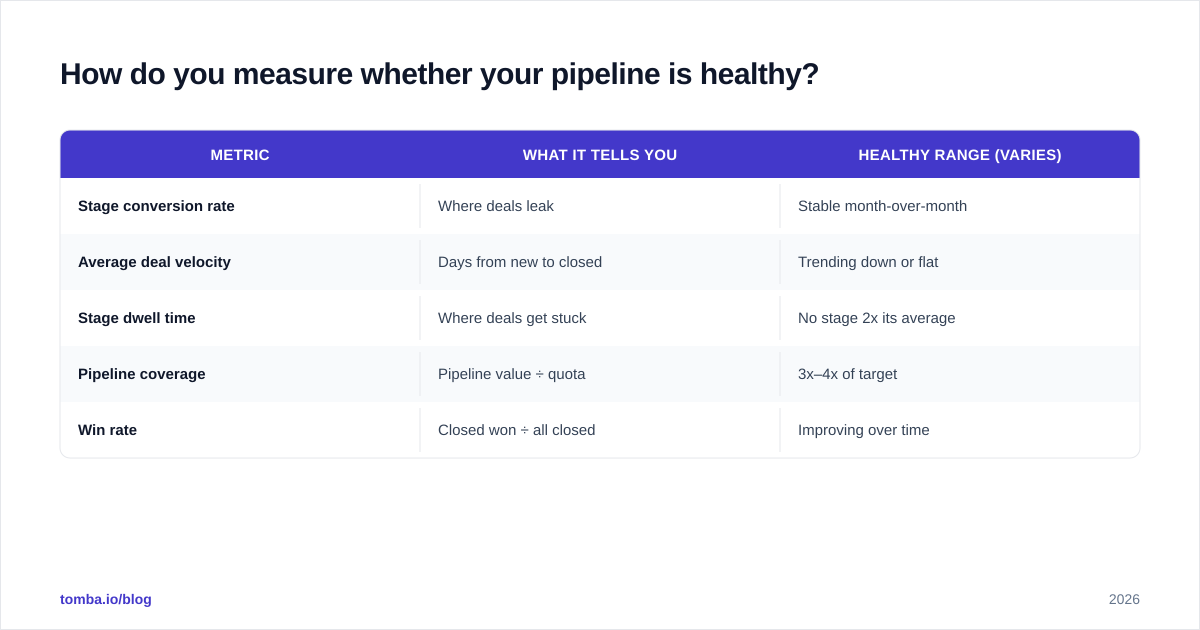
Pipeline health is not "how big is the number." A bloated pipeline full of stale deals is worse than a small honest one, because it lies to you. Track these instead:
| Metric | What it tells you | Healthy range (varies) |
|---|---|---|
| Stage conversion rate | Where deals leak | Stable month-over-month |
| Average deal velocity | Days from new to closed | Trending down or flat |
| Stage dwell time | Where deals get stuck | No stage 2x its average |
| Pipeline coverage | Pipeline value ÷ quota | 3x–4x of target |
| Win rate | Closed won ÷ all closed | Improving over time |
If your win rate is fine but coverage is thin, you have a top-of-funnel problem — go build more pipeline. If coverage is huge but win rate is dropping, you have a qualification problem — your early stages are letting junk through. The metrics tell you which part of the process to fix, which is the entire point of running it inside a hub.
Review these weekly in pipeline meetings. The conversation should be about specific stuck deals and what unsticks them — not a status recitation. A good rule: if a deal hasn't moved and has no next step, it gets a decision (advance, pause, or kill) before the meeting ends.
What's the simplest way to start if your process is a mess today?#
Start small and make it real before you make it fancy.
- Map your actual stages — not the ideal ones, the ones deals really go through. Write the exit criterion for each.
- Build it in your hub as a single pipeline. Resist the urge to create six pipelines on day one.
- Clean your existing contacts — verify and enrich what's already in the CRM so you're not building on sand.
- Add automation last — only after the manual process works. Automating a broken process just breaks it faster.
- Review weekly and adjust stages quarterly based on where deals actually leak.
The teams that win at deal management aren't the ones with the most sophisticated hub. They're the ones whose process is simple enough that every rep follows it the same way every time — fed by data they can trust.
Get the data layer right first#
Your sales process, pipeline, and deal management all sit on top of one thing: accurate contact data. If the email bounces, the deal was never real.
Start at the source. Use the Tomba Email Finder to find verified, professional email addresses by name, company, or domain — then push clean, enriched records straight into your sales hub. The free tier gives you 25 searches a month to test it; paid plans start at $49/mo (Starter), $99/mo (Growth), and $249/mo (Pro). Check current Tomba pricing for details. Build your pipeline on facts, and the forecast will finally start telling the truth.
// get started
Find, verify and enrich your first contacts today
Start on the free plan with 25 searches a month, then scale when your team is ready.
Free plan · No credit card required · GDPR & CCPA
// about the author