HubSpot Sales Hub for Sales Prospecting in 2026: Full Guide
A neutral, hands-on look at how HubSpot Sales Hub handles sales prospecting in 2026 — workspace, sequences, pricing, limits, and where you still need a dedicated email finder.
TL;DR
- HubSpot Sales Hub bundles prospecting into a single "prospecting workspace" — tasks, sequences, queues, and activity feed in one screen — which is its biggest 2026 advantage over standalone tools.
- Sequences (automated multi-step email + task cadences) are the engine, but they sit behind the Professional tier ($100/seat/mo), not the free or Starter plans.
- Sales Hub is a sequencing and CRM layer, not a contact-data provider. Its built-in prospecting database is thin compared to dedicated finders, so you still need an accurate email source.
- For data quality you pair it with a specialist like Tomba's email finder; for sending cadence and pipeline you lean on Sales Hub.
- Best fit: teams already on HubSpot CRM who want prospecting, deals, and reporting under one roof. Worst fit: solo reps or anyone needing cheap, high-volume data.
What is Sales Hub sales prospecting?#
Sales Hub sales prospecting is HubSpot's bundle of tools for finding, contacting, and tracking prospects inside the HubSpot CRM — centered on the prospecting workspace, a single view where a rep manages their day instead of bouncing between tabs.
Think of it like a pilot's cockpit. Instead of separate gauges scattered across the dashboard (one app for tasks, another for email, a third for notes), everything a rep needs to fly the day — overdue tasks, active sequences, scheduled meetings, and the next contact to call — sits on one panel. That consolidation is the actual product story in 2026, more than any single feature.
Underneath the workspace, the prospecting stack is built from a few moving parts:
- Sequences — automated, multi-step cadences mixing emails and task reminders.
- Tasks and queues — batched call/email/LinkedIn to-dos a rep clears in a focused block.
- Templates and snippets — reusable email bodies with personalization tokens.
- Meeting links — calendar booking pages that cut the back-and-forth.
- Email tracking — open and click notifications, plus reply detection.
- Reporting — activity and outcome metrics rolled up per rep and team.
The pitch is that a CRM you already use for deals also runs your outreach, so nothing falls through the cracks between "marketing got a lead" and "a rep worked it."
How does the prospecting workspace actually work?#
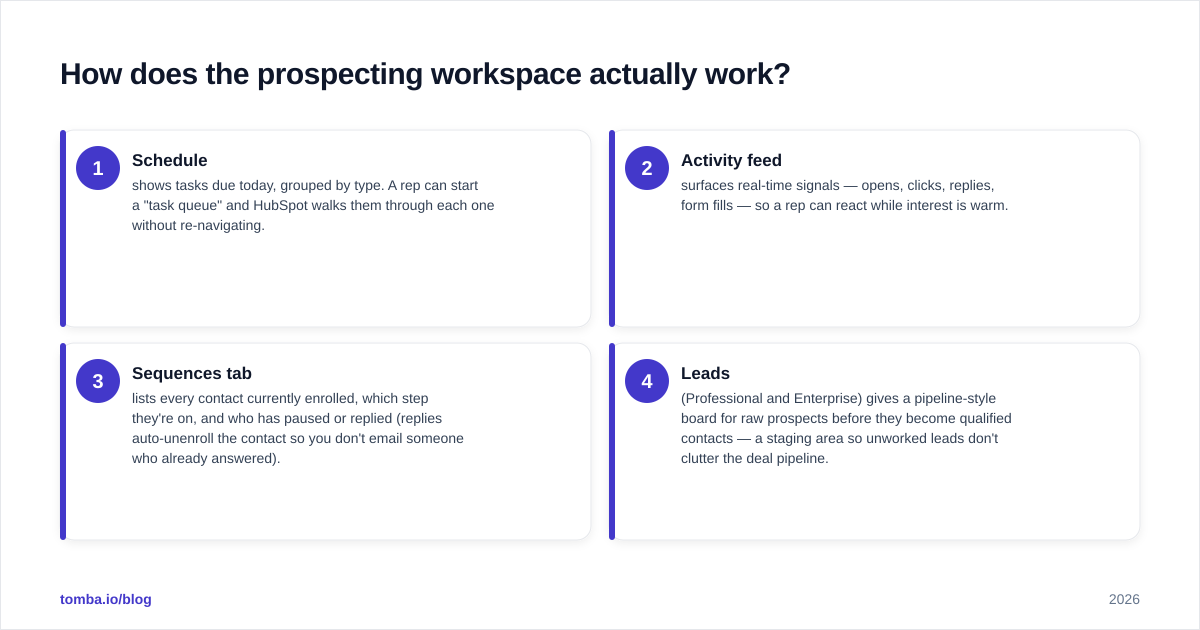
The workspace organizes a rep's day around three questions: who do I touch today, what step are they on, and what happened last time. A rep opens it in the morning and works top to bottom.
Here's the typical loop:
- Schedule shows tasks due today, grouped by type. A rep can start a "task queue" and HubSpot walks them through each one without re-navigating.
- Activity feed surfaces real-time signals — opens, clicks, replies, form fills — so a rep can react while interest is warm.
- Sequences tab lists every contact currently enrolled, which step they're on, and who has paused or replied (replies auto-unenroll the contact so you don't email someone who already answered).
- Leads (Professional and Enterprise) gives a pipeline-style board for raw prospects before they become qualified contacts — a staging area so unworked leads don't clutter the deal pipeline.
The strength is sequencing discipline. Most reps fail at follow-up, not first touch; a 6-step cadence that auto-advances and reminds you to call on day 4 fixes the part humans are worst at. If you want the mechanics of multi-touch cadences in general, our breakdown of sales automation covers the underlying logic.
The catch: the workspace assumes the contact records are already in HubSpot and already accurate. It is a workflow layer, not a discovery layer. Garbage contacts in, bounced emails out — which is where the data question comes in later.
What does Sales Hub prospecting cost in 2026?#
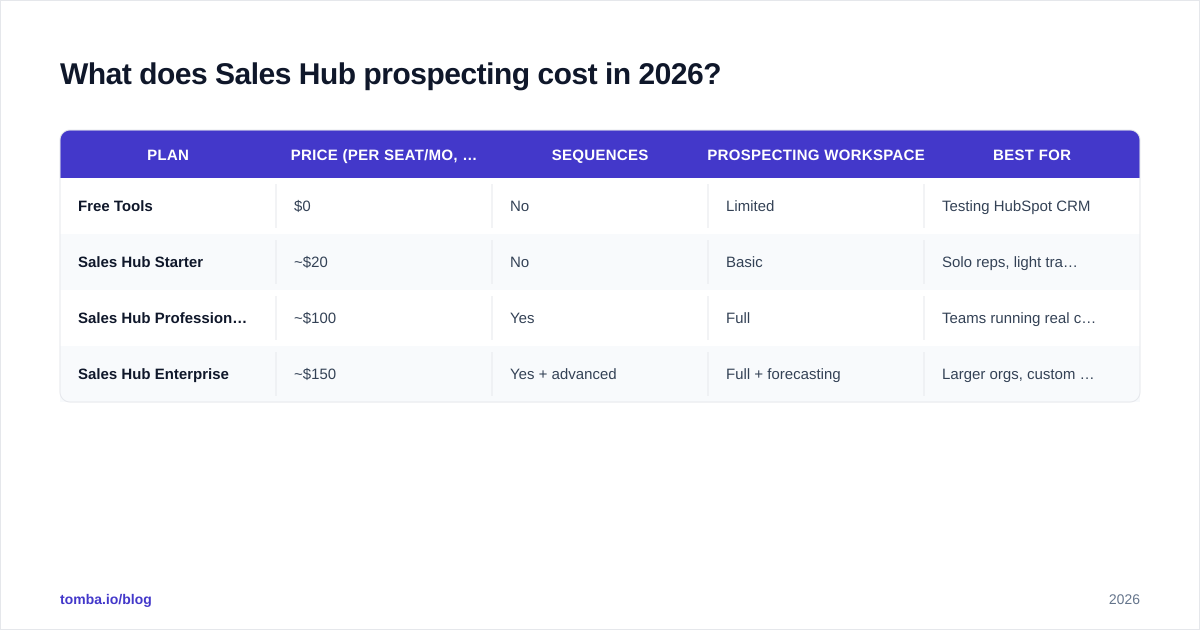
Conclusion first: the prospecting features most teams actually want — sequences, automation, and the full workspace — start at the Professional tier, which is where the price jumps. The free and Starter tiers give you the CRM and basic email tracking, not the cadence engine.
| Plan | Price (per seat/mo, billed yearly) | Sequences | Prospecting workspace | Best for |
|---|---|---|---|---|
| Free Tools | $0 | No | Limited | Testing HubSpot CRM |
| Sales Hub Starter | ~$20 | No | Basic | Solo reps, light tracking |
| Sales Hub Professional | ~$100 | Yes | Full | Teams running real cadences |
| Sales Hub Enterprise | ~$150 | Yes + advanced | Full + forecasting | Larger orgs, custom reporting |
Pricing shifts and HubSpot frequently re-tiers seat minimums, so confirm current numbers on the official HubSpot pricing page before you budget. Two things to watch:
- Seat minimums and onboarding fees. Professional and Enterprise have historically carried one-time onboarding charges that catch buyers off guard.
- Data is not included at any tier in a way that scales. HubSpot's prospecting database exists, but credits and coverage are limited compared to a dedicated provider. You will almost certainly add a data tool on top.
For comparison, a specialist data tool like Tomba's pricing runs a free tier at 25 searches/mo and a Starter at $49/mo — a different budget line entirely, because it solves a different problem (finding and verifying emails, not sequencing them).
Is Sales Hub better than standalone prospecting tools?#
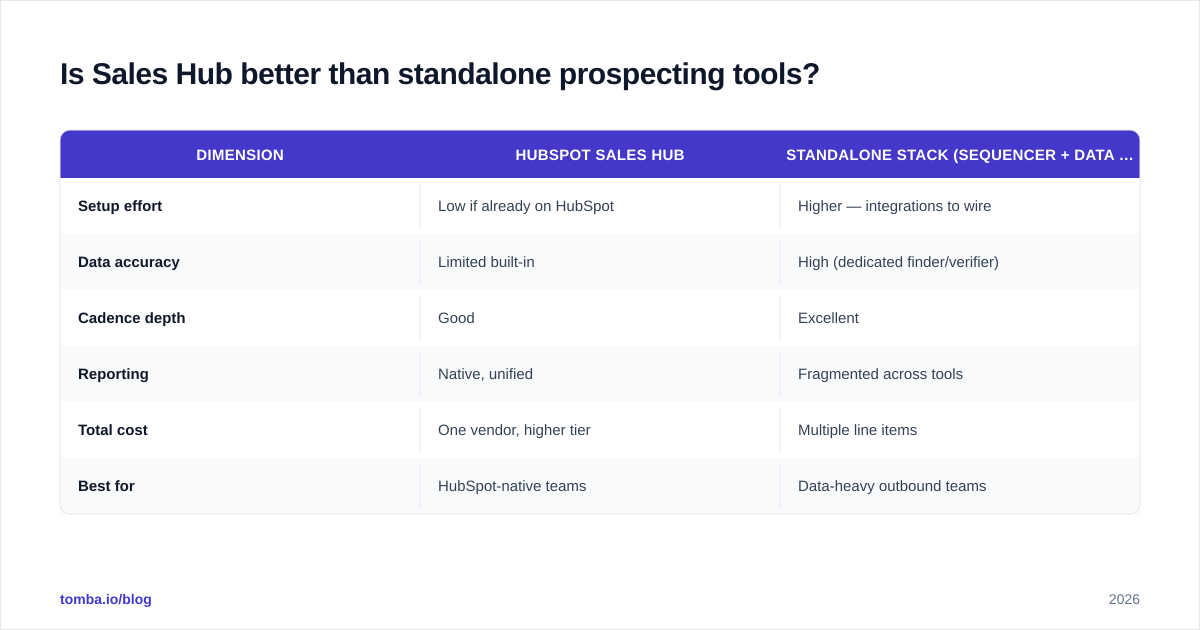
It depends on whether you value consolidation or specialization — and that's the real decision, not a feature-by-feature score.
Sales Hub wins on consolidation. If your CRM, deals, reporting, and outreach all live in HubSpot, a rep never exports a CSV or reconciles two systems. Attribution is clean because the email that booked the meeting is on the same timeline as the closed deal.
Standalone tools win on depth. A dedicated sequencer like Salesloft or Outreach has more granular cadence logic; a dedicated data tool has far better email coverage and verification. You trade a unified timeline for best-in-class components.
| Dimension | HubSpot Sales Hub | Standalone stack (sequencer + data tool) |
|---|---|---|
| Setup effort | Low if already on HubSpot | Higher — integrations to wire |
| Data accuracy | Limited built-in | High (dedicated finder/verifier) |
| Cadence depth | Good | Excellent |
| Reporting | Native, unified | Fragmented across tools |
| Total cost | One vendor, higher tier | Multiple line items |
| Best for | HubSpot-native teams | Data-heavy outbound teams |
Honest read: Sales Hub is the better system of record and action for teams already inside HubSpot. It is not the better data engine. Most high-performing outbound teams in 2026 run a hybrid — Sales Hub for cadence and pipeline, a specialist for contact data. That's not a knock on HubSpot; it's how the category is shaped. If you're evaluating the broader landscape, our B2B data and intelligence overview maps where each layer fits.
Where does Sales Hub fall short on data?#
Sales Hub does not reliably find or verify the email addresses you enroll — and that single gap quietly tanks more campaigns than any cadence mistake.
The failure mode looks like this: you import a list, build a beautiful 7-step sequence, hit enroll, and 18% of step one bounces. Now your sender reputation is damaged, your email deliverability drops, and even your good contacts land in spam. The sequence was fine; the data wasn't.
HubSpot's native prospecting data has three practical limits:
- Coverage gaps. Plenty of mid-market and international contacts simply aren't in the database, or the listed email is a stale catch-all.
- No deep verification step. You can't reliably catch invalid or catch-all addresses before they bounce.
- Credit constraints. Built-in enrichment credits run out fast on real prospecting volume.
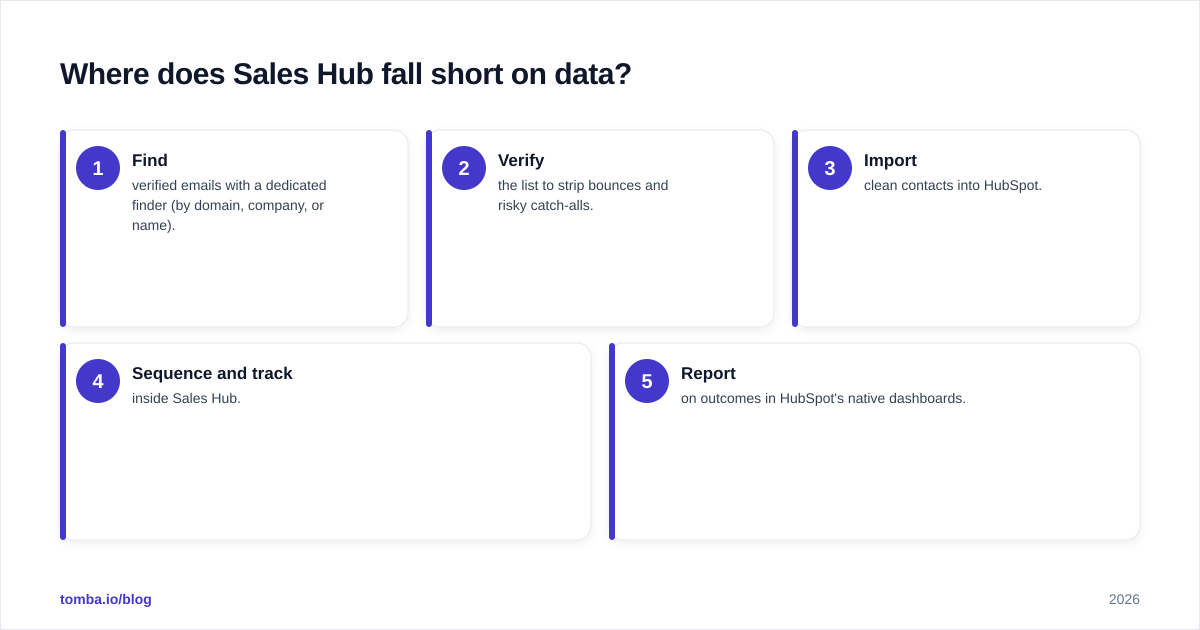
This is the part you fill with a specialist. A dedicated email verifier confirms an address is deliverable before it ever enters a sequence, and a bulk email finder builds clean lists from domains and names. The diagram below shows where each layer plugs in.
The clean workflow most teams settle on:
- Find verified emails with a dedicated finder (by domain, company, or name).
- Verify the list to strip bounces and risky catch-alls.
- Import clean contacts into HubSpot.
- Sequence and track inside Sales Hub.
- Report on outcomes in HubSpot's native dashboards.
Steps 1–2 are not Sales Hub's strength. Steps 3–5 are exactly what it's built for.
How do you set up an effective Sales Hub prospecting workflow?#
Start with clean data, then build the cadence — in that order, because a cadence on bad data just automates failure faster.
1. Build and verify your list first. Before anything enters HubSpot, source emails from a tool with real coverage and verify them. Tomba's domain search pulls every public address on a company domain, and verification removes the ones that would bounce. Import only what passes.
2. Segment before you sequence. Don't run one generic cadence at everyone. Split by persona, industry, or trigger (e.g., recently funded, hiring SDRs). Tighter segments let you write sharper copy and lift response rate.
3. Build sequences with real personalization tokens. Use HubSpot's personalization tokens for name, company, and a custom property like a recent trigger. Generic merge fields read as spam; one specific, true detail per email reads as research.
4. Mix channels. The best cadences interleave email steps with manual tasks — a LinkedIn touch, a call. Sales Hub queues these so a rep clears them in one block. If you're adding calls, sequence them deliberately rather than as an afterthought.
5. Set enrollment and unenrollment rules. Auto-unenroll on reply (default) and on meeting booked. Cap daily enrollment so you don't spike send volume and trip spam filters — protect the sender reputation you're building.
6. Review reporting weekly. Watch reply rate and meetings booked per sequence, not just opens (open tracking is increasingly unreliable post-Apple MPP). Kill cadences that book nothing; double down on the ones that convert.
A practical guardrail: keep a verification step in your weekly routine. Lists decay roughly 2–3% per month as people change jobs, so even a clean import goes stale. Periodic re-verification with an email verification API keeps your bounce rate low and your domain healthy.
Who should actually use Sales Hub for prospecting?#
Strong fit:
- Teams already running HubSpot CRM — you get prospecting with zero data migration and unified reporting.
- Mid-market sales orgs that value one vendor and clean attribution over best-in-class components.
- Managers who need rep-level activity and outcome reporting without stitching tools together.
Weaker fit:
- Solo founders or small teams on a tight budget — sequences require the ~$100 Professional tier.
- High-volume outbound teams whose edge is data — you'll outgrow HubSpot's native contact database fast and pay for a specialist anyway.
- Anyone not already on HubSpot — the consolidation advantage disappears if you're not in the ecosystem, and standalone sequencers may serve you better.
The honest summary: Sales Hub is an excellent action and reporting layer for HubSpot-native teams, and a mediocre data layer for everyone. Treat it as the cockpit, not the fuel. You can validate vendor fit against third-party reviews on G2 before committing budget.
Frequently asked questions#
Does Sales Hub include email finding? Partially. There's a built-in prospecting database, but coverage and verification are limited. Most teams pair it with a dedicated finder for reliable, verified emails.
Can I run sequences on the free plan? No. Sequences require Sales Hub Professional or Enterprise. The free and Starter tiers offer CRM and basic email tracking only.
Will Sales Hub keep my emails out of spam? It helps with tracking and pacing, but deliverability depends on list quality and sender setup. Verify addresses before enrolling and warm your domain — the tool can't fix bad data.
Is it worth it if I'm already on HubSpot CRM? Usually yes, if you run real cadences and want unified reporting. The consolidation is the main value; budget for a data tool alongside it.
The bottom line#
HubSpot Sales Hub turns prospecting into a single, disciplined workflow — and for teams already living in HubSpot, that consolidation is genuinely worth the Professional-tier price. Where it falls short is the same place almost every CRM does: finding and verifying the emails you actually contact. Sequences only pay off when the addresses underneath them are real.
That's the gap to close before you scale outreach. Build and verify your lists with a dedicated source first, then let Sales Hub do what it's great at — pacing, tracking, and reporting. Start free with the Tomba Email Finder to source verified, deliverable emails by domain, company, or name, push the clean list into HubSpot, and let your sequences run against data that won't bounce. Better prospecting starts with better contacts — get those right and the cockpit takes care of the rest.
// get started
Find, verify and enrich your first contacts today
Start on the free plan with 25 searches a month, then scale when your team is ready.
Free plan · No credit card required · GDPR & CCPA
// about the author