7targets Pricing, Reviews, Pros and Cons (2026 Guide)
A direct look at 7targets pricing, real user reviews, pros and cons, and where this AI sales assistant fits in 2026 — plus how it stacks up against modern outbound stacks.
7targets Pricing, Reviews, Pros and Cons (2026 Guide)
This 7targets pricing, reviews, pros and cons guide breaks down what the AI sales assistant actually costs in 2026, what users really say in reviews, and where it fits in a modern outbound stack.
TL;DR
- 7targets is an AI sales assistant that runs nurturing email sequences on autopilot. It sends plain-text follow-ups from your inbox until a prospect replies.
- Pricing starts around $250/month per assistant. That's steep next to modern stacks that bundle a finder, verifier, and sequencer for less.
- Reviews on G2 and Capterra praise the hands-off setup. They also flag limited integrations, basic personalization, and slow support windows.
- It works best for founders and small B2B teams who want a "set and forget" follow-up engine. They also need a verified contact list already in hand.
- If your bottleneck is finding and verifying contacts, pair a dedicated finder like Tomba with a leaner sequencer. You'll often spend half as much.
What is 7targets and who is it built for?#
7targets positions itself as an "AI sales assistant" rather than a full outbound platform. You upload prospects and set a goal: book a call, drive a reply, or push to a demo. The assistant then runs multi-step email cadences from your domain. It adjusts send times, follow-up gaps, and stop conditions based on replies.
Think of it like hiring a junior SDR who only does one thing: chase. The assistant doesn't pull contacts. It doesn't enrich them. It doesn't dial. It writes follow-ups, schedules them, and tracks responses inside its own dashboard. That narrow scope is the company's biggest selling point. Depending on your workflow, it's also its biggest limitation.
The typical buyer is a founder-led sales team, a solo consultant, or a small agency. They already have a list of decision-makers. They just want the chasing automated. Larger sales orgs rarely adopt it as a replacement. Those teams already run mature stacks like Outreach, Salesloft, or Apollo sequencing.
How much does 7targets cost in 2026?#
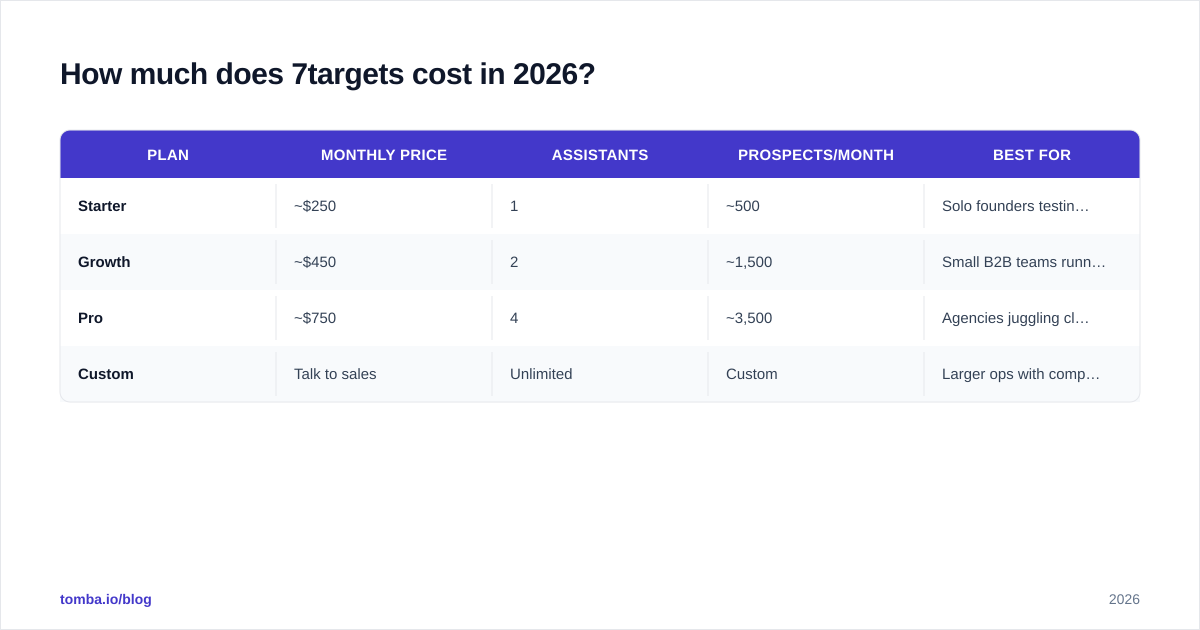
7targets uses a per-assistant pricing model. Each "assistant" represents one mailbox or sending identity. The public plans look roughly like this in 2026:
| Plan | Monthly price | Assistants | Prospects/month | Best for |
|---|---|---|---|---|
| Starter | ~$250 | 1 | ~500 | Solo founders testing outbound |
| Growth | ~$450 | 2 | ~1,500 | Small B2B teams running 2 reps |
| Pro | ~$750 | 4 | ~3,500 | Agencies juggling client inboxes |
| Custom | Talk to sales | Unlimited | Custom | Larger ops with compliance asks |
Prices shift with annual contracts and promo windows. Always confirm on the 7targets pricing page before committing. A 14-day trial is usually available, but it's gated behind a sales call.
Two things to flag for budget planning:
- The price is per assistant, not per seat. Need a CEO inbox and a sales rep inbox to send in parallel? You're paying for two.
- Contacts are not included. You still need an email finder and verifier. That stack — even a generous one — usually costs $49–$99/month on top.
For comparison, Tomba pricing starts at $49/month for the Starter plan. That includes finding, verification, and bulk processing. A founder running outbound on Tomba plus a $30/month sequencer pays under $80/month all-in. That's versus $250+ for 7targets alone.
What do real 7targets reviews say?#
Pulling from G2, Capterra, and product communities, the review pattern is consistent:
What users love:
- Genuinely hands-off after setup. The assistant runs cadences without micromanagement.
- Plain-text emails come from your real inbox. They tend to land in the primary tab, not promotions.
- Friendly onboarding calls with the team during the first two weeks.
- Built-in stop rules (out-of-office detection, unsubscribe handling, reply detection) reduce embarrassing follow-ups.
What users complain about:
- Personalization tokens are basic. You get first name, company name, and not much else.
- No native CRM sync with HubSpot or Salesforce. Exports happen via CSV or Zapier.
- Reporting is shallow. You can see opens and replies but not deep funnel analytics.
- Pricing feels heavy for teams that already pay for a sequencer.
- Some reviewers mention support response times of 24–48 hours. That stings when a campaign is misfiring.
The pattern: good for chasing, weak for everything around chasing. If you already have clean data and a defined ICP, the tool delivers. If your real bottleneck is data quality or pipeline visibility, 7targets won't fix it.
7targets pricing, reviews, pros and cons at a glance#
Here's the honest scorecard most prospective buyers want:
| Dimension | Pros | Cons |
|---|---|---|
| Setup | Onboarding call included, live in days | Requires sales call to start trial |
| Sending | Plain text from your inbox, good deliverability | One inbox per assistant = pricey for teams |
| Cadences | Smart follow-up timing, reply detection | Limited A/B testing, no dynamic branching |
| Personalization | Auto-inserts name, company | No data enrichment, no LinkedIn signals |
| Reporting | Clear reply tracking | Shallow funnel + revenue analytics |
| Integrations | Zapier, basic webhooks | No native HubSpot, Salesforce, or Pipedrive sync |
| Pricing | Predictable per-assistant fee | High floor ($250+) vs modern alternatives |
| Support | Friendly humans, included | 24–48h response on lower plans |
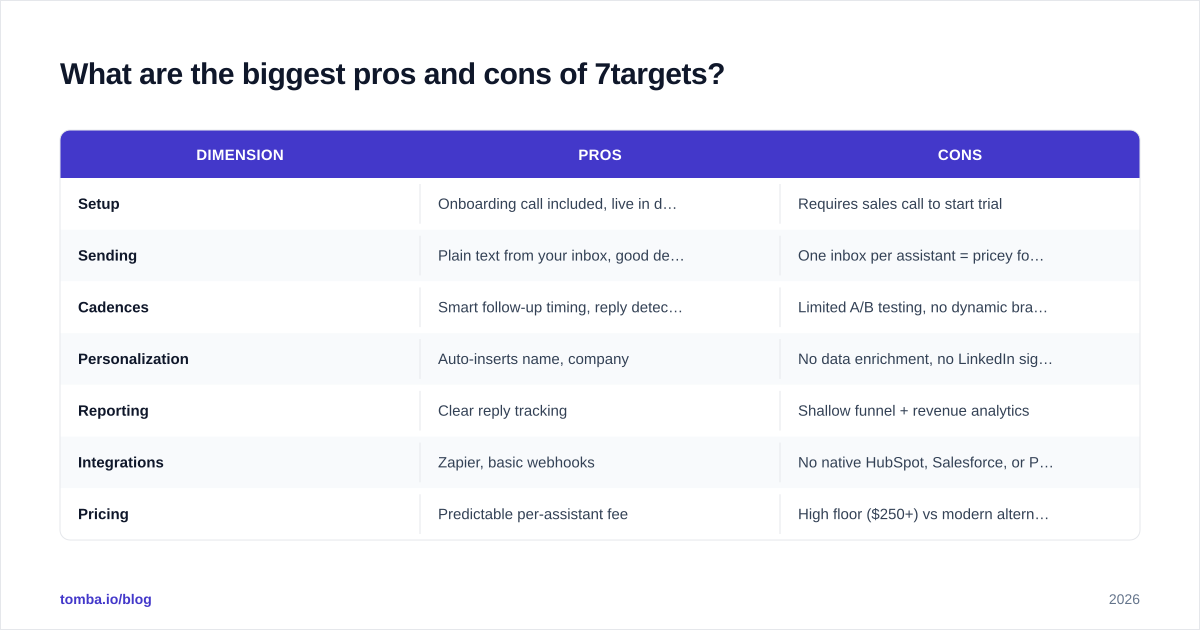
The headline: 7targets is a competent follow-up engine, not an outbound platform. Reviewers say it "does one thing well." That's praise and a warning at the same time.
How does 7targets compare to a modern outbound stack?#
The cleanest way to evaluate 7targets is to compare it against a "best-of-breed" stack: a dedicated finder, a verifier, and a lightweight sequencer.
| Capability | 7targets | Modern stack (Tomba + sequencer) |
|---|---|---|
| Find emails by name/domain | Not included | Yes — via email finder |
| Verify emails before sending | Not included | Yes — via email verifier |
| Bulk list processing | CSV upload only | Yes — via bulk email finder |
| Automated follow-ups | Yes | Yes (in sequencer) |
| Reply detection / stop rules | Yes | Yes |
| CRM sync | Zapier only | Native (HubSpot, Pipedrive, Salesforce) |
| API access | Limited | Full Tomba API |
| Entry cost | ~$250/mo | ~$49–$99/mo combined |
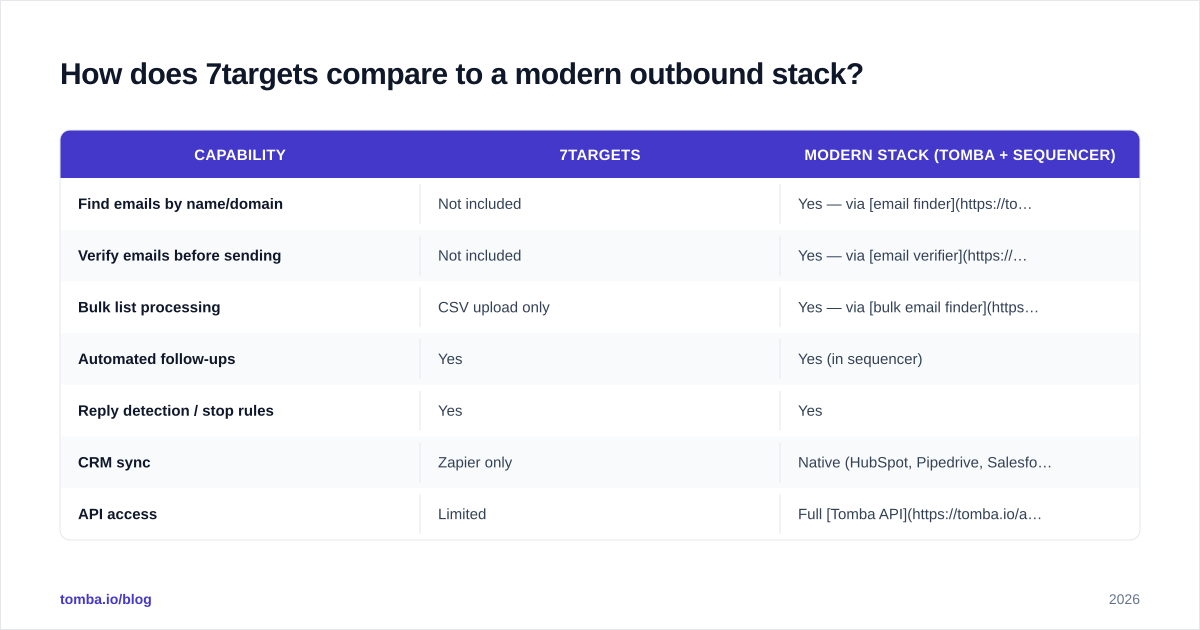
Already have a clean, verified list and just want chasing automated? 7targets is reasonable. Building from a domain list or scraping LinkedIn? You'll need contact data anyway. At that point a stack built around an email finder plus a sequencer of your choice gives you more flexibility for less.
How accurate is the data 7targets sends to?#
This is where 7targets defers to you. The platform doesn't enrich, verify, or score contacts. Whatever you upload is what gets sent to. The quality of your outbound is entirely a function of your data source, not the assistant.
Two failure modes show up in reviews:
- Bounced sends hurting the sending domain. Upload an unverified list and let the assistant blast follow-ups. Bounce rates can spike above 5%. Gmail and Outlook punish that with spam folder placement.
- Catch-all addresses sucking up budget. Catch-all domains accept anything. The assistant happily sends. But you never get a real bounce signal — just silence.
The fix is unsexy but standard: verify before you upload. A dedicated email verifier catches the obvious traps. A catch-all verifier handles the gray-zone domains where Gmail says "maybe."
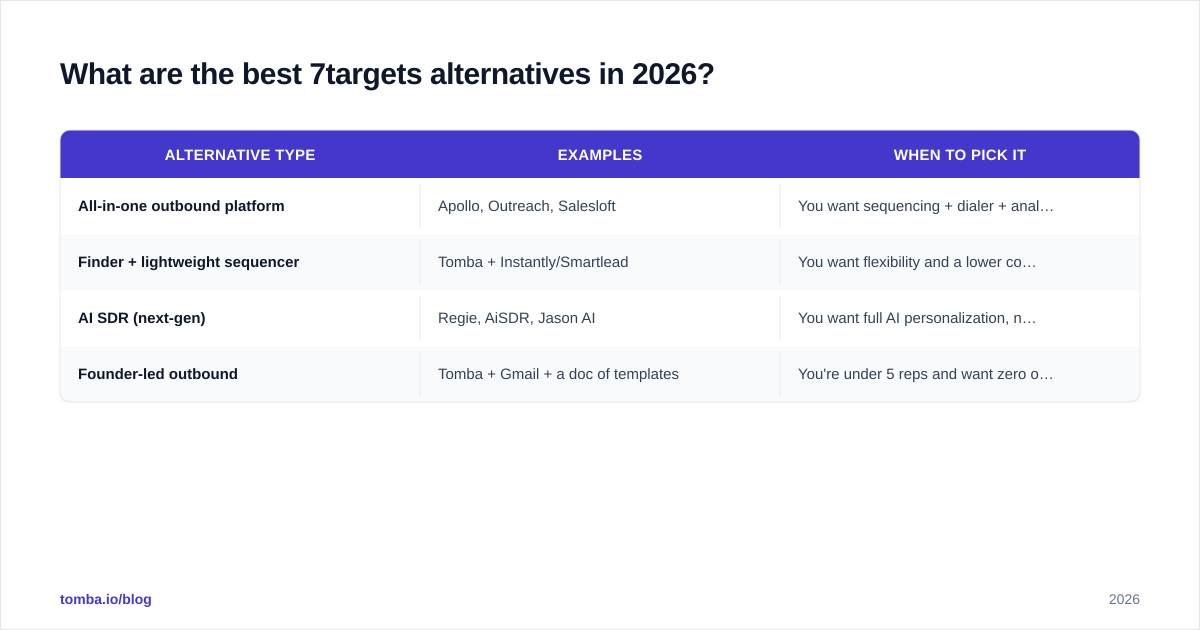
What are the best 7targets alternatives in 2026?#
If 7targets isn't the right fit — too expensive, too narrow, missing CRM sync — here are the categories of tools worth evaluating instead.
| Alternative type | Examples | When to pick it |
|---|---|---|
| All-in-one outbound platform | Apollo, Outreach, Salesloft | You want sequencing + dialer + analytics under one roof |
| Finder + lightweight sequencer | Tomba + Instantly/Smartlead | You want flexibility and a lower cost floor |
| AI SDR (next-gen) | Regie, AiSDR, Jason AI | You want full AI personalization, not just chasing |
| Founder-led outbound | Tomba + Gmail + a doc of templates | You're under 5 reps and want zero overhead |
Tomba sits in the second column. You bring your sequencer of choice — many users pair it with Instantly or a CRM's native cadences. Tomba then handles the contact-data layer. See the Apollo alternative and Instantly alternative breakdowns for head-to-head comparisons.
When should you actually pick 7targets?#
Buy 7targets if you check most of these boxes:
- You have a verified list of 500–2,000 prospects ready to go.
- You don't want to learn a sequencer's UI. You want someone else's UX.
- You value plain-text deliverability over fancy HTML campaigns.
- You're fine with CSV in, CSV out. No deep CRM workflow needed.
- The $250+/month line item doesn't compete with budget for data or ads.
Skip 7targets if:
- You don't have contact data yet. Solve that first.
- You need granular A/B testing, branching, or AI personalization beyond name + company.
- You live inside HubSpot or Salesforce and need native sync.
- You're running multiple ICPs and want consolidated reporting per segment.
How can you build a leaner outbound stack today?#
The pattern that consistently beats single-vendor solutions for small B2B teams looks like this:
- Data layer — a finder + verifier that fits your volume. Tomba's free tier (25 searches/month) covers experiments. Paid plans scale to bulk.
- Sequencer — pick the cheapest tool that handles cadences, replies, and basic A/B tests. Smartlead, Instantly, and Saleshandy all sit under $50/month at the entry level.
- CRM sync — a native integration (HubSpot, Pipedrive) so reps don't context-switch.
- Reporting — start with the sequencer's built-in dashboard. Layer in spreadsheet exports as you scale.
For step one, Tomba's email finder handles domain search, single lookups, and bulk processing through a unified API. To plug it into a CRM directly, the HubSpot integration, Pipedrive integration, and Salesforce integration cover the major paths.
Pair it with a sequencer and you'll have most of what 7targets offers. You'll get more control over data quality and a substantially lower bill.
Final verdict: is 7targets worth it in 2026?#
Yes — for a narrow buyer. Here's the short 7targets pricing, reviews, pros and cons read for 2026. If you're a founder or solo seller with a clean list and zero patience for cadence tooling, 7targets earns its keep. The product does exactly what it advertises. The team is responsive. The deliverability story is solid.
For everyone else, the math gets harder to defend. That includes small teams running multiple ICPs, anyone building a list from scratch, or any org that needs CRM-native workflow. A stack built around a dedicated finder, a verifier, and a $30–$50/month sequencer covers more ground for less money. You also keep the flexibility to swap pieces as you grow.
Want to test the leaner approach? Start with a free Tomba account. The email finder handles 25 searches a month at no cost. The email verifier cleans whatever list you bring. And the Tomba pricing page shows what scaling looks like once you commit. Build the data layer first. The chasing tool you pick after that becomes a much cheaper decision.
// get started
Find, verify and enrich your first contacts today
Start on the free plan with 25 searches a month, then scale when your team is ready.
Free plan · No credit card required · GDPR & CCPA
// about the author