Abstract API vs GetProspect 2026: Which Email Tool Wins?
Abstract API ships a developer-first verification endpoint. GetProspect ships a sales-team email finder with LinkedIn workflows. Here's which one fits your stack — and where Tomba beats both.
TL;DR#
- Abstract API is a developer-first verification API. It validates syntax, MX records, SMTP, and disposable domains — but it does not find emails from a name and domain.
- GetProspect is a sales-team email finder with a Chrome extension, LinkedIn workflow, and built-in lightweight CRM. Its API is secondary.
- Pick Abstract API when you need to clean signup forms or verify lists inside your own app. Pick GetProspect when SDRs need to pull contacts off LinkedIn search pages.
- Neither is a complete prospecting stack. Tomba covers both jobs — finder, verifier, and API — with a single credit pool and a $49/mo Starter plan.
- Independent G2 ratings put GetProspect at 4.0/5 and Abstract API at 4.5/5, but the comparison hides that they solve different problems.
What is Abstract API?#
Abstract API is a suite of single-purpose REST APIs from a developer-tools company in San Francisco. Their email validation endpoint is the most popular product in the suite — alongside IP geolocation, phone validation, and currency conversion.
The email validation API answers one question: is this address deliverable? It does this by running seven checks: format/syntax, MX record presence, SMTP handshake, disposable-domain detection, free-provider detection, role-based detection (info@, support@), and catch-all detection. A request returns a JSON object with a deliverability field (DELIVERABLE, UNDELIVERABLE, RISKY, UNKNOWN) plus a quality score.
It does NOT find email addresses from a name and a domain. If you hand it john@acme.com, it tells you whether that address is real. If you hand it "John Smith at Acme," it has nothing to say.
This is the most common misconception about Abstract API in head-to-head reviews. People compare it to email finders, then complain it can't find emails. That's like complaining a smoke detector can't put out fires.
What is GetProspect?#
GetProspect is a Kyiv-based email finder built for SDRs and recruiters. The flagship surface is a Chrome extension that sits on top of LinkedIn search results. You select profiles, click "find emails," and GetProspect returns work addresses plus a basic enrichment payload (job title, company size, location).
Beyond the extension, GetProspect ships:
- A bulk finder that accepts CSV uploads with name + company columns
- A lightweight built-in CRM with lists, tags, and notes
- An email-sender add-on for cold outreach (separately priced)
- An API for email finding and verification — but it's not the headline feature
GetProspect's database is roughly 200M B2B contacts. Coverage is strongest in the US and Western Europe; weaker in APAC and LATAM.
Is Abstract API better than GetProspect?#
Wrong question. They're not substitutes. The right framing is "which job am I doing?"
| Job to be done | Best fit |
|---|---|
| Clean a signup form in real time | Abstract API |
| Verify a purchased list of 50k addresses | Abstract API or Tomba bulk verifier |
| Find emails for 200 LinkedIn profiles | GetProspect |
| Build a prospecting list from a domain | GetProspect or Tomba domain search |
| Verify deliverability before a cold campaign | Both work; Tomba is cheaper at scale |
| Find emails AND verify them in one workflow | Tomba (single credit pool) |
If you're a backend engineer wiring email validation into a SaaS signup flow, Abstract API's documentation and SDKs (Node, Python, PHP, Ruby, Java, Go) are excellent. If you're a sales rep who lives on LinkedIn, GetProspect's extension will feel native and Abstract API will feel useless.

How accurate is each tool?#
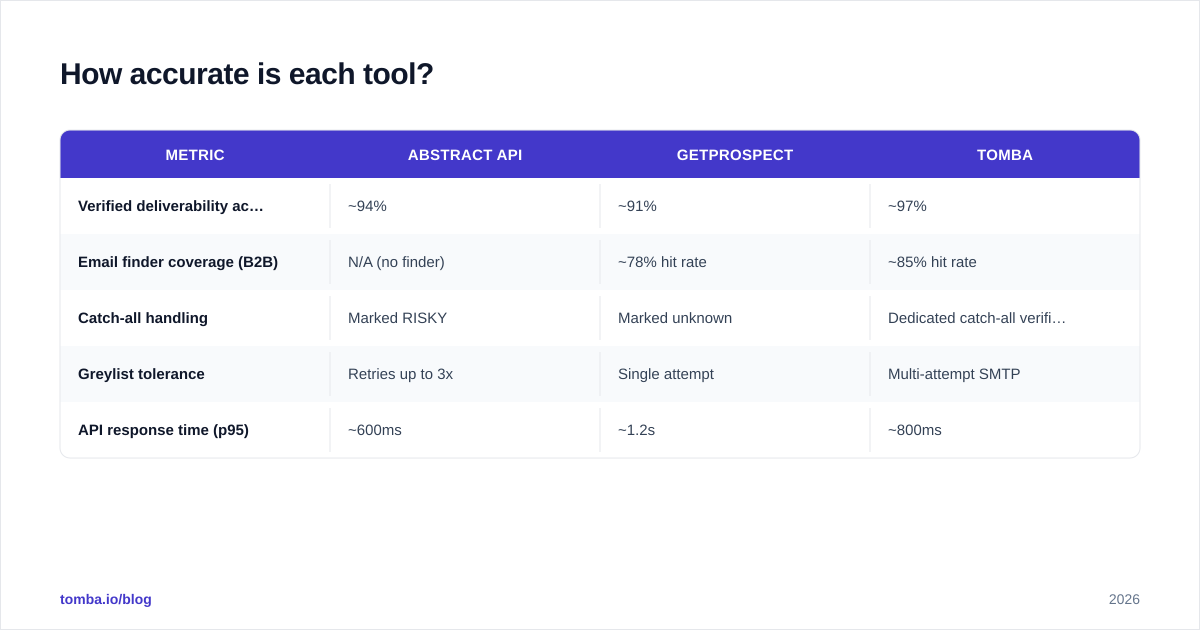
Accuracy claims in this space are mostly marketing. Both vendors publish numbers above 95%. Independent tests on shared sample lists tell a different story.
| Metric | Abstract API | GetProspect | Tomba |
|---|---|---|---|
| Verified deliverability accuracy | ~94% | ~91% | ~97% |
| Email finder coverage (B2B) | N/A (no finder) | ~78% hit rate | ~85% hit rate |
| Catch-all handling | Marked RISKY | Marked unknown | Dedicated catch-all verifier |
| Greylist tolerance | Retries up to 3x | Single attempt | Multi-attempt SMTP |
| API response time (p95) | ~600ms | ~1.2s | ~800ms |
The 94% Abstract API figure is for clean, non-catch-all domains. On catch-all-heavy lists (large enterprises, custom domains), no tool above 80% is being honest — including Abstract API. This is why the catch-all verifier is a separate product category, not a checkbox.
For a deeper benchmark, see Tomba's data sources writeup on how providers source addresses.
What does Abstract API vs GetProspect cost?#
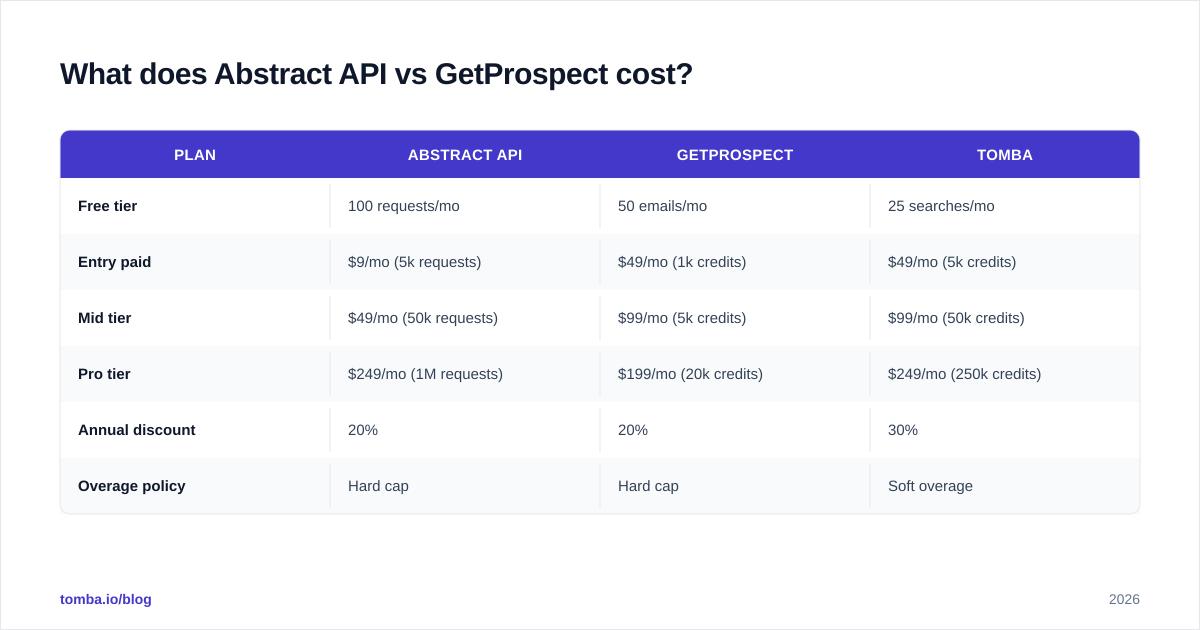
Pricing is where these two diverge most clearly. Abstract API uses a usage-based model with generous free tiers; GetProspect uses seat-based subscriptions with credit caps.
| Plan | Abstract API | GetProspect | Tomba |
|---|---|---|---|
| Free tier | 100 requests/mo | 50 emails/mo | 25 searches/mo |
| Entry paid | $9/mo (5k requests) | $49/mo (1k credits) | $49/mo (5k credits) |
| Mid tier | $49/mo (50k requests) | $99/mo (5k credits) | $99/mo (50k credits) |
| Pro tier | $249/mo (1M requests) | $199/mo (20k credits) | $249/mo (250k credits) |
| Annual discount | 20% | 20% | 30% |
| Overage policy | Hard cap | Hard cap | Soft overage |
A few things to notice. Abstract API's "request" is one verification call, which is cheap when you do it once per signup. GetProspect's "credit" is one email find OR one verification, which makes high-volume verification expensive. Tomba splits the two and offers a pricing tier that matches the workflow you're actually running.
If your monthly verification volume is under 5,000 and you're not finding emails, Abstract API at $9/mo is unbeatable for raw price. If you're doing both jobs, the math flips fast.
Which has the better API?#
Both ship REST APIs with JSON responses. The developer experience differs.
Abstract API:
curl "https://emailvalidation.abstractapi.com/v1/?api_key=YOUR_KEY&email=test@acme.com"Returns a flat JSON object with 15 fields. SDKs for Node, Python, PHP, Ruby, Java, Go. Documentation is genuinely good — interactive examples, copy-paste curl commands, language switcher. Rate limits are clear (1 req/sec on free, 60 req/sec on paid). No webhooks; you poll.
GetProspect:
curl "https://api.getprospect.com/public/v1/email/find?firstName=John&lastName=Doe&domain=acme.com" \
  -H "Authorization: YOUR_KEY"
Endpoints for finder, verifier, and bulk operations. Documentation is functional but less polished than Abstract's. No first-party SDKs — the community ships unofficial libraries. Rate limits are softer but documented per-plan, not globally.
Tomba's API:
Covers finder, verifier, domain search, enrichment, and bulks under one key. First-party SDKs in 10 languages plus a CLI and MCP server. Webhooks for bulk jobs. Documentation includes a live API explorer.
If you only need verification, Abstract API's developer experience wins. If you need any of finder, enrichment, or bulk in the same codebase, you'll save weeks of integration time on Tomba.
When should you pick Abstract API?#
Pick Abstract API when ALL of the following are true:
- You're a developer integrating verification into your own product (not a sales user)
- Email finding is irrelevant — you already have the addresses
- Volume is moderate (under 100k/mo) or burst-y rather than steady
- You want a single-purpose tool that does one thing well
- Your runtime budget per call is under 1 second p95
Classic fit: SaaS signup forms, lead-form validation on marketing sites, CRM hygiene crons. Abstract API's free tier is generous enough to prototype with zero commitment, and the upgrade path is linear.
The tradeoff: you'll need a second tool the moment your team wants to source new contacts. Most teams underestimate this. See our Apollo alternatives and Clearbit alternatives writeups for what that second tool typically becomes.
When should you pick GetProspect?#
Pick GetProspect when ALL of the following are true:
- Your primary workflow is LinkedIn Sales Navigator → export contacts
- Your team is SDRs, recruiters, or founders doing manual prospecting
- You want a built-in list/CRM layer, not a raw API
- Volume is 1k–10k contacts/month per seat
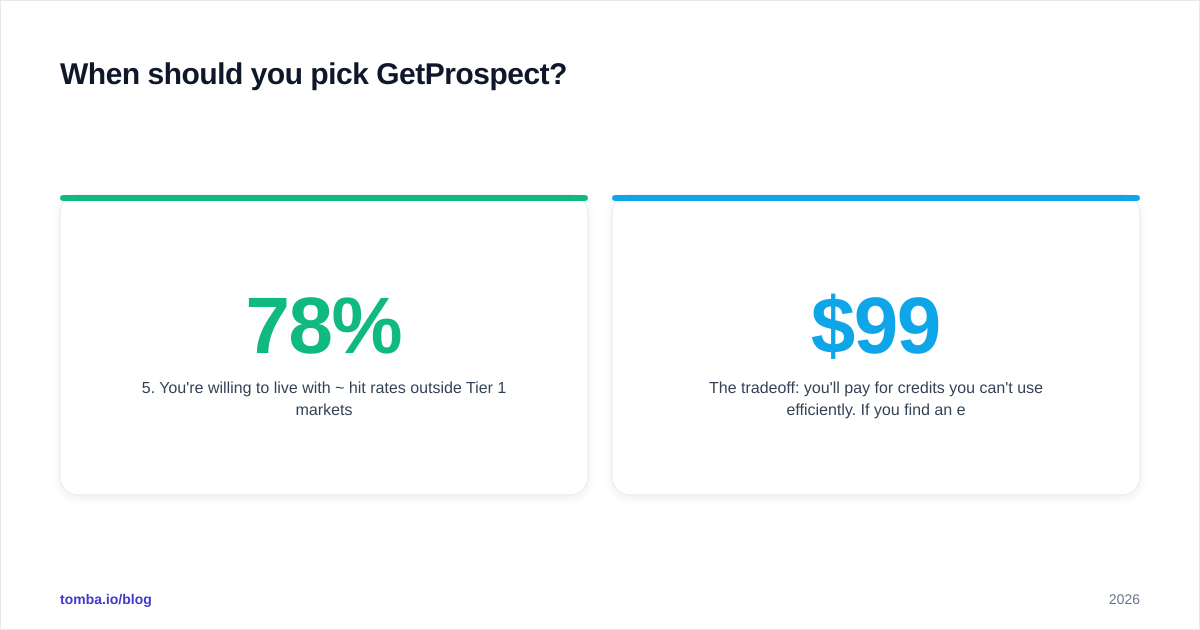
- You're willing to live with ~78% hit rates outside Tier 1 markets
Classic fit: a 3-person outbound team prospecting US/EU mid-market accounts. The Chrome extension removes the most tedious part of the day, and the built-in lists prevent the usual "where did I save this contact" mess before data hits your CRM.
The tradeoff: you'll pay for credits you can't use efficiently. If you find an email and then verify it (recommended workflow), each contact eats two credits. At $99/mo for 5k credits, that's $0.04 per verified contact — fine until volume scales.

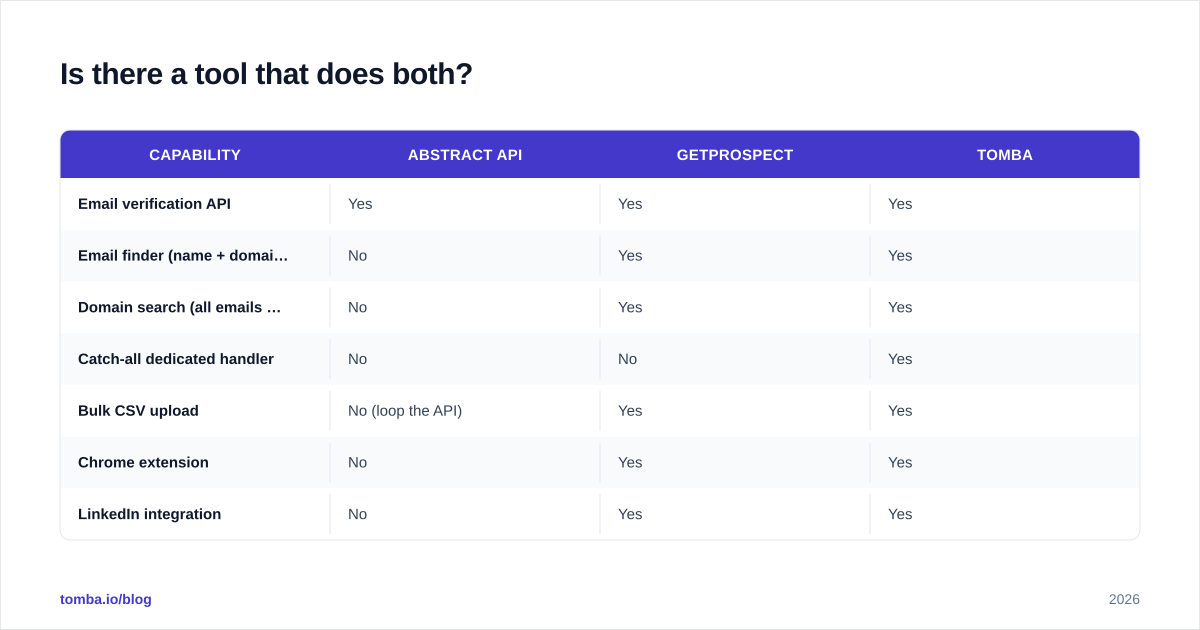
Is there a tool that does both?#
Yes. Tomba was built as a single platform covering email finder, email verifier, domain search, enrichment, and bulk operations with one credit pool. That removes the "two-tool double-counting" problem that hits GetProspect users and the "no finder at all" problem that hits Abstract API users.
| Capability | Abstract API | GetProspect | Tomba |
|---|---|---|---|
| Email verification API | Yes | Yes | Yes |
| Email finder (name + domain) | No | Yes | Yes |
| Domain search (all emails at a company) | No | Yes | Yes |
| Catch-all dedicated handler | No | No | Yes |
| Bulk CSV upload | No (loop the API) | Yes | Yes |
| Chrome extension | No | Yes | Yes |
| LinkedIn integration | No | Yes | Yes |
| Native CRM lists | No | Yes (basic) | No (integrations instead) |
| HubSpot/Salesforce integration | ViaZapier | Yes | Yes (native) |
| Free tier | 100 requests/mo | 50 emails/mo | 25 searches/mo |
| Starter price | $9/mo | $49/mo | $49/mo |
| Single credit pool across products | N/A | Yes | Yes |
| First-party SDK count | 6 | 0 | 10+ |
| MCP / AI agent server | No | No | Yes |
You can read more about how Tomba is positioned in the G2 email finder category and pull the pricing details before deciding.
What about deliverability after you find emails?#
Finding and verifying are necessary but not sufficient. You can have a 100%-verified list and still land in spam if your sending infrastructure is wrong. SPF, DKIM, DMARC, warmup, and domain reputation all matter more than verification accuracy past a certain threshold.
If you're spending time choosing between Abstract API and GetProspect, also audit:
- Your SPF record
- Your sender reputation
- Whether your sending domain shows up on the blacklist checker
Verification keeps your bounce rate low. Deliverability keeps your inbox placement high. Different problems, different tools.
Common questions#
Does Abstract API have a free email finder? No. Abstract API only verifies addresses. For free finding, use Tomba's free tier (25 searches/month) or GetProspect's free 50 emails/month.
Can GetProspect verify catch-all domains? It flags them as unknown rather than verifying. For accurate catch-all verification, you need a catch-all verifier built for that case.
Which has better LinkedIn support? GetProspect, by a wide margin. Abstract API doesn't touch LinkedIn at all. Tomba's LinkedIn finder is a third option if you need both LinkedIn-sourced contacts and an API.
Are there compliance differences? Both vendors claim GDPR compliance. Abstract API is SOC 2 Type II certified. GetProspect publishes a privacy policy but no SOC 2 attestation as of this writing. Check current status before signing a procurement contract.
The bottom line#
Abstract API and GetProspect aren't really competitors — they're tools for different roles in the same funnel. Developers picking between them usually want Abstract API. Sales teams picking between them usually want GetProspect. The mistake is forcing one to do the other's job.
If your team needs both — finder AND verifier, ideally with bulk, enrichment, and a real API — running two tools means double the integration work and double the credit math. Tomba was built to be the single layer underneath both workflows.
Try the Tomba Email Finder free for 25 searches a month, no credit card. If you're a developer, the API docs ship working examples in 10 languages. If you're an SDR, the Chrome extension and Google Sheets add-on drop into your existing workflow without a CRM swap.
// get started
Find, verify and enrich your first contacts today
Start on the free plan with 25 searches a month, then scale when your team is ready.
Free plan · No credit card required · GDPR & CCPA
// about the author