AI Email Verification in 2026: A Practical Accuracy Guide
AI email verification cuts bounce rates and protects sender reputation by scoring risk in real time. Here's how it works, where it beats classic syntax checks, and how to pick a tool in 2026.
TL;DR
- AI email verification layers machine-learning risk scoring on top of classic checks (syntax, MX, SMTP) to predict whether an address will actually accept mail — not just whether it looks valid.
- The biggest win is on the addresses that break old tools: catch-all domains, role accounts, spam traps, and freshly abandoned mailboxes.
- Expect bounce rates under 2-3% when you verify before sending, which directly protects your sender reputation and inbox placement.
- Accuracy claims of "99%" are marketing shorthand. What matters is the unknown/catch-all rate and how the tool labels risk you can act on.
- Verify at the point of capture and again right before a campaign — lists decay roughly 2-3% per month.
What is AI email verification?#
AI email verification is the practice of using machine-learning models to predict whether an email address is deliverable, alongside the traditional rule-based checks that have existed for years.
Think of it like airport security. The old approach was a single metal detector: does this address have an @ sign, a real domain, a mail server that answers? That catches the obvious problems. AI verification adds the behavioral screening layer — patterns, history, and risk signals that a simple gate misses. An address can pass every structural check and still be a trap, a long-dead mailbox, or a domain that accepts everything and delivers nothing.
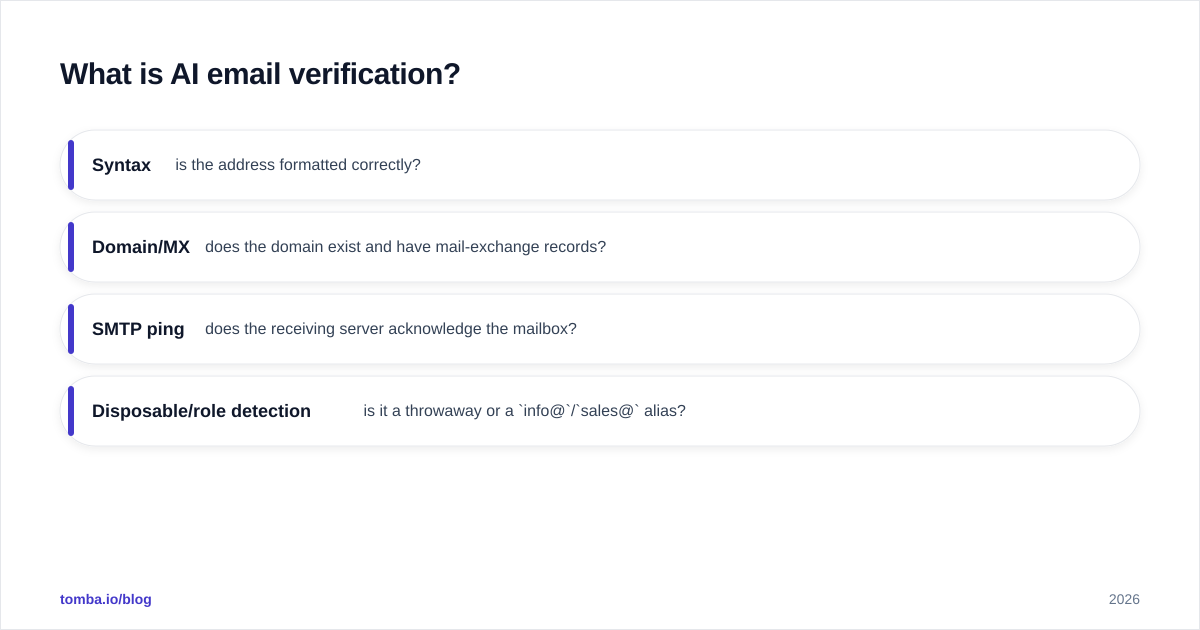
Classic email verification runs a deterministic checklist:
- Syntax — is the address formatted correctly?
- Domain/MX — does the domain exist and have mail-exchange records?
- SMTP ping — does the receiving server acknowledge the mailbox?
- Disposable/role detection — is it a throwaway or a
info@/sales@alias?
That works until it doesn't. Roughly 20-30% of B2B domains are configured as catch-all, meaning the SMTP server says "yes" to every address whether the mailbox exists or not. A rule-based checker has nothing left to do there. AI models step in by weighting dozens of secondary signals — domain age, historical bounce behavior, pattern similarity to known-bad addresses, engagement data — to output a probability instead of a shrug.
How does AI email verification actually work?#
It works in two stages: deterministic filtering first, probabilistic scoring second.
Stage one is the cheap, fast, certain stuff. Bad syntax, dead domains, and missing MX records get rejected immediately — no model needed. This removes the easy 10-15% of any raw list before you spend compute on anything smarter.
Stage two is where the AI earns its place. For every address that survives stage one, the model ingests features such as:
- Domain reputation and age
- Whether the domain is catch-all, and how that catch-all has behaved historically
- Frequency and recency of the address across known datasets
- Structural similarity to confirmed spam traps and honeypots
- Role/distribution-list signals
- Greylisting and tempfail patterns from the SMTP layer
The output is a risk score and a label you can route on: valid, invalid, catch-all/accept-all, risky, or unknown. Good tooling lets you decide the policy — send to everything scored 80+, hold the 50-79 band for a warm-up sequence, suppress the rest.
This is also where data sourcing matters more than the algorithm. A model is only as good as the bounce-and-engagement history it learned from. Vendors with large, continuously refreshed verification corpora produce sharper catch-all predictions than a clever model trained on thin data.
Is AI verification better than traditional syntax checks?#
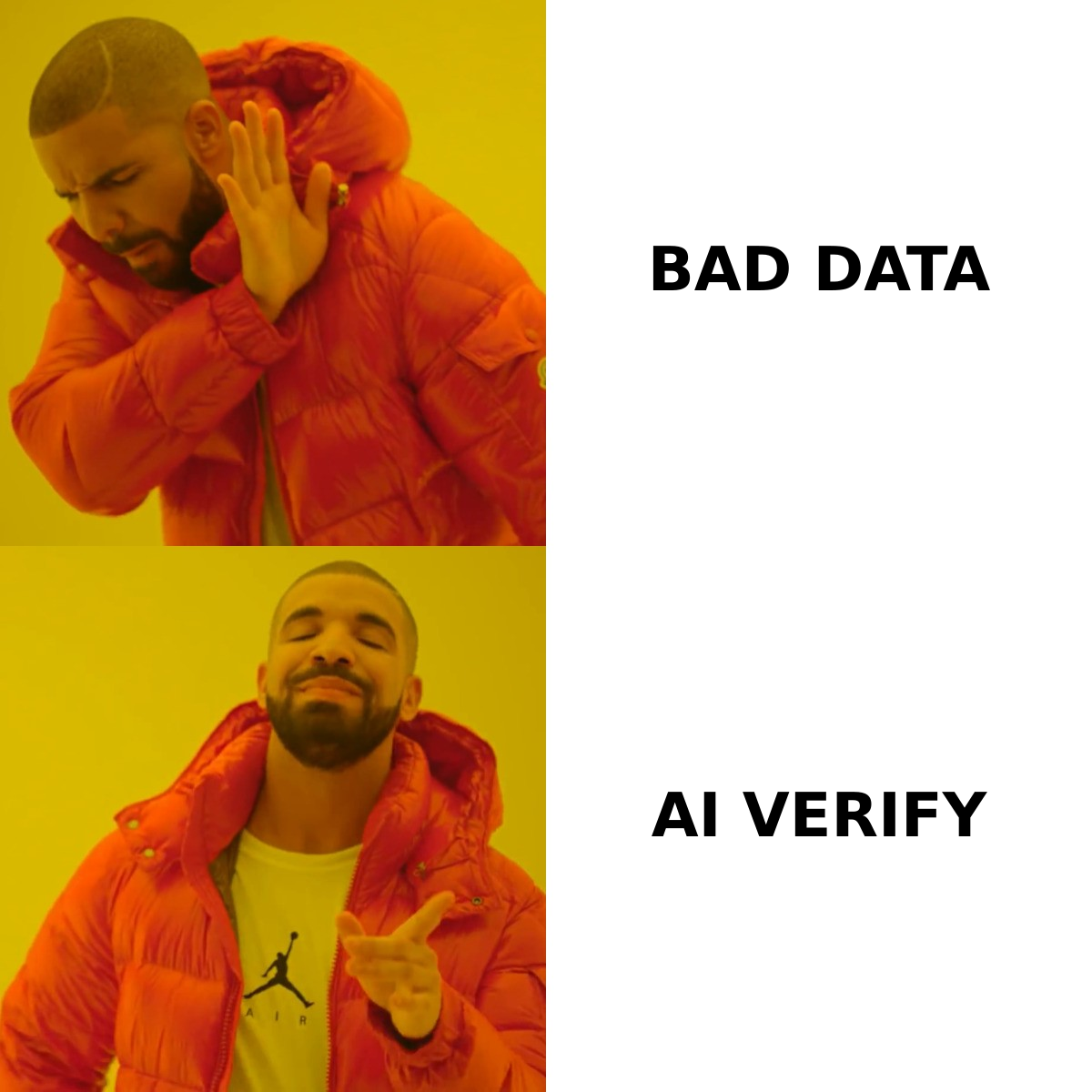
Yes — but only on the addresses that traditional checks can't resolve. For clearly valid or clearly broken addresses, the two approaches agree. The gap shows up in the gray zone.
Here's where each method lands:
| Address type | Syntax/SMTP check | AI verification | Why it matters |
|---|---|---|---|
| Well-formed, mailbox exists | Valid | Valid (high confidence) | Both correct; no advantage |
| Bad syntax / dead domain | Invalid | Invalid | Both correct; AI adds nothing |
| Catch-all domain | "Valid" (false confidence) | Risk-scored with probability | AI separates real mailboxes from accept-all noise |
| Spam trap / honeypot | Often passes | Flagged as high-risk | Avoids the addresses that get you blacklisted |
Role account (info@) |
Detected by rule | Detected + engagement-scored | AI predicts whether it's worth sending |
| Recently abandoned mailbox | "Valid" | Flagged via recency signals | Cuts soft bounces before they hurt reputation |
The practical takeaway: if your lists are clean, opted-in, and single-mailbox, classic verification is fine. The moment you work with scraped data, purchased lists, or B2B domains (which skew heavily catch-all), AI scoring is the difference between a 1% bounce rate and a 12% one.
For a deeper primer on the underlying mechanics, [
ZeroBounce](https://www.zerobounce.net/) and most major vendors publish their verification-status taxonomies, and the broader concept is well-documented on Wikipedia's email verification entry.
What does AI verification do for deliverability?#
It protects the asset you can't easily rebuild: your sender reputation.
Mailbox providers like Google and Microsoft track your bounce rate, spam-complaint rate, and trap hits. Cross their thresholds and they start routing you to spam — or rejecting you outright. A single send to a list with a 10% invalid rate can knock your domain reputation down for weeks. The math is brutal because reputation falls fast and recovers slowly.
AI verification helps three ways:
- Hard-bounce prevention — invalid addresses never get mailed, keeping bounce rate under the ~2-3% danger line.
- Trap avoidance — spam traps are the fastest route to a blacklist; risk scoring flags the addresses most likely to be traps.
- Risk segmentation — instead of one big blast, you send confidently to high-confidence addresses and warm up the risky band slowly.
If you're running cold campaigns, pair verification with the basics: a valid SPF record, DKIM, DMARC, and a sane warm-up schedule. Verification keeps the list clean; authentication keeps the domain trusted. You need both. (Run a quick SPF check if you're unsure your records are right.)
How accurate is AI email verification, really?#
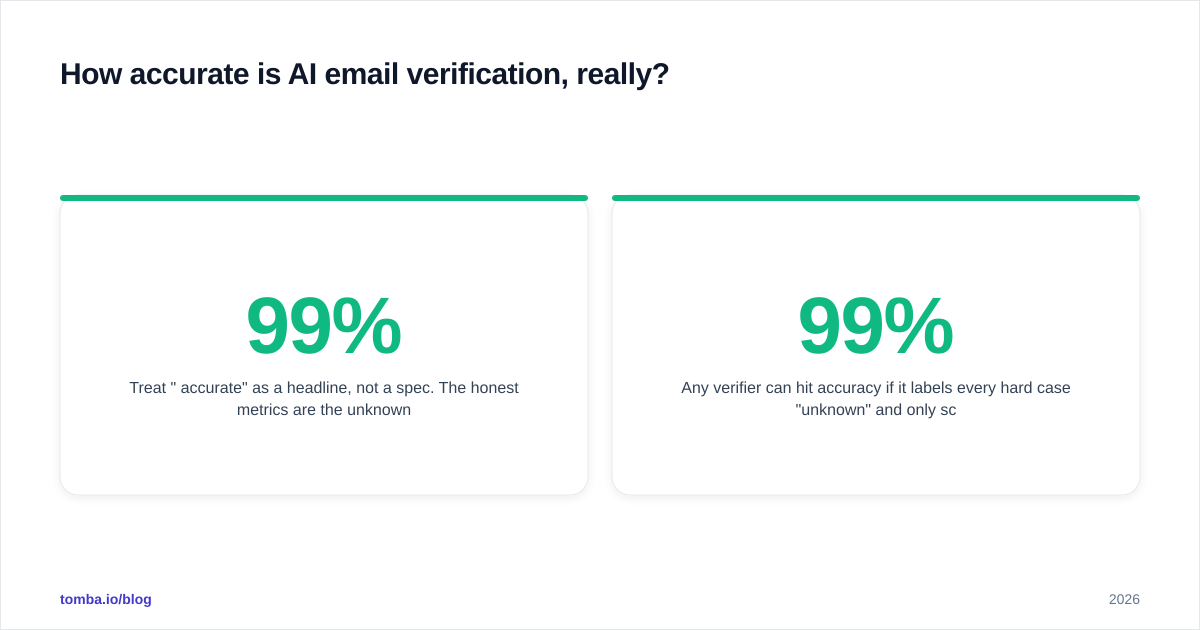
Treat "99% accurate" as a headline, not a spec. The honest metrics are the unknown rate and the catch-all resolution rate.
Any verifier can hit 99% accuracy if it labels every hard case "unknown" and only scores the easy ones. The tool that says "we resolved 70% of your catch-all domains with 95% confidence" is being more useful than the one claiming a round 99% with a 25% unknown bucket. When you evaluate vendors, send a known test list — addresses you've already confirmed live and dead — and measure:
- False-valid rate — dead addresses marked valid (the expensive errors that cause bounces)
- False-invalid rate — live addresses marked invalid (silent revenue loss)
- Unknown/catch-all rate — how much it punts
- Speed and cost per 1,000 verifications
A tool that's overcautious costs you real contacts; one that's overconfident costs you reputation. The right balance depends on your tolerance — transactional senders want near-zero false-valids, while prospecting teams may accept more risk for more coverage.
How do AI email verification tools compare in 2026?#
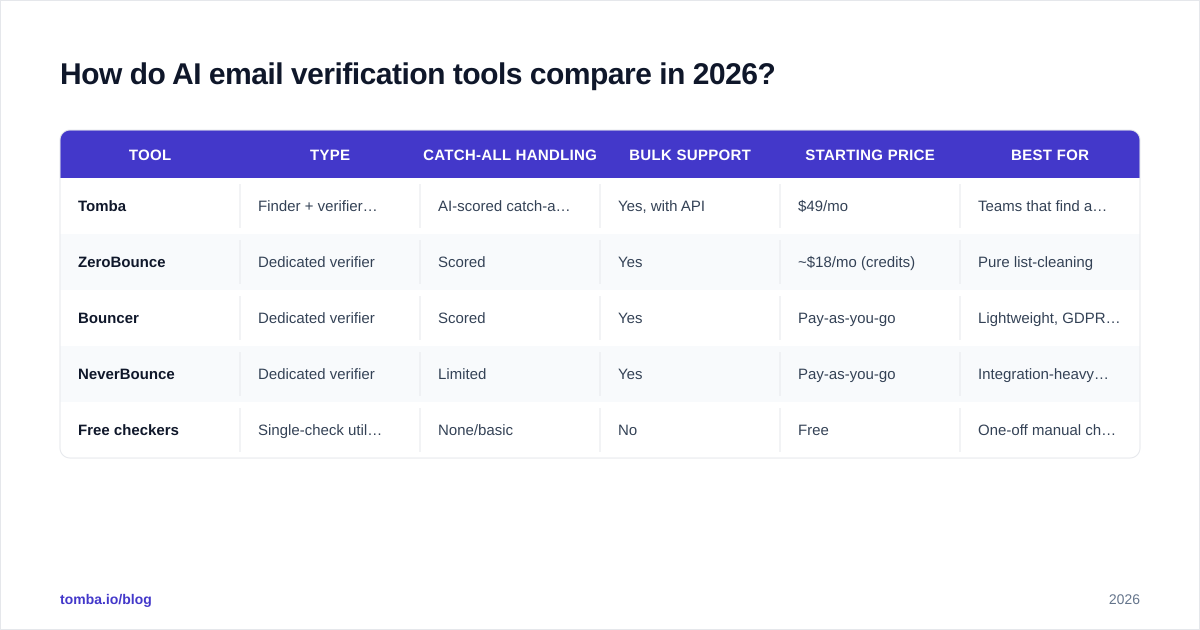
The market splits into three buckets: dedicated verifiers, all-in-one finder-plus-verifier platforms, and free single-check utilities. Here's how representative options stack up:
| Tool | Type | Catch-all handling | Bulk support | Starting price | Best for |
|---|---|---|---|---|---|
| Tomba | Finder + verifier + enrichment | AI-scored catch-all verifier | Yes, with API | $49/mo | Teams that find and verify in one stack |
| ZeroBounce | Dedicated verifier | Scored | Yes | ~$18/mo (credits) | Pure list-cleaning |
| Bouncer | Dedicated verifier | Scored | Yes | Pay-as-you-go | Lightweight, GDPR-focused |
| NeverBounce | Dedicated verifier | Limited | Yes | Pay-as-you-go | Integration-heavy stacks |
| Free checkers | Single-check utility | None/basic | No | Free | One-off manual checks |
If verification is one step inside a broader prospecting workflow, an integrated platform avoids the export-import shuffle. Tomba's catch-all verifier and standard email verifier run on the same data backbone as its finder, so an address can be discovered, scored, and enriched without leaving the tool. For pure list hygiene with no finding needs, a dedicated verifier may be all you want — compare Tomba pricing against credit-based vendors based on your monthly volume.
A note on free tools: a free email checker is genuinely useful for spot-checking a single address before you hit send. It is not a substitute for bulk verification with risk scoring when you're processing thousands of contacts.
When should you verify — and how often?#
Verify at two moments: at capture and before every send.
At capture means real-time verification on your signup forms and lead-gen flows via an email verification API. Stopping a typo'd or fake address at the door keeps your database clean from day one and reduces fraud. Before-send means a fresh pass right before any campaign, because lists rot.
Email lists decay at roughly 2-3% per month — people change jobs, companies fold, mailboxes get deactivated. A list you verified in January is meaningfully stale by April. For active prospecting databases, a monthly bulk verify is a reasonable cadence; for slower-moving lists, quarterly is defensible. The cost of re-verifying is trivial next to the cost of a damaged sending domain.
A simple operating rhythm:
- Verify in real time at the point of capture.
- Re-verify the full list monthly (or before any major campaign).
- Suppress hard-invalids permanently; recycle "risky" into a low-volume warm-up track.
- Monitor your actual bounce data and feed it back — your send results are the ultimate verifier.
What are the limits of AI email verification?#
AI verification reduces risk; it does not eliminate it. Three honest caveats:
Catch-all domains stay probabilistic. No tool can be 100% certain a specific mailbox exists behind an accept-all server without sending to it. AI narrows the uncertainty — it doesn't delete it. Treat high-confidence catch-all scores as "send carefully," not "guaranteed."
Real-time SMTP checks can be rate-limited or blocked. Some providers throttle verification probes, which pushes more addresses into the "unknown" bucket. This is a function of the receiving server, not the verifier's quality.
Verification is not permission. A verified address is deliverable, not consented. Compliance with GDPR, CAN-SPAM, and similar rules is a separate obligation — verification keeps you out of the spam folder, not out of legal trouble.
Used with those limits in mind, AI verification is one of the highest-ROI steps in any outbound stack. It's cheap, fast, and directly defends the reputation that everything else depends on.
The bottom line#
AI email verification has moved from a nice-to-have to a baseline requirement for anyone sending at volume in 2026. The shift is simple: stop asking "does this address look valid?" and start asking "will this address accept mail without hurting me?" That second question is the one that protects your bounce rate, your sender reputation, and your inbox placement — and it's the one AI scoring was built to answer.
If you want finding and verification in a single workflow, start with Tomba's Email Finder — discover professional addresses by domain or name, then run them through the same data backbone that powers the verifier and catch-all checker, so every contact lands scored and ready to send. The free tier covers 25 searches a month to test it on your own list before you commit; paid plans start at $49/mo when you scale up.
// get started
Find, verify and enrich your first contacts today
Start on the free plan with 25 searches a month, then scale when your team is ready.
Free plan · No credit card required · GDPR & CCPA
// about the author