AI Email Warmup in 2026: The Complete Deliverability Guide
AI email warmup adapts your ramp schedule in real time so cold domains land in the inbox, not spam. Here's how it works, what to automate, and how to measure it in 2026.

AI Email Warmup in 2026: The Complete Deliverability Guide
You bought a fresh domain, connected your mailbox, and sent 300 cold emails on day one. Most of them are sitting in spam — and now your domain reputation is tanking before your campaign even started. That's the exact failure AI email warmup is built to prevent.
TL;DR#
- AI email warmup automates the slow, adaptive ramp-up of sending volume so mailbox providers learn to trust a new domain or mailbox before you scale outreach.
- The "AI" part is real value, not marketing: it adjusts daily volume, reply rates, and send timing based on live placement data instead of a fixed schedule.
- A cold domain needs roughly 2–8 weeks of warmup before heavy outbound; warmup never fully stops while you send cold email.
- Warmup fixes reputation, not list quality. Pair it with a clean, verified email list or you'll burn the reputation you just built.
- Tools differ on warmup network quality, deliverability reporting, and price — compare before you commit.
What is AI email warmup?#
AI email warmup is the automated process of gradually increasing a mailbox's sending activity — and simulating positive engagement — so inbox providers like Google and Microsoft classify you as a legitimate sender. The "AI" layer means the system reads signals (spam placement, open behavior, reply patterns) and adjusts the ramp dynamically, rather than following a rigid "send 20 today, 40 tomorrow" script.
Think of it like a new gym membership. If you've never lifted and you load 200kg on day one, you injure yourself and quit. A good coach scales the weight to how your body actually responds week to week. AI warmup is that coach for your domain: it watches how mailbox providers react and only adds "load" (volume) when your reputation can handle it.
Technically, warmup tools create a private network of real mailboxes that exchange messages with yours. Your emails get opened, marked "important," replied to, and dragged out of spam. Those engagement signals teach filters that humans want your mail. The AI decides how aggressive to be based on where your test emails are actually landing.
Why does a new domain need warmup at all?#
Because mailbox providers treat silence-then-spike as the signature of a spammer. A domain with no sending history that suddenly emits hundreds of near-identical messages looks exactly like a throwaway domain bought for a blast. Filters respond by routing you to spam or the Promotions tab — and once you're there, climbing back out is far harder than starting clean.
Reputation is built on a few stacked signals:
- Volume consistency — steady, predictable growth beats erratic spikes.
- Engagement — opens, replies, and "not spam" actions tell filters real people value your mail.
- Authentication — SPF, DKIM, and DMARC prove you are who you claim to be. Check yours with an SPF checker before warmup, not after.
- Complaint and bounce rates — high bounces or spam complaints unwind weeks of warmup overnight.
Google spells this out in its sender guidelines, which explicitly reward gradual volume increases and low spam-complaint rates. Warmup is how you satisfy those guidelines on autopilot.
How does AI warmup differ from old-school warmup?#
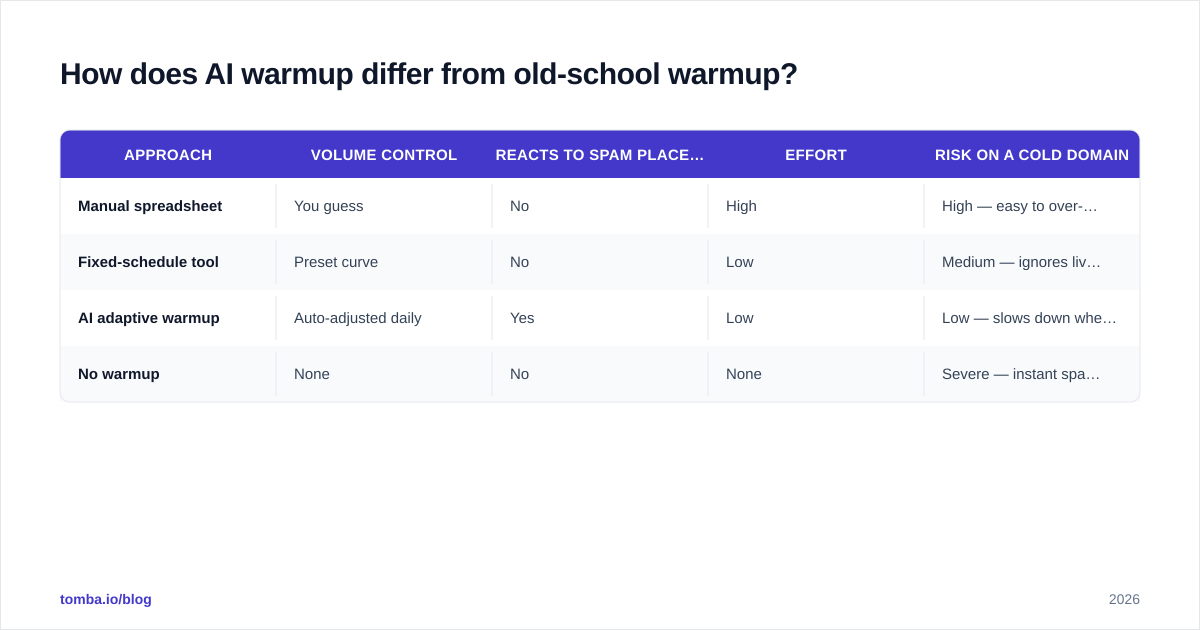
Manual warmup means you maintain a spreadsheet, send a few emails a day, and bump the number when you remember to. Fixed-schedule tools improved on that with preset curves. AI warmup goes further by closing the loop: it measures placement and reacts.
| Approach | Volume control | Reacts to spam placement | Effort | Risk on a cold domain |
|---|---|---|---|---|
| Manual spreadsheet | You guess | No | High | High — easy to over-send |
| Fixed-schedule tool | Preset curve | No | Low | Medium — ignores live signals |
| AI adaptive warmup | Auto-adjusted daily | Yes | Low | Low — slows down when flagged |
| No warmup | None | No | None | Severe — instant spam folder |
The practical difference shows up when something goes wrong. If your test emails start landing in spam mid-ramp, a fixed-schedule tool keeps pushing volume on schedule and digs the hole deeper. An adaptive system pulls volume back, raises the ratio of warmup-to-cold sends, and waits for placement to recover before scaling again.

How long does AI email warmup take?#
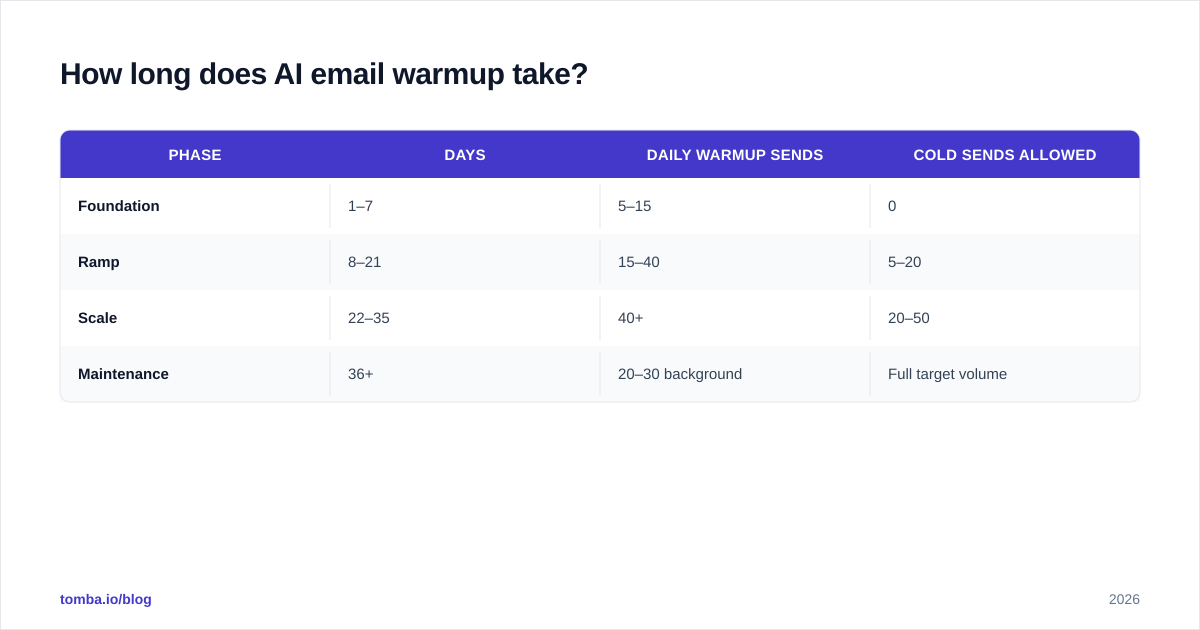
Plan for 2 to 4 weeks minimum for a brand-new domain, and up to 8 weeks if you intend to send high volume (hundreds of cold emails per mailbox per day). The honest answer is that warmup is never fully "done" — most teams keep a background warmup running at low volume for the entire life of a cold-outreach mailbox to absorb the reputation hit that cold sending naturally causes.
A workable timeline looks like this:
| Phase | Days | Daily warmup sends | Cold sends allowed |
|---|---|---|---|
| Foundation | 1–7 | 5–15 | 0 |
| Ramp | 8–21 | 15–40 | 5–20 |
| Scale | 22–35 | 40+ | 20–50 |
| Maintenance | 36+ | 20–30 background | Full target volume |
Two factors stretch this: the provider (Microsoft/Outlook domains are notoriously slower to trust than Google Workspace) and your starting reputation. A domain previously burned by spam needs longer than a clean new one.
What does the AI actually optimize?#
Four levers, all adjusted from live data rather than a calendar:
- Daily volume — how many messages to send today, scaled to current reputation.
- Warmup-to-cold ratio — how many "safe" warmup emails to mix in around your real campaign sends.
- Send timing — spreading sends across human-plausible hours instead of firing 50 at 9:00:00 sharp.
- Engagement simulation — opens, replies, and spam-rescue actions inside the warmup network.
The reason this matters: deliverability is a moving target. A filter update, a bad list, or one aggressive day can shift your placement overnight. A schedule can't see that. An adaptive system can — which is why "AI" warmup is worth more than a fancier countdown timer. For the underlying concept, see this primer on email deliverability and how sender reputation is scored.
Which AI email warmup tools should you consider in 2026?#
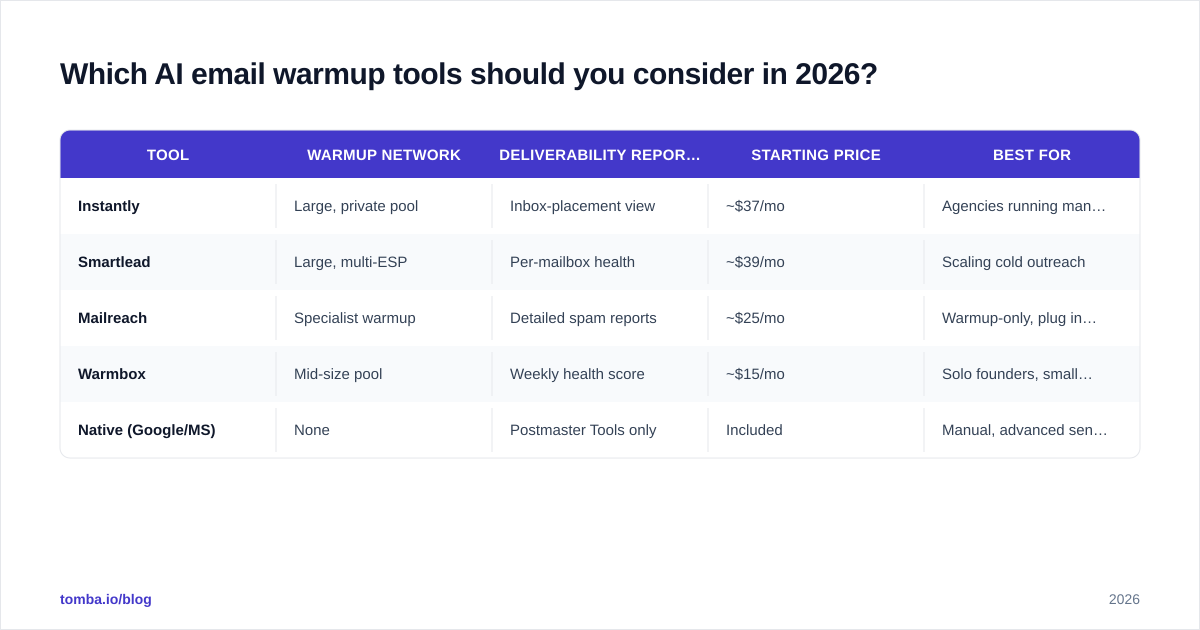
Most outreach platforms now bundle warmup, and a few specialists do it better than the all-in-ones. The differences that matter are warmup-network size and realism, whether reporting shows actual inbox placement (not just "sent"), and how warmup is priced relative to sending seats.
| Tool | Warmup network | Deliverability reporting | Starting price | Best for |
|---|---|---|---|---|
| Instantly | Large, private pool | Inbox-placement view | ~$37/mo | Agencies running many mailboxes |
| Smartlead | Large, multi-ESP | Per-mailbox health | ~$39/mo | Scaling cold outreach |
| Mailreach | Specialist warmup | Detailed spam reports | ~$25/mo | Warmup-only, plug into any sender |
| Warmbox | Mid-size pool | Weekly health score | ~$15/mo | Solo founders, small lists |
| Native (Google/MS) | None | Postmaster Tools only | Included | Manual, advanced senders |
Two caveats. First, prices and feature tiers change often — verify current numbers on each vendor's pricing page and cross-check reviews on G2 before buying. Second, a bigger warmup network isn't automatically better; low-quality networks of spammy mailboxes can pass reputation problems to you. Favor providers transparent about how their network is maintained.

How do you set up AI email warmup correctly?#
Order matters. Do these in sequence — skipping the authentication step is the single most common reason warmup fails.
- Buy a separate sending domain. Never warm up and blast from your primary brand domain. Use something like
getbrand.comorbrand-mail.comso a reputation hit never touches your main inbox. - Set SPF, DKIM, and DMARC. Authenticate before sending a single message. Validate with an SPF record check and a DMARC lookup.
- Add a custom tracking domain and a real signature. Bare links and empty signatures look automated.
- Connect the mailbox to your warmup tool and start at the lowest volume tier.
- Let it run untouched for at least 7 days before sending any cold email. Resist the urge to start campaigns early.
- Layer cold sends in gradually, keeping warmup running in the background the whole time.
The most expensive mistake here is feeding a warmed domain a dirty list. Warmup builds trust; a 15% bounce rate spends it instantly. Run every address through an email verifier and screen risky catch-all domains before your first campaign. The cleanest warmup in the world can't survive an unverified list.
How do you measure whether warmup is working?#
Don't trust the warmup tool's internal "health score" alone — it grades its own homework. Cross-reference with provider-side data.
- Google Postmaster Tools — watch domain and IP reputation move from "low/medium" toward "high." This is the source of truth for Gmail.
- Inbox-placement tests — send seed emails to a panel across Gmail, Outlook, and Yahoo; track the inbox-vs-spam ratio weekly.
- Spam complaint rate — keep it under 0.1% (Google's threshold). Above 0.3% and you're in trouble.
- Bounce rate — under 2–3%. Spikes mean list quality, not warmup, is the problem.
- Reply and open rates on real campaigns — the ultimate downstream signal.
If placement stalls or drops, pause cold sends, raise the warmup ratio, and re-verify your list before resuming. Track these in a simple dashboard so you catch decay early rather than after a campaign flops.
Does AI warmup replace good list hygiene and copy?#
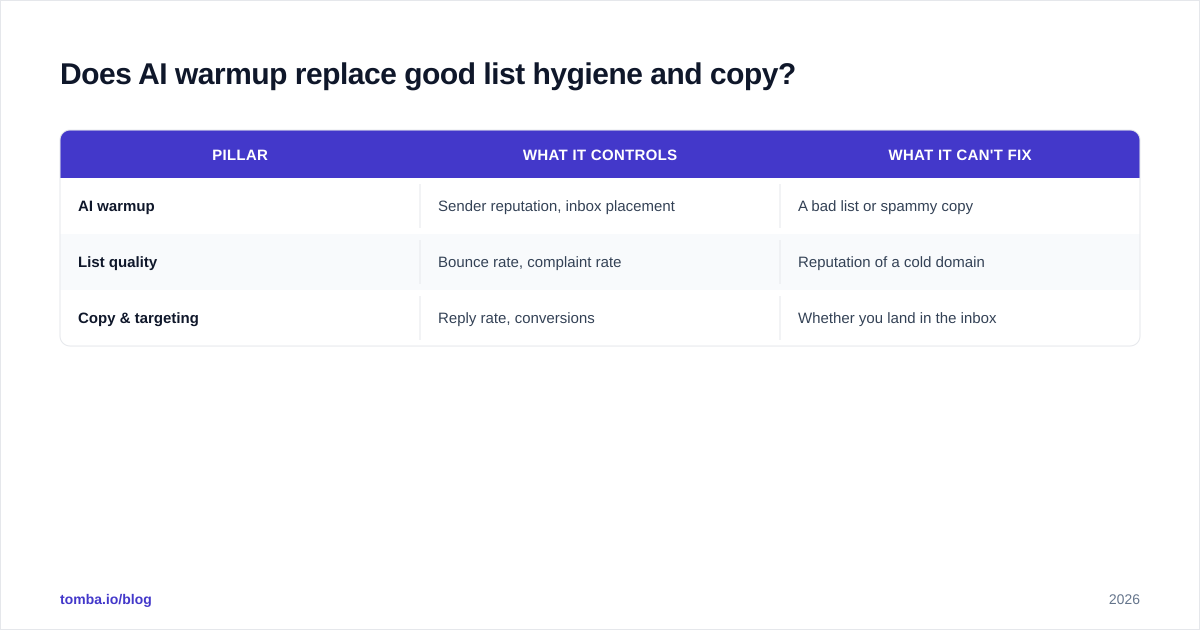
No — and this is where most teams misunderstand the tool. Warmup manages your reputation; it does nothing for who you email or what you say. The three pillars are independent:
| Pillar | What it controls | What it can't fix |
|---|---|---|
| AI warmup | Sender reputation, inbox placement | A bad list or spammy copy |
| List quality | Bounce rate, complaint rate | Reputation of a cold domain |
| Copy & targeting | Reply rate, conversions | Whether you land in the inbox |
You need all three. A perfectly warmed domain sending spammy "Quick question?" blasts to scraped, unverified addresses will still flame out — the warmup just delays the crash. Conversely, brilliant copy to a perfect list from a cold, unwarmed domain never gets seen because it's in spam. Build reputation with warmup, protect it with verification, and earn replies with relevant copy and accurate targeting data.
That targeting data is exactly where reputation is won or lost before warmup even matters. If your contact list is full of guesses and dead addresses, no warmup schedule saves you. Start campaigns with addresses confirmed to exist, sourced from a tool built for accuracy rather than scraping.
Start with a list worth warming up for#
AI email warmup earns you a seat in the inbox — but it's only worth fighting for that seat if the people on your list are real, reachable, and relevant. The fastest way to waste a warmed domain is to point it at addresses you guessed.
Build your outreach on verified contacts from the start. Use the Tomba Email Finder to source accurate professional emails by name, company, or domain search, then run them through verification before your first send. Clean data in, warm reputation maintained, replies out. See Tomba pricing — the free tier lets you test accuracy before you commit a credit. Warm the domain, verify the list, and let your campaigns land where they belong: the inbox.
// get started
Find, verify and enrich your first contacts today
Start on the free plan with 25 searches a month, then scale when your team is ready.
Free plan · No credit card required · GDPR & CCPA
// about the author