AI Prompts for Sales Enablement: 2026 Playbook & Templates
A practical 2026 guide to AI prompts for sales enablement: copy-paste templates, a prompt framework, governance tips, and a tool comparison for reps and managers.
Sales enablement used to mean a shared drive full of stale battle cards nobody opened. In 2026, the highest-performing teams treat their AI assistant as the enablement layer itself — and the difference between a useful answer and a generic one comes down to the prompt.
This guide gives you the prompts, the framework behind them, and the guardrails to run them safely across a team.
TL;DR#
- AI prompts for sales enablement are reusable instructions that turn an LLM into an on-demand coach, content engine, and research analyst for your reps.
- The best prompts share four parts: role, context, task, and format — vague prompts produce vague enablement.
- Use them for five jobs: onboarding, call coaching, content creation, account research, and objection handling.
- Standardize prompts in a shared library so output is consistent and on-brand, not a free-for-all.
- Prompts are only as good as your data — pair them with clean contact and account data from tools like Tomba's data enrichment.
What are AI prompts for sales enablement?#
AI prompts for sales enablement are structured instructions you give a large language model to produce sales-ready output: a coaching summary, a discovery script, a competitor battle card, or a tailored follow-up email.
Think of a prompt like a delegation brief to a new hire. If you say "write me something for this deal," you get filler. If you say "you're a senior AE selling a $40k ARR analytics platform to a skeptical CFO who just churned from a competitor — draft three discovery questions that surface budget without sounding pushy," you get something a rep can use in the next call.
The shift in 2026 is that enablement leaders no longer hand reps a 60-page playbook. They hand them a prompt library — a curated set of tested instructions mapped to each stage of the funnel. That keeps messaging consistent the same way a CRM keeps pipeline data consistent.
Why do most sales prompts fail?#
Most prompts fail because they skip context. An LLM has no idea what you sell, who you sell to, or what "good" sounds like at your company unless you tell it. A one-line request gets you a one-size-fits-nobody answer.
The second failure mode is inconsistency. When every rep writes their own prompts, you get 20 different brand voices and 20 different qualification frameworks. Enablement exists to remove that variance — so the prompts themselves need to be standardized and version-controlled, just like any other asset.
What does a strong prompt framework look like?#
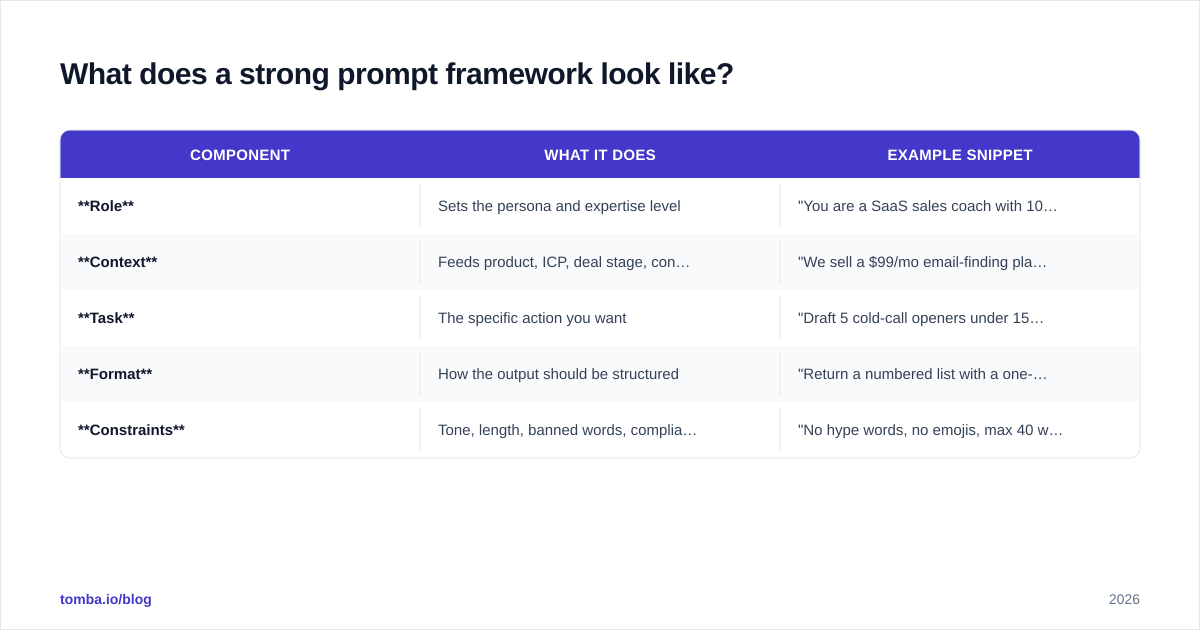
Every reliable sales prompt follows the same skeleton. Memorize it and you can build any prompt on demand.
| Component | What it does | Example snippet |
|---|---|---|
| Role | Sets the persona and expertise level | "You are a SaaS sales coach with 10 years closing mid-market deals." |
| Context | Feeds product, ICP, deal stage, constraints | "We sell a $99/mo email-finding platform to RevOps leaders." |
| Task | The specific action you want | "Draft 5 cold-call openers under 15 seconds each." |
| Format | How the output should be structured | "Return a numbered list with a one-line rationale per opener." |
| Constraints | Tone, length, banned words, compliance | "No hype words, no emojis, max 40 words each." |
The framework matters more than any single template, because the framework is what makes output repeatable across reps. A prompt missing the context row is the most common cause of generic results.
Which AI prompts should every sales team have?#
Here are battle-tested prompts grouped by enablement job. Copy them, swap the bracketed variables, and store the winners in your shared library.
Onboarding and ramp#
You are a sales enablement manager. A new AE is joining a team that sells [product] to [ICP]. Create a 30-day ramp checklist with weekly milestones covering product knowledge, the sales process, and first live calls. Format as a week-by-week table.
Call coaching#
You are a sales coach. Below is a transcript of a discovery call: [paste transcript]. Score the rep 1–10 on discovery, listening, and next-step clarity. Give two specific wins and two coaching points with exact quotes. Keep it under 200 words.
Account research#
You are an SDR researching [company]. Summarize their likely top three business priorities for this quarter based on [recent news / 10-K / press release]. Suggest one trigger event I can reference in outreach and the title most likely to own this problem.
Objection handling#
You are an objection-handling expert. A prospect said: "[objection]." Give three responses using different frames — reframe, evidence, and question-back — each under 30 words and free of defensive language.
Content and battle cards#
You are a competitive intelligence analyst. Build a battle card comparing us to [competitor]. Include their strengths, their weaknesses, three landmines to plant, and our one-line counter for each. Cite only verifiable feature differences.
Pair these with live data and the prompts get sharper. Before an account-research prompt, pull verified contacts with the Tomba Email Finder so the rep is researching the right decision-maker, not a stale name from the CRM.

How do AI prompt tools compare for enablement?#
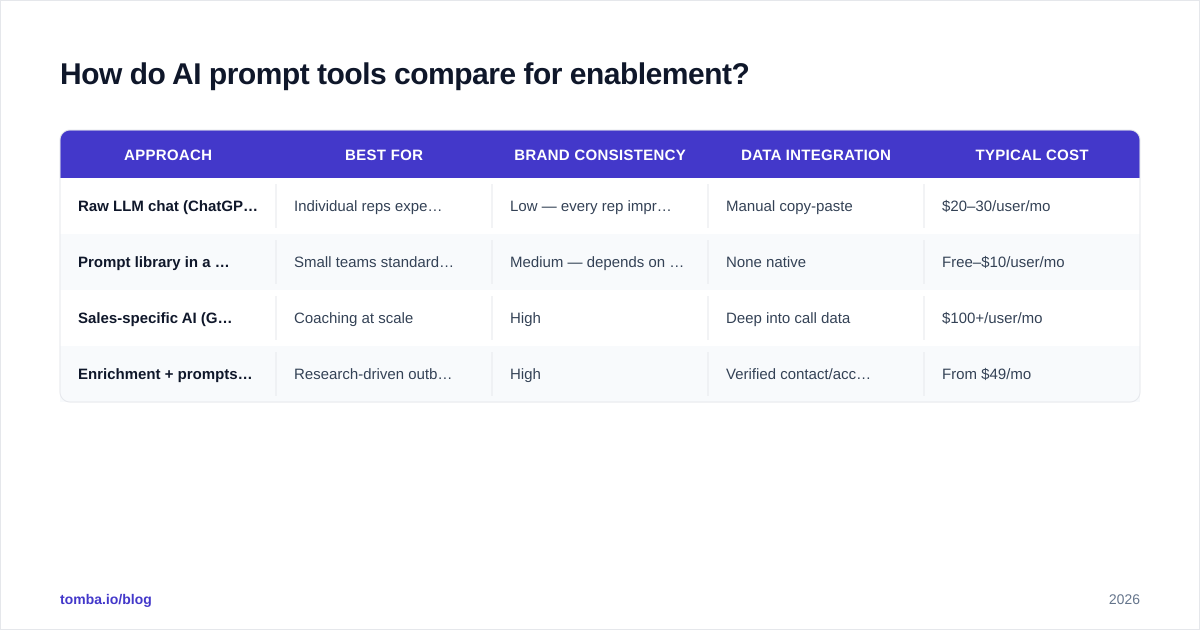
You can run prompts in a raw chat window, but most teams want governance: shared libraries, brand voice, and data that flows from the CRM. Here is how the common approaches stack up.
| Approach | Best for | Brand consistency | Data integration | Typical cost |
|---|---|---|---|---|
| Raw LLM chat (ChatGPT, Claude) | Individual reps experimenting | Low — every rep improvises | Manual copy-paste | $20–30/user/mo |
| Prompt library in a doc/Notion | Small teams standardizing | Medium — depends on adoption | None native | Free–$10/user/mo |
| Sales-specific AI (Gong, conversation AI) | Coaching at scale | High | Deep into call data | $100+/user/mo |
| Enrichment + prompts (Tomba + LLM) | Research-driven outbound | High | Verified contact/account data via API | From $49/mo |
There is no single winner — the right mix depends on whether your bottleneck is coaching, content, or research. Teams whose enablement gap is "we're emailing the wrong people with the right message" should fix the data layer first. For a fuller view of where Tomba sits, see Tomba pricing and the available integrations into HubSpot, Salesforce, and Pipedrive.
For benchmarking AI sales tools more broadly, independent review sites like G2 and Gartner Peer Insights are useful for cutting through vendor claims.
How do you roll prompts out across a team?#
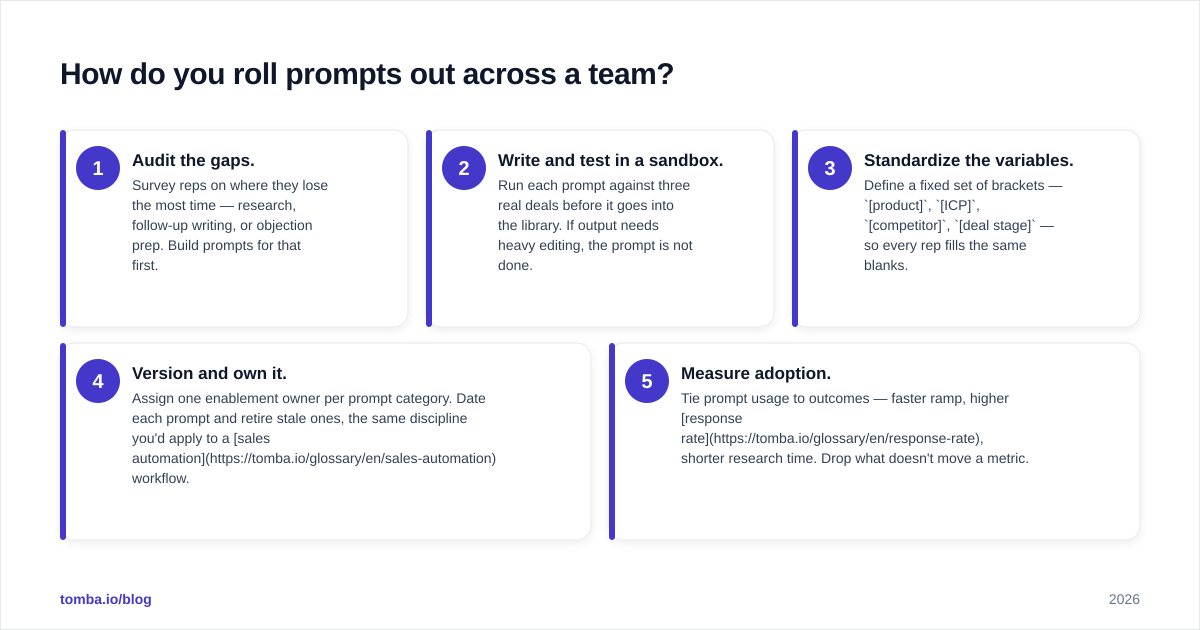
Treat your prompt library like a product, not a one-time memo. The rollout that sticks looks like this:
- Audit the gaps. Survey reps on where they lose the most time — research, follow-up writing, or objection prep. Build prompts for that first.
- Write and test in a sandbox. Run each prompt against three real deals before it goes into the library. If output needs heavy editing, the prompt is not done.
- Standardize the variables. Define a fixed set of brackets —
[product],[ICP],[competitor],[deal stage]— so every rep fills the same blanks. - Version and own it. Assign one enablement owner per prompt category. Date each prompt and retire stale ones, the same discipline you'd apply to a sales automation workflow.
- Measure adoption. Tie prompt usage to outcomes — faster ramp, higher response rate, shorter research time. Drop what doesn't move a metric.
HubSpot's own sales enablement guidance makes the same point in a different way: enablement only works when content is easy to find at the moment of need. A prompt library delivers that better than a buried PDF.
What should you never do with sales AI prompts?#
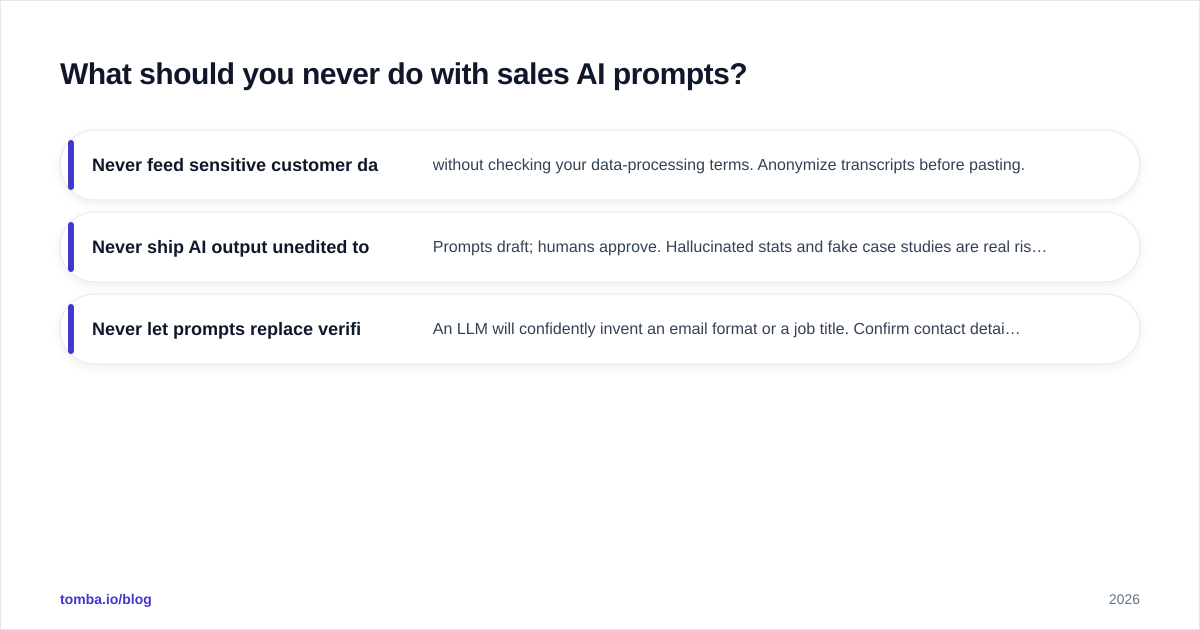
Three guardrails keep prompts from becoming a liability.
- Never feed sensitive customer data into a public model without checking your data-processing terms. Anonymize transcripts before pasting.
- Never ship AI output unedited to a prospect. Prompts draft; humans approve. Hallucinated stats and fake case studies are real risks.
- Never let prompts replace verified data. An LLM will confidently invent an email format or a job title. Confirm contact details with an email verifier before any output reaches a send queue.
The teams that win in 2026 treat AI as a force multiplier on top of clean data and human judgment — not a replacement for either.
Where should you start?#
Start with one prompt that fixes your single biggest enablement bottleneck, prove it on three deals, then expand. Most teams find the fastest ROI is in account research, because that's where reps waste hours and where bad data does the most damage.
Good prompts need good inputs. Before your reps run a single research or outreach prompt, make sure they're working from verified, current contact data. The Tomba Email Finder finds and verifies professional emails by name, domain, or company — so your AI prompts operate on real decision-makers instead of guesses. Start free with 25 searches a month, and scale into the Starter plan at $49/mo once your prompt library is paying off.
Ready to find emails that actually work?
Join 150,000+ professionals who stopped guessing and started sending. Free credits on signup — no credit card required.
Get the Tomba newsletter
Practical outbound tactics and product updates — once every two weeks.
About the author