Aircover Pricing, Reviews, Pros and Cons: 2026 Buyer Guide
Is Aircover worth it in 2026? We break down pricing tiers, real user reviews, and the honest pros and cons of this real-time sales coaching platform.
Aircover sells one promise: stop coaching reps after the deal is lost and start coaching them mid-call, while the buyer is still on the line. That single idea — real-time, in-call enablement — is what separates it from the post-call recorders most teams already own. The question is whether the promise survives contact with your budget and your tech stack.
This is a neutral teardown of Aircover pricing, reviews, pros and cons for 2026. No affiliation, no sponsorship. If you are evaluating real-time sales coaching tools and want to know what you are actually buying, where the real-user complaints cluster, and which alternatives deserve a slot in your shortlist, start here.
TL;DR#
- Aircover is a real-time sales coaching layer that surfaces battlecards, objection responses, and next-step prompts live during video calls — not a post-call recorder you review the next morning.
- Pricing is quote-based, not public. Expect per-seat annual contracts in the mid-three-figures-per-user range, with a platform fee and an annual commitment. Treat any number you see as an estimate until sales confirms.
- Reviews are thin but positive on real-time guidance and CRM-data surfacing; the recurring gripes are setup effort, smaller integration catalog, and limited public pricing transparency.
- Best fit: mid-market SaaS sales teams running structured, repeatable demos who want to shorten ramp time for new reps.
- Weak fit: tiny teams, transactional/phone-heavy outbound, or anyone who needs deep post-call conversation analytics as the primary use case.
What is Aircover?#
Aircover is an AI sales enablement platform that runs inside the live sales call. Think of it as a co-pilot sitting next to your rep during a Zoom demo: when the prospect says "this looks expensive," Aircover detects the objection and pushes the approved response, the relevant case study, and the pricing battlecard onto the rep's screen in real time. After the call, it still handles the usual recording, transcription, and summary work — but the differentiator is the live assist, not the replay.
The everyday analogy: most conversation-intelligence tools are like reviewing game tape on Monday. Aircover is the coach in your earpiece during the game. Both have value, but they solve different problems, and conflating them is where buyers overpay or under-buy.
That distinction matters when you compare it against the category leaders. Recorders like Gong and Chorus are excellent at aggregate analysis — what's working across hundreds of calls — but their coaching is retrospective. Aircover bets that the highest-leverage moment to fix a rep's behavior is the three seconds before they fumble the objection, not the day after.
Where it sits in your stack#
Aircover is not a CRM and not a dialer. It layers on top of your existing CRM and video conferencing, reading deal data from Salesforce or HubSpot and matching it against live conversation signals. It complements, rather than replaces, your data-sourcing and prospecting tools — you still need a way to find and enrich the contacts before any call happens, which is a different job entirely (more on that below).
How much does Aircover cost?#
Short answer: Aircover does not publish list pricing, so every quote is custom. Like most real-time enablement vendors selling to mid-market and up, Aircover runs through a sales-led motion with annual contracts, per-seat licensing, and a likely platform/onboarding fee on top. You will not find a self-serve checkout or a public price page with tiers the way you would with a self-serve email tool.
Based on how comparable AI enablement platforms price (Gong, Chorus/
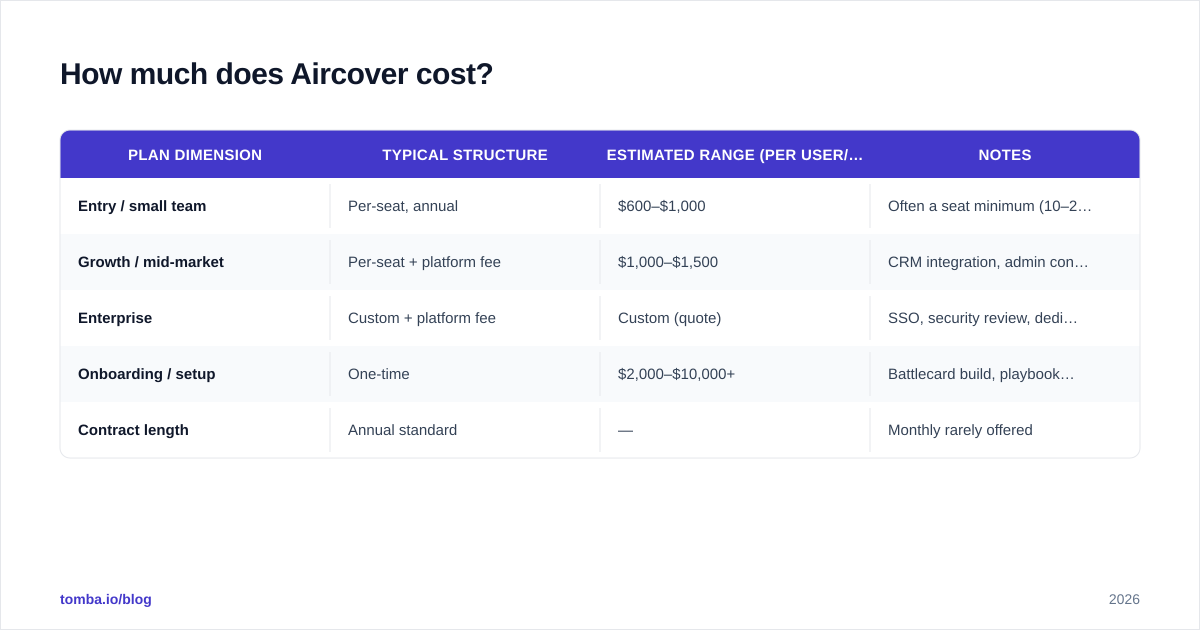
ZoomInfo, Wonderway, Second Nature), here is a realistic framing. These are estimates for budgeting, not confirmed list prices — verify with the vendor.
| Plan dimension | Typical structure | Estimated range (per user/yr) | Notes |
|---|---|---|---|
| Entry / small team | Per-seat, annual | $600–$1,000 | Often a seat minimum (10–25 users) |
| Growth / mid-market | Per-seat + platform fee | $1,000–$1,500 | CRM integration, admin controls |
| Enterprise | Custom + platform fee | Custom (quote) | SSO, security review, dedicated CSM |
| Onboarding / setup | One-time | $2,000–$10,000+ | Battlecard build, playbook config |
| Contract length | Annual standard | — | Monthly rarely offered |
Two budgeting realities to plan around. First, the seat minimum often matters more than the per-seat rate — a sub-10-rep team may not clear the floor economically. Second, the setup cost is the hidden line item: real-time coaching only works if your battlecards, objection library, and playbooks are built and tagged correctly, and that configuration is real work whether you or the vendor does it.
For an apples-to-apples sense of where Aircover sits, compare against published competitor signals on G2 and Capterra before your first sales call so you can anchor the negotiation.
What do Aircover reviews actually say?#
Public review volume for Aircover is thin compared to incumbents — a few dozen data points across G2 and Capterra rather than the thousands Gong has accumulated. That alone is worth knowing: you are buying a younger, smaller-footprint product, which cuts both ways (more responsive vendor, less battle-tested at scale).
Filtering the signal from the noise, the feedback clusters cleanly:
What reviewers praise
- Real-time guidance genuinely helps newer reps. The most consistent positive: ramping reps stop freezing on objections because the answer is on screen.
- Surfacing CRM and account data live during the call reduces the "let me get back to you" tax.
- Responsive support and a hands-on team — typical of a newer vendor that still has founder energy.
What reviewers criticize
- Setup and configuration effort is the number-one complaint. Garbage in, garbage out: weak battlecards mean weak prompts.
- Smaller integration catalog than the entrenched players. Check your exact stack before committing.
- Pricing opacity frustrates buyers who want to self-qualify before booking a demo.
- Live prompts can distract some experienced reps who find the on-screen cues noisy during a flowing conversation.
The honest read: reviews skew positive on the core idea and critical on the operational overhead. That is a normal profile for a category-creating product, but it means your ROI depends heavily on your willingness to invest in content and process, not just buy seats.
Aircover pros and cons at a glance#
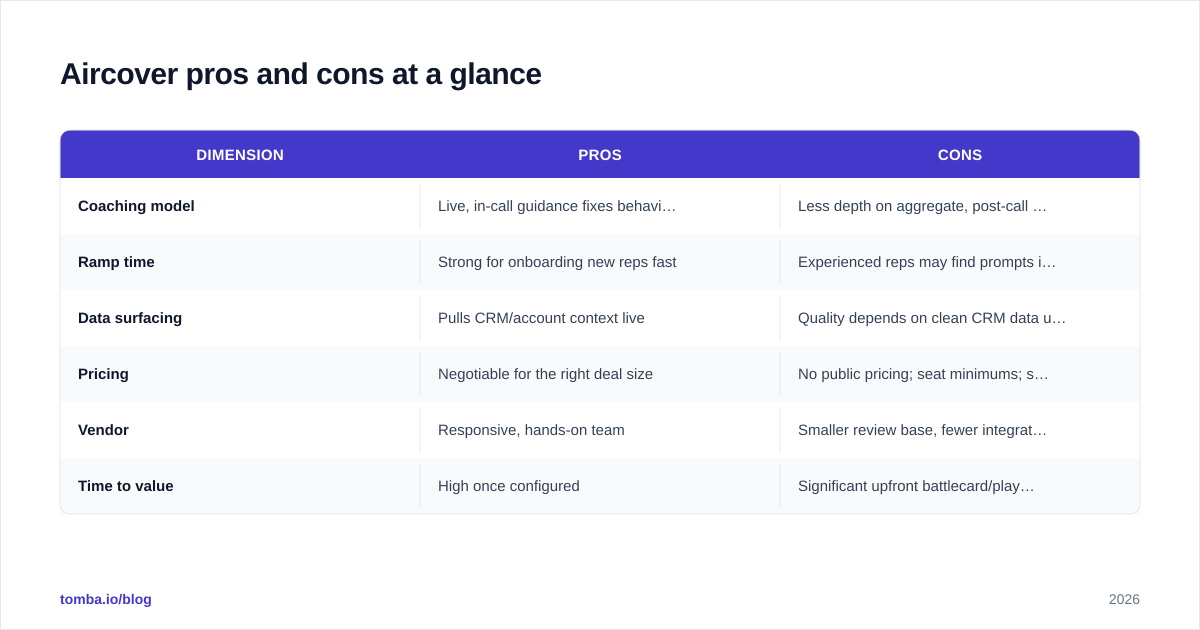
| Dimension | Pros | Cons |
|---|---|---|
| Coaching model | Live, in-call guidance fixes behavior in the moment | Less depth on aggregate, post-call analytics |
| Ramp time | Strong for onboarding new reps fast | Experienced reps may find prompts intrusive |
| Data surfacing | Pulls CRM/account context live | Quality depends on clean CRM data upstream |
| Pricing | Negotiable for the right deal size | No public pricing; seat minimums; setup fees |
| Vendor | Responsive, hands-on team | Smaller review base, fewer integrations |
| Time to value | High once configured | Significant upfront battlecard/playbook build |

Is Aircover worth it in 2026?#
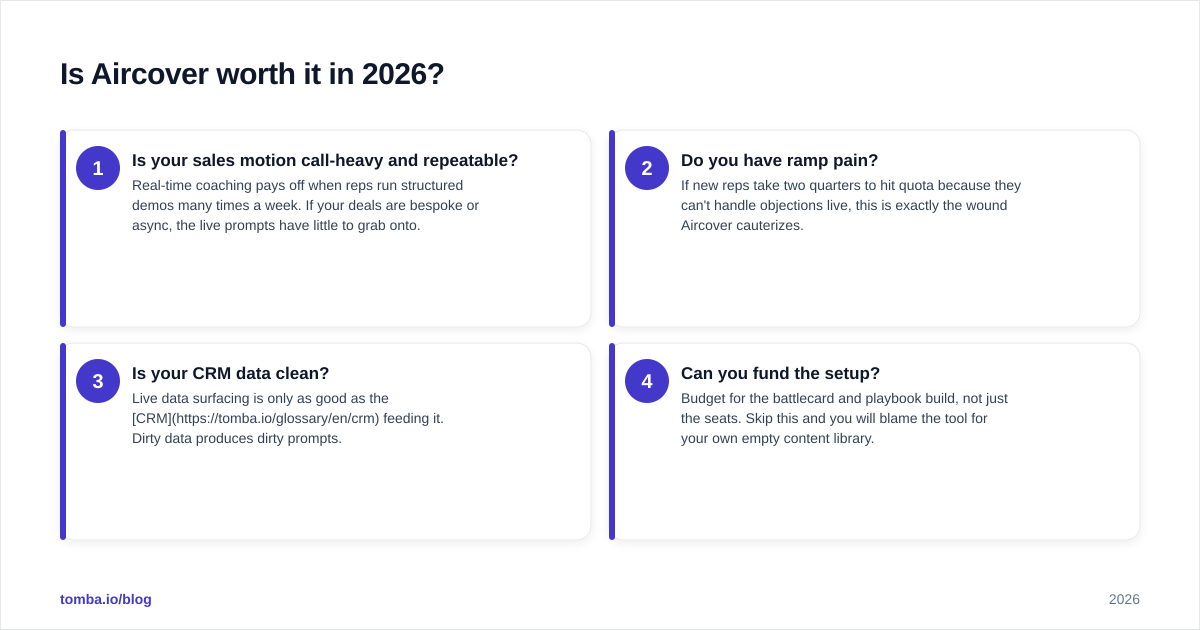
It is worth it if your bottleneck is rep execution on live calls — and not much else. Run this quick framework before you book a demo.
Ask four questions in order:
- Is your sales motion call-heavy and repeatable? Real-time coaching pays off when reps run structured demos many times a week. If your deals are bespoke or async, the live prompts have little to grab onto.
- Do you have ramp pain? If new reps take two quarters to hit quota because they can't handle objections live, this is exactly the wound Aircover cauterizes.
- Is your CRM data clean? Live data surfacing is only as good as the CRM feeding it. Dirty data produces dirty prompts.
- Can you fund the setup? Budget for the battlecard and playbook build, not just the seats. Skip this and you will blame the tool for your own empty content library.
If you answered yes to three of four, Aircover earns a shortlist slot. If you answered no to "call-heavy," look at post-call analytics tools or pure coaching platforms instead — you would be paying a real-time premium for a feature you won't use.
How does Aircover compare to alternatives?#
No real-time coaching tool exists in a vacuum. Here is where the main options diverge, so you shortlist the right two or three rather than demoing eight.
| Tool | Primary strength | Best for | Pricing transparency |
|---|---|---|---|
| Aircover | Real-time in-call coaching | Mid-market teams ramping reps | Low (quote only) |
| Gong | Post-call analytics at scale | Data-driven revenue teams | Low (quote only) |
| Chorus (ZoomInfo) | Conversation intelligence + data | ZoomInfo customers | Low (bundled) |
| Second Nature | AI role-play / practice | Pre-call skill building | Medium |
| Wonderway | Structured coaching/scorecards | Process-driven enablement | Medium |
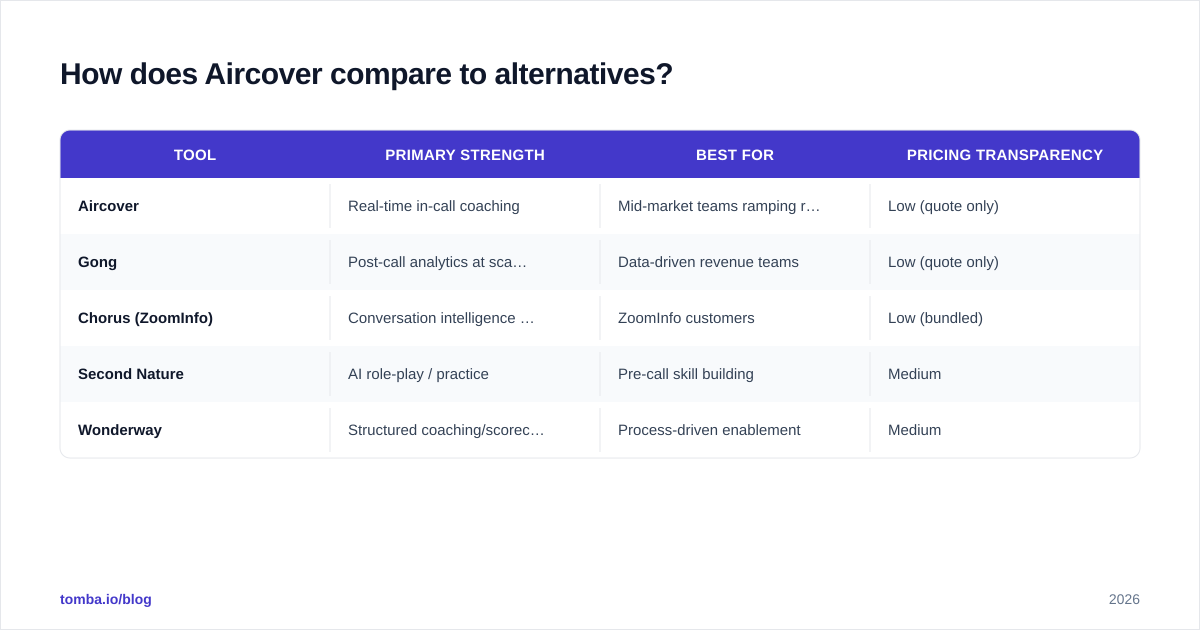
A few clarifying notes. Gong wins if your real need is insight across the whole team rather than nudges during one call. Chorus makes sense if you already pay ZoomInfo and want intelligence bundled. Second Nature and Wonderway attack the practice and scorecard angle — better if your reps need reps (pun intended) before they ever face a buyer. Aircover's defensible niche is the live moment itself.
Whatever you pick, remember the coaching layer is the last mile. None of these tools find your buyers, verify their contact details, or fill your pipeline — they make the calls you already booked go better.
What Aircover does not do (and how to fill the gap)#
This is the part vendors gloss over. A real-time coaching tool assumes the call is already on the calendar. It does nothing to create that pipeline. Before any rep gets a live prompt, someone had to find the right prospect, get a working email or phone number, and book the meeting.
That top-of-funnel work is a separate toolset, and getting it wrong starves even the best coaching platform. If your reps are coached beautifully but only dialing 30% valid numbers, you have optimized the wrong stage. Practical building blocks for that earlier stage:
- Use an email finder to source verified work emails for your target accounts so demos actually get booked.
- Pull direct dials with a phone finder so the live-coached calls connect to a human in the first place.
- Keep records current with data enrichment so the CRM context Aircover surfaces mid-call is accurate, not three jobs out of date.
Get the data foundation right and your coaching investment compounds. Get it wrong and you are coaching reps to talk to disconnected numbers.
Frequently asked questions#
Does Aircover publish pricing? No. Pricing is quote-based with annual, per-seat contracts and likely a platform/setup fee. Get a written quote and confirm the seat minimum before budgeting.
Is Aircover the same as Gong? No. Gong is primarily post-call conversation analytics at scale; Aircover focuses on real-time, in-call coaching. Some teams run a recorder for insights and a real-time tool for execution.
How long is implementation? Plan for weeks, not days. The seat activation is fast; building the battlecards, objection library, and playbooks that power the live prompts is the real work.
Does it integrate with my CRM? It targets the major CRMs (Salesforce, HubSpot), but the integration catalog is smaller than incumbents. Verify every tool in your stack during the demo.
Is it good for small teams? Often not, because of seat minimums and setup overhead. Sub-10-rep teams should price it carefully against lighter alternatives.
The bottom line#
Aircover is a focused, credible answer to a real problem: reps fumbling live calls and ramping too slowly. The pros — genuine real-time guidance, live CRM context, a responsive vendor — are real. The cons — opaque pricing, setup effort, a smaller integration and review footprint — are equally real and concentrated in operations, not the core product. For a call-heavy mid-market team with clean data and budget for configuration, it earns its shortlist slot. For everyone else, the real-time premium may buy a feature you won't fully use.
And remember the order of operations: coaching is the last mile, not the first. The cleanest way to get more from any sales-coaching investment is to feed it more qualified, reachable buyers. Start there with Tomba's Email Finder — find verified, deliverable contact details by domain, name, or company, on a free tier of 25 searches with paid plans from $49/mo — so the calls your team gets coached on are calls worth having in the first place.
// get started
Find, verify and enrich your first contacts today
Start on the free plan with 25 searches a month, then scale when your team is ready.
Free plan · No credit card required · GDPR & CCPA
Get the Tomba newsletter
Product and data updates
// about the author