Apify Pricing, Reviews, Pros and Cons: A 2026 Breakdown
A no-fluff look at Apify pricing, real user reviews, and the pros and cons of running web scrapers on its platform in 2026 — plus when a simpler API wins.
Apify is one of the most flexible web-scraping and automation platforms on the market — and also one of the easiest to overspend on if you don't understand how it bills. Before you drop it into a data pipeline, you want a clear read on what it costs, what real users say, and where it shines versus where it bites.
TL;DR#
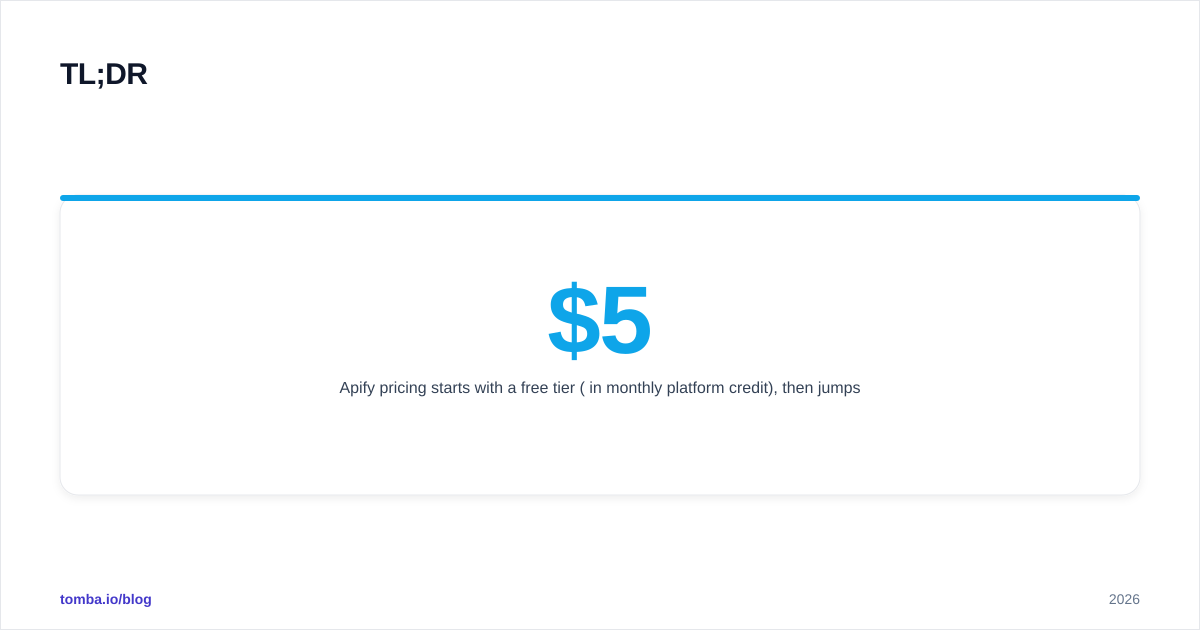
- Apify pricing starts with a free tier ($5 in monthly platform credit), then jumps to Starter at $39/mo, Scale at $199/mo, and Business at $999/mo, with usage billed on top via compute units, proxies, and storage.
- Reviews are strong — roughly 4.7–4.8 stars on G2 and Capterra — praising the Actor marketplace and flexibility, while complaints cluster around billing unpredictability and a learning curve.
- Biggest pro: thousands of pre-built scrapers ("Actors") plus the ability to deploy your own code. Biggest con: consumption-based pricing makes monthly costs hard to forecast.
- Apify is excellent for custom, large-scale scraping; it is overkill if all you actually need is verified B2B contact data from a structured API.
- For email and contact enrichment specifically, a purpose-built tool like Tomba Email Finder is cheaper and more predictable than building a scraper.
What is Apify and who is it for?#
Apify is a cloud platform for running web scrapers, crawlers, and browser-automation jobs at scale. Think of it like an app store crossed with a serverless cloud: you can grab a ready-made scraper from its marketplace, or write your own in JavaScript or Python and let Apify handle the servers, proxies, scheduling, and storage.
The core unit is the Actor — a containerized program that does one scraping or automation job. There are thousands of public Actors (Google Maps scraper, Instagram scraper, LinkedIn profile scraper, e-commerce price trackers) plus the SDK to build private ones. That flexibility is why developers and data teams love it, and why non-technical buyers sometimes find it heavier than they expected.
It's aimed at three groups: developers who want infrastructure without managing servers, growth and RevOps teams pulling B2B data at scale, and businesses that need recurring, scheduled data feeds. If you only need a handful of contacts per week, this is a lot of machinery for the job.
How does Apify pricing actually work in 2026?#
Apify uses a subscription + usage model, and the usage part is what catches people off guard. Your monthly plan comes with a bucket of platform credit, and everything you run draws down that credit (and bills overages beyond it).
The main cost drivers are:
- Compute units (CUs) — the headline meter. One CU is roughly one hour of an Actor running on 1 GB of memory. Heavy jobs with more memory burn CUs faster.
- Residential and datacenter proxies — billed per GB or per IP, and often the single largest line item for scraping sites that fight back.
- Data transfer and storage — datasets, key-value stores, and request queues.
- Actor rental — some premium third-party Actors charge their own monthly or per-result fee on top of platform usage.
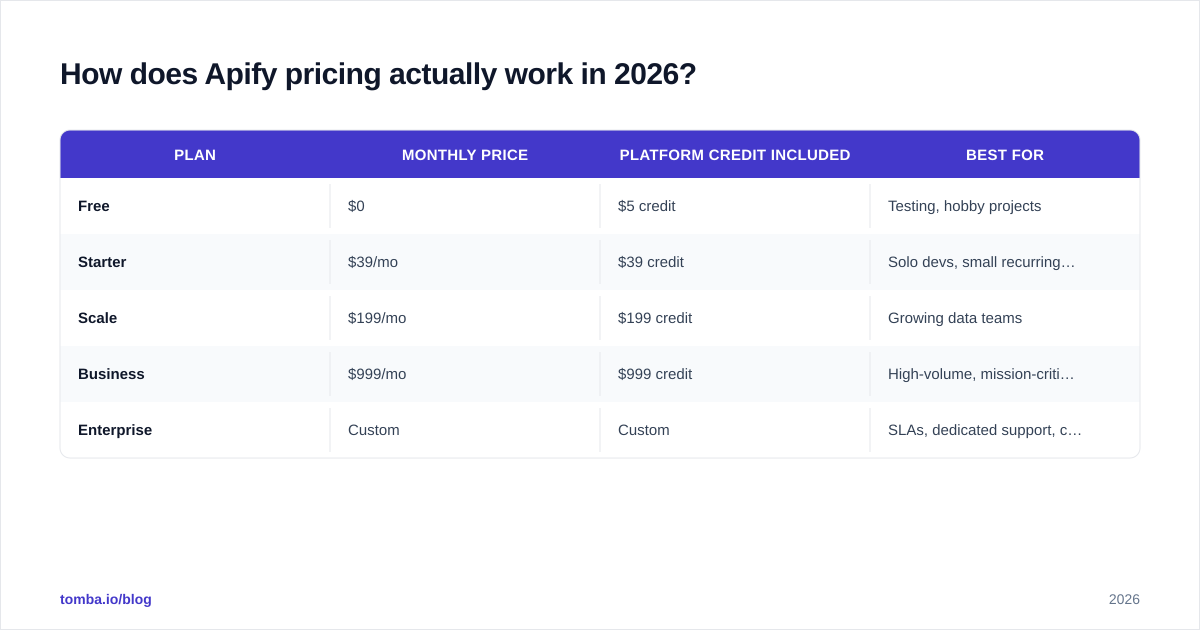
Here's the plan structure as of 2026:
| Plan | Monthly price | Platform credit included | Best for |
|---|---|---|---|
| Free | $0 | $5 credit | Testing, hobby projects |
| Starter | $39/mo | $39 credit | Solo devs, small recurring jobs |
| Scale | $199/mo | $199 credit | Growing data teams |
| Business | $999/mo | $999 credit | High-volume, mission-critical pipelines |
| Enterprise | Custom | Custom | SLAs, dedicated support, compliance |
The clever-but-confusing part: your plan price roughly equals the credit you get, so the subscription isn't really "the price" — it's a prepaid balance plus higher rate limits, longer data retention, and more concurrent runs. Real cost is whatever you consume. A team on the $199 Scale plan running aggressive residential-proxy jobs can easily blow past their credit and see a much larger invoice.
A quick worked example#
Say you scrape 50,000 Google Maps listings a month. That might consume 30–60 CUs depending on memory settings, plus a few GB of proxy traffic. On the Starter plan you could stay near the included $39 credit — or you could double it if you crank concurrency and residential proxies. The lesson: model your CU and proxy burn before committing, because the sticker price tells you almost nothing about your real bill.

What do Apify reviews say — the pros and cons?#
Apify reviews are genuinely positive. On G2 and Capterra it sits around 4.7–4.8 out of 5, which is high for a developer tool. But the star rating hides a consistent split between what users love and what frustrates them.
The pros reviewers mention most#
- The Actor marketplace. Most reviewers say the same thing: they were scraping a target within minutes because a pre-built Actor already existed. No need to reverse-engineer a site from scratch.
- Genuine flexibility. You can run someone else's scraper, fork it, or write your own. Few platforms let you go from "no-code" to "full custom code" in the same environment.
- Managed infrastructure. Proxies, retries, scheduling, autoscaling, and storage are handled. Reviewers repeatedly note they stopped babysitting servers.
- Strong docs and SDK. The Crawlee library and Apify SDK get specific praise from developers.
- Responsive support. Even on lower tiers, support quality scores well.
The cons reviewers mention most#
- Unpredictable billing. This is the number-one complaint. Consumption pricing means a misconfigured Actor or a site that triggers heavy proxy use can spike your bill without warning.
- Learning curve. Compute units, memory settings, proxy types, and dataset management are a lot to absorb for non-developers.
- Premium Actor fees stack up. Third-party Actors with their own pricing can make a "simple" job surprisingly expensive.
- Proxy costs. Residential proxies are powerful but pricey, and scraping defended sites pushes you toward them.
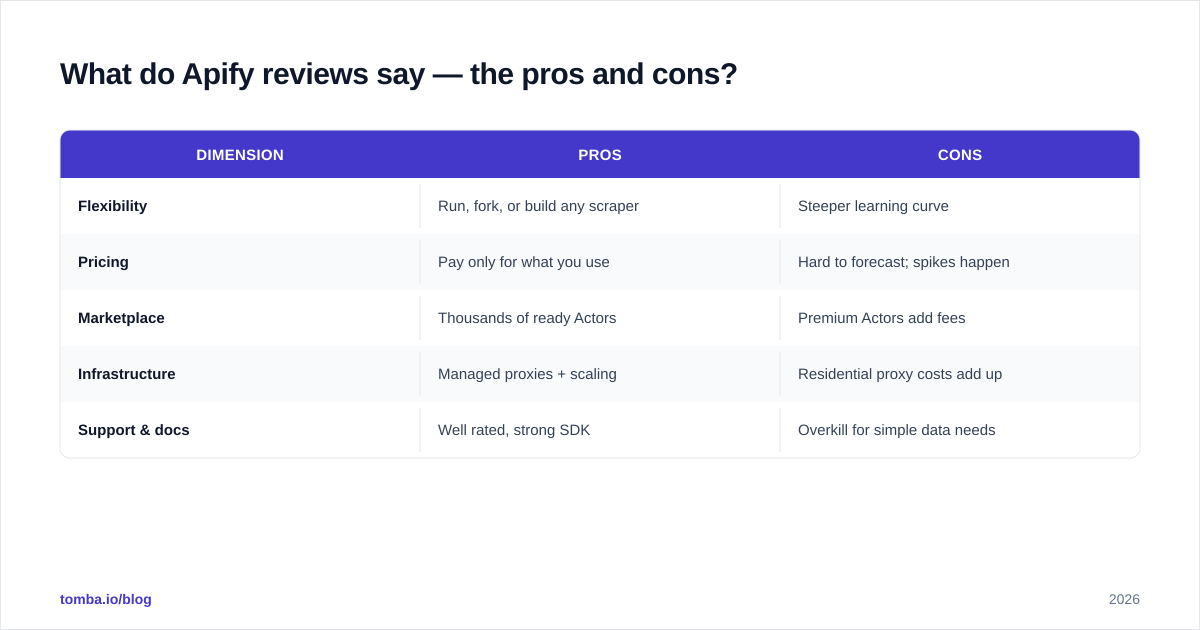
Here's the honest summary in table form:
| Dimension | Pros | Cons |
|---|---|---|
| Flexibility | Run, fork, or build any scraper | Steeper learning curve |
| Pricing | Pay only for what you use | Hard to forecast; spikes happen |
| Marketplace | Thousands of ready Actors | Premium Actors add fees |
| Infrastructure | Managed proxies + scaling | Residential proxy costs add up |
| Support & docs | Well rated, strong SDK | Overkill for simple data needs |
Is Apify worth it compared to a dedicated data API?#
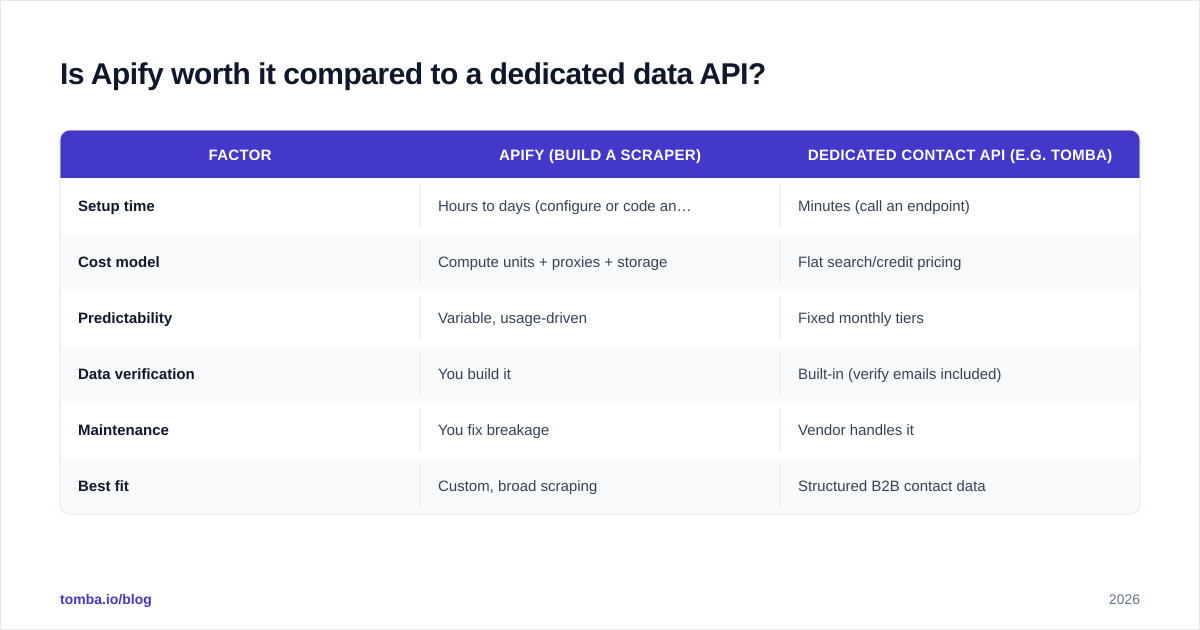
It depends entirely on what you're pulling. Apify wins when the data is custom, messy, or has no API. It loses when you need a single, well-defined data type that a specialist tool already serves through a clean API.
That distinction matters a lot for sales and marketing teams. If your real goal is "get verified work emails for a list of companies," you don't need a general-purpose scraping platform — you need a contact API. Building and maintaining a LinkedIn or company scraper on Apify means owning proxy costs, breakage when sites change, and the legal exposure of scraping. A dedicated email finder or data enrichment API hands you structured, verified results without any of that overhead.

Compare the two approaches directly:
| Factor | Apify (build a scraper) | Dedicated contact API (e.g. Tomba) |
|---|---|---|
| Setup time | Hours to days (configure or code an Actor) | Minutes (call an endpoint) |
| Cost model | Compute units + proxies + storage | Flat search/credit pricing |
| Predictability | Variable, usage-driven | Fixed monthly tiers |
| Data verification | You build it | Built-in (verify emails included) |
| Maintenance | You fix breakage | Vendor handles it |
| Best fit | Custom, broad scraping | Structured B2B contact data |
For reference, Tomba's tiers are flat and easy to budget: a Free plan with 25 searches/mo, Starter at $49/mo, Growth at $99/mo, and Pro at $249/mo — see the full Tomba pricing breakdown. No compute units, no proxy surprises. That predictability is the whole point for teams who just need contacts, not a scraping stack.
When should you choose Apify anyway?#
Pick Apify when at least one of these is true:
- You need data from sites with no API — marketplaces, directories, search results, maps.
- Your scraping needs are custom or constantly changing, so a fixed-schema tool won't fit.
- You have developer resources to configure Actors and tune memory/proxy settings.
- You want scheduled, recurring crawls feeding a warehouse or dashboard.
- You're comfortable monitoring usage and setting spend limits to avoid bill shock.
Skip it, or pair it with a specialist tool, when:
- You mainly need verified emails, phone numbers, or firmographics — use an email verifier and finder instead.
- You want predictable monthly costs with no usage math.
- Your team is non-technical and won't maintain scrapers.
- The data already exists behind a clean, compliant API.
A common smart setup is hybrid: use Apify for the genuinely custom scraping jobs, and a contact API for the parts that are already solved — like turning a domain into a list of verified work emails via domain search. You stop paying compute units for a problem someone else already productized.
How can you control Apify costs?#
If you do commit to Apify, a few habits keep the bill sane:
- Set spending limits in the console before running anything at scale.
- Right-size memory. More memory finishes faster but burns CUs quicker — test to find the sweet spot.
- Prefer datacenter proxies when a site allows them; save residential proxies for sites that truly need them.
- Cache and dedupe so you're not re-scraping the same records. A simple remove-duplicates pass on outputs avoids paying twice.
- Watch premium Actor fees — read each Actor's pricing tab, not just the platform plan.
- Schedule conservatively. Hourly crawls cost roughly 24× daily ones.
Done well, Apify's pay-for-what-you-use model is fair. Done carelessly, it's the thing you'll be explaining to finance at the end of the month.
The bottom line on Apify pricing, reviews, pros and cons#
Apify earns its high review scores: it's a powerful, flexible, well-supported platform that turns weeks of scraper infrastructure into a few clicks. The pros — marketplace, flexibility, managed scaling — are real. The cons — billing unpredictability, learning curve, proxy costs — are equally real and worth budgeting for. If you need broad, custom web data and have the technical chops, it's a strong buy.
But if your actual job is finding and verifying B2B contacts, a scraping platform is the wrong altitude. You'll pay in compute units and engineering time for something a contact API solves out of the box — with verification built in and a flat price you can forecast.
Want verified work emails without building or babysitting a scraper? Start free with Tomba Email Finder — search by name, company, or domain, get accuracy scores on every result, and scale through one simple API with predictable pricing. It's the fast path to the contact data most teams spin up Apify Actors to chase, minus the compute-unit roulette.
// get started
Find, verify and enrich your first contacts today
Start on the free plan with 25 searches a month, then scale when your team is ready.
Free plan · No credit card required · GDPR & CCPA
// about the author