Apollo Cold Email in 2026: Setup, Sequences & Replies
A practical 2026 playbook for running Apollo cold email campaigns that land in the inbox and book meetings — setup, sequences, deliverability, and where Apollo falls short.
Apollo.io is one of the most common starting points for cold email teams because it bundles a B2B database, a sequencer, and email sending into one tab. The catch: bundling everything in one tool also means inheriting one tool's limits — on data accuracy, sending reputation, and how much control you have over deliverability. This guide shows how to run Apollo cold email the right way in 2026, and where to bolt on other tools when Apollo alone isn't enough.
TL;DR#
- Apollo cold email works best as a sequencer + database combo, but its sending engine is shared infrastructure, so deliverability needs active management.
- Warm up domains, cap volume at 30–50 sends/day per mailbox, and use multiple sending domains — Apollo will happily let you overshoot and torch your reputation.
- Apollo's data is good for discovery, average for verification. Re-verify exported emails before you send to keep bounce rates under 3%.
- Segmentation beats blasting. Tight ICP filters plus personalized openers outperform a 10,000-contact spray every time.
- For teams that want clean, verified contact data feeding any sequencer, pair Apollo (or replace it) with a dedicated finder like Tomba Email Finder.
What is Apollo cold email?#
Apollo cold email refers to running outbound email campaigns directly inside Apollo.io — using its contact database to build lists, then its Sequences feature to send and automate multi-step outreach. Think of it like a kitchen that sells you the ingredients and lends you the stove: convenient, but you still have to know how to cook, and the stove is shared with everyone else in the building.
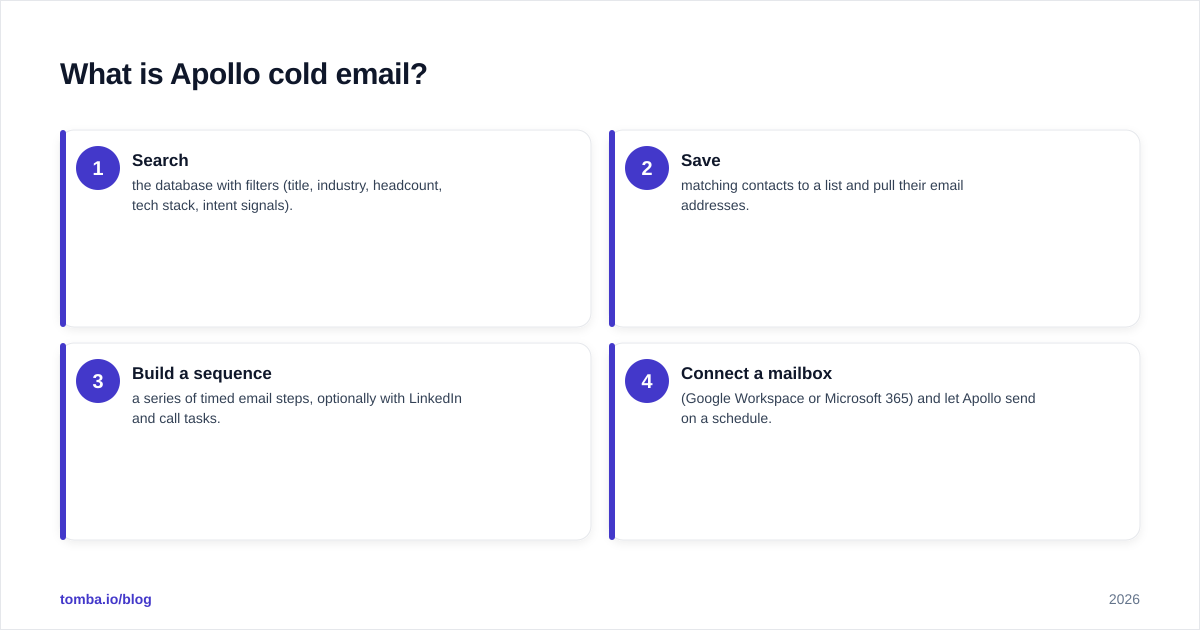
A typical Apollo cold email workflow has four stages:
- Search the database with filters (title, industry, headcount, tech stack, intent signals).
- Save matching contacts to a list and pull their email addresses.
- Build a sequence — a series of timed email steps, optionally with LinkedIn and call tasks.
- Connect a mailbox (Google Workspace or Microsoft 365) and let Apollo send on a schedule.
The appeal is obvious: you go from "I need leads" to "emails are sending" without leaving one screen. The risk is just as obvious: every decision Apollo makes by default optimizes for sending more, not for protecting your domain.
How do you set up an Apollo cold email sequence?#
Start with the boring infrastructure work, because it's what actually determines whether your emails get seen.
1. Authenticate your sending domain. Set up SPF, DKIM, and DMARC records before you send a single message. Use a free SPF checker to confirm your record resolves, and treat email deliverability as a prerequisite, not an afterthought.
2. Use separate sending domains. Never send cold email from your primary domain (e.g., yourcompany.com). Buy lookalike domains (get-yourcompany.com, yourcompany-hq.com), point them at your main site, and send from those. If a domain gets burned, your real one survives.
3. Warm up every mailbox. A brand-new mailbox sending 50 cold emails on day one is a spam-folder guarantee. Ramp from ~5/day to ~40/day over two to three weeks. Apollo offers warmup, but many teams run a dedicated warmup tool in parallel.
4. Build the sequence around one job. A clean three-to-four step cold sequence looks like this:
- Step 1 (Day 1): Short, specific, one ask. No pitch deck.
- Step 2 (Day 3): Reply-bump with a new angle or proof point.
- Step 3 (Day 6): Social proof — a relevant customer or result.
- Step 4 (Day 10): Breakup email. Brief, no guilt-trip.
5. Cap your volume. Keep each mailbox at 30–50 sends/day. To reach more people, add more mailboxes — don't crank one mailbox higher.

What are realistic Apollo cold email limits and benchmarks?#
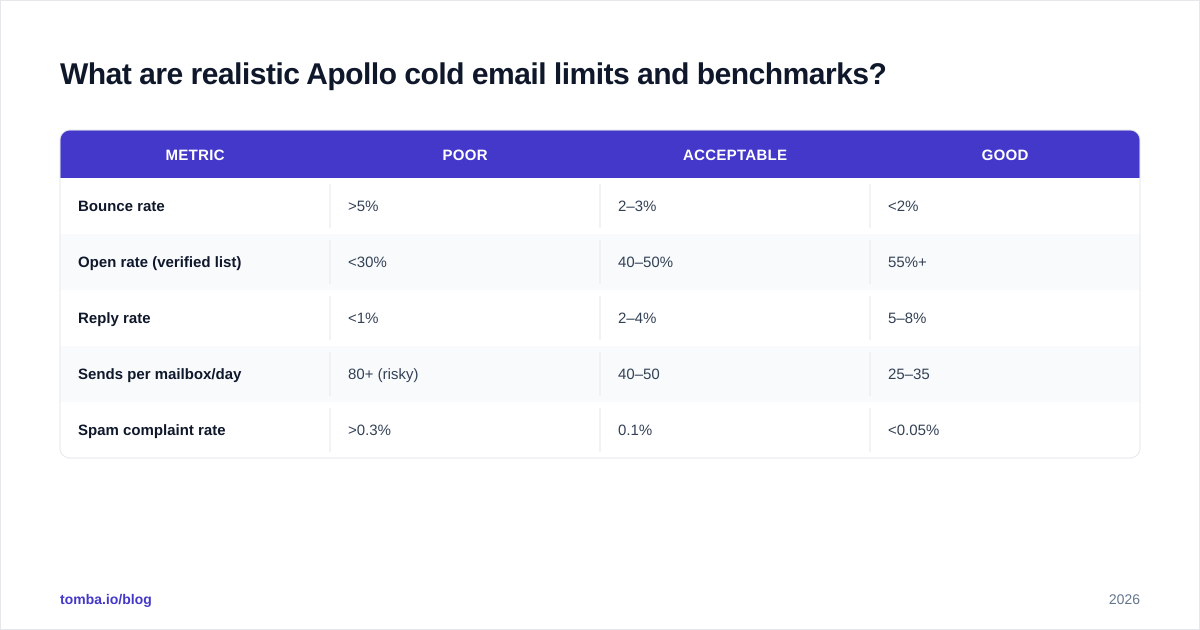
Apollo's plan tiers cap how many email credits, sequences, and sends you get, and your deliverability caps the rest. Here's a realistic benchmark table for a well-run B2B cold campaign in 2026:
| Metric | Poor | Acceptable | Good |
|---|---|---|---|
| Bounce rate | >5% | 2–3% | <2% |
| Open rate (verified list) | <30% | 40–50% | 55%+ |
| Reply rate | <1% | 2–4% | 5–8% |
| Sends per mailbox/day | 80+ (risky) | 40–50 | 25–35 |
| Spam complaint rate | >0.3% | 0.1% | <0.05% |
If your bounce rate climbs past 3%, stop and re-verify your list — mailbox providers read bounces as a spammer signal, and a few bad sends can tank an otherwise healthy domain. This is the single most common way Apollo cold email campaigns quietly die.
Is Apollo's cold email data accurate enough?#
Apollo's database is strong for discovery — finding people who match an ICP — and merely average for verified deliverability. Apollo pulls from crowdsourced and scraped sources, so a meaningful slice of exported emails are stale, guessed, or catch-all addresses that look valid but bounce.
The fix is a two-step data hygiene habit:
- Re-verify before sending. Run exported addresses through a dedicated email verifier so you catch dead and risky addresses Apollo flagged as "likely valid."
- Handle catch-all domains deliberately. Catch-all servers accept everything at SMTP time, so they pass naive checks and bounce later. A catch-all verifier tells you which are genuinely safe to send to.
When you need contacts Apollo doesn't have — niche roles, smaller companies, region-specific teams — a domain-first tool fills the gaps. Tomba's domain search returns the email pattern and known addresses for a company, which is often faster than scrolling Apollo's filters for a single target account.
Apollo cold email vs. a dedicated stack: which wins?#
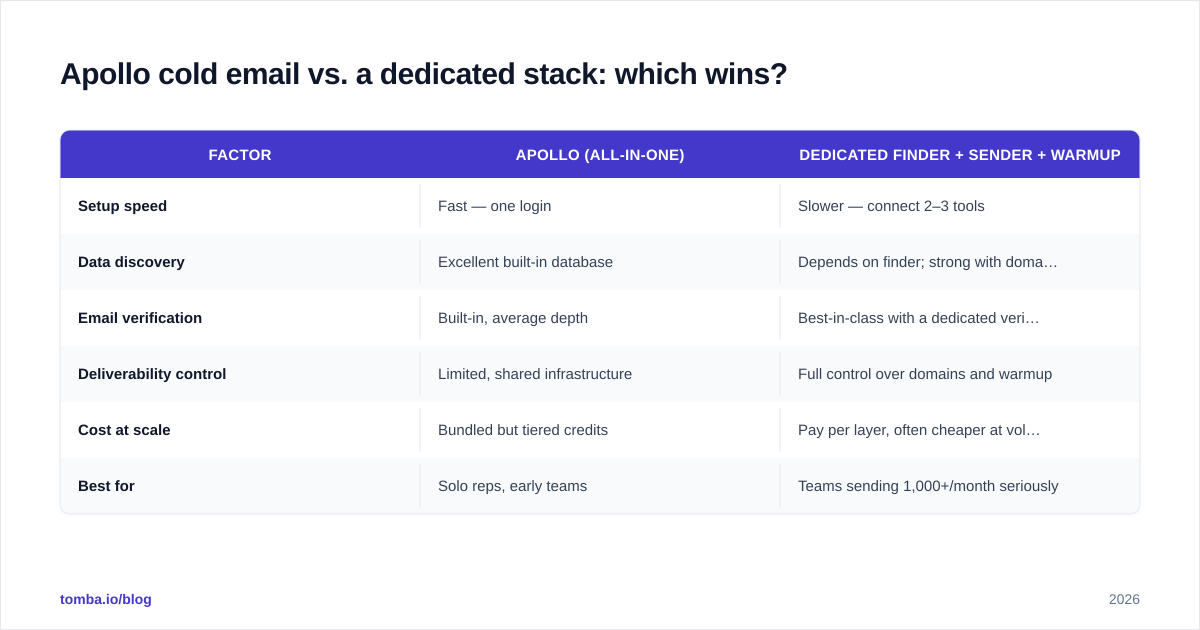
The honest answer: Apollo wins on convenience, a split stack wins on control and data quality. Here's how the two approaches compare across the things that decide whether cold email actually books meetings.
| Factor | Apollo (all-in-one) | Dedicated finder + sender + warmup |
|---|---|---|
| Setup speed | Fast — one login | Slower — connect 2–3 tools |
| Data discovery | Excellent built-in database | Depends on finder; strong with domain search |
| Email verification | Built-in, average depth | Best-in-class with a dedicated verifier |
| Deliverability control | Limited, shared infrastructure | Full control over domains and warmup |
| Cost at scale | Bundled but tiered credits | Pay per layer, often cheaper at volume |
| Best for | Solo reps, early teams | Teams sending 1,000+/month seriously |
The takeaway isn't "Apollo bad." It's that Apollo's bundling hides trade-offs. Plenty of teams use Apollo for prospecting and the database, then export to a dedicated sending and verification stack. If you're weighing the all-in-one route, our Apollo alternative breakdown covers where a focused data tool changes the math.
How do you write Apollo cold emails that get replies?#
Tooling gets your message delivered; copy gets it answered. The two failure modes are equally fatal: a perfect email to a bad list, and a great list with a lazy template.
Keep the first email under 90 words. Prospects skim on mobile. A wall of text reads as "automated" before they've read a word.
Lead with relevance, not your company. Open with something true about them — a hire, a launch, a tech-stack signal Apollo surfaced — then connect it to the problem you solve.
One call to action. "Worth a quick look?" beats "Book a 30-minute demo via this Calendly link and also check our case studies." Make the next step tiny.
Personalize at the segment level, not just the contact level. You can't hand-write 500 emails, but you can write five tight templates for five tight segments. That scales and still feels human. If you're stuck on openers, a subject line generator and a cold email AI draft can get you to a first pass faster.
Test before you trust. Run a draft through a spam checker to catch trigger words and broken formatting that push you to Promotions or worse.
A useful mental model for the whole campaign:
What deliverability mistakes kill Apollo cold email campaigns?#
Most "Apollo doesn't work" complaints trace back to a handful of self-inflicted wounds:
- Sending from the primary domain. One spam wave and your company's real email — invoices, support, sales replies — starts landing in spam folders. Always isolate cold sending.
- Skipping warmup. Cold mailboxes have no sending history; providers treat sudden volume as abuse.
- Ignoring bounce signals. A 6% bounce rate isn't a list problem you fix later — it's an active reputation fire.
- Over-personalizing with spammy tokens. Broken merge fields (
Hi {{first_name}},) scream automation and tank trust instantly. - No reply monitoring. If positive replies sit unanswered for days, your best leads go cold while your sequence keeps nagging them.
Treat your sender reputation like a credit score: slow to build, fast to wreck, and watched by every mailbox provider you're trying to reach. Tools like Google Postmaster Tools let you watch domain reputation directly — check it weekly during active campaigns.
How does Apollo compare to other outbound platforms?#
Apollo competes with a crowded field — Outreach, Salesloft, Instantly, and others — and each makes a different bet. Apollo bets on the database being the moat. Instantly bets on deliverability and unlimited inboxes. Outreach and Salesloft bet on enterprise workflow depth.
For a small or mid-size team, the practical decision isn't "which platform is best" but "where does my pipeline actually leak?" If you can't find good contacts, you have a data problem and a finder matters most. If you find them fine but emails bounce or land in spam, you have a deliverability problem and the sender matters most. Diagnose the leak before you switch platforms — most teams switch the wrong layer.
Independent review sites like G2 are worth scanning for current sentiment, but weight recent reviews heavily; cold-email tooling changes fast, and a 2024 review may describe a product that no longer exists.
When should you replace Apollo entirely?#
Consider moving off Apollo's all-in-one model when any of these become true:
- You're sending 1,000+ cold emails a month and deliverability control matters more than convenience.
- Your bounce rates stay high even after re-verifying, suggesting the underlying data isn't matching your niche.
- You want to feed multiple sequencers, a CRM, and enrichment from one clean source of truth rather than re-exporting from Apollo each time.
- Your team needs bulk processing — uploading thousands of domains or names and getting verified contacts back. A bulk email finder handles this without per-contact clicking.
You don't have to rip Apollo out. The most common 2026 setup keeps Apollo for prospecting and runs a dedicated finder, verifier, and sender alongside it — each layer doing the one job it's best at.
The bottom line#
Apollo cold email is a genuinely fast way to launch outbound, and for solo reps and early teams it's often enough. But its convenience hides the two things that decide success: data accuracy and deliverability. Manage volume, warm up properly, isolate your sending domain, and — above all — verify your data before it hits send.
If clean, verified contact data is where your campaigns leak, that's the layer to fix first. Tomba Email Finder finds professional emails by name, domain, or company and pairs with a built-in verifier, so the addresses you load into Apollo (or any sequencer) actually reach a human. Start on the free tier — 25 searches a month, no card — and scale up through Tomba's pricing plans (Starter $49/mo, Growth $99/mo, Pro $249/mo) only when your pipeline proves it's worth it.
// get started
Find, verify and enrich your first contacts today
Start on the free plan with 25 searches a month, then scale when your team is ready.
Free plan · No credit card required · GDPR & CCPA
// about the author