How to Automate Cold Email Outreach in 2026 (Full Guide)
Manual prospecting caps your pipeline. Here's how to automate cold email outreach in 2026 — from data sourcing to sending — without torching your domain reputation.
Cold email still works in 2026 — but only if you can run it at volume without breaking deliverability or burning your team's hours on copy-paste. Automation is the difference between sending 30 hand-typed emails a day and running 3,000 personalized touches a week that actually land in the inbox.
This guide walks through how to automate cold email outreach end to end: the data layer, the sending layer, personalization, warmup, and the guardrails that keep you out of spam. No fluff, no "synergy" — just the stack and the workflow.
TL;DR#
- Automation is a pipeline, not a tool. You need four layers: data sourcing, list hygiene, sending/sequencing, and reply handling. Skip one and the whole thing leaks.
- Garbage data kills automation faster than bad copy. Verify every address before it enters a sequence — bounce rates above 3% wreck sender reputation.
- Warm up before you scale. A cold domain blasting 500 emails on day one gets flagged. Ramp over 3–6 weeks.
- Personalization can be automated with merge variables and AI snippets, but the research that feeds it (role, company, trigger event) has to be accurate.
- Tomba handles the data layer — finding and verifying addresses via API or bulk — so your sequencer always pulls from a clean list.
What does it mean to automate cold email outreach?#
Automating cold email outreach means replacing the manual steps — finding contacts, copying addresses into a spreadsheet, writing each email, hitting send, and tracking replies — with software that does them on a schedule and at scale.
Think of it like a factory line. Each station does one job and passes the work to the next. A human still designs the line and inspects the output, but they're not screwing in every bolt by hand. In outreach terms, that line looks like this:
- Source contacts — pull verified emails for your target accounts from a database or email finder.
- Clean the list — remove duplicates, catch-alls, and invalid addresses before they ever get a send.
- Enrich and segment — attach role, company size, and trigger data so messaging can be tailored.
- Sequence and send — automated multi-step campaigns with delays, conditions, and A/B variants.
- Route replies — positive responses go to a rep or CRM; bounces and unsubscribes are suppressed automatically.
The mistake most teams make is automating only step 4. They buy a sequencer, point it at a dirty list, and wonder why their open rates crater. Automation amplifies whatever you feed it — including bad data.
What are the core layers of a cold email automation stack?#
A working stack has four distinct jobs. You can buy a single platform that bundles them or compose best-of-breed tools — but every job has to be covered.
| Layer | Job | Tool examples | Why it matters |
|---|---|---|---|
| Data sourcing | Find verified contact emails by domain, name, or role | Tomba, Apollo, RocketReach | No list = no campaign. Accuracy here sets your ceiling. |
| List hygiene | Verify, dedupe, and remove risky addresses | Tomba email verifier, |
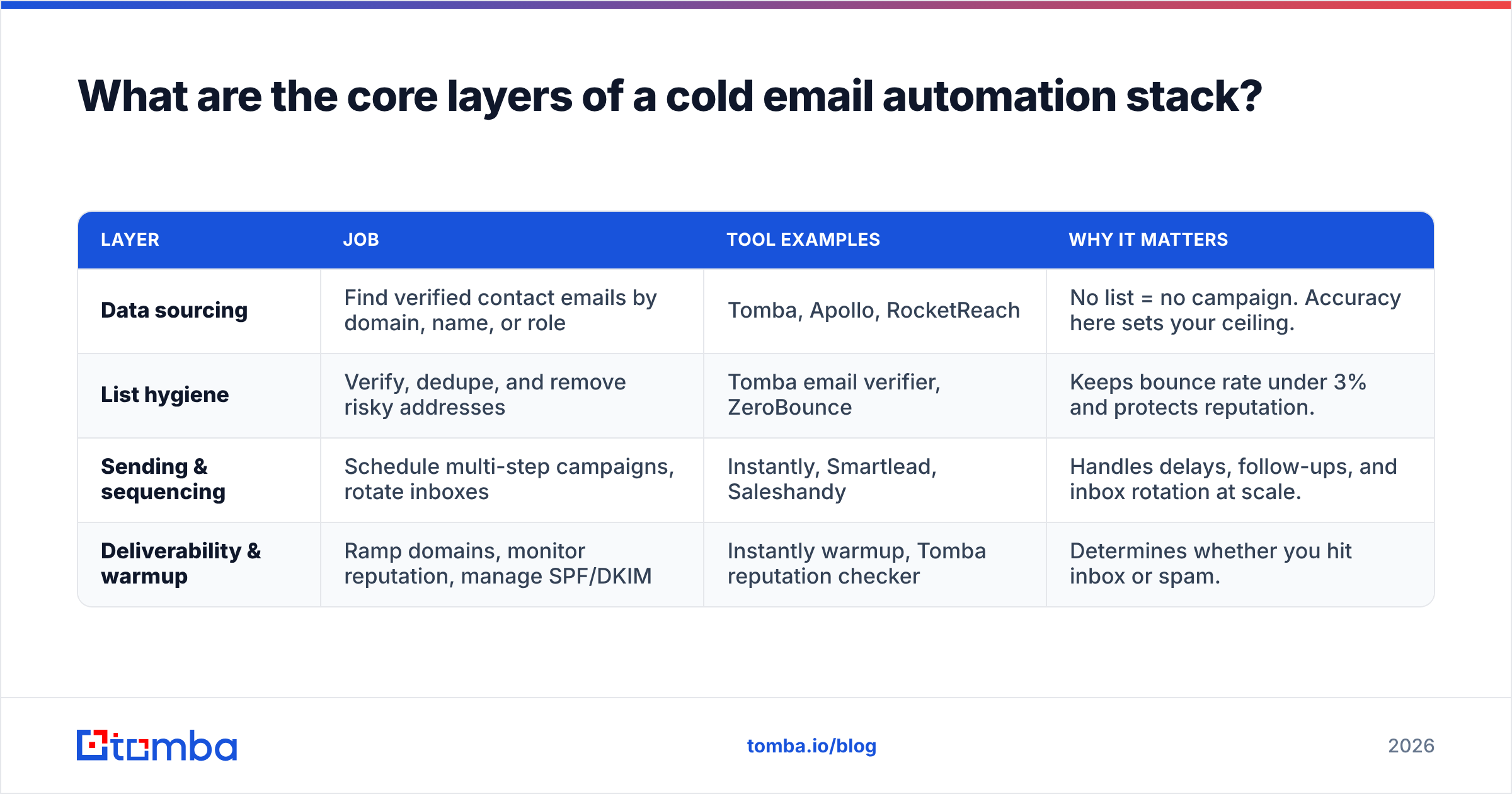
ZeroBounce | Keeps bounce rate under 3% and protects reputation. | | Sending & sequencing | Schedule multi-step campaigns, rotate inboxes | Instantly, Smartlead, Saleshandy | Handles delays, follow-ups, and inbox rotation at scale. | | Deliverability & warmup | Ramp domains, monitor reputation, manage SPF/DKIM | Instantly warmup, Tomba reputation checker | Determines whether you hit inbox or spam. |
Compose these well and you get a system where a new target account flows from "discovered" to "in a personalized 5-step sequence" with almost no manual touch. Compose them badly — say, a great sequencer fed by an unverified list — and you'll spend more time cleaning up bounces than booking meetings.
For data sourcing at volume, the bulk email finder lets you upload a list of domains or names and get back verified addresses in one batch, which is far faster than one-off lookups when you're building campaigns of thousands of contacts.
How do you automate the data and verification layer?#
Start at the top of the funnel, because everything downstream depends on it. Your goal is a continuously refreshed list of verified contacts that your sequencer can pull from without a human in the loop.
Here's the practical workflow:
- Define your ICP precisely. Job titles, company size, industry, and tech stack. The tighter the filter, the less wasted send volume.
- Pull contacts programmatically. Use a domain search to find every public email at a target company, or the Tomba API to fetch addresses on demand from inside your own scripts and workflows.
- Verify before you load. Every address should pass an email verification check — SMTP validation, syntax, MX records, and catch-all detection — before it touches a campaign.
- Suppress the risky ones. Catch-all domains and role-based addresses (info@, sales@) get lower priority or are excluded entirely.
This is the part teams under-invest in. According to HubSpot's research on email marketing, list quality and segmentation are among the strongest predictors of campaign performance — yet most automation buyers spend their budget on the sending tool and treat data as an afterthought.
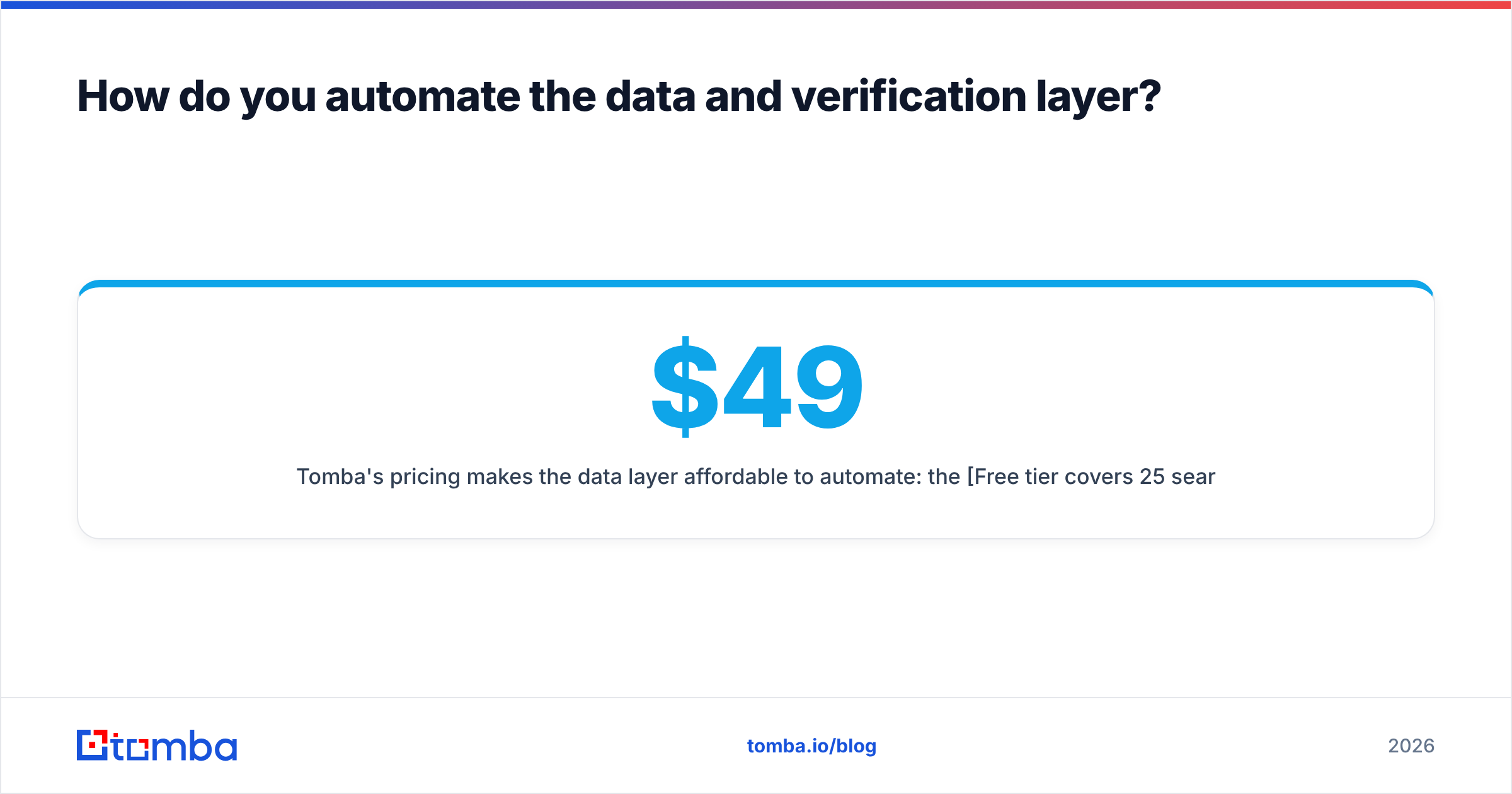
Tomba's pricing makes the data layer affordable to automate: the Free tier covers 25 searches/month, Starter is $49/mo, Growth $99/mo, and Pro $249/mo — so you can scale credit volume to match your send volume instead of overpaying for a bundled suite you only half-use.
How do you automate personalization without sounding like a robot?#
Personalization at scale is the hardest part to automate well, because the easy version — Hi {{first_name}} — is exactly what makes cold email read as spam.
The fix is to automate the inputs to personalization, not just the merge fields. Good automated personalization pulls from enriched data:
- Role-based angle — a VP of Engineering gets a different value prop than a Head of Sales. Map angles to job titles in your sequencer.
- Company trigger — recent funding, a new hire, a product launch. Data enrichment can attach these signals so your opener references something real.
- Dynamic first line — AI-generated openers that reference the prospect's company or role, inserted as a merge variable.
- Conditional branching — if a prospect opens but doesn't reply, the follow-up changes tone automatically.
The rule of thumb: automate the research, hand-approve the templates. Write 3–4 strong template variants per segment, let the system fill in the variables, and spot-check a sample before each batch goes out. That keeps quality high without making a human write every message.

How do you keep automated cold email out of spam?#
Deliverability is where most automation efforts quietly fail. You can send 5,000 perfectly personalized emails and have 4,000 land in spam — and you'd never know without monitoring.
These are the non-negotiables:
- Authenticate your domain. Set up SPF, DKIM, and DMARC records before sending a single email. Use an SPF record checker to confirm yours is valid.
- Warm up new domains. Don't send from a domain that's under 4 weeks old at full volume. Use the email warmup calculator to plan a safe ramp, then automate the warmup with a dedicated tool.
- Cap daily volume per inbox. Keep it to ~30–50 cold emails per inbox per day. To scale, rotate across multiple inboxes and domains — not one inbox at higher volume.
- Keep bounce rate under 3%. This is purely a function of list hygiene. Verified data is your single best defense here.
- Monitor sender reputation. Check it regularly with a sender reputation checker and watch Google Postmaster Tools for spam-rate spikes.
For background on how mailbox providers actually decide inbox vs. spam, Google's Postmaster Tools documentation is the authoritative source — it lays out the spam-rate and authentication thresholds that govern Gmail delivery.
The interplay matters: warmup buys you reputation, list hygiene protects it, and volume caps keep you from spending it all at once. Automate all three or none of them will save you.
Should you build your own stack or buy an all-in-one platform?#
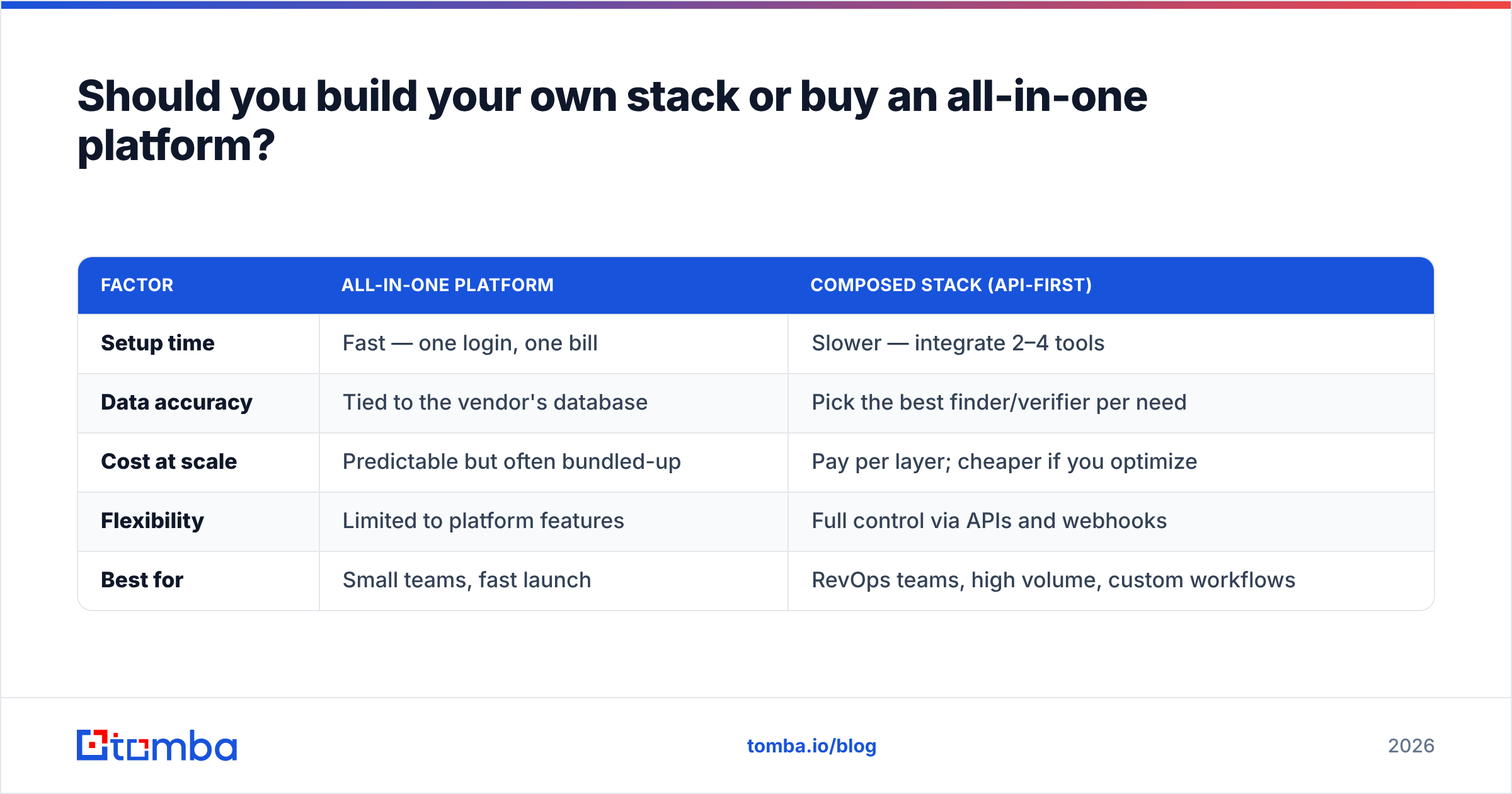
It depends on volume and how much control you need over the data layer. Here's the honest trade-off:
| Factor | All-in-one platform | Composed stack (API-first) |
|---|---|---|
| Setup time | Fast — one login, one bill | Slower — integrate 2–4 tools |
| Data accuracy | Tied to the vendor's database | Pick the best finder/verifier per need |
| Cost at scale | Predictable but often bundled-up | Pay per layer; cheaper if you optimize |
| Flexibility | Limited to platform features | Full control via APIs and webhooks |
| Best for | Small teams, fast launch | RevOps teams, high volume, custom workflows |
If you're a two-person team that wants meetings booked next week, an all-in-one sequencer with a built-in database is the pragmatic call. If you're running serious outbound — thousands of touches a week across segments, or feeding multiple downstream systems — a composed stack with an API-first data provider gives you better accuracy and lower cost per verified contact.
A common hybrid that works well: use a sequencer like Instantly or Smartlead for sending, and plug Tomba into it via [
Zapier](https://tomba.io/integrations/zapier) or the API for the data and verification layer. You get a great sending experience without inheriting a mediocre database. You can compare sequencer options on G2 to find the sending tool that fits your workflow.
What does a fully automated cold email workflow look like end to end?#
Here's a concrete example of how the pieces connect into a hands-off pipeline:
- Trigger: A new account is added to your CRM (or scraped from a target list).
- Enrich: A webhook fires Tomba's API to find and verify the decision-maker's email and attach role + company data.
- Filter: Invalid, catch-all, and role-based addresses are dropped automatically; only verified contacts continue.
- Sync: Clean contacts flow into your sequencer via the HubSpot integration or Zapier.
- Send: A segmented, multi-step sequence fires with personalized variables and conditional follow-ups, spread across rotated inboxes at safe daily caps.
- Route: Positive replies notify a rep and update the CRM; bounces and opt-outs are suppressed globally so they never get re-contacted.
The human's job in this system is strategic, not mechanical: define the ICP, write the templates, review deliverability dashboards, and handle the conversations that automation surfaces. Everything between "we should reach this account" and "a real person replied" runs on rails.
How much does it cost to automate cold email outreach?#
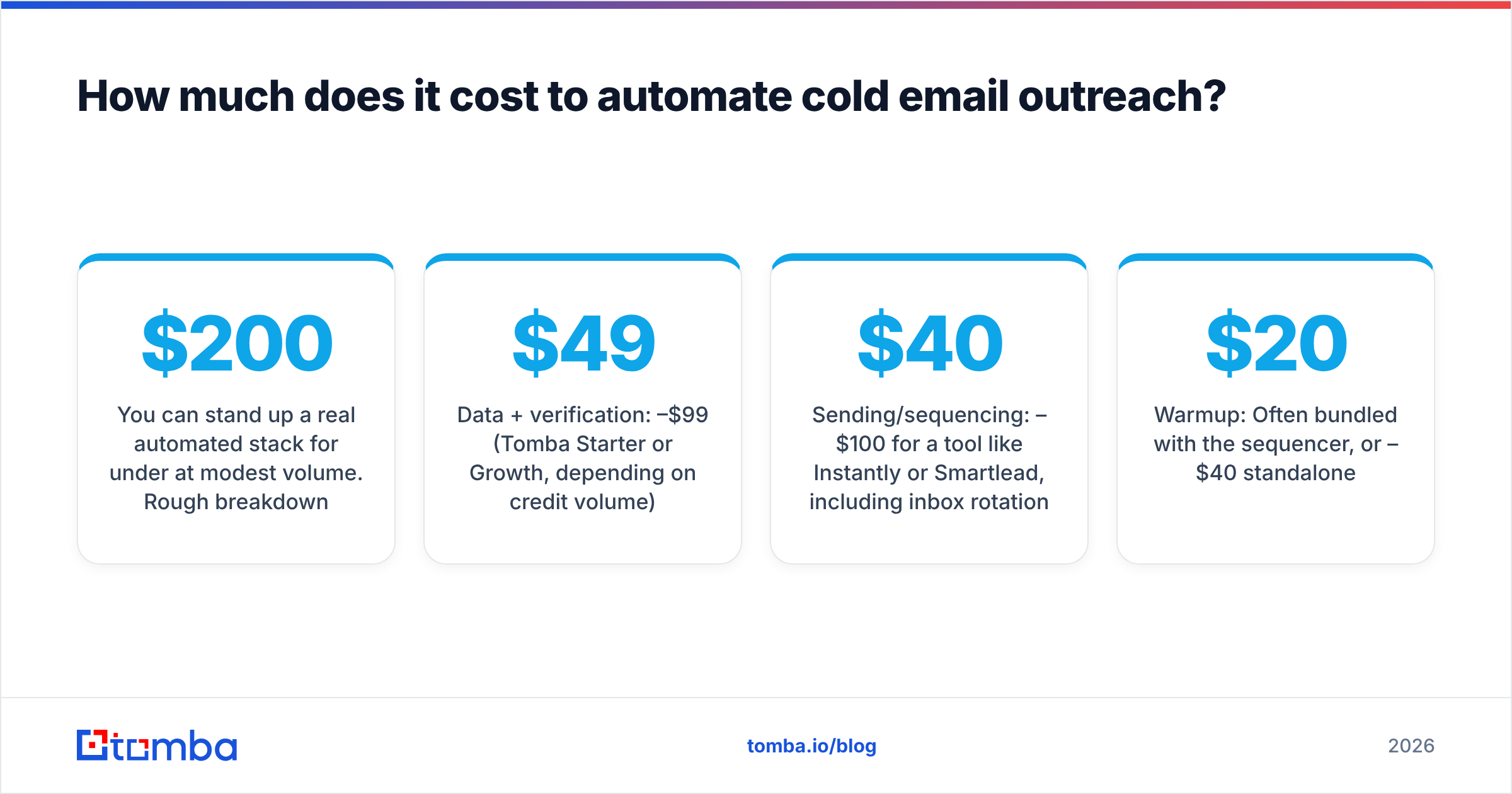
You can stand up a real automated stack for under $200/month at modest volume. Rough breakdown:
- Data + verification: $49–$99/mo (Tomba Starter or Growth, depending on credit volume).
- Sending/sequencing: $40–$100/mo for a tool like Instantly or Smartlead, including inbox rotation.
- Warmup: Often bundled with the sequencer, or $20–$40/mo standalone.
- Domains + inboxes: A few dollars per inbox per month; budget for 3–5 to spread volume.
The single highest-ROI line item is verification. A clean list cuts bounces, protects your domains, and means every dollar you spend on sending actually reaches a real inbox. Cheap on data, expensive everywhere else — that's the trap to avoid.
Start with the data layer#
The fastest way to make cold email automation actually work is to fix the input first. Clean, verified, enriched contact data is what every other layer depends on — and it's the one part most teams get wrong.
Tomba's Email Finder gives you verified professional emails by domain, name, or company, with built-in verification and an API that drops straight into your sequencer or CRM. Start on the free tier — 25 searches a month, no card — and confirm the data quality before you scale. Once your list is clean, the rest of the pipeline finally does what the demos promised.
// get started
Find, verify and enrich your first contacts today
Start on the free plan with 25 searches a month, then scale when your team is ready.
Free plan · No credit card required · GDPR & CCPA
// about the author