Automated Email Campaigns in 2026: The Complete B2B Guide
Automated email campaigns scale outreach without scaling headcount—but only if your data, triggers, and deliverability hold up. Here's the 2026 B2B playbook.
Automated email campaigns are the difference between a rep sending 30 emails a day and a team touching 3,000 prospects a week without dropping personalization. But automation amplifies whatever you feed it. Point it at a clean, well-segmented list with smart triggers and you get a predictable pipeline. Point it at scraped junk and you get a burned domain.
This guide breaks down how automated email campaigns actually work in 2026, what to automate (and what to never automate), the tooling landscape, and the data layer most teams ignore until their reply rates collapse.
TL;DR#
- Automated email campaigns are sequences of emails triggered by time, behavior, or data changes—not one-off blasts.
- The biggest failure point isn't the copy or the tool; it's dirty data and weak deliverability. Fix those first.
- Trigger-based beats schedule-based: behavioral triggers (signups, replies, page visits) outperform fixed drip timing.
- Use a layered stack: a finder/verifier for data, a sequencer for sending, and a CRM for state. Don't expect one tool to do all three well.
- Start small—warm the domain, verify every address, segment tightly—then scale volume only after reply rates stabilize.
What are automated email campaigns?#
An automated email campaign is a pre-built sequence of messages that sends itself based on rules you define, instead of a human hitting "send" each time. Think of it like a thermostat versus manually lighting a furnace: you set the conditions once, and the system fires when those conditions are met.
There are two broad flavors:
- Schedule-based (drip): Email 1 goes out on day 0, email 2 on day 3, email 3 on day 7. Simple, predictable, and the default for most cold outreach.
- Trigger-based (behavioral): An email fires when a prospect does something—books a demo, visits your pricing page, opens but doesn't reply, or gets added to a list via your data enrichment workflow.
The strongest 2026 programs blend both: a baseline drip cadence with behavioral branches that pull people out of the sequence the moment they engage. A reply should never get followed by another "just bumping this to the top of your inbox."
)
Why do most automated email campaigns fail?#
They fail before the first email sends. The campaign builder is the easy part—the failure modes are upstream and downstream of it.
- Bad data. If 20% of your list bounces, mailbox providers read that as a spam signal and throttle the whole domain. Every address should pass an email verifier before it enters a sequence.
- No warmup. A brand-new domain sending 500 cold emails on day one is a guaranteed spam-folder trip. Domains need weeks of gradual volume ramp.
- Over-automation. Automating the reply itself, or letting sequences run after someone says "not interested," destroys trust and invites spam complaints.
- One-size copy. A single template fired at 5,000 people ignores the one thing automation should free up time for: segmentation and relevance.
The pattern: automation is a multiplier, not a strategy. A 2% reply rate automated to 10x volume is still a 2% reply rate—you've just annoyed 10x more people.
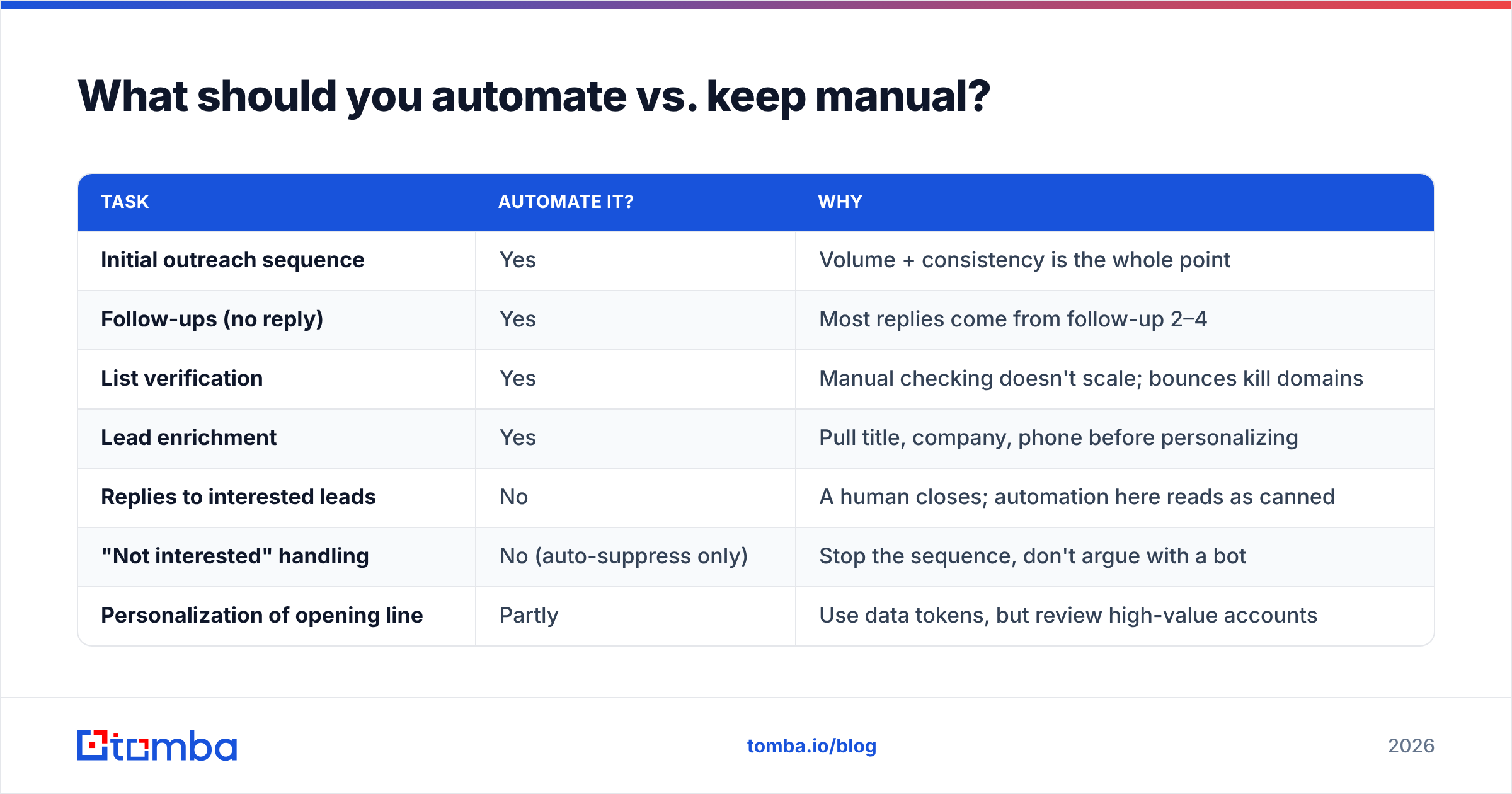
What should you automate vs. keep manual?#
| Task | Automate it? | Why |
|---|---|---|
| Initial outreach sequence | Yes | Volume + consistency is the whole point |
| Follow-ups (no reply) | Yes | Most replies come from follow-up 2–4 |
| List verification | Yes | Manual checking doesn't scale; bounces kill domains |
| Lead enrichment | Yes | Pull title, company, phone before personalizing |
| Replies to interested leads | No | A human closes; automation here reads as canned |
| "Not interested" handling | No (auto-suppress only) | Stop the sequence, don't argue with a bot |
| Personalization of opening line | Partly | Use data tokens, but review high-value accounts |
The rule of thumb: automate the mechanical, keep the relational human. Sending, timing, suppression, and data hygiene are mechanical. Negotiation, objection handling, and genuine personalization are relational.
How do you build a trigger-based campaign?#
Trigger-based campaigns respond to prospect behavior instead of an arbitrary calendar. Here's the core structure most B2B teams use:
- Entry trigger — A prospect enters the campaign when a condition is met: they're added to a verified list, they fill a form, or your website visitor reveal tool identifies them browsing your pricing page.
- Branch on engagement — Opened but didn't click? Send a different email than someone who clicked twice. Most sequencers let you split the path.
- Suppress on reply — The instant someone replies, they exit the automated track and route to a human. This is non-negotiable.
- Re-engagement window — No response after the full sequence? Drop them into a low-frequency nurture track, not the trash.
- Hand-off to CRM — Engaged leads sync to your CRM with a status flag so reps know exactly where each contact stands.
- Feedback loop — Track response rate per segment and per template, then kill the losers.
This structure turns a static list into a living pipeline. The trigger does the work of deciding who gets what and when—your job becomes writing better branches.
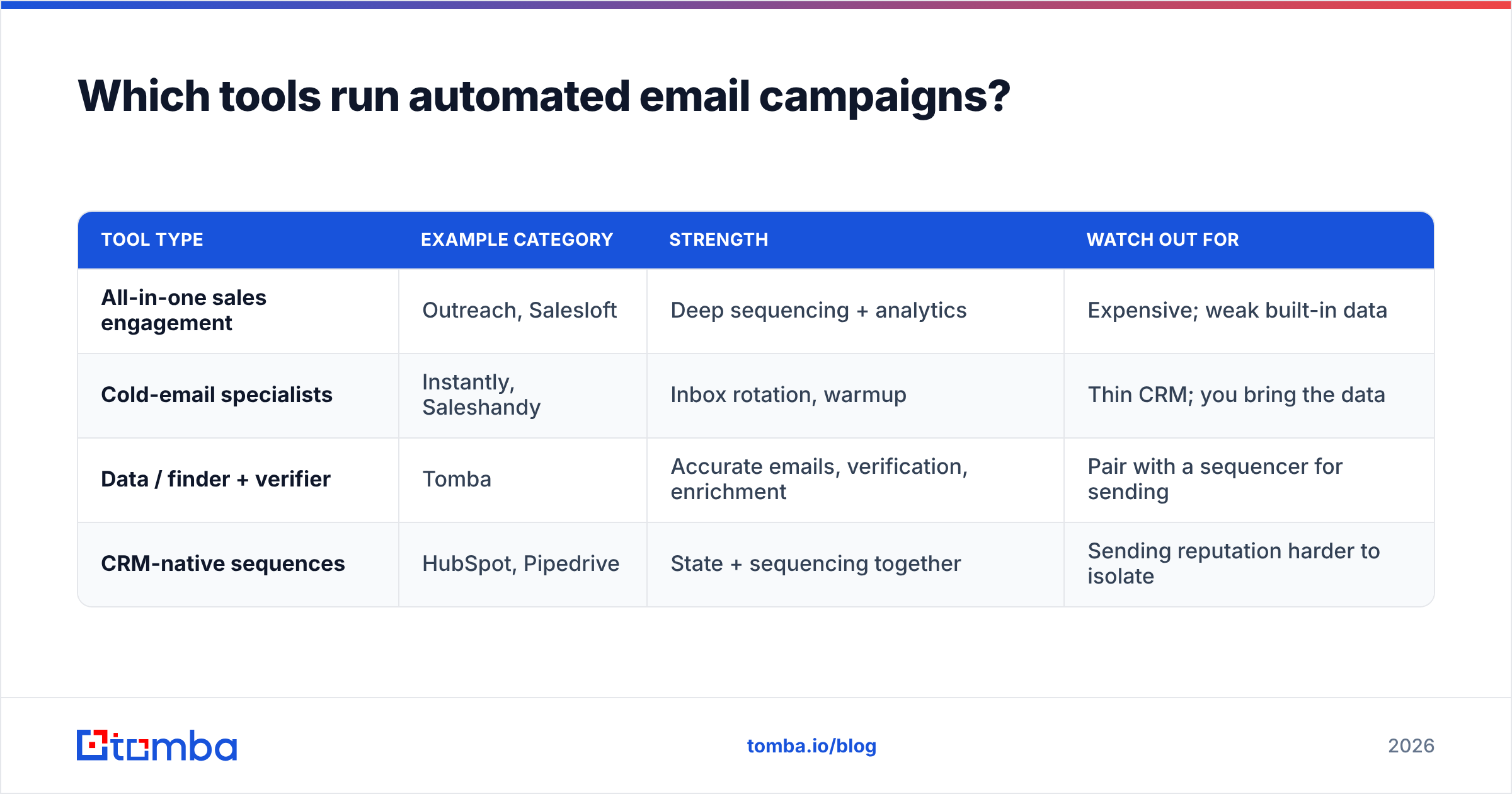
Which tools run automated email campaigns?#
The market splits into three layers, and conflating them is why teams overpay or underperform. You need a data layer (find and verify contacts), a sending layer (sequence and deliver), and a state layer (CRM). Some platforms bundle these; most do one well and the rest poorly.
| Tool type | Example category | Strength | Watch out for |
|---|---|---|---|
| All-in-one sales engagement | Outreach, Salesloft | Deep sequencing + analytics | Expensive; weak built-in data |
| Cold-email specialists | Instantly, Saleshandy | Inbox rotation, warmup | Thin CRM; you bring the data |
| Data / finder + verifier | Tomba | Accurate emails, verification, enrichment | Pair with a sequencer for sending |
| CRM-native sequences | HubSpot, Pipedrive | State + sequencing together | Sending reputation harder to isolate |
A common, cost-effective 2026 stack: Tomba for the data layer (find and verify addresses, enrich with title and company), an Instantly or Saleshandy for sending with inbox rotation and warmup, and HubSpot or Pipedrive for CRM state. If you're evaluating consolidation, see how a focused finder compares as an Apollo alternative before paying for an all-in-one you'll only half-use.
For builders, the Tomba API lets you wire verification directly into your sequencer so no unverified address ever sends—the single highest-ROI integration you can make.
)
How do you protect deliverability while automating?#
Deliverability is the silent killer. You can have perfect copy and the right triggers, and still land in spam if your technical setup is wrong. The fundamentals haven't changed much, but enforcement has gotten stricter—Google and Yahoo's sender requirements now actively penalize sloppy senders.
The deliverability checklist before you automate anything:
- Authenticate the domain. Set up SPF, DKIM, and DMARC. Validate your records with an SPF checker so you're not silently failing alignment.
- Warm the sending domain. Ramp volume over 3–4 weeks. New domains sending cold volume immediately get flagged.
- Verify every address. Bounces above ~3% tank sender reputation. Run lists through verification—and for ambiguous domains, a catch-all verifier tells you which "valid-looking" addresses are actually risky.
- Rotate inboxes. Don't fire 1,000 emails from one mailbox. Spread volume across multiple sending accounts.
- Monitor blacklists. Check your IP and domain reputation regularly so you catch a listing before it costs you a week of campaigns.
Google publishes its current sender guidelines and they're the source of truth—read them, because they change. Mailbox providers care about three things: authentication, low complaint rates, and low bounce rates. Automation that ignores any of the three will fail no matter how good the copy is.
How much do automated email campaigns cost?#
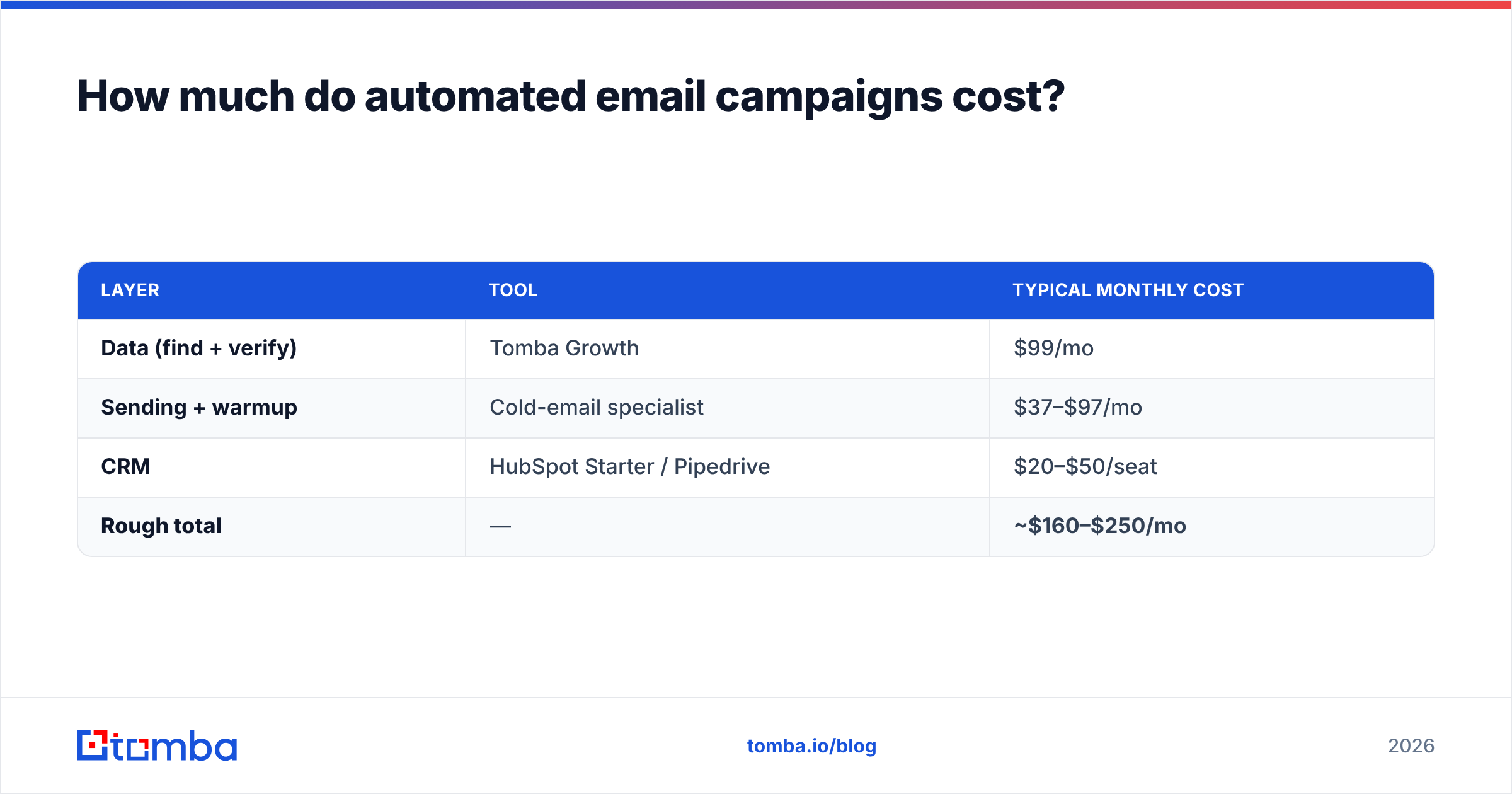
Budget across the three layers, not per tool. Here's a realistic 2026 monthly spend for a small B2B team running ~5,000 contacts a month:
| Layer | Tool | Typical monthly cost |
|---|---|---|
| Data (find + verify) | Tomba Growth | $99/mo |
| Sending + warmup | Cold-email specialist | $37–$97/mo |
| CRM | HubSpot Starter / Pipedrive | $20–$50/seat |
| Rough total | — | ~$160–$250/mo |
Tomba's own tiers scale with volume: a Free tier (25 searches/mo) to test the waters, Starter at $49/mo, Growth at $99/mo, and Pro at $249/mo for higher-volume teams. Full Tomba pricing breaks down search and verification credits per plan. The takeaway: the data layer is the cheapest part of the stack and the one that determines whether the other two work at all. Underinvesting there to save $50 is how teams burn $200/mo sending domains.
How do you measure if it's working?#
Open rate is increasingly unreliable (Apple Mail Privacy inflates it), so anchor on reply-based and pipeline metrics instead:
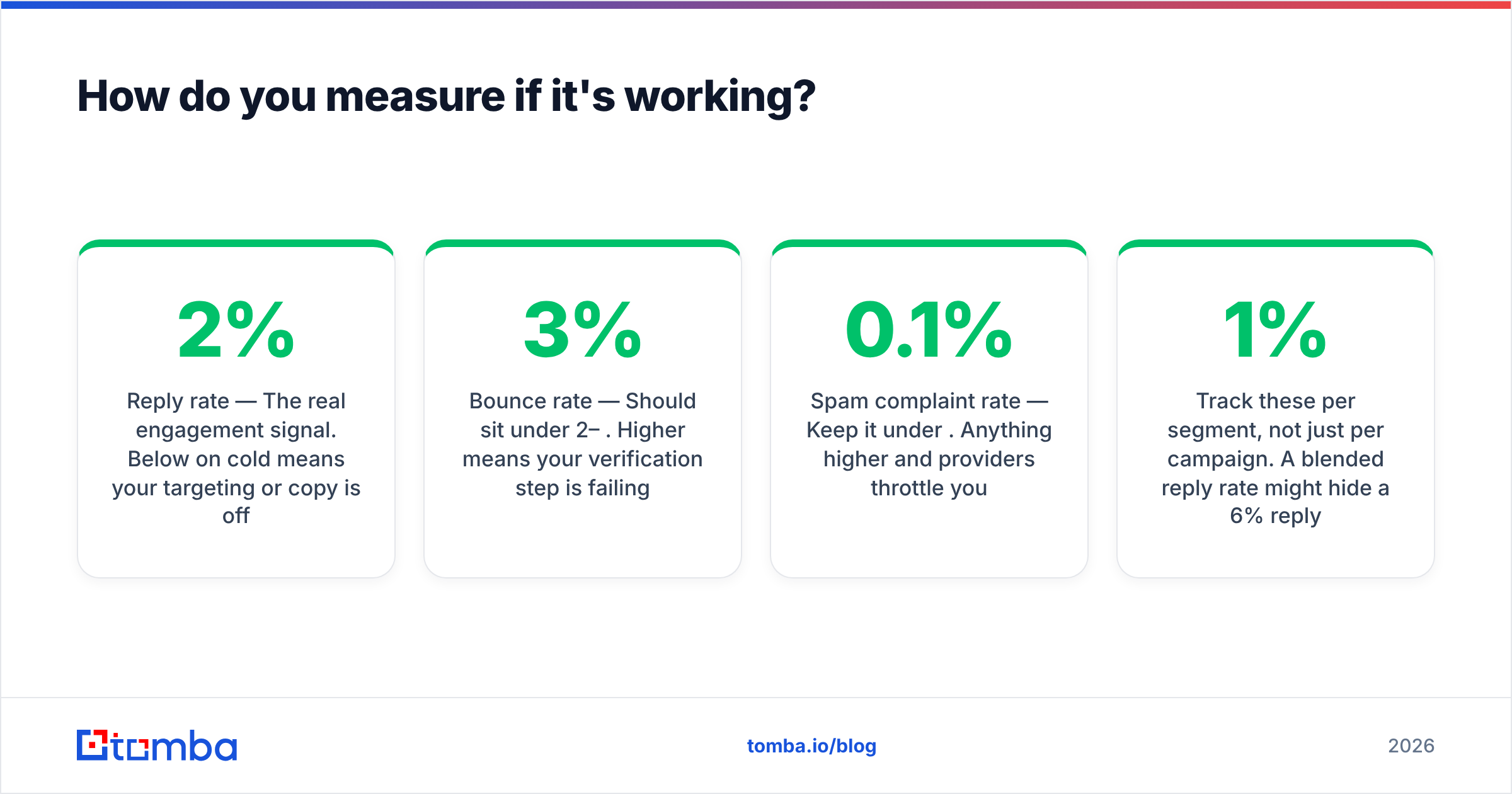
- Reply rate — The real engagement signal. Below 2% on cold means your targeting or copy is off.
- Positive reply rate — Strip out "unsubscribe" and "wrong person." This is what actually matters.
- Bounce rate — Should sit under 2–3%. Higher means your verification step is failing.
- Meetings booked per 1,000 sent — The metric that ties to revenue.
- Spam complaint rate — Keep it under 0.1%. Anything higher and providers throttle you.
Track these per segment, not just per campaign. A 1% blended reply rate might hide a 6% reply rate in one well-targeted segment dragged down by a junk list. Automation makes it cheap to run those segments in parallel and let the data tell you where to double down. G2's category reviews on sales engagement software are a useful reality check when a vendor's own benchmarks look too good.
What's the smartest way to start in 2026?#
Start narrow and earn the right to scale. The teams that win don't launch with 10,000 contacts; they launch with 200 verified, tightly-segmented ones and a warmed domain.
- Pick one segment. One industry, one role, one pain point. Resist the urge to "test broadly."
- Build the list and verify it. Use a domain search to find the right contacts at target companies, then verify every address.
- Write three emails, not ten. A clean opener, one value-add follow-up, one breakup email.
- Warm and authenticate before the first send.
- Automate the sequence, suppress on reply, route humans in.
- Read the data after two weeks, fix the weakest segment or template, then add volume.
Automation rewards discipline. The mechanical parts—sending, timing, verification, suppression—should run themselves so your team spends its hours on targeting and the human conversations that actually close.
Get the data layer right first#
Every automated email campaign lives or dies on the quality of the addresses feeding it. Before you pick a sequencer or write a single line of copy, make sure every contact entering your funnel is real, current, and verified. The Tomba Email Finder finds professional email addresses by name, domain, or company—and pairs with built-in verification so unverified addresses never reach your sender domain. Start on the free tier, verify your first list, and build your automation on a foundation that won't get your domain blacklisted. That's the part no clever subject line can fix.
// get started
Find, verify and enrich your first contacts today
Start on the free plan with 25 searches a month, then scale when your team is ready.
Free plan · No credit card required · GDPR & CCPA
// about the author