Automated Email Follow Up in Gmail: The 2026 Playbook
Stop losing deals to forgotten follow-ups. Here's how to set up automated email follow up in Gmail in 2026 — tools, sequences, deliverability, and the data that powers it.
Most replies don't come from the first email. They come from the third, fourth, or fifth — the ones busy reps forget to send. If you live in Gmail and you're still chasing prospects from memory, you're leaking pipeline every single week.
This guide shows you how to set up automated email follow up in Gmail properly in 2026: which tools actually work inside Gmail, how to build sequences that stop the moment someone replies, how to keep your domain out of the spam folder, and why none of it matters if the email address is wrong in the first place.
TL;DR#
- Automated email follow up in Gmail means scheduling a sequence of messages that send on a cadence and stop automatically when a prospect replies or books.
- Native Gmail only gives you basic scheduling and templates; real automation needs a layer like a mail-merge tool, a sequencer, or a dedicated cold-email platform.
- The single biggest failure point is not the tool — it's bad contact data. Bounces kill your sender reputation faster than any subject line can save it.
- Keep daily volume low, warm the inbox, and personalize the first line. Reply-detection and bounce handling are non-negotiable features.
- Verify and enrich every address before the first send with a tool like the Tomba Email Finder so your automation runs on real people, not guesses.
What does "automated email follow up in Gmail" actually mean?#
Think of follow-up automation like a thermostat for your outreach. You set the rules once — "send email two after three days if no reply, send email three after five more days" — and the system keeps the temperature steady without you touching it. You stop manually remembering who's owed a nudge.
A complete Gmail follow-up system has four moving parts:
- A trigger — usually "no reply within X days," sometimes "email opened but no click."
- A sequence — the ordered set of 2–6 messages, each with its own delay.
- A stop condition — a reply, a bounce, a booked meeting, or an unsubscribe halts the thread instantly.
- A data source — the verified email addresses and merge fields (name, company, role) that feed personalization.
Native Gmail handles none of this end-to-end. "Schedule send" lets you queue one message. Templates (formerly Canned Responses) save you typing. But neither watches for replies, neither enforces a cadence, and neither protects you from sending follow-up four to someone who already said "not interested." That's where an automation layer comes in.
Why do follow-ups matter more than the first email?#
Because persistence is where the conversions hide. Industry data from outreach platforms consistently shows that a majority of positive replies arrive after the first message — often on the third or fourth touch. A single cold email is a coin flip with a weighted edge against you; a five-step sequence with sharp, short follow-ups is a structured conversation.
But there's a catch that trips up most teams: persistence only works when it's welcome persistence. Sending the same "just bumping this to the top of your inbox" line five times trains people to ignore you. Each follow-up should add a reason to reply — a new angle, a relevant case study, a specific question, or a graceful break-up email. The automation handles the timing; you still have to handle the thinking.
This is also why your email response rate is the metric to watch, not open rate. Opens have become noisy and unreliable since privacy changes inflated them. Replies are the truth.
What are the best tools for automated email follow up in Gmail?#
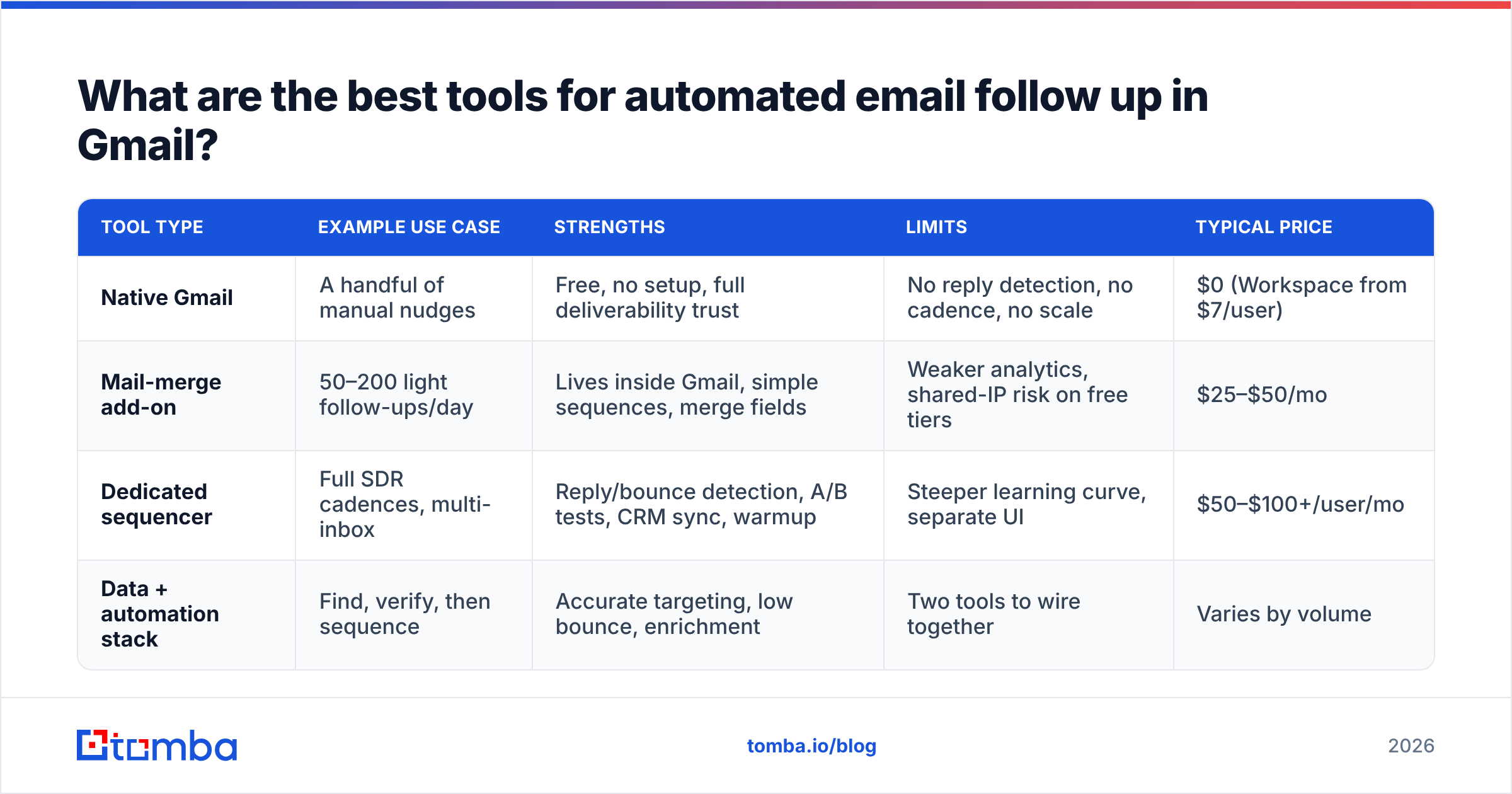
You have three broad categories, and they map to three different stages of a team's maturity. The table below breaks down where each fits.
| Tool type | Example use case | Strengths | Limits | Typical price |
|---|---|---|---|---|
| Native Gmail | A handful of manual nudges | Free, no setup, full deliverability trust | No reply detection, no cadence, no scale | $0 (Workspace from $7/user) |
| Mail-merge add-on | 50–200 light follow-ups/day | Lives inside Gmail, simple sequences, merge fields | Weaker analytics, shared-IP risk on free tiers | $25–$50/mo |
| Dedicated sequencer | Full SDR cadences, multi-inbox | Reply/bounce detection, A/B tests, CRM sync, warmup | Steeper learning curve, separate UI | $50–$100+/user/mo |
| Data + automation stack | Find, verify, then sequence | Accurate targeting, low bounce, enrichment | Two tools to wire together | Varies by volume |
A practical rule: start native if you're sending under ~20 follow-ups a week, graduate to a mail-merge add-on when you're copying and pasting the same message daily, and move to a dedicated sequencer when follow-ups become a team-wide motion with shared reporting.
Whatever layer you pick, it should connect cleanly to the rest of your stack. If you run deals in a pipeline tool, look for a native HubSpot integration or Pipedrive integration so logged activity and replies sync without manual entry.
How do you set up an automated follow-up sequence step by step?#
Here's a concrete five-touch cadence you can copy. Adjust the days to your sales cycle; B2B usually tolerates a slightly slower drip than B2C.
- Day 0 — The opener. Short, personalized first line referencing something specific about them or their company. One clear ask. No attachments, no images on the first send.
- Day 3 — The value add. Reply on the same thread. Share a relevant resource, metric, or one-sentence case study. Don't just say "following up."
- Day 6 — The reframe. Ask a different question or address a likely objection ("Is timing the issue, or is this not a priority right now?").
- Day 10 — The social proof. Mention a comparable customer and the outcome. Keep it to three sentences.
- Day 15 — The break-up. "I'll assume the timing isn't right and stop here — happy to reconnect if that changes." Break-up emails often pull the highest reply rate of the whole sequence.
Wire each step with a "stop on reply" condition so a prospect never receives the next message after they've engaged. Then set send windows to your prospect's business hours, cap daily volume, and turn on bounce suppression. That last setting matters more than people think — which brings us to the part most guides skip.
Why does contact data quality decide whether automation works?#
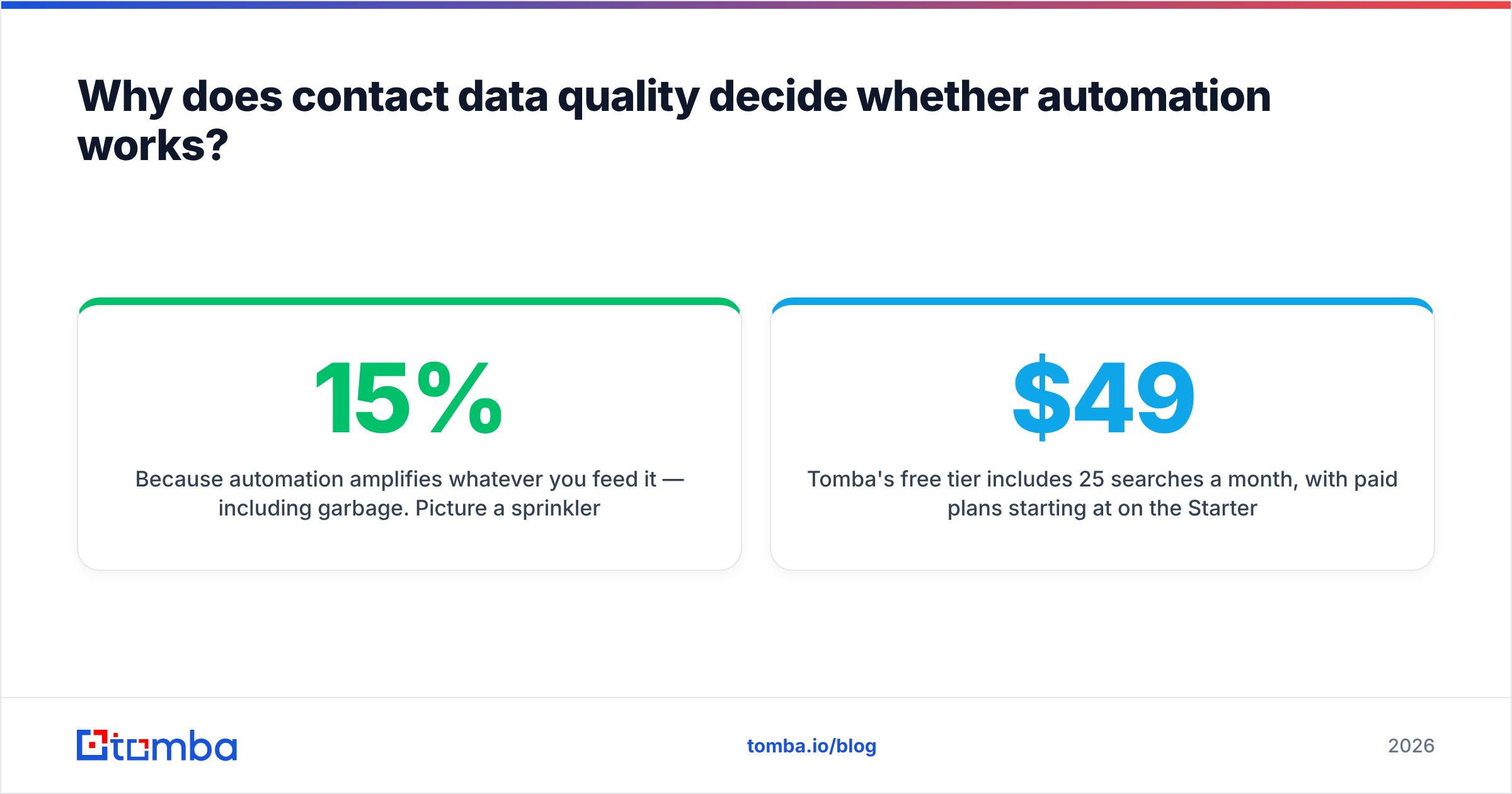
Because automation amplifies whatever you feed it — including garbage. Picture a sprinkler system: brilliant when the pipes carry clean water, a disaster when they carry mud. If 15% of your list is invalid, your sequencer faithfully fires follow-ups at dead addresses, every bounce dings your sender reputation, and within weeks your good emails start landing in spam too.
The fix is upstream, not downstream. Before a single follow-up goes out:
- Find the right address. Use a domain search to pull verified contacts at a target company, or the email finder to resolve a specific name.
- Verify it. Run every address through an email verifier to catch typos, dead mailboxes, and risky catch-all domains before they bounce.
- Enrich it. Add the merge fields — first name, role, company — that make personalization possible at scale via data enrichment.
Tomba's free tier includes 25 searches a month, with paid plans starting at $49/mo on the Starter tier and $99/mo on Growth — see full Tomba pricing for credit volumes. The point isn't the price; it's that clean data is the cheapest deliverability insurance you can buy.

How do you keep automated follow-ups out of the spam folder?#
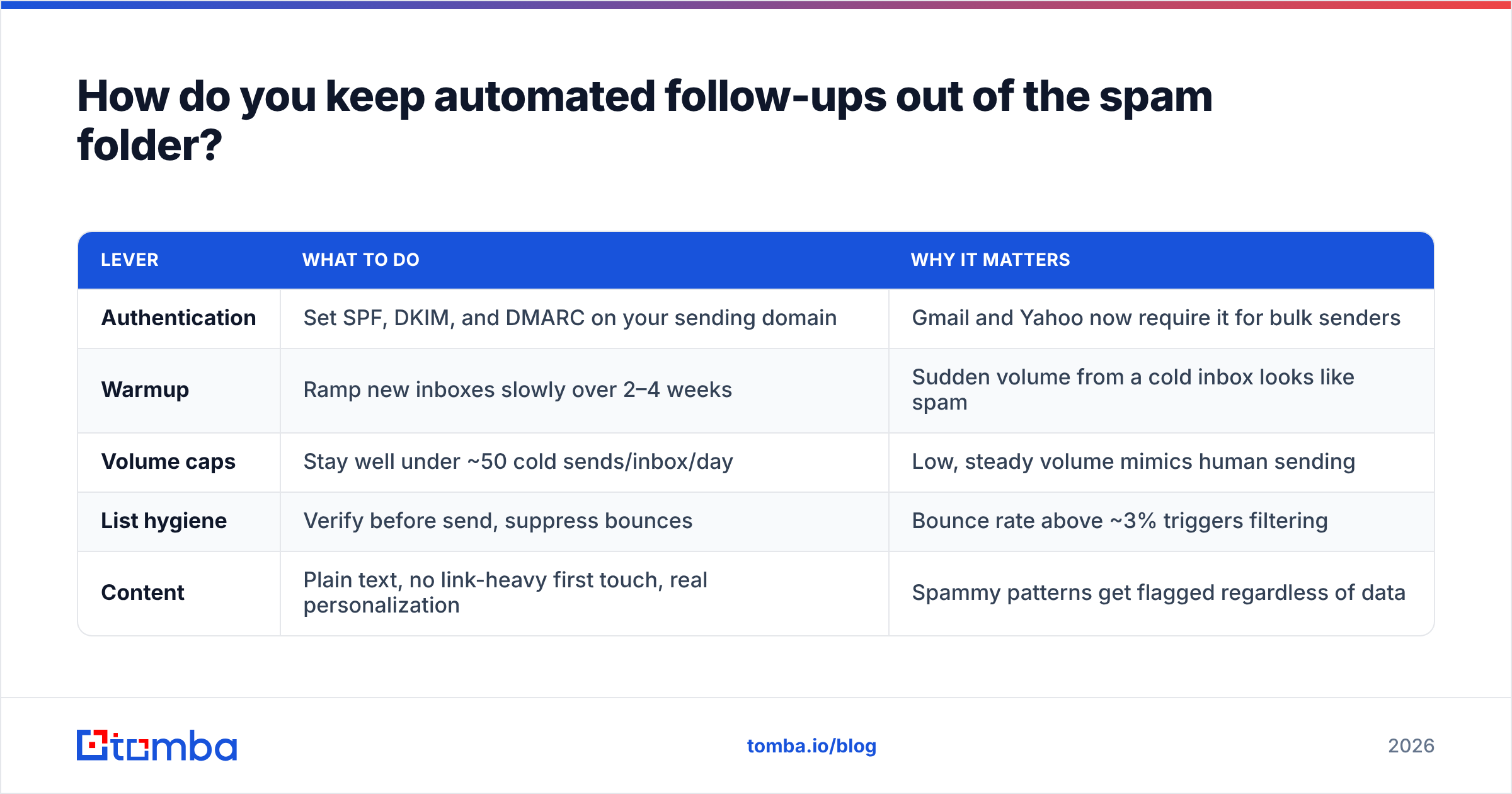
Deliverability is its own discipline, but five habits cover most of the risk for Gmail senders:
| Lever | What to do | Why it matters |
|---|---|---|
| Authentication | Set SPF, DKIM, and DMARC on your sending domain | Gmail and Yahoo now require it for bulk senders |
| Warmup | Ramp new inboxes slowly over 2–4 weeks | Sudden volume from a cold inbox looks like spam |
| Volume caps | Stay well under ~50 cold sends/inbox/day | Low, steady volume mimics human sending |
| List hygiene | Verify before send, suppress bounces | Bounce rate above ~3% triggers filtering |
| Content | Plain text, no link-heavy first touch, real personalization | Spammy patterns get flagged regardless of data |
If you're unsure your records are right, check your SPF record with a free SPF checker before you scale. And remember that email deliverability is a reputation that compounds — it takes weeks to build and one bad blast to wreck. Authentication requirements from major mailbox providers are documented directly in Google's sender guidelines, and they tightened again for 2026.
Is a Gmail add-on enough, or do you need a dedicated platform?#
It depends on volume and team size — here's the honest split.
Stick with a Gmail-native add-on if: you're a founder or small team sending fewer than ~100 follow-ups a week, you value living inside the inbox you already trust, and you don't need shared team reporting. Add-ons keep you on Gmail's own deliverability footprint, which is a real advantage early on.
Move to a dedicated sequencer if: follow-ups are a daily team motion, you need A/B testing and cadence analytics, you're rotating multiple inboxes, or you want tight CRM sync. Platforms like those reviewed on G2's sales engagement category trade simplicity for control.
There's also a middle path many teams miss: keep Gmail as the sending surface, but build the data and targeting layer separately. You find and verify contacts with a dedicated tool, push the clean list into your Gmail sequencer, and let each side do what it's best at. That keeps your follow-ups personal and your bounce rate near zero without forcing your reps out of the inbox they live in. If you scale outbound across hundreds of accounts, a bulk email finder handles the find-and-verify step in one pass.
What metrics tell you the automation is working?#
Track these four, in order of importance:
- Reply rate — the only metric that correlates with revenue. Aim to improve it sequence over sequence.
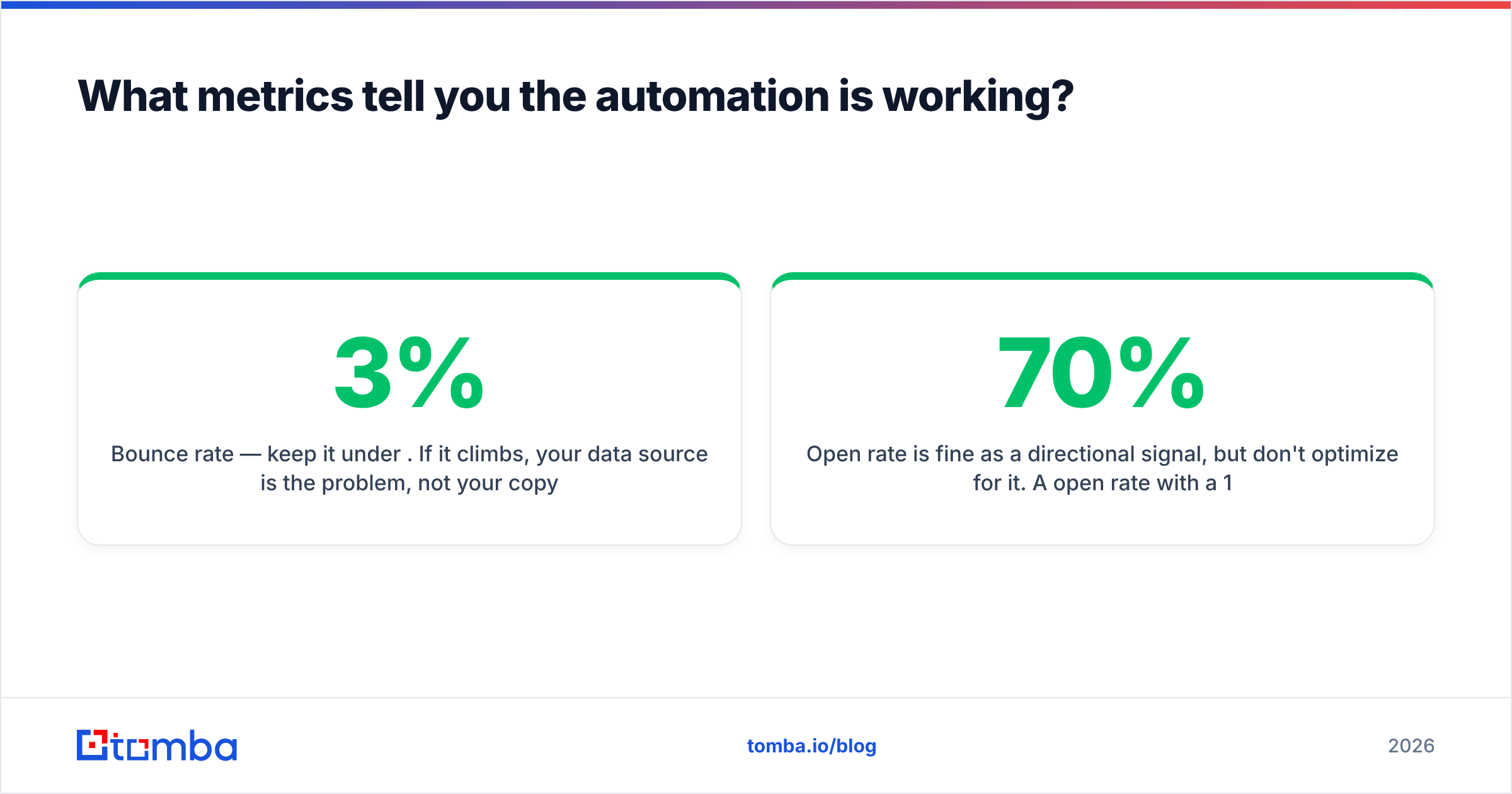
- Bounce rate — keep it under 3%. If it climbs, your data source is the problem, not your copy.
- Positive reply rate — replies that are actually interested, not "unsubscribe." This isolates targeting quality.
- Meetings booked per 100 sends — the bottom-line efficiency number your manager cares about.
Open rate is fine as a directional signal, but don't optimize for it. A 70% open rate with a 1% reply rate means your subject lines work and your offer doesn't.
The bottom line#
Automated email follow up in Gmail is a force multiplier — but it multiplies whatever you point it at. Pointed at a clean, verified, enriched list, a five-touch sequence quietly turns forgotten prospects into booked meetings while you sleep. Pointed at a stale, unverified list, the same automation torches your sender reputation in a fortnight.
So fix the data first. Use the Tomba Email Finder to find and verify professional email addresses by name, company, or domain before a single follow-up leaves your outbox — start free with 25 searches a month, then scale on a plan that fits your volume. Get the inputs right, and the automation takes care of the rest.
// get started
Find, verify and enrich your first contacts today
Start on the free plan with 25 searches a month, then scale when your team is ready.
Free plan · No credit card required · GDPR & CCPA
// about the author