Automated Email Responses: The 2026 Playbook for Sales Teams
Automated email responses can save your team hours a week — or quietly torch your reputation. Here is how to set them up so they sound human, reply fast, and actually convert in 2026.
TL;DR
- Automated email responses are pre-built or AI-generated replies that fire on a trigger — a form fill, a keyword, an out-of-office window, or an inbound sales reply — without a human typing each one.
- Done well, they cut first-response time from hours to seconds and free reps for real conversations. Done badly, they sound robotic, misfire on context, and damage sender reputation.
- The 2026 difference is AI: large language models now draft context-aware replies, not just slot variables into a template.
- Accuracy of your contact data decides everything downstream — a perfect auto-reply sent to a dead address still bounces.
- This guide covers types, triggers, a tool comparison, a setup workflow, and the metrics that tell you it is working.
What are automated email responses?#
Automated email responses are messages your system sends on its own when a defined condition is met. Think of them like a thermostat: you set the rule once ("when the room hits 68°, turn on the heat"), and the machine handles every future event without you watching the dial. In email, the "room temperature" is a trigger — someone replied, a form was submitted, a support ticket opened — and the "heat" is the reply that goes out.
There are two broad families, and mixing them up is where most teams go wrong:
- Rule-based auto-replies — fixed text tied to a condition. Out-of-office messages, "we got your request" confirmations, and drip-sequence follow-ups all live here. Predictable, cheap, and dumb in the literal sense: they do not read the incoming message.
- AI-generated responses — a language model reads the inbound email and drafts a contextual reply. It can answer a pricing question, route a lead, or acknowledge a specific objection. Smarter, but it needs guardrails so it does not invent facts.
Most real sales stacks in 2026 run both: rule-based for the predictable moments, AI for the messy human ones. The art is knowing which job belongs to which tool.
Why do sales teams automate email replies in 2026?#
The short answer: speed wins deals. Studies on lead response have repeatedly shown that contacting an inbound lead within the first few minutes dramatically raises the odds of qualifying it, and those odds collapse after the first hour. A human cannot watch the inbox at 2 a.m. An automated first response can.
Beyond speed, there are three concrete payoffs:
- Consistency — every prospect gets the same accurate answer, not whatever the rep half-remembered.
- Coverage — nights, weekends, and holidays stop being dead zones.
- Rep focus — your closers stop writing "thanks, let me check" forty times a day and spend that time on live calls.
But automation amplifies whatever you point it at. If your list is full of stale or guessed addresses, automation just lets you bounce faster and at scale. That is why the teams who get real value pair their reply automation with clean data — verified emails, enriched context, and accurate routing. A tool like the email verifier sits upstream of the whole flow, making sure the reply you worked hard to automate actually lands in a real inbox.
What types of automated email responses exist?#
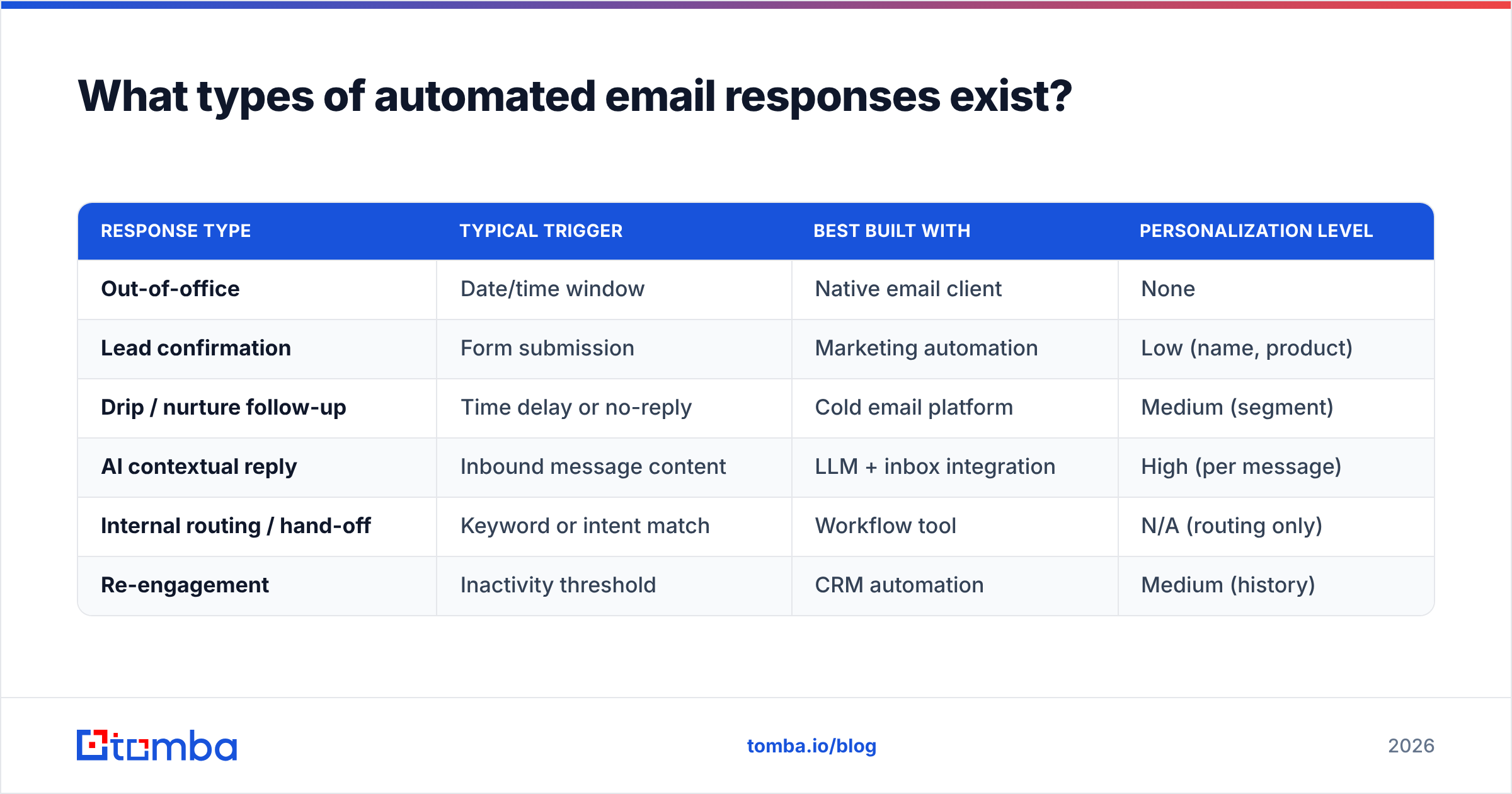
Here is the practical taxonomy, with the trigger that fires each one and the right tool category to build it.
| Response type | Typical trigger | Best built with | Personalization level |
|---|---|---|---|
| Out-of-office | Date/time window | Native email client | None |
| Lead confirmation | Form submission | Marketing automation | Low (name, product) |
| Drip / nurture follow-up | Time delay or no-reply | Cold email platform | Medium (segment) |
| AI contextual reply | Inbound message content | LLM + inbox integration | High (per message) |
| Internal routing / hand-off | Keyword or intent match | Workflow tool | N/A (routing only) |
| Re-engagement | Inactivity threshold | CRM automation | Medium (history) |
A few notes that save pain later:
- Out-of-office is the only one you should never make clever. Keep it short and factual.
- Lead confirmation is your highest-leverage easy win — it sets expectations and buys you time.
- AI contextual replies are the new frontier and the riskiest; they need a human-review or approval step until you trust them.
- Re-engagement only works if the contact record is still valid, which loops back to data hygiene.
How do AI-powered automated responses actually work?#
An AI auto-reply runs a small pipeline every time a message arrives. Understanding the steps tells you where things break.
- Ingest — the inbound email is captured by an inbox integration or API.
- Classify — the system decides intent: is this a pricing question, an objection, a scheduling request, spam?
- Retrieve — it pulls relevant context: the contact's record, prior thread, your knowledge base, product facts.
- Draft — a language model writes a reply grounded in that retrieved context.
- Guardrail — rules check for hallucinated claims, banned topics, or low confidence, and either send, hold for human review, or escalate.
- Send & log — the approved reply goes out and the interaction is written back to the CRM.
The weakest links are steps 3 and 5. If the retrieval step has thin or wrong data about the contact, the draft will be confidently incorrect. This is the same reason data enrichment matters — feeding the model a fuller, accurate picture of who it is replying to. Pulling verified context through data enrichment before the draft stage is what separates a reply that sounds like it knows the prospect from one that sounds like a form letter.

Which tools handle automated email responses best?#
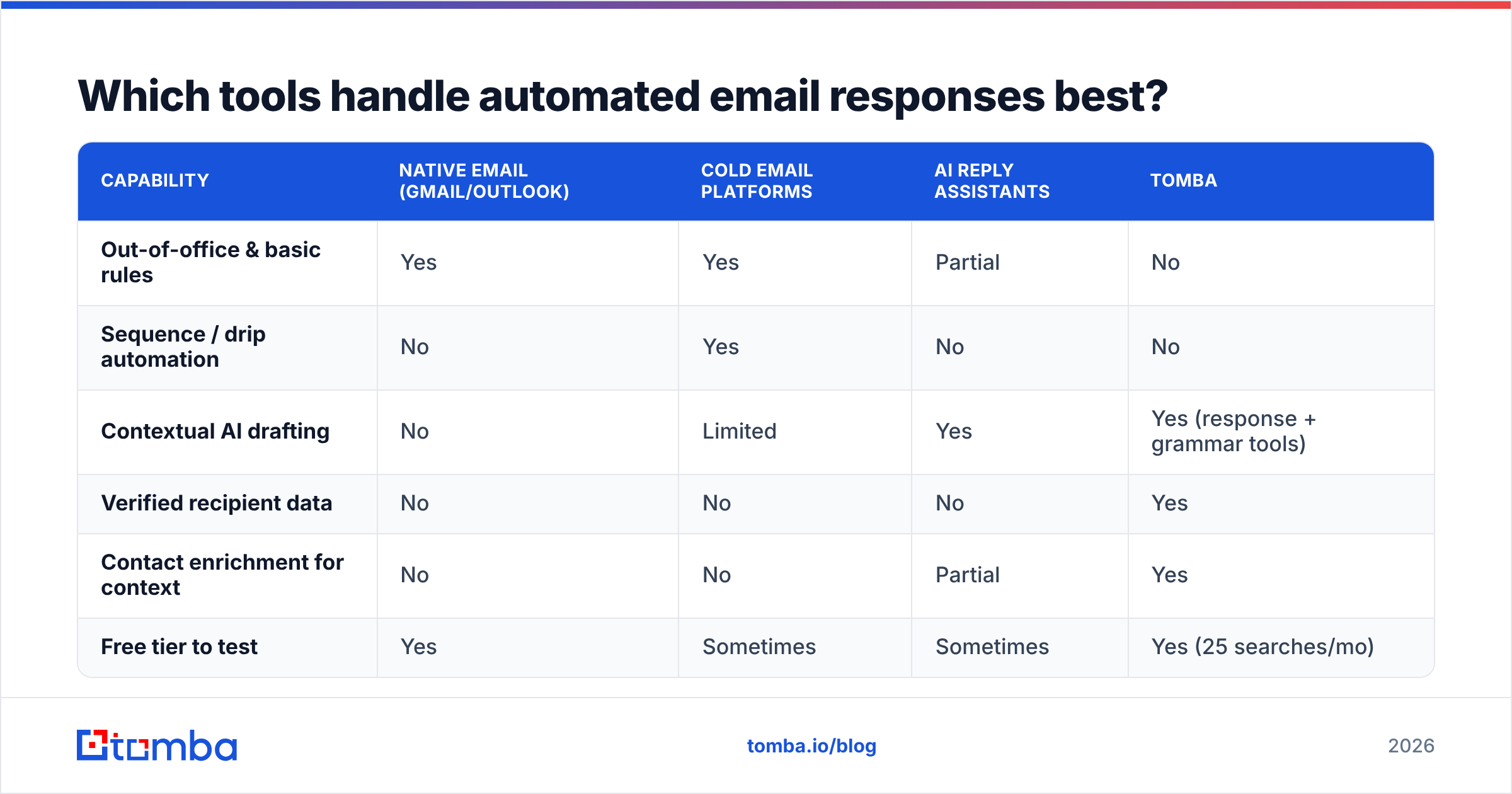
There is no single "best" — it depends on whether your priority is inbound support, outbound sales sequences, or contextual AI replies. Here is an honest comparison of the categories, with where Tomba fits.
| Capability | Native email (Gmail/Outlook) | Cold email platforms | AI reply assistants | Tomba |
|---|---|---|---|---|
| Out-of-office & basic rules | Yes | Yes | Partial | No |
| Sequence / drip automation | No | Yes | No | No |
| Contextual AI drafting | No | Limited | Yes | Yes (response + grammar tools) |
| Verified recipient data | No | No | No | Yes |
| Contact enrichment for context | No | No | Partial | Yes |
| Free tier to test | Yes | Sometimes | Sometimes | Yes (25 searches/mo) |
The honest read: native clients cover out-of-office, cold email platforms own sequences, and AI assistants own drafting. What none of them do well is guarantee the recipient data underneath. Tomba is not a sequencer — it is the layer that makes sure the address is real and the context is rich before any automated reply fires, plus practical helpers like the AI email response generator and an AI grammar checker for polishing drafts.
For teams comparing reply-automation suites head to head, independent review sites like G2 and Capterra are worth checking for current user ratings before you commit budget.
How do you set up automated email responses without sounding robotic?#
The "robotic" problem is almost never the automation — it is lazy copy and missing context. Here is a workflow that keeps replies human.
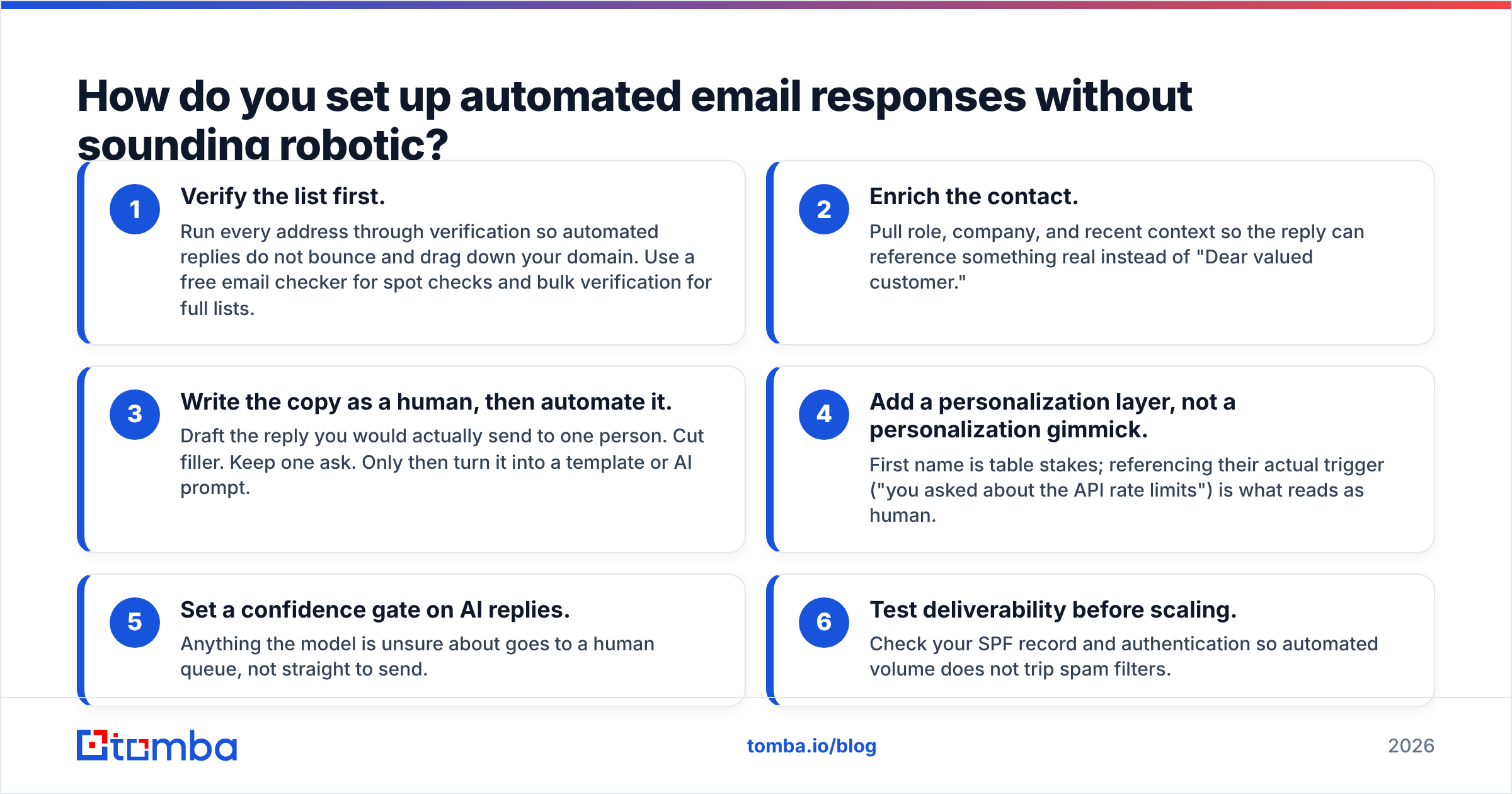
- Verify the list first. Run every address through verification so automated replies do not bounce and drag down your domain. Use a free email checker for spot checks and bulk verification for full lists.
- Enrich the contact. Pull role, company, and recent context so the reply can reference something real instead of "Dear valued customer."
- Write the copy as a human, then automate it. Draft the reply you would actually send to one person. Cut filler. Keep one ask. Only then turn it into a template or AI prompt.
- Add a personalization layer, not a personalization gimmick. First name is table stakes; referencing their actual trigger ("you asked about the API rate limits") is what reads as human.
- Set a confidence gate on AI replies. Anything the model is unsure about goes to a human queue, not straight to send.
- Test deliverability before scaling. Check your SPF record and authentication so automated volume does not trip spam filters.
Notice that two of the six steps are about data, not copy. That ratio is correct. The most beautiful AI reply in the world is worthless if it goes to john@compny.com because someone fat-fingered the domain.
What are the risks of automated email responses?#
Automation removes the human pause, so mistakes ship at scale and instantly. Watch for these:
- Tone-deaf misfires. An upbeat "Thanks for reaching out!" auto-reply to an angry cancellation request makes things worse. Route negative-sentiment messages to humans.
- Loop storms. Two auto-responders emailing each other forever. Always add a header check or rate limit.
- Bounce damage. Sending automated volume to unverified addresses spikes your bounce rate and hurts email deliverability. Verify first, every time.
- Hallucinated facts. AI replies that confidently promise a feature you do not have. Ground the model in a fixed knowledge base and gate low-confidence answers.
- Over-automation. Not every message deserves a bot. High-value prospects notice, and they remember.
The fix for nearly all of these is the same two-part discipline: clean data going in, and a human-in-the-loop checkpoint for anything sensitive.
How do you measure if your automated responses are working?#
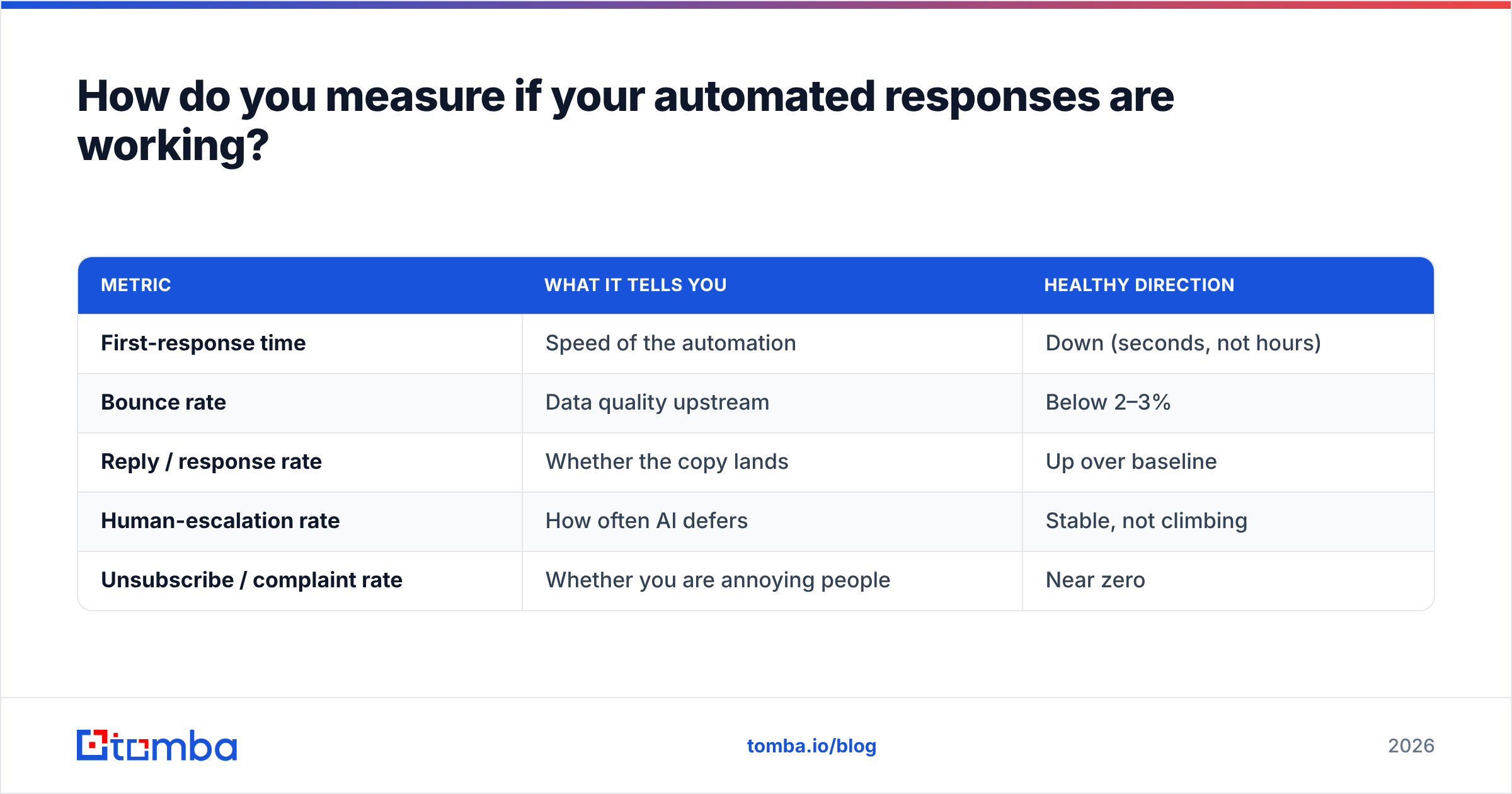
If you cannot measure it, you are guessing. Track these five, and review weekly.
| Metric | What it tells you | Healthy direction |
|---|---|---|
| First-response time | Speed of the automation | Down (seconds, not hours) |
| Bounce rate | Data quality upstream | Below 2–3% |
| Reply / response rate | Whether the copy lands | Up over baseline |
| Human-escalation rate | How often AI defers | Stable, not climbing |
| Unsubscribe / complaint rate | Whether you are annoying people | Near zero |
A rising bounce rate is your earliest warning that the data feeding the automation has decayed — that is your cue to re-verify the list, not to rewrite the copy. A climbing escalation rate means your AI is hitting the edge of its knowledge; feed it better context or tighten its scope.
Pair these reply metrics with your broader funnel numbers so you can connect faster responses to actual pipeline. If automated first-touch is working, you should see it show up in qualified-lead volume, not just in vanity speed stats.
Frequently asked questions#
Are automated email responses bad for deliverability? Not inherently. The damage comes from sending automated volume to unverified or stale addresses. Verify your list, authenticate your domain, and keep complaint rates low, and automation is neutral-to-positive for deliverability.
Can AI auto-replies fully replace human reps? No, and you should not want them to. Use AI for fast, factual, repetitive replies and routing. Keep humans on negotiation, complex objections, and high-value accounts. The best setups are hybrid.
What is the minimum I need to start? A verified contact list, one well-written confirmation auto-reply, and a clear rule for when a human takes over. You can layer AI drafting on after that foundation is solid.
How is this different from cold email sequencing? Sequencing sends scheduled outbound messages regardless of reply. Automated responses react to an event — an inbound message, a form, a trigger. Most teams run both, but they solve different problems.
The bottom line#
Automated email responses are no longer a "nice to have" — in 2026 they are how teams stay responsive at a scale humans cannot match. But automation is a multiplier, not a magic wand. It magnifies the quality of your copy and, even more, the quality of your data. Get those right and you get instant, human-sounding replies that convert. Get them wrong and you just fail faster.
Start at the foundation: make sure every address your automation touches is real and every contact is enriched with the context an AI reply needs to sound like it actually knows the person. That is exactly what the Tomba Email Finder is built for — finding and verifying professional email addresses by name, domain, or company so your automated responses land in real inboxes and read like they were written by someone who did their homework. Check the Tomba pricing plans, start free with 25 searches a month, and build your reply automation on data you can trust.
// get started
Find, verify and enrich your first contacts today
Start on the free plan with 25 searches a month, then scale when your team is ready.
Free plan · No credit card required · GDPR & CCPA
Get the Tomba newsletter
Product and data updates
// about the author