Automated Email Sender in 2026: Send at Scale Without Burning Your Domain
An automated email sender saves hours, but the wrong setup torches your domain. Here's how to pick a sender, warm it up, and scale outreach safely in 2026.
An automated email sender is the engine behind every modern outbound team — but it is also the fastest way to incinerate a sending domain if you wire it up wrong. The tool that schedules and delivers your messages is only half the equation; the data you feed it and the rules you follow decide whether you land in the inbox or the spam folder.
This guide breaks down what an automated email sender actually does, how to choose one in 2026, and the setup steps that keep your deliverability intact while you scale.
TL;DR#
- An automated email sender schedules, personalizes, and delivers email at volume — from drip campaigns to cold outreach sequences — without you hitting "send" manually.
- The tool itself rarely sinks you; bad data and missing warmup do. Verify every address and warm every mailbox before you scale.
- Marketing platforms (Mailchimp, HubSpot) suit opt-in newsletters; cold outreach tools (Instantly, Saleshandy, Smartlead) suit prospecting with inbox rotation.
- Expect to pay $30–$100/mo for a solid sender, plus a separate budget for verified contact data.
- Pair your sender with a verified data source like Tomba's email finder so you never automate emails to addresses that bounce.
What is an automated email sender?#
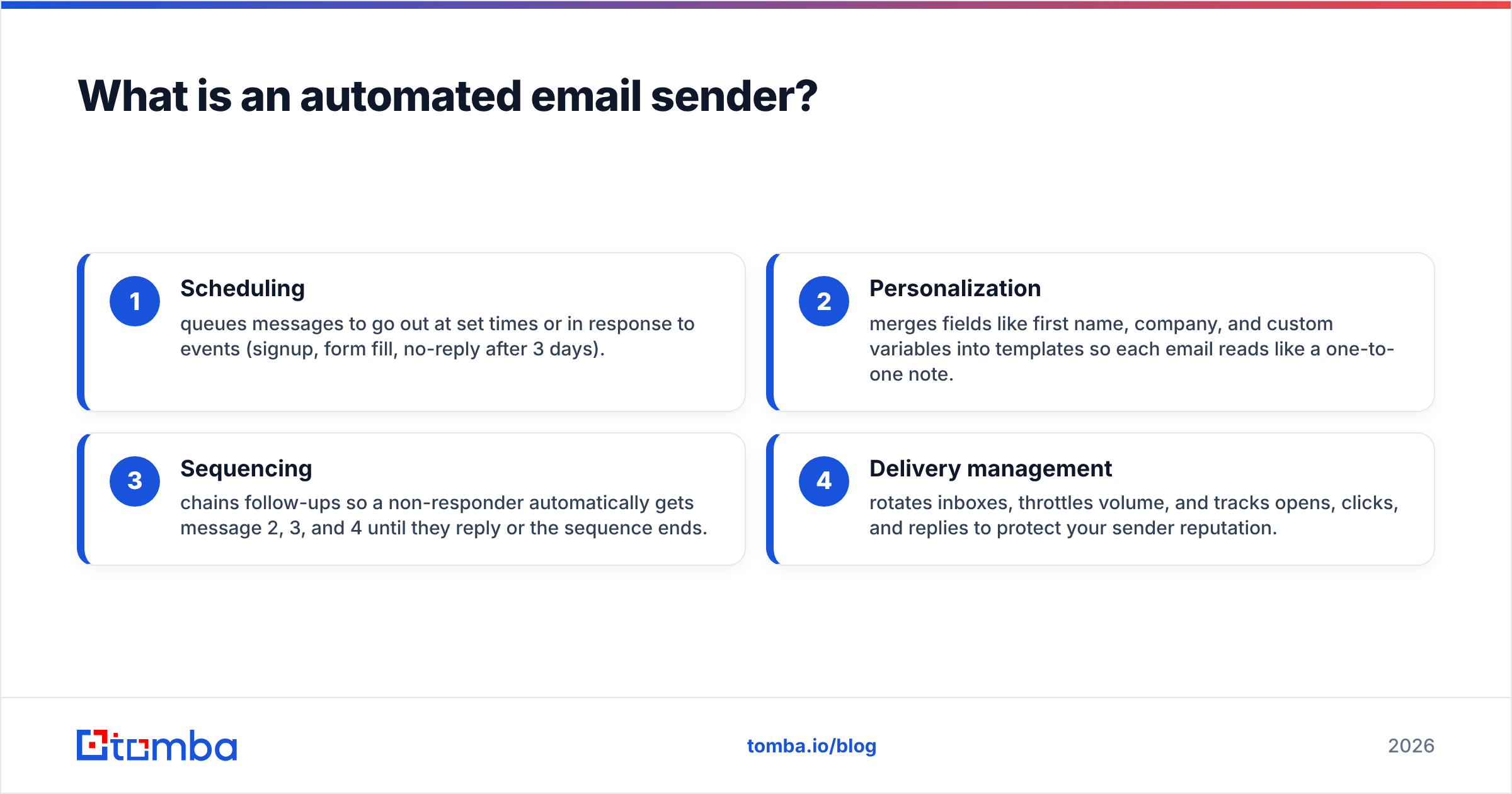
An automated email sender is software that sends email on your behalf based on triggers, schedules, or sequences — instead of you composing and sending each message by hand. Think of it like a sprinkler system for your garden: you set the zones and timing once, and it waters everything on schedule whether you are home or not.
In practice, an automated email sender handles four jobs:
- Scheduling — queues messages to go out at set times or in response to events (signup, form fill, no-reply after 3 days).
- Personalization — merges fields like first name, company, and custom variables into templates so each email reads like a one-to-one note.
- Sequencing — chains follow-ups so a non-responder automatically gets message 2, 3, and 4 until they reply or the sequence ends.
- Delivery management — rotates inboxes, throttles volume, and tracks opens, clicks, and replies to protect your sender reputation.
The category splits into two camps that people constantly confuse: bulk marketing senders built for opt-in lists, and cold outreach senders built for one-to-one prospecting. Using the wrong one for the wrong job is the single most common reason campaigns fail.
Why does data quality matter more than the tool?#
Your automated email sender is only as good as the list you load into it. You can buy the most sophisticated sequencer on the market, but if 30% of your addresses bounce, mailbox providers will flag you as a spammer within days — and no feature set will save you.
Here is the chain of damage from a dirty list:
- High bounce rate signals to Gmail and Outlook that you are not maintaining your list, which tanks your sender reputation.
- A poor reputation means even your good emails land in spam, so reply rates collapse.
- Spam complaints compound the problem, and you can end up on a blocklist that takes weeks to escape.
The fix is boring but non-negotiable: find verified addresses, then verify them again before sending. Use an email verifier to strip out invalid, role-based, and risky addresses, and use a catch-all verifier for domains that accept everything. Industry data from Mailchimp's research consistently shows that clean, segmented lists outperform bulk blasts on every metric that matters.
A practical pre-send checklist:
- Source from a real database, not scraped guesses — a B2B database with documented sources beats a list you bought on a forum.
- Verify in bulk with a bulk verify pass right before import.
- Remove duplicates so the same person does not get hit twice across sequences.
- Segment by intent so your message matches where the prospect actually is.
How do I choose an automated email sender in 2026?#
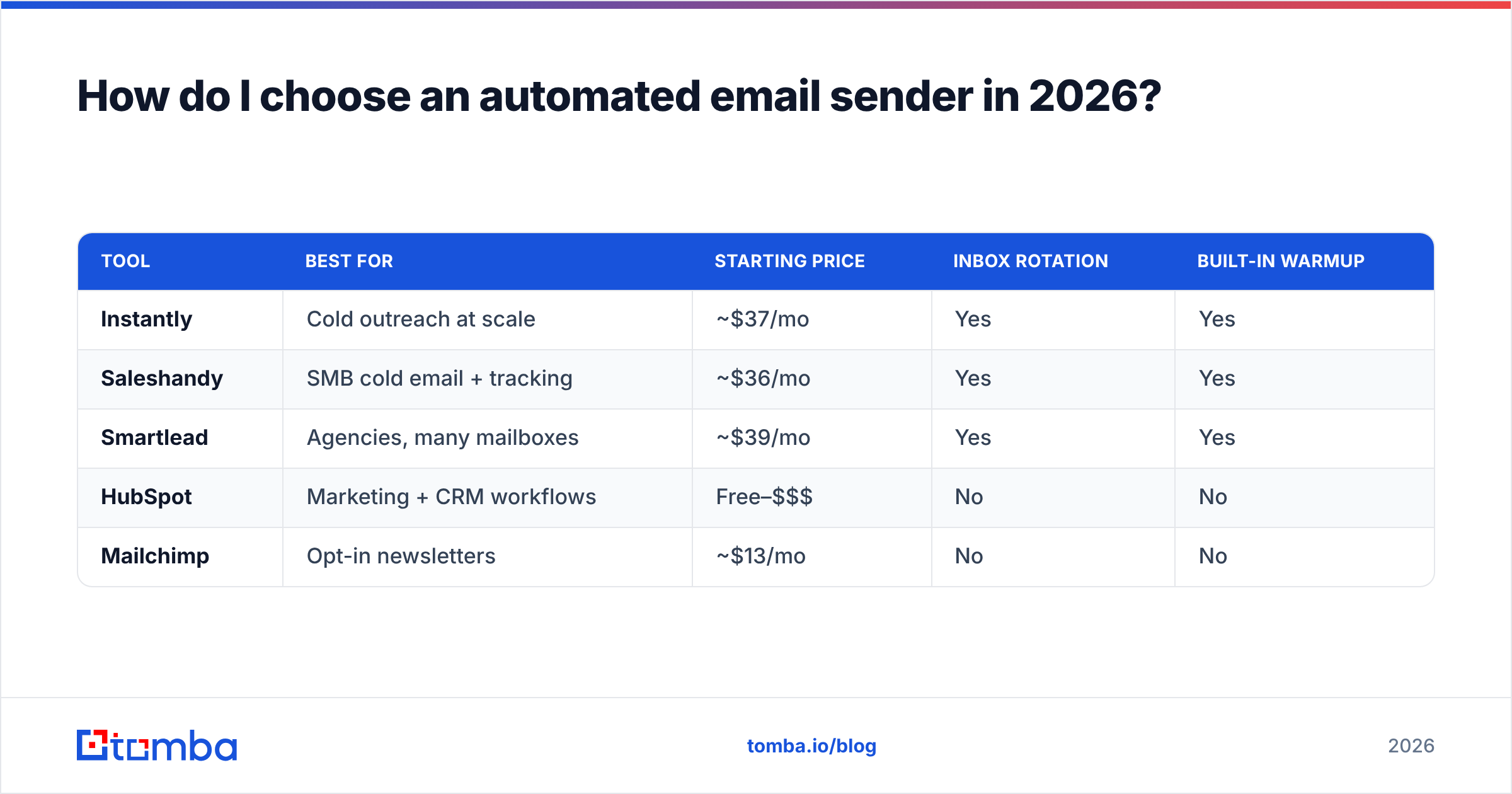
Pick based on what you are actually sending. The right tool for a 50,000-person newsletter is the wrong tool for 200 cold prospects, and vice versa. Match the sender to the job, the volume, and your deliverability tolerance.
| Tool | Best for | Starting price | Inbox rotation | Built-in warmup |
|---|---|---|---|---|
| Instantly | Cold outreach at scale | ~$37/mo | Yes | Yes |
| Saleshandy | SMB cold email + tracking | ~$36/mo | Yes | Yes |
| Smartlead | Agencies, many mailboxes | ~$39/mo | Yes | Yes |
| HubSpot | Marketing + CRM workflows | Free–$$$ | No | No |
| Mailchimp | Opt-in newsletters | ~$13/mo | No | No |
A few decision rules:
- Doing cold outreach? You need inbox rotation and warmup — that points to Instantly, Saleshandy, or Smartlead. If you are weighing these, an Instantly alternative or Saleshandy alternative comparison helps you avoid lock-in.
- Sending newsletters to people who opted in? A marketing platform like Mailchimp or HubSpot is the right home. Cold-emailing from these will get your account suspended fast.
- Running an agency with dozens of mailboxes? Prioritize tools that manage rotation and per-inbox reputation cleanly.
- Need it inside your CRM? Pick the sender that connects to your stack — check the integrations for HubSpot, Pipedrive, and Salesforce before you commit.
Read real buyer feedback on G2 before signing an annual contract — feature lists lie, but hundreds of reviews rarely do.
How does inbox warmup protect deliverability?#
Warmup gradually builds your mailbox's reputation by simulating natural email activity before you send real volume. It is like breaking in a new pair of boots: walk a little each day for two weeks and they fit perfectly; run a marathon on day one and you are crippled.
A cold mailbox that suddenly fires 300 emails on its first day screams "spam bot" to Gmail. Warmup avoids that by:
- Sending a slowly increasing number of emails per day (start at 10–20, ramp to your target over 2–4 weeks).
- Triggering opens and replies on those warmup emails so the activity looks human.
- Moving messages out of spam to teach the provider your domain is trustworthy.
Most dedicated cold-email senders include warmup; marketing platforms do not. If you are setting up new domains for outreach, run warmup for at least two to three weeks before loading a single real prospect. You can model the ramp with a warmup calculator so you know exactly how many emails per day are safe.
Do not skip your authentication records either. Your domain needs valid SPF, DKIM, and DMARC before any automated sending. A quick SPF checker pass confirms the record is published correctly — missing authentication is an instant deliverability penalty in 2026, since Google and Yahoo now enforce it for bulk senders.
What's the difference between bulk senders and cold outreach tools?#
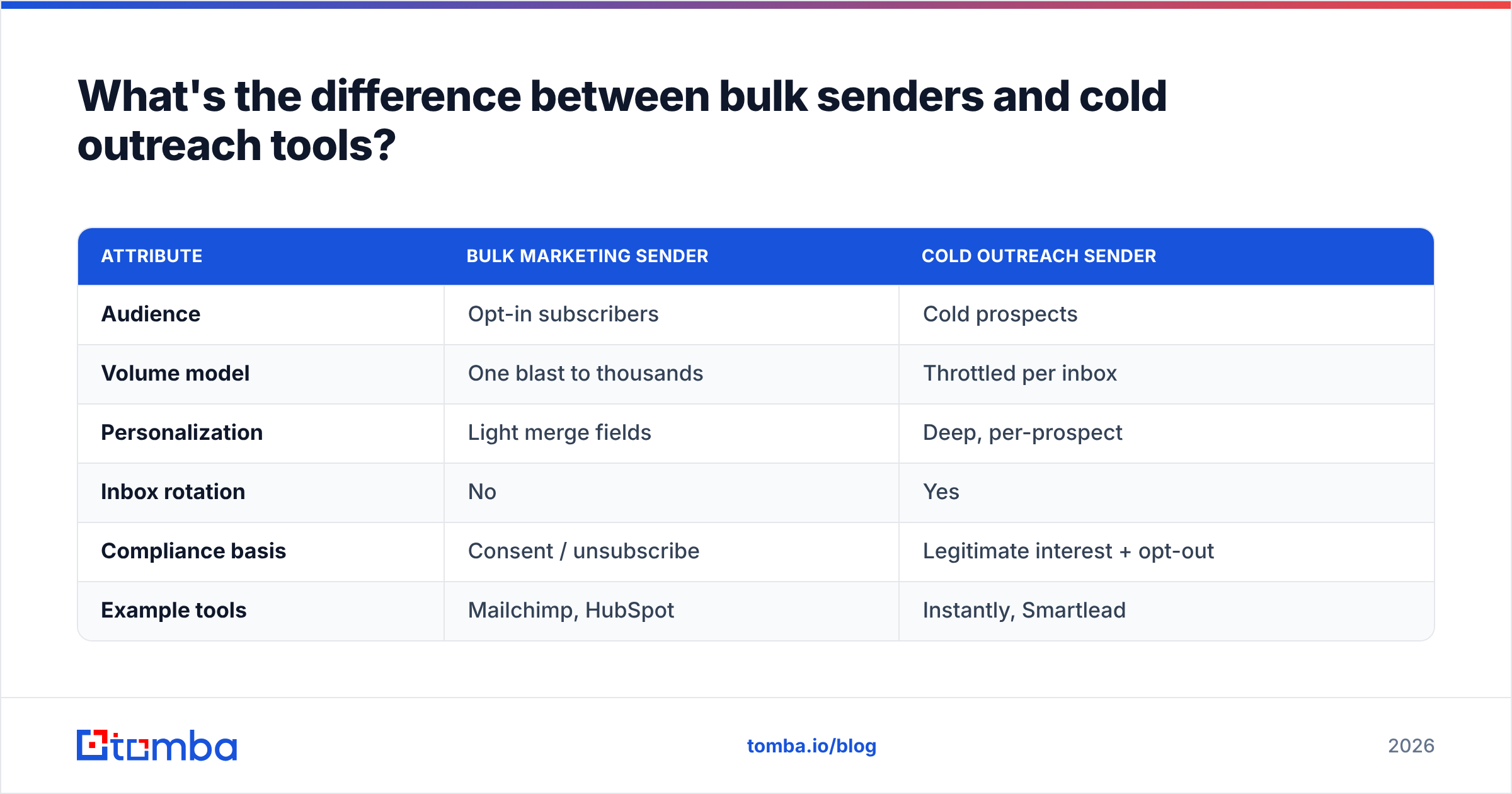
Bulk senders deliver one message to a large opt-in list at once; cold outreach tools deliver personalized one-to-one sequences to prospects who never asked to hear from you. The legal and technical requirements are completely different, and mixing them up is how accounts get banned.
| Attribute | Bulk marketing sender | Cold outreach sender |
|---|---|---|
| Audience | Opt-in subscribers | Cold prospects |
| Volume model | One blast to thousands | Throttled per inbox |
| Personalization | Light merge fields | Deep, per-prospect |
| Inbox rotation | No | Yes |
| Compliance basis | Consent / unsubscribe | Legitimate interest + opt-out |
| Example tools | Mailchimp, HubSpot | Instantly, Smartlead |
The compliance line matters. Bulk marketing leans on prior consent and easy unsubscribes. Cold B2B outreach leans on legitimate business interest, accurate sender identity, and a clear opt-out — and it still must respect CAN-SPAM, GDPR, and similar rules. The Wikipedia overview of CAN-SPAM is a useful primer before you write your first sequence.
If you try to push cold outreach through a bulk marketing platform, two things happen: the platform's terms of service flag you, and the platform's shared IPs punish everyone when you generate complaints. Keep the two workflows on separate tools.
What does a safe automated sending setup look like?#
A safe setup combines verified data, warmed mailboxes, authenticated domains, and conservative volume. Here is the sequence that keeps teams out of the spam folder:
- Buy or register sending domains separate from your primary brand domain so a reputation hit never touches your main email.
- Publish SPF, DKIM, and DMARC on every sending domain and verify them.
- Warm each mailbox for 2–4 weeks before real sending.
- Build a verified list — find addresses with a domain search, then run an email verification pass to drop bounces.
- Cap volume per inbox at 30–50 cold emails per day and rotate across multiple mailboxes for scale.
- Personalize every message beyond first name — reference the prospect's company, role, or a recent trigger.
- Monitor reply and bounce rates and pause any inbox whose bounce rate climbs above 3%.
Notice that the automated email sender is only step 5. The other six steps are data and infrastructure — which is exactly why teams that obsess over picking the "perfect" tool while ignoring their list quality keep wondering why their open rates crater.
For B2B teams, the highest-leverage upgrade is almost always the data layer. A sequence that goes to 500 verified, well-targeted contacts beats one that blasts 5,000 scraped guesses every single time. That is the part most automation guides skip, and it is the part that actually moves your pipeline.
How does Tomba fit into an automated sending workflow?#
Tomba is not an email sender — it is the verified data engine that feeds one. You bring the sequencer; Tomba makes sure every address in that sequencer is real, current, and deliverable.
The workflow looks like this:
- Use the Tomba Email Finder to find professional addresses by name, company, or domain.
- Run them through the email verifier and catch-all verifier to strip risky addresses before they ever hit your sender.
- Enrich the records with data enrichment so your personalization fields are complete.
- Export clean, verified contacts into Instantly, Smartlead, HubSpot, or whatever sender you chose.
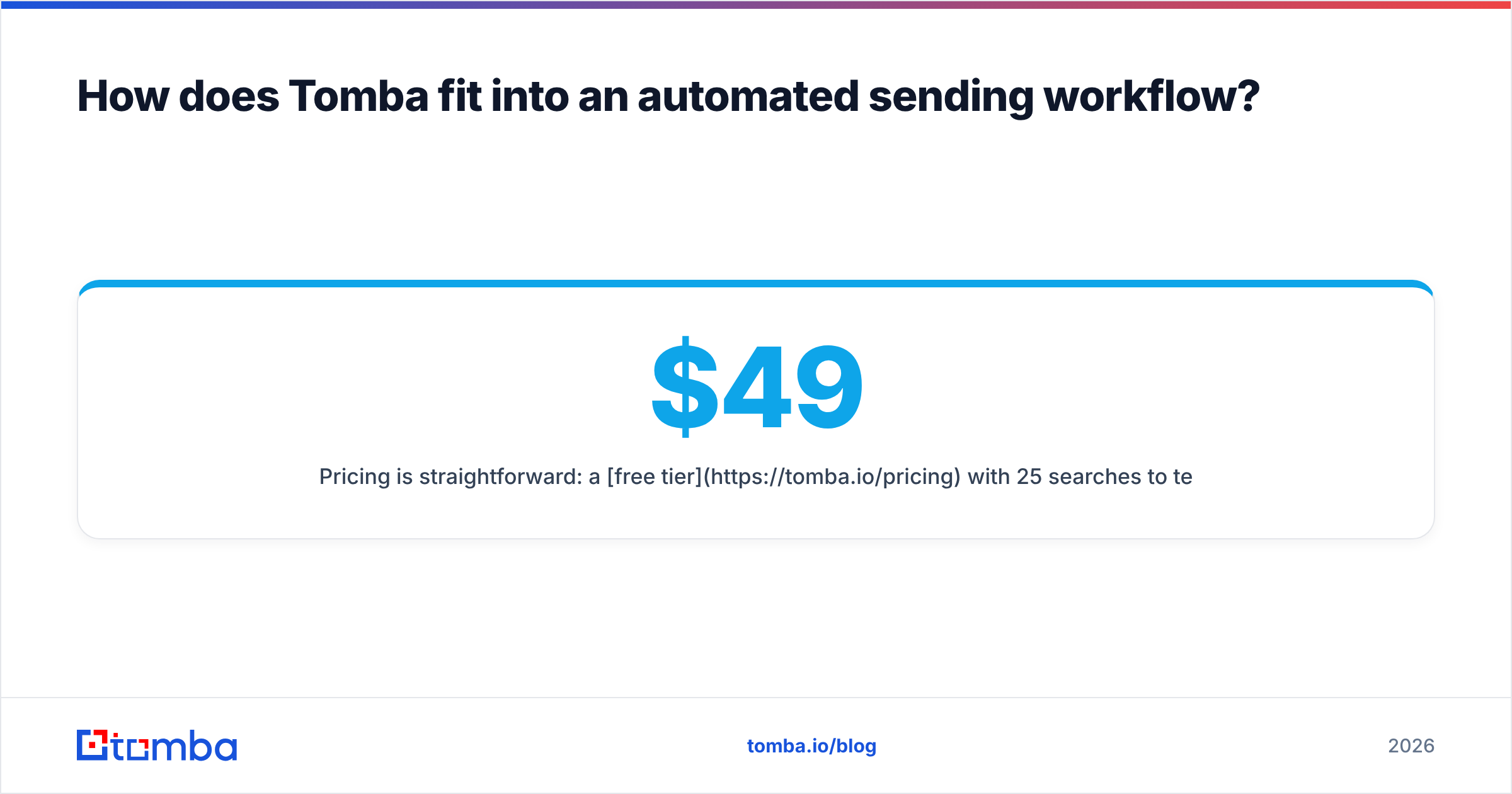
Pricing is straightforward: a free tier with 25 searches/mo to test, then Starter at $49/mo, Growth at $99/mo, and Pro at $249/mo as your volume grows. You can wire it directly into your stack with the Tomba API or the Chrome extension so verification happens automatically before each campaign.
The bottom line#
The best automated email sender in the world cannot rescue a campaign built on bad data. Pick the sender that matches your job — cold outreach versus opt-in marketing — warm your mailboxes, authenticate your domains, and keep volume conservative. Then make the data layer your real priority, because that is what decides whether you land in the inbox.
Start by cleaning the input. Use the Tomba Email Finder to source verified, accurate B2B addresses, run them through verification, and feed only deliverable contacts into your automated email sender. Your bounce rate, your reputation, and your reply rate will all thank you. Spin up a free Tomba account and verify your first list before your next send.
// get started
Find, verify and enrich your first contacts today
Start on the free plan with 25 searches a month, then scale when your team is ready.
Free plan · No credit card required · GDPR & CCPA
// about the author