Automated Email Warmup in 2026: Setup, Tools & Best Practices
Automated email warmup quietly builds sender reputation before you scale outbound. Here's how it works, what it costs, the best 2026 tools, and the mistakes that still land you in spam.
TL;DR
- Automated email warmup uses software to send, receive, and reply to messages between real inboxes, training mailbox providers to trust a new sending domain before you scale cold outreach.
- It is not optional in 2026 — Google and Microsoft now weigh engagement signals heavily, and a cold domain that blasts 500 emails on day one is the fastest route to the spam folder.
- A proper ramp takes 2–4 weeks, starts at 10–20 sends per day, and pairs warmup with correct SPF, DKIM, and DMARC records.
- Warmup software cannot fix a bad list. Verify your contacts first, or warm reputation just to burn it on bounces.
- Budget $20–$50 per inbox per month for dedicated warmup, or use a bundled tool if you already run a sequencing platform.
What is automated email warmup?#
Automated email warmup is the process of gradually building a sending domain's reputation by simulating natural, two-way email activity through software. Think of it like breaking in a new credit card. You don't get a $50,000 limit on day one — you make small purchases, pay them off, and the issuer slowly raises your ceiling as trust builds. Mailbox providers do the same thing with your domain: they watch how recipients treat your early messages and decide how much to trust you.
Technically, a warmup tool connects to your mailbox (via SMTP/IMAP or an API like Gmail's) and joins a pool of thousands of other real inboxes. Those inboxes exchange messages with yours on a schedule. The magic is in the engagement: the software opens your emails, marks them as important, drags them out of spam if they land there, and sends genuine-looking replies. Each of those actions is a positive signal that tells Gmail and Outlook, "real humans want to read this sender."

Without warmup, a brand-new domain has zero history. The moment you send a few hundred cold emails, filters see an unknown sender with sudden volume and no engagement — the exact fingerprint of a spammer. Warmup manufactures the missing history so your real campaigns start from a position of trust. If you want the precise mechanics behind why this matters, the fundamentals of email deliverability and sender reputation are worth a five-minute read before you spend a dollar on tooling.
How does automated email warmup actually work?#
The process is mechanical once you understand the moving parts. Here is what a warmup tool does on your behalf, step by step:
- Inbox enrollment — You connect your sending mailbox (a Google Workspace or Microsoft 365 account, or an SMTP server) to the warmup network. The tool authenticates and joins your inbox to a shared pool.
- Gradual volume ramp — Sends start tiny — often 2 to 10 per day — and climb on a curve. The schedule increases daily volume only when reputation metrics stay healthy.
- Positive engagement simulation — Pool inboxes open your messages, reply, mark them as important, and rescue any that hit spam. This is the single most valuable signal.
- Spam-rate monitoring — The tool watches what percentage of your warmup mail lands in spam and throttles back automatically if the number climbs.
- Reputation reporting — A dashboard shows inbox-placement rate, spam rate, and a health score so you know when the domain is ready for live campaigns.
The reason engagement matters so much is that 2026-era filtering is behavioral, not just rule-based. Google's own Postmaster Tools exposes the metrics it cares about — domain reputation, spam rate, and authentication pass rates — and warmup is engineered to move all three in the right direction. You can read more about the underlying discipline on the email deliverability overview at Wikipedia.
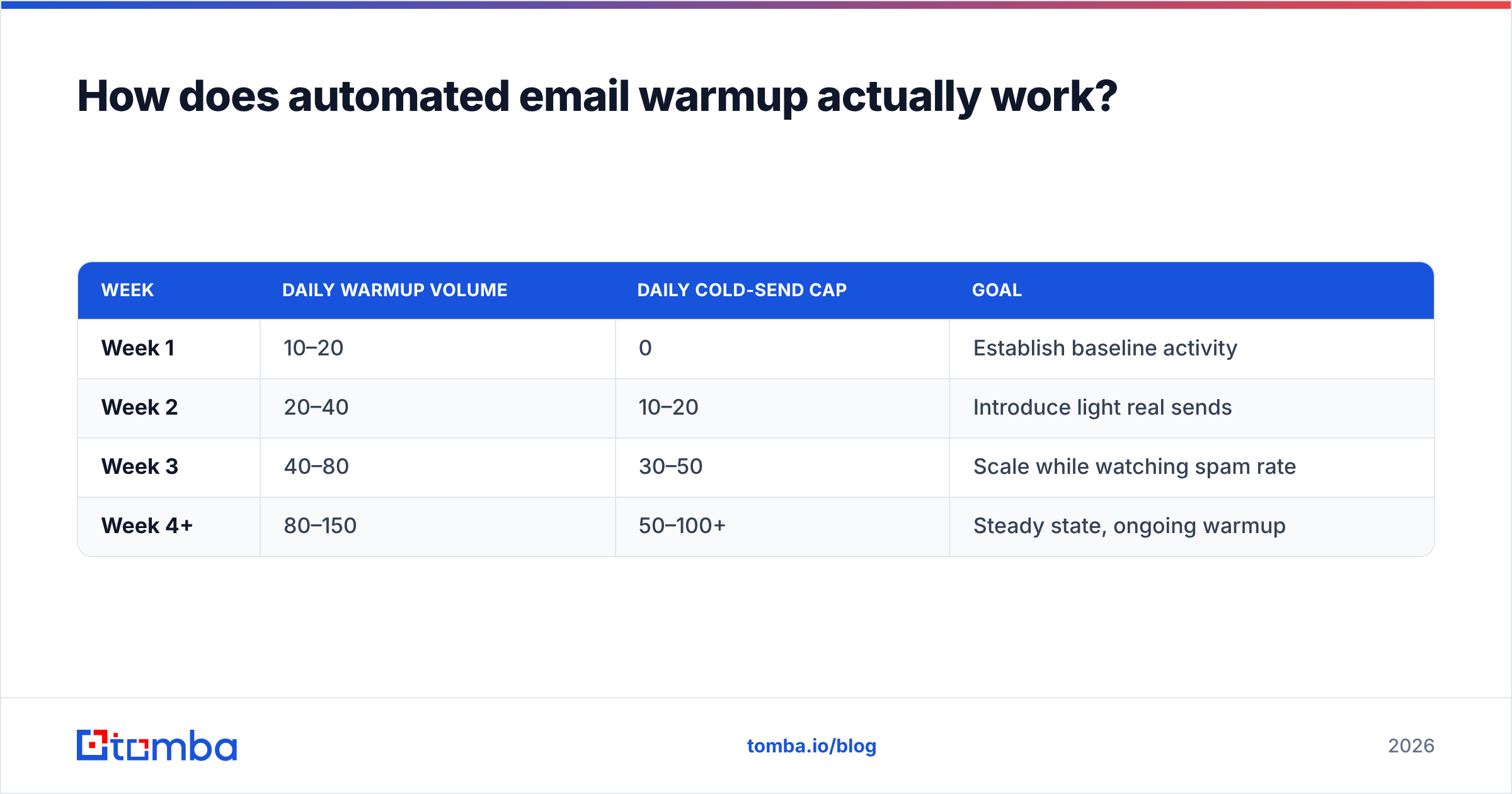
A realistic ramp schedule looks like this:
| Week | Daily warmup volume | Daily cold-send cap | Goal |
|---|---|---|---|
| Week 1 | 10–20 | 0 | Establish baseline activity |
| Week 2 | 20–40 | 10–20 | Introduce light real sends |
| Week 3 | 40–80 | 30–50 | Scale while watching spam rate |
| Week 4+ | 80–150 | 50–100+ | Steady state, ongoing warmup |
Keep a background level of warmup running even after launch. Reputation decays when activity drops, so most teams leave warmup on at a reduced rate permanently.
Why can't you just skip warmup and start sending?#
You can — and your domain will pay for it. The conclusion first: skipping warmup is the most common reason new outbound domains die within their first week, and a burned domain is hard to resurrect.
Here is the failure chain. A fresh domain sends 300 cold emails. Twenty bounce because the list was never verified. A handful of recipients hit "report spam" because the copy felt generic. Gmail sees high volume, high bounce rate, low engagement, and complaints — all at once, from a sender with no track record. The domain reputation drops to "Bad" in Postmaster Tools, and now even your warmup mail lands in spam. At that point you are not warming up; you are digging out.
Two things make this worse in 2026. First, mailbox providers tightened bulk-sender rules — Google and Yahoo now require authenticated mail and enforce a hard spam-complaint threshold of 0.3%. Second, AI-generated outbound flooded inboxes, so filters got more aggressive about unknown senders. The bar to earn trust is higher than it was even two years ago, which makes a deliberate warmup more valuable, not less.
There is also a list-quality dependency people ignore. Warmup builds reputation; a dirty list destroys it. If 15% of your contacts are invalid, no amount of warmup survives the bounce spike. Run every address through an email verifier before the first real send, and use an SPF checker to confirm your authentication is correct. Warmup and clean data are partners, not substitutes.
What are the best automated email warmup tools in 2026?#
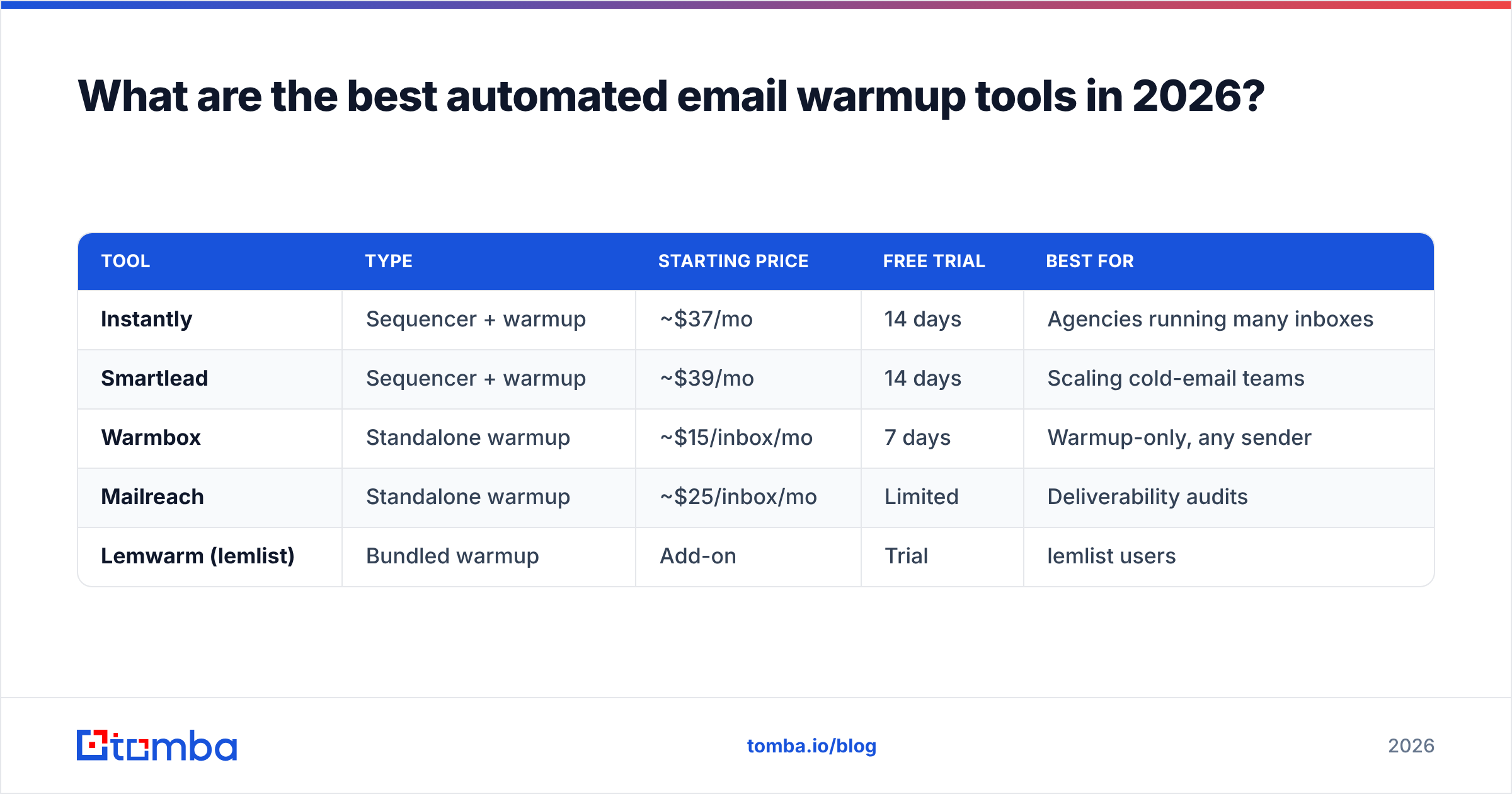
Most warmup now ships bundled inside cold-email sequencing platforms, though standalone tools still exist for teams that want warmup decoupled from sending. Here is an honest comparison of the common options.
| Tool | Type | Starting price | Free trial | Best for |
|---|---|---|---|---|
| Instantly | Sequencer + warmup | ~$37/mo | 14 days | Agencies running many inboxes |
| Smartlead | Sequencer + warmup | ~$39/mo | 14 days | Scaling cold-email teams |
| Warmbox | Standalone warmup | ~$15/inbox/mo | 7 days | Warmup-only, any sender |
| Mailreach | Standalone warmup | ~$25/inbox/mo | Limited | Deliverability audits |
| Lemwarm (lemlist) | Bundled warmup | Add-on | Trial | lemlist users |
A few buying notes. Standalone tools like Warmbox and Mailreach are sensible if you already send through a CRM or a tool that lacks built-in warmup, or if you want a clean, separate reputation report. Bundled options win on price-per-inbox once you operate at scale, because warmup is included rather than billed per seat. If you are evaluating the broader category, our writeup on Instantly alternatives breaks down where each platform's warmup actually differs in network size and engagement realism.

One caution that vendors rarely volunteer: warmup-network quality matters more than feature lists. A pool stuffed with low-reputation throwaway inboxes can do more harm than good, because exchanging mail with junk senders associates your domain with junk. Prefer providers that maintain real, aged Google and Microsoft inboxes and that publish their spam-placement methodology. Before committing, model your ramp with a free email warmup calculator so you know how many inboxes and how many weeks you actually need.
How do you set up automated email warmup correctly?#
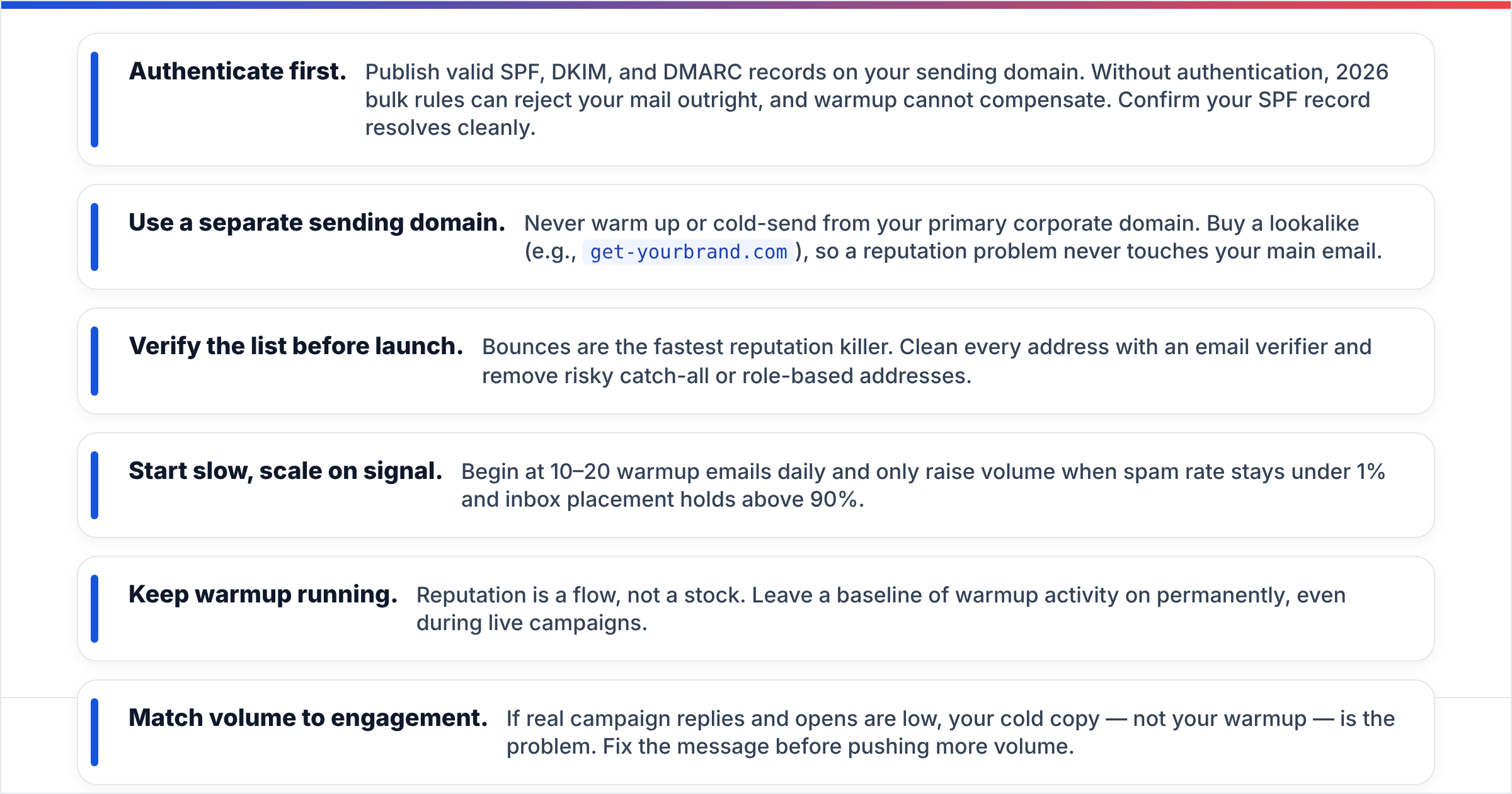
Set the foundation before you turn warmup on. The order matters — warmup amplifies whatever reputation signals already exist, good or bad.
- Authenticate first. Publish valid SPF, DKIM, and DMARC records on your sending domain. Without authentication, 2026 bulk rules can reject your mail outright, and warmup cannot compensate. Confirm your SPF record resolves cleanly.
- Use a separate sending domain. Never warm up or cold-send from your primary corporate domain. Buy a lookalike (e.g.,
get-yourbrand.com), so a reputation problem never touches your main email. - Verify the list before launch. Bounces are the fastest reputation killer. Clean every address with an email verifier and remove risky catch-all or role-based addresses.
- Start slow, scale on signal. Begin at 10–20 warmup emails daily and only raise volume when spam rate stays under 1% and inbox placement holds above 90%.
- Keep warmup running. Reputation is a flow, not a stock. Leave a baseline of warmup activity on permanently, even during live campaigns.
- Match volume to engagement. If real campaign replies and opens are low, your cold copy — not your warmup — is the problem. Fix the message before pushing more volume.
The biggest setup mistake is treating warmup as a one-time switch. It is an ongoing system that runs alongside real sending. The second biggest mistake is warming up faster than your actual demand: there is no point reaching 150 sends per day if your verified, targeted list only justifies 40. Build the list and the offer first, then warm to that number.
How long does automated email warmup take and what does it cost?#
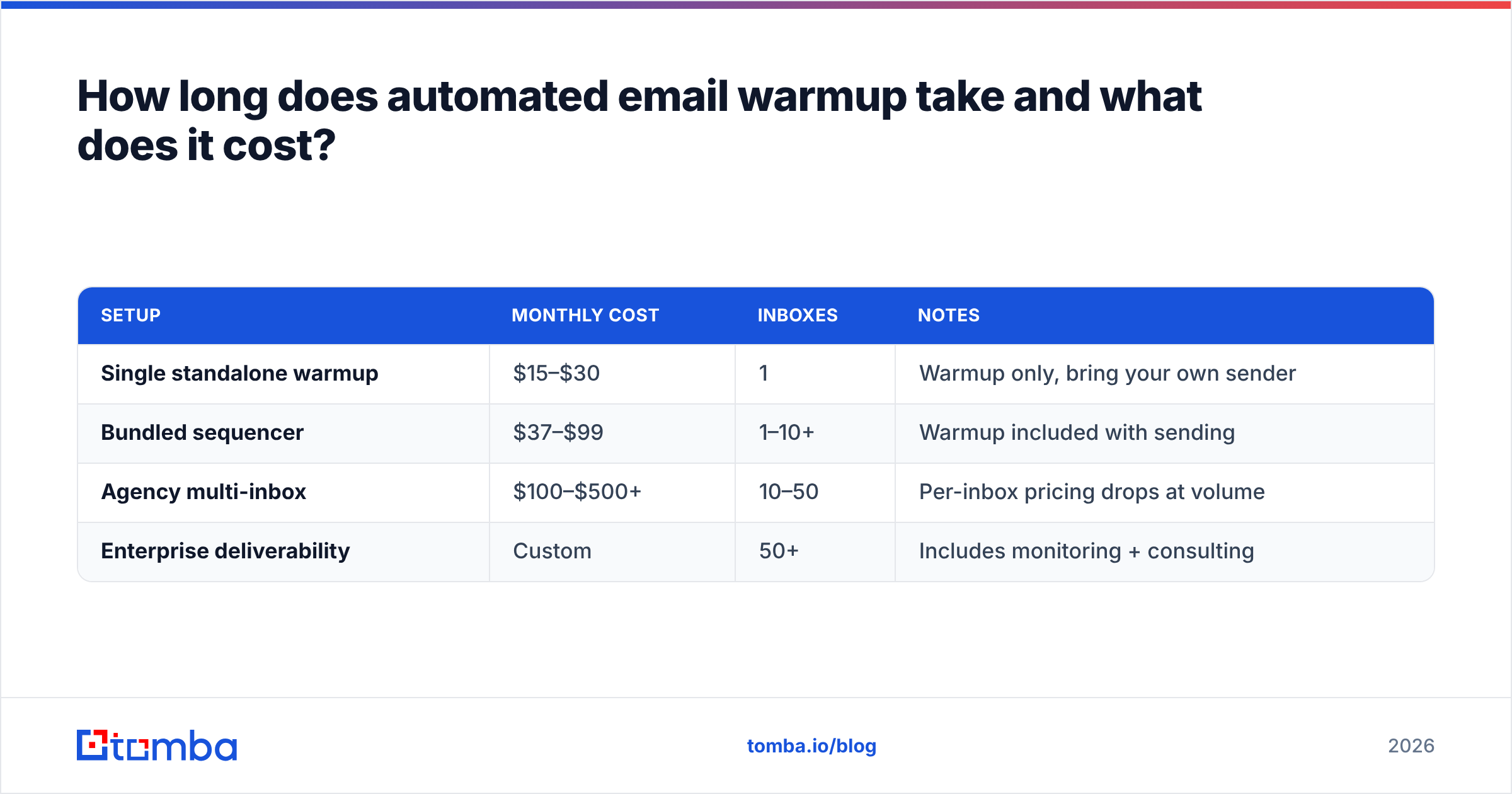
Plan for two to four weeks before meaningful cold volume, and longer if you are scaling many inboxes at once. A single Google Workspace inbox can be production-ready in about 14 days of disciplined warmup. Microsoft 365 inboxes sometimes need an extra week because Outlook's filtering is stricter with new senders.
On cost, expect roughly:
| Setup | Monthly cost | Inboxes | Notes |
|---|---|---|---|
| Single standalone warmup | $15–$30 | 1 | Warmup only, bring your own sender |
| Bundled sequencer | $37–$99 | 1–10+ | Warmup included with sending |
| Agency multi-inbox | $100–$500+ | 10–50 | Per-inbox pricing drops at volume |
| Enterprise deliverability | Custom | 50+ | Includes monitoring + consulting |
The hidden cost is data, not software. A warmup subscription is cheap; a burned domain plus the wasted SDR hours emailing dead addresses is expensive. That is why the highest-ROI spend is usually upstream — accurate contact data and verification — rather than a fancier warmup network. If you are sourcing those contacts, data accuracy directly determines whether your warmed reputation survives the first campaign.
Does automated email warmup guarantee inbox placement?#
No — and any vendor who promises a guarantee is overselling. Warmup is necessary but not sufficient. It builds the reputation foundation, but three other factors decide whether you actually land in the inbox:
- List quality — Invalid and spam-trap addresses sink even a well-warmed domain.
- Content — Spammy phrases, heavy HTML, link-stuffing, and misleading subject lines trip filters regardless of reputation.
- Recipient engagement — If real prospects ignore, delete, or report your mail, reputation erodes faster than warmup can rebuild it.
Treat warmup as the entry ticket, not the whole game. The teams that win at outbound pair a steady warmup baseline with verified lists, tightly targeted segments, and copy that earns replies. Skip any leg of that and you are optimizing one variable while another quietly drags placement down.
The bottom line#
Automated email warmup is the difference between an outbound program that scales and a domain that flames out in week one. In 2026, with stricter bulk-sender rules and behavioral filtering, it is table stakes — but only when paired with proper authentication and clean data. Warm the domain, verify the list, ramp on signal, and keep a baseline running forever.
Your warmup is only as good as the contacts you eventually send to. Before you scale a single campaign, build a targeted, accurate list with the Tomba Email Finder — find verified professional emails by name, domain, or company so the reputation you worked weeks to build doesn't get torched by bounces on day one. Start free with 25 searches a month, then check Tomba pricing when you're ready to scale your outbound.
// get started
Find, verify and enrich your first contacts today
Start on the free plan with 25 searches a month, then scale when your team is ready.
Free plan · No credit card required · GDPR & CCPA
// about the author