Automated Follow Up Email: The 2026 Guide to More Replies
Most deals die in the gap between the first email and the reply that never comes. Here's how to build an automated follow up email system in 2026 that books meetings while you sleep.
TL;DR
- An automated follow up email is a pre-built message that sends itself based on time or behavior triggers — so nobody on your team has to remember to chase a cold lead on day 3, 7, and 14.
- Roughly 80% of conversions need five or more touches, yet most reps stop after one or two. Automation closes that gap without adding headcount.
- The system has three moving parts: clean contact data, a sequencing tool, and tested copy. Skip any one and reply rates collapse.
- Timing, personalization tokens, and a hard stop on reply are what separate a sequence that books meetings from one that gets you marked as spam.
- Below: a tool comparison table, a 5-step build, real timing intervals, and templates you can paste in today.
What is an automated follow up email?#
An automated follow up email is a message that fires on its own after a trigger — a set delay, an opened email, a clicked link, or silence from the prospect. Instead of a rep manually drafting "just bumping this to the top of your inbox" for the 40th time, software watches each thread and sends the next touch when the conditions are met.
Think of it like a thermostat for your pipeline. You set the rules once — "if no reply in 3 days, send touch two" — and the system holds the temperature without you standing over it. You only step in when a human reply actually lands.
That distinction matters because follow-up is where most revenue leaks out. The first email rarely closes anything; it starts a conversation that needs nurturing across days or weeks. According to research compiled by HubSpot, the majority of sales require multiple follow-ups, but a large share of reps give up after a single attempt. Automation doesn't make you more persistent than a human — it makes you consistently persistent, which is the part humans are bad at.
)
Why do automated follow up emails outperform manual ones?#
Three reasons, and none of them are "robots are smarter than people."
- Consistency beats intensity. A human rep is sharp on Monday and buried by Thursday. A sequence sends touch four at 9:02 a.m. on day 9 whether or not the rep had a good week. The cadence never drifts.
- You stop losing warm leads to forgetfulness. Most pipeline rot isn't from bad leads — it's from good leads that nobody followed up with. Automation makes "I forgot" structurally impossible.
- You get data to optimize. Manual follow-up gives you anecdotes. Automated follow-up gives you open rates, reply rates, and step-by-step drop-off, so you can cut the touch that's killing the sequence.
The catch: automation amplifies whatever you feed it. Send an automated follow up email to a stale or unverified list and you'll torch your sender reputation at scale. That's why the data layer comes before the copy layer — more on that below.
What does an automated follow up email sequence look like?#
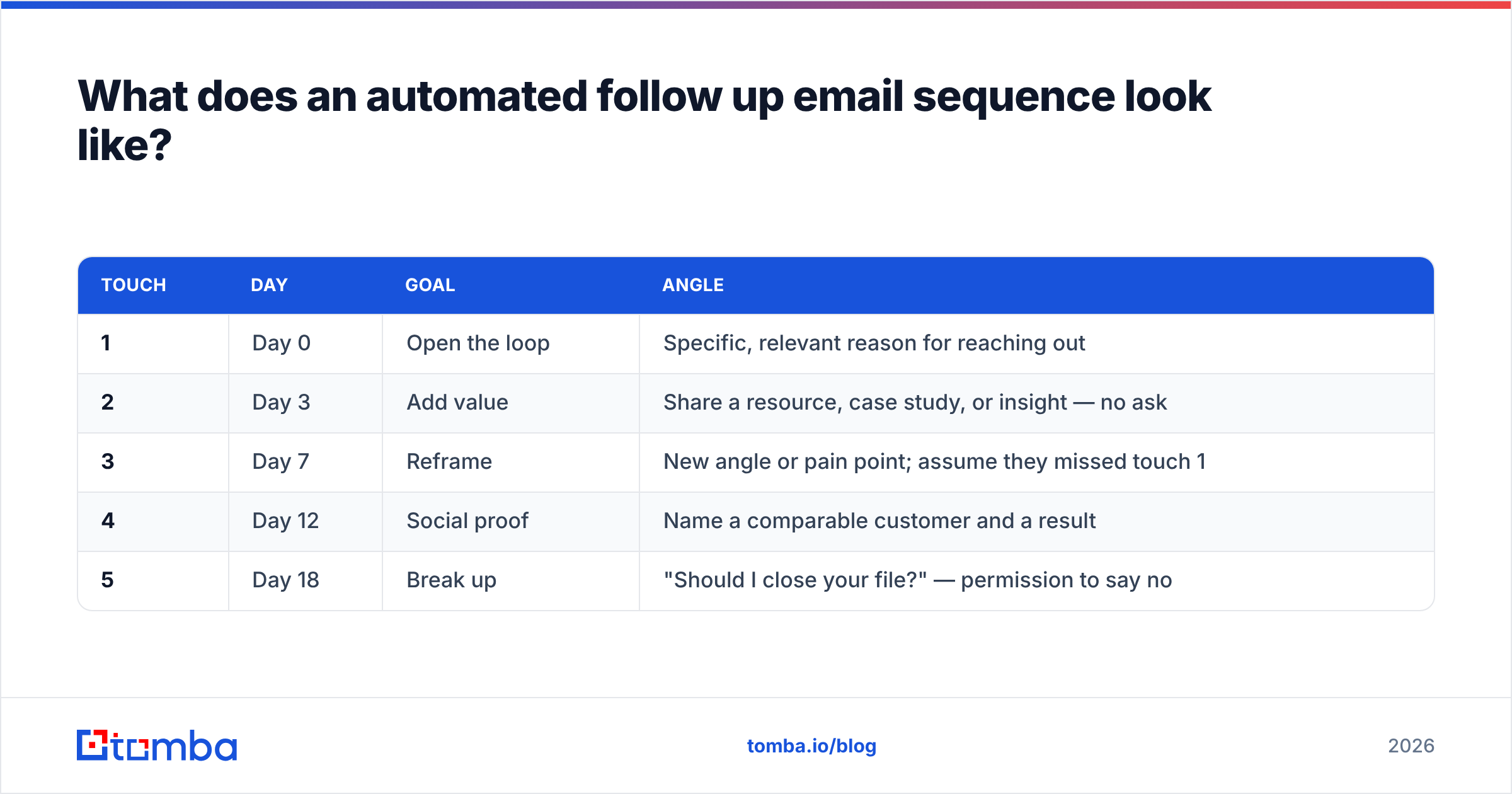
A good sequence is short, spaced, and ends cleanly. Here's a battle-tested five-touch structure for B2B cold outreach:
| Touch | Day | Goal | Angle |
|---|---|---|---|
| 1 | Day 0 | Open the loop | Specific, relevant reason for reaching out |
| 2 | Day 3 | Add value | Share a resource, case study, or insight — no ask |
| 3 | Day 7 | Reframe | New angle or pain point; assume they missed touch 1 |
| 4 | Day 12 | Social proof | Name a comparable customer and a result |
| 5 | Day 18 | Break up | "Should I close your file?" — permission to say no |
Notice three things. The gaps widen over time so you don't crowd the inbox. Every touch carries a different reason to reply, not "just following up." And the sequence has a defined end — the break-up email — instead of nagging forever. The break-up email is often the highest-replying message in the whole sequence because it triggers loss aversion.
Crucially, every step must auto-stop the instant the prospect replies. Nothing destroys trust faster than getting "touch 4" after you already answered. Any tool worth using handles reply-detection by default; verify it does before you launch.
Which tools send automated follow up emails best in 2026?#
The market splits into three buckets: dedicated cold-email platforms, full sales-engagement suites, and lightweight CRM add-ons. Here's how the common choices compare on the attributes that actually affect reply rates.
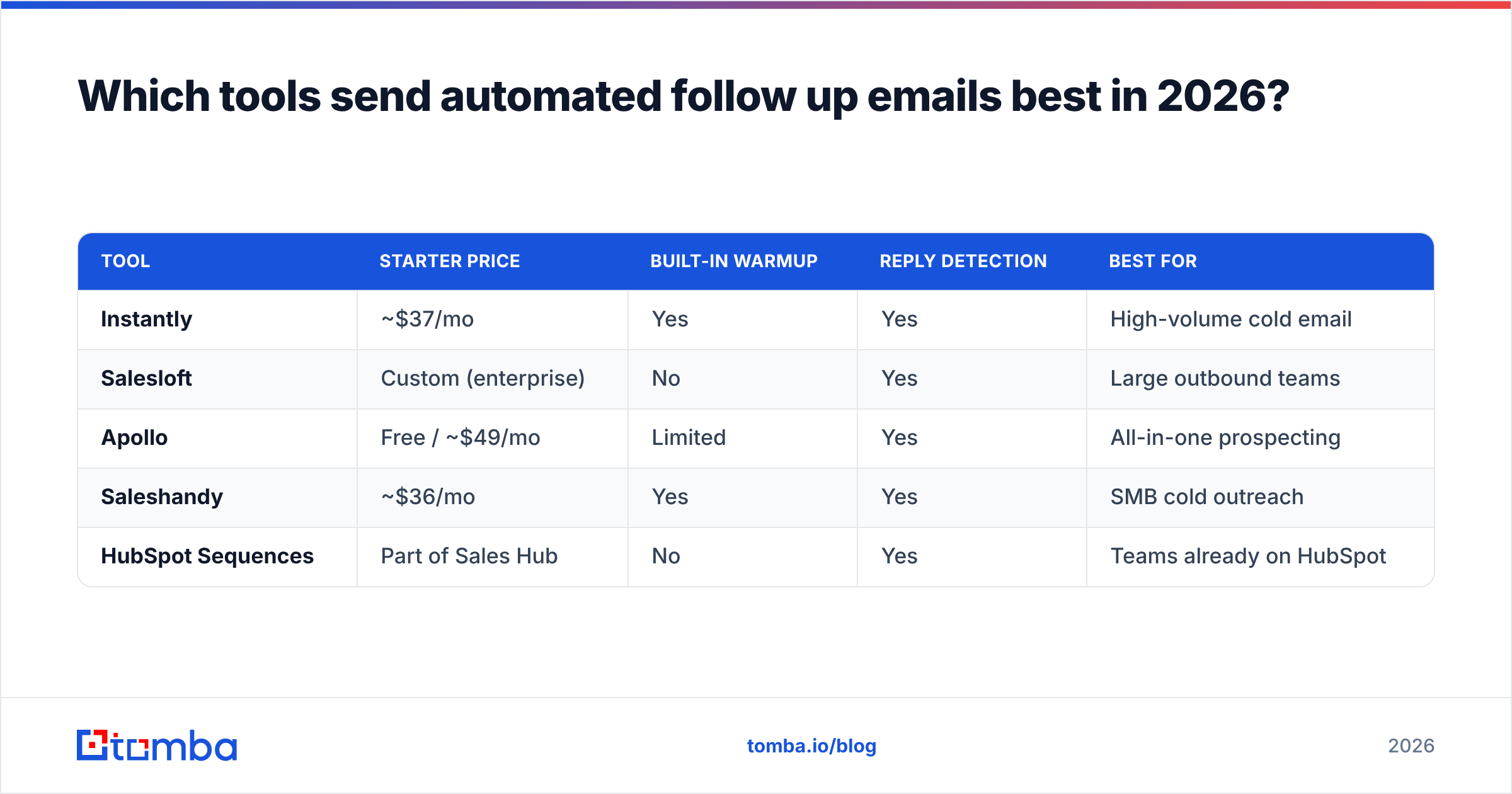
| Tool | Starter price | Built-in warmup | Reply detection | Best for |
|---|---|---|---|---|
| Instantly | ~$37/mo | Yes | Yes | High-volume cold email |
| Salesloft | Custom (enterprise) | No | Yes | Large outbound teams |
| Apollo | Free / ~$49/mo | Limited | Yes | All-in-one prospecting |
| Saleshandy | ~$36/mo | Yes | Yes | SMB cold outreach |
| HubSpot Sequences | Part of Sales Hub | No | Yes | Teams already on HubSpot |
No single tool wins for everyone. If you live inside HubSpot already, its native sequences avoid yet another login. If you're running cold volume, a dedicated platform with warmup baked in protects deliverability. If you want to consolidate prospecting and sending, an all-in-one like Apollo trims your stack — and if Apollo's data feels thin, an Apollo alternative focused on data quality can sit upstream of whatever sender you pick.
The tool is the easy part. The hard part is what feeds it.
How do you build an automated follow up email system?#
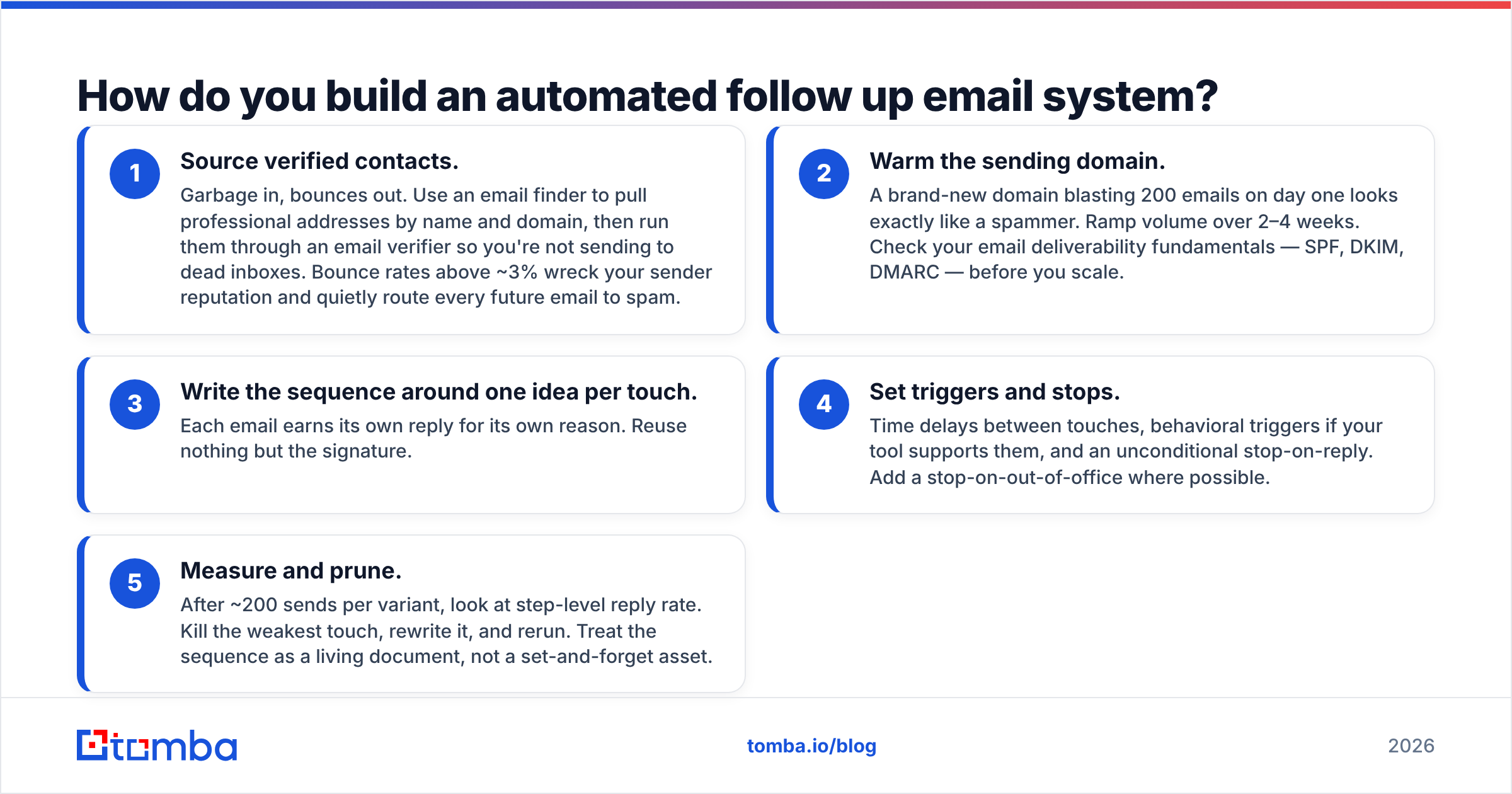
Five steps, in order. Do not reorder them.
- Source verified contacts. Garbage in, bounces out. Use an email finder to pull professional addresses by name and domain, then run them through an email verifier so you're not sending to dead inboxes. Bounce rates above ~3% wreck your sender reputation and quietly route every future email to spam.
- Warm the sending domain. A brand-new domain blasting 200 emails on day one looks exactly like a spammer. Ramp volume over 2–4 weeks. Check your email deliverability fundamentals — SPF, DKIM, DMARC — before you scale.
- Write the sequence around one idea per touch. Each email earns its own reply for its own reason. Reuse nothing but the signature.
- Set triggers and stops. Time delays between touches, behavioral triggers if your tool supports them, and an unconditional stop-on-reply. Add a stop-on-out-of-office where possible.
- Measure and prune. After ~200 sends per variant, look at step-level reply rate. Kill the weakest touch, rewrite it, and rerun. Treat the sequence as a living document, not a set-and-forget asset.
)
The data step is where most teams cut corners and pay for it later. If you're sourcing contacts at scale, a bulk email finder plus verification turns a messy lead list into a clean send list before a single follow-up goes out. You can also pull entire org charts with domain search when you need to reach several people at one account.
What timing and frequency actually work?#
Conclusion first: space touches 3–4 days early and stretch to a week or more later, and cap the whole sequence at 5–7 messages. Beyond that you're harassing, not following up.
Some concrete guidance that holds up across B2B:
- First follow-up: 2–3 days after the opener. Soon enough to stay top-of-mind, not so soon you look desperate.
- Mid-sequence: every 4–7 days. Widen the gap as the sequence ages.
- Send windows: Tuesday–Thursday, mid-morning local time. Mondays are buried; Fridays are checked out. Always send in the recipient's time zone, which good tools handle automatically.
- Never two emails in 24 hours. It reads as a glitch or a bot.
These are starting points, not laws. Your response rate data should eventually override any rule of thumb. A developer-tools audience and a retail-buyer audience will not behave the same way, and only your own numbers know the difference.
What makes an automated follow up email feel human?#
The fear with automation is sounding like a robot. The fix is structural, not cosmetic.
- Personalize the first line, not the whole email. A single specific, true detail — their recent funding round, a post they wrote, a competitor they just lost a deal to — beats five generic merge tags. Pull that detail from real research, not a
{{company}}token. - Write at a sixth-grade reading level. Short sentences. One idea per paragraph. No "I hope this email finds you well."
- Reference the prior touch naturally. "Following up on the note I sent Tuesday about X" signals a real thread, not a fresh blast.
- Keep it under 90 words. Long automated emails scream sequence. Short ones read like a busy human typed them on the way to a meeting.
- Use a plain-text look. Drop the images, banners, and tracking-pixel clutter for cold follow-ups. They hurt both deliverability and the human feel.
If you want a faster start, generate first drafts with a cold email AI writer and then edit hard for voice — the AI gets you 70% of the way, your edits supply the 30% that earns replies. Pair that with a subject line tester so your touch-two subject doesn't quietly tank the open rate.
What mistakes kill automated follow up campaigns?#
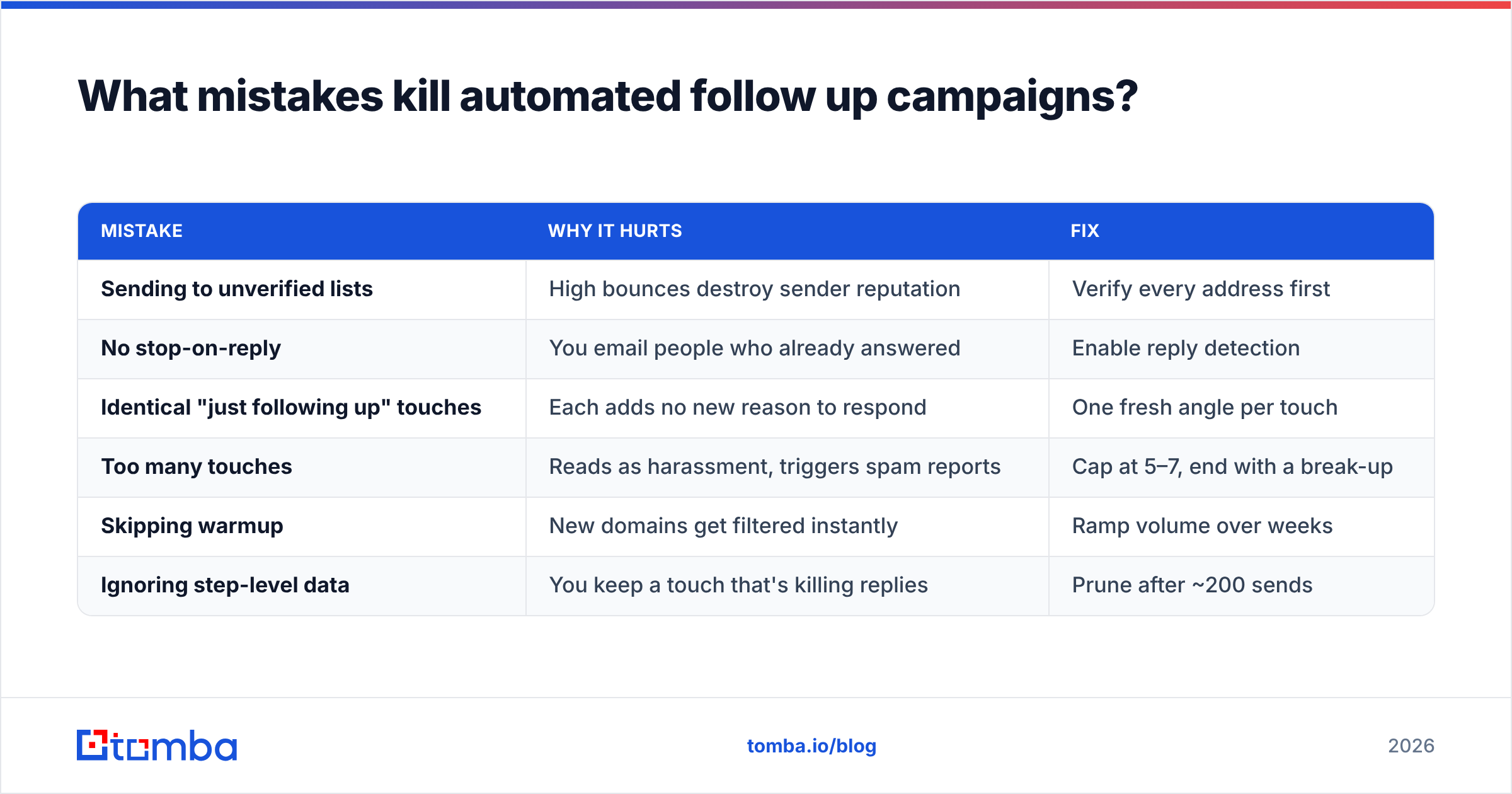
Most failures trace back to a short list of avoidable errors:
| Mistake | Why it hurts | Fix |
|---|---|---|
| Sending to unverified lists | High bounces destroy sender reputation | Verify every address first |
| No stop-on-reply | You email people who already answered | Enable reply detection |
| Identical "just following up" touches | Each adds no new reason to respond | One fresh angle per touch |
| Too many touches | Reads as harassment, triggers spam reports | Cap at 5–7, end with a break-up |
| Skipping warmup | New domains get filtered instantly | Ramp volume over weeks |
| Ignoring step-level data | You keep a touch that's killing replies | Prune after ~200 sends |
The first row is the silent killer. A 10% bounce rate doesn't just waste those sends — it tells inbox providers you're a careless sender, and they start filtering the good addresses too. This is exactly why the data layer is non-negotiable. Clean, verified contacts aren't a nice-to-have on top of automation; they're the foundation the whole system stands on.
How does data quality change everything downstream?#
Here's the chain of cause and effect most teams learn the expensive way:
- Bad data → bounces → reputation damage → spam folder → zero replies, even from perfect copy.
- Verified data → low bounces → strong reputation → primary inbox → your sequence actually gets read.
Automation multiplies whatever you put in. A flawless five-touch sequence sent to a 60%-deliverable list will underperform a mediocre sequence sent to a 98%-deliverable one. The copy gets the credit, but the data does the heavy lifting.
That's why the smart move is to treat sourcing and verification as step zero. Find the right people with an email finder, confirm the addresses are live, then hand a pristine list to your sequencing tool. You can review where that data comes from on Tomba's data sources page if accuracy is a sticking point for your team. Independent reviews on G2 are another sanity check before you commit a tool to your stack.
Frequently asked questions#
How many follow-up emails should I send? Five to seven total, including the opener. Past that, reply rates fall and spam complaints rise. End with a break-up email rather than trailing off.
Do automated follow-ups hurt deliverability? Only if you skip warmup or send to unverified lists. Done right — clean data, ramped volume, plain text — they perform as well as manual sends and far more consistently.
Should every touch reference the last one? The later touches benefit from a light reference ("circling back on Tuesday's note"). The opener obviously can't, and touch two often works better as a standalone value-add.
Can I automate replies too? You can draft them with an AI email response tool, but a human should approve anything sent after a real prospect engages. Automation is for the chase; people close the deal.
Putting it together#
An automated follow up email system isn't a copy trick or a tool purchase — it's a pipeline. Verified contacts feed a warmed domain, which sends a short, human-sounding sequence that stops the moment someone replies, and the whole thing improves every time you read the step-level data. Get the order right and you'll book meetings from leads you used to lose to silence.
Start where the leverage is highest: the data. Before you write a single follow-up, use the Tomba Email Finder to source accurate, professional email addresses by name, company, or domain — then verify them so every automated touch lands in a real inbox. The free tier gives you 25 searches a month to test it, and paid plans start at $49/mo on the Tomba pricing page when you're ready to scale. Clean data first, automation second, replies third.
// get started
Find, verify and enrich your first contacts today
Start on the free plan with 25 searches a month, then scale when your team is ready.
Free plan · No credit card required · GDPR & CCPA
// about the author